1
Table of Contents
Connections and Setup
Using the Radio
Things to consider before you connect ................... 2
Accessories provided ................................................ 2
Front panel controls ................................................. 3
Front Panel Display ................................................... 3
Connecting to audiovisual equipment .................... 4
Connecting the antenna .......................................... 4
Magnetic shielding ......................................................... 5
Positioning speakers ....................................................... 5
Connecting the speakers ............................................... 5
Front Speaker Placement .............................................. 6
Preferred surround placement .................................... 6
Test Tone / Channel balance ........................................ 7
Manual tuning ........................................................ 19
Storing radio stations ............................................ 19
Retrieving preset stations ...................................... 19
Using the player menus .......................................... 20
Playmode Selection ................................................ 20
Standard ......................................................................... 20
Random (all discs except DVD) ......................................................... 20
Program (all discs except mp3/JPEG discs and JPEG) ................. 20
AutoDetect ..................................................................... 20
IntroScan (Audio CD only) .......................................... 21
Parental Control Settings ....................................... 21
Lock Player ...................................................................... 21
Change Password .......................................................... 21
Rated Titles ..................................................................... 21
Unrated Titles ................................................................. 21
Display Settings ...................................................... 22
TV Image ......................................................................... 22
Front Display ................................................................. 22
Black level ...................................................................... 22
Progressive Scan ........................................................... 22
Sound Settings ........................................................ 23
Night Mode .................................................................... 23
Distance .......................................................................... 23
Test tone ......................................................................... 23
Downmix ........................................................................ 23
Language settings ................................................... 24
Player Menus ................................................................. 24
Disc Menus .................................................................... 24
Audio ............................................................................... 24
Subtitles .......................................................................... 24
The remote control
Remote Control functions in DVD/CD mode ........... 8
Remote control functions in Tuner mode ................ 9
Remote control functions in TV mode ...................... 9
Inserting batteries in the remote control ................ 9
Playing Discs – Basic Functions
Compatible discs ..................................................... 10
Compatible formats ................................................ 10
Regional coding ...................................................... 10
Operating the DVD receiver ................................... 10
Description of the various menus ......................... 10
Basic Playback Operations ...................................... 11
Playback ........................................................................... 11
Accelerated play ............................................................ 11
Pause ................................................................................ 11
Frame advance ............................................................... 11
Variable slow motion ................................................... 11
Changing chapter/track .............................................. 11
Zoom ................................................................................. 11
Using Memory Cards
Compatible Memory Cards ..................................... 12
Reading Memory Cards .......................................... 12
Using Auto-Detect ....................................................... 12
The Info Menu
Using the Info Menu .............................................. 13
Time display ................................................................... 14
Title/Chapter (DVD)/Track (audio CD and VCD) ... 14
Subtitles (DVD) ............................................................. 14
Audio (DVD,VCD) .......................................................... 14
Play mode (all discs) .................................................... 15
Bookmark (DVD and audio CD) ................................ 15
Camera angle (DVD) .................................................... 16
PBC - PlayBack Control (VCD) .................................. 16
Sleep ................................................................................ 16
mp3 Files and JPEG Files
Additional Information
Troubleshooting ...................................................... 25
Precautions .............................................................. 26
Use ................................................................................... 26
Cleaning .......................................................................... 26
Handling and caring for discs .................................. 26
Disc Formats you can play ..................................... 27
DVD-Video ...................................................................... 27
DVD-R,DVD-RW, DVD+R, DVD+RW ........................ 27
VCD - Video Compact Disc ........................................ 27
SVCD - Super Video Compact Disc ......................... 27
Audio CDs ....................................................................... 27
CD-R, CD-RW ................................................................ 27
mp3 files ......................................................................... 27
JPEG files ........................................................................ 27
Kodak Picture CDs ........................................................ 27
Sound Enhancement Systems ................................ 28
Dolby Pro Logic II ......................................................... 28
Dolby Digital .................................................................. 28
Limited Warranty .......................................... 28
Playing mp3 files or displaying JPEG files .................. 17
Illustrations contained in this document are for representation only.
RDT170
1
1/31/05, 7:46 AM
1
Connections and Setup
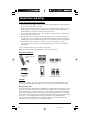
Things to consider before you connect
•
Ensure that the mains supply in your house complies with that indicated on the identification
sticker located on the back of your unit.
•
Install your unit horizontally, away from any source of heat (fireplace) or appliances creating
strong magnetic or electric fields. The components of this unit are sensitive to heat. The
maximum ambient temperature should not exceed 35° Celsius.
•
Leave enough space around the unit to allow adequate ventilation: 10 cm on either side and
above the top, and 5 cm at the rear.
•
The humidity of the room should not exceed 75%. If you have to use the unit outdoors, do
not expose it to rain or splashing water. The apparatus should not be exposed to dripping or
splashing and no objects filled with liquids, such as vases, should be placed on the apparatus.
•
Moving the unit from a cold place to a warm one can cause condensation on some
components inside the unit. Let the condensation disappear on its own before turning the
unit on again.
• Before moving the player, make sure the disc tray is empty.
Other important use and cleaning information at the end of the booklet.
Accessories provided
Remote control and 2
non-rechargeable AAA
batteries
+
-
-
+
Left and right
front speakers
Center speaker
1 x Pig-tail antenna wire
6 x Stripped wires
for speakers
Subwoofer
Left and right rear speakers
Caution!
Invisible laser radiation when open. Avoid exposure to beam. Class 1 laser product. This system
must be opened only by qualified technicians to prevent accidents caused by the laser beam.
DVD copy protection
In accordance with the DVD standard, your DVD player is equipped with a Copy Protection system,
which can be switched on and off by the DVD disc itself, in order to make any recording of the
relevant DVD disc onto a videotape of very poor picture quality, or even impossible. This product
incorporates copyright protection technology that is protected by method claims of certain U.S.
patents and other intellectual property rights owned by Macrovision Corporation and other rights
owners. Use of this copyright protection technology must be authorized by Macrovision
Corporation, and is intended for home use only unless otherwise authorized by Macrovision
Corporation. Reverse engineering or disassembly is prohibited.
2
RDT170
Illustrations contained in this document are for representation only.
2
1/31/05, 7:46 AM
Connections and Setup
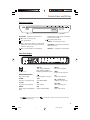
Front panel controls
DVD Home Theatre System RTD170
VOLUME
+
SOURCE
ON/STANDBY
SUBWOOFER
SD/MMC/SMC/MS CARD
COMPACT FLASH CARD
ON/STANDBY - Switch the unit on and off.
playback. Move to the next preset memory
location in tuner mode.
Open and close the disc tray.
Start playing a disc. Pause.
Stop disc playback.
Skip to the previous chapter or track during
playback. Go to the previous preset memory
location in tuner mode.
SOURCE - Select the input source.
SUBWOOFER - Toggle between different
subwoofer modes.
VOLUME +/- - Adjust the sound volume.
Skip to the next chapter or track during
Front Panel Display
Speaker icons
PLII
Audio output in Dolby PL II
Movie, Dolby PL II Music or
Dolby Prologic Emulation mode.
DVD/CD/VCD/WMA/MP3
Type of disc loaded.
Disc in playback or in pause.
SLP
Sleep mode activated.
STEREO
Tuner stereo signal detected.
TITLE
Title number (DVD).
REP 1 / REP / A-B
Playback in repeat mode.
P-SCAN
Progressive Scan activated.
TRK
Track number.
kHz / MHz
Tuner frequency unit.
DIGITAL
Audio output in Dolby Digital
mode.
CHP
Chapter number (DVD).
TUNED
Radio station tuned.
Note:
Dolby and the double-D symbol
license from Dolby Laboratories.
PRESET
Preset station number.
PROG
Program mode activated.
are trademarks of Dolby Laboratories. Manufactured under
3
RDT170
3
1/31/05, 7:46 AM
Connections and Setup
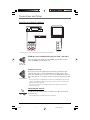
Connecting to audiovisual equipment
AUDIO OUT (VCR)
COMPONENT VIDEO (TV)
AUDIO OUT (SAT)
Pr
Pb
Y
COMPONENT VIDEO
1
VIDEO OUT
Note: Use only one of the connection methods shown above for each device.
AUDIO IN L (left) and AUDIO IN R (right) jacks (AUX 1 and AUX 2)
These are analog audio output jacks. The AUDIO L jack and cable are white,
while the AUDIO R jack and cable are red.
Audio cables
(red and white)
Component video out
Component cable
The Y, Pb, Pr jacks provide optimum picture quality by separating the video
signal into three parts. To ensure maximum picture quality, use three videograde cables (yellow) for the connection. You can also buy bundled component
video cables that are color-coded to match the Y, Pb, Pr inputs (green, blue and
red).
Note: If your television is a high definition television, use the DVD player’s progressive scan
output to get the highest possible video resolution. Set the Progressive Scan option in the
Display menu to On (see page 22).
Note: If one of the devices is not working, check that all the cables have been inserted
properly into the jacks.
Connecting the antenna
The FM antenna (provided) should be connected to the FM aerial jack at the
back of the unit.
Note: For FM reception, extend the antenna to its full length.
4
RDT170
4
1/31/05, 7:46 AM
Connections and Setup
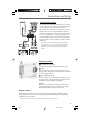
Connecting the speakers
Six speakers are provided with the unit (2 front, 1 center,
2 rear, 1 subwoofer). To achieve good surround effects, all
six speakers need to be connected to the receiver.
One speaker wire is provided for each speaker connection.
Speaker wires are color-coded to match the terminals.
SUB CEN SR
SL
FR
Connect the speaker wire to the back of each speaker and
to the corresponding color terminal at the back of the
unit. Press down the tab to open the terminal and insert
the wire (1). Release the tab to lock wire in the terminal
(2). Do the same for center speaker, rear speakers and the
subwoofer.
FL
SPEAKERS 8 Ω
4Ω
Note: When connecting the speakers, make sure the polarities
(“+” speaker wire to “+” on the receiver) of speaker wires and
terminals match. If the cords are reversed, the sound will be
distorted. Do not ground the output line, it will damage the
speaker.
(1)
R l
3
b
l k i
(2)
i
h
Positioning speakers
1
1 Left, Right (Front Speakers)
Front speakers carry primarily music and sound effects.
2
1
3
2 Center
In surround mode, the center speaker carries most of the
dialog as well as music and effects. It should be set between
the left and right speakers.
3 Surround (Rear Speakers)
Courtesy Dolby Laboratories
The rear speakers’ overall sound balance should be as close
as possible to the front speakers. Proper placement is vital
to establish an evenly distributed sound field.
Subwoofer
A subwoofer is designed to reproduce powerful low bass
effects (explosions, the rumble of spaceships, etc.) which
dramatically heighten the action on the screen.
Magnetic shielding
Speakers placed less than two feet from the TV set must be magnetically shielded in order to
prevent picture distortion. Front and center speakers provided with this unit are magnetically
shielded to protect your TV set.
Note: It is not recommended to place the rear speakers and subwoofer near the TV set.
5
RDT170
5
1/31/05, 7:46 AM
Connections and Setup
Front Speaker Placement
Follow the suggestions for speaker placement below to get the
best results.
Alignment
Courtesy Dolby Laboratories
Align the center speaker evenly with (A) or slightly behind (B) (the
left and right speakers), but not ahead of them.
Angle
Place the left and right speakers to form a 45-degree angle with
your favorite viewing position to duplicate the soundtrack mixer’s
perspective.
Height
Courtesy Dolby Laboratories
The mid- and high-frequency drivers of the three front speakers
should be as close as possible to the same height. This often
requires placing the center speaker directly on top (A) or beneath
(B) the TV set.
Preferred surround placement
Location
If possible, place surround speakers to either side of the
listening area, not behind it.
Height
If space permits, install surround speakers 2-3 feet above
viewers. This helps to minimize localization effects.
Aiming
Aim surround speakers straight across the room, not down
at viewers, to help create a more open, spacious surround
sound field.
Alternative Surround Placement
Rear wall
If rear wall mounting is the only choice, aim the speakers
at each other (A), towards the front (B) or towards the
sidewalls (C, D). Experiment with placement until sounds
seem to surround you, rather than come from behind you.
6
RDT170
6
1/31/05, 7:46 AM
Connections and Setup
No adjacent walls
Surround speakers can go on stands facing each other to
approximate sidewall mounting (A), or to the sides or rear of
the viewing area, aimed upwards; they can go right on the
floor, or preferably, a few feet off the floor such as on end
tables (B).
Test Tone / Channel balance
Channel balance
Your receiver is equipped with a test signal generator for
balancing the channels. As the signal “travels” from channel to
channel, adjust the level controls until each channel plays at
the same loudness level (see page 22).
Level adjustment and surround channel level expectation
Even though you adjust the surround channel to be as loud as
the others on the test signal, on actual program material the
surround channel is usually much lower than the front. Don’t
re-adjust the surround level; program producers use surround
for subtle atmospherics and ambience, and only rarely for
special effects.
7
RDT170
7
1/31/05, 7:46 AM
The Remote Control
The remote control
Navigating through menus
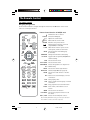
Use the direction buttons to navigate through the menus. Press the OK button on the remote
control to confirm your selection.
Remote Control functions in DVD/CD mode
ON OFF
DVD•CD
TUNER
TV
GO BACK
CH
VOL
MUTE
RETURN
CLEAR
SAVE
MENU
TUNER
–
OK
TUNER
+
SUBWOOFER
SURROUND
TITLE•GUIDE
EQ. LEVEL
INFO
DISC
1
2
3
4
5
6
ANGLE 7
8 NIGHT DVD 9
INPUT
0/--
AUDIO
REVERSE
PLAY
FORWARD
ZOOM
STOP
PAUSE
AUX 2
VCR
AUX 1
SAT•CABLE
RECORD
PLAY MODE
CLOCK•WAKE
Switches the unit on and off.
DVD•CD Selects the DVD player.
+/- Adjusts the sound volume.
(mute) Mutes and restores the sound.
RETURN Returns to the previous menu.
Directly accesses the next or previous
chapter (DVD) or track (CD).
CLEAR Hides the Info menu. If you are in the
menu system, returns to main menu.
MENU Accesses the disc menu during play
(if available).
SURROUND Changes the Surround sound setting.
EQ. LEVEL Toggles between equalizer, BASS/TRE and
channel settings.
INFO Accesses the Info menu.
TITLE•GUIDE Accesses the disc menu.
SUBWOOFER Selects among subwoofer output levels.
0-9 Number entry.
ANGLE Accesses the camera angle function.
NIGHT DVD Activates Night Mode (see page 22).
AUDIO Accesses the audio function of the Info
menu.
REV Starts reverse accelerated play or reverse
slow motion.
PLAY Starts playing a disc.
FWD Starts forward accelerated play or forward
slow motion.
STOP Stops play and accesses the main menu.
PAUSE Freeze frame, frame advance or slow
motion.
ZOOM Accesses the Zoom function.
PLAY MODE Accesses the play mode function of the
Info menu.
AUX1 / AUX2 Selects various audio/video sources.
Note: In AUX1, AUX2 and TV modes, you need to press the button
twice within 2 seconds to turn off the component.
8
RDT170
Illustrations contained in this document are for representation only.
8
1/31/05, 7:46 AM
The Remote Control
Remote control functions in Tuner mode
TUNER Selects the tuner.
+/- Adjusts the sound volume.
(mute) Mutes and restores the
sound.
Selects programmed
stations.
MENU Stores a station.
TUNER- / TUNER+ Tunes down and up the
radio frequencies.
AUDIO Toggles between Stereo
and Mono modes.
Remote control functions in TV mode
Note: The buttons described below operate as specified,
provided that the function is available on the television.
TV
PR+/-
Selects the TV.
Changes the channel.
GO BACK Returns to the previous
channel.
CLEAR Exits a menu.
MENU Accesses the TV’s main menu.
ZOOM Accesses the Zoom function
(16x9 TV only).
INFO Provides information about
the channel.
TITLE•GUIDE Displays the program guide.
0-9
Selects a channel. For 2-digit
channels, first press 0.
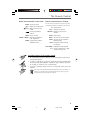
Inserting batteries in the remote control
•
Do not mix different types of batteries or new and old batteries. Do not use
rechargeable batteries.
•
In order to avoid any risk of explosion, observe the polarities indicated inside
the battery compartment. Replace only with the type of batteries specified.
Do not dispose of them in a fire or recharge them.
•
If you are not using the remote control for a long period of time, remove the
batteries.
Please respect the environment and prevailing regulations. Before you dispose of
batteries or accumulators, ask your dealer whether they are subject to special
recycling and if they will accept them for disposal.
N
9
RDT170
9
1/31/05, 7:46 AM
Playing Discs – Basic Functions
Compatible discs
•
DVD
•
DVD-R,DVD-RW, DVD+R, DVD+RW
•
CD
•
CD-R, CD-RW.
Compatible formats
•
DVD, VCD (Video Compact Disc), SVCD (Super Video Compact Disc), JPEG
•
CD, mp3, CD Kodak Picture.
See page 26 for more information about discs and compatible formats.
Regional coding
Your DVD player has been designed to process regional management information stored on DVD
discs. The regional code for your player is 1. Discs that have a different regional code will not play.
Operating the DVD receiver
1. Turn on your television set.
2. Press the DVD•CD button on the remote control. Press the
STANDBY button located on the DVD player’s front panel.
button on the remote or ON/
Description of the various menus
•
Disc menu – The appearance and contents of this menu varies according to the type of disc
you have inserted. It is separate from the player menu. When the disc is playing, press the
TITLE•GUIDE button to toggle the menu on or off.
00:02:16
T : 01
C : 02
1 of 1
Z Z Z
.
.
.
•
Info menu – The player’s Info menu
appears as a bar at the top of the screen
while the disc is playing. Press the INFO
button on the remote to toggle the Info
menu on or off.
•
Player menu – If no disc has been
inserted, the player menu appears
automatically. If a disc is being played,
press the STOP button to access this menu.
PLAY
Play
Play Mode
Standard
Parental Control
Random
Display
Program
Sound
Auto-Detect
Languages
IntroScan
Note: A function is only available if it is on the
disc you have inserted. For instance, if you
select the Subtitles function from the Info
menu, subtitles will only appear if subtitles
have been provided on the disc. If a menu or
icon appears grayed out, the menu or the
associated function is not available.
P
10
RDT170
Illustrations contained in this document are for representation only.
10
1/31/05, 7:46 AM
Playing Discs – Basic Functions
Basic Playback Operations
Playback
Switch the DVD player and the TV set on.
1. Press the
button on the front of the player to open the disc tray.
2. Put the disc in with the printed side up (in the case of a single-sided disc).
3. Press again to close the disc tray. Play starts automatically, or the disc menu appears. If the
disc menu appears, select the Play option to begin playback.
4. Press STOP to stop playback.
Note: When you press STOP, the player stores the point where playback was interrupted. If you press PLAY
again, playback resumes from this point. To stop playback completely or to start again from the beginning,
press STOP twice. If the player is left in STOP mode for more than two minutes without any user interaction,
a screen saver is activated. At the end of 30 minutes without any user interaction, the player switches off
automatically.
Accelerated play
While the disc is playing, press the REV or FWD button one or more times to vary the speed and
direction of the accelerated play. Press PLAY to resume normal playback.
Pause
While the disc is playing, press PAUSE once for freeze frame. Press PLAY to resume normal
playback.
Frame advance
1. Press PAUSE twice. FRAME is displayed.
2. Press the REV or FWD button to advance backward or forward image by image.
3. Press PLAY to resume normal playback.
Variable slow motion
1. While the disc is playing, press the PAUSE button once. PAUSE is displayed.
2. Press the REV or FWD button to vary the speed and direction of the slow motion.
3. Press PLAY to resume normal playback.
Note: Backward slow motion is not available on VCDs.
Changing chapter/track
While the disc is playing, press the left/right arrow button to go immediately to the next or
previous chapter, or to the next or previous track.
Zoom
1. While a disc is playing, press the ZOOM button until you reach the zoom size you want.
2. Move from one area to another (pan) using the arrow buttons.
11
RDT170
11
1/31/05, 7:46 AM
Using Memory Cards
Your receiver has two memory card slots. You can transfer information (jpeg or mp3 files) from
your memory cards to the receiver and display the pictures on screen or play the mp3 files. The
upper slot can read different formats; the lower slot is for Compact Flash Cards.
Compatible Memory Cards
•
Compact Flash 1 and 2
•
MultiMedia Card
•
Secure Digital
•
Memory Stick
•
Smart Media
Reading Memory Cards
The Auto-Detect Feature
The Receiver has an Auto-detect feature that reads the type of card you’ve inserted and displays a
dialog box asking if you want to access the card. By default, auto-detect is turned on. You can
turn this feature off so no message appears (see page 20).
When Auto-detect is on, and a disc is playing, the receiver will pause playback and ask if you
want to continue playback, or access the card. It will also show you what type of card is in the
slot when you turn it on.
If auto-detect is off, no message appears when you insert a card. You must press the INPUT
button on the remote to access the card. If a card was left in the slot when you last turned the
unit off, no message will appear unless you press INPUT.
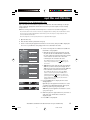
1. With no disc playing, insert your memory card into
the slot.
Card inserted. To continueplaying disc,
pres PLAY/PAUSE or remove card.
To stop playing disc and access card,
press STOP.
Note: If you insert a card while a disc is playing, a dialog
box is displayed, giving you the option of continuing to
play the disc or to stop disc playback and access the
memory card.
AUTO-DETECTION ON. If you don’t want this message to appear again, turn
off auto-detect in the Play Mode menu (press MENU).
2. A dialog box is displayed showing a list of the
types of media that are in the receiver (DVD,
Memory Card).
3. Use the up/down arrow buttons to select the
Memory Card option. If there is more than one
memory card inserted, a submenu will appear. Use
the up/down arrow buttons to select the card you
want to access.
4. Press OK to select. The contents of the card is
displayed.
Note: Although your memory card may be compatible with
the unit, the data on the card must be in a format the rceiver
can read (jpeg or mp3).
12
RDT170
Illustrations contained in this document are for representation only.
12
1/31/05, 7:46 AM
The Info Menu
Using the Info Menu
Press the INFO button on the remote while a disc is playing to display the Info menu.
Use the right/left arrow buttons on the remote to select an icon.
Use the up/down buttons to scroll through the options.
When the option you want is highlighted, press OK to select it.
To directly access a title or a chapter (DVD), a track (audio CD and VCD), select the icon and enter
a number using the numeric buttons on the remote.
Notes: Many discs only have one title.
When one of the icons is grayed out, this means that the function is not available on the disc.
The invalid symbol indicates that the function selected or the button used is not available.
Illustrations contained in this document are for representation only.
RDT170
13
1/31/05, 7:46 AM
13
The Info Menu
01:49:37
Time Display
To access the Time Display, press the INFO button on the remote. Use the left/
right arrow buttons to select the Time display icon. Press the up/down
buttons repeatedly to display:
DVD: Chapter elapsed time, Chapter remaining time, Title elapsed time and
Title remaining time.
VCD and audio CD: Track elapsed time and Track remaining time.
To directly access a location on the disc which does not correspond to the
start of a title or chapter, enter a time with the number buttons (hh:mm:ss).
Note: This function may not be available on all discs.
Title/Chapter (DVD) / Track (audio CD and VCD)
T:1
C: 12
To directly access a title, chapter (DVD) or a track (audio CD and VCD), press
the INFO button, then select the Title or Track icon with the left/right arrow
buttons. Choose a number using the up/down buttons or enter a number
directly with the numeric buttons.
Note: Many discs only have one title.
Subtitles (DVD)
Subtitles are turned off by default. Turn on Subtitles as follows:
1. While the disc is playing, press the INFO button, then select the Subtitles
icon using the left/right arrow buttons.
2. Select a language using the up/down arrow buttons.
3. To turn subtitles off, select the Off option.
Notes:
When you change the language of the subtitles using the Info menu, it only applies
to the disc currently being played. When you eject the disc and switch off the
player, the subtitles will default to the subtitle language you selected in the
Languages menu (see page 23).
This function may not be available on all discs.
Audio (DVD,VCD)
Some discs have several audio tracks used for different languages or different
audio formats.
To change the language or audio format during playback:
1. Press the INFO button.
2. Use the left/right arrow buttons to select the Audio icon, or press the
AUDIO button on the remote control.
3. Choose a language or an audio format with the up/down arrow buttons.
Notes:
This option is only available if the disc offers dialog languages or audio formats.
When you change the dialog language using the Info menu, it only changes the
dialog language of the disc being played. When you eject the disc or switch off the
player, the language will revert to the one you selected in the Languages menu (see
page 23).
14
RDT170
14
1/31/05, 7:46 AM
The Info Menu
Play mode (all discs)
Note: For mp3 play modes, please refer to page 16.
1. While the disc is playing, press the INFO button.
2. Select the Play mode icon using the left/right arrow buttons, or press the
PLAY MODE button on the remote control.
3. Use the up/down arrow buttons to select an option.
• DVD play modes: standard, program, title repeat, chapter repeat, A-B repeat.
Notes:
Program play mode is only available if a programmed list has been created (page 19).
Repeat mode is only available with discs that display elapsed time and remaining time.
To repeat a sequence between points A and B, choose the A-B repeat option, and then
follow the instructions for entering the two points. If, during a fast forward or reverse,
point B is reached, the player continues playback at normal speed from point A. If,
during a fast search, point A is reached, the player starts playback from point A at
normal speed.
• VCD and SVCD play modes: standard, disc repeat, track repeat, A-B repeat.
PBC must be turned on for Repeat functions to work.
• Audio CD play modes: standard, program, random, disc repeat, track repeat,
A-B repeat, IntroScan.
Note: IntroScan plays the first ten seconds of each track. When all the tracks have been
scanned, IntroScan stops. If you want to continue playing the track being scanned,
press the PLAY button. Press the STOP button to stop IntroScan.
3. To stop repeat playback, select the Play mode icon and choose the Standard
option, or press the STOP button twice.
Bookmark (DVD and audio CD)
The player can store up to 12 disc locations as long as the disc remains in the
player and the unit remains switched on.
Note: This function is only available with discs whose elapsed time or remaining time
appears in the Info menu.
1. Press the INFO button. Select the Bookmark icon with the left/right buttons,
and press OK. A menu is displayed with six bookmarks. To display the other six
bookmarks, press the down arrow button.
00:06:18 T1
00:28:04 T01
03:24:09 T01
Unmarked 4
02:12:56 T02
Unmarked 6
Play button
“unmarked” icon
2. To create a bookmark, select a position shown as “unmarked” using the arrow
buttons and press OK.
3. To start playback from a bookmark, select Play icon and press OK.
4. To delete a bookmark, select the trashcan icon and press OK.
15
RDT170
15
1/31/05, 7:46 AM
The Info Menu
Camera Angle (DVD)
1 of 3
Some discs offer different camera angles for specific scenes.
1. To change the camera angle, press the ANGLE button on the remote or press
the INFO button and select the Camera angle icon with the left/right
buttons.
2. Choose the angle with the up/down arrow buttons.
Note: If the disc was recorded using a single camera angle, this function is not
available.
PBC - PlayBack Control (VCD)
PBC
The PlayBack Control function offers scenes and information which can be
selected through a menu. It can also be used to display high-resolution pictures,
if the disc contains any.
Press the INFO button, then select the PBC icon. Press the up/down buttons to
enable or disable this function.
Z Z Z
.
.
.
Sleep
1. Press the INFO button, then select the Sleep icon with the left/right arrow
buttons.
2. Select one of the available options using the up/down arrow buttons: Off, 30,
60, 90 or 120 minutes.
16
RDT170
16
1/31/05, 7:46 AM
mp3 Files and JPEG Files
Playing mp3 Files or Displaying JPEG Files
mp3 is an audio file format which compresses recorded music. The main advantage of the mp3
format is that CD-quality music tracks can be stored on a personal computer in user-friendly
compressed files.
JPEG files are image files. Make sure that they have a resolution of less than 2 megapixels.
Note: The time taken for the contents of the disc to be displayed varies according to the size and number of JPEG
files on the disc. If nothing is displayed after a few minutes, the file sizes may be too large. Reduce the files’
resolution and write another disc.
Before inserting a disc or memory card, make sure it is compatible with the player.
.
1. Open the disc tray.
2. Place the disc with the printed side facing up.
3. Select a folder using the up/down arrow buttons on the remote, then press OK to display the
list of files or press PLAY to start playing all the files contained in the folder.
4. Select a file using the arrow buttons. Press OK and
then PLAY to start playback.
PLAY
2000
Curr ent Selection
I will sur vive
Robbie Williams
RobbieWilliams
mp3
Torn
Angel
Beautiful
Testify
Not selected
• mp3 file: the player begins playing the selected
file, then all the files and subfolders contained in
the same folder. The player then plays the contents
of the folders at the same level as the folder
containing the file selected at the start.
Note: While listening, you can use the
button to go
back to the previous track or the
button to go on to
the next one.
PLAY
2000
• JPEG file: the player starts the slide show with the
JPEG file you have selected, then displays all the
JPEG files in the same folder, then all the JPEG files
in the subfolders located in the same folder.
Curr ent Selection
EiffelTower
Tr ocadero
Not selected
Louvre1
Louvre2
Note: During the slide show you can use the ANGLE
button to rotate the picture 90°, the ZOOM button to
magnify the picture, the
button to go back to the
previous picture or the
button to go to the next one,
and the STOP button to interrupt the slide show and
display the disc’s contents.
Concor de
/2000/
Mum and dad
5. Press the INFO button to display the Info menu
during playback.
Z Z Z
00:02:45
PLAY
.
MP3
Angels
.
.
None
mp3 file: press the up/down arrow button to select
a playback mode (Standard, Random, Track repeat,
Folder repeat, Disc repeat), and press OK.
mp3 Play Mode : Standard
Z Z Z
JPEG
PLAY
None
.
.
.
Holidays 03
JPEG file: press the up/down arrow button to select
a projection speed.
Slideshow speed:Fast
6. When the player has played all the files, the music or
slide show stops and the disc’s contents are
displayed again.
7. Press STOP to end playback.
Illustrations contained in this document are for representation only.
RDT170
17
1/31/05, 7:46 AM
17
mp3 Files and JPEG Files
Playing JPEG and mp3 Music Files at the Same Time
You can display JPEG files while listening to mp3 music files recorded on the same disc.
1. Insert the disc containing the two types of files in the player.
PLAY
2000
Curr ent Selection
I will sur vive
Robbie Williams
RobbieWilliams
mp3
Torn
Angel
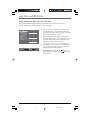
2. Select an image file using the arrow buttons, then
press OK. The name of the folder where the file is
located and the name of the file appear on the right
in the “Current selection” section.
3. Select an mp3 music file using the arrow buttons,
then press OK. The name of the folder where the file
is located and the name of the file appear on the
right in the “Current selection” section.
Killian
Testify
2000
Mum and dad
Note: To delete your selection, press the CLEAR button.
4. Press INFO to access the Info menu during playback.
You can change the slide show’s projection speed
using the up or down arrow button.
Z Z Z
00:02:45
PLAY
MP3
Angels
JPEG
.
.
.
Holidays 03
5. During playback you can use the
button to go
back to the previous picture or the
button to go
to the next one.
Slideshow speed:Fast
18
RDT170
18
1/31/05, 7:46 AM
Using the Radio
The unit has a built-in tuner for FM radio
function.
Manual Tuning
1. Connect the FM antenna.
2. Press the TUNER button on the remote.
3. When the FM station broadcasts Stereo
sound, STEREO is displayed.
4. Tune a station by pressing TUNER + or
TUNER - on the remote until the desired
station is found. You can also press and
hold the TUNER +/- button for
approximately one second to use the
automatic search function; in this mode,
the unit will automatically find a station.
5. Repeat step 4 to tune to another radio
station.
Note: If there is interference, change the location
of the antenna until you get optimal sound.
TV and other electronic devices could cause
interference. Position the antenna away from
electronic devices.
Automatic preset programming
1. Press the TUNER button on the remote
control to select TUNER mode.
2. Press and hold TUNER for 3 seconds to start
the automatic preset programming.
Note: A weak signal can affect the “Automatic
preset programming function.” You may need to
adjust the antenna for a more efficient search.
3. Radio frequencies will be browsed and radio
stations stored automatically. When all the
available radio stations are stored, or if all
40 memory locations are full, the auto
preset programming will stop.
Manual preset
1. Tune to a radio station (see Manual tuning
on the left).
2. Press MENU on the remote control. PRESET
will appear on the display.
3. While the display is flashing P01,2, input
your desired preset number (1-40) using the
up/down arrow buttons. Press Menu to
store it.
Storing Radio Stations
Retrieving Preset Stations
The receiver can store up to 40 radio stations.
You can enter radio stations yourself, or the
receiver can store all available radio stations
automatically, in ascending order.
1. Press the TUNER button on the remote to
enter the tuner mode.
2. Press
or
on the unit or PR+ or PRon the remote to search up or down the
preset stations.
Illustrations contained in this document are for representation only.
RDT170
19
1/31/05, 7:46 AM
19
Player Menus
Using the Player Menus
The player’s main menu is displayed when there is no disc in the player or when playback has been
stopped by pressing the STOP button. Select a menu option using the arrow buttons. Press OK to
select. Return to a previous menu using the left arrow button.
Play Mode Selection
Play
Play Mode
Standard
Parental Control
Random
1. Load a disc and press STOP.
Display
Program
2. Select the Play Mode option and press OK.
Sound
Auto-Detect
Languages
IntroScan
Note: The content of the Play Mode menu varies
depending on the type of disc.
3. Select a play mode with the up/down arrow buttons,
and press OK to select.
Standard
Press OK or the PLAY button to begin the disc’s standard playback.
Random (all discs except DVD)
You can listen to all the tracks on the disc in random order by choosing the Random option.
Press OK to start random playback. Press STOP to stop random playback. Press PLAY to resume
normal playback.
Program (all discs except mp3/JPEG discs and JPEG)
With this option, you can program the playback order. Lists vary according to the type of disc.
1a. DVD: Select a title using the up/down arrow buttons and press the right arrow button to
access the list of chapters. Select a chapter using the up/down arrow buttons.
1b. Audio CD and VCD: Select a track using the up/down arrow buttons, or select All to start
playing all the tracks.
1c. mp3: select a folder using the up/down arrow buttons, then press the right arrow button to
access the list of files. Select a file using the up/down arrow buttons.
2. Press OK to add the title, chapter (DVD), track (audio CD and VCD) or file (mp3) to the list.
3. Press the CLEAR button to remove the last title/chapter/track/file from the list.
4. Press PLAY to start program play or select Done and press OK.
Repeat steps 1 and 2 as necessary.
Auto-Detect
When Auto-Detect is turned on, it reads what type of memory card has been inserted into the
card reader and displays a dialog box with options (see page 12). When Auto-detect is turned off,
no message is displayed; the card is accessed by pressing the INPUT button on the remote.
Auto-detect has two submenus: one for what action you want the unit to take when a disc is
playing, and one for listing the types of media currently in the player (disc, memory card) and the
option to select which type of media you want to access.
Use the arrow buttons to highlight your choice (On or Off) and press OK to select.
20
RDT170
Illustrations contained in this document are for representation only.
20
1/31/05, 7:46 AM
Player Menus
IntroScan (Audio CD only)
This option plays the first ten seconds of each track.
Press OK to start IntroScan, press STOP to stop it and PLAY to continue playing the current track.
Parental Control Settings
You can control access to the player and the type of discs your family can watch with the lock
function. There are eight levels of parental control.
Select the Parental Control option in the main menu and press OK. The Parental Control menu is
displayed.
Play Mode
Lock Player
Play
Play Mode
Parental Control
Lock Player
Display
Change Password
Sound
Rated Titles
Languages
Unrated Titles
Free Access
This setting prevents playback of DVDs that may not
be suitable for all audiences by using the rating level
encoded on the disc (not all discs are rated). If the
rating level of the disc is higher than the preset level,
playback is prohibited unless a password is entered.
1. To activate locking according to your preset rating
limits, select the Lock Player option using the up/
down arrow buttons and press OK.
2. You are asked for a new password. Enter four digits using the number buttons and press OK.
You are asked for confirmation; enter the four digits again and press OK.
Note: Choose a password that is easy to remember, or write it down.
3. To unlock, select the Parental Control option. Enter your password. Select the Lock Player
function and press OK.
Change Password
1. To change the password, select the Change Password option and press OK.
2. Enter the four digits of your new password.
Rated Titles
The disc publisher is responsible for coding scenes according to the rating limits.
1. Select Rated Titles and press OK.
2. For the rating limit, select the level using the up/down arrow buttons and press OK.
Unrated Titles
1. To set up password-only access to unrated titles, select Unrated titles and press OK.
2. Select Password required using the up/down arrow buttons and press OK.
Note: You must put the player into Lock mode (see above) for the Rating Limits to apply.
21
RDT170
21
1/31/05, 7:46 AM
Player Menus
Display settings
Play
Play Mode
Parental Control
TV Image
4x3
standard
Display
Front display
Dim
Sound
Black level
Normal
Languages
PAL/NTS C
PAL
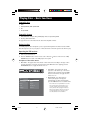
1. Select the Display option in the main menu using
the up/down arrow buttons and press OK.
2. Select an option using the left/right arrow buttons
and press OK.
4x3
TV Image
Depending on the format of the DVD disc, you can choose the picture format (aspect ratio) best
suited to the format of your TV screen:
4x3 Letterbox: gives best reproduction of pictures recorded in this format (i.e. with horizontal
bands at the top and bottom of the screen) or in 16x9.
4x3 Standard: reproduces a 4x3 picture without distortion.
16x9 Widescreen: reproduces 16x9 format films in full on a 16x9 screen.
Front Display
This option lets you choose how the front display of the DVD player appears. Four settings are
available:
Auto: the front display dims when a disc is playing.
Bright: the front display is always bright.
Dim: the front display is always dim.
Black level
This option lets you adjust the video brightness level.
Three settings are available: Normal, Dark and Light.
Progressive Scan
Progressive Scan provides high quality pictures with less flickering. Turn on Progressive Scan if you
used the Component Video jacks of the player to connect a TV or monitor compatible with a
progressive scan signal.
Press OK to activate Progressive Scan.
IMPORTANT! Once Progressive Scan has been activated, an image will only be visible on a progressive scan TV
or monitor. If you activate Progressive Scan by mistake, follow the procedure below to reset the unit:
Press and hold the SUBWOOFER button on the remote control. The video output will be restored to the standard
setting and a picture will once again be visible on a conventional analog TV or monitor.
22
RDT170
22
1/31/05, 7:46 AM
Player Menus
Sound settings
Play
Play Mode
Night Mode
Parental Control
Distance
Display
Test Tone
Sound
Downmix
You can adapt your player to other equipment and
access specific functions with the Sound menu.
1. Select the Sound option in the main menu using the
up/down arrow buttons and press OK.
Languages
2. Select an option using the left/right arrow buttons,
and press OK.
Play
Night Mode
You can use this function to control the different sound levels via dynamic compression. It
improves the quality of the sound track at a low volume and quiets the loudest sounds. Select an
option using the up/down arrow buttons: Quiet, Moderate or Off.
Note: This function is available only on DVD discs recorded in Dolby Digital.
Distance
Basic settings have been preset for the speakers included with your unit. However, to suit the
acoustic conditions in your listening room and to make the sound more effective, you may need
to delay the signal coming from some of the speakers. Channel delay compensates for center or
surround speakers that are closer to the listening position than the front speakers.
1. Select Front, Center or Rear using the and buttons and press OK.
2. Adjust the distance using the and buttons and press OK.
Note: The receiver speaker distance default settings are the following:
Front speakers (L/R): 4.5 m
Center speaker (Cch): 3 m
Rear speaker (SUR): 3 m
Test tone
This function is used to test the speaker setting and change the speaker level. A short noise comes
successively from each speaker. Adjust the volume level using the up/down arrow buttons.
Downmix
This function can process a multi-channel audio source to a two-channel stereo signal.
The options are: Stereo and Off.
23
RDT170
23
1/31/05, 7:46 AM
Player Menus
Language settings
Play
Play Mode
Parental Control
Player Menus
English
Display
Disc Menus
English
Sound
Audio
English
Languages
Subtitles
English
With this menu, you can set the language for player
menus, dialog, subtitles and the disc menus.
If you chose “English” during initial set-up, any menus
generated by the disc are in English, and so is the
language of the dialogs (if this language is available on
the disc).
1. Select the Languages option in the main menu using
the up/down arrow buttons and press OK.
2. Select one of the options using the up/down arrow
buttons and press OK.
English
Eitles
Audio
Player Menus
To change the language of the player menus, choose the language using the up/down arrow
buttons and press OK.
Disc Menus
To change the language of the disc menus, choose the language using the up/down arrow buttons
and press OK.
Audio
1. To change the dialog language, choose the language using the up/down arrow buttons and
press OK.
Note: If the selected language is not available on a disc, the disc’s language will be used instead.
2. To change the language during play, display the audio icon by pressing the AUDIO button on
the remote (see page 13).
Subtitles
1. To change the subtitle language, choose the language using the up/down arrow buttons and
press OK.
Note: If the language chosen is available, it is automatically selected when you display the subtitles (see page
13). Otherwise, the subtitle language indicated on the disc is selected .
2. To change the language of the subtitles during playback, display the Info menu by pressing
the INFO button on the remote (see page 13).
24
RDT170
24
1/31/05, 7:46 AM
Additional Information
Troubleshooting
The unit does not switch on.
•
Make sure it is plugged in.
•
Press the button on the remote control or the ON/STANDBY button on the front of the unit.
The device switches off spontaneously.
•
The device switches off automatically when it is in STOP mode for more than 30 minutes without
any user intervention. Switch it on again.
It is impossible to read the disc.
•
Insert the disc with the printed side facing up.
•
Check that the disc can actually be played by this device (see page 26).
•
If you are trying to play a disc containing JPEG files, check that the files have a resolution of less
than 2 megapixels.
•
Check that the disc’s regional code matches the player’s regional code. This player’s regional code is 1.
•
Clean the disc.
There is no picture.
•
Check you have switched on the TV set.
•
Check the connections (see pages 4 and 5).
•
Select the AV input assigned to the player on the TV.
The picture is of poor quality (with snow or lines).
•
Check the connections (see pages 4 and 5).
There is no sound or the sound is of poor quality.
•
Check the connections (see pages 4 and 5).
•
Make sure the speakers are connected.
•
Make sure the MUTE function is not on.
No surround sound.
•
Check the speaker configuration in the Sound menu.
The remote control does not work or works only intermittently.
•
Check that batteries are inserted or change them.
•
Aim the remote control at the unit. The infrared beam must not be blocked or interrupted.
•
Check that the remote control is configured to control the device you are trying to operate with it.
Press the DVD•CD button if you want to operate a DVD player, the TV button to operate a
television set and the TUNER button to operate the radio.
The subtitles do not appear.
•
Check that the DVD disc provides subtitles.
•
Refer to the section on how to display subtitles (see page 13).
The disc menu language is not the correct one.
•
The disc menu language has not been set up (see page 23).
•
The language of your choice is not available on the disc (see page 23).
You have forgotten your password (Parental control).
•
When the receiver is on and the disc tray is opened, press and hold the button on the front panel
until the unit goes to standby mode. All system settings will be restored to default, the parental
password will also be reset.
Illustrations contained in this document are for representation only.
RDT170
25
1/31/05, 7:46 AM
25
Additional Information
Additional Information
Precautions
Use
•
If your unit has been stored in a cool place for any length of time, during a journey for example,
wait for about 2 hours before using it.
•
The openings located on the top and bottom are for ventilation and must not be obstructed.
•
During thunderstorms, we recommend that you isolate the unit from the electrical supply so that it
is not damaged by electrical or electromagnetic surges.
•
This unit is designed for continuous use. Switching off the DVD player to standby mode does not
disconnect it from the mains supply. To completely isolate the equipment, remove the plug from the
mains jack as some components remain connected to the electrical supply.
•
If you notice any burning or smoke, disconnect the unit immediately to avoid any risk of
electrocution.
•
Do not attempt to look inside the unit through the disk tray opening or any other opening. You
may be electrocuted or exposed to laser radiation.
•
This unit is for domestic use only and must not be used for industrial purposes.
•
Total or partial copying of recordings protected by copyright legislation, without the explicit
permission of the holder of the rights, contravenes current legislation.
Copying or downloading music files for sale or any other business purpose constitutes or could
constitute a violation of copyright law.
Cleaning
•
Use a soft, dry, clean cloth. Regularly dust the vents at the back or sides.
•
Using solvents, abrasive or alcohol-based products risks damaging the unit.
•
If an object or liquid enters inside the unit, unplug it immediately and have it checked by an
authorized engineer.
Handling and caring for discs
•
Handle your discs with care. Hold the disc with your fingers at the edges or through the hole.
•
Insert the disc with the label facing up (for a single-sided disc).
•
Place the disc properly into the tray in the allotted holder.
•
Use a soft cloth to clean discs if necessary, always wiping from the centre to the edge.
•
Always put discs back in their cases after use and store in a vertical position.
•
Do not close the tray with two discs in it or with a disc not sitting correctly in the holder.
•
Do not play cracked, chipped or warped discs nor try to repair them with adhesive tape or glue.
•
Do not write on a disc.
•
Do not move the player when a disc is being played.
•
Do not scratch discs or store them in places exposed to direct sunlight, high humidity or high
temperatures.
•
Do not use aerosol cleaners, benzene, anti-static liquids or any other solvent for cleaning discs.
When cleaning, wipe gently with a soft damp (water only) cloth from the centre to the edge,
avoiding circular motions, which could cause scratches and interference during playback.
26
RDT170
26
1/31/05, 7:46 AM
Additional Information
Disc Formats you can play
In order to ensure playback, discs must conform with DVD, CD, VCD or SVCD standards. This unit may not play some
recordings or files due to differences in recording formats, software used & Disc types.
DVD-Video
mp3 files
Digital video discs - 12 cm and 8 cm, single or
double sided, single or dual layer. DVDs are
high-density optical discs on which high quality
picture and audio are recorded by means of
digital signals.
CD-R and CD-RW discs containing audio files in
mp3 format. As for CD-R mp3 discs, please
follow all the recommendations for CD-R above,
along with the comments below:
DVD-R,DVD-RW, DVD+R, DVD+RW
DVD+Rewritable
Most DVD-R and DVD+R (one recording only),
DVD-RW and DVD+RW discs (rewritable),
depending on the DVD writer and discs used.
Recordings using DVD-R and DVD-RW discs
must be made in Video DVD mode. Recordings
using DVD+RW discs must be made in
accordance with the specifications for DVD+RW
discs with a 4.7 GB capacity.
VCD - Video Compact Disc
CD on which you can record up to 74 min. of
VHS quality video associated with still images,
audio tracks and interactive menus.
SVCD - Super Video Compact Disc
Most SVCDs comply with the IEC62107 standard.
SVCDs can be used to record up to 70 minutes
of digital sound and images in accordance with
MPEG-2 standards for video and MPEG-1
standards for audio.
Audio CDs
Audio CDs (8 and 12 cm).
CD-R, CD-RW
Most CD-R (one recording only) and CD-RW
discs (rewritable).
CD-Rs written during a multisession recording
can be played, provided that the session has
ended before the disc is played (depending on
the write software). However, depending on the
condition of the CD-writer, computer and the
disc used, you may find that not all discs will
play. When playing a CD-R disc, it is normal for
the unit to take up to 20 seconds to recognize
the disc before starting to play.
If the disc is not recognized after a period of 20
seconds, remove the disc, and insert it again.
• Do not use its full capacity.
• CD-Rs should be preferably used instead of
CD-RWs (rewritable CDs) as, in certain cases,
CD-RW playback may be faulty.
• Use reliable, good-quality CD write software.
• Close all other applications on the computer
to ensure reliable CD-R disc recording.
• Your mp3 files should be ISO 9660 or JOLIET
format. ISO 9660 format and Joliet mp3 files
are compatible with Microsoft’s DOS and
Windows, as well as with Apple Mac.
• mp3 filenames should not exceed 8 characters,
and should end with the “.mp3” extension.
General name format: Title.mp3. When
composing your title, use 10 characters or less,
no spaces, and avoid the use of special
characters including (. , / , \ , = ,+).
• The total number of files on a disc should be
less than 400.
• Use a decompression transfer rate of at least
128 kB/sec (kilobytes/second) when recording
mp3 files. Sound quality with mp3 files
basically depends on the rate of
compression/decompression you choose.
Obtaining audio CD quality sound requires an
analog/digital sampling rate, that is
conversion to mp3 format, of at least 128
kB/sec and up to 160 kB/sec. Choosing higher
rates, such as 192 kB/sec or more, only rarely
produces even better sound quality.
Conversely, files with sampling rates below
128 kB/sec will not play properly.
• Do not record copyright-protected mp3 files.
“Securized” files are encrypted and codeprotected to prevent illegal copying.
Important: The above recommendations does
not guarantee that the DVD player will play
mp3 recordings, or as an assurance of sound
quality. Certain technologies and methods for
mp3 file recording on CD-Rs prevent optimal
playback of these files on your DVD player
(i.e. degraded sound quality and in some
cases, inability of the player to read the file).
JPEG files
CD-R and CD-RW with JPEG files. Certain JPEG
files, including progressive JPEG files, cannot be
read by this player.
The total number of files and folders on the disc
should be less than 650. Make sure that files
have the “.jpg” extension. Files without the “.jpg”
extension will not be able to be read by the
player - even though the files are shown as
JPEG images on your computer.
Kodak Picture CDs
27
RDT170
27
1/31/05, 7:46 AM
Additional Information
Sound Enhancement Systems
This receiver is equipped with several built-in sound enhancement systems.
Dolby Pro Logic II
The Pro Logic II mode uses the built-in circuit to steer the Left, Center, Right and Surround left and right channel
audio signals and uses all five speakers to play both stereo and Dolby Pro Logic program source, such as TV and VCR.
Dolby Pro Logic II includes Dolby Pro Logic II Movie, Dolby Pro Logic II Music and Dolby Pro Logic Emulation. You can
use this mode to suit any stereo program source to enjoy multi-channel sound experience).
Dolby Digital
The Dolby Digital mode lets you enjoy full digital surround from software processed in the Dolby Digital format. Dolby
Digital provides better sound quality and a more powerful presence than conventional Dolby Surround. This unit is
equipped with Dolby Digital 5.1-channel so that you can enjoy enhanced full digital surround sound. Different from
Dolby Pro Logic in that only four channels (Front Left, Front Right, Centre and Rear ) are used, the new system
provides stereo separation of the rear speakers (Rear-Right, Rear-Left ). Adding the to the 5 channels the subwoofer
channel for bass sounds (counted as 0.1 channel) results in 5.1 channels (or 6 Channels) that bring you the most
sophisticated Dolby Digital sound enjoyment.
Limited Warranty
What your warranty covers:
•
Defects in materials or workmanship.
For how long after your purchase:
•
•
One year from date of purchase - Unit exchange, which includes parts and labor.
The warranty for rental units begins with the first rental or 45 days from date of shipment to the rental firm,
whichever comes first.
What we will do:
•
Exchange the defective unit for a new, or at our option, refurbished unit.
How you get service:
•
•
•
•
Call 1-580-634-0366 and have your unit's date of purchase and model/serial number ready. The model/serial
number information is on the back of your unit.
A representative will troubleshoot your problem over the phone.
If the representative determines that you should receive a replacement unit you will be provided with a Service
Request (SR) number. No returns will be accepted without the SR number.
Proof of purchase in the form of a bill of sale or receipted invoice which is evidence that the product is within the
warranty period must be presented to obtain warranty service. For rental firms, proof of first rental is also required.
Option I:
1. Provide your Discover, MasterCard or Visa account number and expiration date to your phone representative. This is
for security purposes only and your account will not be charged at this time.
2. We will send you a replacement unit.
3. If you return the defective unit to us within 14 days from the date you were provided a SR number, only items not
covered by warranty will be charged to your account. If your unit is not received within 14 days, the suggested
retail value of the unit will be charged to your credit card. This amount will be credited, less a handling fee, if the
unit is subsequently received.
4. Ship your defective unit back to us, less accessories, using the replacement unit's carton. Shipping instructions will
be included in the carton along with your SR number which will allow you to easily ship the unit back to us. Make
sure you insure your shipment in case of damage or loss. Include with the shipment:
• Evidence of purchase date such as a bill of sale.
• A brief note describing your unit’s problem.
• Your name, address and phone number.
Option II:
1. For a fee, we will send a replacement unit to our exchange point.
2. The exchange location will notify you of its arrival.
28
RDT170
28
1/31/05, 7:46 AM
Additional Information
3. Take your unit and evidence of purchase date, such as a bill of sale, to the exchange location and you will be
provided the new or refurbished unit. Please retain all accessories such as the remote control hand unit.
4. If the repairs are covered by your warranty, you will not be billed.
Thomson assumes no responsibility for warranty shipments from the customer to the factory if not shipped in the
manner prescribed by Thomson.
To receive a replacement unit after we have received your unit:
• Write the SR number on the outside of the carton used to return the unit. Make sure you insure your
shipment in case of damage or loss.
• Carefully pack the unit using the original box and packing material if possible. Please retain all accessories
that were included with your unit such as the remote control hand unit.
• Include with the shipment:
1.
2.
3.
•
•
Evidence of purchase date such as a bill of sale.
A brief note describing your unit’s problem.
Your name, address and phone number.
The representative will advise the address to mail a cashier’s check or money order for payment if there are
any out of warranty labor or parts charges, and you elect not to use your credit card.
After we receive your product, a new or refurbished unit will be shipped to you.
What your warranty does not cover:
•
•
•
•
•
•
•
•
•
•
Acts of nature, such as but not limited to lightning damage.
Adjustment of customer controls.
Damage from misuse or neglect.
A unit that has been modified or incorporated into other products or is used for institutional or other
commercial purposes.
Batteries.
Units purchased, serviced or operated outside the U.S.A.
Loss of programming. It is recommended that you retain all original CD software that was loaded in the unit.
Installation.
Shipping damage if the unit was not packed and shipped in the manner prescribed by Thomson.
Storage fees may be charged by the exchange point if you fail to pick up the replacement unit in a timely
manner.
Product Registration:
•
Please complete and the online Product Registration on RCA.com/productregistration or complete and mail
the Product Registration Card packed with your product. It will make it easier to contact you should it ever be
necessary. The return of the card is not required for warranty coverage.
Limitation of Warranty:
• THE WARRANTY STATED ABOVE IS THE ONLY WARRANTY APPLICABLE TO THIS PRODUCT. ALL OTHER
WARRANTIES, EXPRESS OR IMPLIED (INCLUDING ALL IMPLIED WARRANTIES OF MERCHANTABILITY OR
FITNESS FOR A PARTICULAR PURPOSE) ARE HEREBY DISCLAIMED. NO VERBAL OR WRITTEN
INFORMATION GIVEN BY THOMSON, ITS AGENTS OR EMPLOYEES SHALL CREATE A GUARANTY OR IN
ANY WAY INCREASE THE SCOPE OF THIS WARRANTY.
•
REPAIR OR REPLACEMENT AS PROVIDED UNDER THIS WARRANTY IS THE EXCLUSIVE REMEDY OF THE
CONSUMER. THOMSON SHALL NOT BE LIABLE FOR INCIDENTAL OR CONSEQUENTIAL DAMAGES
RESULTING FROM THE USE OF THIS PRODUCT OR ARISING OUT OF ANY BREACH OF ANY EXPRESS OR
IMPLIED WARRANTY ON THIS PRODUCT. THIS DISCLAIMER OF WARRANTIES AND LIMITED WARRANTY
ARE GOVERNED BY THE LAWS OF THE STATE OF INDIANA. EXCEPT TO THE EXTENT PROHIBITED BY
APPLICABLE LAW, ANY IMPLIED WARRANTY OF MERCHANTABILITY OR FITNESS FOR A PARTICULAR
PURPOSE ON THIS PRODUCT IS LIMITED TO THE APPLICABLE WARRANTY PERIOD SET FORTH ABOVE.
How state law relates to warranty:
•
•
Some states do not allow the exclusion nor limitation of incidental or consequential damages, or limitations
on how long an implied warranty lasts, so the above limitations or exclusions may not apply to you.
This warranty gives you specific legal rights, and you also may have other rights that vary from state to state.
If you purchased your product outside the United States:
•
This warranty does not apply. See your dealer for warranty information.
29
RDT170
29
1/31/05, 7:46 AM
Visit the RCA website at www.rca.com
Please do not send any products to the Indianapolis address listed in this manual or
on the carton. This will only add delays in service for your product.
Thomson Inc.
10330 North Meridian Street
Indianapolis, IN 46290
©2005 Thomson Inc.
Trademark(s)® Registered
Marca(s) Registrada(s)
Printed in China
TOCOM 16514460
RDT170
30
1/31/05, 8:04 AM