1
!
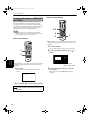
Initial settings
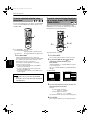
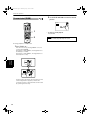
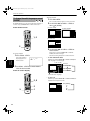
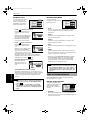
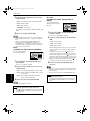
• STREAM/PCM
Should be selected when you connect to the digital
input of an amplifier with a built-in DTS, Dolby Digital,
or MPEG multichannel decoder.
• DOLBY DIGITAL/PCM
Should be selected when you connect to the digital
input of a Dolby Digital decoder, or an amplifier with a
built-in Dolby Digital decoder.
English
NOTE
• When playing a DVD VIDEO or Audio CD disc with DTS,
use a DTS decoder to get correct signals from your
speakers.
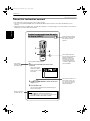
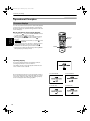
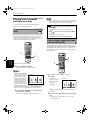
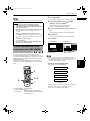
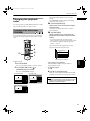
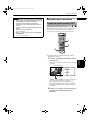
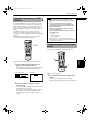
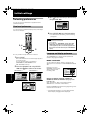
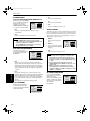
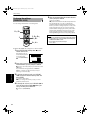
DOWN MIX
To playback a DVD VIDEO
PREFERENCE1
PREFERENCE2
SPK. SETTING
disc recorded with
DIGITAL AUDIO OUTPUT
surround multichannel
DOWN MIX
COMPRESSION
DTS BASS MANAGEMENT
audio correctly, the DOWN
AUTO STANDBY
SCREEN SAVER
MIX setting must be
AV COMPULINK MODE
PRESS
KEY
properly made according to
your audio system.
Note that this setting affects
only the output signal from the ANALOG AUDIO output
jacks when playing back a DVD VIDEO disc recorded with
surround multichannel audio.
STREAM/PCM
OFF
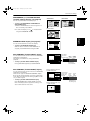
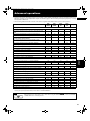
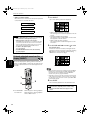
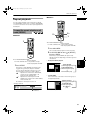
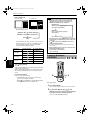
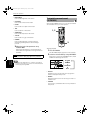
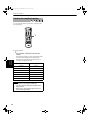
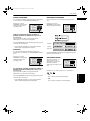
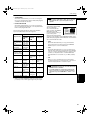
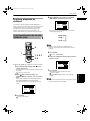
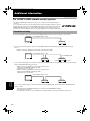
The following chart shows the relationship between
types of playback discs and output signals.
Output
STREAM/
PCM
DOLBY
DIGITAL/
PCM
PCM ONLY
DVD with 48/44.1
kHz, 16 bit linear
PCM
48/44.1 kHz,
16 bit, stereo
linear PCM
+
+
DVD with 48/44.1
kHz, 20/24 bit
linear PCM
48/44.1 kHz,
16 bit, stereo
linear PCM*
+
+
DVD with 96/88.2
kHz, linear PCM
No output
DVD with 192/
176.4 kHz, 16/22/
24 bit linear PCM
No output
DVD with DTS
DTS bitstream 48 kHz, 16 bit,
stereo linear
PCM*
DVD with Dolby
Digital
Dolby Digital
bitstream
Video CD
44.1 kHz,
16 bit, stereo
linear PCM
Audio CD
44.1 kHz,
16 bit,
stereo linear
PCM
+
+
+
+
+
48 kHz, 16 bit,
stereo linear
PCM*
+
+
OFF
DVD1
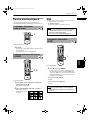
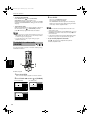
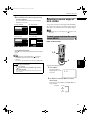
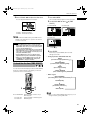
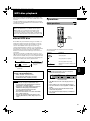
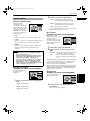
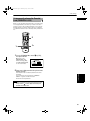
• Lt/Rt
Should be selected when you enjoy multichannel
surround audio by connecting the unit’s ANALOG
AUDIO output to a surround decoder.
• L0/R0
Should be selected when you enjoy conventional 2channel stereo audio by connecting the unit’s AUDIO
output to a stereo amplifier/receiver or television set,
or when you duplicate audio of a DVD VIDEO disc
recorded with surround audio to your MD, cassette,
etc.
• OFF
When you enjoy multichannel surround audio by
connecting the unit's 5.1-channel audio outputs to an
amplifier equipped with 5.1-channel inputs.
NOTES
+
Audio CD with DTS DTS bitstream 44.1 kHz,
16 bit, stereo
linear PCM
CD-R/RW with MP3 No output
+
OFF
MODE1
+
+
+
+
* With some DVD VIDEO discs that are not fully copyprotected, a 20 or 24 bit digital signal may be output.
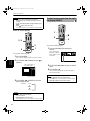
• The “DOWN MIX” function does not work when the 3D
PHONIC function is activated.
• Some DVD AUDIO discs prohibit the 2-channel downmix. For such a disc, you cannot get the down-mixed
signal even if you set “DOWN MIX” to “Lt/Rt” or “Lo/
Ro”.
Initial settings
Playback discs
OFF
57