1
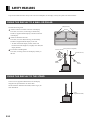
To prevent the display’s internal components from overheating, make sure that the display is installed in a well-ventilated location.
Be sure to use the (optionally available) stand, wall-mounting unit or the other unit when installing the display. Also, be also sure that
your dealer performs the actual installation.
See the appropriate instruction manual for more information on the installation hardware you select.
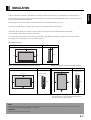
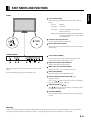
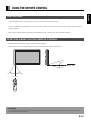
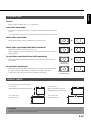
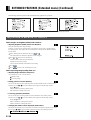
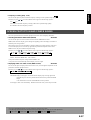
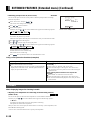
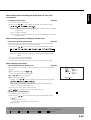
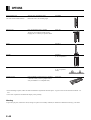
To ensure proper heat radiation, provide at least as much space around the display as shown below.
* Make sure that the display is installed in a location where the temperature can be maintained between 0°C and 40°C.
* Never attempt to tilt the display sideways or backward.
* To prevent the power and other cables from being accidentally pulled, make sure that they run along the wall or through corners.
* The display can be installed with either of its sides facing down.
When using the stand
Front
Side
(cm)
Upper
(cm)
1.5
10
10
10
Left
Wall
Right
6
Floor
Floor
When using the wall-mounting unit (horizontal type)
Front
When using the wall-mounting unit (vertical type)
Side
(cm)
Front
Side
(cm)
Upper
(cm)
Upper
(cm)
Wall mounting unit
10
Wall mounting unit
10
Left
10
10
10
Right
Wall
10
Left
Right
Wall
6
Lower
1.5
10
Lower
1.5
* When you install the display lengthwise (rather than in
its normal position), you need to adjust the display so
that characters will appear properly.
Note
The display is a highly precise piece of equipment and therefore must be packed properly before transportation. Be sure to use only those packing
materials originally supplied with the display when repacking it.
Reference
See P. E-40 for more information on options.
E-7
English
INSTALLATION