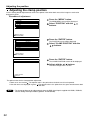
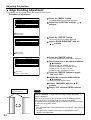
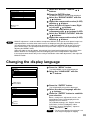
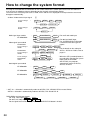
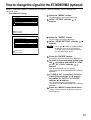
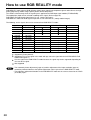
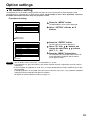
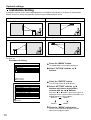
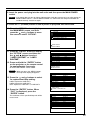
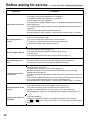
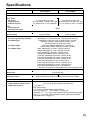
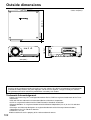
1
DLPTM Based Projector Commercial Use Operating Instructions Model No. ON POWER PT-D7500U PT-D7600U OFF AUTO SETUP RGB RGB VIDEO S-VIDEO MENU FREEZE 1 AUX 2 SHUTTER SHUT PAGE UP ENTER PAGE DOWN ON SCREEN 1 STD 2 4 FUNC 1 5 7 LENS 8 OSD 3 SYSTEM SEL D.ZOOM 6 BRIGHT NEXT ASPECT LIGHT ID ALL Computer Numetric CONTRAST 9 0 USER ID SET LASER ON/OFF Projector Read these instructions completely before operating this unit. TQBJ 0113-1 Dear Panasonic Customer: This instruction booklet provides all the necessary operating information that you might require. We hope it will help you to get the most performance out of your new product, and that you will be pleased with your Panasonic DLPTM based projector. The serial number of your product may be found on its back. You should note it in the space provided below and retain this booklet in case service is required. Model number: PT-D7500U / PT-D7600U Serial number: IMPORTANT SAFETY NOTICE WARNING: TO REDUCE THE RISK OF FIRE OR ELECTRIC SHOCK, DO NOT EXPOSE THIS PRODUCT TO RAIN OR MOISTURE. CAUTION RISK OF ELECTRIC SHOCK. DO NOT OPEN AVIS: RISQUE DE CHOC ÉLECTRIQUE NE PAS OUVRIR. VORSICHT: ZUR VERMEIDUNG EINES ELEKTRISCHEN SCHLAGES GERÄT NICHT ÖFFNEN. The lightning flash with arrowhead symbol, within an equilateral triangle, is intended to alert the user to the presence of uninsulated “dangerous voltage” within the Product's enclosure that may be of sufficient magnitude to constitute a risk of electric shock to persons. The exclamation point within an equilateral triangle is intended to alert the user to the presence of important operating and maintenance (servicing) instructions in the literature accompanying the product. 2 CAUTION: This equipment is equipped with a three-pin grounding-type power plug. Do not remove the grounding pin on the power plug. This plug will only fit a grounding-type power outlet. This is a safety feature. If you are unable to insert the plug into the outlet, contact an electrician. Do not defeat the purpose of the grounding plug. Do not remove WARNING: This equipment has been tested and found to comply with the limits for a Class B digital device, pursuant to part 15 of the FCC Rules. These limits are designed to provide reasonable protection against harmful interference in a residential installation. This equipment generates, uses and can radiate radio frequency energy and, if not installed and used in accordance with the instructions, may cause harmful interference to radio communications. However, there is no guarantee that interference will not occur in a particular installation. If this equipment does cause harmful interference to radio or television reception, which can be determined by turning the equipment off and on, the user is encouraged to try to correct the interference by one or more of the following measures: – Reorient or relocate the receiving antenna. – Increase the separation between the equipment and receiver. – Connect the equipment into an outlet on a circuit different from that to which the receiver is connected. – Consult the dealer or an experienced radio/TV technician for help. CAUTION: Any unauthorized changes or modifications to this equipment will void the user’s authority to operate. Declaration of Conformity Model Number: PT-D7500U/PT-D7600U Trade Name: Panasonic Responsible Party: Matsushita Electric Corporation of America One Panasonic Way, Secaucus, NJ 07094 Telephone Number: 1-800-524-1448 or 1-800-526-6610 Email: [email protected] This device complies with Part 15 of the FCC Rules. Operation is subject to the following two conditions: (1) This device may not cause harmful interference, and (2) this device must accept any interference receiver, including interference that may cause undesired operation. NOTICE: This product has a High Intensity Discharge (HID) lamp that contains a small amount of mercury. It also contains lead in some components. Disposal of these materials may be regulated in your community due to environmental considerations. For disposal or recycling information please contact your local authorities, or the Electronics Industries Alliance: <http://www.eiae.org.> 3 Contents IMPORTANT SAFETY NOTICE ..........................2 Precautions with regard to safety ....................5 Caution ................................................................6 Accessories ........................................................7 Precautions on handling ..................................8 Examples of system expansion ........................9 Name and function of parts ............................10 Remote control ................................................................10 Front and side of the projector ........................................12 Rear view of the main unit ..............................................13 Controls on rear panel ....................................................13 Side-mounted connection terminals ................................14 Using the remote control unit ........................15 Loading dry cells ............................................................15 Effective range of remote control operation ....................15 Setting projector ID number to remote control ................16 Using the remote control as a PC mouse........................17 Using a wired remote control ..........................................17 Installation ........................................................18 Adjusting the leveling feet ..............................................18 Projection scheme ..........................................................18 Installation geometry ......................................................18 Projection distances by the type of projection lenses (optional) ........................................................................19 Connection ......................................................24 Before starting connection ..............................................24 Example of connecting with VIDEO devices ..................25 Example of connecting with personal computers ............26 Example of connecting with the signal selector ..............27 Installation of input module (optional) ..........28 Installing the input module ..............................................28 Connecting signals to the input module ..........................30 Connecting the signal to the analog RGB signal input module ............................................................................31 Connecting the signals to the video signal input module 32 Connecting the signal to the serial digital signal input module..34 Connecting signals to the DVI signal input module ........37 How to install and remove the projection lens (optional) ..........................................................38 How to install the projection lens ....................................38 How to remove the projection lens ..................................38 Projection..........................................................39 Powering up the projector ..............................................39 Making adjustment and selection ....................................39 Powering off the projector ..............................................40 How to adjust the lens ....................................41 How to adjust the lens focus, lens zoom and lens shift (optical shift) ....................................................................41 Automatic adjustment (AUTO SETUP) ..........42 Registration of input signal data ....................43 Registration of new data..................................................43 If new registration is not available because of full memory ......44 Sub memory ....................................................................45 Using the FREEZE function ............................47 Using the SHUTTER function..........................47 Using the digital zoom (– D.ZOOM +) function ......47 On-screen menus ............................................48 Structure of menu screens ..............................................48 Basic operations on menu screen ..................................49 Returning to the previous screen ....................................49 Menu items shown in gray characters ............................49 Menu items setting ..........................................................49 Resetting to the factory default........................................49 Adjusting the picture ......................................50 Switching the picture mode ............................................50 Switching the AI control ..................................................50 Adjusting Contrast / Bright / Color / Tint ..........................51 Adjusting the color temperature ......................................52 Adjusting color matching ................................................53 4 Sharpness / Gamma / Noise reduction / Pulldown mode................................................................54 To set the sRGB compliant picture..................................55 To input BETACAM with YCbCr 480i ..............55 Adjusting the position ....................................56 Shift adjustment ..............................................................56 Size adjustment ..............................................................57 Blanking adjustment ........................................................59 Clock phase adjustment ..................................................60 Adjusting the input resolution ..........................................61 Adjusting the clamp position............................................62 Keystone distortion correction ........................................63 Edge blending adjustment ..............................................64 Changing the display language ......................65 How to change the system format..................66 How to change the signal for the ET-MD95VM2 (optional) ..................................67 How to use RGB REALITY mode ....................68 Optional settings ..............................................69 ID number setting ............................................................69 Installation Setting ..........................................................70 Lamp select ....................................................................71 Lamp power ....................................................................71 Lamp cooling time ..........................................................71 RGB2 select ....................................................................71 Position of on-screen indicators ......................................71 System information..........................................................72 Video setting....................................................................72 Fan control ......................................................................72 Automatic adjustment......................................................72 P IN P ..............................................................................73 Setting FUNC1 ................................................................74 Password ........................................................................74 Setting the contrast mode ..............................75 How to switch the input impedance (signal level) of the synchronization signal ..............76 Using the serial terminals ..............................77 Examples of connection ................................................77 Pin assignments and signal names ................................77 Communication conditions (Factory setting) ..................77 Basic format ....................................................................77 Procedure of setting communication conditions..............78 Control commands ..........................................................79 Cable specifications ........................................................79 Using the REMOTE 2 terminal ........................80 Displaying the internal test pattern ................81 Cycle of displayed internal test patterns..........................81 RS-422 control functions ................................81 How to use network module (optional) ..........82 Initial setting of network module ......................................83 Accessing from the Web browser....................................85 Returning the network module setting back to the factory setting..............................................................................92 Indication of monitor lamp ..............................93 Cleaning and replacement of air filter ............94 Procedure of cleaning ....................................................94 Replacement of unit lamp ..............................95 Timing of lamp unit replacement ....................................95 Procedure of lamp unit replacement ..............................96 Before asking for service ................................98 Specifications ..................................................99 Appendix ........................................................101 Outside dimensions ......................................102 Français Information......................................103 Precautions with regard to safety WARNING If a problem occurs (such as no image) or if you notice smoke or a strange smell coming from the projector, turn off the power and disconnect the power cord from the wall outlet. • Do not continue to use the projector in such cases, otherwise fire or electric shocks could result. • Check that no more smoke is coming out, and then contact an Authorized Service Center for repairs. • Do not attempt to repair the projector yourself, as this can be dangerous. Do not install this projector in a place which is not strong enough to take the full weight of the projector. • If the installation location is not strong enough, it may fall down or tip over, and severe injury or damage could result. • Installation work (such as ceiling suspension) should only be carried out by a qualified technician. • If installation is not carried out correctly, there is the danger that injury or electric shocks may occur. If foreign objects or water get inside the projector, or if the projector is dropped or the cabinet is broken, turn off the power and disconnect the power cord from the wall outlet. • Continued use of the projector in this condition may result in fire or electric shocks. • Contact an Authorized Service Center for repairs. Do not cover the air filter, the air inlet and exhaust vents. • Doing so may cause the projector to overheat, which can cause fire or damage to the projector. Do not overload the wall outlet. • If the power supply is overloaded (for example, by using too many adapters), overheating may occur and fire may result. Do not remove the cover or modify it in any way. • High voltages which can cause fire or electric shocks are present inside the projector. • For any inspection, adjustment and repair work, please contact an Authorized Service Center. Clean the power cord plug regularly to prevent it from becoming covered in dust. • If dust builds up on the power cord plug, the resulting humidity can damage the insulation, which could result in fire. Pull the power cord out from the wall outlet and wipe it with a dry cloth. • If not using the projector for an extended period of time, pull the power cord plug out from the wall outlet. Do not do anything that might damage the power cord or the power cord plug. • Do not damage the power cord, make any modifications to it, place it near any hot objects, bend it excessively, twist it, pull it, place heavy objects on top of it or wrap it into a bundle. • If the power cord is used while damaged, electric Shocks, short-circuits or fire may result. • Ask an Authorized Service Center to carry out any repairs to the power cord that might be necessary. Do not handle the power cord plug with wet hands. • Failure to observe this may result in electric shocks. Insert the power cord plug securely into the wall outlet. • If the plug is not inserted correctly, electric shocks or overheating could result. • Do not use plugs which are damaged or wall outlets which are coming loose from the wall. Do not place the projector on top of surfaces which are unstable. • If the projector is placed on top of a surface which is sloped or unstable, it may fall down or tip over, and injury or damage could result. Do not place the projector into water or let it become wet. • Failure to observe this may result in fire or electric shocks. Do not disassemble the lamp unit. • If the lamp section breaks, it may cause injury. 5 Precautions with regard to safety Do not place liquid containers on top of the projector. • If water spills onto the projector or gets inside it, fire or electric shocks could result. • If any water gets inside the projector, contact an Authorized Service Center. Do not insert any foreign objects into the projector. • Do not insert any metal objects or flammable objects into the projector or drop them onto the projector, as doing so can result in fire or electric shocks. After removing the battery from remote control unit, keep it away from the reach of children. • The battery can cause death by suffocation if swallowed. • If the battery is swallowed, seek medical advice immediately. Do not allow the + and - terminals of the battery to come into contact with metallic objects such as necklaces or hairpins. • Failure to observe this may cause the battery to leak, overheat, explode or catch fire. • Store the battery in a plastic bag and keep it away from metallic objects. Insulate the battery using tape or similar before disposal. • If the battery comes into contact with metallic objects or other batteries, it may catch fire or explode. Caution Do not set up the projector in humid or dusty places or in places where the projector may come into contact with smoke or steam. • Using the projector under such conditions may result in fire or electric shocks. When disconnecting the power cord, hold the plug, not the cord. • If the power cord itself is pulled, the cord will become damaged, and fire, short-circuits or serious electric shocks may result. Always disconnect all cables before moving the projector. • Moving the projector with cables still attached can damage the cables, which could cause fire or electric shocks to occur. Do not place any heavy objects on top of the projector. • Failure to observe this may cause the projector to become unbalanced and fall, which could result in damage or injury. Do not short-circuit, heat or disassemble the battery or place it into water or fire. • Failure to observe this may cause the battery to overheat, leak, explode or catch fire, and burns or other injury may result. When inserting the battery, make sure the polarities (+ and -) are correct. • If the battery is inserted incorrectly, it may explode or leak, and fire, injury or contamination of the battery compartment and surrounding area may result. Use only the Specified battery. • If an incorrect battery is used, it may explode or leak, and fire, injury or contamination of the battery compartment and surrounding area may result close to this port, otherwise burns or damage could result. 6 Do not look into the lens while the projector is being used. • Strong light is emitted from the projector’s lens. If you look directly into this light, it can hurt and damage your eyes. Do not bring your hands or other objects close to the air outlet port. • Heated air comes out of the air outlet port. Do not bring your hands or face, or objects which cannot withstand heat. Replacement of the lamp unit should only be carried out by a qualified technician. • The lamp unit has high internal pressure. It can easily become damaged if struck against hard objects or dropped, and injury or malfunctions may result. Do not use the old lamp unit. • The lamp section may break. Replacement of the lamp unit should only be carried out after it has completely cooled off, otherwise burns may result. Disconnect the power cord plug from the wall outlet as a safety precaution before carrying out any cleaning. • Electric shocks can result if this is not done. Ask an Authorized Service Center to clean inside the projector at least once a year. • If dust is left to build up inside the projector without being cleaned out, it can result in fire or problems with operation. • It is a good idea to clean the inside of the projector before the season for humid weather arrives. Ask your nearest Authorized Service Center to clean the projector when required. Please discuss with the Authorized Service Center regarding cleaning costs. Do not reach for the openings beside the optical lens, during horizontal or vertical movements of the lens there is a injury hazard. An effort to keep our environment clean, Please bring the non repairable unit your Dealer or a Recycling Company. Accessories Check that all of the accessories shown below have been included with your projector. Remote control unit ON POWER Power cord [K2CF3EH00001 x 1] wired cable for remote control Battery for remote control unit [15m (49'3"), [R03NPA/2ST x 1] K1EA03NA0001 x 1] OFF AUTO SETUP RGB RGB VIDEO S-VIDEO MENU FREEZE 1 AUX 2 SHUTTER SHUT PAGE UP ENTER PAGE DOWN ON SCREEN 1 STD 2 4 FUNC 1 5 7 LENS 8 OSD 3 SYSTEM SEL D.ZOOM 6 BRIGHT ASPECT LIGHT ID ALL Computer Numetric CONTRAST 9 NEXT 0 USER ID SET LASER ON/OFF Projector 7 Precautions on handling Precautions on transport The projection lens is susceptible to vibrations and impacts. Care should be taken to protect the lens from vibrations and impacts when transporting. Precautions on installation Be sure to observe the following precautions when installing the product. Avoid installing the product in a place exposed to vibrations or impacts. If the projector is installed in a place where vibrations are transmitted from a source of driving power and others or mounted in a car or a vessel, vibrations or impacts may be transmitted to the product to damage the internal parts, causing failure. Install the product in a place free from vibrations and impacts. Do not install the projector near highvoltage power lines or power sources. The product may be exposed to interference if it is installed in the vicinity of high-voltage electrical power lines or power sources. Do not place the projector on a vinyl sheet or carpet. If a vinyl sheet sucked up and blocks the air filter intake port, the internal temperature of the projector may increase, which triggers the protection circuit, turning off the power. Be sure to ask a specialized technician when to install the product to a ceiling. If the product is to be installed hanging from the ceiling, purchase an optional hanging attachment (for high ceiling: Model No. ET-PKD75) (for low ceiling: Model No. ET-PKD75S) and call a specialized technician for installation. Do not place the projector over 2 700 m (8881.5') above sea level. When using it over 1 400 m (4605.3') above sea level, set the “Fan Control”, described on page 72, to “HIGH”. Precautions on use To view clear images: • The audience cannot enjoy high-contrast and clear images if outside light or the illumination interferes the screen surface.Draw window curtains or blinds, turn off the lightings near the screen or take other proper measures. • In rare cases, wafture can occur on the screen affected by the warm air from the exhaust port depending on the environment. Do not touch the surface of the projection lens with bare hand. If fingerprints or stains are left on the projection lens surface, they are magnified and projected on the screen. Keep your hands away from the lens. Cover the lens with the supplied lens cap when the projector is not used. Screen If the screen has stains, flaws or discoloration, clear images cannot be viewed. When handling the screen, be careful not to apply volatile substances or leave flaws or stains on the screen. Lamp A mercury lamp with high internal pressure is used for the light source of this product. A high-pressure mercury lamp has the following characteristics: • It may burst with a loud sound or end its life cycle by not illuminating because of given impacts, flaws, or deterioration due to used hours. • The life cycle of a mercury lamp varies according to the individual difference or conditions of use. • In rare cases, it may burst shortly after the first lighting. • The possibility of burst increases when the lamp is used beyond the replacement time. Disposal To discard the product, call the dealer or a specialized dealer Otherwise the life of the product may be shortened. Cleaning and maintenance Be sure to remove the power cord plug from the receptacle before cleaning. Use soft and dry cloth to clean the cabinet If stains are hard to remove, use a cloth dampened with a kitchen detergent solution (neutral) and squeezed to wipe the cabinet and finish with a dry cloth. If a chemical wipe is used, follow its instructions. Do not clean the lens surface with fuzzy or dusty cloth. If dust adheres to the lens, it will be magnified and projected on the screen. Use a soft and clean cloth to wipe off dust. 8 Examples of system expansion The projector is provided with a number of terminals and optional accessories to enable various system expansions. Both input and output are provided to all terminals on the main unit. The following are some examples of system expansion: System 1 System 2 Stacking two projectors with the stacking brackets can double the picture brightness. The optional high- or low-ceiling mount bracket flexibly fits the projector in individual site conditions. System 3 System 4 PC equipped with a DVI-D input module (an optional item) can be attached to the projector for computer image viewing (Realization of high-resolution picture.) Connection of a signal selector enables to feed a variety of video sources to the projector. Digital broadcasting tuner or DVD player Control PC Signal selector (Option) Video deck POWER OFF ON OFF 1 2 INPUT SELECT 3 4 5 VP 6 ON/OFF Signal Selector TW-SWS J 9 Name and function of parts Remote control ON POWER OFF AUTO SETUP RGB RGB VIDEO S-VIDEO MENU FREEZE 1 AUX 2 SHUTTER SHUT PAGE UP ENTER PAGE DOWN ON SCREEN 1 STD 2 4 FUNC 5 OSD 3 SYSTEM SEL D.ZOOM 1 6 BRIGHT 7 LENS 8 ASPECT LIGHT ID ALL Numetric < When the operation mode selector set to Projector > is Remote control operation indicator lamp The lamp flashes when any remote control button is pressed. POWER ON button (page 39) Turns on the power if the MAIN POWER has been put to the “l” position. POWER OFF button (page 40) Turns off the power if the MAIN POWER has been put to the “l” position. AUTO SET UP button (page 42) Pressing this button while projecting an image automatically corrects the picture positioning on the screen. While the auto setup feature is active, a message“AUTO SETUP” appears on the screen. Input selector (RGB1, RGB2, AUX, VIDEO, SVIDEO) button Use to toggle through the RGB1, RGB2, AUX (module input), VIDEO and S-VIDEO input ports. SYSTEM SELECTOR button (page 66) System switching can be done. MENU button (page 49) Displays and clears the Main Menu. It can also return to the previous screen when the menu is displayed. FREEZE button (page 47) Press this button to freeze the image temporarily. Arrow buttons (page 49) Use these buttons to select an item on the menu screen, change setting and adjust the level. ENTER button (page 49) Press this button to enter your menu selection or to run function. Standard (STD) button (page 49) Press this button to restore the default factory setting. ON SCREEN button (page 48) This button turns on and off the on-screen indication function. 10 9 NEXT Computer CONTRAST 0 USER ID SET LASER ON/OFF Projector SHUTTER button (page 47) Press this button to black out the image temporarily. Function 1 (FUNC1) button (page 74) This button can control the functions set in “FUNC1” of the “Option” screen from Main Menu. Digital Zoom (- D.ZOOM +) buttons (page 47) Any portion of the picture can be zoomed in. LENS button (page 41) Switches to the mode of projection lens adjustment. BRIGHT button (page 51) Switches to the mode of black level adjustment. CONTRAST button (page 51) Switches to the mode of image contrast adjustment. NEXT button When multiple signal selectors are connected to the main unit in the system, this button specifies the second signal selector or beyond. With the ID set button pressed, every press on the button will change the value in the ten’s place. ASPECT button Switches the image aspect ratio to 4:3, 16:9. P FF /O c je N SE R O ro AUTO SETUP to r OFF LA T LL A U ID T H LIG 0 CT PE AS T X E N 9 8 T H IG R B 7 T S A R T N O C N O 5 C N FU 2 M N W O D D T S L 6 E S M O 3 D O S .Z O D STE N E E R C S SY P U PA GE R TE EN S N LE FREEZE SHUT 1 MENU AUX SHUTTER 4 S-VIDEO 1 VIDEO 2 C RGB 1 o Nu mpu me te tric r S E R SE POWER ID ON RGB PA GE ID O EGE IDA VP B G R 2 F F O B G R 1 N O P W O E R PAGE DOWN E GNU PAE M -V S TO P U U A T E S ENTER EO X U A FR EE S ZE H R E TT U T H U S PAGE UP ON SCREEN 1 STD 2 4 FUNC 5 OSD 3 SYSTEM SEL D.ZOOM 1 6 BRIGHT 7 LENS 9 8 NEXT ASPECT LIGHT ID ALL Computer Numetric CONTRAST 0 USER ID SET LASER ON/OFF Projector USER button Displays the sub-memory screen of the signal registration. LIGHT button ( Click button) When this button is pressed, the remote control button light is turned on.The light goes off about 30 seconds after you stop remote control operation. ID ALL button (page 16,69) When two or more main units are used in the system, this button switches to the mode to control them simultaneously with a single remote control. ID SET button (page 16,69) When two or more main units are used in the system, this button specifies the ID of the remote control. Remote control wired terminal (page 17) To use the wired output terminal, connect the remote control and the main unit with the supplied cable. Remote control transmitter window Operate the remote control aiming at the remote control receiver window on the main unit. <When the operation mode selector set to Computer> is ENTER button Moves the mouse cursor. ( ) buttons These buttons correspond to the left and right mouse buttons. PAGE UP/PAGE DOWN buttons These buttons correspond to the PAGE UP/PAGE DOWN buttons on PC's keyboard. Numeric (0-9) button In a system that uses two or more units of this projector or in a system that connects to an optional signal selector, these buttons specify a particular projector unit or the input of the signal selector. They are also used to enter ID numbers when selecting the ID or to enter specific numbers when entering a password. Operation mode selector (Computer/Numeric, Projector) switch (page 17) Put this selector to the right position to control the projector and to the left position to control the PC or use numeric buttons. Click button (page 17) This button corresponds to the left mouse button when the operation mode is switched to the Computer position. Note • To use the remote control as a mouse, please purchase an optional wireless mouse receiver (model No.: ET-RMRC1). • The AUX button to switch the input is disabled when an optional input module is not connected. 11 Name and function of parts Front and side of the projector AC IN terminal (page 39) Connect the supplied line power cord into this receptacle. Do not connect any other cable to this socket. MAIN POWER switch (page 39) Use this switch to turn on “I” and off “o” the commercial line power applied to the projector. Burglar lock Attach a commercial burglar prevention cable (e.g., from Kensington) to this lock port. It is compatible with the Micro Save Security System from Kensington. This security lock is compatible with the Microsaver Security System from Kensington. Contact details for this company are given below. Kensington Technology Group ACCO Brands Inc. 2885 Campus Drive San Mateo, CA94403 Tel (650)572-2700 Fax (650)572-9675 http://www.kensington.com/ http://www.gravis.com/ Air filter (page 94) Level-adjusting feet (page 18) Use these feet to adjust the tilt of the projector. (Leveling feet are provided at the front and rear, right and left.) Remote control receiver window (front) (page 15) This window receives the signal beam emitted from the remote control. Projection lens (optional) Lens for projecting images on the screen. Power indicator lamp (page 39) The lamp lights in red when the MAIN POWER switch is turned to “I” (on). It turns to green when the POWER ON button of the remote control or the main unit is pressed. 12 Side-mounted connection terminals (page 14) LAMP1 monitor (page 93) This lamp lights up when the time to replace lamp unit 1 is reached. It also blinks if something unusual occurs in the lamp circuit. LAMP2 monitor (page 93) This lamp lights up when the time to replace lamp unit 2 is reached. It also blinks if something unusual occurs in the lamp circuit. Temperature monitor (TEMP) (page 93) Lighting or blinking of this lamp indicates an abnormal condition of the internal temperature. Projection lens cover lock button This button toggles between lock and unlock of the detachable cover for the projection lens (optional). Use this for locating the projectors when stacking two units. Rear view of the main unit Controls on rear panel AUTO SETUP RGB 1 RGB 2 VIDEO S-VIDEO AUX SHUTTER LENS MENU Lamp unit housing door The lamp unit is housed. Remote control receiver window (rear) (page 15) This also receives the signal beam coming from the remote control. POWER ON (I) button (page 39) Turns on the power. POWER OFF ( ) button (page 40) Turns off the power. VIDEO button (page 39) Switches to video input. S-VIDEO button (page 39) Switches to S-VIDEO input. RGB1 button (page 39) Switches to RGB1 input. RGB2 button (page 39) Switches to RGB2 input. AUX button (page 39) Switches to optional input module input. ENTER AUTO SETUP button (page 42) Pressing this button while projecting an image automatically corrects the picture positioning on the screen. While the auto setup feature is active, a message “EXECUTING...” appears on the screen. SHUTTER button (page 47) Press this button to black out the image temporarily. MENU button (pages 48 and 49) Displays and clears the Main Menu. It can also return to the previous screen when the menu is displayed. Arrow ( ) buttons (page 49) Use to select an item on the menu screen, change setting and adjust the level. ENTER button (page 49) Press this button to enter your menu selection or to run function. LENS button (page 41) Switches to the adjustment mode for lens focus, zoom and shift (position). 13 Name and function of parts Side-mounted connection terminals RS-232C (G) / RS-422 (R) IN OUT REMOTE 1 S-VIDEO IN IN OUT R/PR S-VIDEO IN terminal (pages 24 and 25) An input terminal for S-video signals (MIN4-pin DIN). This terminal complies with S1 signals and automatically toggles between 16:9 and 4:3 according to the size of input signals. VIDEO IN terminal (page 25) An input terminal for video signals. (BNC) VIDEO OUT terminal (page 25) An output terminal (active through) for video signals. (BNC) SERIAL IN terminal (pages 25–27, 77–79) This terminal is an RS-232C/RS-422 compliant input terminal (switching necessary) to connect a PC and to externally control the main unit (D-SUB 9-pin female). 14 RS-232C (G) / RS-422 (R) IN REMOTE 2 VIDEO G/Y OUT RGB 1 IN B/PB SYNC/HD SERIAL RGB 2 IN / RGB 1 OUT VD SERIAL OUT terminal (pages 26, 27, 77–79) This terminal is an RS-232C/RS-422 compliant output terminal (switching necessary) to supply signals given to the serial input terminal (D-SUB 9-pin male). RGB (YPBPR)1 input terminal (pages 26, 27) A terminal to input RGB or YPBPR signals (BNC). RGB (YPBPR)2 input/RGB (YPBPR)1 output terminal (pages 26, 27) This terminal (active through) receives RGB or YPBPR signals or supplies signals given to the RGB1 input terminal (D-SUB 15-pin female). REMOTE2 terminal (page 80) The user can remotely control the main unit by using an external control circuit to this terminal (D-SUB 9-pin female). REMOTE1 lN/OUT terminal (page 17) When two or more main units are used in the system, they can be connected and controlled with a wired remote control cable (M3 jack). Using the remote control unit Loading dry cells When loading supplied AA dry cells into the battery compartment of the remote control, make sure that their polarities are correct. 1. Open battery compartment lid. Open the lid in the order of steps and . Effective range of remote control operation The remote control should normally be aimed at either the front or rear remote control receiver window on the projector (fig. 1). Otherwise, it may also be aimed at the screen, which will reflect commands back to the projector's front receiver window as illustrated in figure 2. The effective control range is approx. 7 meters from the beam receiver on the front or rear. (Front) Remote control 30˚ Into battery compartment, with their polarities orientated as indicated ( , )in the compartment. Supplied AA dry cells (insert the side first). Remote control 30˚ 2. Insert the dry cells. 30˚ Remote control (Rear) 30˚ [Top view] 15˚ 15˚ Remote control 15˚ [Side view] 15˚ Figure 1 Screen 3. Close the battery compartment lid. Projector Replace the battery compartment lid over the compartment and slide until it clicks. Remote control receiver window (front) Remote control receiver window (rear) Remote control Figure 2 Note Attention • Do not drop the remote control unit. • Do not expose remote control unit to any liquid. • Do not use NiCd batteries. • When the remote control is aimed at the screen, the effective control range may be reduced due to the optical loss by screen reflection. • The remote control may not function properly if an object is in the light path. • The remote control receiver may not function properly in intense ambient light such as fluorescent lamps. Carefully site the projector so its remote control receiver windows will not be directly exposed to intense light. 15 Using the remote control unit Setting projector ID number to remote control Every projector has its ID number and the ID number of the controlling projector must be set to the remote control in advance so that the user can operate the remote control. The ID number of the projector is set to “ALL” on shipping, and use the ID ALL button of the remote control when using only a single projector. Procedure of ID setting Press the ID SET button, and within five seconds, use the NEXT button to set the number of the tens digit in the ID number, which is already set in the projector, and then use one of the numeric (0-9) buttons to set the number of the units digit. However, if the ID ALL button is pressed, the projector can be controlled regardless of the ID number of the projector (simultaneous control mode). • If the ID SET button is pressed, the ID number goes back to the one set before pressing the ID SET 16 button unless the NEXT button and a numeric button are pressed within five seconds after the ID SET button is pressed. • Do not press the ID SET button accidentally or carelessly because the ID number on the remote control can be set even when no projector is around. • Your specified ID number is stored in the remote control unit unless another one is specified later. However, the stored ID will be erased if the batteries of the remote control are left exhausted. When the dry cells are replaced, set the same ID number again. Using the remote control as a PC mouse Operation mode selector switch ON POWER Put the knob to the Computer position. • ENTER button Pressing the front, rear, left and right edges of the button moves the mouse cursor up, down, left and right. • Right click ( ) button This button can be used as the right mouse button. • Left click ( ) button This button can be used as the left mouse button. • PAGE UP button This button can be used as the Page Up button on the PC keyboard. • PAGE DOWN button This button can be used as the Page Down button on the PC keyboard. • Click button This button can be used as the left mouse button. OFF AUTO SETUP RGB RGB VIDEO S-VIDEO MENU FREEZE 1 AUX 2 SHUTTER PAGE UP button SHUT ENTER button PAGE UP Left click ( ) button Right click ( ) button PAGE DOWN button ENTER PAGE DOWN ON SCREEN 1 STD 2 4 FUNC 5 3 OSD SYSTEM SEL D.ZOOM 1 6 BRIGHT 7 9 8 LENS CONTRAST NEXT ASPECT LIGHT ID ALL 0 USER ID SET LASER ON/OFF Computer Operation mode selector switch Projector P ro je cto r Numetric /O FF ID SE T 0 T N 9 R A S T ASPE CT T X E N S N LE 6 M O 1 7 5 E R D S T 4 C S 2 D N 8 M TE S L Y S SE 3 D O S .Z O D E N BR IG HT FU NC N r te pu om C R ON R E S U SE AL L C ID O LIG HT W O etric O LA Num EN TE R U P 1 PA GE ZE EO -V O EGE IDA VP 2 1 O N R E W O P O F R G F B R G B TO U U A T E S S P E GNU PAE M X SH UT TE R U A EE ID FR T U H S PA GE Note Click button • To use the remote control as a mouse, please purchase an optional wireless mouse receiver (model No.: ET-RMRC1). Using a wired remote control When multiple main units are connected in the system, connect the units with the supplied remote control cable to simultaneously control the multiple main units with a single remote control unit through the REMOTE1 IN/OUT terminal. It is effective to use the wired remote control in the environment in which an obstacle stands in the light path or where devices are susceptible to outside light. Remote control cable (supplied) ON POWER OFF AUTO SETUP RGB RGB 1 AUX 2 SHUTTER S-VIDEO VIDEO MENU SHUT FREEZE PAGE UP RS-232C (G) / RS-422 (R) IN OUT REMOTE 1 S-VIDEO IN VIDEO IN OUT R/PR G/Y ENTER RS-232C (G) / RS-422 (R) IN REMOTE 2 OUT RGB 1 IN B/PB SYNC/HD SERIAL PAGE DOWN RGB 2 IN / RGB 1 OUT VD ON SCREEN 1 STD 2 4 FUNC 5 7 LENS OSD 3 SYSTEM SEL D.ZOOM 1 6 BRIGHT 8 ASPECT LIGHT ID ALL Numetric Side-mounted terminals Connect to the secondary projector 9 NEXT Computer CONTRAST 0 USER ID SET LASER ON/OFF Projector Remote control 17 Installation Adjusting the leveling feet The four leveling feet mounted at the bottom of the projector are level-adjustable (0 mm–33 mm) which can be used when the floor surface is not horizontal. < Front > < Side > Leveling feet Projection scheme This projector is applicable to any of the following four projection schemes. Select the most suitable scheme to the situation of your location. Use the OPTION menu on the menu screen to choose the desired projection scheme. (Refer to page 70) Installation geometry When planning the projector and screen geometry, refer to the figures below and the information on the next page for reference. After the projector is roughly positioned, picture size and vertical picture positioning can be finely adjusted with the powered zoom lens and lens shifting mechanism. Side view (unit: mm/inch) Table standing Ceiling mount 438-558 (17.2"-21.9") Front projection When optional ceiling mount bracket (ET-PKD75) H L 237 (9.3") SH (Default position) Rear projection Table standing L H Ceiling mount Screen L : Projection distance SH : Height of the image SW: Image width H : Vertical distance between the lens center level and the bottom edge of the projected image Top view (unit: mm/inch) 314 86 (3.4") 140 (5.5") SW L (12.3") *For PT-D7500U, H= -0.2 x SH to 1.2 x SH For PT-D7600U, H= 0 to SH L1 175 (6.9") Screen 117 (4.6") Lens ET-D75LE1/ET-D75LE1SC ET-D75LE2/ET-D75LE2SC ET-D75LE3/ET-D75LE3SC ET-D75LE4/ET-D75LE4SC ET-D75LE5 18 468 (18.4") Dimension of L1 (Approx.) 102 (4") 86.5 (3.4") 90 (3.5") 113.9 (4.5") 190 (7.5") Projection distances by the type of projection lenses (optional) Every type of optional projection lenses has a different projection distance to achieve the same screen size. Select and purchase a projection lens most suitable to the size of your location referring to the following tables and the projection distances by the type of projection lenses on the pages 19-22. Screen L : Projection distance SH : Effective screen height SH L Projection distances by the type of projection lenses (for PT-D7500U) • For the screen aspect ratio of 4:3 Units: m (feet/inches) Projection distance (L) Screen Screen dimensions Fixed-focus lens Zoom lens size Effective ET-D75LE1/SC (1.87-2.5 :1) ET-D75LE2/SC(2.5-3.75 :1) ET-D75LE3/SC(3.75-6.25 :1) ET-D75LE4/SC (6.25-10.0 :1) ET-D75LE5 (inch) Effective height (SH) width(SW) Minimum Maximum Minimum Maximum Minimum Maximum Minimum Maximum (1.0 : 1) 70 80 90 100 120 150 200 250 300 350 400 500 600 Note 1.066 (3'6") 1.219 (4'0") 1.371 (4'6") 1.524 (5'0") 1.828 (6'0") 2.286 (7'6") 3.048 (10'0") 3.810 (12'6") 4.572 (15'0") 5.334 (17'6") 6.096 (20'0") 7.620 (25'0") 9.144 (30'0") 1.422 2.81 3.74 3.78 (4'8") (9'3") (12'3") (12'5") 1.625 3.22 4.29 4.34 (5'4") (10'7") (14'1") (14'3") 1.828 3.63 4.84 4.89 (6'0") (11'11") (15'11") (16'1") 2.032 4.04 5.39 5.44 (6'8") (13'3") (17'9") (17'11") 2.438 4.87 6.49 6.54 (8'0") (16'0") (21'4") (21'6") 3.048 6.10 8.13 8.20 (10'0") (20'0") (26'9") (27'0") 4.064 8.16 10.88 10.96 (13'4") (26'10") (35'9") (36'0") 5.080 10.22 13.62 13.72 (16'8") (33'7") (44'10") (45'1") 6.096 12.28 16.37 16.48 (20'0") (40'5") (53'16") (54'2") 7.112 14.34 19.11 19.24 (23'4") (47'2") (62'10") (63'3") 8.129 16.40 21.86 22.00 (26'8") (53'11") (71'11") (72'4") 10.160 20.52 27.35 27.52 (33'4") (67'6") (90'1") (90'6") 12.192 24.64 32.84 33.04 (40'0") (81'0") (108'1") (108'8") 5.68 (18'8") 6.50 (21'4") 7.33 (24'11") 8.15 (26'10") 9.81 (32'3") 12.28 (40'5") 16.41 (54'0") 20.54 (67'7") 24.67 (81'2") 28.80 (94'9") 32.93 (108'4") 41.19 (135'6") 49.45 (162'8") 5.73 9.47 (18'10") (31'2") 6.57 10.84 (21'7") (35'8") 7.40 12.21 (24'4") (40'2") 8.23 13.58 (24'1") (44'8") 9.90 16.32 (32'7") (53'8") 12.40 20.43 (40'9") (67'2") 16.56 27.28 (54'6") (89'9") 20.73 34.13 (68'2") (112'3") 24.89 40.98 (81'11") (134'10") 29.06 47.83 (95'7") (157'4") 33.22 54.68 (109'3") (179'11") 68.38 41.55 (136'8") (224'11") 49.88 82.08 (164'1") (270'0") 9.48 (31'2") 10.85 (35'8") 12.22 (40'2") 13.59 (44'8") 16.33 (53'9") 20.44 (67'3") 27.29 (89'9") 34.14 (112'3") 40.99 (134'10") 47.84 (157'4") 54.69 (179'11") 68.39 (224'11") 82.09 (270'0") 15.45 (50'10") 17.67 (58'1") 19.90 (65'5") 22.12 (72'9") 26.56 (87'4") 33.23 (109'3") 44.34 (145'10") 55.45 (182'5") 66.56 (218'11") 77.67 (255'6") 88.78 (292'0") 111.00 (365'1") 133.22 (437'6") 1.40 (4'7") 1.61 (5'3") 1.82 (6'0") 2.04 (6'8") 2.46 (8'1") 3.10 (3'6") 4.16 (10'2") 5.22 (17'2") 6.28 (20'8") ----------------- • The projection distances listed here involve an error of ±5%. • Keystone distortions are corrected in the way the screen size becomes smaller than the original one. 19 Installation Projection distances by the type of projection lenses (for PT-D7500U) • For the screen aspect ratio of 16:9 Units: m (feet/inches) Projection distance (L) Screen Screen dimensions Fixed-focus lens Zoom lens size Effective ET-D75LE1/SC(1.87-2.5 :1) ET-D75LE2/SC(2.5-3.75 :1) ET-D75LE3/SC(3.75-6.25 :1) ET-D75LE4/SC(6.25-10.0 :1) ET-D75LE5 (inch) Effective height (SH) width(SW) Minimum Maximum Minimum Maximum Minimum Maximum Minimum Maximum (1.0 : 1) 70 80 90 100 120 150 200 250 300 350 400 500 600 Note 20 0.871 (2'10") 0.996 (3'3") 1.120 (3'8") 1.245 (4'1") 1.494 (4'11") 1.868 (6'2") 2.491 (8'2") 3.113 (10'3") 3.736 (12'3") 4.358 (14'4") 4.981 (16'4") 6.226 (20'5") 7.472 (24'7") 1.549 3.062 4.090 4.133 6.196 6.258 (5'1") (10'1") (13'5") (13'7") (20'4") (20'7") 1.771 3.510 4.688 4.735 7.097 7.166 (5'10") (11'6") (15'5") (15'7") (23'4") (23'7") 1.992 3.959 5.287 5.337 7.997 8.074 (6'7") (13'0") (17'4") (17'7") (26'3") (26'7") 2.214 4.407 5.885 5.939 8.897 8.982 (7'3") (14'6") (19'4") (19'6") (29'6") (29'6") 2.657 5.304 7.083 7.143 10.698 10.798 (8'9") (17'5") (23'3") (23'6") (35'2") (35'6") 3.321 6.649 8.878 8.949 13.399 13.522 (10'11") (21'10") (29'2") (29'5") (44'1") (44'6") 4.428 8.890 11.871 11.958 17.901 18.081 (14'6") (29'37") (39'0") (39'4") (58'11") (59'6") 5.535 11.132 14.865 14.968 22.403 22.601 (18'2") (36'7") (48'11") (49'3") (73'8") (74'4") 6.641 13.374 17.858 17.979 26.905 27.140 (21'70") (44'0") (58'9") (59'11") (88'6") (89'3") 7.748 15.616 20.851 20.987 31.407 31.680 (25'5") (51'4") (68'7") (69'0") (103'4") (104'2") 8.855 17.857 23.844 23.997 35.909 36.219 (29'0") (58'9") (78'5") (78'11") (118'11") (119'1") 11.069 22.341 29.830 30.018 44.913 45.298 (36'4") (73'6") (98'0") (98'9") (147'11") (149'0") 13.282 26.824 35.816 36.035 53.917 54.377 (43'8") (88'3") (117'10") (118'6") (177'4") (178'11") 10.326 (34'0") 11.819 (38'11") 13.311 (43'9") 14.804 (48'8") 17.788 (58'6") 22.266 (73'3") 29.728 (97'10") 37.190 (122'4") 44.652 (146'11") 52.114 (171'5") 59.577 (196'0") 74.501 (245'1") 89.425 (294'2") 10.332 (34'0") 11.824 (38'11") 13.317 (43'10") 14.809 (48'9") 17.794 (58'6") 22.271 (73'3") 29.734 (97'10") 37.196 (122'4") 44.658 (146'11") 52.120 (171'5") 59.582 (196'0") 74.507 (245'1") 89.431 (294'2") 16.845 (55'5") 19.266 (63'4") 21.687 (71'4") 24.108 (79'3") 28.950 (95'2") 36.213 (119'1") 48.318 (158'11") 60.424 (198'9") 72.529 (238'7") 84.634 (278'5") 96.740 (318'2") 120.950 (397'10") 145.161 (477'16") 1.535 (5'1") 1.766 (5'10") 1.998 (6'7") 2.229 (7'4") 2.692 (8'10") 3.386 (11'2") 4.542 (14'11") 5.699 (18'19") 6.855 (22'7") ----------------- • The projection distances listed here involve an error of ±5%. • Keystone distortions are corrected in the way the screen size becomes smaller than the original one. Projection distances by the type of projection lenses (for PT-D7600U) • For the screen aspect ratio of 5:4 Units: m (feet/inches) Projection distance (L) Screen Screen dimensions Fixed-focus lens Zoom lens size Effective ET-D75LE1/SC (1.5-2.0 :1) ET-D75LE2/SC (2.0-3.0 : 1) ET-D75LE3/SC (3.0-5.0 :1) ET-D75LE4/SC(5.0-8.0 :1) ET-D75LE5 (inch) Effective height (SH) width(SW) Minimum Maximum Minimum Maximum Minimum Maximum Minimum Maximum (0.8 : 1) 70 80 90 100 120 150 200 250 300 350 400 500 600 Note 1.111 (3'8") 1.270 (4'2") 1.428 (4'4") 1.587 (5'3") 1.905 (6'3") 2.381 (7'10") 3.175 (10'5") 3.968 (13'1") 4.762 (15'8") 5.556 (18'3") 6.350 (20'11") 7.937 (26'1") 9.520 (31'4") 2.17 4.42 7.40 2.89 2.92 1.389 4.41 7.41 11.97 (7'2") (9'6") (9'7") (14'6") (14'6") (24'4") (24'5") (39'4") (4'7") 2.49 5.06 8.48 3.32 3.35 1.587 5.05 8.48 13.69 (8'2") (10'11") (11'0") (16'7") (16'7") (27'11") (27'11") (45'0") (5'3") 2.81 5.71 3.74 3.78 9.55 1.785 5.70 9.56 15.41 (9'3") (12'4") (12'5") (18'9") (18'9") (31'5") (31'5") (50'7") (5'11") 3.13 4.17 6.35 4.21 10.63 1.984 6.34 10.63 17.14 (6'6") (10'4") (13'9") (13'10") (20'10") (20'10") (35'0") (35'0") (56'5") 3.78 5.02 7.64 5.07 12.78 2.381 7.63 12.78 20.59 (7'10") (11'1") (16'6") (16'8") (25'1") (25'2") (42'0") (42'0") (67'9") 4.74 6.30 9.58 6.36 16.00 2.976 9.57 16.01 25.70 (9'10") (15'7") (20'9") (20'11") (31'6") (31'6") (52'8") (52'8") (84'7") 6.34 8.44 12.80 8.50 21.38 3.968 12.79 21.38 34.38 (13'1") (20'10") (27'9") (28'0") (42'1") (42'1") (70'4") (70'4") (113'1") 7.95 16.03 10.57 10.65 26.75 4.960 16.02 26.76 43.00 (16'4") (26'2") (34'9") (35'0") (52'8") (52'8") (88'0") (88'0") (141'5") 9.55 19.25 12.71 12.79 32.13 5.953 19.24 32.13 51.62 (19'7") (31'5") (41'10") (42'1") (63'3") (63'4") (105'8") (105'8") (169'10") 11.16 22.48 60.24 14.84 37.50 14.94 22.47 6.945 37.51 (22'10") (36'9") (48'10") (49'2") (73'11") (74'0") (123'4") (123'4") (198'2") 12.76 25.70 68.86 16.98 42.88 17.08 25.69 7.937 42.88 (26'1") (42'0") (55'10") (56'2") (84'6") (84'7") (141'1") (141'1") (226'6") 15.97 32.15 86.10 21.25 53.63 21.37 9.921 32.14 53.63 (32'8") (52'7") (69'11") (70'4") (105'9") (105'10") (176'5") (176'5") (283'3") 19.18 38.60 25.52 64.38 25.66 11.906 38.59 64.38 103.34 (39'2") (63'1") (83'11") (84'5") (126'11") (127'0") (211'10") (211'10") (339'11") 1.13 (3'9") 1.29 (4'3") 1.45 (4'9") 1.62 (5'4") 1.94 (6'5") 2.43 (8'0") 3.24 (10'8") 4.05 (13'4") 4.86 (16'0") ----------------- • The projection distances listed here involve an error of ±5%. • Keystone distortions are corrected in the way the screen size becomes smaller than the original one. 21 Installation Projection distances by the type of projection lenses (for PT-D7600U) • For the screen aspect ratio of 16:9 Units: m (feet/inches) Projection distance (L) Screen Screen dimensions Fixed-focus lens Zoom lens size Effective ET-D75LE1/SC (1.5-2.0 : 1) ET-D75LE2/SC (2.0-3.0 :1) ET-D75LE3/SC (3.0-5.0 :1) ET-D75LE4/SC (5.0-8.0 :1) ET-D75LE5 (inch) Effective height (SH) width(SW) Minimum Maximum Minimum Maximum Minimum Maximum Minimum Maximum (0.8 : 1) 70 80 90 100 120 150 200 250 300 350 400 500 600 Note 22 0.871 (2'10") 0.996 (3'3") 1.120 (3'8") 1.245 (4'1") 1.494 (4'11") 1.868 (6'2") 2.491 (8'2") 3.113 (10'3") 3.736 (12'3") 4.358 (14'4") 4.981 (16'4") 6.226 (20'5") 7.472 (24'7") 1.549 4.944 2.428 3.238 3.273 4.934 (5'1") (8'0") (10'8") (10'9") (16'3") (16'3") 1.771 5.664 2.785 3.715 3.752 5.654 (5'10") (9'2") (12'3") (12'4") (18'7") (18'8") 1.992 6.386 3.143 4.192 4.231 6.374 (6'7") (10'4") (13'10") (14'0") (21'0") (21'0") 2.214 7.105 3.501 4.669 4.711 7.094 (7'3") (11'6") (15'4") (15'6") (23'4") (23'5") 2.657 8.545 4.216 5.623 5.669 8.534 (8'4") (13'11") (18'6") (18'8") (28'1") (28'1") 3.321 5.290 7.054 7.106 10.695 10.705 (10'11") (17'5") (23'2") (23'4") (35'2") (35'1") 4.428 7.078 9.439 9.501 14.295 14.306 (14'6") (23'3") (31'1") (31'3") (47'0") (47'1") 5.535 8.867 11.824 11.896 17.896 17.906 (18'2") (29'2") (38'11") (39'2") (58'10") (58'11") 6.641 10.656 14.209 14.291 21.496 21.507 (21'10") (35'1") (46'9") (47'1") (70'9") (70'9") 7.748 12.444 16.594 16.686 25.097 25.107 (25'5") (41'0") (54'7") (54'11") (82'7") (82'7") 8.855 14.233 18.979 19.082 28.697 28.708 (29'0") (46'10") (62'5") (62'9") (94'5") (94'5") 11.069 17.811 23.749 23.872 35.898 35.909 (36'4") (58'7") (78'1") (78'6") (118'1") (118'2") 13.282 21.388 28.519 28.662 43.099 43.110 (43'8") (70'4") (93'10") (94'3") (141'10") (191'10") 8.279 (27'3") 9.479 (31'2") 10.680 (35'2") 11.880 (39'1") 14.280 (47'0") 17.881 (58'10") 23.882 (78'7") 29.882 (98'4") 35.883 (118'0") 41.884 (137'10") 47.885 (157'6") 59.893 (197'0") 71.894 (236'6") 8.285 (27'3") 9.485 (31'3") 10.685 (35'2") 11.886 (39'1") 14.286 (47'0") 17.886 (58'10") 23.887 (78'7") 29.888 (98'4") 35.889 (118'1") 41.890 (137'10") 47.891 (157'7") 59.893 (197'0") 71.894 (236'6") 13.368 (44'0") 15.293 (50'4") 17.217 (56'8") 19.142 (63'0") 22.990 (75'8") 28.764 (94'8") 38.386 (126'3") 48.009 (157'11") 57.630 (189'7") 67.252 (221'3") 76.874 (252'11") 96.118 (316'2") 115.362 (379'6") 1.263 (4'2") 1.444 (4'9") 1.624 (5'7") 1.805 (5'11") 2.167 (7'1") 2.710 (8'11") 3.614 (11'11") 4.519 (14'11") 5.423 (17'10") ----------------- • The projection distances listed here involve an error of ±5%. • Keystone distortions are corrected in the way the screen size becomes smaller than the original one. If the projector is used with a screen size not listed in this manual, check the diagonal dimension (inch) of your screen and calculate the projection distance using the following formulas. Calculation formulas for projection distance by lens types (for PT-D7500U) Model number of projection lens ET-D75LE1 ET-D75LE1SC (1.87–2.5 :1) ET-D75LE2 ET-D75LE2SC (2.5–3.75 :1) Zoom lens ET-D75LE3 ET-D75LE3SC (3.75–6.25 :1) ET-D75LE4 ET-D75LE4SC (6.25–10.0 :1) Fixedfocus lens ET-D75LE5 (1.0 :1) Aspect ratio Projection distance (L) formula 4:3 Minimal distance: L=0.0412 x Screen diagonal (inch) – 0.0760 Maximal distance: L=0.0549 x Screen diagonal (inch) – 0.1003 16:9 Minimal distance: L=0.0443 x Screen diagonal (inch) – 0.0759 Maximal distance: L=0.0598 x Screen diagonal (inch) – 0.1002 4:3 Minimal distance: L=0.0552 x Screen diagonal (inch) – 0.0795 Maximal distance: L=0.0826 x Screen diagonal (inch) – 0.1061 16:9 Minimal distance: L=0.0601 x Screen diagonal (inch) – 0.0794 Maximal distance: L=0.0899 x Screen diagonal (inch) – 0.1060 4:3 Minimal distance: L=0.0833 x Screen diagonal (inch) – 0.0963 Maximal distance: L=0.137 x Screen diagonal (inch) – 0.1203 16:9 Minimal distance: L=0.090 x Screen diagonal (inch) – 0.0963 Maximal distance: L=0.0149 x Screen diagonal (inch) – 0.1023 4:3 Minimal distance: L=0.137 x Screen diagonal (inch) – 0.1146 Maximal distance: L=0.2222 x Screen diagonal (inch) – 0.1023 16:9 Minimal distance: L=0.1491 x Screen diagonal (inch) – 0.1145 Maximal distance: L=0.2418 x Screen diagonal (inch) – 0.1022 4:3 L= 0.0212 x Screen diagonal (inch) – 0.0836 16:9 L= 0.0231 x Screen diagonal (inch) – 0.0836 Units: m Calculation formulas for projection distance by lens types (for PT-D7600U) Model number of projection lens ET-D75LE1 ET-D75LE1SC (1.5–2.0 : 1) ET-D75LE2 ET-D75LE2SC (2.0–3.0: 1) Zoom lens ET-D75LE3 ET-D75LE3SC (3.0–5.0: 1) ET-D75LE4 ET-D75LE4SC (5.0–8.0: 1) Fixedfocus lens ET-D75LE5 (0.8 : 1) Aspect ratio Projection distance (L) formula 5:4 Minimal distance: L=0.0321 x Screen diagonal (inch) – 0.0761 Maximal distance: L=0.0427 x Screen diagonal (inch) – 0.1003 16:9 Minimal distance: L=0.0352 x Screen diagonal (inch) – 0.0761 Maximal distance: L=0.0469 x Screen diagonal (inch) – 0.1002 5:4 Minimal distance: L=0.0429 x Screen diagonal (inch) – 0.0794 Maximal distance: L=0.0645 x Screen diagonal (inch) – 0.1065 16:9 Minimal distance: L=0.0472 x Screen diagonal (inch) – 0.0793 Maximal distance: L=0.0709 x Screen diagonal (inch) – 0.1065 5:4 Minimal distance: L=0.0645 x Screen diagonal (inch) – 0.0959 Maximal distance: L=0.1075 x Screen diagonal (inch) – 0.1214 16:9 Minimal distance: L=0.7095 x Screen diagonal (inch) – 0.0958 Maximal distance: L=0.1075 x Screen diagonal (inch) – 0.1214 5:4 Minimal distance: L=0.1177 x Screen diagonal (inch) – 0.1156 Maximal distance: L=0.1724 x Screen diagonal (inch) – 0.102 16:9 Minimal distance: L=0.1182 x Screen diagonal (inch) – 0.115 Maximal distance: L=0.1892 x Screen diagonal (inch) – 0.102 5:4 L= 0.0162 x Screen diagonal (inch) – 0.0032 16:9 L= 0.0212 x Screen diagonal (inch) – 0.0318 Units: m 23 Connection Before starting connection Before connection, read carefully the instruction manual for the device to be connected. Turning off the power switch of the devices before connecting cables. If any connection cable is not supplied with the device, or if no optional cable is available for connection of the device, prepare a necessary system connection cable to suit the device. Video signals containing too much jitter may cause the images on the screen to randomly wobble or wafture. In this case, a time base corrector (TBC) must be connected. The projector accepts the following signals: video, S-Video, analog RGB and digital signals from the PC. Some PC models cannot be connected to the projector. The pin-out and signal names of the S-VIDEO IN terminal are shown in the diagram below. Pin No. Signal Ground (luminance signal) Ground (color signal) Luminance signal Color signal Outside view The pin-out and signal names of the RGB2 input terminal are shown in the diagram below. Pin No. Outside view Signal R/PR G/G・SYNC/Y PB SDA HD/SYNC VD SCL and are not assigned. , and are GND terminals. ~ and are effective if the PC has the corresponding functions. 24 Example of connecting with VIDEO devices Video deck (TBC built-in) Color monitor Control PC RS-232C (G) / RS-422 (R) IN OUT REMOTE 1 S-VIDEO IN VIDEO IN OUT R/PR RS-232C (G) / RS-422 (R) IN REMOTE 2 G/Y RGB 1 IN B/PB SYNC/HD OUT SERIAL RGB 2 IN / RGB 1 OUT VD Red (connected to PR terminal) Blue (connected to PB terminal) Green (connected to Y terminal) Video deck (TBC built-in) High-vision video deck Attention • When connecting with a video deck, be sure to use the one with a built-in time base corrector (TBC) or use a TBC between the projector and the video deck. • If nonstandard burst signals are connected, the image may be distorted. If this is the case, connect a TBC between the projector and the video deck. 25 Connection Example of connecting with personal computers Control PC PC or color monitor with RGB input terminals PC I/F RS-232C (G) / RS-422 (R) IN OUT REMOTE 1 S-VIDEO IN VIDEO OUT IN G/Y OUT R/PR G/Y SERIAL RGB 2 IN / RGB 1 OUT VD RS-232C (G) / RS-422 (R) IN REMOTE 2 VIDEO IN OUT RGB 1 IN B/PB SYNC/HD RS-232C (G) / RS-422 (R) IN OUT REMOTE 1 S-VIDEO IN R/PR RS-232C (G) / RS-422 (R) IN REMOTE 2 RGB 1 IN B/PB SYNC/HD OUT SERIAL RGB 2 IN / RGB 1 OUT VD Attention • When the main power of the main unit is turned off, also turn off the power of the PC. • When stacking projectors using RGB/YPBPR/YCBCR signals, divide the signals at the signal source and use RGB1 input for both projectors. When the RGB1 OUT is connected to the external RGB monitor, the image quality will be almost the same as that of checking monitors. Note 26 • For the specifications of the RGB signals that can be applied from the PC, see the data sheet on page 101. • If your PC has the resume feature (last memory), the computer may not function properly until the resume capability is disabled. • The RGB 1 OUT (RGB 2) terminal will issue the signal that is connected to the input terminal of RGB1. Example of connecting with the signal selector Notebook computer Video deck (TBC built-in) Control PC Signal selector POWER OFF R/PR 4 5 VP 6 ON/OFF Signal Selector TW-SWS J RS-232C (G) / RS-422 (R) OUT IN REMOTE 2 OUT INPUT SELECT 3 DVD player VIDEO IN 2 OFF RS-232C (G) / RS-422 (R) OUT IN REMOTE 1 S-VIDEO IN 1 ON Digital broadcasting tuner G/Y RGB 1 IN B/PB SYNC/HD SERIAL RGB 2 IN / RGB 1 OUT VD OUT RS-232C (G) / RS-422 (R) OUT IN REMOTE 1 S-VIDEO IN IN OUT R/PR RS-232C (G) / RS-422 (R) IN REMOTE 2 VIDEO G/Y RGB 1 IN B/PB SYNC/HD OUT SERIAL RGB 2 IN / RGB 1 OUT VD Color monitor with RGB input terminal Attention • When stacking projectors using RGB/YPBPR/YCbCr signals, divide the signals at the signal source and use RGB1 input for both projectors. When the RGB1 OUT is connected to the external RGB monitor, the image quality will be almost the same as that of checking monitors. Note • Carefully read also the instruction manual for the signal selector. 27 Installation of input module (optional) Installing the input module Types of the input modules (optional) Prepare beforehand an input module (optional) compatible with the input signals of the system. Input signal Analog RGB signal Video signal Serial digital signal Serial digital signal HD serial digital signal VGA, SVGA, XGA, SXGA Image file 28 Module model No. ET-MD95RGB ET-MD95VM2 ET-MD95SD1 ET-MD95SD2 ET-MD95SD3 ET-MD75DV ET-MD75NT Input signal level Image signal input: impedance of 75 Ω Synchronizing signal input: impedance of 75 Ω /1 kΩ R/PR/Cr: 0.7 V [p-p]: 1.0 V [p-p] for BETACAM input. G/Y: 0.7 V [p-p]: 1.0 V [p-p] for SYNC ON G/Y signal input. B/PB/Cb: 0.7 V [p-p]:1.0 V [p-p] for BETACAM input. 0.6 V [p-p]-4.0 V [p-p] for composite SYNC 75 Ω For 1 kΩ: TTL level Three value composite SYNC not supported For separate SYNC 75 Ω: 0.6 V [p-p] - 4.0 V [p-p] For 1 kΩ: TTL level Signals supporting analog RGB input modules fH: 15kHz-100kHz, fV: 24Hz -120Hz, Dot clock frequency: 20 MHz -162 MHz Signals supporting color-difference input Types Supported: 480i, 576i, 480p, 720/60p, 1080/60i(1035/60i), 1080/50i,1080/30p,1080/25p, 1080/24p, 1080/24sF Video/Y 1.0 V [p-p] C: 0.286 V [p-p] Cr / Cb: 0.7 V [p-p] Impedance: 75 Ω SMPTE259M compliant SMPTE259M/294M compliant SMPTE292M compliant DVI1.0 compliant Displayable resolution: VGA - SXGA Dot clock frequency: 25 MHz -112 MHz Format: BMP, JPEG, PNG Number of pixels: 1 024 x 768 dots Display colors: 65 536 colors Separate software is necessary to display image files. Please contact the dealer. Procedure of installation Disconnect the power before installing the input module. Remove the slot cover. Slot cover Remove 2 screws. Insert the input module. Slot Input module Fix the input module. Tighten the two screws. Register the input signal. • This projector needs to register the type of input signal after the installation of the input module. (For details on the registration of the input signals, refer to pages 43 and 46.) 29 Installation of input module (optional) Connecting signals to the input module When installing the projector, it is necessary to connect signals to the input module in accordance with the connecting equipment. Refer to the following diagram to establish proper signal connection. Signal selector PC I/F RGB signal Input RS-232C Output RS-232C input terminal Projector Input Input High-vision video deck DVD player / BS digital HD tuner Component signal Output Component signal RGB signal input module ET-MD95RGB Video signal input module ET-MD95VM2 Video deck (TBC built-in) Serial digital input module ET-MD95SD1 SD signal Serial digital input module ET-MD95SD2 Business digital VCR SD signal HD serial digital input module ET-MD95SD3 PC SD signal DVI signal LAN 30 DVI input module ET-MD75DV Network module ET-MD75NT Note • When switching multiple signals of the same type and connecting to the same input module (for example, when using a signal chosen from multiple highvision signals), use a signal selector for this purpose and connect it with the projector through RS-232C. Those signals can be used individually according to the input terminal on the signal selector. • Digital signals cannot be connected to the signal selector. Connecting the signal to the analog RGB signal input module An interface (D-SUB module. BNC) is necessary to connect the projector with a PC using an analog RGB signal input 1. Connecting analog RGB signals RGB signal input module (optional) ET-MD95RGB R/PR G/Y B/PB H/H·V V RGB Module ET-MD95RGB H/H.V R G B V D - SUB (Please purchase commercially available interface.) BNC PC Attention • The module does not support the three value synchronizing input to the H/H•V and V terminals. • Do not supply synchronizing input signals to H/H•V and V terminals when supplying SYNC ON GREEN signals. 2. Connecting the component signals RGB signal input module (optional) ET-MD95RGB R/PR G/Y H/H·V B/PB V RGB Module ET-MD95RGB PR/Cr Y PB/Cb High-vision video deck PR/Cr Y PB/Cb DVD player / BS digital HD tuner 31 Installation of input module (optional) Connecting the signal to the video signal input module 1. Connecting the video signals Video signal input module (optional) ET-MD95VM2 LINE/Cr IN LINE OUT Y IN C/Cb IN Video Module ET-MD95VM2 Luminance signal Image signal Color signal S terminal Image signal BNC S terminal DVD player Monitor TV Video deck (TBC built-in) BS digital HD tuner • An optional slot selector (AUX) button toggles between the LINE and Y/C input. (Example) Each time AUX button is pressed, LINE input Y/C input The above cycle is repeated. • When connecting with a video deck, be sure to use the one with built in TBC (time base corrector) or use the time base corrector between the projector and the video deck. • If burst signals are connected to the nonstandard signals, the image may be distorted. If this is the case, connect the time base corrector between the projector and the video deck. 32 2. Connecting the component signals Video signal input module (optional) ET-MD95VM2 LINE/Cr IN LINE OUT Y IN C/Cb IN Video Module ET-MD95VM2 Luminance signals Y Color-difference signals Cr DVD player Color-difference signals Cb Video deck (TBC built-in) • For details on switching between the video signals connection and the component signals connection, refer to the section for switching the signals of ET-MD95VM2 (optional) on page 67. 33 Installation of input module (optional) Connecting the signal to the serial digital signal input module Serial digital input module (optional) ET-MD95SD1 (for 480i/576i) 480i Module ET-MD95SD1 OUT IN SERIAL SD signal SD signal output (active through) Business digital video deck • Insert the input module suitable for the input signal specifications. • Use the SYSTEM SELECTOR button to toggle the systems of the input module that supports two types of signal specifications. Upon toggling, the input signals are displayed on the screen and cleared automatically. 34 1. For 480p dual link (4:2:2p) SMPTE294M-compliant, 720x483 active line 59.94 Hz progressive scan 270 Mbps Serial digital input module (optional) ET-MD95SD2 (for 480p/480i/576i) MAIN IN MAIN OUT 480p Module ET-MD95SD2 SUB IN SUB OUT SERIAL SD signal SUB (Link-B) MAIN (Link-A) Business-use digital video deck MAIN (Link-A) SUB (Link-B) SD signal output (active through) 2. 1) For 480p single link (4:2:0p) SMPTE294M-compliant, 720x483 active line 59.94 Hz progressive scan 360 Mbps 2. 2) For 480i (4:2:2): SMPTE259M-compliant, 59.94 Hz 525 Line 270 Mbps 3) For 576i (4:2:2): SMPTE259M-compliant, 50 Hz 625 Line 270 Mbps Serial digital input module (optional) ET-MD95SD2 (for 480p/480i/576i) MAIN IN MAIN OUT 480p Module ET-MD95SD2 SUB IN SUB OUT SERIAL ※ Connect nothing to SUB IN/OUT terminals. SD signal Business-use digital video deck SD signal output (active through) • Insert the input module that meets the input signal specifications. • Use the SYSTEM SELECTOR button to select the input module that meets desired one of the above four types of signal specifications. While toggling through those four types, input signal and other information are displayed and cleared on the screen automatically. • Normally, use SYSTEM SELECTOR in “AUTO”. • Automatic detection may malfunction if connection is made in any other way than listed above or if any unstable signal is connected. If this happens, switch to a system that is compatible with the signal format using the SYSTEM SELECTOR button. • Use a 3C2W or superior cable for connection to transmit the image information without error. (Example: 3C2W, 3CFB, 4CFB, 5C2W, 5CFB, 5CFTX, 7CFB etc.) 35 Installing the input module (optional) Serial digital input module (optional) ET-MD95SD3 (for HD SDI) OUT IN 1080i/720p Module ET-MD95SD3 HD SERIAL HD SD signal HD SD signal output (active through) Business-use digital video deck • Insert the input module that meets the input signal specifications. • Use the SYSTEM SELECTOR button to select the input module that meets desired one of the eight types (14 formats) of signal specifications (SMPTE292M). While toggling through those eight types, input signal and other information are displayed and cleared on the screen automatically. AUTO 1080/60i 1080/24sF 1035/60i 1080/25p 1080/30p 720/60p 1080/24p 1080/50i • Normally, use SYSTEM SELECTOR in “AUTO”. • Automatic detection may malfunction if connection is made in any other way than listed above or if any unstable signal is connected. If this happens, switch to a system that is compatible with the signal format using the SYSTEM SELECTOR button. • Use a 5CFB or superior cable for connection to transmit the image information without error. (Example: 5CFB, 5CFTX, 7CFB etc.) 36 Connecting signals to the DVI signal input module DVI-D input module (optional) ET-MD75DV DVI Module ET-MD75DV DVI-D IN DVI-D OUT DVI signal PC with DVI output • Pin assignments and signal names of DIV-D input terminal are listed in the table at right (terminal for TMDS-equipped PC). Pin No. Signal TMDS data 2– TMDS data 2+ TMDS data 2 / 4 shield T.M.D.S data 4– T.M.D.S data 4+ DDC clock DDC data External view T.M.D.S data 1– T.M.D.S data 1+ T.M.D.S data 1/3 shield T.M.D.S data 3– Pin No. Signal T.M.D.S data 3+ +5V Ground Hot plug detection T.M.D.S data 0– T.M.D.S data 0+ T.M.D.S data 0/5 shield T.M.D.S data 5– T.M.D.S data 5+ T.M.D.S clock shield T.M.D.S clock+ T.M.D.S clock– 37 How to install and remove the projection lens (optional) How to install the projection lens How to remove the projection lens While pressing the lock button on the projection lens cover, pull the cover forward to remove it. (Figure 1) Pull and remove the dustproof sheet on the back of the projection lens cover. Insert while aligning the projection lens side mark (orange) with the set side mark. (Figure 2) Turn the lens clockwise until it clicks. Insert the tab at the left of the projection lens cover into the projector and while pressing the lock button, mount the projection lens cover. (Figure 3) While pressing the lock button on the projection lens cover, pull the cover forward to remove it. (Take care not to break the tab) (Figure 4) While pressing the lock button, turn the projection lens anticlockwise. (Figure 5) Pull the projection lens. Lens cover’s lock button (Figure 1) (Figure 4) Projection lens lock button (Figure 2) Lens cover’s tab (Figure 3) 38 (Figure 5) Projection AUTO SETUP ON POWER AUTO SETUP RGB VIDEO S-VIDEO MENU FREEZE 1 RGB 1 RGB 2 VIDEO S-VIDEO OFF RGB AUX 2 SHUTTER AUX SHUT SHUTTER PAGE UP 〜 ENTER LENS MENU ENTER PAGE DOWN ON SCREEN 1 STD 2 4 FUNC 5 OSD 3 SYSTEM SEL D.ZOOM 1 6 BRIGHT 7 〜 LENS 8 ASPECT LIGHT ID ALL Numetric Powering up the projector Connect the supplied power cable. (120 V AC, 50 Hz/60 Hz) Press the “I” marked side of the MAIN POWER switch to turn on the power. The power indicator lamp on the projector will flash in red. After a short period, the indicator will illuminate and the projector will enter standby mode. Press the “l” button. [on the main unit or the remote control] The power indicator lamp illuminates in green and soon the image is projected on the screen. Making adjustment and selection Roughly adjust the focus of the lens. (Refer to page 41.) Press the LENS button on the main unit or the remote control unit to display a focus adjustment screen. Pressing buttons to adjust the image into focus. Select and set the projection scheme. (Refer to page 70.) Select the input signal by pressing the input selector button to toggle through RGB1, RGB2, VIDEO, S-VIDEO and AUX. [on the main unit or the remote control] Adjust the tilt of the main unit in front and rear or right and left. (Refer to page 18.) 9 NEXT Computer CONTRAST 0 USER ID SET LASER ON/OFF Projector Press the LENS button two or three times to adjust the lens shift. (Refer to page 41.) Press the AUTO SETUP button if the input signal is RGB signal. [on the main unit or the remote control] Fit the image size to the screen size. (Refer to page 41.) Press the LENS button twice and adjust the zoom of the lens on the lens zoom adjustment menu. Press the LENS button and adjust the focus of the lens on the lens focus adjustment menu. Display the zoom adjustment menu again and adjust the zoom of the lens to fit the image size to the screen size. (Refer to page 41.) Note • If the projector is powered up at about 0˚C, a warmup period of approximately five minutes may be necessary to start projection. The temperature monitor (TEMP) lamp flashes during the warm-up period. When the warm-up is completed, the temperature monitor (TEMP) lamp turns off and the image is projected on the screen. • If this happens, raise the surrounding temperature to 0°C or higher and then turn the main power “on” and turn the power “on” (|). • The AUX button is disabled when an optional input module is not connected. 39 Projection ON AUTO SETUP POWER OFF AUTO SETUP RGB RGB VIDEO S-VIDEO MENU FREEZE 1 AUX 2 SHUTTER RGB 1 RGB 2 VIDEO S-VIDEO AUX SHUT SHUTTER PAGE UP ENTER LENS MENU ENTER PAGE DOWN ON SCREEN 1 STD 2 4 FUNC 5 OSD 3 SYSTEM SEL D.ZOOM 1 6 BRIGHT 7 LENS 8 9 NEXT ASPECT LIGHT ID ALL Computer Numetric CONTRAST 0 USER ID SET LASER ON/OFF Projector Powering off the projector Press the POWER OFF “ ” button. Select “EXECUTE” with or button and press the ENTER button. (or press the POWER OFF “ ” button again.) A message “UNDER SHUTDOWN 20 SECONDS” appears and the projection of the image stops when the count turns to zero. (The power indicator lamp of the main unit turns to orange. The cooling fan keeps running still after the projection stopped.) Wait until the power indicator lamp of the main unit turns to red (i.e., until the cooling fan stops). While the cooling fan is still running, never turn off the MAIN POWER switch, nor unplug the projector from the outlet. Press the “O” marked side of the MAIN POWER switch to remove all power from the projector. 40 Note • Turning on the power supply will not light up the light source lamp if the lamp is in the process of cooling down after turning off the power supply. To light up the lamp, turn on the power supply again when the lamp has been cooled sufficiently. • The projector consumes approximately 12 watts of power even in standby mode after the cooling fan stops. (Power indicator lamp lit in red) • If you re-power the projector after shutting off the main power inadvertently, the projection lamp may remain unlit. Please turn the power on again after a while. How to adjust the lens How to adjust the lens focus, lens zoom and lens shift (optical shift) If the focusing, zooming or positioning of the image projected on the screen is not successful, even though the projector is properly positioned against the screen, you can adjust the focus, the zoom, or the vertical or horizontal position of the image. LENS FOCUS LENS ZOOM Press the LENS button on the remote control or on the control panel of the main unit. Pressing the button changes the setup screen in the order of “LENS FOCUS”, “LENS ZOOM” and “LENS SHIFT”. Choose an item and adjust it using buttons. LENS SHIFT Caution Be careful not to catch your fingers between the lens and shroud when shifting the lens. Note • The lens zoom adjustment menu will be displayed only when a lens with zoom function is being used. 41 Automatic adjustment (AUTO SETUP) Automatic adjustment function adjust the resolution, clock phase and image position automatically when dotsstructured analog RGB signals such as computer signal are supplied. (Automatic adjustment is not available if signals or moving images other than analog RGB signals are supplied.) It is recommended to supply images with a bright white frame at the outermost periphery containing characters etc. that are clear in white and black contrast when the system is in automatic adjustment mode. Avoid supplying images that involve halftones or gradation such as photographs and computer graphics. Note 42 • A message “COMPLETE” appears if adjustment is ended normally. • “CLOCK PHASE” may have been shifted even when the adjustment ended normally. In this case, manually adjust the “CLOCK PHASE”. • If an image with blurred edges or a dark image is supplied, a message “INCOMPLETE” appears, indicating the automatic adjustment was unsuccessful. In this case, manually adjust the items of “INPUT RESOLUTION”, “CLOCK PHASE” and “SHIFT”. • For specific signals and long-sideways (or landscape) signals such as 16:9, adjustment should be made according to “AUTO SETUP” in the option menu. • Automatic adjustment may not be available depending on the machine type of the personal computer. • Automatic adjustment may not available for synchronization signal of C-SYNC and G-SYNC. • Image may be disturbed for about 4 seconds during automatic adjustment, which is not an abnormal error. • For every supplied signal, adjustment is required. • Automatic adjustment can be cancelled by pressing the MENU button during the course of automatic adjustment. Registration of input signal data The input signal data must be registered because it is not registered on shipment of the projector. Note • Up to 96 input signals can be registered. • Registration is performed by supplying the signal that corresponds to the mounted input module. Registration of new data When a new signal is supplied, press the MENU button on the remote control or operating section of the main unit, and a “NEW SIGNAL INPUTS” screen appears. NEW SIGNAL INPUTS. RESISTER? NAME: MEMORY NO: –– S.S.NO: ––– INPUT NO: VIDEO fH: 15.73kHz fV: 59.94Hz FORMAT: NTSC ENTER:EXECUTE MENU:ESC CHANGING DESIGNATION OF REGISTERED SIGNALS NAME: MEMORY NO: S.S.NO: INPUT NO: fH: fV: SYNC. STATE: :NEXT FIGURE Press the “MENU” button. The “NEW SIGNAL INPUT” screen will be displayed. MAC16-A1 A1 –– RGB1 15.73kHz 59.94Hz H(POS) V(POS) Press the ENTER button. The “CHANGING DISIGNATION OF REGISTERED SIGNALS” screen will be displayed. Note :FONT SELECT ENTER:SET MENU:ESC • The name of input signal, memory No., signal selector input No., input terminal, frequency, synchronization signal and other data are automatically identified and displayed. • For memory numbers, 12 pages are available (eight pieces of data can be registered on each page, from A to L) and the lowest unused number in the memory will be shown automatically. If the memory has no vacancy, use the overwriting registration procedure described on the next page. (Refer to page 44) • The registration name (NAME) will be automatically shown by the signal name and memory number. When using the registration name automatically shown, press the ENTER button. This completes the registration and returns to the “MAIN MENU” screen. To change the registration name, select characters one by one with the and buttons and press the and buttons to fix the characters or numbers (to delete the automatically shown name, press the STD button) and press the ENTER button when the name is changed successfully. This completes the registration and returns to the MENU screen. Note • If you press the MENU button instead of the ENTER button, the new name to which you tried to change will not be registered but the signal name automatically shown will be registered. 43 Registration of input signal data If new registration is not available because of full memory: If the number of already registered signals is 96, or the memory is full when you entered a new signal, then press the MENU button of the remote control or the operating section of the main unit, and a “Confirm overwriting registration” screen appears. This means to erase registered signal and to register a new signal by overwriting. In this case, erase the registered signal and register a new signal by overwriting using the following Steps to : Press the “MENU” button. MEMORY FULL OVERWRITE? NAME: MEMORY NO: S.S.NO: INPUT NO: fH: fV: FORMAT: ENTER:EXECUTE The “Confirm overwriting registration” screen will be displayed. –– ––– VIDEO 15.73kHz 59.94Hz NTSC Press the ENTER button. The SIGNAL LIST screen will be displayed. The memory list contains 96 data items on its 12 pages (8 each on A to L pages). MENU:ESC Select the signal to erase with the and buttons. SELECT OVERWRITE SIGNAL. A1:SVGA72-A1 A2:SVGA72-A2 A3:SVGA72-A3 A4:SVGA72-A4 A5:SVGA72-A5 A6:SVGA72-A6 A7:SVGA72-A7 A8:SVGA72-A8 RGB1 RGB1 RGB1 RGB1 RGB1 RGB1 RGB1 RGB1 :SELECT ENTER:SET ––– ––– ––– ––– ––– ––– ––– ––– Press the ENTER button. The SIGNAL STATUS screen will be displayed. If you do not want to erase, press the MENU button to return to the “SIGNAL LIST” screen. OVERWRITE THIS SIGNAL. NAME: MEMORY NO: S.S.NO: INPUT NO: fH: fV: SYNC. STATE: SVGA72-A3 A3(3-2) ––– RGB1 48.08kHz 72.17Hz H(POS) V(POS) ENTER:EXECUTE MENU:ESC 44 Press the ENTER button. This erases the signal selected in Step and the “SIGNAL STATUS” screen for the overwritten signal appears. In each item, automatically identified content of the new signal is displayed. Further Steps are the same as Step on page 43. Sub memory The projector is provided with a sub memory function to register plural pieces of image adjustment data even they are determined to be the same signal by the frequency and form of the synchronization signal source. Use this function when the user needs adjustment of picture quality such as aspect switching and white balance using the same signal source. Sub-memory contains all data that can be adjusted by signals such as screen aspect ratio and image adjustment data (BRIGHT, CONTRAST etc.). How to register into sub memory A new signal cannot be registered into sub memory. A new signal must undergo signal registration. LIST OF SUB MEMORY Press the USER button or the and buttons on normal screen (menu is not displayed). 1- 1:MAC16-A1 1- 2:MAC16-A2 1- 3: – – – 1- 4: – – – 1- 5: – – – 1- 6: – – – 1- 7: – – – 1- 8: – – – :SELECT (A “Check sub-memory registration” screen will appear if sub-memory has not been registered.) The screen will show a list of the sub-memory registered for the currently entered signal. Select the SUB MEMORY number stored with the , , and buttons in the “Signal List”. Press the ENTER button. ENTER:CHANGE A “Change registered signals” screen will appear. DO YOU REGISTER SUB MEMORY? NAME: MEMORY NO: S.S.NO: INPUT NO: fH: fV: SYNC. STATE: ENTER:EXECUTE If the user wants to use the name automatically displayed without change, do the same as in Step . MAC16-A1 –– ––– RGB1 48.00kHz 60.00Hz H(POS) V(POS) MENU:ESC Procedure to switch to sub memory Press the USER button or the and buttons on normal screen (menu is not displayed). The screen will show a list of the sub-memory registered for the currently entered signal. In the “Signal List”, select the sub-memory signal to be switched using the and buttons. Press the ENTER button. Signal will be switched to the one that was selected in Step , , . How to erase sub memory The currently selected SUB MEMORY is deleted by pressing the standard button (STD) at the “REGISTERED SIGNAL LIST” or the “SUB MEMORY LIST”. 45 Registration of input signal data On-screen indications Input switching / signal switching This shows the registered signal name on the status screen for signal switching. NAME: MEMORY NO: S.S. NO: INPUT NO: RGB A1 (1-2) ––– RGB1 Details of registered signal RESISTERED SIGNAL STATUS NAME: MEMORY NO: S.S.NO: INPUT NO: fH: fV: SYNC. STATE: SXGA60-A1 ?? (1-2) ––– RGB1 48.00kHz 60.00Hz H(POS) V(POS) The designation can be set by the sub memory items. MEMORY NUMBER: A1 (1-2) displays the sub memory number. The place in which address code (A1, A2, ..., H7 and H8) signals are registered Note Restrictions The maximum sub memory items that can be registered for the projector are 96 including the basic signal. 46 Using the FREEZE function Pressing the “FREEZE” button of the remote control switches between a still image and a motion image. Still image Motion image Using the SHUTTER function If the projector is not used for a certain period of time during the meeting intermission, for example, a shutter mode is available that allows the user to hide images temporarily. Press the SHUTTER button of the remote control or the main unit. The image is turned off. Press the SHUTTER button again. The image comes back. Using the digital zoom (– D.ZOOM +) function A portion of the picture on the screen can be zoomed in on with “– D.ZOOM +” buttons of the remote control. It is useful for highlighting a specific object during the presentation. (単位:億円) 製 作 別 E D 18 5% A 122 47 13% C 76 2000年 前年比 A 110 122 110% B 131 106 81% C 64 76 119% D 42 47 112% E 26 -5 18 -1 69% 368 368 100% 32% 29% 21% B 106 ADJ 合 2 ’99年 計 A 110 B 131 C 64 D 42 E 26 Press the “– D.ZOOM +” button of the remote control. The image is zoomed in. Change the magnification with the “– D.ZOOM +” button. The magnification can be adjusted in 0.1 steps over the range of 1.0 to 3.0 times. Use buttons to move the magnified image. To restore the original image, press the MENU button. 32% Attention • The digital zoomed state cannot be stored in memory. • If the input signal format is changed while in digital zoom mode, the projector will exit digital zoom function. 47 On-screen menus Structure of menu screens Menus are extensively used for configuring, adjusting or reconfiguring the projector. The menus structure is as follows: MAIN MANU MAIN MENU PICTURE POSITION LANGUAGE OPTION TEST PATTERN RESISTERED SIGNAL LIST PICTURE (pages 50-55) PICTURE PICTURE MODE COLOR TINT COLOR TEMP. GAMMA CONTRAST BRIGHT SHARPNESS NOISE REDUCTION AI CONTROL :MENU SELECT ENTER:SUB MENU STANDARD 50 30 STANDARD STANDARD 32 32 6 2 OFF :MENU SELECT :CHANGE RESISTERED SIGNAL LIST (pages 43 and 44) PULLDOWN MODE COLOR MATCHING RESISTERED SIGNAL LIST A1 : A2 : A3 : A4 : A5 : A6 : A7 : A8 : 430i-A1 1080/60i-A2 XGA60-A3 SXGA60-A4 XGA60-A5 NTSC-A6 XGA60-A7 SXGA60-A8 :SELECT PICTURE RGB1 RGB1 RGB1 RGB1 AUX VIDEO RGB1 RGB1 ENTER:DETAILS ——— ——— ——— ——— ——— ——— ——— ——— :MENU SELECT ENTER:SUB MENU AUTO OFF :CHANGE STD:DELETE POSITION (pages 56-64) OPTION (pages 69-75) OPTION ID SETTING LAMP1 RUNTIME LAMP2 RUNTIME LAMP SELECT LAMP POWER LAMP COOLING TIME RS232C SETTING RGB2 SELECT OSD POSITION 2 FRONT-F 57h 60h DUAL HIGH SHORT RGB1 OUT 1 :MENU SELECT :CHANGE OPTION SYSTEM INFORMATION VIDEO SETTING FAN CONTROL NORMAL P IN P ON FUNC1 P IN P CONTRAST MODE NORMAL PASSWORD POSITION SHIFT SIZE BLANKING KEYSTONE EDGE BLENDING :MENU SELECT ENTER:SUB MENU LANGUAGE (page 65) LANGUAGE ENGLISH DEUTSCH FRAN AIS ESPA OL ITALIANO :SELECT :MENU SELECT ENTER:SUB MENU 48 VID AUTO ENTER:SET Basic operations on menu screen • When the “MENU” is on the screen, pressing the “MENU” button returns to the previous page. • When the MAIN MENU is on the screen, pressing the “MENU” button clears all menus from the screen. Press the “MENU” button. The MAIN MENU appears on the screen. MAIN MENU PICTURE POSITION LANGUAGE OPTION TEST PATTERN RESISTERED SIGNAL LIST Menu items shown in gray characters • Some menu items may not be valid for certain signal formats applied to the projector. The menu items that cannot be adjusted or used are shown in gray characters, and they cannot be selected. :MENU SELECT ENTER:SUB MENU Select the desired item with the button. or Selected items are displayed in blue. MAIN MENU PICTURE POSITION LANGUAGE OPTION TEST PATTERN RESISTERED SIGNAL LIST Menu items setting The bottom prompt line differs on each menu depending on the selected menu option: • A prompt “ CHANGE” appears when changing the setting. • A prompt “ ADJUST” appears for a separate bar graph. • When and buttons are displayed above or under the items in the “PICTURE” or “OPTION” screen, they indicate that there are more adjustment (items). Resetting to the factory default :MENU SELECT ENTER:SUB MENU Press the “ENTER” button to establish your selection. The submenu for the selected option will now open. (Example: PICTURE Menu) PICTURE PICTURE MODE COLOR TINT COLOR TEMP. GAMMA CONTRAST BRIGHT SHARPNESS NOISE REDUCTION AI CONTROL Returning to the previous screen STANDARD 50 30 STANDARD STANDARD 32 32 6 2 OFF :MENU SELECT :ADJUST Highlight the desired adjustment item with the or button, then change or adjust the parameter value with the or buttons. STD (standard) button is used to reset all of the projector adjustment values to the default levels which were set at the time of shipment from the factory. It is pressed after the respective adjustment mode screen has been displayed. • When the Menu screen is displayed A“STANDARD” indicator appears on the upper right corner of the menu. PICTURE PICTURE MODE COLOR TINT COLOR TEMP. GAMMA CONTRAST BRIGHT SHARPNESS NOISE REDUCTION AI CONTROL STANDARD STANDARD 32 32 STANDARD STANDARD 32 32 6 2 OFF :MENU SELECT :ADJUST For the items such as “COLOR”, “TINT”, “CONTRAST” and “BRIGHT”, an individual adjustment screen with an individual bar graph as shown below is displayed by pressing the ENTER button. CONTRAST 32 • If no button is operated for approx. 5 seconds while the individual adjustment screen is displayed, the screen will return to the previous page. 49 Adjusting the picture Switching the picture mode The user can switch to the desired picture mode suitable for the image source and the environment in which this projector is used. MAIN MENU PICTURE POSITION LANGUAGE OPTION TEST PATTERN RESISTERED SIGNAL LIST Press the “MENU” button. The MAIN MENU screen will be displayed. Select “PICTURE” with the buttons. :MENU SELECT ENTER:SUB MENU PICTURE PICTURE MODE COLOUR TINT COLOUR TEMP. GAMMA CONTRAST BRIGHT SHARPNESS NOISE REDUCTION AI CONTROL Press the “ENTER” button. STANDARD 50 30 STANDARD STANDARD 32 32 6 2 OFF :MENU SELECT :CHANGE PICTURE MODE GRAPHIC STANDARD CINEMA NATURAL The PICTURE screen will be displayed. Select “PICTURE MODE” with the buttons. Select “PICTURE MODE” with the buttons. GRAPHIC: The picture becomes suitable for input from to the personal computer. STANDARD: The picture becomes suitable for moving images in general. CINEMA: The picture becomes suitable for movie sources. NATURAL: The picture complies with sRGB. DYNAMIC: The picture becomes suitable for the use in well-lighted areas. • Factory defaults are “GRAPHIC” for RGB system and “STANDARD” for moving images. DYNAMIC Switching the AI control By setting the AI control to “ON”, the picture is automatically adjusted for the optimal contrast in response to the changes in brightness. AI CONTROL ON OFF 50 Press the buttons on the “PICTURE” screen and select “AI CONTROL”. Switch the AI control to “ON” with the buttons. The desired picture can be obtained by following the procedure below. Adjusting Contrast / Bright / Color / Tint Adjustment procedure – to adjust picture (color intensity) Press the “MENU” button. MAIN MENU PICTURE POSITION LANGUAGE OPTION TEST PATTERN RESISTERED SIGNAL LIST The MAIN MENU screen will be displayed. Select “PICTURE” with the buttons. :MENU SELECT ENTER:SUB MENU PICTURE PICTURE MODE COLOR TINT COLOR TEMP. GAMMA CONTRAST BRIGHT SHARPNESS NOISE REDUCTION AI CONTROL Press the “ENTER” button. STANDARD 50 30 STANDARD STANDARD 32 32 6 2 OFF The PICTURE screen will be displayed. Select “CONTRAST” with the buttons. :MENU SELECT :ADJUST CONTRAST Press the “ENTER” button. 32 The CONTRAST individual adjustment screen will be displayed. Adjust the level with the buttons. Thu function of the button changes according to the item as shown in the following table: Repeat Steps , and to adjust the “BRIGHT”, “COLOR” or “TINT”. The individual adjustment screen can be displayed for “CONTRAST” and BRIGHT” by the remote control. Refer to the following table: Item Operation Adjustment Adjustment range Remarks CONTRAST Press Press button button Raises the picture brightness and the picture becomes clearer. Lowers the picture brightness and weakens the picture. Maximum value 63 Minimum value 0 Use the CONTRAST button on the remote control. BRIGHT Press Press button button Raises the picture brightness. Lowers the picture brightness. Maximum value 63 Minimum value 0 Use the BRIGHT button on the remote control. COLOR Press Press button button Deepens colors. Weakens colors. Maximum value 100 Minimum value 0 TINT Press Press button button Adjusts skin tone toward greenish color. Adjusts skin tone toward reddish-purple Maximum value 100 Minimum value 0 Note • If no button is operated for approx. 5 seconds while the individual adjustment screen is displayed, the screen will return to the “PICTURE” screen. 51 Adjusting the picture Adjusting the color temperature Adjustment procedure (to be performed while projecting the signals to be adjusted) Press the “MENU” button. MAIN MENU PICTURE POSITION LANGUAGE OPTION TEST PATTERN RESISTERED SIGNAL LIST PICTURE PICTURE MODE COLOR TINT COLOR TEMP. GAMMA CONTRAST BRIGHT SHARPNESS NOISE REDUCTION AI CONTROL The MAIN MENU screen will be displayed Select “PICTURE” with the buttons. Press the “ENTER” button. STANDARD 50 30 STANDARD STANDARD 32 32 6 2 OFF The PICTURE screen will be displayed. Select “COLOR TEMP.” with the buttons. Select the desired setting from below with the buttons. “LOW”, “MIDDLE”, “HIGH”, “DYNAMIC” and “USER”, “STANDARD”, “NATURAL”, “CINEMA”, “GRAPHIC” :MENU SELECT :CHANGE <To further adjust toward the desired white balance> WHITE BALANCE WHITE BALANCE HIGH WHITE BALANCE LOW Select “USER” in Step . Press the “ENTER” button. Select “WHITE BALANCE HIGH” or “WHITE BALANCE LOW” with the buttons. :MENU SELECT ENTER:SUB MENU WHITE BALANCE HIGH R G B Press “ENTER” button. 255 255 255 The WHITE BALANCE HIGH (LOW) screen will be displayed. Select “R”, “G” or “B” with the buttons. Adjust the level with the buttons. :MENU SELECT :ADJUST Item Adjustment R (Red) Press Press button button Deepens red. Weakens red. G (Green) Press Press button button Deepens green. Weakens green. B (Blue) Press Press button button Deepens blue. Weakens blue. Note 52 Operation Remarks Maximum value 255 Minimum value 0 • All colors will not be displayed properly unless adequate adjustment is made. If the adjustment is not successful, press “STD” (standard) button when the individual adjustment screen is displayed to restore the factory default setting only for the displayed item. • The color temperature cannot be adjusted for the internal test pattern (refer to page 81). Be sure to project the input signal when adjusting the color temperature. • If the color matching is set to “USER”, the color temperature will be fixed to “USER”. Adjusting color matching When multiple sets are used simultaneously, this projector allows the user to correct the difference of colors among the sets. Procedure of adjustment MAIN MENU PICTURE POSITION LANGUAGE OPTION TEST PATTERN RESISTERED SIGNAL LIST :MENU SELECT ENTER:SUB MENU Select “PICTURE” with the buttons. Press “ENTER” button. PICTURE PULLDOWN MODE COLOR MATCHING Press the “MENU” button. The MAIN MENU screen will be displayed. AUTO USER The PICTURE screen will be displayed. Select “COLOR MATCHING” with the buttons. Switch to “USER” with the buttons. :CHANGE COLOR MATCHING:USER R G B Press the “ENTER” button. The COLOR MATCHING screen will be displayed. Select the desired color for adjustment with the buttons. :MENU SELECT ENTER:SUB MENU R R G B 2048 0 0 Press the ENTER button. Select the color to be corrected with the buttons. Adjust with the buttons. :MENU SELECT :ADJUST Note Adjustment • The effects of correcting the adjustment color When tuning the correction color that is the same as the adjustment color: the brightness of the adjustment color changes. When tuning the correction color RED: RED is added to or reduced from the adjustment color. When tuning the correction color GREEN: GREEN is added to or reduced from the adjustment color. When tuning the correction color BLUE: BLUE is added to or reduced from the adjustment color. • This adjustment should be carried out by a person who is familiar with the projector or by a service person because a high level of skill is required to make successful adjustment. • Pressing the “STD” (standard) button will restore the factory defaults for all items. • If the color matching is set to “USER”, the color temperature will be fixed to “USER”. 53 Adjusting the picture Sharpness / Gamma / Noise reduction / Pulldown mode Procedure of adjustment MAIN MENU PICTURE POSITION LANGUAGE OPTION TEST PATTERN RESISTERED SIGNAL LIST Press the “MENU” button. The MAIN MENU screen will be displayed. Select “PICTURE” with the buttons. :MENU SELECT ENTER:SUB MENU PICTURE PICTURE MODE COLOR TINT COLOR TEMP. GAMMA CONTRAST BRIGHT SHARPNESS NOISE REDUCTION AI CONTROL Press the “ENTER” button. STANDARD 50 30 STANDARD STANDARD 32 32 6 2 OFF The PICTURE screen will be displayed. Select desired one of the items in the following table with the buttons. Note :MENU SELECT :ADJUST • When and buttons are displayed above or under the items in the “PICTURE” or “OPTION” screen, they indicate that there are more adjustment (items). Switch the setting with the buttons. Refer to the following table for the items and the details. Adjustment items Adjustment Sharpens the outline of the image. 0 to 7 for the RGB system and the HD system (factory setting is 2) 0 to 15 for the SD system (factory setting is 6) Switches the gamma modes 10 types including: Standard 1, 2, Cinema, User 1, User 2, 2.2, 2.5, Natural, Graphic 1, Graphic 2 (Factory setting is Graphic 1 for the RGB system and Standard 1 for the SD and HD systems) Noise reduction Switches the noise reduction effect mode. Four types: OFF (no correction), 1 (low), 2 (middle), 3 (high) (factory default: 2) Pulldown mode Increase the vertical resolution when the PAL (or SECAM) 576i signal input or the NTSC 480i signal input is applied. OFF: Unforced cinema processing AUTO: Performs automatic detection and cinema processing. (factory default) 2:2 FORCED-ON: Forced cinema processing Sharpness Gamma selection Note 54 Operation • Noise reduction cannot be adjusted with analog RGB input, DVI input or network input. • In pull-down mode, the image quality will be deteriorated (lowered vertical resolution) if “2:2 Forced On” is selected for setting of others than a signal that has been pulled-down by 2:2. To set the sRGB compliant picture sRGB is the international color reproduction standard (IEC61966-2-1) established by IEC (International Electrotechnical Commission). Perform the following setting procedure to reproduce the higher-fidelity picture in compliance with sRGB. 1. Set color matching adjustment to “OFF”. 2. Press the buttons on the “PICTURE” menu and select the “PICTURE MODE”. Set to “NATURAL” with the buttons. 3. Select the “COLOR” with the buttons. Press the STD (standard) button on the remote control to restore the factory default. Follow the same procedure to restore the factory default for “TINT”, “COLOR TEMP.” and “GAMMA”. Note • sRGB is only enable when RGB signals are being input. To input BETACAM with YCbCr 480i When receiving a picture of 480i with analog component signal YCbCr input, the input level of Cb and Cr can be switched. MAIN MENU PICTURE POSITION LANGUAGE OPTION TEST PATTERN RESISTERED SIGNAL LIST Press the “MENU” button. The MAIN MENU screen will be displayed. Select “PICTURE” with the buttons. :MENU SELECT ENTER:SUB MENU Press “ENTER” button. PICTURE FORMAT PULLDOWN MODE COLOR MATCHING SMPTE AUTO USER The PICTURE screen will be displayed. Select “FORMAT” with the buttons. Switch the signal format with the buttons. • This toggles between SMPTE and BETACAM. :MENU SELECT :CHANGE Note <Signal level> Format Y Synchronous part Cb , Cr SMPTE 700 mV 300 mV ±350 mV BETACAM 714 mV 286 mV ±504 mV • This function is available only when input signals are supplied through the analog RGB input module (ET-MD95RGB). RGB1, RGB2 inputs do not support BETACAM signals. • This function can be switched only when receiving the picture of 480i in the YCbCr mode. It cannot be switched when receiving the picture of signals other than RGB-REALITY mode, RGB mode and 480i. • SMPTE is the factory default. 55 Adjusting the position Desired position can be achieved by following the procedure below. Shift adjustment This function allows the user to adjust the picture position vertically or horizontally if the position of the image projected on the screen is displaced when the projector is properly positioned against the screen. Procedure of adjustment MAIN MENU PICTURE POSITION LANGUAGE OPTION TEST PATTERN RESISTERED SIGNAL LIST Press the “MENU” button. The MAIN MENU screen will be displayed Select the “POSITION” with the buttons. :MENU SELECT ENTER:SUB MENU POSITION SHIFT SIZE BLANKING KEYSTONE EDGE BLENDING Press the “ENTER” button. VID AUTO The POSITION screen will be displayed. Select “SHIFT” with the buttons. :MENU SELECT ENTER:SUB MENU Press the “ENTER” button. SHIFT V: H: 0 0 The SHIFT screen will be displayed. Adjust the position with the buttons. Press the “MENU” button three times. The on-screen indications disappear and the normal screen appears again. :ADJUST <For horizontal (right and left) adjustment> Pressing button will move the image to the right. Pressing button will move the image to the left. <For vertical (up and down) adjustment> Pressing button will move the image upward. 56 Pressing button will move the image downward. Size adjustment Procedure of adjustment MAIN MENU PICTURE POSITION LANGUAGE OPTION TEST PATTERN RESISTERED SIGNAL LIST Press the “MENU” button. The MAIN MENU screen will be displayed. Select the “POSITION” with the buttons. :MENU SELECT ENTER:SUB MENU Press the “ENTER” button. POSITION SHIFT SIZE BLANKING KEYSTONE EDGE BLENDING The POSITION screen will be displayed. VID AUTO Select “SIZE” with the buttons. Using the buttons, select a size mode from the following: “DEFAULT”, “THROUGH”, “ZOOM”, “4:3”, “16:9”, “S 4:3”, “HV FIT”, “VID AUTO”, “S1 AUTO”, and “VID AUTO (PRIORITY)” :MENU SELECT :CHANGE ENTER:SUB MENU ZOOM INTERLOCK: V: H: HV: Press the “ENTER” button. OFF 100 % 100 % 100 % The SIZE adjustment screen will be displayed. Select the desired item with the buttons. Adjust with the buttons. :MENU :CHANGE Note • For details on the size mode, refer to the next page. • If “THROUGH” is selected in the size mode, the individual adjustment screen is not displayed. 57 Adjusting the position Size modes • DEFAULT: Pictures are displayed without changing the aspect ratio of the input signals. • THROUGH: Pictures are displayed without changing the resolution of the input signals. • ZOOM: Pictures can be displayed in various magnifications. The user can magnify the pictures with the magnification ranging from 50% to 999%, and the fiducial point is set on the top left of the screen. • 4:3: Pictures are displayed in the aspect ratio of 4:3. • 16:9: Pictures are displayed in the aspect ratio of 16:9. • S4:3: Pictures are scaled down to 75% of the original size without changing the aspect ratio of the input signals. This mode is used when projecting the 4:3 pictures on the 16:9 screen. • HV FIT: Pictures are displayed on the whole panel pixels. If the aspect ratio of the input signals is different from that of the panel, the pictures are displayed by converting it into the panels aspect ratio (4:3 for PT-D7500U and 5:4 for PT-D7600U). • VID AUTO: The projector identifies the video ID (VID) embedded in the picture signals and displays the picture by automatically switching the screen sizes between 4:3 and 16:9. This function is effective for the video and S-video input. • S1 AUTO: The projector identifies the S1 signal and displays the picture by automatically switching the screen sizes between 4:3 and 16:9. This function is effective for the S-video input. • VID AUTO (PRIORITY): The projector identifies the abovementioned VID or S1 signals and displays the picture by automatically choosing the screen sizes of 4:3 or 16:9 according to the VID if it is detected or S1 signals if a VID is not detected. This function is effective for the S-video input. Note 58 Some size modes are not available for certain types of input signals. • For RGB1 and RGB2 input signals: VID AUTO, S1 AUTO or VID AUTO (PRIORITY) cannot be selected. • For VIDEO input signals: DEFAULT, S1 AUTO or VID AUTO (PRIORITY) cannot be selected. • For an NTSC signal with VIDEO or S-VIDEO input: DEFAULT cannot be selected. Blanking adjustment Blanking adjustment fine-tunes the images projected by the video deck or other devices when the noise appears on the edges of the screen or if a part of the image lies slightly offscreen. Procedure of adjustment MAIN MENU PICTURE POSITION LANGUAGE OPTION TEST PATTERN RESISTERED SIGNAL LIST Press the “MENU” button. The MAIN MENU screen will be displayed. Select the “POSITION” with the buttons. :MENU SELECT ENTER:SUB MENU POSITION SHIFT SIZE BLANKING KEYSTONE EDGE BLENDING Press the “ENTER” button. VID AUTO The POSITION screen will be displayed. Select “BLANKING” with the buttons. :MENU SELECT ENTER:SUB MENU BLANKING UPPER LOWER LEFT RIGHT Press the “ENTER” button. 0 0 0 0 The BLANKING adjustment screen will be displayed. Select the desired item for adjustment with the buttons. Adjust blanking with the buttons. The value changes from 0 to 511. :MENU SELECT :ADJUST <When correcting the upper blanking of the screen (top) > Press button to move the blanking zone upward; button to downward. <When correcting the lower blanking of the screen (bottom) > Press button to move the blanking zone upward; button to downward. <When correcting the left hand blanking of the screen (left) > Press button to move the blanking zone to the right; button to the left. <When correcting the right hand blanking of the screen (right) > Press button to move the blanking zone to the right; button to the left. 59 Adjusting the position Clock phase adjustment Clock phase adjustment achieves the best image when the screen flickers or halo is observed around the contour. Procedure of adjustment MAIN MENU PICTURE POSITION LANGUAGE OPTION TEST PATTERN RESISTERED SIGNAL LIST Press the “MENU” button. The MAIN MENU screen will be displayed Select the “POSITION” with the buttons. :MENU SELECT ENTER:SUB MENU POSITION SHIFT SIZE DEFAULT BLANKING CLOCK PHASE 0 INPUT RESOLUTION CLAMP POSITION KEYSTONE EDGE BLENDING Press the “ENTER” button. The POSITION screen will be displayed Select “CLOCK PHASE” with the buttons. Adjust the clock phase with the buttons. The value changes from 0 to 31. :MENU SELECT :ADJUST Note 60 • No optimal value may be obtained if the output of the PC to which the signal input is applied is unstable. • No optimal value may be obtained if the total number of dots is not correct. • The clock phase can be adjusted only when RGB signal input is applied with RGB1, RGB2 IN, and the analog input module (optional: ET-MD95RGB). Adjusting the input resolution Input resolution adjustment achieves the best image when the screen flickers or halo is observed around the contour. Procedure of adjustment MAIN MENU PICTURE POSITION LANGUAGE OPTION TEST PATTERN RESISTERED SIGNAL LIST Press the “MENU” button. The MAIN MENU screen will be displayed. Select the “POSITION” with the buttons. :MENU SELECT ENTER:SUB MENU POSITION SHIFT SIZE DEFAULT BLANKING CLOCK PHASE 0 INPUT RESOLUTION CLAMP POSITION KEYSTONE EDGE BLENDING Press the “ENTER” button. The POSITION screen will be displayed. Select “INPUT RESOLUTION” with the buttons. :MENU SELECT ENTER: SUB MENU INPUT RESOLUTION TOTAL DOTS DISPLAY DOTS TOTAL LINES DISPLAY LINES :MENU SELECT :ADJUST Note Press the “ENTER” button. 1056 832 666 624 The INPUT RESOLUTION screen will be displayed. Select one of the following items with the buttons and adjust it with the buttons. “TOTAL DOTS”, “DISPLAYED DOTS”, “TOTAL LINES” and “DISPLAYED LINES” Each item automatically displays a value in response to the type of the input signal. If vertical stripes appear on the screen or the image is partly missing, increase or decrease the displayed value while observing the screen to achieve the optimal value. • The abovementioned vertical stripes will not appear on the screen when all signals are input. • The picture may be distorted during the adjusting operation, but this is not a fault. • The input resolution can be adjusted only when RGB signal input is applied with RGB1, RGB2 IN, and the analog RGB input module (optional: ET-MD95RGB). 61 Adjusting the position Adjusting the clamp position Use the clamp position adjustment to achieve the optimal value when dark areas of the image are crushed or displayed in green. Procedure of adjustment MAIN MENU PICTURE POSITION LANGUAGE OPTION TEST PATTERN RESISTERED SIGNAL LIST Press the “MENU” button. The MAIN MENU screen will be displayed. Select “POSITION” with the buttons. :MENU SELECT ENTER:SUB MENU POSITION SHIFT SIZE DEFAULT BLANKING CLOCK PHASE 0 INPUT RESOLUTION CLAMP POSITION KEYSTONE EDGE BLENDING Press the “ENTER” button. The POSITION screen will be displayed. Select “CLAMP POSITION” with the buttons. :MENU SELECT ENTER:SUB MENU CLAMP POSITION POSITION 1 Press the “ENTER” button. The CLAMP POSITION screen will be displayed. Adjust with the buttons. The value changes from 1 to 255. :MENU SELECT :ADJUST The optimal value for the clamp position adjustment • If dark areas are crushed: The optimal value is the point where the dark area is best improved. • If the dark areas are displayed in green: The optimal value is the point where the green area becomes dark and clear. Note 62 • The clamp position can be adjusted only when the RGB signal input is applied with RGB1, RGB2 IN, and the analog RGB input module (optional: ET-MD95RGB). Keystone distortion correction Keystone distortion can be corrected only along either horizontal bound of the picture. Procedure of adjustment MAIN MENU PICTURE POSITION LANGUAGE OPTION TEST PATTERN RESISTERED SIGNAL LIST Press the “MENU” button. The MAIN MENU screen will be displayed. Select the “POSITION” with the buttons. :MENU SELECT ENTER:SUB MENU POSITION SHIFT SIZE BLANKING KEYSTONE EDGE BLENDING Press the “ENTER” button. VID AUTO The POSITION screen will be displayed. Select “KEYSTONE” with the buttons. :MENU SELECT ENTER:SUB MENU KEYSTONE KEYSTONE LINEARITY 63 63 Press the “ENTER” button. The KEYSTONE screen will be displayed. Adjust the “KEYSTONE” horizontally with the buttons. The value changes from 0 to 127. Adjust the vertical “LINEARITY” with the buttons. :ADJUST Note The value changes from 0 to 127. • Adjust the “LINEARITY” after adjusting the “KEYSTONE”. • The variable range of the “LINEARITY” changes in response to the adjusted value of the “KEYSTONE”. • Pressing STD (standard) button of the remote control will restore the factory default (“KEYSTONE”: 63, “LINEARITY”: 63). • The adjusted value is reflected in other input signals. • Keystone distortion can be corrected to ±40° of the angle of tilt for the projector against the screen. (If fixed-focus lens is used, the angle will be within ±27° for PT-D7500U and within ±22° for PT-D7600U.) 63 Adjusting the position Edge blending adjustment This projector has the function to hide the seams for multi-screens. Procedure of adjustment Press the “MENU” button. MAIN MENU PICTURE POSITION LANGUAGE OPTION TEST PATTERN RESISTERED SIGNAL LIST The MAIN MENU screen will be displayed. Select the “POSITION” with the buttons. :MENU SELECT ENTER:SUB MENU POSITION SHIFT SIZE BLANKING KEYSTONE EDGE BLENDING Press the “ENTER” button. The POSITION screen will be displayed. VID AUTO Select “EDGE BLENDING” with the buttons. :MENU SELECT ENTER:SUB MENU EDGE BLENDING UPPER LOWER LEFT RIGHT MARKER BRIGHT Press the “ENTER” button. OFF OFF OFF OFF OFF 128 128 128 128 The EDGE BLENDING screen will be displayed. Specify the area to be adjusted with the buttons. To joint the top: set “UPPER” to “ON”. To joint the bottom: set “LOWER” to “ON”. To joint the left: set “LEFT” to “ON”. To joint the right: set “RIGHT” to “ON”. :MENU SELECT :ADJUST ENTER:CHANGE Press the “ENTER” button to toggle “ON” and “OFF”. Adjust the correction width with the buttons. <To display the adjustment marker> Select “MARKER” with the buttons. Select “ON” with the ENTER buttons. The optimal point is where these lines overlap. Note Adjustment marker When the “MARKER” is set to “ON”, the image position adjustment marker is displayed. Green lines are shown on the top and the left of the displayed picture frame and red lines are displayed on the right and the bottom. The optimal point is the position where the red line of one frame overlaps the green line of the other frame. Notice: The correction widths of the jointed frames must be the same value all the time. The optimal joint cannot be achieved if the jointed frames have different correction widths. 64 BRIGHT ADJUST BRIGHT INSIDE BRIGHT OUTSIDE UPPER LOWER RIGHT LEFT 6 6 0 0 0 0 :MENU SELECT :ADJUST Note Select the “BRIGHT” with the buttons. Press the ENTER button. The BRIGHT ADJUST screen will be displayed. Select the “BRIGHT INSIDE” with the buttons. Adjust the compensation value (0-255) with the buttons. Select the part of Upper, Lower, Right or Left with buttons. Adjust the width which do not compensate with buttons (0-255). Select the "BRIGHT OUTSIDE" with the buttons. Adjust the compensation value (0-255) with the buttons. • BRIGHT adjustment is used to avoid the conspicuous BRIGHT of the part in which picture images are superimposed on each other when multi-screens are displayed using the edge blending system. The optimal point will be achieved when correction is made so that BRIGHT will be the same in the part in which images are superimposed and in the part in which images are not superimposed by adjusting the BRIGHT inside. Adjust the widths of the top, bottom, left and right if the image looks brighter only in the vicinity of the borders between the overlapping and non-overlapping parts after making BRIGHT adjustment. If the image becomes darker only in the vicinity of the borders after width adjustments, also adjust the BRIGHT outside. Changing the display language MAIN MENU PICTURE POSITION LANGUAGE OPTION TEST PATTERN RESISTERED SIGNAL LIST :MENU SELECT ENTER:SUB MENU LANGUAGE ENGLISH DEUTSCH FRANÇAIS ESPAÑOL ITALIANO :SELECT ENTER:SET Press the “MENU” button. The MAIN MENU screen will be displayed. Select the “LANGUAGE” with the buttons. Press the “ENTER” button. The LANGUAGE screen will be displayed. Select the desired language with the buttons. Press the “ENTER” button to establish your selection. Menus, setting items, adjustment screens, and control button names will be displayed in the language the user chooses. The available languages are: English, German (DEUTSCH), French (FRANÇAIS), Italian (ITALIANO), Spanish (ESPAÑOL), Japanese ( ) and Chinese ( ). Note • The on-screen display of the projector is set to the English language on shipping. 65 How to change the system format Pressing the SYSTEM SELECTOR button on the remote control or the control panel of the main unit allows the user to make the following changes depending on the currently selected input module. The name of the selected system such as RGB, YPBPR and AUTO is displayed on the top left of the screen and disappears automatically. S video / Video terminal input signal For the setting of AUTO1 : AUTO1 NTSC PAL PAL60 For the setting of AUTO2 : AUTO2 SECAM NTSC4.43 NTSC PAL-M PAL-N RGB signal input module ET-MD95RGB : RGB RGB REALITY YPBPR * For 720P and 1080i input RGB RGB REALITY YCbCr * For 480i,576i,480P input The SYSTEM SELECTOR button is ineffective with other types of signals. SECAM Video signal input module ET-MD95VM2 For the setting of AUTO1 ET-MD95VM2 For the setting of AUTO2 For the setting of ET-MD95VM2 YCbCr : AUTO1 NTSC PAL60 : AUTO2 NTSC PAL NTSC4.43 PAL-M PAL-N : AUTO 480i * When the STD (standard) button is pressed while changing the system mode (with the SYSTEM SELECTOR), the projector automatically returns to AUTO1, AUTO2, or AUTO. 576i Serial digital input module ET-MD95SD1 : AUTO 480i ET-MD95SD2 : AUTO 480p ET-MD95SD3 : AUTO 1080/60i 1080/24sF * For the details on the setting for AUTO1, AUTO2 or YCbCr, refer to page 67. 576i 480i 576i 1035/60i 1080/25p 720/60p 1080/30p 1080/50i * “AUT* O 1”: Selection is automatically made out of NTSC, PAL, SECAM, NTSC4.43 and PAL60. “AUTO 2”: Selection is automatically made out of NTSC, PAL-M and PAL-N. RGB1/RGB2 terminal input signals For 720p, 1080i input: RGB YPBPR For 480i, 576i, 480p input: RGB YCbCr For the signals other than those above, SYSTEM SELECTOR button is invalid. 66 1080/24p How to change the signal for the ET-MD95VM2 (optional) When ET-MD95VM2 (optional) is installed with the projector, select the signaling system according to the connected device. Procedure of setting MAIN MENU PICTURE POSITION LANGUAGE OPTION TEST PATTERN RESISTERED SIGNAL LIST Press the “MENU” button. The MAIN MENU screen will be displayed. Select “OPTION” with the buttons. :MENU SELECT ENTER:SUB MENU OPTION SYSTEM INFORMATION VIDEO SETTING FAN CONTROL NORMAL P IN P ON FUNC1 P IN P CONTRAST MODE OFF PASSWORD :MENU SELECT ENTER:SUB MENU Press the “ENTER” button. The OPTION screen will be displayed. Select “VIDEO SETTING” with the buttons. Note • When buttons are displayed above or under the items in the “PICTURE” or “OPTION” screen, they indicate that there are more adjustment (items). Press the “ENTER” button. The VIDEO SETTING screen will be displayed. Choose an input signaling system with the buttons and switch to “LINE or Y/C” or “YCbCr” with the buttons. The selected signaling system appears. (The picture may be distorted during the switching operation.) If “LINE or Y/C” is selected, choose a video system with the buttons and switch to “AUTO1” or “AUTO2” with the buttons. The selected signaling system appears. (The picture may be distorted during the switching operation.) Press the “MENU” button three times. The on-screen indications disappear and the set screen appears. 67 How to use RGB REALITY mode RGB REALITY mode converts RGB (primary colors) input signals into component signals and achieves the highquality playback by motion-image-specific picture conversion process. This mode is effective only when the signal input is applied to the RGB input signal module (ET-MD95RGB). The appropriate mode can be selected according to the signal. (Refer to page 66) RGB mode: For RGB signals input from a PC etc. (mostly still images) RGB REALITY mode: For RGB signals input from a scan converter etc. (mostly motion images) The following are the signals that can be converted into RGB REALITY mode: Signal name 480i 576i 480p 720/60p 1035/60i 1080/60i 1080/24p 1080/50i 1080/30p 1080/25p 1080/24sF Others fH(kHz)/fV(Hz) 15.73/60 15.63/50 31.47/60 45.00/60 33.75/60 33.75/60 27.00/24 28.12/50 33.75/30 28.12/25 27.00/48 RGB mode RGB REALITY mode Remarks RGB mode only : Supported (Factory default) : Supported (To use the signal in the mode with , select the signal with the SYSTEM SELECTOR button and register it.) : Use the signal in the RGB REALITY mode because the signal may not be supported depending on the state of the signal. : Not supported Note 68 • The automatic picture adjustment (page 42) and the adjustment of the input resolution (page 61) cannot be performed because the optimal adjustment value is preset in the RGB REALITY mode. • The projector's adjustment functions in the RGB REALITY mode are the same as those for the YPBPR (or YCbCr) input. Option settings ID number setting The projector has an ID number setting function that helps the user to control two or more projectors either simultaneously or separately with a single remote control. The ID number is set to "ALL" by default. Hence the ID number need not be set when only one projector is used. Procedure of setting MAIN MENU PICTURE POSITION LANGUAGE OPTION TEST PATTERN RESISTERED SIGNAL LIST Press the “MENU” button. The MAIN MENU screen will be displayed. Select “OPTION” with the buttons. :MENU SELECT ENTER:SUB MENU OPTION ID SETTING LAMP1 RUNTIME LAMP2 RUNTIME LAMP SELECT LAMP POWER LAMP COOLING TIME RS232C SETTING RGB2 SELECT OSD POSITION :MENU SELECT :CHANGE Note Press the “ENTER” button. 2 FRONT-F 57h 60h DUAL HIGH SHORT RGB1 OUT 1 The OPTION screen will be displayed. Select “ID” with buttons and change the value with buttons (ALL, 1, 2, …64). Press the “MENU” button twice. This concludes the setting procedure and the onscreen indications disappear and the normal screen appears again. • The ID number can be set to “ALL”, or selected from “1” to “64”. • If the projectors are given ID numbers, their remote controls must be assigned the same ID numbers, respectively. • If the ID number of a projector is set to “ALL”, it can be controlled by the remote control or the PC with any ID number. If multiple projectors are used and some of them have their IDs set to “ALL”, they cannot be controlled separately from the projectors with other ID numbers. For details on remote control ID setting, see page 16. 69 Optional settings Installation Setting A projection scheme can be chosen depending on the installation of the projector. If the picture is shown upside down or in reverse, change the projection scheme using the following figures A to D. A: Floor mount front projection (Front – Floor mount) B: Ceiling mount front projection (Front – Ceiling mount) C: Floor mount rear projection (Rear – Floor mount) D: Ceiling mount rear projection (Rear – Ceiling mount) Select the setting by displaying the on-screen indications using buttons of the remote control or the control panel on the main unit. Procedure of setting MAIN MENU PICTURE POSITION LANGUAGE OPTION TEST PATTERN RESISTERED SIGNAL LIST Press the “MENU” button. The MAIN MENU screen will be displayed. Select “OPTION” with the buttons. :MENU SELECT ENTER:SUB MENU Press the “ENTER” button. OPTION ID SETTING LAMP1 RUNTIME LAMP2 RUNTIME LAMP SELECT LAMP POWER LAMP COOLING TIME RS232C SETTING RGB2 SELECT OSD POSITION :MENU SELECT :CHANGE The OPTION screen will be displayed. 2 FRONT-F 57h 60h DUAL HIGH SHORT RGB1 OUT 1 Select “SETTING” with the buttons and choose a projection scheme with the buttons. Each time or button is pressed, the types of projection scheme, together with its indications, are toggled through a cycle as follows: FRONT-F FRONT-C REAR-C REAR-F Press the “MENU” button twice. The on-screen indications disappear and the normal screen appears again. 70 Lamp select Lamp power Two internal lamps in the projector can be used either in “DUAL” or “SINGLE” mode depending on user's needs or viewing conditions. In the “SINGLE” mode, the projector may automatically switches between one lamp and the other, or one of the lamps can be specified. LAMP SELECT DUAL The luminance of the projection lamp can be changed depending on user's needs or the viewing conditions. LAMP POWER LOW HIGH “HIGH”: Set when high brightness is necessary. “LOW”: Set when high brightness is not necessary. LAMP1 LAMP2 Note SINGLE “DUAL”: Two lamps illuminate. “LAMP 1”: One lamp illuminates. (Lamp Unit 1 is always used) “LAMP 2”: One lamp illuminates. (Lamp Unit 2 is always used) “SINGLE”: One of the lamps illuminates. (The lamp with shorter operating hours is automatically selected) Note • If any of “LAMP 1”, “LAMP 2” and “SINGLE” has been selected, when a currently lit lamp expires, or is turned off due to the elapsed time of lamp lighting exceeding 1500 hours, the other lamp will be turned on. If “DUAL” has been selected, when either of the two lamps expires, or is turned off due to the elapsed time of lamp lighting exceeding 1500 hours, the other lamp with elapsed time not exceeding 1500 hours continues lighting. Further, if the elapsed time exceeds 1500 hours for both lamps, the projector will enter a standby state. • If only one lamp is mounted, select “LAMP 1” or “LAMP 2” according to the relevant lamp unit. In “LAMP 1” or “LAMP 2” mode, if the corresponding lamp is not installed, the other lamp will turn on. • If the lamp selection is changed, picture is muted during lamp switching execution. (7-25sec.) • When set to “LOW”, it is possible to reduce power consumption, reduce operating noise and extend lamp service life. Lamp cooling time The user can change the length of time for cooling down lamps after the power off. LAMP COOLING TIME STANDARD SHORT Note (Approx. 160 secs.) (Approx. 240 secs.) • When set to “SHORT”, operating noise increases a little. RGB2 select The RGB2 terminal can be used either for RGB2 IN or RGB1 OUT function. RGB2 SELECT RGB2 IN RGB1 OUT Position of on-screen indications The user can specify the position of the on-screen indications ON-SCREEN POSITION 1 2 3 “1”: Top of the screen “2”: Middle of the screen “3”: Bottom of the screen 71 Option settings System information Displays the system information of the projector. SYSTEM INFORMATION ROM VIRSION: 1.00 SET RUNTIME: 14h LAMP1 RUNTIME: 13h LAMP2 RUNTIME: 13h INPUT BOARD: NO INSERT NUMBER OF ENTRY SIGNAL: 4/96 Fan control When using the projector over 1 400 m (4605.3') above sea level, set to “High”. FAN CONTROL NORMAL HIGH Automatic adjustment (Only for RGB input) Use this setting when adjusting a specific or oblong (16:9, etc.) signal. ENTER: NEXT • Pressing the “ENTER” button will move on to the next page. SYSTEM INFORMATION ROM VERSION: 1.00 ON COUNT POWER ON TIMES: 55 LAMP 1 ON: 57( 0) LAMP 2 ON: 59( 0) AUX: NO INSERT NUMBER OF ENTRY SIGNAL: 4/96 Press the MENU button. The MAIN MENU screen will be displayed. Select “OPTION” with the buttons. Press the ENTER button. The OPTION screen will be displayed. Using the SETUP”. Press the buttons, select “AUTO buttons. The AUTO SETUP screen will be displayed. ENTER: NEXT Using the buttons, switch to the desired mode. Video setting This feature allows the user to select the signaling system according to the connected device. Select “VIDEO SETTING” from the “OPTION” screen and press the ENTER button. The “VIDEO SYSTEM” screen will be displayed. Use the buttons to select “AUTO 1” or “AUTO 2”. Note • When ET-MD95VM2 (optional) is mounted, an item of “VIDEO SELECT” will appear on the “VIDEO SETTING” screen allowing the used to select either “LINE or Y/C” or “YCbCr”. VIDEO SYSTEM AUTO 1 AUTO 2 “AUTO1”: The system is automatically selected from among NTSC, PAL, SECAM, NTSC4.43 and PAL60. “AUTO2”: The system is automatically selected from among NTSC, PAL-M and PAL-N. 72 “STANDARD”: “WIDE”: “USER”: MODE to receive signals of which image aspect is 4:3 or 5:4 to receive signals of which image aspect is 16:9 (oblong) to receive signals of specific horizontal resolution (number of horizontally displayed dots) Applicable resolution 640 x 400, 640 x 480, 800 x 600, 832 x 624, 960 x 720, 1 024 x 768, 1 152 x 864, STANDARD 1 152 x 870, 1 280 x 960, 1 280 x 1 024, 1 600 x 1 200 WIDE 720 x 400, 848 x 480, 1 280 x 720, 1 120 x 750, 1 376 x 768, 1 600 x 1 024 If “USER” is selected, enter the horizontal resolution of signal source into “number of horizontally displayed dots” using buttons. Press the ENTER button. Execute automatic adjustment. A message “EXECUTING...” appears during automatic adjustment. When the adjustment is complete, the system returns to the input screen. P IN P This item is used to set the condition of the Picture-InPicture. OPTION SYSTEM INFORMATION VIDEO SETTING FAN CONTROL NORMAL P IN P ON FUNC1 P IN P PASSWORD P IN P MAIN WINDOW: SIZE POSITION SUB WINDOW: SIZE POSITION FRAME LOCK: TYPE: LINEALITY RGB1 RGB1 MAIN WINDOW MAIN WINDOW MAIN WINDOW :MENU SELECT Select “ON” or “OFF” with the buttons. The submenu can be displayed with the “ENTER” button only when “ON” is selected. • Type: The user can select the window that is displayed by priority when two windows overlap. “MAIN WINDOW”: The main window is displayed by priority. “SUBWINDOW”: The subwindow is displayed by priority. • Linearity: The user can select the window to apply the linearity correction when the P IN P function and the keystone distortion correction function are both used simultaneously. “MAIN WINDOW”: The linearity correction is applied to the main window. “SUBWINDOW”: The linearity correction is applied to the subwindow. Note • The P IN P function is not available depending on the input signals and the selected input terminals. • The main window’s picture adjustment values such as the picture mode, gamma selection and color temperature setting for the main window will be applied. Main window Subwindow • Main window: The terminal selected for input is displayed. Size: The user can specify the display size of the main window between 10% and 100%. Position: The user can specify the display position of the main window on the screen. •Subwindow: The input terminal for the subwindow is displayed. If more than one input terminal is available for P IN P, one of them can be selected with the buttons. Size: The user can specify the display size of the subwindow between 10% and 100%. Position: The user can specify the display position of the subwindow on the screen. • Frame lock: The user can select the window to apply frame lock. “MAIN WINDOW”: Frame lock is set for the input signals specified for the main window. “SUBWINDOW”: Frame lock is set for the input signals specified for the subwindow. 73 Option settings List of P IN P RGB2 ET-MD75NT ET-MD75DV ET-MD95SD3 ET-MD95SD2 ET-MD95SD1 YCbCr input Y / C input YPbPr input ET-MD95VM2 LINE input YCbCr input RGBrealiry input ET-MD95RGB RGB input YPbPr YCbCr input RGB input YPbPr input Main window YCbCr input RGB input Subwindow S-VIDEO input AUX VIDEO input RGB1 RGB input YCbCr input RGB1 YPbPr input RGB input RGB2 YCbCr input YPbPr input VIDEO input S-VIDEO input RGB input RGBrealiry input ET-MD96RGB YCbCr input YPbPr input LINE input AUX ET-MD95VM2 Y / C input YCbCr input ET-MD95SD1 ET-MD95SD2 ET-MD95SD3 ET-MD75DV ET-MD75NT : P in P (Picture in Picture) combinations are enabled : P in P (Picture in Picture) combinations are disabled Setting FUNC1 The user can specify the function of the “FUNC 1” button on the remote control. FUNC1 P IN P LAMP POWER SIZE “P IN P”: Displays the P IN P function. “LAMP POWER”: Allows the user to set the lamp power. “SIZE”: Allows the user to set the picture size. 74 Password This function is used when a service person. Input the password with the numeric buttons (0 to 9) of the remote control and press ENTER button to confirm the entry. Setting the contrast mode Menus are extensively used for configuring, adjusting or reconfiguring the projector. The menus structure is as follows: MAIN MENU PICTURE POSITION LANGUAGE OPTION TEST PATTERN RESISTERED SIGNAL LIST Press the “MENU” button. The MAIN MENU screen will be displayed. Select “OPTION” with the buttons. :MENU SELECT ENTER:SUB MENU OPTION SYSTEM INFORMATION VIDEO SETTING P IN P ON FUNC1 P IN P CONTRAST MODE HIGH PASSWORD :MENU SELECT :CHANGE Press “ENTER” button. The OPTION screen will be displayed. Select “CONTRAST MODE” with the buttons. Switch to “HIGH” or “NORMAL” with the buttons. Mode Contrast Brightness Note NORMAL HIGH Normal Maximum Maximum Normal • It is recommended that the contrast mode be set to “HIGH” when watching pictures such as movies. 75 How to switch the input impedance (signal level) of the synchronization signal When the ET-MD95RGB input module (sold separately) is mounted, the user can switch the input impedance (signal level) of the synchronization signal with the analog RGB input. Choose 75 Ω when connecting with the equipment whose synchronization output impedance is 75 Ω such as a signal selector, or switch to HI-Z (TTL) when connecting with the equipment whose synchronization output is TTL such as a video card of a PC. Press the “MENU” button. MAIN MENU PICTURE POSITION LANGUAGE OPTION TEST PATTERN RESISTERED SIGNAL LIST The MAIN MENU screen will be displayed. Select “OPTION” with the buttons. :MENU SELECT ENTER:SUB MENU Press the “ENTER” button. OPTION The OPTION screen will be displayed. SYSTEM INFORMATION VIDEO SETTING AUTO SETUP SYNC. TERM 75 P IN P ON FUNC1 P IN P CONTRAST MODE HIGH PASSWORD Select “SYNC. TERM” with the buttons. Switch the input impedance (signal level) of the synchronization signal with the buttons. • These buttons toggle between 75 Ω and HI-Z (TTL). :MENU SELECT :CHANGE SYNC. TERM 75 Ω HI-Z (TTL) Note 76 Signal level Amplitude: 0.6V[p-p] to 4.0V[p-p] High level: 2.0 V or over Low level: 0.8 V or lower Input impedance 75 Ω 1 kΩ • Switch the input impedance according to the input signal. • The factory default is 75 Ω. • The clock phase and image position may become out of balance during this switching operation. Please make readjustment accordingly. Using the serial terminals The main unit is equipped with SERIAL terminals located in its terminal section on the side, and this terminal is compliant with RS-232C. Also a serial output terminal is provided to enable plural projector control. Examples of connection Single projector Plural projectors <Terminal section on projector side> D-Sub 9-pin (female) RS-232C (G) RS-422 (R) IN RS-232C (G) RS-422 (R) OUT <Terminal section on Projector 1> <Terminal section on Projector 2> PC D-Sub 9-pin (male) PC SERIAL RS-232C (G) RS-422 (R) D-Sub 9-pin (male) D-Sub 9-pin (female) D-Sub 9-pin D-Sub 9-pin (female) (male) Communication cable IN RS-232C (G) RS-422 (R) RS-232C (G) RS-422 (R) SERIAL OUT IN RS-232C (G) RS-422 (R) OUT SERIAL D-Sub 9-pin D-Sub 9-pin D-Sub 9-pin (male) (female) (male) Communication cable Communication cable Pin assignments and signal names D-Sub 9-pin (female), external appearance Pin No. Signal name TXD RXD GND CTS RTS Serial input terminal Description NC Send data Receive data Connected internally Ground NC D-Sub 9-pin (male), external appearance Connected internally Serial output terminal Description NC Receive data Send data NC Ground NC Pin No. Signal name RXD TXD GND RTS CTS Connected internally NC NC Communication conditions (Factory setting) RS-232C-compliant Start-stop synchronization 9 600bps None 8 bits 1 bit None None Signal level Synchronization method Baud rate Parity Character length Stop bit X parameter S parameter Basic format Transmission from the computer begins with STX, then the ID, command, parameter, and ETX are sent in this order. Add parameters according to the details of control. STX Start A D I1 I2 ; C1 C2 C3 : Two ID characters (2 bytes) Colon Semicolon 3 command ZZ, 1 to 64 and 0A to 0Z characters (3 bytes) ID designate P1 P2 〜 Pn Parameter (undefined length) ETX End Attention • No command can be sent or received for 10 to 60 seconds after the lamp starts lighting. Try sending any command after that period has elapsed. • When sending several commands, be sure to wait for a response from the projector before sending the next command. When sending commands without parameters, a colon (:) is not necessary. Note • If a wrong command is received, the projector will send an “ER401” command to the computer. • Projector ID supported on the RS-232C interface is ZZ (ALL) and a group of 1 to 64 and 0A to 0Z. • If a command is sent with a projector ID specified, the projector will return answer back only in the following cases: If it coincides with the projector ID, ID specification is ALL and VPS-SYSTEM is the master, or ID specification is group and Group is the master. 77 Using the serial terminals Procedure of setting communication conditions MAIN MENU PICTURE POSITION LANGUAGE OPTION TEST PATTERN RESISTERED SIGNAL LIST Press the “MENU” button. The MAIN MENU screen will be displayed. Press and “OPTION”. buttons to select :MENU SELECT ENTER:SUB MENU Press the “ENTER” button. OPTION ID SETTING LAMP1 RUNTIME LAMP2 RUNTIME LAMP SELECT LAMP POWER LAMP COOLING TIME RS232C SETTING RGB2 SELECT OSD POSITION 2 FRONT-F 57h 60h DUAL HIGH SHORT The OPTION screen will be displayed. Press and buttons to select “RS232C SETTING”. RGB1 OUT 1 :MENU SELECT ENTER:SUB MENU RS232C SETTING (IN) BAUDRATE (IN) PARITY (OUT) BAUDRATE (OUT) PARITY VPS SYSTEM GROUP :MENU SELECT :CHANGE 78 Press the “ENTER” button. 38400 EVEN 38400 EVEN MASTER A MASTER The RS232C SETTING screen will be displayed. Press and buttons to select communication conditions Press and buttons to confirm the setting. Press the “MENU” button three times. The on-screen indications disappear, and the system returns to the normal screen. Control commands When controlling the projector from a computer, the following commands are available: Remarks Command Function of command PON Power “ON” POF Power “OFF” IIS Switch input modes VID = VIDEO In standby mode, commands other than “PON” are invalid. • While the lamp is ON and being controlled, a “PON” command will not be accepted. Parameter RG1 = RGB1 QSL Query for active lamp mode SVD = S-VIDEO RG2 = RGB2 AUX=AUX Parameter 0 = DUAL 1 = SINGLE 2 = LAMP 1 3 = LAMP 2 * “SINGLE” will use the lamp (LAMP 1 or LAMP 2) with shorter operating hours. Parameter 0 = DUAL 1 = SINGLE 2 = Only LAMP 1 is on 3 = Only LAMP 2 is on LPM Active lamp mode OLP Lamp power setting 0 = STANDARD, 1= HIGH Parameter Cable specifications <Connecting to a PC> Computer (DTE specifications) Projector 1 NC NC 1 2 2 3 3 4 NC NC 5 5 6 4 NC NC 6 7 7 8 8 9 NC NC 9 Attention • To connect the computer to the SERIAL terminal, prepare an adequate communication cable that fits to your personal computer. 79 Using the REMOTE 2 terminal Using the REMOTE 2 terminal provided on the side of the main unit, it is possible to operate the projector from a control panel etc. furnished in a distant location where infrared remote control signal cannot be received. Example of a control panel layout Remote terminal External control Remote terminal/External control ON STANDBY LAMP VIDEO/S-VIDEO RGB RGB/VIDEO S-VIDEO RGB2 VIDEO RGB1 INPUT SELECT Control panel located in a different room Projector set up in a meeting room Pin assignments and control Be sure to short-circuit Pins and when controlling. Names of terminals D-Sub 9-pin (female) external appearance Note 80 1 2 3 4 5 6 7 8 9 GND POWER RGB1 RGB2 VIDEO S-VIDEO AUX SHUTTER RST / SET Open (H) Short (L) OFF Other Other Other Other Other OFF GND ON RGB1 RGB2 VIDEO S-VIDEO AUX ON Controlled by remote control Controlled by external contact • The “POWER”, “RGB” and “VIDEO” buttons on the remote control and projector will not operate when pins and are shorted. In addition, it disables the main unit operation sections that correspond to those functions, remote control buttons and RS-232C commands. Displaying the internal test pattern The projector has seven types of internal test patterns to check the condition of the set. To display test patterns, follow the steps below. Note • Results of adjustment on the image, picture quality, position, size and other factors will not be reflected in test patters. Be sure to display the input signal before performing various kinds of setting. Press the MENU button. MAIN MENU PICTURE POSITION LANGUAGE OPTION TEST PATTERN RESISTERED SIGNAL LIST The MAIN MENU screen will be displayed. Select “TEST PATTERN” with the buttons. Search through the various types of test patterns with the buttons. :MENU SELECT :CHANGE Cycle of displayed internal test patterns MENU screen + Entry screen MENU screen + All white MENU screen + All black MENU screen + Flag MENU screen + Focus MENU screen + Wind (inversion) MENU screen + Wind MENU screen + Flag (inversion) RS-422 control functions The RS-232C terminal of the projector is available as a RS-422 control terminal. RS-232C control terminal is selected on shipping. CAUTION Consult a service technician to convert RS-422 control functions. 81 How to use network module (optional) The network module of the projector (ET-MD75NT) is provided with a LAN interface to enable projector control from the Web browser of personal computer. In addition, the network module also fulfills automatic E-mail transmission function. It can send mail to a predefined E-mail address when the system malfunctions or when the lamp used hours reaches the set value. Example of connection A LAN cable is required to use the network module. PC Projector LAN cable (straight) LAN cable (straight) Hub • A Web browser is required to use this function. Make sure that a Web browser is available in the system. • Use Microsoft Windows 95/98/Me or Windows NT4.0/Windows 2000/XP for the OS of your personal computer. • The Web browser should be Internet Explorer 5.01 or later or Netscape Navigator/Communicator 4.75 or later. • To use the E-mail function, communication with E-mail server must be established. Make sure that E-mail feature is available in your system. • Use a LAN cable of straight connection and compatible to Category 5. • The length of LAN cable must be 100 m or shorter. Name and function of network module parts Function switch Use this function to return the network module setting to the factory setting. Serial input/output terminal A special terminal for service person. Connect nothing here. LAN terminal (10Base-T/100Base-TX) Connect LAN cable here. FUNCTION ON-LINE Network Module SERIAL RECEIVE On-line lamp This lamp lights up when the system gets ready for LAN connection. Unlit or blinking lamp indicates that the system is in preparation for LAN connection. TRANSMIT LAN signal sending lamp Blinks when sending signals. LAN signal receiving lamp Blinks when receiving signals. Attention • If the LAN terminal is touched by electrostatically charged hands (or body), failure may be caused by the discharge of static electricity. Be careful not to touch metallic part of LAN terminal or LAN cable. 82 Initial setting of network module Procedure of setting Press the “MENU” button. MAIN MENU PICTURE POSITION LANGUAGE OPTION TEST PATTERN RESISTERED SIGNAL LIST The MENU screen will be displayed. Select “OPTION” with the buttons. :MENU SELECT ENTER:SUB MENU OPTION Press the “ENTER” button. SYSTEM INFORMATION VIDEO SETTING NETWORK SETTING FAN CONTROL NORMAL P IN P ON FUNC1 P IN P CONTRAST NORMAL PASSWORD The OPTION screen will be displayed. Select “NETWORK SETTING” with the buttons. :MENU SELECT ENTER:SUB MENU NETWORK SETTING HOST NAME DHCP IP ADRESS PORT NET MASK GATEWAY MAC ADRESS STORE :MENU SELECT ENTER:ADJUST Press the “ENTER” button. PROJECTOR OFF 192.168. 0. 8 80 255.255.255. 0 192.168. 0. 1 00.00.00.00.00.00 The NETWORK SETTING screen will be displayed. Select items with the buttons and press the “ENTER” button to change the setting. Select the “STORE” with the buttons and press the “ENTER” button twice. The on-line lamp of network module turns off and then turns on. Note • It takes about two minutes for the setting to be reflected in the system. • Do not turn off the main power supply until the online lamp of network module turns on again. 83 How to use network module (optional) Items HOSTNAME Function Description Display of host name and setting Make alteration if necessary when to use the DHCP server. DHCP client function Set the DHCP item to ON when to acquire an IP address automatically using the DHCP server. Set to OFF if DHCP server is not used. DHCP IP ADDR Display of IP address and setting Enter the IP address if DHCP server is not used. PORT No. Display and setting of the port number for connection with the Web browser. Number 80 is normally used. Change the data if necessary. Display of net mask and setting Enter the net mask if DHCP server is not used. NET MASK GATEWAY Display of gateway address and Enter the gateway address if DHCP server is not used. setting MAC ADDR Display of MAC address Displays the MAC address (Media Access Control Address), which is proper to the network device. This function may be needed when to use the DHCP server. • Before using the DHCP server, make sure the DHCP server is already functioning. • For details of IP address, net mask, and gateway, ask the network administrator. 84 Accessing from the Web browser Activate the Web browser in the personal computer. Enter the IP address set by the projector into the URL input field of the Web browser. Enter “user1” in the user name field and enter “panasonic” (lower case) in the password field. Press OK and the top page will appear. Note • Avoid activating two or more Web browser simultaneously to work out setting or control actions. • This feature is effective when the on-line lamp of network module is lighting. • Change the password first of all. 85 How to use network module (optional) Top page Control button Click this item, and a projector control page appears. Update button Click this item, and a projector firmware update page appears. E-mail setting button Click this item, and an E-mail setting page appears. Network setting button Click this item, and a network setting page for IP address and other items appear. Monitor information button Click this item, and the status of the projector is displayed. Network setting page Link button to network setting Link button to time setting If time setting goes wrong immediately after setting time, the battery must be replaced. Link button to password changing 86 Network setting page Select ON to enable the DHCP client function. Enter the IP address if DHCP server is not used. Enter the port number. Normally use the value of 80 as indicated. Enter the net mask if DHCP server is not used. Enter the gateway address if DHCP server is not used. Enter the projector name. Enter this field when the host name is required such as when to use the DHCP server. Projector control page On-screen status is displayed, even if the on-screen of projector is set to off. Pressing these buttons controls the projector and updates the on-screen description on the right of the control page when control is finished. This button updates the on-screen description on the right of the control page with the latest information. 87 How to use network module (optional) Status indication page Displays the status of input slot. Displays temperature of projector’s intake air. Displays temperature inside the projector. Displays temperature of projector exhaust. Displays the lamp lit hours. Displays used hours of the projector. Displays self-diagnosis information. Displays the firmware version of the projector main unit. Displays the type of projector. 88 E-mail setting page • This page allows the user to send mail to up to two mail addresses automatically. Select “Enable” to use the E-mail function. Enter the IP address of the E-mail server (SMTP). The user can enter the location of, for example, the installed projector so that the recipient may easily identify the originator of the E-mail. Enter the E-mail address of the projector. The user can modify the minimum time interval of temperature warning mail. The default value is 60 minutes. In this case, the user cannot send another mail for 60 minutes after sending previous temperature warning mail even the set warning temperature is reached again. The user can modify the threshold temperature for sending temperature warning mail. If the temperature rises above the set value, control sends temperature warning mail. Enter the E-mail address of your desired recipient. 89 How to use network module (optional) E-mail setting page (continuing) Select the conditions for sending E-mail. Error: an error is detected by self-diagnosis: Warning LAMP1: remaining lamp service time has reached the value set in the field on the right. Warning LAMP2: remaining lamp service time has reached the value set in the field on the right. Warning input air Temperature: temperature inside the projector has reached the value set in the above field. Warning output air Temperature: exhaust temperature has reached the value set in the above field. When all entries are complete, press the Submit button. 90 To use two E-mail addresses, enter the Email address of the destination recipient. Select the conditions for sending E-mail. Error: an error is detected by self-diagnosis: Warning LAMP1: remaining lamp service time has reached the value set in the field on the right. Warning LAMP2: remaining lamp service time has reached the value set in the field on the right. Warning imput air Temperature: temperature inside the projector has reached the value set in the above field. Warning output air Temperature: exhaust temperature has reached the value set in the above field. Firmware update page (Only those personnel with expertise must execute firmware update.) Enter file name and press the Upload button, which starts transfer. It will take some tens of seconds to finish transfer. The time will depend on the network situation. Enter the file name of the desired firmware for updating. Current version appears. Transferred updating version is displayed here. Check the current version and the updating version, and if they are correct, press the Write button, which starts updating. Do not turn off the power supply during the updating process. When updating is complete, this message appears. 91 How to use network module (optional) Page for control of image files Folder selection button This button specifies the folder to store the image data. Display selection button This button selects the format of listing of images stored in the network module. Transmission button Transfers an image stored in the PC to the network module. Display button Displays an image stored in the network module. Delete file button Deletes an image stored in the specified folder of the network module. Note • The format of images is compatible with BMP, JPEG and PNG. However, some images may not be displayed because of more than one format existing in JPEG and PNG images. • Pixels of an image correspond to horizontal 1 024 dots times vertical 768 dots. • The system can display 65 536 colors. Returning the network module setting back to the factory setting Using the following procedure, the user can return all settings of network module such as IP address, password and Email setting to the factory setting. Procedure of setting Using the remote control “POWER” button, switch the power supply of the projector to standby state. Using something with a thin tip, press and hold the FUNCTION switch for three seconds. The ON-LINE lamp blinks and turns off after 30 seconds or so. Turn off MAIN POWER. Turn on MAIN POWER while holding the FUNCTION switch pressed using something with a thin tip. When the ON-LINE lamp lights up, the operation is complete. Note 92 • Do not use a pencil or other fragile thing to depress the function switch. Indication of monitor lamp Three monitor lamps are provided at the top of main unit front to inform the user of the lamp replacement time and unusual internal temperature. These lamps indicate the degree of abnormality by combination of blinking and/or lighting lamps. Turn off the power and take the proper measure according to the table below. TEMP LAMP1 LAMP2 POWER Lamp 2 monitor (LAMP2) Lamp 1 monitor (LAMP1) Temperature monitor (TEMP) Name of monitor lamp Temperature monitor TEMP Lamp monitor LAMP1 Lamp indication Information Lighting in red (lamp unit ON) High temperature inside. Blinking in red (2 times) High temperature inside (Standby condition) Blinking in red (3 times) Cooling fan has been stopped. Lighting in red Indicates the time for replacing the lamp unit. Blinking in red (3 times) Error is ditected in the lamp circuit. LAMP2 Checkpoint Remedial measure • Remove the object that is blocking the ventilation port. • Check if the • Move the projector to a ventilation port is temperature of 0 to 40 ˚C and blocked. the humidity of 20 to 80% (no • Is the room air condensation). temperature too high? • Turn off the MAIN POWER • Check the air filter for switch using the procedure on clogging. page 40 and clean the air filter (refer to page 94). • Turn off the main power supply (MAIN POWER) switch in the procedure shown on page 38 and consult the distributor. • Did you notice a “REPLACE THE • This lamp monitor lights up LAMP” message on when the lamp unit used hours the screen when have reached 1 300 hours. turning on the Request the dealer to replace projector power the lamp unit. supply. • Some error has arisen in the lamp • Turn off the MAIN POWER cirsuit. switch using the procedure on • Check for fluctuation page 40 and consult the (or drop) in the source dealer. voltage. Attention • Be sure to observe the procedure (How to turn “ON” and “OFF” the power supply) on page 39–40 when performing power supply operation to take a measure to the indication of temperature monitor (TEMP) lamp and lamp monitor (LAMP) lamp. 93 Cleaning and replacement of air filter If too much dust is deposited in the air filter, temperature inside the main unit will rise and the temperature monitor (TEMP) lamp blinks, eventually turning off the power supply. Clean the air filter section once every 100 hours or so as a guideline depending on the location of projector operation. Procedure of cleaning Turn off the main power and remove the power plug from the receptacle. Turn off the power supply observing the procedure (How to turn “OFF” the power supply) on page 40 and then remove the power plug. Dismantle the air filter. Put a hand in the bottom of the air filter, take out the filter from the main unit while pulling toward yourself. Clean the air filter. Suck off deposited dust with a vacuum cleaner. Attention • Be careful not to suck in the air filter itself. Air filter Mount the air filter. Set the air filter and then mount the filter in the reverse order to step . Attention • The air filter must be fitted in place when using the projector. Using the projector without the air filter fitted inside, dirt and dust are sucked into the projector, causing failure. Note 94 • If cleaning cannot remove the dust completely, then it is a sign to replace the air filter. Consult the dealer. In addition, when the lamp unit is replaced, also replace the air filter. Replacement of lamp unit CAUTION Wait until the lamp is cooled sufficiently before replacing the lamp unit. Precautions on lamp unit replacement Be careful when handling a light source lamp. The lamp may burst if it is hit by solid objects or if it is dropped because of high air pressure inside the bulb. A used lamp unit may burst if it is handled violently. For disposition of used lamps, request an industrial waste disposal contractor. Do not reset the cumulative time, except when the lamp unit has been replaced with a new unit. If you continue to use a lamp after the replacement time, the lamp may break. Philips screwdriver is necessary when replacing a lamp unit. Take care not to slip your hand when using a screwdriver. Attention • A lamp unit is an optional part. Contact the dealer. Lamp unit model No.: ET-LAD7500 (single bulb), ET-LAD7500W (double bulbs) Rating: 300W 65V • Other lamps than specified above cannot be used. Be sure to use the specified lamp. Timing of lamp unit replacement The lamp used for the light source has its due life. The life of light source lamp used in the main unit is 1 500 hours (when lamp output is HIGH and lamp selection is DUAL). However, it may happen that the lamp becomes dead (will not light) by the time of 1 500 hours depending on the characteristics of individual lamps and working conditions (lamps may reduce their life affected by the times of lighting and the intervals between previous lighting and next lighting). Therefore, it is strongly recommended for the user to keep a spare bulb. If your lamp unit is not replaced after 1 300 hours, power supply will be turned off automatically at the time of 1 500 hours, entering a standby state. After 1 500 hours of initial lighting, power supply is turned off automatically about 10 minutes later, entering a standby state even if it is turned on again. Indication after 1 300 hours When lamp unit used hours have reached 1 300 hours, lamp monitor (LAMP1 or LAMP2) light up including standby state. Further, an on-screen indication will appear for about 30 seconds as shown in the diagram on the right, recommending replacement of lamp unit. (The indication on the below diagram will disappear after about 30 seconds or when either control button on the rear of main unit or remote control button is operated.) After the time of 1 500 hours, the on-screen indication will not disappear unless the menu (MENU) button is operated. REPLACE THE LAMP 95 Replacement of lamp unit Procedure of lamp unit replacement Caution • After 1 500 hours of operating the same lamp, it is only possible to operate the unit for approximately 10 minutes. Steps 8 to 14 must be completed within ten minutes. 1. Turn the power off by following the steps on pages 39 ~ 40, remove the power plug and confirm that the surroundings of the lamp unit have cooled off. 2. Using a Philips screwdriver, remove the 7 screws on the lamp unit cover located on the rear of the projector. Fixing screws 3. Remove the lamp unit housing door from the main unit. Lamp unit cover 4. Use a Phillips screwdriver to loosen the two lamp unit fixing screws until the screws turn freely. Then hold the handle of the lamp unit and gently pull it out from the projector. Lamp unit 2 Handle Lamp unit 1 Caution The lamp unit will be hot after it has been used. You might get burned if you touch it while it is still hot. Lamp unit Fixing screws Lamp unit Fixing screws 5. Install the new lamp unit. 6. Use a Phillips screwdriver to securely tighten the lamp unit fixing 2 screws. 7. Install the lamp unit cover, and then use a Phillips screwdriver to securely tighten the lamp unit cover fixing 7 screws. Caution • Firmly install the lamp unit and lamp unit cover. If not installed firmly, a protection circuit will function and the power will not be turned on. 96 Fixing screws Lamp unit cover 8. Insert the power cord plug into the wall outlet and then press the MAIN POWER switch. Caution • If the power does not turn on (power indicator lamp (red) does not turn on) even after turning the MAIN POWER switch “I”, turn the MAIN POWER “O”, confirm that the lamp unit and door are installed correctly, and turn on again. 9. Press the “I” (POWER) button so that a picture is projected onto the screen. 10. Press the “MENU” button to display the MAIN MENU screen, and then press the and buttons to move the cursor to select “OPTION”. MAIN MENU PICTURE POSITION LANGUAGE OPTION TEST PATTERN RESISTERED SIGNAL LIST :MENU SELECT ENTER:SUB MENU 11. Press the “ENTER” button to display the “OPTION” screen, and then use the and buttons to select “LAMP1 RUNTIME” or “LAMP2 RUNTIME”. 12. Press and hold the “ENTER” button on the projector or the remote control for approximately 3 seconds. An item “LAMP RESET” will be added. Note • When you press the “MENU” button, the lamp reset display disappears. 13. Press the and buttons to select for replacement lamp setting. LAMP1: Replace the LAMP UNIT 1 LAMP2: Replace the LAMP UNIT 2 DUAL: Replace the LAMP UNIT 1 & LAMP UNIT 2 14. Press the “ENTER” button. When “OK?” is displayed, press the “ENTER” button. The used hours of the specified lamp unit will be reset to zero. OPTION ID SETTING LAMP1 RUNTIME LAMP2 RUNTIME LAMP SELECT LAMP POWER LAMP COOLING TIME RS232C SETTING RGB2 SELECT OSD POSITION 2 FRONT-F 1310h 1310h DUAL HIGH SHORT RGB1 OUT 1 :MENU SELECT ENTER:INITIALIZE OPTION ID SETTING LAMP1 RUNTIME LAMP2 RUNTIME LAMP RESET LAMP SELECT LAMP POWER LAMP COOLING TIME RS232C SETTING RGB2 SELECT 2 FRONT-F 1310h 1310h DUAL DUAL HIGH SHORT RGB1 OUT :NENU SELECT :CHANGE ENTER:EXECUTE OPTION ID SETTING LAMP1 RUNTIME LAMP2 RUNTIME LAMP RESET LAMP SELECT LAMP POWER LAMP COOLING TIME RS232C SETTING RGB2 SELECT ENTER:EXECUTE OK? 2 FRONT-F 1310h 1310h DUAL DUAL HIGH SHORT RGB1 OUT MENU:ESC 97 Before asking for service … try to check the following points again. Symptoms 98 Checkpoint Power does not turn on • Is the power cord securely plugged in the receptacle? • Is the MAIN POWER switch put to the “O” position? • Is power supply live at the receptacle? • Is the temperature monitor (TEMP) lamp on the projector front lighting or blinking? (Refer to page 93.) • Is the lamp monitor (LAMP) lamp on the projector front lighting or blinking? (Refer to page 93.) • Is the lamp unit housing door completely attached? • Was operation of ID setting made in a correctly way? (Refer to pages 16 and 69.) No image appears on screen • Is the lens covered with the cap? • Is the screen image input connected in a correct manner? • Is the device(s) connected to the projector working normally? • Is the shutter function used? (Refer to page 47.) Screen image is blurred • Is the lens in focus? (Refer to page 41.) • Is the projection distance adequate? (Refer to page 18-22.) • Is the lens dirty? • Is the projector placed vertical to the screen? (Refer to page 19.) Pale color / bad color tint • Are color strength and color tint correctly adjusted? (Refer to page 51.) • Is the device(s) connected to the projector adjusted correctly? Remote control does not function • Are dry batteries consumed? • Is polarity correct in battery setting? (Refer to page 15.) • Are there any obstacle between the remote control and the beam receiving window? (Refer to page 15.) • Are you trying to operate the remote control beyond the effective range? (Refer to page 15.) • Is the remote 2 (REMOTE2) terminal used for external control? (Refer to page 80.) • Is any external light interfering with the remote control operation? • Was operation of ID setting made in a correctly way? (Refer to pages 16 and 69.) Abnormal image on the screen • Is the input selector set to correct position? (Refer to page 66.) • Is the correct signaling system selected? (Refer to page 66-67.) • Are there any malfunctions on the source side, such as bad video tape? • Are you supplying a signal that is not compatible with the projector? (Refer to page 101.) Images from PC are not projected • Is the cable too long? • Is the correct signal destination set for notebook computer screen image? Use Fn and F3 keys for setting. (For details, refer to the instruction manual of the computer.) Specifications Model No. PT-D7500U Power supply PT-D7600U AC 120 V, 50 Hz/60 Hz Power consumption 800 W (about 12 W in standby without fan running) DLPTM panel Panel size Display system Number of pixels 0.7 inch (aspect ratio 4:3) 0.9 inch (aspect ratio 5:4) Three-unit DMDTM element, DLP type Three-unit DMDTM element, DLP type 3 x 786 432 pixels (1 024 x 768 dots) 3 x 1 310 720 pixels (1 280 x 1 024 dots) Lens Powered zoom Powered focus control Option Projection lamp Optical output Applicable scanning frequency For video signal (S-video included) For RGB signal For DVI-D signal For YPBPR signal Colour system 2 bulbs x 300 W UHM lamp 5 000 lm (ANSI) Horizontally 15.73 kHz/15.63 kHz, vertically 59.94 Hz/50 Hz Horizontally 15 kHz–100 kHz, vertically 24 kHz–120 kHz, Panasonic Intelligent Auto Scanning (PIAS) system Dot clock frequency 20 MHz–162 MHz (When DVI module (optional item) is mounted) VGA–S-XGA Dot clock frequency 25 MHz–112 MHz [480i], horizontally 15.73 kHz, vertically 59.94 Hz [480p], horizontally 31.5 kHz, vertically 59.94 Hz [576i], horizontally 15.63 kHz, vertically 50 Hz [720/60p], horizontally 45 kHz, vertically 60 Hz [1035/60i], horizontally 33.75 kHz, vertically 60 Hz [1080/60i], horizontally 33.75 kHz, vertically 60 Hz [1080/50i], horizontally 28.13 kHz, vertically 50 Hz [1080/24p], horizontally 27 kHz, vertically 24 Hz [1080/30p], horizontally 33.75 kHz, vertically 30 Hz [1080/25p], horizontally 28.13 kHz, vertically 25 Hz [1080/24sF], horizontally 27 kHz, vertically 48 Hz * HD/SYNC, VD terminals are not compliant with 3 value composite SYNC. 7 standards (NTSC/NTSC4.43/PAL/PAN-N/PAL-M/SECAM/PAL60) Screen size Screen aspect ratio Projection schem Contrast ratio Interface ports Input module connection slot RGB1 input terminal 6 000 lm (ANSI) 70 inch–600 inch 4:3 5:4 Menu-selectable from front/rear/ceiling mount, and floor standing 600:1 One system of input module connection slot 1 set, BNC x 5 [For YPBPR input] Y: 1.0 V[p-p] synchronization signal included, PBPR: 0,7 V[p-p] 75 Ω For G-SYNC: 1.0 V[p-p] 75 Ω HD/SYNC: 75 Ω, 1.4–5 Vp-p, positive/negative polarity automatically ajusted VD: 75 Ω, 1.4–5 Vp-p, positive/negative polarity automatically ajusted [For RGB input] 0.7 V[p-p] 75 Ω 99 Specifications PT-D7500U Model No. Interface ports RGB2 input/RGB1 output terminal Video input/output terminal S-video input terminal Serial input/output terminal Remote1 input/output terminal Remote2 terminal PT-D7600U 1 set of high-density, D-sub 15p (female) [For YPBPR input] Y: 1.0 V [p-p] synchronization signal included, PBPR: 0.7 V[p-p] 75 Ω [For RGB input] 0.7 V[p-p] 75 Ω For G-SYNC: 1.0 V[p-p] 75 Ω HD/SYNC: TTL, high-impedance, positive/negative polarity automatically adjusted VD: TTL, high-impedance, positive/negative polarity automatically adjusted • However, HD/SYNC, and VD terminals are not compliant with 3-value direct SYNC. (Active through for RGB1 output) 1 set BNC Y 1.0 V[p-p] C 0.286 V[p-p] 75 Ω; Compliant with S1 signals 1 set Mini DIN 4p Y 1.0 V[p-p] C 0.286 V[p-p] 75 Ω D-sub 9-pin (female), RS-232C compliant Used for personal computer control 1 set each for M3 pin jack Wired remote control, used for link control D-sub 9p (female) Used for external control Length of power supply cord 2.5 m (8.2") Cabinet Molded resin Outside dimensions Width: 530 mm (20.8"); Height : 200 mm (7.9"); Depth: 569 mm (22.4") Mass Working environment condition Remote control Power source Operation range Mass Outside dimensions 19.8 kg (44 lb) (without lens) *1.Ambient temperature: 0 to 40°C for setting of lamp output at [LOW] and lamp selection at [DUAL, LAMP 1, LAMP 2 or SINGLE] 0 to 35°C for setting of lamp output at [HIGH] and lamp selection at [DUAL] Ambient humidity: 20 to 80% (no condensation) 3 V DC (two AA dry cells) approx. 7 m/23' (in front of beam receiver) 110 g (0.24 lb) (including dry cells) Width: 50 mm (1.9"), Thickness: 31 mm (1.2"), Depth: 181 mm (7.1") Option Hanging attachment (For high celling) Hanging attachment (For low celling) Dual attachment Carrying handle Projection lens DVI-D input module Network module Video signal input module RGB signal input module Serial digital input module (SD) Serial digital input module (480p) Serial digital input module (HD) Lamp unit Wireless mouse receiver : ET-PKD75 : ET-PKD75S : ET-DFD75 : ET-HAD75 : ET-D75LE1, ET-D75LE2, ET-D75LE3, ET-D75LE4, ET-D75LE5, ET-D75LE1SC, ET-D75LE2SC, ET-D75LE3SC, ET-D75LE4SC : ET-MD75DV : ET-MD75NT : ET-MD95VM2 : ET-MD95RGB : ET-MD95SD1 : ET-MD95SD2 : ET-MD95SD3 : ET-LAD7500 (single bulb), ET-LAD7500W (double bulbs) : ET-RMRC1 *1.If the projector is used at high altitude (1 400 to 2 700 m), the value for allowable ambient temperature should be lowered by 5°C. 100 Appendix <Compatible RGB/YPBPR Signals> The following table specifies the types of RGB/ YPBPR signals compatible with the projector. RGB signals can also be input within the range of fH=15 kHz–100 kHz, fV=24 Hz–120 Hz, dot clock=20 MHz–162 MHz. Display mode VGA400 VGA480 SVGA XGA MXGA SXGA UXGA MAC16 MAC21 HDTV 720p NTSC PAL 480p Note Number of displayed dots 640 x 400 640 x 400 640 x 480 640 x 480 640 x 480 640 x 480 640 x 480 800 x 600 800 x 600 800 x 600 800 x 600 800 x 600 800 x 600 1 024 x 768 1 024 x 768 1 024 x 768 1 024 x 768 1 024 x 768 1 024 x 768i 1 024 x 768 1 024 x 768 1 152 x 864 1 152 x 864 1 152 x 864 1 120 x 750 1 120 x 750i 1 280 x 1 024 1 280 x 1 024 1 280 x 1 024 1 280 x 1 024 1 280 x 1 024 1 280 x 1 024 1 280 x 1 024i 1 280 x 1 024i 1 600 x 1 200 832 x 624 1 152 x 870 1 920 x 1 035i 1 280 x 720 768 x 480i 768 x 576i 720 x 483 Applicable input signal data Horizontal scanning frequency (kHz) Vertical scanning frequency (Hz) 56.4 24.8 70.1 31.5 59.9 31.5 66.7 35.0 72.8 37.9 75.0 37.5 85.0 43.3 51.0 32.1 56.3 35.2 60.3 37.9 72.1 48.1 75.0 46.9 85.1 53.7 60.0 48.4 70.1 56.5 75.0 60.0 81.6 65.5 85.0 68.7 86.8 35.5 100.8 80.7 120.0 94.0 70.0 63.9 75.0 67.5 85.0 77.1 60.1 50.1 80.0 32.6 50.0 52.4 60.0 64.0 66.3 72.4 71.7 78.2 75.0 80.0 85.0 91.2 86.0 46.2 88.9 47.6 60.0 75.0 74.6 49.7 75.0 68.6 60.0 33.8 60.0 45.0 59.9 15.7 50.0 15.6 59.9 31.5 • The number of displayed dots of PT-D7600U is 1280 x 1024. Those combinations listed in the above table that exceed these limits will be converted into 1280 x 1024 for display. • The number of displayed dots of PT-D7500U is 1024 x 768. Those combinations listed in the above table that exceed these limits will be converted into 1024 x 768 for display. • Character “i” that follows the number of displayed dots stands for interlace signal. • Flicker (line flicker) will be caused in images if interlace signals are connected. 101 Outside dimensions 200 (7.8") 29 (1.1") 540 (21.2") <Units: mm(inch)> 530 (20.8") Note: Purchase of this equipment includes the rights to use this software (the built-in microcomputer and information recorded on ROMs) but does not grant copyrights. Do not reverse engineer, change or modify the software. The guarantee will not be valid for any malfunctions caused by such actions. Trademark Acknowledgement • Digital Light Processing, DLP, and Digital Micromirror Device, DMD are registered trademarks of the Texas Instruments. • VGA and XGA are trademarks of International Business Machines Corporation. • S-VGA is a registered trademark of the Video Electronics Standards Association. • "Microsoft Windows" is a registered trademark of the Microsoft Corporation (U.S.A.) in the U.S. and other countries. • "Netscape" and "Netscape Navigator" are registered trademarks of the Netscape Communications Corporation in the U.S. and other countries. • Patent No. 5,717,422 All other trademarks are the property of the various trademark owners. 102 NOTES IMPORTANTES CONCERNANT LA SÉCURITÉ AVERTISSEMENT: POUR RÉDUIRE LES RISQUES DE FEU OU DE CHOC ÉLECTRIQUE, NE PAS EXPOSER CE PRODUIT À L’EAU OU À L’HUMIDITÉ CAUTION RISK OF ELECTRIC SHOCK. DO NOT OPEN AVIS: RISQUE DE CHOC ÉLECTRIQUE NE PAS OUVRIR. VORSICHT: ZUR VERMEIDUNG EINES ELEKTRISCHEN SCHLAGES GERÄT NICHT ÖFFNEN. Le symbole de la flèche en forme d’éclair, dans un triangle, avertit l’usager de la présence de “tensions dangereuses” à l’intérieur du produit qui peuvent être de force suffisante pour constituer un risque de choc éIectrique aux personnes. Le point d’exclamation dans un triangle avertit l’usager de la présence d’instructions importantes concernant l’utilisation et l’entretien (réparation) dans la littérature accompagnant le produit. ATTENTION: Cet appareil est équipé d’une fiche de courant à trois broches avec mise à la terre. Ne pas retirer la broche de mise à la masse de la fiche. Cette fiche ne pourra être utilisée que dans une prise avec mise à la terre. Ceci est une précaution sécuritaire. S’il est impossible d’insérer la fiche dans la prise, s’adresser à un éIectricien. Ne pas annuler la protection de la fiche à mise à la terre.. Ne pas retirer 103 Précautions concernant la sécurité AVERTISSEMENT En cas de problème (pas d’image), ou si le projecteur dégage de la fumée ou une odeur étrange, éteindre l’appareil et débrancher immédiatement la fiche d’alimentation de la prise de courant. • Ne pas continuer d’utiliser le projecteur dans ces cas, autrement cela peut entraîner un incendie ou des chocs éIectriques. • Après s’être assuré que de la fumée ne se dégage plus, s’adresser à un centre technique agréé et demander que les réparations nécessaires soient faites. • Le fait de réparer le projecteur soi-même est très dangereux, et ne doit jamais être fait. Ne pas installer ce projecteur dans un endroit qui n’est pas assez résistant pour supporter le poids du projecteur. • Si I’emplacement d’installation n’est pas assez résistant, le projecteur risque de tomber et causer de graves blessures et (ou) des dommages.. Demander à un technicien qualifié d’installer le projecteur par exemple s’il est instalIé au plafond. • Si l’installation n’est pas faite correctement, cela peut entraîner des blessures ou des chocs électriques. Si de l’eau ou des objets étrangers entrent dans le projecteur, si le projecteur tombe, ou si le boîtier est endommagé, éteindre l’appareil et débrancher immédiatement la fiche d’alimentation de la prise de courant. • Si l’on continue d’utiliser le projecteur dans ces conditions, cela peut entraîner un incendie ou des chocs éIectriques. • S’adresser à un centre technique agréé pour que les réparations nécessaires puissent être faites. Ne pas couvrir le filtre et la sortie d’air. • Cela risque de faire surchauffer le projecteur, et causer un incendie ou endommager le projecteur. Ne pas surcharger la prise de courant. • Si I’alimentation est surchargée (par exemple, par l’utilisation de trop d’adaptateurs), cela risque de faire surchauffer le projecteur et peut entraîner un incendie. Ne pas retirer le couvercle ou le modifier. • Des hautes tensions qui peuvent causer de graves blessures sont présentes à l’intérieur du projecteur. • Pour toute inspection, réglage ou réparation, s’adresser à un centre technique agréé. Nettoyer la fiche du cordon d’alimentation régulièrement afin d’éviter toute accumulation de poussière. • Si de la poussière s’accumule sur la fiche du cordon d’alimentation, l’humidité peut endommager l’isolant et entraîner un incendie. Débrancher le cordon d’alimentation de la prise de courant et l’essuyer avec un chiffon sec. • Si le projecteur ne sera pas utilisé pendant une période prolongée, débrancher le cordon d’alimentation de la prise de courant. Faire attention de ne pas endommager le cordon d’alimentation. • Ne pas endommager le cordon d’alimentation, ne pas le modifier, ne pas placer d’objets lourds, ne pas le chauffer, ne pas le placer près d’objets chauffants, ne pas le tordre, ne pas le plier ou le tirer excessivement et ne pas le rouler en boule. • Si le cordon d’alimentation est endommagé, cela peut entraîner un incendie et des chocs électriques. • Si le cordon d’alimentation est endommagé, le faire réparer par un centre technique agréé. Ne pas manipuler le cordon d’alimentation avec les mains mouillées. • Cela peut entrainer des chocs électriques.it become wet. 104 Brancher la fiche du cordon d’alimentation fermement dans la prise de courant. • Si la fiche n’est pas complètement insérée, cela peut entraîner des chocs électriques ou la faire surchauffer. • Si la fiche est endommagée ou la plaque de la prise est desserrée, elles ne devraient pas être utilisées. Ne pas placer le projecteur sur des surfaces instables. • Si le projecteur est placé sur une surface qui est inclinée ou instable, il risque de tomber ou de se renverser et cela peut causer des blessures ou des dommages. Ne pas placer le projecteur dans I’eau ou ne pas le laisser se mouiller. • Sinon cela peut causer un incendie ou des chocs électriques. Ne pas placer des récipients de liquide sur le projecteur. • Si de l’eau se renverse sur le projecteur, s’adresser à un centre technique agréé. • Si n’importe quel liqui de s’infiltre à l’intérieur du projecteur, entrer en contact avec un centre commercial autorisé. Ne démontez pas le bloc lampe. • Une rupture de la lampe peut provoquer une blessure corporelle. Ne pas mettre d’objets étrangers dans le projecteur. • Ne pas insérer d’objets métalliques ou inflammables dans les orifices de ventilation ou les faire tomber sur le projecteur, car cela peut causer un incendie ou des chocs électriques. Après avoir retiré la pile de la télécommande, la garder hors de la portée des enfants. • Si avalée, Ia pile peut causer la mort par suffocation. • Si la pile est avalée, s’adresser à un médecin immédiatement. Ne pas laisser les bornes + et - de la pile entrer en contact avec des objets métalliques tels que des colliers ou des épingles à cheveux. • Cela peut faire que la pile fuit, surchauffe, éclate ou prenne feu. • Garder la pile dans un sachet en plastique et la maintenir éloignée des objets métalliques. Isoler la pile à l’aide de ruban ou autre avant de la mettre au rebut. • Si la pile entre en contact avec des objets métalliques ou d’autres piles, elle peut prendre feu ou éclater. Attention Ne pas installer le projecteur dans des endroits humides ou poussiéreux ou dans des endroits où le projecteur peut entrer en contact avec de la fumée ou la vapeur. • L’utilisation du projecteur dans de telles conditions peut causer un incendie ou des chocs électriques. Pour débrancher le cordon d’alimentation, tenir la fiche et non pas le cordon. • Si le cordon d’alimentation est tiré, le cordon sera endommagé et cela peut causer un incendie, des courtscircuits ou des chocs électriques sérieux. Débrancher toujours tous les câbles avant de déplacer le projecteur. • Le fait de déplacer le projecteur avec des câbles branchés peut endommager les câbles, ce qui pourrait causer un incendie ou des chocs électriques. Ne pas placer d’objets lourds sur le projecteur. • Cela peut déséquilibrer le projecteur et le faire tomber, ce qui peut entraîner des dommages ou des blessures. Ne pas court-circuiter, chauffer ou démonter la pile et ne pas la placer dans I’eau ou le feu. •Cela peut faire que la pile fuit, surchauffe, éclate ou prenne feu et causer des brûlures ou autres blessures. 105 Précautions concernant la sécurité Lors de l’insertion de la pile, s’assurer que les polarités (+ et -) sont correctes. • Si la pile est insérée incorrectement, elle peut éclater ou fuire et cela peut causer un incendie, des blessures ou la contamination du compartiment des piles. N’utiliser que la pile indiquée. • Si une pile incorrecte est utilisée, elle peut éclater ou fuire et cela peut causer un incendie, des blessures ou la contamination du compartiment des piles. Ne pas regarder directement dans la lentille pendant que le projecteur fonctionne. • Une lumière intense est émise par la lentille du projecteur. Si l’on regarde directement dans cette lumière, elle risque de causer des blessures et de graves lésions aux yeux. Ne pas placer les mains ou autres objets près de la sortie d’air. • De l’air chaud sort par l’ouverture de sortie d’air. Ne pas placer les mains ou le visage, ou d’autres objets qui ne peuvent résister à la chaleur près de cette sortie d’air, sinon cela peut causer des blessures ou des dommages. N'utilisez pas un bloc lampe usagé. • Cela peut entraîner une rupture de la lampe. Le remplacement de l’unité de lampe ne devrait être effectué que par un technicien qualifié. • L’unité de lampe a une pression interne élevée. Elle peut facilement s’endommager si cognée contre des objets durs ou si elle tombe, et cela peut causer des blessures ou des mauvais fonctionnements. Débrancher la fiche du cordon d’alimentation de la prise de courant comme mesure de sécurité avant d’effectuer tout nettoyage. • Sinon cela peut causer des chocs électriques. Demander à un centre technique agréé de nettoyer I’intérieur du projecteur au moins une fois par an. • S’il n’est pas nettoyé et que la poussière s’accumule à l’intérieur du projecteur, cela peut causer un incendie ou des problèmes de fonctionnement. • Il est recommandé de nettoyer l’intérieur du projecteur avant que la saison humide n’arrive. Demander au centre technique agréé le plus proche de nettoyer le projecteur lorsque cela est requis. Se renseigner auprès du centre technique agréé pour le coût du nettoyage. Nous faisons tous les efforts possibles afin de préserver l’environnement. Prière d’apporter I’appareil, s’il n’est pas réparable, à votre revendeur ou à un centre de recyclage. 106 Précautions pour la manipulation Précautions pour le transport L'objectif de projection est sensible aux vibrations et aux impacts. Le protéger contre les vibrations et les impacts pendant le transport. Précautions pour l'installation Observez les précautions suivantes à l'installation du produit. Evitez d'installer le produit à un emplacement exposé à des vibrations ou impacts. Si le projecteur est installé à un emplacement où des vibrations sont transmises d'une source à puissance motrice et autre, ou monté sur une voiture ou un bateau, des vibrations ou impacts peuvent être transmis au produit qui peuvent endommager les pièces internes, causant une défaillance. Installez le produit à un emplacement exempt de vibrations et d'impacts. N'installez pas le projecteur près de lignes haute tension ou de sources d'énergie. Le produit pourrait être exposé à des interférences s'il est installé à proximité de lignes haute tension ou de sources d'énergie. Ne placez pas le projecteur sur une feuille en vinyle ou un tapis. Si la feuille de vinyle est aspirée et bloque de port d'admission du filtre à air, la température peut augmenter à l'intérieur du projecteur, ce qui déclenchera le circuit de protection et mettra le projecteur hors tension. Consultez un technicien spécialisé pour l'installation du projet au plafond. Si le produit doit être suspendu au plafond, achetez un accessoire de suspension en option (pour plafond haut: modèle n˚ ET-PKD75) (pour plafond bas: modèle n˚ ET-PKD75S) et appelez un technicien spécialisé pour l'installation. N'installez pas le projecteur à plus de 2 700 m (8881.5') au-dessus du niveau de la mer. A l'utilisation au-dessus de 1 400 (4605.3') m au-dessus du niveau de la mer, réglez "CTRL.VENTILATEUR", expliqué à la page 72, à "HAUTE". Précautions pour l'utilisation Si le projecteur est utilisé en continu pendant plus de huit heures, un réglage spécial est requis. Consulter un agent de service. Pour visualiser des images nettes: • Le public ne peut pas jouir d'un fort contraste et d'image nettes si la lumière extérieure ou l'éclairage interfère avec la surface de l'écran.Tirez les rideaux des fenêtres ou les stores, éteignez l'éclairage près de l'écran ou prenez d'autres mesures adaptées. • Cas rare, un flottement peut survenir sur l'écran affecté par l'air chaud du port de sortie selon l'environnement. Ne touchez pas la surface de l'objectif de projection les mains nues. Si des empreintes de doigts sont laissées sur la surface de l'objectif de projection, elles seront agrandies et projetées sur l'écran. Maintenez vos mains loin de l'objectif. Couvrez l'objectif avec le bouchon d'objectif fourni quand le projecteur n'est pas utilisé. Ecran Si l'écran est taché, a des défauts ou est décoloré, des images nettes ne pourront pas être obtenues. En manipulant l'écran, évitez d'appliquer des substances volatiles ou de laisser des imperfections ou taches sur l'écran. Lampe Une lampe au mercure à pression interne élevée est utilisée comme source lumineuse de ce produit. Cette lampe a les caractéristiques suivantes. • Elle peut éclater sous l'effet d'un son fort ou terminer sa vie de service par un non-éclairage à cause de certains impacts, d'imperfections ou d'une détérioration due aux heures d'utilisation. • La vie de service d'une lampe au mercure varie individuellement et selon les conditions d'utilisation. • Dans de rares cas, elle peut éclater un peu après son premier allumage. • La possibilité d'un éclatement augmente quand la lampe est utilisée au-delà du temps de remplacement. Mise au rebut Contacter le revendeur ou un revendeur spécialisé pour la mise au rebut du produit. En cas contraire, la durée de vie l’appareil risque d’être raccourcie. Nettoyage et maintenance Débranchez bien la fiche du cordon d'alimentation de la prise avant le nettoyage. Utilisez un chiffon doux et sec pour nettoyer le coffret Pour les taches rebelles, utilisez un chiffon humidifié de solution détergente de cuisine (neutre) et essorez-le pour essuyer le coffret; finissez avec un chiffon sec. En cas d'utilisation d'un produit chimique, suivez ses instructions. Ne nettoyez pas la surface de l'objectif avec un chiffon pelucheux ou poussiéreux. Si de la poussière adhère à l'objectif, elle sera grossie et projetée sur l'écran. Utilisez un chiffon doux et sec pour éliminer la poussière. 107 Remplacement de la lampe CAUTION Attendez que la lampe soit refroidie pour effectuer le remplacement. Précautions pour le remplacement de la lampe Soyez prudent en manipulant la lampe source de lumière. La lampe peut éclater si elle est heurtée par des objets solides ou si elle tombe à cause de la forte pression d'air dans l'ampoule. Une lampe usée peut éclater si elle est manipulée sans soin. Contactez une entreprise d'évacuation des déchets industriels pour l'enlèvement des lampes usées. Ne remettez pas à zéro la durée cumulée, à moins que le bloc lampe n'ait été remplacé par un bloc lampe neuf. Si vous persistez à utiliser une lampe après le moment où elle aurait dû être remplacée, la lampe peut casser. Un tournevis Philips est requis pour le remplacement de la lampe. Faites attention que votre main ne glisse pas en utilisant le tournevis. Période de remplacement de la lampe La lampe utilisée comme source lumineuse dans le projecteur a une vie de service de 1 500 heures (quand la sortie de la lampe est HAUT et la sélection de lampe DOUBLE). Il peut arriver que la lampe soit épuisée (ne s'allume pas) à 1 500 heures selon les caractéristiques des lampes individuelles et les conditions de travail (la vie de service des lampes peut être réduite par le nombre d'allumages et les intervalles entre les allumages). Il est donc fortement conseillé aux utilisateurs de conserver une ampoule de rechange. Si la lampe n'est pas remplacée après 1 300 heures, l'alimentation sera automatiquement coupée à 1 500 heures, avec passage en mode d'attente. 1 500 heures à partir de l'allumage initial, l'alimentation est automatiquement coupée environ 10 minutes plus tard, avec passage en mode d'attente, même si la lampe est allumée à nouveau. Indication après 1 300 heures Attention • La lampe est une pièce en option (vendue comme pièce de service). Contactez le revendeur. Lampe modèle n˚: ET-LAD7500 (une ampoule), ET-LAD7500W (deux ampoules) Valeurs nominales: 300 W, 65 V • Des lampes autres que celles spécifiées cidessus ne sont pas utilisables. Utilisez la lampe spécifiée. Quand la lampe a été utilisée 1 300 heures, le témoin de lampe (LAMPE1 ou LAMPE2) s'allume, état d'attente y compris. Une indication sur écran apparaîtra également environ 30 secondes comme indiqué dans le diagramme de droite, recommandant le remplacement de la lampe. (L'indication dans le diagramme de droite disparaîtra après environ 30 secondes ou quand la touche de commande de l'arrière du projecteur ou de la télécommande est opérée.) Après 1 500 heures, l'indication sur écran ne disparaîtra pas à moins d'une opération de la touche MENU. REMPLACER LA LAMPE 108 Procédure de remplacement de la lampe Attention • Au bout de 1 500 heures de fonctionnement pour une même lampe, le projecteur ne peut plus fonctionner que pendant environ 10 minutes. 10 minutes. Les étapes 8 à 14 doivent être achevées en moins de dix minutes. 1. Mettez hors tension en suivant la procédure de la page 39 à 40, débranchez la fiche électrique et vérifiez que les éléments autour de la lampe ont refroidi. 2. En utilisant un tournevis Phillips, retirez les 7 vis de la porte d'accès à la lampe située à l'arrière du projecteur. Vis de fixation 3. Retirez la porte du logement de lampe du projecteur. Attention • Faites attention de ne pas casser le cliquet situé au centre de la partie inférieure de la porte dÅfaccès la lampe. 4. Á l'aide d'un tournevis Phillips, desserrez les deux vis de fixation de la lampe jusqu’à ce qu'elles puissent tourner facilement. Ensuite, saisissez la poignée de la lampe et tirez doucement pour la sortir du projecteur. Cache de la lampe Poigne Lampe 2 Lampe 1 Attention La lampe est chaude si elle vient d’être utilisée. Vous risquez de vous brûler si vous la touchez alors qu'elle est encore chaude. Vis de fixation de la lampe Vis de fixation de la lampe 5. Installez la nouvelle lampe. 6. Utilisez un tournevis Phillips pour serrer correctement les vis de fixation de la lampe (2 pos.). 7. Remettez en place le cache de la lampe, puis, à l'aide d'un tournevis Phillips, serrez fermement les 7 vis de fixation du cache de la lampe. Attention • La lampe et le cache doivent être correctement fixés. Si ce n'est pas le cas, un circuit de protection entre en action et la mise sous tension sera impossible. Vis de fixation Cache de la lampe 109 Remplacement de la lampe 8. Branchez la fiche du cordon d'alimentation dans la prise murale et actionnez l'interrupteur MAIN POWER. Attention • Si la mise sous tension ne s'effectue pas (le témoin d'alimentation (rouge) ne s'éclaire pas) bien que vous ayez positionné l'interrupteur principal sur “ I ”, replacez l'interrupteur principal sur “ O ”, vérifiez que la lampe et son cache sont correctemrnt installés et effectuez une nouvelle fois la mise sous tension. 9. Appuyez sur la touche “POWER” afin de projeter une image sur l’écran. 10.Appuyez sur la touche “MENU” pour afficher l’écran du menu principal, puis utilisez les touches et pour amener le curseur sur “OPTION” et sélectionner cette option. MENU PRINCIPAL IMAGE POSITION LANGAGE (LANGUAGE) OPTION MIRE DE TEST LISTE SIGNAUX ENREGISTRES :SÉLECTION RUBRIQUE ENTER:MENU SECONDAIRE 11. Appuyez sur la touche “ENTER” pour passer dans l’écran “OPTION”, puis utilisez les touches et pour sélectionner “L. 1 TEMPS DE MARCHE” ou “L. 2 TEMPS DE MARCHE”. 12. Maintenez presse la touche “ENTER” sur le projecteur ou sur la telcommande pendant environ 3 secondes. OPTION ID REGLAGES L. 1 TEMPS DE MARCHE L. 2 TEMPS DE MARCHE S LECTION LAMPE PUIS. LAMPE TEMPS REFROID. L R G. RS232C S LECTION RGB2 POSITION OSD 2 FA ADE-SOL 1310h 1310h DOUBLE HAUT COURT RGB1 SORTIE 1 :S LECTION RUBRIQUE ENTER:INITIALISER L'article “REINITIALISATION LAMPE” sera ajouté. Remarque • Lorsque vous appuyez sur la touche “MENU”, la page de remise à zéro de la durée de la lampe disparaît. 13. Appuyez sur les touches et pour sélectionner le paramètre de remplacement de la lampe. LAMPE 1: Remplacement de la lampe 1 LAMPE 2: Remplacement de la lampe 2 DOUBLE: Remplacement de la lampe 1 et de la lampe 2 14. Appuyez sur la touche “ENTER”. Quand “OUI?” s’affiche, appuyerz sur la touche ENTER. Les heures d'utilisation de la lampe spécifiée seront remises à zéro. 15. Consultez le mode d’emploi pour remplacer l’ancien filtre à air. OPTION ID REGLAGES L. 1 TEMPS DE MARCHE L. 2 TEMPS DE MARCHE REINIT. LAMPE SÉLECTION LAMPE PUISSANCE LAMPE TEMPS REFROID. L RÉG. RS232C SÉLECTION RGB2 RGB1 SORTIE :SÉLECTION RUBRIQUE :CHANGEMENT ENTER:EXÉCUTER OPTION ID REGLAGES L. 1 TEMPS DE MARCHE L. 2 TEMPS DE MARCHE REINIT. LAMPE S LECTION LAMPE PUIS. LAMPE TEMPS REFROID. L R G. RS232C S LECTION RGB2 ENTER:EX CUTER 110 2 FAÇADE-SOL 1310h 1310h DOUBLE DOUBLE HAUT COURT OUI? 2 FA ADE-SOL 1310h 1310h DOUBLE DOUBLE HAUT COURT RGB1 SORTIE MENU:SORTIR 111 Professional/Industrial Video Panasonic Broadcast & Television Systems Company Division of Matsushita Electric Corporation of America One Panasonic Way 4E-7 Secaucus, NJ 07094 (201) 392-4443 3330 Cahuenga Blvd West Los Angels, CA 90068 (323) 436-3500 Technical Support: (800) 524-1448 (800) 526-6610 FAX: (201) 392-6514 E-Mail: [email protected] Panasonic Canada Inc. 5770 Ambler Drive, Mississauga, Ontario L4W 2T3 (905) 624-5010 c Matsushita Electric Industrial Co., Ltd. 2002 M1002-2112