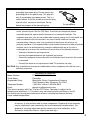
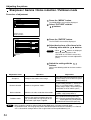
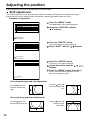
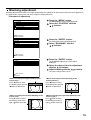
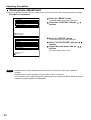
1
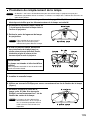
8. Insert the power cord plug into the wall outlet and then press the MAIN POWER
switch.
Caution • If the power does not turn on (power indicator lamp (red) does not turn on) even after turning the
MAIN POWER switch “I”, turn the MAIN POWER “O”, confirm that the lamp unit and door are
installed correctly, and turn on again.
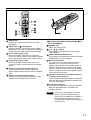
9. Press the “I” (POWER) button so that a picture is projected onto the screen.
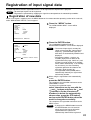
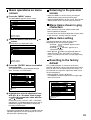
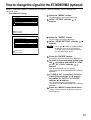
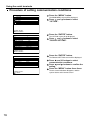
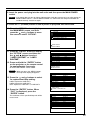
10. Press the “MENU” button to display
the MAIN MENU screen, and then
press the
and
buttons to move
the cursor to select “OPTION”.
MAIN MENU
PICTURE
POSITION
LANGUAGE
OPTION
TEST PATTERN
RESISTERED SIGNAL LIST
:MENU SELECT
ENTER:SUB MENU
11. Press the “ENTER” button to display
the “OPTION” screen, and then use
the
and
buttons to select
“LAMP1 RUNTIME” or “LAMP2
RUNTIME”.
12. Press and hold the “ENTER” button
on the projector or the remote control
for approximately 3 seconds.
An item “LAMP RESET” will be added.
Note
• When you press the “MENU” button,
the lamp reset display disappears.
13. Press the
and
buttons to select
for replacement lamp setting.
LAMP1: Replace the LAMP UNIT 1
LAMP2: Replace the LAMP UNIT 2
DUAL: Replace the LAMP UNIT 1 & LAMP UNIT 2
14. Press the “ENTER” button. When
“OK?” is displayed, press the
“ENTER” button.
The used hours of the specified lamp unit will be
reset to zero.
OPTION
ID
SETTING
LAMP1 RUNTIME
LAMP2 RUNTIME
LAMP SELECT
LAMP POWER
LAMP COOLING TIME
RS232C SETTING
RGB2 SELECT
OSD POSITION
2
FRONT-F
1310h
1310h
DUAL
HIGH
SHORT
RGB1 OUT
1
:MENU SELECT
ENTER:INITIALIZE
OPTION
ID
SETTING
LAMP1 RUNTIME
LAMP2 RUNTIME
LAMP RESET
LAMP SELECT
LAMP POWER
LAMP COOLING TIME
RS232C SETTING
RGB2 SELECT
2
FRONT-F
1310h
1310h
DUAL
DUAL
HIGH
SHORT
RGB1 OUT
:NENU SELECT
:CHANGE ENTER:EXECUTE
OPTION
ID
SETTING
LAMP1 RUNTIME
LAMP2 RUNTIME
LAMP RESET
LAMP SELECT
LAMP POWER
LAMP COOLING TIME
RS232C SETTING
RGB2 SELECT
ENTER:EXECUTE
OK?
2
FRONT-F
1310h
1310h
DUAL
DUAL
HIGH
SHORT
RGB1 OUT
MENU:ESC
97