1
Before Operation (Continued)
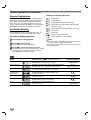
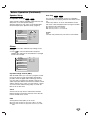
On-Screen Display (Continued)
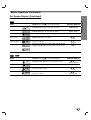
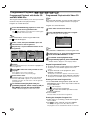
DVD-A
Items
4 to select desired item)
Function (Press 3/4
Group Number
Track Number
Time search
Subtitle language
Page (or Angle)
2 /6
Shows the current group number and total number
of groups, and skips to the desired group number.
1 / 2, or
Numbers, ENTER
1 /12
Shows the current track number and total number
of tracks, and skips to the desired track number.
1 / 2, or
Numbers, ENTER
0:10:15
DVD Audio
Output mode
1
PCM
5 CH
ABC
Selection Method
Shows the elapsed playing time.(Display only)
Shows the current encoding method, and channel
number, and changes the setting.
OFF
Shows the current subtitles language, and
changes the setting.
1 /12
Shows the current page (or angle) number and total number
of pages (or angle), and changes the page (or angle) number.
_
1 / 2, or
AUDIO
1 / 2, or
SUBTITLE
1 / 2, or
ANGLE
or
1 /1
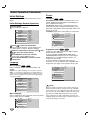
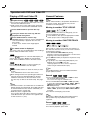
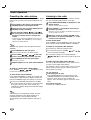
VCD2.0
VCD1.1
Items
4 to select desired item)
Function (Press 3/4
Track Number
1 /4
Time
0:20:09
Audio Channel
STER.
Sound
BYPASS
Shows the current track number, total number of tracks
and PBC On mode, and skips to the desired track number.
Shows the elapsed playing time (Display only)
Shows the audio channel, and
changes the audio channel.
Shows the current sound mode, and
changes the setting.
Selection Method
1 / 2, or
Numbers, ENTER
–
1 / 2, or
AUDIO
1 / 2, or
SOUND MODE
17
PREPARATION
d