1
PAGE 32
ADVANCED OPERATION
Playback with MP3 (Cont’d)
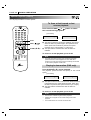
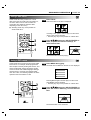
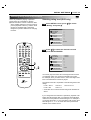
To program play an MP3 file
power
marker
audio
subtitle
angle
1
2
3
4
5
6
7
8
9
-
search
open / close
random
program
3
clear
4
1
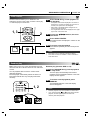
Follow steps 1 to 2 on previous page.
2
Select an MP3 file to program with D/E.
MP3
Program
MP3-1
0
..
TRACK_1
TRACK_2
play
skip
stop
pause /step
slow
select /
enter
skip
TRACK_3
TRACK_4
zoom
display
menu
title
repeat
a-b
setup
TRACK_5
TRACK_6
4
2, 4
TRACK_7
TRACK_8
3
Press PROGRAM button to add an MP3 file to
the program list.
return
MP3
MP3-1
..
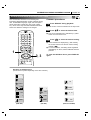
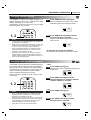
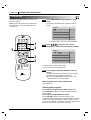
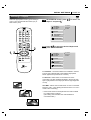
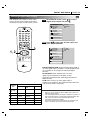
To play an MP3 file repeatedly
TRACK_2
TRACK_2
TRACK_7
TRACK_7
TRACK_6
TRACK_6
TRACK_9
TRACK_9
TRACK_7
TRACK_1
TRACK_6
TRACK_2
TRACK_9
TRACK_5
TRACK_6
TRACK_7
TRACK_8
Clear All
• Repeat steps 2 - 3 to select another track.
• Up to 60 files can be programmed.
4
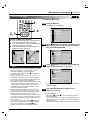
Press G button and select the desired MP3
file and press SELECT/ENTER or PLAY button
to play.
MP3
MP3-1
..
Clear All
Clear All
TRACK_2
TRACK_4
the current MP3 file will play repeatedly.
● If you press REPEAT button twice during play,
the all MP3 files on the program list will play
repeatedly.
● If you press REPEAT button three times, the
repeat play will be cancelled.
Program
Program
TRACK_3
● If you press REPEAT button once during play,
Program
Clear All
Program
TRACK_2
TRACK_7
TRACK_1
TRACK_6
TRACK_2
TRACK_9
TRACK_3
TRACK_4
TRACK_5
REPEAT symbol
TRACK_6
TRACK_7
TRACK_8
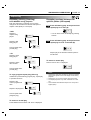
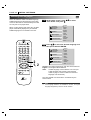
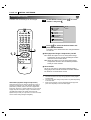
Clearing the program
●
To clear the program one by one
Press D/E/F/G to select the unwanted MP3 file on
the program list and then press CLEAR.
●
To clear all the programs
Press D/E/F/G to select the “Clear All” and press
SELECT/ENTER.
Clear All
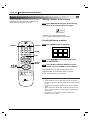
If you want to enter the main menu, press F button.
After playback all tracks programmed
Play is stopped.