1
XV-N5SL(B).book Page 27 Thursday, May 9, 2002 11:11 AM
Advanced operations
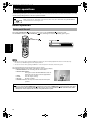
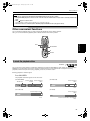
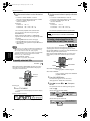
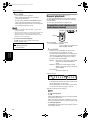
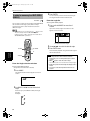
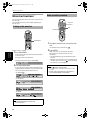
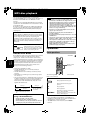
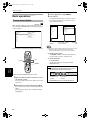
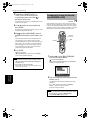
4 Specify tracks in the desired order using the
numeric buttons.
• To select a number between 1 and 10:
Press the corresponding button for the number.
• To select a number higher than 10:
Use the +10 button.
Examples:
To select 13: +10 → 3
To select 34: +10 → +10 → +10 → 4
To select 40: +10 → +10 → +10 → 10
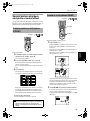
Up to 99 tracks can be programmed. You may
select the same track more than once.
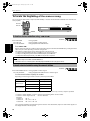
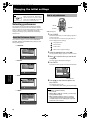
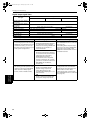
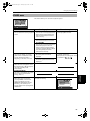
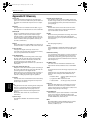
The total program time is shown at the right top of
the program table.
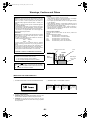
The total program time
No.
1
2
3
4
5
6
7
8
9
10
2
3
7
4
3
5
6
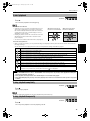
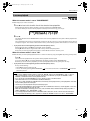
• To exit the program mode
After clearing all programmed tracks, press ON
SCREEN.
The program table is dismissed and the status bar
appears on the TV screen.
The PROGRAM indicator in the display window
disappears and the unit quits program playback
mode.
NOTES
• During program playback, you cannot edit the program
contents.
• During program playback, pressing ¢ skips to the
next selection of the program. Pressing 4 returns to
the beginning of the current selection.
00:25:12
TrackDisc
1
5
4
2
3
4
6
USE NUMERIC KEYS TO PROGRAM TRACKS.
CANCEL DELETES THE LAST STEP. 7 DELETES ALL.
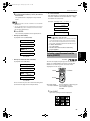
• To dismiss the program table:
Press ON SCREEN. The program table is dismissed and
the status bar is shown.
• To dismiss the menu bar (and the status bar):
Press ON SCREEN.
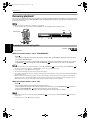
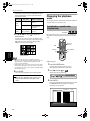
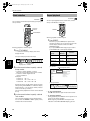
To playback in random order
[Random play]
Selected track number
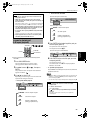
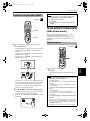
• If you specify a wrong track
Use 5/∞ to move
to the wrong track, then
press TV/VIDEO - CANCEL. The track is erased
and the subsequent programmed tracks move up.
Available :
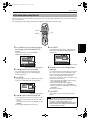
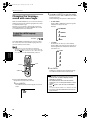
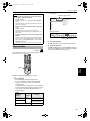
You can play tracks on a disc in random order by using
the random function.
TV
TV
TV1
With a Video CD/SVCD disc, the program table is
automatically dismissed when the program
playback starts.
With an Audio CD disc, the program table remains
on the TV screen during program playback.
However, pressing the ON SCREEN button brings
up the status bar.
When all of the programmed tracks have finished
playback, the unit stops and the program table
appears again.
Note that the program remains.
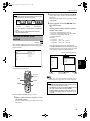
• To check the program contents
During playback, press 7. Playback stops and the
program table is shown.
When the unit is playing back an Audio CD and the
program table is not shown, you can bring up the
table by carrying out steps 1 to 3.
During Video CD/SVCD playback, you cannot see the
program table during playback.
TV2
TV3
1
2
3
TV5
TV6
4
5
6
TV7
TV8
TV9
7
8
9
TV-/--
TV0
MUTING
0
RETURN
T
DVD
TV4
10
2/3
DVD
STANDBY/ON
OPEN/
CLOSE
• To clear the program while programming
Press 7.
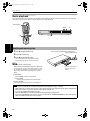
5 Press 3 to start program playback.
Advanced
operations
Total Program Time
PROGRAM
• To clear the program
While stopped and the program table is shown on the
TV screen, press 7.
All the programmed tracks are erased.
OP
SUBTITLE
+10
TITLE/
GROUP
TV/VIDEO
CANCEL
NU CH
ME
+
ME
NU
VOL-
VOL+
ENTER
ENTER
CH
OIC
E
CH
-
E
RE
SC
ON
NEXT
PREVIOUS
CLEAR
SELECT
STROBE
SLOW+
SLOW-
REPEAT SUB TITLE AUDIO
DIGEST
ON SCREEN
N
ANGLE
3D
PHONIC
VFP
ZOOM
AMP VOL
RM-SXV009E
REMOTE CONTROL
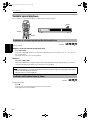
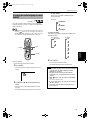
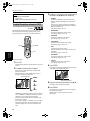
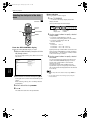
¶ While stopped
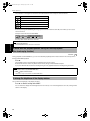
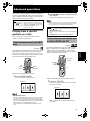
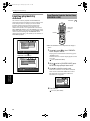
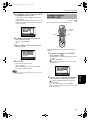
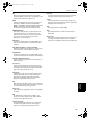
1 Press ON SCREEN twice.
The menu bar appears on the TV screen.
(See page 36 for details about menu bar)
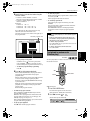
2 Use 2/3 to move
to
RND.
.
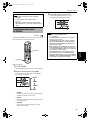
(Screen example for Audio CD)
TRACK 33
OFF
PROG.
TIME
25:58
RND.
• To quit program playback
Press 7. Note that the program remains.
27