1
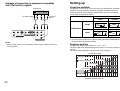
Example of connecting to equipment compatible
with YPBPR(CBCR) signals
Setting-up
Preparation
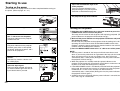
Projection methods
The projector can be set up so that any one of the following four projection
methods can be used. Select whichever projection method matches the
setting-up method. (The projection method can be set from the OPTION
menu. Refer to page 38 for details.)
DVD player
To YPBPR
output
To audio output
DESK/CEILING
DESK
CEILING
FRONT
(Factory default setting)
FRONT/REAR
L
|
AUDIO
|
R VIDEO
AUDIO
S2 VIDEO
PC IN
L
|
AUDIO
|
R
Y
REAR
PB/CB
VIDEO IN
PR/CR
COMPONENT IN
NOTE:
B Refer to page 49 for a list of compatible YPBPR signals which can be input
to the projector.
NOTE:
B You will need to purchase the separate ceiling bracket (ET-PKE100) when
using the ceiling installation method.
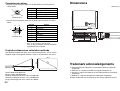
Projector position
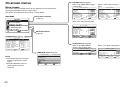
The projection range of this projector is 1.2 m – 7.4 m.
The lower edge of the projected image falls about 0.1 m from the center of
the lens.
For details about projected image distances, refer to page 51.
Screen Size (16:9)
5.08 m(200")
Minimum Distance
Maximum Distance
3.81 m(150")
2.54 m(100")
2.03 m(80")
1.52 m(60")
1.01 m(40")
0.0 1.0 2.0 3.0 4.0
Projection Distance Unit: m
20
5.0
6.0
7.0
21