1
Management
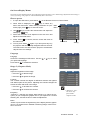
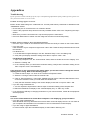
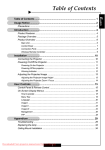
* Lamp Reminding: Select this function to show or hide the warning
message when the lamp replacing reminder message is displayed.
The message will show up when the lamp reaches 1500 hours at
normal mode. See “Replacing the Lamp” for more details.
Image - I
Language
Image - II
Management
Audio
PIP
Menu location
Projection
Lamp
* Lamp Hours: Display the cumulative lamp operating time.
Source lock
* Lamp Reset: Reset the lamp life hour after replacing a new lamp.
Display mode
Press OK to adjust
On
PC
Movie
Off
Grame
sRGB
Dynamic
User
* ECO Mode: Choose "On" to dim the projector lamp which will lower
power consumption and extend the lamp life by up to 130%.
Choose “Off” to return normal mode.
* Auto Power Off: Sets the interval of power-off of the system, if there is no signal input. (In minutes)
Source Lock
When source lock is turned off, the projector will search for other signals if the current input signal is
lost. When source lock is turned on, it will search specified connection port.
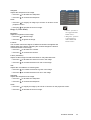
Display Mode
There are many factory presets optimized for various types of images.
* PC: For computer or notebook.
* Movie: For home theater.
* Game: For game.
* sRGB: For PC standard color.
* Dynamic: For all these four modes as above and get more contrast and color saturation.
* User: Memorize userís settings.
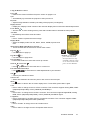
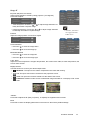
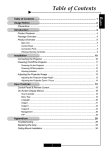
PIP
PIP
Choose “On” to select on the PIP screen.
Position
Choose the PIP screen position on the display screen.
Image - I
Language
Image - II
Management
Audio
PIP
On
Off
Source change
Yes
No
Swap
Yes
No
PIP
Position
Source Change
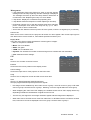
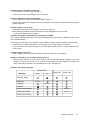
Choose the input source of the projector on the PIP screen.
Swap
Choose "On" to swap main screen and PIP screen each other.
Note:
Group 1): S-Video/Composite Video/Component-i.
Group 2): Digital video/Component-p/HDTV/PC signals.
*
PIP Image can be enabled only when main source is group 1 and PIP source is group 2 OR main
source is group 2 and PIP source is group 1. Meaning, not for the signals within the same group.
*
When swapping the "main" and "PIP" displays, the smallest screen size of "PIP" display will be vary
depending on different combinations of signal sources for PIP.
*
The PIP may not support for some high resolution signals and blue image will be displayed.
*
When main source and PIP source come from either DVI-I or D-SUB15 the two connectors at same
time, PIP source can not be displayed even one is group 1 and the other is group 2.
ViewSonic PJ755D
21