1
FASTORA NAS-T4 Quick Installation Guide
V.
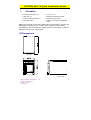
Front Bezel Indicators
8
4
1
2
5
6
7
3
Power control and reset buttons
8
Power control button
1. Be sure the A/C power cable is in socket
2. When Power switch on, the appliance starts to initiate.
3.
Press this button once to shutdown the appliance, and then
press once again to switch on the appliance.
Attention:
1. When the appliance is switched on, press this button
continuously over 4 seconds to switch off the power. This
switch-off activity happens only when the appliance is hung;
otherwise it may make the appliance non-operational or
damage the drives.
2. It takes around 20 seconds for shutdown.
Indicators of Ethernet control
6
Link/Active LED of LAN port # 1
1. This green LED is on when Ethernet port #1 is active
©Copyright 2003 AXIOMTEK Co., Ltd.
Version A1 August 2003
Printed in Taiwan
9410000400
3