1
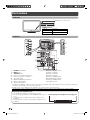
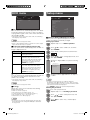
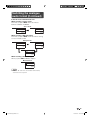
ECO menu
Setup menu
MENU [Setup]
Setup
ECO
No signal off
Option
Setup
[ Enable]
4 Power management
No operation off
Digital setup
Option
Auto installation
4 Analogue programme setup
[ 3hr.]
Digital Programme Setup
Ecology
Child lock
Input skip
4 Input label
Position
4 HDMI auto view
WSS
H No signal off
You can set the TV to automatically power off in about
15 minutes after the TV goes into a state of receiving
no programme signals, such as the end of a broadcast
day. (Enable, Disable)
• Five minutes before the power shuts down, the remaining
time displays every minute.
NOTE
• “Disable” is the factory preset value.
• When a TV programme finishes, and the TV receives signal
input, this function may not operate.
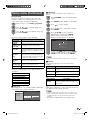
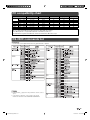
H Power management (PC input mode only)
You can set the TV to automatically power off when no
image is displayed on PC.
Selected item
Description
Off
• No power management
• Factory preset value.
Mode1
• If no signal inputs for approximately
8 minutes, the power shuts down.
• Even if you start using the PC and the
signal inputs again, the TV stays off.
• The TV turns on again by pressing
POWER. (See page 7.)
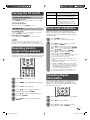
4:3 mode
Quick start
Text language
Reset
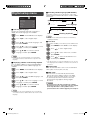
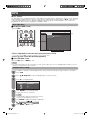
H Child lock (ATV and DTV input mode only)
Allows you to use a password to protect certain
settings from being accidentally changed.
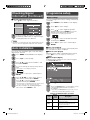
Setting a password
1 Repeat steps 1 to 2 in Menu operation.
2
Press a/b to select “Child lock”, and then
press ENTER.
3
If you already set the password, enter it here.
4
Press a/b to select “Change password”, and
then press ENTER.
5
Enter the 4-digit number as a password using
0 — 9.
• If no signal inputs for approximately
8 seconds, the power shuts down.
• When you start using the PC and the
signal inputs again, the TV turns on.
• The TV turns on again by pressing
POWER. (See page 7.)
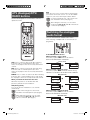
H No operation off
You can set the TV to automatically power off when no
TV operation is performed for more than 3 hours.
(30min., 3hr., Disable)
• Five minutes before the power shuts down, the remaining
time displays every minute.
NOTE
• “Disable” is the factory preset value.
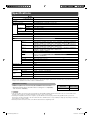
H Ecology
When set to “Yes”, the TV activates the following
power saving mode.
• “OPC” set to “On” (Page 11)
• “No signal off” set to “Enable” (Page 12)
• “Power management” set to “Mode1” (Page 12)
• “No operation off” set to “3hr.” (Page 12)
• “Quick start” set to “Off” (Page 14).
NOTE
• Ecology mode cannot be deactivated by selecting “No”.
Each setting must be changed individually to deactivate
Ecology mode.
[ Off]
[ West Europe]
Identification
Change password
Mode2
[On]
[Panorama]
Enter your new password. Use 4 digits
Clear password
Parental rating
New password – – – –
Reconfirm – – – –
6
Enter the same 4-digit number as in step 5 to
confirm.
NOTE
• To view a locked channel (Lock setting in Analogue
programme setup “Manual adjust” is set to “On”), you must
enter a password. When you select a locked channel, “Child
lock has been activated” is displayed.
• Press ENTER to display the password input window.
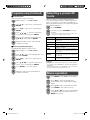
Clearing the password
Allow you to clear your password.
1 Repeat steps 1 to 3 in Setting a password.
2
Press a/b to select “Clear password”, and
then press ENTER.
3
Press c/d to select “Yes”, and then press
ENTER.
12
LC22LE520X_EN.indb 12
11/24/2010 4:31:52 PM