1
Manual Selection
EPG (Continued)
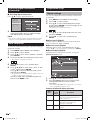
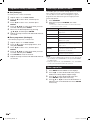
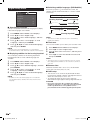
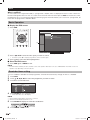
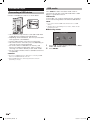
Viewing the reminder schedule list
1
2
3
4
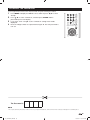
Press EPG.
Press Y to display the reminder schedule list.
Press a/b to display next or previous screen.
Press MENU or EPG to exit.
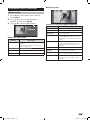
Cancelling the reminder timer
setting
1
2
3
4
5
Press EPG.
Press Y to display the reminder schedule list.
Press a/b to select a programme you want to
cancel.
Press R to delete a programme from reminder list.
Press MENU or EPG to exit.
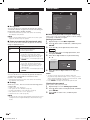
Picture and still image
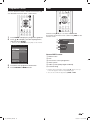
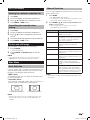
You can freeze a motion picture on the Display.
1 Press FREEZE.
• A still image displays.
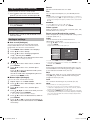
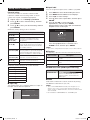
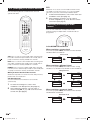
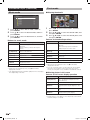
You can select different picture sizes that account for the
kind of each picture.
1
Press WIDE.
• The WIDE MODE menu displays.
• The menu lists the wide mode options selectable for the
type of video signal currently received.
2
Press WIDE or a/b while the WIDE MODE menu
displays on the screen.
• As you toggle down the options, each mode is
immediately reflected on the TV.
Selected item
Normal
For 4:3 “standard” pictures. A side bar
appears on each side.
Zoom14:9
For 14:9 letterbox pictures. A thin side
bar appears on each side, and you may
also see bars on the top and bottom
with some programmes.
Panorama
In this mode the picture is progressively
stretched toward each side of the
screen.
Full
For 16:9 squeeze pictures.
Cinema16:9
For 16:9 letterbox pictures. Bars may
appear on the top and bottom with some
programmes.
Cinema14:9
For 14:9 letterbox pictures. Bars may
appear on the top and bottom with some
programmes.
Dot by Dot
Displays an image with the same number
of pixels on the screen (only when
receiving a 1080i/1080p/SXGA/SXGA+
signal)
Underscan
Display with an Underscan image only
when receiving a 720p signal. Display
with the High-Definition image adjusted
optimally. Noise may appear on the edge
of the screen with some programmes.
2
Press FREEZE or RETURN again to exit still
image.
NOTE
• The still image automatically goes out after 30 minutes.
• FREEZE doesn’t function for PC input (all resolution).
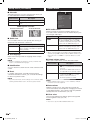
Wide Mode
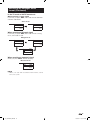
Auto Selection
Description
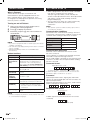
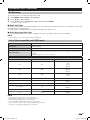
If you set “WSS” and “4:3 mode” in the Setup menu, the
optimum WIDE mode is automatically chosen for every
broadcast containing the WSS information.
NOTE
“WSS” menu
To enable Auto Selection, set “WSS” in the Setup menu
to “On”. (See page 15)
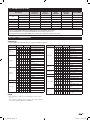
• Some picture size may not be displayable depending on the
input signal.
“4:3 mode” menu
To set the type of the wide screen, select “Panorama” or
“Normal” in the 4:3 mode menu. (See page 16)
4:3 mode set to “Panorama”
4:3 mode set to “Normal”
NOTE
• If the broadcast signal contains no WSS information, Auto
Selection will not function even when the WSS option is
enabled.
23
LC_60LE631X_EN.indd 23
11/5/2012 10:57:12 AM