1
3
Viewing People and Content
What can you expect to see on the displays during a telepresence conference
in an OTX room? That depends on the type of system you are calling at the
other site and whether your call is to one site (point-to-point) or multiple sites
(multipoint). This chapter describes what you can expect to see in these
various scenarios.
This chapter also describes how to bring content (such as slides, spreadsheets,
or other documents) into the OTX room using a laptop or an optional
document camera.
Viewing People
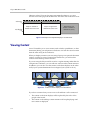
Different types of video conferencing systems use a different number of
cameras and displays. The OTX automatically adapts by adjusting its camera
views depending on how many displays are at the far site.
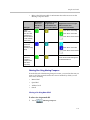
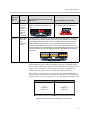
The following table describes what you can expect to see when you view the
people at the other sites during a telepresence conference in an OTX room.
.
If you
make a call
between
an...
And a/an...
OTX 300
OTX 300
This is what you will see in your OTX
300 room...
This is what the far site will see...
The entire OTX 300 room. Two seats are
shown on each display.
The entire OTX 300 room. Two seats are
shown on each display.
3–1