1
RemoteControls_MCP9350i_English.qxd
20-10-2005
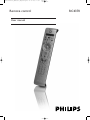
Remote control
User manual
16:47
Pagina 1
RC4370
RemoteControls_MCP9350i_English.qxd
20-10-2005
16:47
Pagina 2
Online help: www.P4C.philips.com
For interactive help, downloads and frequently asked questions
2
RemoteControls_MCP9350i_English.qxd
20-10-2005
16:47
Pagina 3
Contents
Page
EN
Functional overview................................................................4
Introduction .............................................................................6
Installing the remote control ................................................6
Inserting the batteries in the remote control ........................................................................6
Testing the remote control ........................................................................................................6
Setting the remote control for operating other devices.....................................................7
Extra possibilities ....................................................................9
Copy key .........................................................................................................................................9
Assigning the volume control to another mode (Punch through volume)...................10
Restoring all original functions (Factory reset)....................................................................11
Troubleshooting ....................................................................12
Need help? .............................................................................13
Code list of all brands / equipment................................14-18
Information to the consumer ..............................................19
3
RemoteControls_MCP9350i_English.qxd
20-10-2005
16:47
Pagina 4
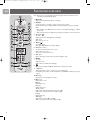
Functional overview
EN
Note: When a key or key combination is pressed for longer than 30 seconds, the remote
control will stop transmitting IR signals.
1
1 y Standby
Switches the Media Center ON or to standby.
24
2
23
3
22
4
21
5
20
6
7
19
18
8
9
17
10
2 SELECT
Selects the device you wish to operate via the remote control:
PC (Media Center), TV, AMP(amplifier), SAT (cable/satellite set-top box), DVD.
Notes:
– After switching on the Media Center, the remote control will automatically go to Media
Center mode.
– When selecting devices, the SELECT key must be pressed within 10 seconds each time
3 Teletext ( )
TV: text.
DVD: system menu, OSD (On Screen Display).
AMP: sleep.
SAT: text, text on / off.
4 Guide ( )
TV / DVD: guide.
SAT: guide. EPG (Electronic Program Guide).
5 AV (Audio / Video)
TV: selects external audio / video source.
DVD: return, exit menu.
SAT: return, exit menu, back up.
11
6 1 2 3 4
Cursor left, right, up and down keys. Menu navigation keys.
12
13
16
14
15
7 MENU
TV: menu.
DVD: disc menu.
AMP / SAT: menu (On Screen Display).
8
Opens Microsoft Windows® XP Media Center edition home menu.
9 – Volume +
Adjusts the volume down (–) and up (+) of your Philips TV.
For adjusting the volume of other TV brands, see CHAPTER ‘Installing the remote
control’.
10 Mute (s)
Mutes speaker and headphones output.
11 0 (Record)
DVD / SAT: record.
9 (Stop)
DVD / SAT: stop.
; (Pause)
DVD / SAT: pause.
5 6 (Search)
DVD / SAT: fast backward (5) / fast forward (6).
AMP: center speaker volume down (5) / up (6).
2 (Play)
DVD / SAT: play.
¡ ™ (Skip)
DVD / SAT: previous (¡) / next (™).
AMP: rear speaker volume down (¡) / up (™).
4
RemoteControls_MCP9350i_English.qxd
20-10-2005
16:47
Pagina 5
EN
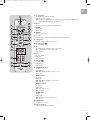
12 0 - 9 digit keys
TV / SAT: direct channel selection.
DVD: direct track selection.
AMP: TV input (1), DVD input (2), VCR input (3), tuner input (4), CD input (5),
AUX / SAT /MD input (6), tape input (7)
1
24
2
23
13 P1 P *
TV / SAT: previous program, alternate channel.
14 CLEAR
DVD: clear.
SAT: help.
3
22
4
21
5
20
15 ENTER
Confirms text input.
19
16 – / – – #
Selects between one- and two digit program / channel numbers.
18
17 – Program +
Program / channel down (–) and up (+).
17
18 Recorded TV (
TV: Text hold.
6
7
8
9
10
)
19 OK
TV / DVD / AMP: confirms actions in the menu.
SAT: confirms actions in the menu, select.
SAT: favorite.
11
20 i (info)
TV: info, display .
DVD: info.
SAT: info, index.
12
13
16
14
15
21 Live TV ( )
TV: wide, 16:9.
DVD: live TV.
SAT: live TV.
22 SHOWVIEW / Red
TV: Red.
DVD: chapter.
AMP: DSP (Digital Signal Processor) on / off.
SAT: red, A.
ANGLE / Green
TV: green.
DVD: angle.
AMP: DSP (Digital Signal Processor) mode.
SAT: green, B.
AUDIO / Yellow
TV: yellow.
DVD: audio.
AMP: Surround on / off.
SAT: yellow, C.
ZOOM / Blue
TV: blue.
DVD: zoom.
AMP: Surround scroll / surround mode.
SAT: blue, D.
23 LIKE MUSIC
TV: text off, text cancel.
24 Selector window
Indicates which device is selected.
5
RemoteControls_MCP9350i_English.qxd
EN
20-10-2005
16:47
Pagina 6
Introduction
The Philips RC4370 is a universal remote control that is primarily meant for
operating the MCP9350i Media Center. However after installing the remote control
you can also operate up to four other types of devices with it: TV, amplifier/receiver,
satellite tuner/cable decoder and DVD/VCR.
After switching on the remote control, it will automatically go to Media Center mode
(PC).
You can find information about how to prepare the remote control for operating
other types devices in the chapter ‘Installing the remote control’.
Installing the remote control
Inserting the batteries in the remote control
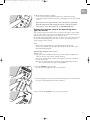
1 Remove the battery compartment cover and insert two AA (1.5 V) batteries
(supplied), noting the + and – position in the battery compartment.
2 Replace the cover.
Note: When replacing batteries, all user settings will be retained in the remote control
memory for 5 minutes. When a key is pressed during battery replacement the
memory may be erased and all user settings will be set to the factory default settings
again.
Testing the remote control
Testing the remote control for use with the Media Center
After switching on the Media Center, the remote control will automatically go to
Media Center mode (PC).
1 Press the
key (8) on the remote control.
> The Media Center Start menu should appear.
2 Check whether all keys are working. For an overview of the keys and their
functions in PC mode, see ‘Functional overview - Remote control’ in the Quick
Install Guide.
> If the Media Center responds as it should to all of the key commands the remote
control is ready for use with the Media Center.
•
If the Start menu does not appear or if the Media Center does not respond
at all or not to all of the key commands go to: www.P4C.philips.com or call
our helpline. You will find our contact details after the code list at the back
of this manual.
Testing the remote control for use with other types of devices
The remote control has been programmed to operate most Philips devices. Because
the remote control may use different signals for each brand and even for different
models of the same brand, it is advisable to test whether your device responds to the
remote control. The example below (TV) instructs you how to do this. You can
repeat the same steps for other devices (DVD player/recorder, amplifier/receiver,
etc.) which you want to operate using the remote control.
Example TV:
1 Switch on your TV manually or use the original remote control.
Tune to channel 1.
2 Press the SELECT key (2) to select TV.
Press the key until TV lights up in the selector window.
3 If TV does not light up, check whether the batteries are properly inserted
(see ‘Inserting the batteries in the remote control’).
6
RemoteControls_MCP9350i_English.qxd
20-10-2005
16:47
Pagina 7
EN
4 Check whether all keys are working.
For an overview of the keys and their functions see ‘Functional overview’.
> If the TV responds as it should to all of the key commands the remote control is ready
for use.
•
If the device does not respond at all or not to all of the key commands,
follow the instructions under ‘Setting the remote control for operating
other devices’, or for online support go to: www.P4C.philips.com
Setting the remote control for operating other
types of devices
This is only necessary if your device does not respond to the remote control. If that
is the case, the remote control does not recognize the brand and/or model of your
device and you need to program the remote control to do so.
The example below (TV) instructs you how to do this. You can repeat the same steps
for other devices (DVD player/recorder, video recorder, etc.) which you want to
operate using the remote control.
Notes:
– All keys must be pressed within 10 seconds after releasing the previous key.
– If a key or key combination is pressed for longer than 30 seconds, the remote control
will stop transmitting IR signals.
Automatically setting the remote control
Example of TV:
1 Make sure the TV is switched on and select a channel using the original remote
control or the keys on the TV (for example channel 1).
The remote control emits the ‘switch off TV’ signal for all models of TV that are
stored in the memory.
Note: If you are setting up the remote control for use with a DVD player/recorder or
video recorder, insert a disk or tape and start playback.
2 Press the SELECT key to select TV.
Press the key until TV lights up in the selector window.
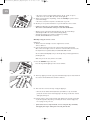
3 Then keep digit keys 1 and 3 (12) pressed simultaneously for five seconds until TV in
the selector window blinks twice and then remains lit.
4 Press and hold the Standby key (1) of the remote control.
7
RemoteControls_MCP9350i_English.qxd
20-10-2005
16:47
Pagina 8
EN
> The remote control now starts emitting all known ‘TV off ’ signals, one by one.
Each time a code is sent, TV in the selector window lights up.
5 When your TV switches off (stand-by), release the Standby key of the remote
control immediately.
> The remote control has now found a code that works on your TV.
6 Check if you can operate all functions on your TV with the remote control .
•
If this is not the case, you can redo the automatic setting.
The remote control will then search for a code that works better.
– After the remote control has run through all known codes, the search will stop
automatically and TV in the selector window will stop flashing.
– Automatic programming of a TV takes a maximum of 5 minutes.
For DVD, SAT and AMP this time is 2 minutes.
Manually setting the remote control
Example TV:
1 Switch on the TV manually or use the original remote control.
Tune to channel 1.
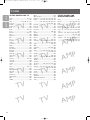
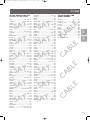
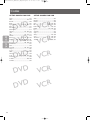
2 Look up the brand of your TV in the code list at the back of this manual.
One or more three-figure codes are shown for each brand. Note the first code.
Be careful! There are separate tables for TV, DVD/VCR, AMP and SAT.
On our website www.P4C.philips.com you can directly select your device typenumber to
find the right code.
Make sure you use the codes from the correct table.
3 Press the SELECT key to select TV.
Press the key until TV lights up in the selector window.
4 Then keep digit keys 1 and 3 (12) pressed simultaneously for five seconds until TV in
the selector window blinks twice and then remains lit.
5 Then enter the code noted in step 2 using the digit keys.
> TV in the selector window will now flash twice. If TV blinks once for an extended
period, the code has not been entered properly or the wrong code has been entered.
Start again from step 2.
6 Point the remote control at the TV and check that the TV responds as it should.
> If the TV responds to all of the key commands, the remote control is ready for use.
Do not forget to note your code.
•
8
If the device does not respond at all, or not to all of the key commands,
start again from step 2 and try the next code from the list.
RemoteControls_MCP9350i_English.qxd
20-10-2005
16:47
Pagina 9
Extra possibilities
EN
Copy key
This feature is used to copy key functions from one device mode to another.
E.g the ‘Live TV’ function of the
key (21) in SAT mode can be copied to the
Guide ( ) key (4) in TV mode. The example below shows you how.
Notes:
– All key functions can be copied except the SELECT key (2) function.
– Keys cannot be copied to themselves.
– Up to 6 key functions can be copied to other keys.
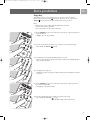
1 Use the SELECT key (2) to select the device you wish to copy a key function to.
In this example TV.
> TV lights up in the selector window
2 Press the key to which you wish to copy a function to (the destination key).
In this example the Guide (
) key (4).
3 Press digit keys 1 and 6 (12) simultaneously for 3 seconds.
> After 3 seconds the device indicator in the selector window, in this example TV, blinks
twice and then remains lit.
4 Press digit keys 9, 9, 5 (12).
> TV blinks once after every key press. After the last key press, TV blinks twice and then
remains lit.
5 Use the SELECT key (2) to select the device you wish to copy a key function
from. In this example SAT.
> SAT lights up in the selector window
6 Press the key which function you wish to copy (the source key).
In this example the Live TV
key (21).
> SAT blinks briefly in the selector window
9
RemoteControls_MCP9350i_English.qxd
20-10-2005
16:47
Pagina 10
EN
> When key copying was successful the TV in the selector window switches off, then
blinks twice briefly. The remote control returns to normal operation mode. You can
now use the ‘Live TV’ function in TV mode using the Guide ( ) key (4).
> When key copying was not successful the TV in the selector window switches off and
then blinks for at least 1 second. Start again from step 1.
•
To restore the original function of the Guide ( ) key (4), you have to revert th
remote control back to the factory default settings. For this see ‘Restoring all
original functions’.
Assigning the volume control to another mode
(Punch through volume)
The volume controls (– Volume + (9) and s (10) on the remote control are
assigned to either your TV or your amplifier/receiver, depending on the device you
have selected:
MODE
VOLUME CONTROLS
TV mode . . . . . . . . . . . . . . . . . . . . . . controls the TV
PC mode . . . . . . . . . . . . . . . . . . . . . . controls the TV
DVD/VCR mode. . . . . . . . . . . . . . . . controls the TV
SAT mode . . . . . . . . . . . . . . . . . . . . . controls the TV
AMP mode . . . . . . . . . . . . . . . . . . . . controls the amplifier/ receiver
If you want a different setup, the volume control assignment can be changed by
punching through the volume controls from one device to another. You can then use
the TV or AMP volume controls in a different mode (PC, DVD/VCR, SAT).
Example: In SAT mode you want to operate the amplifier/receiver volume control.
1 Use the SELECT key (2) to select the device you wish to punch through to
(destination device). In this example SAT.
> SAT lights up in the selector window.
2 Press digit keys 1 and 6 (12) simultaneously for 3 seconds.
> After 3 seconds SAT blinks twice and then remains lit.
3 Press keys 9, 9, 3 (12).
> SAT blinks once after every key press. After the last key press, SAT blinks twice and
then remains lit.
4 Use the SELECT key (2) to select the device you wish to punch through from
(source device). In this example AMP.
> AMP lights up in the selector window.
10
RemoteControls_MCP9350i_English.qxd
20-10-2005
16:47
Pagina 11
EN
5 Press any key to confirm the new setup.
•
> When setup was successful AMP, in the selector window, switches off, then blinks twice
briefly. The remote control returns to normal operation mode. You can now use the
AMP volume controls in SAT mode.
> When setup was not successful AMP, in the selector window, switches off and then
blinks for at least 1 second. Start again from step 1.
To restore the original setup, you have to revert the remote control back to the
factory default settings. For this see ‘Restoring all original functions’.
Restoring all original functions (Facory reset)
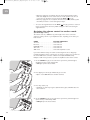
1 Press digit keys 1 and 6 (12) simultaneously for 3 seconds.
> After 3 seconds one of the device indicators in the selector window (PC, TV, AMP, SAT
or DVD) blinks twice and then remains lit .
2 Press digit keys 9, 8, 1 (12).
> The device indicator blinks once after every key press. After the last key press, the
device indicator blinks twice and then remains lit.
> When factory reset was successful the device indicator blinks twice, then remains lit.
The indicator then blinks twice again and the remote control returns to normal
operation mode. All user settings are set back to the factory default settings.
> When factory reset was not successful the indicator switches off and then blinks for at
least 1 second. Start again from step 1.
11
RemoteControls_MCP9350i_English.qxd
EN
20-10-2005
16:47
Pagina 12
Troubleshooting
• Problem
– Solution
•
The device indicators in the selector window (PC, TV, AMP, SAT or DVD) blink
four times after every key press.
– The remote control is indicating that its batteries are running low.
Replace the old batteries with new AA batteries.
•
The device you want to operate does not respond and it’s indicator in the
selector window does not blink when you press a key.
– Replace the old batteries with new AA batteries.
•
The device you want to operate does not respond but it’s indicator in the
selector window does blink when a key is pressed.
– Point the remote control at the device and make sure that there are no obstructions
between the remote control and the device.
• The remote control does not respond properly to commands.
– Maybe you are using the wrong code. Try programming the remote control again using
another code, or reset for automatic search to find the right code.
If the device still does not respond, call our helpline. You will find our contact details after
the code list at the back of this manual.
• The Teletext keys do not work.
– Find out whether your TV is equipped with Teletext.
• You have difficulties operating all of the functions on a device.
– Maybe the remote control has to be adapted to the model of the device.
Call our helpline for details.
• None of the codes works during manual setting of the remote control.
– Follow the instructions under ‘Automatically setting the remote control’.
• Key copying does not work.
– You exceeded the maximum of 6 copy keys. Restore all original functions of the remote
control in order to create memory space. See ’Restoring all original functions’.
12
RemoteControls_MCP9350i_English.qxd
20-10-2005
16:47
Pagina 13
Need help?
EN
If you have any questions about the RC4370 remote control, you can always contact
us. You will find our contact details after the code list at the back of this manual.
Read this manual carefully before you make a call. You can solve most of the
problems yourself. If you cannot find any answer to your problem, write down the
codes for your device shown in the code list at the back of this manual. This will help
our operators to assist you better and more quickly. Look up the model number in
the User manual accompanying the device or on the back of your device. When you
call our helpline, make sure the device is at hand so that our operators can help you
determine whether your remote control is working properly.
Online help: www.P4C.philips.com
For interactive help, downloads and frequently asked questions
13
RemoteControls_MCP9350i_English.qxd
20-10-2005
16:47
Pagina 14
Codes
SETUP CODES FOR TV
TV
AMP
Aiwa ..................................................003, 090
Akai.............................................................082
Alba.................................004, 082, 091, 092
Aristona .....................................................082
Atlantic.......................................................082
Audiosonic ................................................082
Baur ............................................................082
Beko ..................................................005, 093
Beon ...........................................................082
Brandt ...............................................006, 009
Dixi .............................................................082
Dynatron ...................................................082
Elin ..............................................................082
Erres ...........................................................082
Ferguson ....................................................082
Finlux ..........................................................082
Formenti ....................................................082
GEC ............................................................082
Goldstar.....................................................082
Goodmans.................................................082
Granada .....................................................082
Grandin......................................................082
Grundig......................................................013
Hanseatic ...................................................082
Hinari..........................................................082
Hitachi...............................................014, 079
Inno Hit .....................................................082
Interfunk ....................................................082
Irradio ........................................................082
ITV ..............................................................082
JVC.....................................................015, 016
Karcher......................................................082
Magnadyne ................................................082
Marantz ......................................................082
Matsui.........................................................082
Multitech....................................................082
Neckermann .............................................082
NEI ..............................................................082
Nikkai .........................................................082
Orion..........................................................082
Otto Versand ...........................................082
Panasonic.....019, 030, 031, 032, 033, 034
Philips ...........035, 036, 037, 038, 039, 040
......................041, 042, 043, 044, 045, 046,
..................................................047, 080, 082
Phoenix ......................................................082
Phonola ......................................................082
Protech ......................................................082
Provision....................................................082
Pye .....................................................048, 082
Quelle.........................................................082
Radiola .......................................................082
RC4370......................................................000
Revox .........................................................082
Saba ...................................................049, 050
Samsung.......020, 021, 022, 051, 052, 053
.........................................054, 082, 081, 083
Sanyo.................................................055, 056
SBR..............................................................082
Schneider ................................057, 058, 082
SEG .............................................................082
Sharp ............001, 023. 024, 025, 059, 060
..................................................061, 078, 096
Sinudyne ....................................................082
Sonoko..............................................082, 089
Sony..............062, 063, 084, 085, 086, 087
Starlight......................................................082
Tatung ........................................................082
Teletech.....................................................082
Thomson ..............064, 065, 066, 067, 068
Thorn .........................................................082
Toshiba .......069, 070, 071, 072, 073, 074,
.........................................075, 076, 077, 088
Universum.................................................082
Vestel..........................................................082
Vortec ........................................................082
Watson ......................................................082
Weltblick ...................................................082
White Westinghouse .............................082
Yoko ...........................................................082
TV
TV
TV
Aiwa............................................................041
Denon.............................040, 043, 044, 045
JVC..............................................................046
Kenwood...................................................029
Panasonic...................................................007
Pioneer ........008, 010, 011, 015, 021, 024
Sony..............012, 013, 014, 016, 042, 047
Teac ............................................................030
Technics .....017, 018, 019, 020, 022, 023,
..................................................025, 037, 038
Thomson ...................................................009
Yamaha .......001, 002, 003, 004, 005, 006,
......................026, 027, 028, 031, 032, 033,
.........................................034, 035, 036, 039
P
M
A
P
M
A
TV
P
M
A
TV
P
M
A
TV
TV
P
M
A
TV
TV
P
M
A
TV
TV
14
TV
SETUP CODES FOR
AUDIO AMPLIFIERS
RemoteControls_MCP9350i_English.qxd
20-10-2005
16:47
Pagina 15
Codes
T
A
S
T
A
S
T
A
S
T
A
S
T
A
S
T
A
S
T
A
S
T
A
S
T
A
S
T
A
S
T
A
S
BT Cable........................................................031
Cabletime ......................................................037
France Telecom ...........................................040
Grundig ..........................................................041
Jerrold ............................................................034
Nokia ..............................................................043
Philips..............................................................042
Pioneer...........................................................032
Sagem .............................................................044
Salora..............................................................038
Scientific Atlanta ..........................................035
Videoway .......................................................033
Westminister Cable....................................031
SAT
T
A
S
SETUP CODES FOR
CABLE BOXES
CAB
Alba ..........................................001, 002, 003
Amstrad............................................005, 015
Ankaro .......................................................006
Anttron.............................................001, 003
Apollo.........................................................001
Armstrong.................................................005
Astra...........................................................005
Astro........................................003, 004, 006
AudioTon ..................................................003
Best.............................................................006
Brain Wave ...............................................008
Brandt ........................................................011
BSkyB ................................................015, 020
BT Satellite................................................011
Bush ............................................................002
CityCom....................................................002
Clatronic....................................................008
Condor ......................................................006
Crown........................................................005
Daeryung ...................................................007
DNT ...........................................................007
Echostar............................................007, 012
Einhell................................................001, 005
Elta.....................................................001, 006
Emme Esse ................................................006
Ep Sat .........................................................002
Eurosat.......................................................005
Eurosky.............................................005, 006
Eurostar .....................................................005
Ferguson..................................002, 009, 014
Finlandia .....................................................002
Finlux ..........................................................002
Fuba..........................................001, 006, 007
Galaxis........................................................006
GMI.............................................................005
Goodmans.................................................002
Grundig ...................................002, 003, 015
Hanseatic ...................................................010
Hisawa........................................................008
Hitachi........................................................002
Huth ..................................................005, 008
Intertronic.................................................005
Johansson ..................................................008
Kathrein .........................018, 028, 029, 030
KR ...............................................................003
Kyostar ......................................................001
Lasat ..................................................004, 006
Lenco..........................................................001
Macab .........................................................014
Manhattan ........................................002, 004
Mascom......................................................004
Maspro .......................................................002
Matsui.........................................................011
Mediamarkt...............................................005
Medion ...........................006, 010, 012, 013
Metronic.................................001, 003, 004,
Mitsubishi .........................................002, 011
Morgan's ....................................................005
Nikko .........................................................005
Nokia..........................................................002
Nordmende .........001, 002, 004, 009, 014
Novis ..........................................................008
Octagon............................................001, 003
Okano ........................................................005
Orbitech ....................................................001
Pace ..........................................002, 015, 024
Palladium....................................................005
Panasonic..........................................002, 015
Panda ..........................................................002
Philips ................................................002, 019
Phonotrend...............................................002
Predki .........................................................008
Provision....................................................004
Quadral......................................................006
Radix...........................................................007
Saba ...................................................004, 009
Sabre...........................................................002
Sagem .........................................................014
Samsung .....................................................001
Satcom ..............................................008, 010
SatPartner......................001, 003, 004, 008
Schneider ................................006, 012, 013
Seemann ...........................................005, 007
SEG .................................001, 006, 008, 010
Skymaster ...............................010, 012, 013
Strong ......................................001, 003, 006
Sunstar .......................................................005
Tandberg ...................................................014
Tandy..........................................................003
Tantec ........................................................002
TechniSat...................................................007
Teco ...........................................................005
Telasat........................................................010
Telefunken .......................................001, 011
Teleka ......................................003, 005, 007
Telemaster ................................................004
Telesat........................................................010
Televes.......................................................002
Thomson ....002, 009, 011, 014, 025, 026,
.....................................................................027
Thorn .........................................................002
Tonna .........................................................002
Unisat .........................................................005
Unitor.........................................................008
Visiosat .............................................008, 012
Vortec ........................................................001
Wewa.........................................................002
Winersat....................................................008
Wisi ...................................................002, 007
Zehnder............................................004, 006
C
C
C
C
AB
AB
AB
AB
LE
LE
LE
LE
SETUP CODES FOR SAT
(satellite set-top boxes)
15
RemoteControls_MCP9350i_English.qxd
20-10-2005
16:47
Pagina 16
Codes
SETUP CODES FOR DVD
SETUP CODES FOR VCR
Aiwa............................................................002
Alba ...................................................003, 004
Brandt ........................................................044
Bush ............................................................005
CyberHome ..................006, 007, 050, 051
Elta ..............................................................009
Goodmans.................................................010
Grundig......................................................011
Hitachi .....................................012, 052, 053
JVC..............................................................013
LG.............................................014, 015, 016
Mustek .......................................................017
Panasonic .......................001, 018, 019, 047
Philips ..........020, 021, 022, 023, 024, 026,
.........................................027, 030, 031, 054
Pioneer ....................................025, 028, 029
RC4370......................................................000
Saba.............................................................044
Samsung...................................032, 033, 034
Sanyo ..........................................................035
Scott ...........................................................036
SEG....................................................037, 049
Sharp...........................................................038
Sony .......................039, 040, 041, 042, 046
Thomson ...................................................044
Toshiba .............................................045, 048
Yamaha.......................................................043
Aiwa............................................................056
Daewoo .....................................................057
Hitachi........................................................058
JVC ...........................................059, 076, 080
LG.............................................060, 061, 077
Panasonic..........................................062, 063
Philips.......................................055, 064, 065
Pye ..............................................................066
Samsung .....................................................067
Sanyo ..........................................................068
Sharp .................................................069, 078
Sony...................................................074, 075
Thomson ..........................................070, 071
Toshiba....................................072, 073, 079
D
V
D
DVD VCR
16
D
V
D
R
C
V
R
C
V
D
V
D
R
C
V
D
V
D
R
C
V
D
V
D
R
C
V
RemoteControls_MCP9350i_English.qxd
20-10-2005
16:47
Pagina 17
Note your code!
TV
Equipment
Brand
Model number
Number of original remote
Code
AMPLIFIER
Equipment
Brand
Model number
Number of original remote
Code
SAT
Equipment
Brand
Model number
Number of original remote
Code
CABLE
Equipment
Brand
Model number
Number of original remote
Code
SET-TOP BOX
Equipment
Brand
Model number
Number of original remote
Code
DVD
Equipment
Brand
Model number
Number of original remote
Code
VCR
Equipment
Brand
Model number
Number of original remote
Code
TUNER/RECEIVER/HOME THEATER
Equipment
Brand
Model number
Number of original remote
Code
17
RemoteControls_MCP9350i_English.qxd
20-10-2005
16:47
Pagina 18
3 Helpline
18
Country
Phone number
Tariff
België/Belgique (Belgium)
Danmark (Denmark)
France
Deutschland (Germany)
España (Spain)
da (Greece)
Ireland
Italia (Italy)
Luxembourg
Nederland (Holland)
Norge (Norway)
Östereich (Austria)
Portugal
Suomi (Finland)
Sverige (Sweden)
Suisse/die Schweiz (Switzerland)
United Kingdom
070 253 011
35258758
08 9165 0007
0180 5 007 533
902 889 343
00800 3122 1219
01 6011158
199 404 043
40 6661 5645
0900 0400 062
22 70 82 58
0820 901116
2 1359 1441
09 2294 8258
08 7505196
01 212 0045
0906 1010 018
€ 0,17
/
Local tariff /
€ 0,23
/
€ 0,12
/
€ 0,15
/
Local tariff /
Local tariff /
€ 0.25
/
Local tariff /
€ 0,20
/
Local tariff /
Local tariff /
Local tariff /
Local tariff /
Local tariff /
Local tariff /
£ 0.15
/
min
min
min
min
min
min
min
min
min
min
min
min
min
min
min
min
min
RemoteControls_MCP9350i_English.qxd
20-10-2005
16:47
Pagina 19
Information to the Consumer
Disposal of your old product
Your product is designed and manufactured with high quality materials and
components, which can be recycled and reused.
When this crossed-out wheeled bin symbol is attached to a product it means the
product is covered by the European Directive 2002/96/EC.
Please inform yourself about the local separate collection system for electrical and
electronic products.
Please act according to your local rules and do not dispose of your old products with
your normal household waste. The correct disposal of your old product will help
prevent potential negative consequences for the environment and human health.
RemoteControls_MCP9350i_English.qxd
20-10-2005
16:47
Pagina 20
Specifications are subject to change without notice.
Trademarks are the property of Koninklijke Philips Electronics N.V. or their respective owners.
2005 © Koninklijke Philips Electronics N.V. All rights reserved.
www.philips.com
3122 475 00 002
Printed in Hungary
NM/RR/4205