1
PT950 and 1050_En.book
Page 12
Thursday, December 21, 2006
1:48 PM
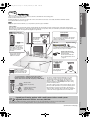
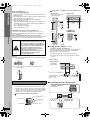
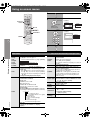
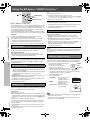
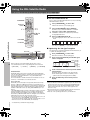
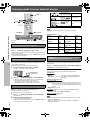
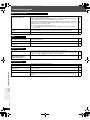
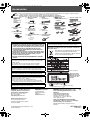
Control reference guide
See page references in parentheses.
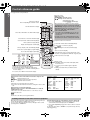
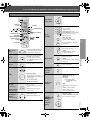
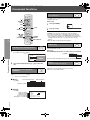
Select the source
[DVD]: DVD/CD (11)
[TUNER/BAND]: FM/AM (29), XM (30)
[N, O SELECT]: DVD/CD, FM/AM, XM,
AUX (34)/ MUSIC P. (34)/
D-IN (34) ([PT1050]) / OPTION (34)
Television operations
Refer to “Operating the television” below.
The below function is available only when using the
optional Panasonic wireless sound system SH-FX85.
Turn the main unit on/off (11)
[2ND SELECT]: Change the source for the second room
MAIN SOURCE (follows the selected source for the
main room)#(FM#AM)§#XM#OPTION#
Return to MAIN SOURCE
§
Select disc’s title numbers etc./Enter numbers (17)
If the main room is in FM/AM mode, you can only
select the same mode for the FM/AM tuner of the
second room.
Control reference guide
For details, refer to the operating instructions for the
optional Panasonic wireless sound system SH-FX85.
Select the disc or show disc information (18)
Adjust the volume of the main unit
Select preset radio stations/channels (29, 31)
Basic operations for play (16, 17)
Select radio stations/channels manually (29, 31)
Display current playback condition (18)
Select a group of contents to play (17)
[PT1050]
Enhancing the surround sound effect (33)
Start up and play a disc automatically (17, 28)
Show a disc top menu (20) or program list (21)
Show on-screen menu (22)
Show a disc menu (20) or play list (21)
CANCEL
PLAY MODE
REPEAT
CD MODE
(17)
(19, 31)
(18)
(18)
EQ
SRD
MUSIC
PL
S.SRD
SUBWOOFER
LEVEL
(32)
(32)
(32)
(32)
FL DISPLAY
C.FOCUS
QUICK REPLAY
(17)
(32)
(18)
AUTO
SETUP
TEST
CH SELECT
(25)
(33)
(33)
Frame-by-frame/Select or register menu items on the
television screen (17)/Browse XM radio categories (31)
Return to previous screen (17)
H.BASS
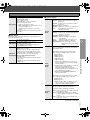
Mute the sound
≥ “MUTING” flashes in the main unit’s display while
the function is on.
≥ To cancel, press the button again or adjust the
volume.
≥ Muting is canceled when you switch the unit to
standby.
AUTO
(33)
Turn the unit off automatically (Sleep timer)
≥ The maximum setting is 120-min (in 30-min steps).
≥ Press the button again to confirm the remaining time on
the unit’s display.
≥ To cancel, select “OFF” in the main unit’s display.
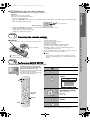
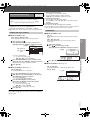
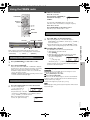
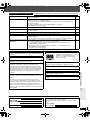
Operating the television
Aim the remote control at the Panasonic television and press the
button.
[Í TV]:
Turn the television on/off
[TV/VIDEO]: Change the television’s video input mode
[r, s]:
Adjust the television volume
≥ This may not work properly with some models.
≥ To operate some other brands of televisions, change the remote control
code.
Aim the remote control at the television.
While pressing [Í TV], press the numbered buttons to enter the
4-digit television code.
If the code is correct, the television turns on or off. If it does not, try
entering another code.
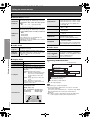
Television code list
Panasonic: 0051, 0250
Fisher:
0154
GE:
0047
Gold Star: 0178, 0317, 0457
Hitachi:
0145
JVC:
0053
Magnavox: 0054
Mitsubishi: 0150
Philips:
0054
Quasar:
0051, 0250
RCA:
Samsung:
Sanyo:
Sharp:
Sony:
Sylvania:
Thomson:
Toshiba:
Zenith:
0047
0060, 0587, 0702
0154
0093, 0165
0000
0054
0047
0156
0017
]Note]
Reenter the codes after you change the batteries.
RQTX0064
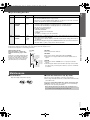
Avoiding interference with other Panasonic equipment
12
Other Panasonic audio/video equipment may start functioning when you
operate the unit using the supplied remote control.
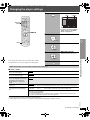
You can operate this unit in another mode by setting the remote control
operating mode to “REMOTE 2”.
The main unit and remote control must be set to the same mode.
1 Press and hold [5] on the main unit and [2] on the remote
control until the main unit's display shows "REMOTE 2".
2 Press and hold [ENTER] and [2] on the remote control for at least 2
seconds.
To change the mode back to “REMOTE 1”, repeat both steps above by
replacing [2] with [1].