1
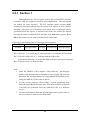
3.2.2.8.2 Trigger Method Selection
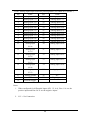
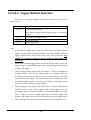
There are several trigger methods that can be selected by the user (see
section 1.4.5):
[Bit1,Bit0 ]
Descriptions
[ 0, 0 ]
General trigger mode.
8254 timer 0 trigger (internal pacer trigger ) or software
trigger.
[ 0, 1 ]
External clock trigger mode.
[ 1, 0 ]
Pre-trigger mode.
[ 1, 1 ]
Post-trigger mode.
Note:
1. In the general trigger mode, both the 8254 timer 0 and the software
trigger are used as the A/D trigger signals. The timer 0 and the software
trigger should not be used at the same time! This means the user
2.
3.
4.
5.
should not generate a software trigger while the 8254 timer 0 is
activated!
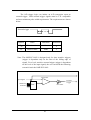
In the external clock trigger mode, an external input is taken as the A/D
trigger signal. A single falling edge of the external trigger will generate
a single A/D trigger.
The pre-trigger mode employs the 8254 timer 1. The user should first
configure timer 1, then set the trigger mode to pre-trigger. Once the
pre-trigger mode has been activated, it will automatically turn on timer
1 and start the A/D trigger. This will continue until a falling edge from
an external trigger signal is received. Any change to the trigger mode
selection will turn off the pre-trigger mode.
The post-trigger mode employs the 8254 timer 1. The user should first
configure timer 1, then set the trigger mode to post-trigger. Once the
post-trigger mode has been activated, it will automatically turn off the
timer 1 until it receives a falling edge from an external signal. Any
change to the trigger mode selection will turn off the post-trigger mode.
The A/D trigger selection is set to 0 after power-on or hardware reset.
34