1
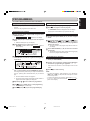
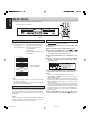
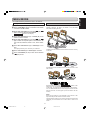
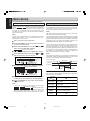
Model CDR500 User Guide
CD Recorder/CD Player
R
CLASS 1 LASER PRODUCT
LUOKAN 1 LASERLAITE
KLASS 1 LASERAPPARAT
Recordable
ReWritable
CDR500U cover 1,4 (E)
1
10/11/00, 9:27 AM
CDR500U COVER 3
1
10/11/00, 9:30 AM
CAUTION
INPORTANT SAFETY
INSTRUCTIONS
RISK OF ELECTRIC SHOCK
DO NOT OPEN
READ BEFORE OPERATING EQUIPMENT
CAUTION: TO REDUCE THE RISK OF ELECTRIC SHOCK,
DO NOT REMOVE COVER (OR BACK).
NO USER-SERVICEABLE PARTS INSIDE.
REFER SERVICING TO QUALIFIED SERVICE PERSONNEL.
The lightning flash with arrowhead symbol, within
an equilateral triangle, is intended to alert the user
to the presence of uninsulated “dangerous voltage”
within the product’s enclosure that may be of sufficient magnitude to constitute a risk of electric shock
to persons.
The exclamation point within an equilateral triangle
is intended to alert the user to the presence of
important operating and maintenance (servicing)
instructions in the literature accompanying the
product.
12. Grounding or Polarization — The precautions that should be
taken so that the grounding or polarization means of an
appliance is not defeated.
This product was designed and manufactured to meet strict
quality and safety standards. There are, however, some installation and operation precautions which you should be particularly
aware of.
1. Read Instructions — All the safety and operating instructions should be read before the appliance is operated.
2. Retain Instructions — The safety and operating instructions
should be retained for future reference.
AC POLARIZED PLUG
3. Heed Warnings — All warnings on the appliance and in the
operating instructions should be adhered to.
13. Power-Cord Protection — Power-supply cords should be
routed so that they are not likely to be walked on or pinched
by items placed upon or against them, paying particular attention to cords at plugs, convenience receptacles, and the
point where they exit from the appliance.
4. Follow Instructions — All operating and use instructions
should be followed.
5. Water and Moisture — The appliance should not be used
near water — for example, near a bathtub, wash-bowl,
kitchen sink, laundry tub, in a wet basement, or near a
swimming pool, etc.
14. Cleaning — The appliance should be cleaned only as recommended by the manufacturer.
15. Nonuse Periods — The power cord of the appliance should
be unplugged from the outlet when left unused for a long period of time.
6. Carts and Stands — The appliance should be used only
with a cart or stand that is recommended by the manufacturer.
WARNING
TO REDUCE THE RISK OF FIRE OR ELECTRIC SHOCK,
DO NOT EXPOSE THIS APPLIANCE TO RAIN OR MOISTURE.
CAUTION: TO PREVENT ELECTRIC SHOCK, MATCH WIDE BLADE
16. Object and Liquid Entry — Care should be taken so that
objects do not fall and liquids are not spilled into the enclosure through openings.
7. An appliance and cart combination should be moved with
care. Quick stops, excessive force, and uneven surfaces
may cause the appliance and cart combination to overturn.
17. Damage Requiring Service — The appliance should be
serviced by qualified service personnel when:
OF PLUG TO WIDE SLOT, FULLY INSERT.
A. The power-supply cord or the plug has been damaged; or
ATTENTION: POUR ÉVITER LES CHOCS ÉLECTRIQUES,
B. Objects have fallen, or liquid has spilled into the appliance; or
INTRODUIRE LA LAME LA PLUS LARGE DE LA FICHE DANS LA BORNE
CORRESPON DANTE DE LA PRISE ET POUSSER JUSQU’AU FOND.
C. The appliance has been exposed to rain; or
D. The appliance does not appear to operate normally or exhibits a marked change in performance; or
NOTE:
– Reorient or relocate the receiving antenna.
This equipment has been tested and found to comply with the
limits for a Class B digital device, pursuant to Part 15 of the FCC
Rules. These limits are designed to provide reasonable protection against harmful interference in a residential installation.
This equipment generates, uses and can radiate radio frequency energy and, if not installed and used in accordance with
the instructions, may cause harmful interference to radio communications. However, there is no guarantee that interference
will not occur in a particular installation. If this equipment does
cause harmful interference to radio or television reception,
which can be determined by turning the equipment off and on,
the user is encouraged to try to correct the interference by one
or more of the following measures:
– Increase the separation between the equipment and receiver.
– Connect the equipment into an outlet on a circuit different
from that to which the receiver is connected.
– Consult the dealer or an experienced radio/TV technician for
help.
NOTE:Changes or modifications may cause this unit to fail to
comply with Part 15 of the FCC Rules and may void the user's
authority to operate the equipment.
LASER SAFETY
This unit employs a LASER. Only a qualified service person should remove the cover or attempt to service this
device, due to possible eye injury.
8. Wall or Ceiling Mounting — The appliance should be
mounted to a wall or ceiling only as recommended by the
manufacturer.
E. The appliance has been dropped, or the enclosure damaged.
18. Servicing — The user should not attempt to service the
appliance beyond that described in the operating instructions. All other servicing should be referred to qualified service personnel.
9. Ventilation — The appliance should be situated so that its
location or position does not interfere with its proper ventilation. For example, the appliance should not be situated on a
bed, sofa, rug, or similar surface that may block the ventilation openings; or, placed in a built-in installation, such as a
bookcase or cabinet that may impede the flow of air through
the ventilation openings.
10. Heat — The appliance should be situated away from heat
sources such as radiators, heat registers, stoves, or other
appliances (including amplifiers) that produce heat.
11. Power Sources — The appliance should be connected to a
power supply only of the type described in the operating
instructions or as marked on the appliance.
CAUTION-USE OF CONTROLS OR ADJUSTMENTS OR PERFORMANCE OF PROCEDURE OTHER THAN
THOSE SPECIFIED HEREIN MAY RESULT IN HAZARDOUS RADIATION EXPOSURE.
This Class B digital apparatus meets all
requirements of the Canadian InterferenceCausing Equipment Regulations.
Cet appareil numérique de la Classe B respecte
toutes les exigences du Règlement sur le materiel
brouilleur du Canada.
i
CDR631(U)-orikomi
1
ii
10/11/00, 9:35 AM
Player front
29 28 27 26 25
30
ENGLISH
CONTROLS AND CONNECTIONS
24
CD RECORDER/CD PLAYER CDR500
CDR
PLAY MODE
CD
IR
Recordable
ReWritable
STORE
STANDBY
POWER
ERASE
REC.
MODE
FINAL
INPUT
REC LEVEL/SELECT
MENU
TIME
TEXT
PROG
LEVEL
HEADPHONE
DELETE
CANCL
PUSH ENTER
0
1
2
Player back
3
4
5
6
7 8 9 11 13 15 17
10 12 14 16 18
19
20
21
22
10
23
45
CD
PUSH
PUSH
NEUTRIK
NEUTRIK
CDR
GROUND
ANALOG
OUT
ANALOG
COLD(-) IN
OUT
L
AC120V 60HZ
0
+22
LOOP
OUT
REMOTE
(RC5)
MADE IN JAPAN
L
L
BALANCED
IN
R -TRIM- L
0
33
IN
EXT.
R
+22
(REF=+16dBu/0dBFS)
31 32
2
3
DIG.
OUT
R
R
MODEL NO.CDR500/U1B
DIGITAL
(SPDIF)
HOT(+)
1
OUT
INPUT
SELECT
IN
34
35
OUT
INT.(IR)
IN
36 37 38 39 40 41 42 43
44
Remote control
72
Display
TRACK
INCR.
46
47 48
49
50
51
73
52
SCAN
53
74
75
76
54
55
56
71
69
68 67 66 65 64 63
62
61
60 59 58 57
PROG.
RANDOM
ABC
DEF
GHI
1
2
3
JKL
MN
OPQ
4
5
6
RST
UVW
XYZ
7
8
9
DISPLAY
77
SPACE
SCROLL
90
0
CD
CDR
84
85
MENU/
STORE
CANCEL/
DELETE
ENTER
REMOTE CONTROLLER
RC6050DR
iii
3
89
88
87
86
81
82
83
CDR500U COVER 2
92
91
FUNCTION
78
79
80
70
REPEAT
10/11/00, 9:28 AM
ENGLISH
TABLE OF CONTENTS
CONTROLS AND CONNECTIONS ............... iii
MENU MODE ................................................ 20
Player front ........................................................... iii
Player back .......................................................... iii
Display ................................................................. iii
Remote control ..................................................... iii
About MENU MODE .......................................... 20
Text Submenus .................................................. 20
About TEXT ........................................................ 21
Recording submenu ........................................... 22
INTRODUCTION ............................................. 1
DISPLAY ....................................................... 25
CD-R and CD-RW Discs ...................................... 1
Unpacking ............................................................ 1
Setup .................................................................... 1
Compact Discs Care ............................................ 1
Maintenance ........................................................ 2
General .............................................................. 25
Recording ........................................................... 25
Play .................................................................... 25
Others ................................................................ 25
Menu messages ................................................. 26
CONTROLS AND CONNECTIONS ................ 3
OTHER INFORMATION................................ 26
Fixing problems .................................................. 26
INSTALLATION .............................................. 5
EXTERNAL DIMENSIONS .............. Last page
The following options are available: ..................... 5
Balanced analog connections .............................. 5
Unbalanced analog connections .......................... 5
Digital Coaxial connections .................................. 6
Digital Optical connections ................................... 6
Digital cascade connections ................................ 6
TECHNICAL SPECIFICATIONS...... Last page
REMOTE CONTROL (RC5) CONNECTION ... 7
Remote control cable connections ....................... 7
INITIAL SETUP ............................................... 8
Switching ON and OFF ........................................ 8
Using the remote control ...................................... 8
Inserting discs ...................................................... 8
RECORDING .................................................. 9
Recording modes ................................................. 9
Remarks about recording .................................... 9
Double speed recording ..................................... 10
Normal speed recording .................................... 11
Disc At Once (DAO) recording ........................... 12
Manual start recording ....................................... 13
Sync Recording .................................................. 14
FINALIZING/UNFINALIZING ........................ 15
Finalizing CD-R & CD-RW discs ........................ 15
Unfinalizing CD-RW discs .................................. 15
ERASING ...................................................... 16
Erasing ............................................................... 16
Erasing one or more tracks from the end ........... 16
Erasing the entire disc ....................................... 16
PLAYING ....................................................... 17
Changer Mode ................................................... 17
Dual Mode .......................................................... 17
Selecting a track ................................................ 18
Scan play ........................................................... 18
Search ................................................................ 18
Random play ...................................................... 18
Repeat play ........................................................ 18
PROGRAMMING .......................................... 19
Programmed play ............................................... 19
iv
CDR500U COVER 2
4
10/11/00, 9:28 AM
Copyright
Unpacking
Recording and playback of some material may require permission. For further information refer to the following:
- Copyright Act 1956
- Dramatic and Musical Performers Act 1958
- Performers Protection Acts 1963 and 1972
- Any subsequent statutory enactments and orders
First check the contents of the packaging. It should contain the
following:
- CD-Recorder/CD-Player CDR500
- Remote control with batteries packaged separately
- Power cord
- Digital coaxial cable (black)
- Stereo RCA Audio cable (red and white)
- Instructions
Congratulations on your purchase of the CDR500 CD recorder.
This unit enables you to record, play, and erase (using CD-RW
discs) your own audio Compact Discs. Naturally the recorder
can also be used to play all pre-recorded CDs.
If one of these components is missing, please inform your supplier immediately. Save the packaging material it may come in
handy if you move the appliance.
CD-R and CD-RW Discs
With the exception of legal restrictions pertaining to copying,
you can create your own high-quality audio recordings on CD.
The discs used to record must bear the logos shown below.
Setup
There are two types of recordable discs:
-
1
-
CD-R (record once):
CD-R discs are only able to be recorded onto a single time but
will playback in most CD players.
CD-R discs can be recognized by the following logos:
2
Attention!
If this unit is not used or operated in accordance with the
instructions, this may result in exposure to dangerous radiation or other risks.
Recordable
Recordable
Only authorized technicians are allowed to open the appliance casing or to perform repairs or maintenance.
CD-RW (multiple recording):
CD-RW discs are able to be recorded onto many times but
will only playback in CD players offering CD-RW compatibility. Products that offer CD-RW playback compatibility are
available from Marantz, Marantz Professional, and
Superscope. Please contact your dealer for more information on these products.
CD-RW discs can be recognized by the following logos:
Compact Discs Care
The glossy side shining like a rainbow is the front side of the
disc, and the side on which the label is printed is the back.
Handle discs carefully so as not to damage or scratch the
front side.
To protect the disc, avoid placing it in the following locations:
- In direct sunlight or near a source of heat like a heater.
- In a place which is damp or dirty.
- In a place which could be exposed to rain, such as near
a window.
ReWritable
ReWritable
Place the recorder on a strong, vibration-free surface.
Do not use the recorder under extremely damp conditions.
If the recorder is placed in a cabinet, make sure that a
1"(2.5 cm) space remains free on all sides of the recorder for proper ventilation.
Note:
- Most DVD players cannot playback CD-R discs and some
cannot playback CD-RW discs because of laser power differences.
- Some CD players may be able to playback finalized CD-RW
discs.
- Some CD players can not play the finalized CD-R discs because of the low reflectivity of such discs.
Always keep the disc surface clean.
Up to six billion data units are recorded on the front side of the
disc. When cleaning the disc surface, always be sure to use a
special compact disc cleaner and wipe as shown below.
The CDR500 is able to record onto any 1X or 2X compatable
CD-R and CD-RW disc, including discs for Consumer use and
Professional (computer) discs. For a list of recommended
discs, please see the Marantz Professional website at
www. marantz. com
Note:
For both CD-R and CD-RW discs, only discs that are compatible with 1X or 2X recording should be used.
Wipe in a radial direction.
It is forbidden to copy material protected by copyright, including computer programs, films, television and audio recordings. This appliance may not be used for applications
of this type.
1
CDR500U Eng 01-14
1
10/11/00, 9:31 AM
Do not wipe in circumferential direction.
ENGLISH
INTRODUCTION
ENGLISH
INTRODUCTION
•
•
Do not use record cleaner to clear a disc, as this will adversely affect the disc surface.
Store discs properly by placing them in their disc cases.
•
Do not attach a piece of paper or sticker on the label side of
disc. When a disc has a piece of plastic tape or rental CD
label with paste protruded from the edge or when a disc has
a trace of such a sticky object, do not attempt to play the disc.
If such a disc is played on the CD player, impossibility of taking out the disc or other malfunction may result.
•
Write only on the printed side of a CD-R or CD-RW, and only
with a soft felt-tipped pen.
•
Do not use a disc with a special shape.
•
Do not attempt to play a disc with a special shape such as a
heart-shaped disc or octagonal disc. Otherwise the equipment malfunction may result.
Maintenance
Clean the CDR500 with a soft, slightly dampened lint-free cloth.
Do not use any cleaning agents as they may have a corrosive
effect.
Do not expose the CDR500, batteries or CDs to humidity, rain,
sand or excessive heat (caused by heating equipment or direct
sunlight).
CD RECORDER/CD
PLAYER
CDR500
IR
CDR
PLAY
MODE
CD
Recordable
ReWr
POWER
itable
STANDBY
REC LEVEL/SELECT
ERASE
TIME
TEXT
PROG
FINAL
INPUT
PUSH
ENTER
HEADPHONE
LEVEL
0
10
If the CDR500 in unable to read CDs correctly, use a commonly
available cleaning CD to clean the lens before taking the CD
player to be repaired. Other cleaning methods may destroy the
lens. Always keep the tray closed to avoid dust on the lens.
The lenses may cloud over when the CDR500 is suddenly
moved from cold to warm surroundings. It is not possible to play
a CD then. Leave the CDR500 in a warm environment until the
moisture evaporates.
2
CDR500U Eng 01-14
2
10/11/00, 9:31 AM
Controls on the front
Connections at the back
CD-Recorder
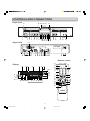
(31) ANALOG OUTPUT CD .. connects CD-Player drive to the
line input of an external analog
source (left and right)
(32) DIGITAL OUTPUT CD ... connects CD-Player drive to the
digital coaxial input of external
digital source
(33) TRIM .............................. adjusts the XLR input level
(34) INPUT SELECT ............. selects the analog input
(35) ANALOG IN ................... connects to the line output of an
external analog source (left and
right)
(36) ANALOG OUT ............... connects to the line input of an analog pre-amp (left and right)
(37) DIGITAL (SPDIF) IN ....... connects to the digital coaxial
output of an external digital
source
(38) DIGITAL (SPDIF) OUT .... connects to the digital coaxial input another digital device
(39) DIGITAL (SPDIF)
LOOP OUT .................... connects to the digital coaxial input another digital device
(40) DIGITAL (SPDIF)
OPT INPUT .................... connects to the digital optical out
put of an external digital source
(41) REMOTE CONTROL SWITCH ... selects remote control from the
IR sensor on the front panel
(INT.) or the REMOTE (RC5) input (EXT.)
(42) REMOTE CONTROL OUT ..... connects to a remote control input
(43) REMOTE CONTROL IN .... connects to a remote control output
(44) Connection to AC power
(45) BALANCED IN .............. connects to the balanced output
of an analog source (left and
right)
(1) POWER .......................... turns the CD-Recorder ON and OFF
(2) Standby indicator
(3) Disc tray (Deck1) .......... records CD-R/RW and plays CD
and CD-R/RW
(4) 0 .................................... starts recording, finalizing, erasing
(5) 9 ..................................... stops/clears a program
(6) 2/; .................................. starts play/interrupts play or recording
(7) ERASE ........................... selects erasing mode
(8) FINAL ............................. selects finalize mode
(9) INPUT ............................ selects external input source
(10) REC MODE .................... selects recording modes
(27) CDR ............................... selects CDR display/keys (left
side)
(28) / .................................... opens/closes disc tray
General
(11) CANCL/DELETE ........... - deletes tracks from a program
- deletes text in Menu mode
- returns to a higher level in the
menu
(12) STORE/MENU ............... - enters Menu mode
- stores Menu settings
(13) REC LEVEL/SELECT .... - previous/next track (Play and
Program mode)
- recording level control (recording)
- selects settings (menu on)
PUSH ENTER ................ - plays selected tracks
- selects settings in Menu mode
- programs track numbers
(14) TIME ............................... selects display information/text
(15) Q ................................ searches backward
(16) TEXT .............................. activates scrolling of text over the
display
(17) R ................................ searches forward
(18) PROG ............................. opens/closes program memory
(22) HEADPHONE ................ socket for headphones
(23) LEVEL ............................ adjusts the headphones volume
(26) PLAY MODE .................. selects if the CD-Recorder drive
plays in conjunction with the CDPlayer drive or separately
(29) Display .......................... information screen
(30) IR sensor ....................... receives signals from the remote
control.
CD-Player
(19)
(20)
(21)
(24)
(25)
9 ..................................... stops/clears a program
2/; .................................. starts play/pauses play
Disc tray (Deck2) .......... plays CD and CD-R/RW
/ .................................... opens/closes disc tray
CD .................................. selects CD display/keys
(right side)
Note:
Some functions are only on the remote control.
3
CDR500U Eng 01-14
3
10/11/00, 9:31 AM
ENGLISH
CONTROLS AND CONNECTIONS
ENGLISH
REMOTE CONTROL
DISPLAY indications
Remote control commands
(46) REM/REC TIME ............. remaining recording time / recording time
(47) TRACK ........................... track number
(48)
............................... balance (lights during balance
adjustment)
(49) TOTAL REM
TRACK TIME ................. total or remaining time of disc or
track
(50) STEP .............................. indicates the number of tracks in
a program
(51) 20 + ................................ disc or program contains more
than 20 tracks
(52) Track Number ............... tracks on a discs or in a program
track in play
(53) PROGRAM .................... flashes during programming/
lights in program mode
(54) RANDOM ....................... plays tracks in random order
(55) SCAN ............................. plays First 10 seconds of each
track
(56) REPEAT TRACK/ALL ... lights up when a track/ complete
disc (or program) is repeated.
(57)
................................... CD player selected
(58) CD .................................. CD inserted (a pre-recorded CD
or finalized CD-R or CD-RW
disc)
(59)
................. changer mode selected
(60) (DUAL MODE) ........... Dual mode selected
(61) L/R ................................. record/play level bar. Indicates
the audio signal level.
(62) 1 DUBBING ................... lights during recording from the
internal CD
(63) 2 ..................................... lights during play
(64) CD-RW ........................... indicates the type of disc in the
disc tray
(65) 0 .................................... lights during recording
(66) ; ..................................... indicates pause mode
(67)
.......................... optical input selected for external
recording
(68)
.................. analog input selected for external
recording
........................ analog recording
(69) MANUAL ........................ manual track increment
(70) SYNC ............................. automatic or synchronized start
of external recording
(71)
........................ coaxial digital input selected for external recording
(72) STANDBY
................. switches Standby On/Off
(73) TRACK INCR. ................ increases track numbers during
recording
(74) SCAN ............................. plays the first 10 seconds of each
track
(75) REPEAT ......................... repeat play(All, program or track)
(76) Number/alphabet keys 0 - 9 .. - selects a track by number
- selects character for text input
(77) DISPLAY ........................ selects display information/text
(78) CDR ............................... selects CD-Recorder control
(79) 2 ..................................... starts play
(80) S ................................ previous track (Play and Program mode)
(81) Q ................................ - searches backward
(82) ; ..................................... pauses play/recording
(83) MENU/STORE ............... - enters Menu mode
- stores Menu settings
(84) ENTER ........................... - selects settings in Menu mode
- programs track numbers
- starts playback of selected
track
(85) CANCEL/DELETE ......... - deletes tracks from a program
- deletes text in Menu mode
- returns to a higher level in the
menu
(86) R ................................ - searches forward
(87) 9 ..................................... stops CD-R/RW and clears a
program
(88) T ................................ next track (Play and Program
mode)
(89) CD .................................. selects CD player control
(90) SCROLL ........................ activates scrolling of text over the
display
(91) PROG. (ram) .................. opens/closes program memory
(92) RANDOM ....................... plays discs or program in random
order
4
CDR500U Eng 01-14
4
10/11/00, 9:31 AM
The numbers between parentheses refer to the fold-out.
The CDR500 can be used to record from any digital or analog
audio source, either directly or through a mixer/pre-amplifier. In
addition, this unit can also be used as a regular CD player.
Unbalanced analog connections
1
For correct connection to other audio equipement, please refer
to the operating instructions for those units.
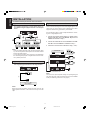
For recording and playing, connect the CDR500 to
other equipment based on the diagram below:
CD RECORDER/CD PLAYER CDR500
CDR
PLAY MODE
CD
IR
The following options are available:
Recordable
ReWritable
STORE
POWER
STANDBY
ERASE
REC.M
FINAL
INPUT
REC LEVEL/SELECT
MENU
TIME
TEXT
PROG
LEVEL
HEADPHONE
DELETE
CANCL
PUSH ENTER
0
-
Balanced analog connections (XLR)
-
Unbalanced analog connections (RCA)
L
-
Digital Coaxial connections
R
-
Digital Optical connections
-
Digital cascade connections
CD
ANALOG
OUT
L
3
4
R
5
Balanced analog connections
1
10
CDR
ANALOG
IN
OUT
L
L
L
L
L
R
R
R
R
R
INPUT
INPUT
Mixer/Pre-Amp,
DAT, CD/R,etc.
For recording, connect an analog balanced cable from
the CDR500 to a source based on the diagram below:
2
OUTPUT
INPUT
Mixer/Pre-Amp,
DAT, CD/R,etc.
OUTPUT
Mixer/Pre-Amp,
DAT, CD/R,etc.
Set INPUT SELECT switch (34) to ANALOG L/R (RCA).
3
ANALOG
OUT
CD RECORDER/CD PLAYER CDR500
CDR
PLAY MODE
CD
COLD(-) IN
IR
R
Recordable
ReWritable
STORE
STANDBY
POWER
ERASE
REC.M
FINAL
INPUT
L
REC LEVEL/SELECT
MENU
TIME
TEXT
HEADPHONE
LEVEL
DELETE
CANCL
PUSH ENTER
0
10
R
0
+22
0
Note:
- During the default playback mode (see changer Mode, page
17), the CD-Player drive will output to both the CDR and CD
analog and digital outputs.
- Never connect the CDR500 to the PHONO input on a PreAmp or Receiever.
2
1
R
L
Mixer/Pre-Amp,
DAT, CD/R,etc.
Set INPUT SELECT switch (34) to BALANCED IN.
3
ANALOG
OUT
COLD(-) IN
R
L
R
L
L
BALANCED
IN
R -TRIM- L
0
+22
0
R
+22
INPUT
SELECT
(REF=+16dBu/0dBFS)
Note:
- The default (set at factory) input level is +16dBu / 0dBFS. If
you want to change the level, rotate the TRIM control (33) to
adjust input level for both L and R.
ANALOG
OUT
COLD(-) IN
R
L
R
L
L
BALANCED
IN
R -TRIM- L
0
+22
0
R
+22
(REF=+16dBu/0dBFS)
INPUT
SELECT
- Make sure that all balanced inputs do not carry phantom
power. It may damage the unit.
5
CDR500U Eng 01-14
5
INPUT
SELECT
L
BALANCED
2
R
+22
(REF=+16dBu/0dBFS)
R
L
BALANCED
IN
R -TRIM- L
PROG
CDR
L
10/11/00, 9:31 AM
ENGLISH
INSTALLATION
ENGLISH
INSTALLATION
The numbers between parentheses refer to the fold-out.
Digital cascade connections
Digital Coaxial connections
1
Cascade recording allows, via the LOOP OUT jack, multiple
units to record all using the exact same digital signal. The
LOOP OUT can also be used to pass a digital signal to other
equipment without being processed by the CDR500.
For recording and playing, connect coaxial cables from
the CDR500 to digital equipment based on the diagram
below:
CD RECORDER/CD PLAYER CDR500
CDR
PLAY MODE
CD
IR
Recordable
ReWritable
STORE
POWER
STANDBY
ERASE
REC.M
FINAL
INPUT
Use the following steps to setup multiple CDR500s for recording from a single digital source:
REC LEVEL/SELECT
MENU
TIME
TEXT
PROG
LEVEL
HEADPHONE
DELETE
CANCL
PUSH ENTER
0
10
CDR
DIGITTAL
LOOP
OUT
CD
DIG.
OUT
6
R
7
IN
1
Connect the coaxial digital output of a digital source
machine (CD, DAT, etc.) to the DIGITAL IN jack on the
CDR500 as indiacted in step 0.
2
Connect the LOOP OUT of the first CDR500 to the DIGITAL IN on the next CDR500 as indiacted in step !.
3
Continue to conect units as indicated in step ! and @.
OUT
8
R
INP UT
INP UT
Mixer/Pre-Amp,
DAT, CD/R,etc.
O UTP UT
Mixer/Pre-Amp,
DAT, CD/R,etc.
INPUT
OUTPUT
Mixer/Pre-Amp,
DAT, CD/R,etc.
Note:
DIGITTAL
- During the default playback mode (see Changer Mode, page
17), the CD-Player drive will output to both the CDR and CD
analog and digital outputs.
- You can also connect the LOOP OUT jack on the CDR500 to
the coaxial digital input jack of a digital device when the DIGITAL (SPDIF) IN is used.
CD, DAT, etc.
IN P U T
PLAY MODE
10
DIGITTAL
CD RECORDER/CD PLAYER CDR500
CDR
OU T P U T
CD
IR
LOOP
OUT
Recordable
ReWritable
STORE
STANDBY
POWER
ERASE
REC.M
REC LEVEL/SELECT
MENU
TIME
TEXT
PROG
HEADPHONE
LEVEL
DELETE
FINAL
INPUT
CANCL
PUSH ENTER
0
10
11
IN
OUT
DIGITTAL
LOOP
OUT
CD RECORDER/CD PLAYER CDR500
CDR
PLAY MODE
CD
IR
Digital Optical connections
Recordable
ReWritable
STORE
STANDBY
POWER
ERASE
REC.M
REC LEVEL/SELECT
MENU
TIME
TEXT
PROG
HEADPHONE
LEVEL
DELETE
FINAL
INPUT
CANCL
12
PUSH ENTER
0
1
10
IN
For recording, connect a fiber-optic cable to the CDR500
with a digital equipment based on the diagram below.
OUT
DIGITTAL
CD RECORDER/CD PLAYER CDR500
CDR
PLAY MODE
CD
LOOP
OUT
IR
CD RECORDER/CD PLAYER CDR500
CDR
PLAY MODE
CD
IR
Recordable
ReWritable
Recordable
ReWritable
STORE
POWER
STANDBY
ERASE
REC.M
FINAL
INPUT
REC LEVEL/SELECT
MENU
TIME
TEXT
PROG
STORE
HEADPHONE
LEVEL
STANDBY
POWER
DELETE
ERASE
REC.M
REC LEVEL/SELECT
MENU
TIME
TEXT
PROG
HEADPHONE
LEVEL
DELETE
CANCL
FINAL
INPUT
CANCL
PUSH ENTER
PUSH ENTER
0
10
0
10
IN
5 CDR500s max.
DIGITAL
Note:
IN
The LOOP OUT jacks will pass-through an input digital signal
only when the power is ON or while the unit is in the STANDBY
mode (see Switching ON and OFF on page 8)
o
OUTPUT
Mixer/Pre-Amp,
DAT, CD/R,etc.
Note:
Before Connecting the cables, remove the dust caps from the
digital optical connections. We recommend that you save the
caps.
6
CDR500U Eng 01-14
OUT
6
10/11/00, 9:31 AM
The numbers between parentheses refer to the fold-out.
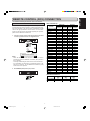
RC5 command list
Remote control cable connections
CDR Code
The REMOTE CONTROL (RC5) jacks on the back panel allow
an external remote control system to control the playback functions of the CDR500. The control system is called RC5 and the
chart on the right provides the control code list. For more information on the RC5 system and details regarding it's operation,
please contact Marantz Professional.
Function
Standby(on/off toggle)
Select CDR
Select CD
0
1
2
3
1. Connect a remote control cable to the CD recorder from
a control system based on the diagram below:
CD RECORDER/CD PLAYER CDR500
CDR
PLAY MODE
CD
IR
4
5
6
7
8
Recordable
ReWritable
STORE
STANDBY
POWER
ERASE
REC.M
FINAL
INPUT
REC LEVEL/SELECT
MENU
TIME
TEXT
PROG
HEADPHONE
LEVEL
DELETE
CANCL
PUSH ENTER
0
10
REMOTE
CONTROL
IN
EXT.
OUT
INT.(IR)
9
Search BWD
Search FWD
13
REMOTE
CONTROL
IN
OUT
Play
Stop
Pause
Track increm.
Next
Remote Control Generator
Note:
- When the external remote control is not used, it is recommended to leave the REMOTE CONTROL (RC5) switch in
the IR position.
- A heavily shielded single-conductor wire is recommended.
- If it is desiriable, for example in a professional studio, to disable the IR receiver, set the REMOTE CONTROL (RC5)
switch to the EXT. position.
Previous
Program
Menu/store
Cancel/delete
Enter
Random
Repeat
Scroll
2. Set REMOTE (RC5) switch (41) to EXT.
Display
Intro scan
CD RECORDER/CD PLAYER CDR500
CDR
PLAY MODE
CD
IR
Recordable
ReWritable
STORE
STANDBY
POWER
ERASE
REC.M
FINAL
INPUT
CD Code
System
Command System
Command
code (dec) code (dec) code (dec) code (dec)
26
26
-
12
63
-
26
26
26
00
01
02
26
26
26
03
04
05
26
26
26
26
26
06
07
08
09
50
26
26
26
52
53
54
26
26
26
26
26
48
114
32
33
36
26
26
26
82
49
87
26
26
28
29
26
26
26
11
15
43
20
20
20
63
00
01
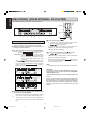
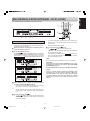
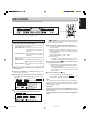
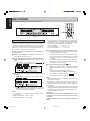
20
20
20
02
03
04
20
20
20
20
20
05
06
07
08
09
20
20
20
50
52
53
20
20
20
20
54
48
32
33
20
20
20
20
20
36
82
49
87
28
20
20
20
29
11
15
20
43
REC LEVEL/SELECT
MENU
TIME
TEXT
PROG
HEADPHONE
LEVEL
DELETE
CANCL
PUSH ENTER
0
10
RC5 extend command
REMOTE
CONTROL
System code Command code
(dec)
(dec)
IN
Fanction
EXT.
OUT
INT.(IR)
Power off (standby)
Power on
26
26
7
CDR500U Eng 01-14
7
10/11/00, 9:31 AM
12
12
Data code
(dec)
02
01
ENGLISH
REMOTE CONTROL (RC5) CONNECTION
ENGLISH
INITIAL SETUP
The numbers between parentheses refer to the fold-out.
Inserting discs
Switching ON and OFF
1
Plug the power cord supplied into the AC IN socket on
the CDR500, then into a AC power outlet.
CD
RE
CO
RD
ER
IR
/CD
PL
AY
ER
CD
R5
00
MODEL NO.CDR500
Re
Record
W rit able
ab
le
PO
WE
R
MADE IN JAPAN
ST
AN
DB
Y
CD
IN
R
PL
AY
MO
DE
CD
OUT
ER
AS
FIN
E
RE
MO C.
DE
ST
INP
DE
AL
OR
ME
UT
E
NU
LE
CA
RE
C LE
VE
L/S
TE
NC
EL
EC
T
L
TIM
PU
SH
EN
E
TE
TE
XT
R
PR
q
2
HE
PH
ON
E
VE
L
0
10
CD RECORDER/CD PLAYER CDR500
1
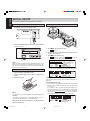
Press / (28) to open the disc tray.
lights up.
➔
2
Insert a CD, CD-R or CD-RW in the appropriate recess in
the tray, label side up.
3
Press / (28) to close the tray.
lights up, followed by
and the dis➔
play will show the type of disc you inserted.
IR
Recordable
ReWritable
STANDBY
AD
LE
Press the POWER (1) button on the front of the CDR500
to turn it on or off.
POWER
OG
ERASE
FINAL
w
Note:
When the power is switched ON, the STANDBY function on the
remote control (72) allows the CDR500 to be turned OFF except for the IR receiever circuit that will wait for the standby
signal to turn power back on.
•
•
If a CD-R/RW is finalized it will show CD on the display.
If CD-text is available the TITLE/ARTIST will scroll by.
Using the remote control
1
Open the battery compartment cover.
2
Insert 2 batteries (AA, LR-6 or UM-3; as supplied) as
shown.
3
Replace the cover.
Note:
The CD-Player drive is able to read un-finalized CD-R and CDRW discs.
CD-Recorder drive only
- For recording it is important that the blank disc is completely
free from dust particles or scratches. (see Compact Discs
Care, page 1).
- If you insert a blank or partly-recorded CD-R/RW or an
unfinalized CD-R/RW, the CD-Recorder will calibrate the
disc for optimum recording. During this process the display
will first show
and then the number of
audio tracks. Calibration can take up to 30 seconds.
Note:
We recommend you use 2 batteries of the same type and
condition.
This remote control can switch “STANDBY ON/OFF” but cannot switch “POWER ON/OFF” on the CD-Recorder.
Batteries contain chemical substances, so they should be
disposed of properly.
8
CDR500U Eng 01-14
8
10/11/00, 9:31 AM
The numbers between parentheses refer to the fold-out.
Recording modes
Remarks about recording
The CDR500 offers several recording modes.
For recording from internal CD-Player:
-
(double speed recording) - fast recording
of a disc or programmed tracks.
-
(normal speed recording) - listening to a
recording while making it.
-
(double speed recording and auto-finalize) - fast
recording of a disc or programmed tracks. Recording will be
finalized automatically.
-
(Disc-At-Once double speed recording
and auto-finalize) - fast recording of a complete disc for mastering purposes. Disc will be recorded as a finalized disc.
•
The recording procedure is the same for CD-Rs and CDRWs.
•
If the disc already contains recordings, the CD-Recorder will
automatically search for the end of the last track, so that recording can start from there.
•
There must be at least 7 seconds of recording time left
on the disc, otherwise you will not be able to enter record
standby mode.
will light up.
•
A maximum of 99 tracks can be recorded on a disc. Minimum
allowable track length is 4 seconds.
•
Recordings from DAT or DCC players will not always stop
automatically.
•
SRC (Sample Rate Conversion)
This CD-Recorder can perform Sample Rate Conversion on
the incoming digital signal, it is capable of handling sources
ranging from 11 kHz up to 56 kHz.
If a non 44.1 kHz (± 100 PPM) source is connected, this CDRecorder will automatically switch on the SRC.
If the digital source is 44.1kHz (± 100PPM) the SRC will be
automatically bypassed.
For recording from external sources:
-
(SYNC recording) - to make an automatic recording of an external source simply by starting the
source.
-
(manual start recording) - to start a
manual recording from an external source.
•
-
Note:
- When Auto track is on (default setting) during manual recording, track numbers will automatically be increased
during recording.
Notes about CD-Text:
-
- Discs and tracks copied from the internal CD-Player drive will
have the same CD-Text information as the source.
- CD-Text information is not passed thourgh external analog
and digital connections. Therefore, discs and tracks copied
from an external CD source that contains CD-Text information will not recieve any CD-Text information from the source.
•
If the recording source is a special disc such as HDCD or
DTS, you have to
• set source sampling frequency to 44.1kHz.
• use a digital connection.
• set the digital rec-volume of the CDR500 to 0 dB.
When you copy the tracks from a DAT recorded by different
sampling frequencies, noise might be recorded in the disc
when the sampling rate changes.
See page 23 for information about the recording menu settings.
Important:
If you want to play a recorded CD-R disc on any regular CD
player, it must first be finalized. (See FINALIZING/
UNFINALIZING page 15.)
Warning:
Recording is no longer possible after finalizing a CD-R
disc!
Finalized CD-RW discs play only on CD-RW compatible CD
players.
If the disc is a CD-RW and is already finalized you must
unfinalize it first to record onto it.
-
If a finalized CD-R disc is inserted in the CD-Recorder drive,
will be displayed. Recording is not
possible.
-
If a finalized CD-RW disc is inserted in the CD-Recorder
drive,
and
will be displayed when the REC MODE (10) is pressed. If the REC
LEVEL/SELECT (13) knob is pressed, the disc will be
unfinalized.
See page 1 for more information on CD-R and CD-RW discs
and compact Disc Care.
9
CDR500U Eng 01-14
9
10/11/00, 9:31 AM
ENGLISH
RECORDING
ENGLISH
RECORDING (FROM INTERNAL CD-PLAYER)
The numbers between parentheses refer to the fold-out.
SCAN
w
RANDOM
GHI
1
2
3
JKL
MN
OPQ
4
5
6
RST
DISPLAY
CD RECORDER/CD PLAYER CDR500
PLAY MODE
PROG.
DEF
7
CDR
REPEAT
ABC
UVW
XYZ
8
9
SPACE
w
SCROLL
0
CD
IR
FUNCTION
CD
CDR
Recordable
ReWritable
STORE
POWER
STANDBY
ERASE
REC.M
FINAL
INPUT
r
REC LEVEL/SELECT
MENU
TIME
TEXT
PROG
HEADPHONE
LEVEL
DELETE
CANCL
PUSH ENTER
0
e
r
10
q w
w
MENU/
STORE
CANCEL/
DELETE
ENTER
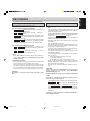
4 To start recording press 0 (4).
Double speed recording
Using the internal CD-Player drive.
• During double speed recording the sound is not audible.
•
1 Make sure that the recording disc is absolutely free of
scratches and dust particles.
•
➔ The display shows the real remaining time for the selected recording. High speed recording starts.
lights continuously.
To check the elapsed recording time, press TIME (14) or
DISPLAY (77). This can be done during recording.
Recording will stop automatically.
2 To choose the type of recording, press REC MODE (10).
if you wish to make a
once: to select
fast recording of a disc or programmed tracks.
three times: to select
if you wish to make a
fast recording of a disc or programmed tracks
and to automatically finalize the recording.
Also see ‘FINALIZING CD-R & CD-RW’ discs
on page 15.
The
display starts blinking. After 3 seconds the display shows the remaining CD-R/RW recording time on the left and total time of source on the right.
(every 2 seconds
is displayed.)
Both selection indicators are lit.
5 To stop recording manually, press 9 STOP (5, 87).
➔
goes out and recording stops.
•
If 9 STOP (5, 87) is pressed within 3 seconds after 0 (4) is
pressed, no recording will take place.
•
After recording, the display shows
for several seconds. The Total time indications can differ slightly. However,
no music information is lost.
Note:
- In this Recording mode, the Pause function is not operative.
Important:
If you want to play the recorded CD-R/RW disc on any regular CD player, it must first be finalized. (See FINALIZING/
UNFINALIZNG page 15).
Finalized CD-RW discs play only on CD-RW compatible CD
players.
There is a chance that the sound will be distorted if the
recording level is set at a value that exceeds 0 dB for digital sound sources and -12dB for analog sound sources.
The factory settings at the time of shipping are 0 dB for
digital sound sources and -12dB for analog sound
sources.
3 Press PROG (18 or 91) to select one or more tracks for
recording (see PROGRAMMING):
- rotate the REC LEVEL/SELECT (13) key to the required
track number, then press REC LEVEL/SELECT (13).
or:
-
directly select the track number via the 10-keypad (76)
on the remote control, then press REC LEVEL/SELECT
(13).
10
CDR500U Eng 01-14
10
10/11/00, 9:31 AM
The numbers between parentheses refer to the fold-out.
SCAN
w
RANDOM
GHI
1
2
3
JKL
MN
OPQ
4
5
6
RST
7
DISPLAY
PLAY MODE
PROG.
DEF
CD RECORDER/CD PLAYER CDR500
CDR
REPEAT
ABC
UVW
8
SPACE
w
XYZ
9
SCROLL
0
CD
IR
FUNCTION
CDR
CD
Recordable
ReWritable
STORE
POWER
STANDBY
ERASE
REC.M
FINAL
INPUT
r
REC LEVEL/SELECT
MENU
TIME
TEXT
PROG
LEVEL
HEADPHONE
DELETE
CANCL
PUSH ENTER
0
e
r
q w
w
•
Normal speed recording
Using the internal CD-Player drive.
• During the normal speed recording, you can listen to the recording while you are making it.
•
MENU/
STORE
CANCEL/
DELETE
ENTER
To check the elapsed recording time, press TIME (14) or
DISPLAY (77) on the remote control. This can be done during recording.
Recording will stop automatically.
5 To stop recording, press 9 (5, 87).
1 Make sure that the recording disc is absolutely free of
➔
scratches and dust particles.
2 Press REC MODE (10) twice.
•
10
The
display starts blinking. After 3 seconds the
display shows the remaining CD-R/RW recording time on the left
and total time of source on the right. (every 2 seconds
is displayed) Both selection indicators are lit.
goes out and recording stops.
•
If 9 STOP (5, 87) was pressed within 3 seconds after 0 (4),
no recording will take place.
•
After recording, the display shows
for several seconds. The Total time indications can differ slightly. However,
no music information is lost.
Note:
In this recording mode, the Pause function is not operative.
Important:
If you want to play the recorded CD-R/RW disc on any regular CD player, it must first be finalized. (See FINALIZING/
UNFINALIZING page 15.)
Finalized CD-RW discs play only on CD-RW compatible CD
players.
There is a chance that the sound will be distorted if the
recording level is set at a value that exceeds 0 dB for digital sound sources and -12dB for analog sound sources.
The factory settings at the time of shipping are 0 dB for
digital sound sources and -12dB for analog sound
sources.
3 Press PROG (18 or 91) to select one or more tracks for
recording (see PROGRAMMING page 19):
- rotate the REC LEVEL/SELECT (13) key to the required
track number, then press PUSH ENTER (13).
or:
-
directly select the track number via the 10-keypad (76)
on the remote control, then press REC LEVEL/SELECT
(13).
4 To start recording, press 0 (4).
➔
lights continuously and the selected track
or program is copied at normal speed. The recording
time left will appear.
11
CDR500U Eng 01-14
11
10/11/00, 9:31 AM
ENGLISH
RECORDING (FROM INTERNAL CD-PLAYER)
ENGLISH
RECORDING (FROM INTERNAL CD-PLAYER)
The numbers between parentheses refer to the fold-out.
CD RECORDER/CD PLAYER CDR500
CDR
PLAY MODE
CD
IR
Recordable
ReWritable
REC LEVEL/SELECT
STANDBY
POWER
ERASE
REC
MODE
MENU
STORE
FINAL
INPUT
CANCL
DELETE
TIME
TEXT
PROG
HEADPHONE
LEVEL
PUSH ENTER
0
e
w
Note:
Disc At Once (DAO) recording
- Once DAO recording is started, you cannot stop recording.
- The DAO function cannot record correctly if the source CD
disc has scratches or dust particles.
The DAO function makes a complete copy of a source CD without stopping. Therefore, the lead-in (TOC), program (audio
data), and lead-out portions of the disc are all recorded without
linking point errors. Linking point errors occur every time the
laser starts and stops a recording, including when a disc is finalized.
A disc recorded using DAO should be completely free of any
linking point errors which will allow DAO recorded discs to be
used as a master for duplication. The DAO function can also be
used for discs that are having trouble playing in some CD players, where the DAO function can act as a “clean up” so that a
clean, error free copy can be made of a bad disc.
Important:
The DAO function will not allow copying in the following
situations:
- The source disc is an un-finalized CD-R or CD-RW.
- The recording disc is not blank.
Because the DAO function will record the lead-in area, the
program area and read-out area continuously, you don't
have to finalized the recorded disc.
1 Make sure that the recording and source disce are absolutely free of scratches and dust particles.
If you unfinalize a DAO recorded CD-RW disc, all the disc
information wil be lost.
2 Press REC MODE (10) four times so that
appears on the display.
•
The
starts blinking. After 3 seconds, the remaining CD-R/RW recording time, total time of CD disc, and
will be shown continuously on the display.
3 To start recording, press 0 (4).
➔ The total remain time of recording appears on the display. It starts recording.
lights continuously.
12
CDR500U Eng 01-14
12
10
10/11/00, 9:31 AM
ENGLISH
RECORDING
The numbers between parentheses refer to the fold-out.
MN
OPQ
4
5
6
RST
JKL
UVW
7
DISPLAY
CD RECORDER/CD PLAYER CDR500
CDR
PLAY MODE
8
SPACE
XYZ
9
SCROLL
0
CD
IR
FUNCTION
CD
CDR
Recordable
ReWritable
STORE
POWER
STANDBY
ERASE
REC.M
FINAL
INPUT
u
REC LEVEL/SELECT
MENU
TIME
TEXT
PROG
LEVEL
HEADPHONE
DELETE
CANCL
PUSH ENTER
0
y
u
er t
MENU/
STORE
•
About AUTO TRACK and AUTO STOP
•
CANCEL/
DELETE
ENTER
Manual start recording
•
10
If
or
flashes, the digital data is not being received
correctly. Check all connections and settings on both the
source unit and the CDR500.
5 Set the optimal recording level on the CD-Recorder.
AUTO TRACK is a function to increment track numbers
either manually or automatically.
AUTO TRACK ON : track numbers will be automatically incremented according to
the source. (See the table on
page 23)
AUTO TRACK OFF : track numbers are manually
incremented by pressing TRACK
INCR. (73).
When AUTO TRACK is ON, you can also set the AUTO
STOP function.
AUTO STOP ON : the recording will be stopped automatically. (See the Table on page
23.)
AUTO STOP OFF : the recording has to be stopped
manually.
1. Play the source first to set the optimal recording level on
the CD-Recorder.
2. Rotate the REC LEVEL/SELCT (13) key until, on the
Record/Play Level bar, all the blue segments light but
the red segments do not light continuously during the
loudest passages.
DIGITAL RECORDING : +6dB ~ –63dB
ANALOG RECORDING: 0dB ~ –63dB
3. Stop the source.
• To record a 3-second silence at the start of a track,
press 2/; (6) or ; (82) before starting the source.
6 To start recording, press 0 (4) on the CD-Recorder and
immediately start the source.
The track number and recording time left appear on the display.
• If 9 (5, 87) is pressed within 3 seconds after 0 (4), no
recording will take place.
• To check the elapsed recording time, press TIME
(14) or DISPLAY (77). (This can also be done during
the recording.)
1 Make sure the disc is absolutely free of scratches and
dust particles.
2 Connect the CDR500 to an external source. (see INSTALLATION page 5 and 6.)
7 To stop recording, press 9 (5, 87).
• To pause recording, press 2/; (6) or ; (82).
3 Press INPUT (9) repeatedly until the selected external
After recording, the display will show
eral seconds as it finishes recording.
source appears on the display (depending on the connection used):
➔
,
or
lights up and
,
or
appears on the display.
for sev-
Note:
The recorded sound might be distorted when you adjust the
recording level above 0dB for digital recording and -12dB for
analog recording. The default setting of record level for digital is
0dB and analog is -12dB.
Important:
If you want to play the recorded CD-R/RW disc on any
regular CD player, it must first be finalized. See finalizing
discs on page 15.
4 With the recorder stopped, press REC MODE (10) five
times to enter the Manual Record standby mode.
➔
.
Finalized CD-RW discs play only on CD-RW compatible CD
players.
13
CDR500U Eng 01-14
13
10/11/00, 9:31 AM
ENGLISH
RECORDING
The numbers between parentheses refer to the fold-out.
ABC
DEF
GHI
1
2
3
JKL
MN
OPQ
4
5
6
RST
UVW
7
8
DISPLAY
CD RECORDER/CD PLAYER CDR500
CDR
PLAY MODE
SPACE
XYZ
9
SCROLL
0
CD
IR
FUNCTION
CDR
CD
Recordable
ReWritable
STORE
POWER
STANDBY
ERASE
REC.M
FINAL
INPUT
u
REC LEVEL/SELECT
MENU
TIME
TEXT
PROG
HEADPHONE
LEVEL
DELETE
CANCL
PUSH ENTER
0
y
er t
MENU/
STORE
CANCEL/
DELETE
ENTER
- You can adjust the recording balance by pressing the
STORE/MENU (12 or 83) button and then pressing REC
LEVEL/SELECT (13). Rotate REC LEVEL/SELECT to adjust
the balance. Press STORE/MENU when finished.
EQUAL BALANCE
: L = 100 , R = 100
ALL LEFT CHANNEL
: L = 200 , R = 0
ALL RIGHT CHANNEL : L = 0 , R = 200
Sync Recording
The SYNC feature enables you to make fast and easy recordings from an externally connected CD, DAT, or MD. Track increments are automatically detected from the source material
and cannot be added manually. For analog source material, a
silence of 2.7 seconds or more is automatically detected as a
track increment. (See page 22 for more detail)
5 To start recording, press PLAY on the selected source.
1 Make sure the disc is absolutely free of scratches and
➔ The CDR500 automatically starts to record. The recording time left appears on the display.
dust particles.
•
2 Connect the CDR500 to an external source. (see INSTALLATION from page 5 and 6.)
3 Press INPUT (9) repeatedly until the selected source appears on the display (depending on the digital connection
used):
➔
,
or
lights up and
,
or
appears on the display.
•
•
If, however, you start the source in the middle of a track,
SYNC recording starts at the beginning of the next track
(or track ID) or after 2.7 seconds of silence in analog
recordings.
To check the elapsed recording time, press TIME (14) or
DISPLAY (77). (This can also be done during recording)
The recorder stops automatically.
6 To stop recording manually, press 9 (5, 87).
•
•
4 With the CD-Recorder stopped, press REC MODE (10)
six times.
➔
start to flash and the display shows
.
•
10
If 9 (5, 87) is pressed within 3 seconds after pressing
PLAY on the selected source, no recording will take
place.
To pause recording, press 2/; (6) or ; (82).
To resume recording, press 0 (4) on the CDR500.
After recording, the display will show
eral seconds as it finishes recording.
for sev-
Note:
- Recordings from DAT, DCC or analog sources will only stop
after 20 seconds silence.
- MAKE CD is a recording mode that will auto finalize after
synchronized recording. It takes about 1 minute to start auto
finalizing after the last track is finished. (WAIT appears on
the display.)
- The recorded sound might be distorted when you adjust the
recording level above 0dB for digital recording and -12dB for
analog recording. The default setting of record level for digital is 0dB and analog is -12dB.
If
or
flashes, the digital data is not being received correctly. Check all connections and settings on
both the source unit and the CDR500.
Note:
Important:
- You can adjust the recording level by rotating REC LEVEL/
SELECT (13).
DIGITAL RECORDING : +6dB ~ –63dB
ANALOG RECORDING : 0dB ~ –63dB
If you want to play the recorded CD-R/RW disc on any regular CD player, it must first be finalized. See finalizing discs
on page 15.
Finalized CD-RW discs play only on CD-RW compatible CD
players.
14
CDR500U Eng 01-14
14
10/11/00, 9:32 AM
ENGLISH
FINALIZING/UNFINALIZING
The numbers between parentheses refer to the fold-out.
CD RECORDER/CD PLAYER CDR500
CDR
PLAY MODE
CD RECORDER/CD PLAYER CDR500
CD
CDR
PLAY MODE
CD
IR
IR
Recordable
ReWritable
Recordable
ReWritable
STORE
POWER
STANDBY
ERASE
REC.M
FINAL
INPUT
REC LEVEL/SELECT
MENU
TIME
TEXT
STORE
PROG
POWER
DELETE
STANDBY
ERASE
REC.M
FINAL
INPUT
REC LEVEL/SELECT
MENU
TIME
TEXT
PROG
DELETE
CANCL
PUSH ENTER
CANCL
PUSH ENTER
q q w
q q w
Finalizing CD-R & CD-RW discs
Unfinalizing CD-RW discs
Finalizing is necessary to:
For CD-RW discs only.
-
If you want to make more recordings or erase unwanted tracks
on a finalized disc, you must unfinalize it first. The unfinalize
process erases the TOC (Table of Contents) from the disc.
be able to play the recorded CD-R/RW disc on a CD player.
avoid further unwanted recordings on a disc.
avoid erasure of tracks on a CD-RW.
Note:
1 With the CD-Recorder stopped, press REC MODE (10)
- A finalized CD-R disc can never be recorded onto again.
- A finalized CD-RW disc can be unfinalized for continued recording.
- Finalizing is the process of writing the TOC (Table of Contents) on a disc so that a CD player can recognize the contents of the disc.
- The CD-Player drive is able to play back un-finalized CD-R
and CD-RW discs.
or ERASE (7).
➔
the display.
and
will appear on
Auto finalizing
Auto finalizing is possible when using the
ing function.
record-
Manual finalizing
1 With the recorder stopped press FINAL (8).
➔ The display shows
.
and
2 Press REC LEVEL/SELECT (13).
➔ The disc will now be unfinalized and can be recorded on
again.
Note:
- Unfinalizing will take approximately 1.5 minutes.
- When Unfinalizing a CD-RW disc with text written on it, the text
will be transferred to the CDR500Text Memory. If the Text
Memory of the CDR500 is full becuase of text from other
unfinalized discs, the
/
message will be displayed. In order to obtain memory space,
text on this disc or on the other discs must be erased or other
discs with stored text need to be finalized. See page 20 and 21
for more information regarding CD-Text and the Text Memory.
2 Press 0 (4).
➔
and the approximate finalization time
appears on the display.Finalizing will take at least 2 - 4
minutes.
The display counts down through the finalization.
On completion, the total number of tracks and the total
time recorded appears on the display.
The CD-R or CD-RW indication in the display will
change to CD.
Note:
During finalization, the CDR500 accepts no operating commands.
15
CDR500U ENG 15-21
15
10/11/00, 9:32 AM
ENGLISH
ERASING
The numbers between parentheses refer to the fold-out.
CD RECORDER/CD PLAYER CDR500
CD RECORDER/CD PLAYER CDR500
CDR
CDR
PLAY MODE
PLAY MODE
CD
CD
IR
IR
Recordable
ReWritable
Recordable
ReWritable
STORE
STORE
POWER
STANDBY
ERASE
REC.M
FINAL
INPUT
REC LEVEL/SELECT
MENU
STANDBY
TIME
TEXT
POWER
PROG
ERASE
REC.M
FINAL
INPUT
REC LEVEL/SELECT
TIME
MENU
TEXT
PROG
DELETE
DELETE
CANCL
CANCL
PUSH ENTER
PUSH ENTER
e
q
w
w
Erasing
Erasing the entire disc
For unfinalized CD-RW discs only.
You can erase:
- one or more tracks from the end, or
-
1 Press ERASE (7) twice.
➔ The display shows the number of tracks and their total
playing time.
and
light up.
the entire disc.
•
Erasing one or more tracks from the end
1 Press ERASE (7) once.
➔ The display shows the number of tracks and their total
playing time.
and
lights up.
•
q
If the disc is finalized, CD appears on the display after
inserting a CD-RW in the recorder drive. The CDR500
will ask you to confirm Unfinalizing first. Confirm by
pressing the REC LEVEL/SELECT (13) knob or ENTER
(84) on the remote control.
If the disc is finalized, CD appears on the display after
inserting a CD-RW in the recorder drive. The CDR500
will ask you to confirm Unfinalizing first. Confirm by
pressing the REC LEVEL/SELECT (13) knob or ENTER
(84) on the remote control.
2 Select the number of track(s) you wish to erase by turning the REC LEVEL/SELECT (13) knob to the left and
confirm by pushing the knob.
➔ The selected track numbers start blinking on the track
bar.
➔ The display shows the remaining number of tracks and
the remaining playing time after erasing the selected
track(s).
2 Press 0 (4).
➔ The display shows the total countdown time and
appears on the display. The complete disc will be
erased.
Erasure of a complete disc may take up to 15 seconds.
3 Press 0 (4).
➔ The display shows the total countdown time and
appears on the display.
➔ After the selected track(s) have erased, the display
shows the remaining tracks and their total playing time.
16
CDR500U ENG 15-21
16
10/11/00, 9:32 AM
The numbers between parentheses refer to the fold-out.
ABC
DEF
GHI
1
2
3
MN
OPQ
4
5
6
RST
JKL
UVW
XYZ
7
8
9
DISPLAY
CD RECORDER/CD PLAYER CDR500
CDR
PLAY MODE
SCROLL
FUNCTION
w
e
Recordable
ReWritable
STORE
POWER
SPACE
0
CD
IR
STANDBY
ERASE
REC.M
FINAL
INPUT
REC LEVEL/SELECT
MENU
TIME
TEXT
PROG
LEVEL
HEADPHONE
DELETE
CANCL
CD
CDR
PUSH ENTER
0
e w
10
q
MENU/
STORE
CANCEL/
DELETE
ENTER
Dual Mode
Changer Mode
The Changer Mode is the default play mode of the CDR500 and
will operate in such a way that both the CD-Recorder and CDPlayer drive of the unit work together as one. Only one deck
can play at a time and both output from the CDR jacks.
The Dual Mode allows both the CD-Recorder and CD-Player
drive to playback and operate independently of each other, so
as to simulate two seperate CD players. Both can play back at
the same time and are output to seperate jacks.
The Changer Mode can be used to continuously play two discs or
a program can be created that is amix of tracks between two discs.
The Dual Mode can be used to playback two discs in two
seperate locations or in a DJ-type mixing application.
Note:
Note:
- Recording can only be started while in the Changer Mode.
- The CD-Player drive will also always output to the CD jacks.
- Recording can only be started while in the Changer Mode.
Press the PLAY MODE (26) button in order to start recording.
q Select Changer mode using the PLAY MODE (26) button.
➔
q Select Dual Mode using the PLAY MODE (26) button.
appears on the display and
lights up.
➔
w On the deck you want to play, press 2/;; (6, 20) to start
playback.
➔ 2 lights up and the track number and track time of the
track in play appear on the display.
Press TIME (14) or DISPLAY (77) once, twice or three
times to see:
➔ remaining track time, total remaining time, text information (see MENU MODE page 21).
•
To interrupt play temporarily, press 2/; (6, 20).
➔ ; lights on the display.
•
To continue play, press 2/; (6, 20) again.
•
Press TIME (14) or DISPLAY (77) once, twice or three
times to see:
➔ remaining track time, total remaining time, text information (see MENU MODE page 21).
If you want to see this information about the other
deck, press CDR (27) or CD (25).
•
To interrupt play temporarily, press 2/; (6, 20).
➔ ; lights on the display.
•
To continue play, press 2/; (6, 20) again.
e To stop play, press 9 STOP (5, 87).
➔ The number of tracks and the total playing time appear
on the display.
e To stop play, press 9 (5, 87).
➔ The number of tracks and the total playing time appear
on the display.
Note:
DISPLAY (77) button is only on the remote control.
17
CDR500U ENG 15-21
17
lights up.
w On the deck you want to play, press 2/;; (6, 20) to start
playback.
➔ The track number and track time of the sclected track
appear on the display.
• After the first disc has finished playing, the disc in the
other deck will automatically start playing from the
begining.
• After the second deck has finished playing the unit will
enter the stop mode.
•
appears on the display and
10/11/00, 9:33 AM
ENGLISH
PLAYING
ENGLISH
PLAYING
The numbers between parentheses refer to the fold-out.
EX: Selecting a track when CD play is stopped
EX: Search
ABC
1
JKL
CD RECORDER/CD PLAYER CDR500
CDR
PLAY MODE
OPQ
6
UVW
XYZ
8
DISPLAY
CD RECORDER/CD PLAYER CDR500
CDR
PLAY MODE
GHI
3
MN
5
RST
7
CD
IR
DEF
2
4
SPACE
9
SCROLL
0
CD
FUNCTION
CD
CDR
Recordable
ReWritable
Recordable
ReWritable
STORE
STANDBY
ERASE
REC.M
FINAL
INPUT
REC LEVEL/SELECT
TIME
MENU
TEXT
PROG
LEVEL
HEADPHONE
DELETE
CANCL
PUSH ENTER
0
STORE
STANDBY
POWER
ERASE
REC.M
FINAL
INPUT
10
q
q
REC LEVEL/SELECT
MENU
TIME
TEXT
PROG
q q
DELETE
CANCL
PUSH ENTER
MENU/
STORE
CANCEL/
DELETE
ENTER
REMOTE CONTROLLER
RC6050DR
qw
w
Selecting a track
Search
1 Press 2/;; (6) or 2 (79).
Selecting a track during play
•
•
•
2 Hold down Q (15, 81) or R (17, 86).
On the CDR500.
q Turn the REC LEVEL/SELECT (13) knob until the required track number appears on the display.
➔ Play skips to the beginning of the selected track.
On the remote control <i>.
w Key in the required track number using the NUMERICAL
(76) keys. For 2-digit track numbers, press the keys in
rapid succession.
➔ Play skips to the beginning of the selected track.
On the remote control <ii>.
e Press S (80) or T (88) one or more times.
➔ Play skips to the beginning of the present, previous or
subsequent tracks.
➔ The drive first searches backwards or forwards at 10
times normal speed with sound at low volume, then
goes to 50 times normal speed with sound muted.
3 Release the button at the desired point.
➔ Play starts at the desired point.
Note:
During Random, Repeat Track or Programmed play, search is
restricted to within the track being played at the time.
Random play
1 Press RANDOM (92) before or during CD play to start
random play.
➔ All the tracks or programmed tracks on the discs in the
CD-Recorder drive and the CD-Player drive will be randomly played.
Selecting a track when CD play is stopped
•
•
•
On the CDR500.
q Turn the REC LEVEL/SELECT (13) knob until the required track number appears on the display.
w Press REC LEVEL/SELECT (13) to confirm or press 2/;
(6) to start playing.
On the remote control <i>.
q Key in the required track number using the NUMERICAL
(76) keys. For 2-digit track numbers, press the keys in
rapid succession. Play starts.
On the remote control <ii>.
q Briefly press S (80) or T (88) one or more times.
w Start playback by pressing 2 (79) or ENTER (84).
2 Press RANDOM (92) again to return to normal CD play.
Note:
- Random play is only available in Changer Mode.
- Random is also cleared if you open the disc tray.
Repeat play
1 Press REPEAT (75) one or more times during CD play.
➔ When REPEAT TRACK lights up, the current track
plays repeatedly. When REPEAT ALL lights up, both
discs or the program plays repeatedly.
Note:
When in Changer Mode, tracks can be selected from both the
CD-Recorder and CD-Player drives without having to press any
drive select buttons on the front panel or remote.
Scan play
1 Press SCAN (74) on the remote control.
-
2 To return to normal play, press REPEAT (75) one or
The first 10 seconds of each track will be played.
The CDR500 automatically stops after playing all tracks.
more times until:
➔ The REPEAT indication disappears from the display.
2 To stop scan play, press 9 (87).
-
Note:
The SCAN indiction disappears from the display.
- If Repeat All is selected during Changer Mode, discs in both
the CD-Recorder drive and CD-Player drive will be
sequentially repeated.
- Repeat is also cleared if you open the disc tray.
Note:
Scan play is only available in Changer Mode.
18
CDR500U ENG 15-21
18
10/11/00, 9:33 AM
The numbers between parentheses refer to the fold-out.
Clearing a program
Programmed play
•
You can program up to 99 tracks to play in any desired sequence.
•
Tracks can be programmed more than once.
1 Press 9 (5, 87) to stop programmed play.
2 Press 9 (5, 87) again to clear the program.
➔ PROGRAM indication disappears from the display.
•
Programming for playback
The program is also cleared if you open the disc tray.
Erasing a track from a program
1 Select Changer mode or Dual mode using the PLAY
MODE (26) button.
➔
or
1 In Stop mode press PROG (18, 91) to enter Program
appears on the display.
mode.
2 Press CDR (27, 78) or CD (25, 89) to select the required
2 Use the REC LEVEL / SELECT (13) knob, the S (80) or
deck.
➔ Selected deck lights up in the display.
T (88) keys, the Q (15, 81) or R (17, 86) keys, or
the NUMERICAL (76) keys to select the programmed
tracks to be erased.
➔ The track number and program step will be shown on
the display.
3 Press PROG (18, 91) to enter Program mode.
➔ PROGRAM indication flashes and
on the display.
appears
3 Press DELETE/CANCEL (11, 85) to erase the track from
the program.
➔ The remaining program steps and the remaining playing
time of the program will be displayed.
4 Select the required track numbers by turning the REC
Programming for recording
LEVEL/SELECT (13) knob left or right and store by pressing the knob.
1 Press REC MODE (10) to select the required recording
mode (see ‘RECORDING’).
2 Compile your program by repeating steps 3 to 5 as
described in “programming for playback”.
•
or:
Only tracks from the disc in the CD-Player drive can be
stored.
3 Press 0 (4) to start recording.
Key in a track number with the NUMERICAL (76) keys.
For 2-digit numbers, press the keys in rapid succession and
store by pressing REC LEVEL/SELECT (13) or ENTER
(84).
Note:
- To review the program, press PROG (18, 91), followed by
Q (15,81) or R (17, 86) with the CD-Player or CD-Recorder in stop mode.
- To add more tracks to the program, repeat steps 1 to 5.
ap- If you try to store more than 99 tracks,
pears on the display.
➔ The track will be stored in the program.
➔ The track number, total program time and the number of
programmed tracks (steps) are displayed.
5 Repeat step 2 - 4 for all tracks to be programmed.
6 Press 9 (5, 87) or PROG (18, 91) to end programming.
➔ PROGRAM lights continuously.
7 Press 2/;; (6, 20) or 2 (79) to start programmed play.
19
CDR500U ENG 15-21
19
10/11/00, 9:33 AM
ENGLISH
PROGRAMMING
ENGLISH
MENU MODE
The numbers between parentheses refer to the fold-out.
u
EX: Storing names of Text settings
ABC
DEF
GHI
1
2
3
JKL
MN
OPQ
4
5
6
RST
UVW
XYZ
7
8
9
DISPLAY
SPACE
SCROLL
0
CD RECORDER/CD PLAYER CDR500
CDR
PLAY MODE
CD
FUNCTION
IR
CD
CDR
Recordable
ReWritable
STORE
POWER
STANDBY
ERASE
REC.M
FINAL
INPUT
REC LEVEL/SELECT
TIME
MENU
TEXT
PROG
HEADPHONE
LEVEL
DELETE
CANCL
PUSH ENTER
0
wo
y
i
ert
yui
MENU/
STORE
CANCEL/
DELETE
ENTER
Storing names
About MENU MODE
1 Press STORE/MENU (12, 83) to enter Menu mode.
MENU MODE allows more sophisticated settings for making
CDs. There are two kinds of submenus in the MENU MODE.
• Text submenus ............. adding and erasing the CD-Text
•
10
appears on the display.
2 Press REC LEVEL/SELECT (13) to select the TEXT EDIT
submenus.
Recording submenus ... Auto track increment ON/OFF
... Auto stop ON/OFF
3 Press PUSH ENTER (13) or ENTER (84) to confirm.
... Copy protection
4 Rotate REC LEVEL/SELECT (13) or press S (80), T
(88) to select the required option in the submenu: CD Artist, CD Title, Track 1 Artist, Track 1 Title, etc.
... Adjusting right-left balance during
the recording
5 Press REC LEVEL/SELECT (13) or ENTER (84) to confirm.
TEXT EDIT
6 Select the characters by rotating the REC LEVEL/SELECT (13) or by pressing the corresponding numeric/
alphabet key (76).
TEXT ERASE
TEXT VIEW
AUTO TRACK
Structure of MENU
in the STOPMODE
AUTO TRACK
ON/OFF
OFF
7 Press REC LEVEL/SELECT (13) or ENTER (84) to store
ON
the characters and move to the next cursor position.
AUTO STOP
Note:
COPY
- A maximum of 60 characters can be stored per item.
- With the Q (15, 81) R (17, 86) keys you can move to a
required cursor position.
- With the CANCEL/DELETE (11, 85) you can delete a character.
- By pressing the REC LEVEL/SELECT (13) or ENTER (84)
without selecting a character first, you can insert a space
between characters.
- When an artist’s name has been stored for a certain track,
the name will automatically be copied to the next track when
you chose to edit the artist's name for the next track. To save
the same name for the next track press STORE/MENU (12,
83) when it is displayed, or a new name can be entered as
described above.
Note:
- When AUTO TRACK increment is OFF, AUTO STOP does
not appears in the menu.
- CD-Text can only be edited on unfinalized discs. (finalized
CD-RW discs must be unfinalized)
Text Submenus
The CD-Text feature allows the CD title, artist names, and the
track names to be saved on any disc you record. When played
back on the CDR500 or any other CD player/recorder that supports CD-Text, the CD-Text information stored on the disc will
be displayed.
8 Press STORE/MENU (12, 83) to store a name you have
entered and return to the submenu or 9 (5,87) to exit.
Note:
Products that offer CD-Text display are available from Marantz,
Marantz Professional, and Superscope. Please contact your
dealer for more information on these products.
20
CDR500U ENG 15-21
20
10/11/00, 9:33 AM
The numbers between parentheses refer to the fold-out.
Erasing names
About TEXT
1 Stay in the stop mode. (No Operation)
The input text data is saved in the text memory until the disc is
finalized. Therefore, the data is not written in the CD-R/RW
disc before finalizing the disc.
2 Press STORE/MENU (12, 83) on the deck or the remote
control to enter Menu mode.
3 Rotate REC LEVEL/SELECT (13) or press S (80), T
PO
(88) to select the submenu TEXT ERASE.
appears on the display.
CLA
SSI
C
JAZ
Z2
PS
4 Press REC LEVEL/SELECT (13) or ENTER (84) on the
remote control to confirm.
5 Rotate REC LEVEL/SELECT (13) or press S (80), T
(88) to select the required option in the submenu: All
Text, CD Title, CD Artist, Track 1 Title, Track 1 Artist,
etc.
6 Press REC LEVEL/SELECT (13) or ENTER (84) to con-
JAZZ 2
firm.
The display will ask you to reconfirm your selection.
CLASSIC
POPS
Finalizing the disc transfers the text data from the text memory
to the disc.
7 Press PUSH ENTER (13) or ENTER (84) to reconfirm.
8 Press STORE/MENU (12, 83) to return to the submenu
or 9 (5,87) to exit.
PO
CLA
SSI
C
PS
JAZ
Z2
JAZZ 2
Unfinalizing the disc transfers the text data from the disc to the
text memory.
T
MY
PO
CLA
PS
BES
SSI
C
ReWritable
MY BEST
When the text memory is full,
appears on the
display and you cannot add more text data.
In this case, you need to free up more space in text memory.
You can either finalize one or more disc(s) to transfer the text
data to each disc, or erase (part of) the text data in the text
memory.
Note:
When the text memory is full depends on the amount of the
input text data per disc and the number of discs.
Typically the text memory can store for 50 discs of the text data
consisting of 60 characters of an artist name or title for 20
tracks.
21
CDR500U ENG 15-21
21
10/11/00, 9:33 AM
ENGLISH
MENU MODE
ENGLISH
MENU MODE
The numbers between parentheses refer to the fold-out.
Text Memory Review/Erase Text Memory
Recording submenus
All input CD-Text data is stored in the Text Memory of the
CDR500 until the disc is finalized. If the text memory becomes
full, the
message will appear in the display
and you will be unable to add more text. If you would like to add
more text, you must finalize a disc that has text stored in the
Text Memory or the text for a disc can be erased by following
the procedure below.
The Auto Track increment menu selection determines whether
the CDR500 automatically marks tracks based on the source
(Auto Track ON) or if all track increments are made manually
via the TRACK INCR (73) button (Auto Track OFF).
Note:
The TRACK INCR (73) buttons will mark a track mark during
both Auto Track ON and OFF recording.
Note:
The text for all unfinalized discs is accessible during the Text
Memory Review mode. You do not need to insert the corresponding disc to erase its text.
The most efficient way to record from a digital source is via a digital
connection that contains user data. The user data part of a digital
signal provides track information to the CD recorder. User data is
usually found only in an SPDIF format digital connection. The
AES/EBU standard does support user data information.
1 Stay in the stop mode. (No Operation)
2 Press STORE/MENU (12, 83) on the deck or the remote
4 Press REC LEVEL/SELECT (13) or ENTER (84) to confirm.
If Auto Track is ON and the source you are recording from is
analog or digital without user data, the CDR500 will use a silence gap to mark tracks. As the chart below indicates, once
the source signal drops below -55dB, the CDR500 will look for
2.7 seconds of no signal (-55dB or below). When the source
signal returns and reaches a level of -35dB, the CDR500 will
then mark a new track and continue recording.
5 Rotate RECLEVEL/SELECT (13) or press S (80), T
Note:
control to enter Menu mode.
3 Rotate REC LEVEL/SELECT (13) or press S (80), T
(88) to select the TEXT VIEW submenu.
appears on the display.
If the silence gap is less than 2.7 seconds or the dB level never
drops below -55dB, the CDR500 will probably not mark a track
and continue to record on the same track number.
(88) to select the disc you wish to erase.
Audio source signal
Silence gap
A (-35 dB)
B (-55 dB)
6 Press REC LEVEL/SELECT (13) or ENTER (84) to confirm.
appears on the display.
2.7 sec
B is DETECTED
A is DETECTED
Track X
Track X+1
The chart below will help identify how each source will be handled by the Auto Track system.
7 Press the REC LEVEL/SELECT (13) or ENTER (84) to
AUTO TRACK
ON
confirm the erasure of the text for that particular disc.
Source
8 Press STORE/MENU (12, 83) to return to the submenu
CD/MD
or 9 (5,87) to exit.
(with user data)
DAT/DCC
Note:
(with user data)
- If there are no discs in the memory, the message
appears on the display.
/
may also appear when
Unfinalizing a CD-RW disc for which text was stored (see
‘UNFINALIZING CD-RW discs’ page 15). The same
action(s) should be taken in order to obtain memory space.
Unknown
Track increment based on user data of in
coming signal
Track increment based on user data of in
coming signal
(no user data)
Track increment after silence gap of 2.7
seconds on incoming signal
Analog
Track increment after silence gap of 2.7
seconds on incoming signal
No source
(no lock)
22
CDR500U ENG 22-27
22
10/11/00, 9:35 AM
None
The numbers between parentheses refer to the fold-out.
If Auto Stop is ON, the chart below indicates what amount of
silence (-55dB or lower) is required for each source to trigger
the CDR500 to stop recording. If Auto Stop is OFF, the
CDR500 will record until stopped by the STOP (5,87) button or
the end of the disc is reached.
Auto track increment
1 Stay in the stop mode. (No Operation)
2 Press STORE/MENU (12, 83) on the deck or the remote
control to enter Menu mode.
AUTO STOP
3 Rotate REC LEVEL/SELECT (13) or press S (80), T
ON
Source
(88) to select the AUTO TRACK submenu.
appears on the display.
CD/MD
(with user data)
4 Press REC LEVEL/SELECT (13) or ENTER (84) to confirm.
Stop after 3 seconds of user DATA of stop
pattern detected on the incoming source signal
Stop after 20 seconds of silence
DAT/DCC
(with user data)
5 Select Auto track
or
by rotating REC LEVEL/
SELECT (13) or press S (80), T (88).
Unknown
Stop after 20 seconds of silence
(no user data available)
Stop after 20 seconds of silence
Analog
No source
Stop after 3 seconds of unlock
(no lock)
Note:
6 Press REC LEVEL/SELECT (13) or ENTER (84) to confirm.
•
•
- The aboue silence time needed to stop will be recorded onto
the last track of the recording.
is selected, track numbers will be automatiWhen
cally incremented during recording.
When
is selected, you can mark the recorded tracks
yourself by press TRACK INCR (73).
1 Stay in the stop mode.(No operation)
2 Press STORE/MENU (12, 83) on the deck or the remote
7 Press STORE/MENU (12, 83) to store settings and re-
control to enter Menu mode.
turn to the submenu or 9 (5, 87) to exit.
3 Rotate REC LEVEL/SELECT (13) or press S (80), T
Note:
(88) to select the AUTO STOP submenus.
appears on the display.
- The Auto Track menu item is also available during recording
and in the record-standby mode.
- The Auto Track setting determines if the Auto Stop menu
item is available. If Auto Track is OFF, Auto Stop is automatically OFF and the Auto Stop menu item is not displayed in
the menu. If Auto Track is ON, the Auto Stop menu item is
available and Auto Stop can be switched ON or OFF. See
this page for information regarding the Auto Stop menu item.
4 Press REC LEVEL/MENU (13) or ENTER (84) to confirm.
5 Select Auto stop
or
by rotating REC LEVEL/
SELECT (13) or press S (80), T (88).
AUTO STOP ON : fully automatic stop.
AUTO STOP OFF : only manual stop during the recording.
Auto stop
If the Auto Track function is ON, the Auto Track menu item will
become available. The Auto Stop function can then be turned
ON or OFF depending on the recording requirements.
6 Press REC LEVEL/SELECT (13) or ENTER (84) on the
Note:
remote control to confirm.
Auto Stop is automatically turned OFF and the menu item will
not be displayed when Auto Track is OFF.
7 Press STORE/MENU (12, 83) to store setting and return
to the submenu, or press 9 (5,87) to exit.
The benefit of turning Auto Stop OFF is, for example, when you
are recording sources such as classical music, which could
have long passages of low level sound. If Auto Stop is ON in
such a case, the CDR500 may automatically stop during such a
passage.
Note:
- The Auto Track menu item is also available during the
Record-Pause and Record modes.
- The Auto Track setting determines if the Auto Stop menu
item is available. If Auto Track is OFF, Auto Stop is automatically OFF and the Auto Stop menu item is not displayed
in the menu. If Auto Track is ON, the Auto Stop menu item is
available and Auto Stop can be switched ON or OFF. See
page 20 for information regarding the Auto Stop menu item.
23
CDR500U ENG 22-27
23
10/11/00, 9:35 AM
ENGLISH
MENU MODE
ENGLISH
MENU MODE
The numbers between parentheses refer to the fold-out.
Copy protection
Balance (Only active in Record/Standby mode)
All pre-recorded audio CDs include a digital mark indicating the
copy protection status of the disc. This information is stored in
the user data area of the disc and is transmitted in the SPDIF
format digital output.
During recording (with both analog and digital sources), the
balance of the audio recorded onto the disc can be adjusted
using the Balance menu item.
1 Press STORE/MENU (12, 83) to enter Menu mode.
Since the CDR500 is a professional CD recorder, it will record
from any digital source, ignoring the copy protection setting of
the source material. Addtionally, the CDR500 allows you to set
the level of copy protection of each disc you record.
2 Rotate REC LEVEL/SELECT (13) or press S (80), T
(88) to select the SET BALANCE submenu.
appears on the display.
There are three settings for the copy protection on a disc:
Copy Protection OFF
This recording allows unlimted digital copying. A consumer digital recording device can digitally record this
disc.
Copy Protection ON
This recording allows a single generation digital copy to
be made for personal use. A consumer digital recording
device will be able to digitally record this disc but the
copy will have Copy Protection set to HCO so that further digital copies can not be made.
Copy Protection HCO (Home Copy protected Original)
This recording does not allow digital copying. A consumer digital recording device will not be able to make
digital copies of this disc.
3 Press REC LEVEL/SELECT (13) or ENTER (84) to confirm.
➔
and
4 Adjust the recording balance by turning the REC LEVEL/
SELECT (13) or press S (80), T (88).
5 Press REC LEVEL/SELECT (13) or ENTER (84) to confirm.
6 Press STORE/MENU (12, 83) to store settings.
Note:
1 Stay in the stop mode.(No operation)
The balance setting is not saved if a disc is changed or the
power is switched off.
2 Press STORE/MENU (12, 83) to enter Menu mode.
3 Rotate REC LEVEL/SELECT (13) or press S (80), T
(88) to select the Copy submenus.
appears on the display.
4 Press REC LEVEL/SELECT (13) or ENTER (84) to confirm.
5 Select Copy
,
, or
by rotating REC LEVEL/
SELECT (13) or press S (80), T (88).
6 Press REC LEVEL/SELECT (13) or ENTER (84) to confirm.
7 Press STORE/MENU (12, 83) to store setting and return
to the submenu, or press 9 (5,87) to exit.
Note:
Analog sources do not carry copy protection.
24
CDR500U ENG 22-27
24
appear on the display.
10/11/00, 9:35 AM
Messages, as listed and explained here, may appear on the
display for your guidance.
.............. when finalizing a disc
(page 15)
.............. when 0 is pressed while no digital
source is detected
.............. time countdown when erasing a
track or a disc (page 16)
................. time countdown when finalizing a
disc (page 15)
........... to start manual recording, finalizing
or erasing (page 10, 11, 12, 15, 16)
........... to start synchronised recording
from a source
.................. when trying to record on a finalized
CD-R/RW or a prerecorded CD
General
......................... reading disc information (page 8)
................................. during tray opening (page 8)
............................... during tray closing (page 8)
......................... no disc inserted, disc unreadable or
disc inserted upside down
................... program full (page 19)
.............. insert disc or insert disc in correct
way
................. inserted disc is not an audio CD
(page 26)
.............. unfinalized CD-R/RW disc
.............. when trying to record on a
finalized CD-RW (page 9, 15)
.............. when a professional source is connected
........... indicates the amount of text
memory used for unfinalized discs
Recording
Play
................................. - when 9 STOP is pressed during
recording
......................... Changer Mode selected
(page 17, 19)
.................... Dual Mode selected
(page 17, 19)
......................... program mode selected (page 19)
.............. will be followed by album title
.............. will be followed by track title
........... will be followed by artist name
(page 8)
........... will be followed by track artist name
- when 9 STOP is pressed during
recording the first 4 seconds of a
track
............................ updating disc contents (page 10,
11, 13, 14)
.................... no more recording possible
.................... digital coaxial input selected
(page 13, 14)
......................... digital optical input selected
(page 13, 14)
........... a button is pressed during Dual
Mode that only applies to Changer
Mode (page 17)
........................... analog input selected (page 13, 14)
........... when opening the tray with an
unfinalized disc inserted (in the CDRecorder)
Others
.............. High Speed recording selected
(page 9, 10)
.............. when the recorder finds a computer
data track during recording
........... CD-R/RW disc has been finalized
(page 9)
........... during laser power calibration for
unfinalized discs (page 8)
........... during disc recovering after power
failure (page 27)
................... OPC failure during OPC procedure
(OPC = Optimum Power Calibration) meaning that the CD-R/RW
disc is bad
........... recording error in menu mode
................. when trying to record on or finalize
a recovered disc (page 27), disc is
no longer usable
................ Normal Speed recording selected
(page 9, 11)
......................... Start of synchronised recording of
a complete disc and Auto Finalize
function selected
(page 9, 10, 15)
........... Synchronised start of recording
from external source selected
(page 9, 14)
.............. Manual start of recording from external source selected (page 13, 14)
............................ Recording level is being adjusted
........... time left on CD-R/RW disc is not
enough for proposed recording
(page 9)
........... when text memory is full. To add a
CD to the list, first finalize or erase
another disc from the list. (page 15,
22, 26)
.............. when erasing one or more tracks
(page 16)
................. when erasing a disc (page 16)
25
CDR500U ENG 22-27
25
10/11/00, 9:35 AM
ENGLISH
DISPLAY
ENGLISH
DISPLAY
OTHER INFORMATION
The numbers between parentheses refer to the fold-out.
Menu messages
Fixing problems
................... when attempting to edit text on a
disc which has no tracks
If you think your CD-Recorder is defective, it is wise to read this
list first. Maybe you forgot a simple step.
................... when entering Text Edit mode
(page 20)
Warning!
.................... when editing or erasing an artist
name for a disc
Under no circumstances should you attempt to repair the
unit yourself as this will invalidate the guarantee.
...................... when editing or erasing a disc title
No power
.............. when editing or erasing an artist
name on a specific track
•
................. when editing or erasing a title on a
specific track
•
•
................. when entering Text Erase mode
(page 21)
...................... when entering All Text display
mode
ensure that the POWER ON/OFF (1) button is on: the
CD-Recorder may be in standby mode, press any button
to activate it
ensure that the power cord is plugged in correctly
switch the recorder OFF and then immediately back ON
Auto track does not work
•
•
...................... when confirmation for erasing has
to be given with ENTER key
........... when confirmation for erasing all
tracks have to be given with ENTER key
•
•
........... when waiting for confirmation when
erasing a disc (page 22)
•
................... when selecting text review for all
the unfinalized discs in memory
(page 22)
check if auto track is ON
check if there are 2.7 seconds silence in between the
tracks (analog recording only)
check that the digital source conforms to the SPDIF (or
IEC-958-II) standard
source is a DVD video disc (DVD video discs do not contain track information)
make sure analog source meet track marking criteria on
page 22
No sound
•
•
........... when REVIEW is selected while no
text is in memory (page 22)
............... when selecting auto track increment ON or OFF (page 23)
...................................... Auto Track increment on
(page 23)
check the audio connections
if using a amplifier or receiever, check that a signal is
present using headphones or try a different amplification
system
Amplified Sound is distorted
•
.................................... Auto Track increment off
(page 23)
•
.............. when selecting BALANCE (page 24)
......................... no text stored for disc
check that the CD-Recorder analog output is not connected to a PHONE input.
check that the disc is not defective by trying another disc
Play will not start
•
•
•
ensure that the label of the CD is facing up
clean the disc
check that the disc is not defective by trying another disc
Remote control does not work
•
•
•
•
set the remote control selector to ‘INTERNAL’ on the
back panel
point the remote control directly at the CD-Recorder
check the batteries and replace if necessary
select the right source first (CDR)
Will not record
•
•
•
•
•
•
•
clean the disc
check if CD-R/RW is an unfinalized disc
check that the disc is recordable and replace if necessary
the disc is not an audio disc (
)
wrong input source chosen.
text memory full (
/
).
Erase text for other disc(s) or finalize other disc(s) to
obtain memory space.
check that the disc is not defective by trying another disc
26
CDR500U ENG 22-27
26
10/11/00, 9:35 AM
ENGLISH
OTHER INFORMATION
The numbers between parentheses refer to the fold-out.
Recording is distorted
•
•
make sure the recording level was not too high
check that the disc is not defective by trying another disc
20 second pause between recordings
•
see ‘RECORDING’ SYNC on page 14
Player does not react
•
use the POWER ON/OFF (1) button on the front of the
Player to switch it off and back on
•
a power failure has occurred during recording the CDRecorder is attempting to repair the disc
If
then appears on the display, the disc
cannot be recorded further, and cannot be Finalized.
But it can still be played on the CDR500 or another CDRecorder.
on a CD-R/RW disc, the track being recorded is lost, but
further recording and finalisation can still be done
check that the disc is not defective by trying another disc
on display
•
•
•
XLR input level is too low or too high
•
adjust the R and L TRIM pots on the back panel to the
optimum level
Digital input source indication is flashing
•
•
•
check the digital cable connections
check that the output of the digital source is conforms to
the SPDIF (or IEC-958-II) standard
try a different cable to make sure the digital cable is OK
Recorded disc playback quality on other CD players is poor
•
•
•
•
make sure to use good quality discs when recording audio
make sure the discs used for recording are compatible
with 1X speed recording
try recording onto a 'Music' (consumer) type blank disc
because they are specially designed for 1X speed audio
recording
If using 80 minute discs, try a 74 minute disc because
they provide a wider recording area and thus have a less
chance for error
CD-Text appears on CD-Player but not on CD-Recorder
•
the CD-Recorder drive does not display the CD-Text on
“hybrid” CDs that contain audio and data together on the
disc.
27
CDR500U ENG 22-27
27
10/11/00, 9:35 AM
Rergarding addresses for your local Marantz organization,
please visit us on the web at
http://www.marantz.com.
is a registered trademark.
00/09 388K851310 (MITi)
Printed in Japan
CDR500U cover 1,4 (E)
2
10/11/00, 9:27 AM