1
English
INSTALLATION
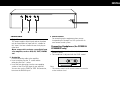
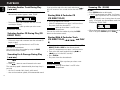
COAXIAL
R
L
IN
OUT
DIGITAL
OUTPUT
ANALOG
OUT
REMOTE
CONTROL
1
2
3
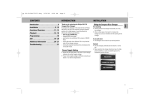
Connections
1 Digital Out
This output supplies digital signal and can therefore
only be connected to an input which is suitable for
this signal. Use here a lead with one cinch plug on
either end.
Never connect this socket to a non-digital input
of an amplifier, such as AUX, CD, TAPE, PHONO
etc!
2 Analog Out
For the connecting cable to the amplifier.
• Insert a red plug into the ‘R’ socket and the
other plug into the ‘L’ socket.
• Insert the two other plugs into the corresponding
sockets of the CD or AUX input of your amplifier.
You can also use the TUNER or TAPE IN connection,
but never the PHONO input!
3 Remote Control
For connecting up the equipment when you are
incorporating the changer in a HiFi system with its
own remote control system.
Connecting Headphones (for CC4000 &
CC4000OSE only)
• Connect headphones with a 6.3 mm jack plug to the
PHONES socket.
• The sound level is adjusted with the LEVEL control.
PHONES/
LEVEL
Note:
– The volume control on the remote control must not be
at the minimum level.
7