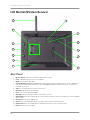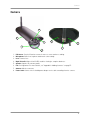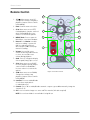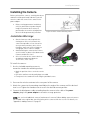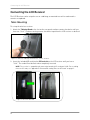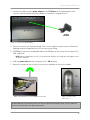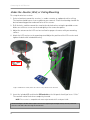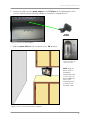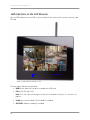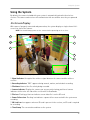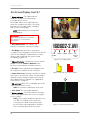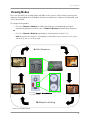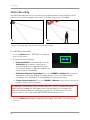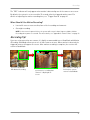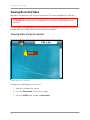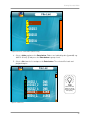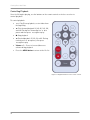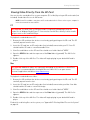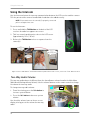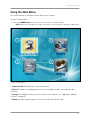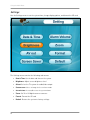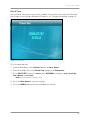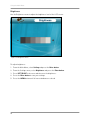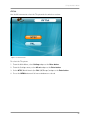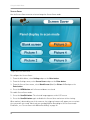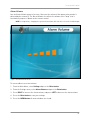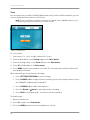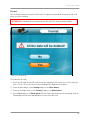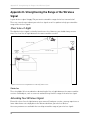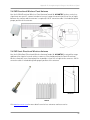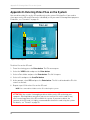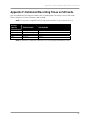
1
www.lorexcctv.com DIGITAL WIRELESS QUAD LCD SURVEILLANCE SYSTEM WITH BUILT-IN VIDEO RECORDER/INTERCOM AND INDOOR/OUTDOOR MOTION CAMERA Instruction Manual English Version 1.0 MODELS: LW2702 Series www.lorexcctv.com Copyright © 2009 Lorex Technology Inc. Important Safeguards Thank you for purchasing the Digital Wireless Quad View Monitoring System. This manual refers to the following products: • LW2702 Series Please visit us on the web for the most current Manuals, Quick Start Guides and Firmware. Additional Language Manuals may also be available at: www.lorexcctv.com CAUTION RISK OF ELECTRIC SHOCK DO NOT OPEN CAUTION: TO REDUCE THE RISK OF ELECTRIC SHOCK DO NOT REMOVE COVER (OR BACK). NO USER SERVICABLE PARTS INSIDE. REFER SERVICING TO QUALIFIED SERVICE PERSONNEL. The lightning flash with arrowhead symbol, within an equilateral triangle, is intended to alert the user to the presence of uninsulated “dangerous voltage” within the products ‘ enclosure that may be of sufficient magnitude to constitute a risk of electric shock The exclamation point within an equilateral triangle is intended to alert the user to the presence of important operating and maintenance (servicing) instructions in the literature accompanying the appliance. WARNING: TO PREVENT FIRE OR SHOCK HAZARD, DO NOT EXPOSE THIS UNIT TO RAIN OR MOISTURE. CAUTION: TO PREVENT ELECTRIC SHOCK, MATCH WIDE BLADE OF THE PLUG TO THE WIDE SLOT AND FULLY INSERT. 2 BEFORE YOU START THIS PRODUCT MAY REQUIRE PROFESSIONAL INSTALLATION LOREX IS COMMITTED TO FULFILLING YOUR SECURITY NEEDS • We have developed user friendly products and documentation. Please read the Quick Start Guide and User Manual before you install this product. • Consumer Guides and Video Tutorials are available on our web site at www.lorexcctv.com/support • If you require further installation assistance, please visit www.lorexcctv.com/installation or contact a professional installer. • Please refer to the “Need Help” insert for technical support and customer care information. • Please note that once the components of this product have been unsealed, you cannot return this product directly to the store without the original packaging. www.lorexcctv.com AVANT DE COMMENCER ANTES DE EMPEZAR CE PRODUIT POURRAIT EXIGER UNE INSTALLATION PROFESSIONNELLE ESTE PRODUCTO PUEDE EXIGIR UNA INSTALACIÓN PROFESIONAL LOREX S’ENGAGE À SATISFAIRE VOS BESOINS SÉCURITAIRES LOREX SE COMPROMETE A SATISFACER SUS NECESIDADES EN SEGURIDAD • Veuillez lire le guide de démarrage rapide et le mode d’emploi avant d’installer ce produit. • Favor de leer la guía de instalación rápida y la guía del usuario antes de instalar este producto. • Les guides du consommateur et les séances de tutorat vidéo sont disponibles sur l’Internet en visitant www.lorexcctv.com/support • Puede conseguir las guías del consumidor y los cursos en enseñanza video sobre el Internet visitando www.lorexcctv.com/support • Si vous avez besoin de l’aide pour l’installation, veuillez visiter www.lorexcctv.com/installation ou contactez un spécialiste en installation • Si necesita ayuda para la instalación, visite www.lorexcctv.com/installation o contacte un especialista en instalaciones • Veuillez référer à l’insert “Need Help” pour ob¬tenir de l’information sur le service à la clientèle et le support technique • Favor de referir al documento “Need Help” para obtener información acerca del servicio al cliente y al soporte técnico • Veuillez constater qu’une fois que les com¬posantes de ce produit ont été retirées de l’emballage, vous ne pourrez plus retourner ce produit directement au magasin. • Favor de notar que una vez que los componentes de este producto han sido removidos del embalaje, no podrá devolver este producto directamente a la tienda w w w . l o r e x c c t v . c o m NEED HELP? CONTACT US FIRST DO NOT RETURN THIS PRODUCT TO THE STORE Please make sure to register your product at www.lorexcctv.com to receive product updates and information 3 Easy Ways to Contact Us: Online: Product Support is available 24/7 including product information, user manuals, quick start up guides an d F A Q ’ s at www.lorexcctv.com/support To order accessories, visit w ww.lorexcctv.com By Email: Technical Support (for technical/installation issues) s u [email protected] Customer Care (for warranty and accessory sales) c u [email protected] Customer Feedback i n f [email protected] By Phone: N O RTH AMERICA: 1-888-425-6739 (1-888-42-LOREX) M E XICO: 1-800-514-6739 I N TERNATIONAL: +800-425-6739-0 (Example: From the UK, dial 00 instead of +) Technical Support (for technical/installation issues) Press option 1 for English, and then press option 1 OR Customer Care (for warranty and accessory sales) Press option 1 for English, and then press options 2 t o 5 NECESITA AYUDA VOUS AVEZ BESOIN D’AIDE? COMUNÍQUESE PRIMERO CON NOSOTROS CONTACTEZ-NOUS D’ABORD NO DEVUELVA ESTE PRODUCTO A LA TIENDA NE RETOURNEZ PAS CE PRODUIT AU MAGASIN Cerciórese de por favor colocar su producto en www. lorexcctv.com/registration para recibir actualizaciones y la información del producto Veuillez veiller à enregistrer votre produit à www. lorexcctv.com/registration pour recevoir des mises à jour et l’information de produit 3 3 maneras sencillas de comunicarse con nosotros : www En línea: apoyo al producto disponible 24/7 incluyendo información del producto, manuales para el usuario, guías de inicio rápido y preguntas más frecuentes en façons faciles de nous contacter : www www.lorexcctv.com/support Pour commander des accessoires, visitez www.lorexcctv.com Por Correo Electrónico: soporte técnico (para asuntos técnicos/la instalación) www.lorexcctv.com [email protected] O Par Courriel: support technique (pour les questions techniques et d’installation) [email protected] OU service à la clientèle (pour les questions de garantie et les ventes d’accessoires) servicio al cliente (respecto a la garantía y a la venta de accesorios) le support des produits est disponible 24 heures sur 24, 7 jours sur 7, y compris les informations sur les produits, les guides de l’utilisateur, les guides de démarrage rapide et les foires à questions www.lorexcctv.com/support Para colocar pedidos de accesorios, visite En ligne: [email protected] [email protected] Comentarios de cliente Commentaires des clients [email protected] [email protected] Por Teléfono: L’Amérique du Nord: 1-888-425-6739 (1-888-42-lorex) MEXICO: 1-800-514-6739 INTERNACIONAL: +800-425-6739-0 (Ejemplo: Desde el Reino Unido, marque el 00 en lugar del +) soporte técnico (para asuntos técnicos/la instalación) oprima la opción 1 para inglés y luego oprima la opción 1 O servicio al cliente (respecto a la garantía y a la venta de accesorios) oprima la opción 1 para inglés y luego oprima las opciones 2 A 5 sus opiniones son bienvenidas en [email protected] para colocar pedidos de accesorios, visite www.lorexcctv.com Par Téléphone: Norte América: 1-888-425-6739 (1-888-42-lorex) MEXICO: 1-800-514-6739 INTERNATIONAL: +800-425-6739-0 (Exemple: À partir du Royaume-Uni, composez 00 au lieu de +) support technique (pour les questions techniques et d’installation) appuyez sur l’option 1 pour l’anglais, et ensuite sur l’option 1 OU service à la clientèle (pour les questions de garantie et les ventes d’accessoires) appuyez sur l’option 1 pour l’anglais, et ensuite sur les options 2 à 5 nous serions heureux de recevoir vos commentaires à [email protected] pour commander des accessoires, visitez www.lorexcctv.com Important Safeguards Important Safeguards In addition to the careful attention devoted to quality standards in the manufacture process of your video product, safety is a major factor in the design of every instrument. However, safety is your responsibility too. This sheet lists important information that will help to assure your enjoyment and proper use of the video product and accessory equipment. Please read them carefully before operating and using your video product. Installation 1. 2. 3. 4. Read and Follow Instructions - All the safety and operating instructions should be read before the video product is operated. Follow all operating instructions. Retain Instructions - The safety and operating instructions should be retained for future reference. Heed Warnings - Comply with all warnings on the video product and in the operating instructions. Polarization - Do not defeat the safety purpose of the polarized or grounding-type plug. o A polarized plug has two blades with one wider than the other. o A grounding type plug has two blades and a third grounding prong. o The wide blade or the third prong is provided for your safety. o If the provided plug does not fit into your outlet, consult an electrician for replacement of the obsolete outlet 5. 6. 7. Power Sources - This video product should be operated only from the type of power source indicated on the marking label. If you are not sure of the type of power supply to your location, consult your video dealer or local power company. For video products intended to operate from battery power, or other sources, refer to the operating instructions. Overloading - Do not overload wall outlets of extension cords as this can result in the risk of fire or electric shock. Overloaded AC outlets, extension cords, frayed power cords, damaged or cracked wire insulation, and broken plugs are dangerous. They may result in a shock or fire hazard. Periodically examine the cord, and if its appearance indicates damage or deteriorated insulation, have it replaced by your service technician. Power-Cord Protection - Power supply cords should be routed so that they are not likely to be walked on or pinched by items placed upon or against them, paying particular attention to cords at plugs, convenience receptacles, and the point where they exit from the video product. 8. Ventilation - Slots and openings in the case are provided for ventilation to ensure reliable operation of the video product and to protect it from overheating. These openings must not be blocked or covered. The openings should never be blocked by placing the video equipment on a bed, sofa, rug, or other similar surface. This video product should never be placed near or over a radiator or heat register. This video product should not be placed in a built-in installation such as a bookcase or rack unless proper ventilation is provided or the video product manufacturer’s instructions have been followed. 9. Camera Extension Cables – Check the rating of your extension cable(s) to verify compliance with your local authority regulations prior to installation. 10. Attachments - Do not use attachments unless recommended by the video product manufacturer as they may cause a hazard. 11. Water and Moisture - Do not use this video product near water. For example, near a bath tub, wash bowl, kitchen sink or laundry tub, in a wet basement, near a swimming pool and the like. Caution: Maintain electrical safety. Power line operated equipment or accessories connected to this unit should bear the UL listing mark of CSA certification mark on the accessory itself and should not be modified so as to defeat the safety features. This will help avoid any potential hazard from electrical shock or fire. If in doubt, contact qualified service personnel. 12. Accessories - Do not place this video equipment on an unstable cart, stand, tripod, or table. The video equipment may fall, causing serious damage to the video product. Use this video product only with a cart, stand, tripod, bracket, or table recommended by the manufacturer or sold with the video product. Any mounting of the product should follow the manufacturer’s instructions and use a mounting accessory recommended by the manufacturer. 3 Important Safeguards Service Use 13. Servicing - Do not attempt to service this video equipment yourself as opening or removing covers may expose you to dangerous voltage or other hazards. Refer all servicing to qualified service personnel. 19. Cleaning - Unplug the video product from the wall outlet before cleaning. Do not use liquid cleaners or aerosol cleaners. Use a damp cloth for cleaning. 14. Conditions Requiring Service - Unplug this video product from the wall outlet and refer servicing to qualified service personnel under the following conditions. A. When the power supply cord or plug is damaged. B. If liquid has been spilled or objects have fallen into the video product. C. If the video product has been exposed to rain or water. D. If the video product does not operate normally by following the operating instructions. Adjust only those controls that are covered by the operating instructions. Improper adjustment of other controls may result in damage and will often require extensive work by a qualified technician to restore the video product to its normal operation. E. If the video product has been dropped or the cabinet has been damaged. F. When the video product exhibits a distinct change in performance. This indicates a need for service. 15. Replacement Parts - When replacement parts are required, have the service technician verify that the replacements used have the same safety characteristics as the original parts. Use of replacements specified by the video product manufacturer can prevent fire, electric shock or other hazards. 16. Safety Check - Upon completion of any service or repairs to this video product, ask the service technician to perform safety checks recommended by the manufacturer to determine that the video product is in safe operating condition. 17. Mounting - The cameras provided with this system should be mounted only as instructed in this guide, using the provided mounting brackets. 18. Heat - The product should be situated away from heat sources such as radiators, heat registers, stoves, or other products (including amplifiers) that produce heat. 4 20. Product and Cart Combination - Video and cart combination should be moved with care. Quick stops, excessive force, and uneven surfaces may cause the video product and car combination to overturn 21. Object and Liquid Entry - Never push objects for any kind into this video product through openings as they may touch dangerous voltage points or “short-out” parts that could result in a fire or electric shock. Never spill liquid of any kind on the video product 22. Lightning - For added protection for this video product during a lightning storm, or when it is left unattended and unused for long periods of time, unplug it from the wall outlet and disconnect the antenna or cable system. This will prevent damage to the video product due to lightning and power line surges. The manufacturer’s instructions and use a mounting accessory recommended by the manufacturer. General Precautions General Precautions 1. All warnings and instructions in this manual should be followed 2. Remove the plug from the outlet before cleaning. Do not use liquid aerosol detergents. Use a water dampened cloth for cleaning 3. Do not use this unit in humid or wet places 4. Keep enough space around the unit for ventilation. Slots and openings in the storage cabinet should not be blocked FCC NOTICE This device complies with Part 15, subpart C, of the FCC Rules. Operation is subject to the following two conditions: (1) this device may not cause harmful interference, and (2) this device must accept any interference received, including interference that may cause undesired operation. The manufacturer is not responsible for any radio or TV interference caused by unauthorized modifications to this equipment. Such modifications could void the user's authority to operate the equipment. However, it is imperative that the user follows the guidelines in this manual to avoid improper usage which may result in damage to the unit, electrical shock and fire hazard injury In order to improve the feature functions and quality of this product, the specifications are subject to change without notice from time to time. www.lorexcctv.com 5 Features Features Technology Ultra Digital Wireless technology features the latest advancements in wireless video surveillance Minimizes interference with other devices such as wireless routers, cordless phones, Bluetooth devices and is Wi-Fi friendly 100% Digital video and audio provides excellent image quality and crystal clear sound Offers a secure connection between the receiver and camera for total privacy Signal strength and out of range notifications help you find best possible installation location 7” LCD Receiver 7” Color LCD monitor with built-in wireless receiver and video recorder Five preloaded scenery images enable digital picture frame simulation when no motion is detected by the cameras Video recorder features an SD memory card slot Includes SD memory card and supports up to 16GB size Record when motion is detected by the camera or schedule a recording start and stop time Record at VGA (640 x 480) resolution for excellent playback quality or QVGA (320 x 240) resolution to maximize recording time Viewing Options: • Quad Mode Shows up to 4 Camera Views on Same Screen • Auto Sequence Mode displays all cameras in Full Screen • Single Channel Full Screen viewing • Screen Saver mode with Motion Activated Single Channel Full Screen Viewing Intercom function allows for 2-way communication between LCD receiver and camera. Speak to the person at the camera end On-screen menu system makes set-up and changing settings easy RCA output allows you to connect to a TV or monitor for large screen viewing System expandable up to 4 cameras New recording / memory full indicators Place on a tabletop or wall / under counter mount with included accessories Camera VGA (640x480) Resolution Camera IR Night Vision Built-in PIR motion sensor for accurate motion detection Durable metal weatherproof housing ideal for indoor/outdoor use Built-in microphone and speaker for listening and speaking The Digital Wireless signal transmission type used by the Lorex LW2702 series is also known as FHSS – Frequency Hopping Spread Spectrum. This type of signal is highly resistant to deliberate jamming as it generates a channel hopping sequence using an algorithm generated by the receiver system. 6 Table of Contents Table of Contents Getting Started ................................................................................................................................................ 9 LCD Monitor/Wireless Receiver................................................................................................................... 10 Camera........................................................................................................................................................... 11 Remote Control ............................................................................................................................................. 12 Installing the Camera ................................................................................................................................... 13 Connecting the LCD Receiver ....................................................................................................................... 14 Table Mounting........................................................................................................................................... 14 Under-the-Counter, Wall, or Ceiling Mounting ......................................................................................... 16 LED Indicators on the LCD Receiver.......................................................................................................... 18 Using the System........................................................................................................................................... 19 On-Screen Display...................................................................................................................................... 19 Viewing Modes............................................................................................................................................... 21 Quad Mode .............................................................................................................................................. 21 Screen Saver Mode .................................................................................................................................... 23 Motion Detection..................................................................................................................................... 24 Screen Saver with Motion Recording......................................................................................................... 24 Setting the Time ............................................................................................................................................ 25 Recording....................................................................................................................................................... 26 Recording Mode Summary......................................................................................................................... 26 Manual Recording ...................................................................................................................................... 27 Schedule Recording ................................................................................................................................... 28 Stopping Schedule Recording ................................................................................................................ 29 Motion Recording ....................................................................................................................................... 30 Viewing Recorded Video................................................................................................................................ 32 Viewing Video Using the System ................................................................................................................ 32 Controlling Playback .............................................................................................................................. 34 Viewing Video Directly From the SD Card ................................................................................................ 35 PC............................................................................................................................................................ 35 Mac.......................................................................................................................................................... 35 Using the Intercom........................................................................................................................................ 36 Two-Way Audio Volume.............................................................................................................................. 36 Using the Main Menu ..................................................................................................................................... 37 Camera On/Off............................................................................................................................................ 38 Record ........................................................................................................................................................ 39 Quality ..................................................................................................................................................... 40 Trigger Record........................................................................................................................................ 41 Schedule Record..................................................................................................................................... 42 Overwrite ................................................................................................................................................ 43 Pairing ........................................................................................................................................................ 44 Settings....................................................................................................................................................... 46 Date & Time ............................................................................................................................................ 47 Brightness .............................................................................................................................................. 48 AV Out...................................................................................................................................................... 49 Screen Saver........................................................................................................................................... 50 Alarm Volume ......................................................................................................................................... 51 Zoom ....................................................................................................................................................... 52 Format .................................................................................................................................................... 53 Default .................................................................................................................................................... 54 7 Table of Contents Appendix A: System Specifications .............................................................................................................. 55 Appendix B: About Digital Wireless Technology ......................................................................................... 56 Appendix C: Adding Cameras ....................................................................................................................... 57 Appendix D: Strengthening the Range of the Wireless Signal ................................................................... 58 Extending Your Wireless Signal ................................................................................................................. 58 Appendix E: Deleting Video Files on the System ......................................................................................... 60 Appendix F: Estimated Recording Times on SD Cards................................................................................ 61 Appendix G: Power Failure ........................................................................................................................... 62 Troubleshooting ............................................................................................................................................ 63 FAQ................................................................................................................................................................. 64 8 Getting Started Getting Started The system comes with the following components: 2 x COLOR TWO-WAY AUDIO OUTDOOR CAMERAS* 2 x CAMERA MOUNTING STANDS 3 x POWER ADAPTERS (FOR RECEIVER & CAMERAS) 1 x REMOTE CONTROL 1 x AUDIO/VIDEO CABLE 1 X UNDER-THECOUNTER MOUNTING KIT 2 x MOUNTING KITS 1 x 7” LCD MONITOR/WIRELESS RECEIVER 1 x TABLETOP STAND 1 x SD MEMORY CARD 2 X WIRELESS ANTENNA (FOR CAMERAS) *Camera configuration may vary by model CHECK YOUR PACKAGE TO CONFIRM THAT YOU HAVE RECEIVED THE COMPLETE SYSTEM, INCLUDING ALL COMPONENTS SHOWN ABOVE. 9 LCD Monitor/Wireless Receiver LCD Monitor/Wireless Receiver 1 8 2 9 10 3 4 13 5 11 6 7 12 Rear Panel 1. Wireless Antenna: Position the antenna as needed for best reception. 2. Power: Slide button to turn the LCD receiver ON/OFF. 3. MENU: Press to open the Main Menu. 4. Channels/Navigation Joystick: QUAD MODE ONLY—Move UP to view camera 1, RIGHT (2) to view camera 2, DOWN (3) to view camera 3, and LEFT (4) to view camera 4; move UP/DOWN/LEFT/RIGHT to navigate menus; press the joystick to confirm menu selections. 5. TALK: Press to talk using the Intercom; release to listen. 6. Microphone: Microphone for two-way audio. 7. DC 5V: Connect the included power adapter. 8. Wall Hanger: Use hole to hang the LCD Receiver like a picture frame. 9. Mounting Hole: Attach the included under-the-counter mount to mount the LCD Receiver underneath a counter/cupboard, wall, or ceiling. 10. SD Card Slot: Insert up to a 16GB SD card. 11. AV OUT: Connect the Audio/Video cable to view video on an external TV or monitor (optional) 12. Support Stand: Attach the included support stand to position the LCD receiver like a picture frame. 13. Speaker: Speaker for two-way audio. Pair VGA / QVGA 10 Camera Camera 3 2 4 6 1 8 7 5 1. PIR Sensor: Passive IR motion sensor for more accurate motion recording. 2. Microphone: Built-in microphone underneath camera body. 3. Lens: Camera lens. 4. Night Vision IR: Night vision IR LEDs used for viewing in complete darkness. 5. Speaker: Speaker for two-way audio. 6. Pair: Pairing button. For more details, see “Appendix C: Adding Cameras” on page 57. 7. Antenna: Wireless antenna. 8. Power Cable: Connect the included power adapter to the cable extending from the camera. 11 Remote Control Remote Control 1 1. 1/: Move menu cursor UP; change time settings; start/pause playback; jump to camera 1 while in Quad Mode; 2. Enter: Confirm menu selections. 3. 4/: Move menu cursor LEFT; rewind playback; jump to camera 4 while in Quad Mode; decrease values in certain menu options. 4. MENU / Back: Press to open the Main Menu; close menu windows. 5. Record: Press Motion to enable motion recording – system will ONLY record when motion is to start/stop detected; press manual recording. 6. Volume: Increase/decrease volume of two-way audio from the receiver; increase/decrease volume during playback. 7. Quad: Press to change the display view to quad (4-way) split-screen. 8. 2/: Move menu cursor RIGHT; increase playback speed; jump to camera 2 while in Quad Mode; increase values in certain menu options. 9. 3/: Move menu cursor DOWN; change time settings; stop playback; jump to camera 3 while in Quad Mode. 7 2 8 3 9 4 10 5 11 6 12 Figure 1.0 Remote Control 10. Scan/Del: Press to enable/disable Screen Saver mode; delete recorded video files. 11. Channel: Press “A” to enable/disable automatic sequence; press M to manually change the channels (1~4). 12. AV: Press to send the image to a connected TV or monitor (AV cable required) NOTE: Screen Saver Mode is not available if using AV-out. 12 Installing the Camera Installing the Camera Before you install the camera, carefully plan where and how it will be positioned, and where you will route the cable that connects the camera to the power adapter. • Before starting permanent installation, verify its performance by observing the image on a monitor when camera is positioned in the same location/position where it will be permanently installed Figure 2.0 Attach stand to mounting surface Installation Warnings • • • Aim the Cameras to best optimize the viewing area: Select a location for the camera that provides a clear view of the area you want to monitor, which is free from dust, and is not in line-of-sight to a strong light source or direct sunlight Avoid installing the cameras where there are thick walls or obstructions between the Cameras and the Receiver* Select a location for the camera that has an ambient temperature between 14°F~122°F (-10°C ~ 50°C) To install the camera: 1. Use the included mounting screws to mount the stand to the mounting surface: Figure 2.1 Attach the camera to the stand • Mark the position of the screw holes on the wall • Drill holes and insert the drywall plugs as needed • Firmly attach the stand to the wall using the provided screws 2. Screw on the wireless antenna to the rear panel of the camera. 3. Attach the camera to the mounting stand. Adjust the angle of the camera until the desired view is set. Tighten the thumbscrews to secure the desired camera position. 4. Connect the black power cable extending from the camera to the cable of the power adapter; plug in the power adapter to an outlet or surge protector. NOTE: You can install additional cameras (maximum of 4 cameras). When adding cameras that were not included in the original box, you will need to pair the cameras with the receiver. For details, see “Appendix C: Adding Cameras” on page 57. 13 Connecting the LCD Receiver Connecting the LCD Receiver The LCD Receiver can be setup for use on a tabletop, or mounted to a wall or underneath a counter or cupboard. Table Mounting To set up the wireless receiver: 1. Attach the Tabletop Stand to the slot on the rear panel and turn counter clockwise until you hear one “click.” Continue turning counter clockwise to position the LCD receiver as desired. Figure 3.0 Attach the Tabletop Stand and turn counter clockwise. 2. Insert the included SD card into the SD Card slot on the LCD receiver until you hear a “click.” The card will not be flush when completely inserted. NOTE: The receiver is compatible with most major brands of SD card up to 16 GB. For recording times on SD cards, see “Appendix F: Estimated Recording Times on SD Cards” on page 61. A. Figure 3.1 Insert the SD card 14 B. Connecting the LCD Receiver 3. Connect the cable from the power adapter to the 5V DC port on the bottom panel of the receiver, and then plug in the power adapter to an outlet or surge protector. POWER ADAPTER Figure 3.2 Connect the 5V AC adapter. 4. Place the receiver in a location that will have a clear reception to your camera*. Rotate the tabletop stand to help position the LCD receiver to your liking. 5. OPTIONAL: Connect the included AV cable to AV OUT port on the system for viewing on a TV, VCR, or Monitor. NOTE: When using AV Out, the LCD screen will be blacked out—the image will only appear on the TV, VCR, or Monitor. 6. Slide the power switch on the rear panel to the “ON” position. 7. Adjust the antenna on the receiver as necessary to provide the clearest reception. Figure 3.4 Position the receiver and adjust the antenna Figure 3.3 Power on the LCD receiver. *Avoid installing in a location which requires the wireless signal to pass through cement, concrete, and metal structures. This will reduce the range of transmission. 15 Connecting the LCD Receiver Under-the-Counter, Wall, or Ceiling Mounting To set up the wireless receiver: 1. Select a location to mount the receiver, i.e. under a counter or cupboard, wall or ceiling. The location should have a clear reception to your camera*. Place the mounting stand in the desired mounting position and mark holes for the screws. 2. Drill the holes, and then mount the stand to the desired surface using the provided screws. Make sure all three screws are fastened tightly at the connection points. 3. Adjust the antenna on the LCD receiver to allow for proper clearance with your mounting surface. 4. Attach the LCD receiver to the mounting stand. Adjust the position of the LCD receiver and tighten the bolts with included Allen key. Figure 3.5 Mount the stand, attach the LCD receiver, and insert the SD card. 5. Insert the included SD card into the SD Card slot on the left panel of until you hear a “click.” The card will not be flush when completely inserted. NOTE: The receiver is compatible with most major brands of SD card up to 16 GB. *Avoid installing in a location which requires the wireless signal to pass through cement, concrete, and metal structures. This will reduce the range of transmission. 16 Connecting the LCD Receiver 6. Connect the cable from the power adapter to the 5V DC port on the bottom panel of the receiver, and then plug in the power adapter to an outlet or surge protector. POWER ADAPTER Figure 3.6 Connect the 5V AC adapter. 7. Slide the power switch on the rear panel to the “ON” position. Figure 3.7 Power on the LCD receiver. NOTE: Keep the power cable in mind when mounting the LCD receiver. You can drill an additional hole in your mounting surface to help conceal the power cable. Figure 3.8 LCD receiver mounted under a cupboard 17 Connecting the LCD Receiver LED Indicators on the LCD Receiver Use the LED indicators on the LCD receiver to observe the status of the receiver, cameras, and SD card. NEW AUTO REC Figure 3.9 LED indicators on LCD receiver The blue lights indicate the following: • NEW: A new video file has been recorded to the SD card • FULL: The SD card is full NOTE: The “Full” light will only appear if Overwrite is disabled. For details, see “Overwrite” on page 43. 18 • SCAN: Screen Saver Mode (“Scan” Mode) is enabled • AUTO REC: Motion recording is enabled Using the System Using the System By default, the camera included with your system is automatically paired to the wireless receiver. The camera and receiver will communicate with one another once they are powered on. On-Screen Display With camera 1 properly connected and powered on, the system displays a single channel fullscreen live view of the camera. NOTE: You should always power on the cameras before powering on the receiver. 1 2 REC Cam1 4 160602-1.AVI 5 3 6 7 2009 07 17 16:32:05 8 Figure 4.0 Live viewing – single channel 1. Signal Indicator: Strength of the wireless signal between the camera and the wireless receiver. 2. Recording Indicator: “REC” appears during manual, motion, and schedule recording. 3. File Name: Name of the file actively being recorded. 4. Camera indicator: Displays the camera you are presently viewing; position of camera indicators shifts to the left side of the screen while in Quad mode. 5. File Icon: Flashing yellow icon indicates a new video file is on the SD card. 6. Power Failure icon: Flashing icon indicates a power failure occurred while the system was recording. 7. SD Card icon: Icon appears when an SD card is present in the receiver; an SD card is required for recording. 8. Time Stamp: The current date and time on the system. 19 Using the System On-Screen Display (cont’d.) 1. Signal Indicator – The signal indicator shows the strength of the signal being received from the camera. The number of bars in the Signal Indicator shows the strength of the signal – One or No Bars indicates the signal is poor, and 4 bars indicate a very strong signal. REC Cam1 160602-1.AVI NOTE: Signal Indicator not shown while in Quad Mode. ATTENTION: If signal is low (e.g. 1 or 2 bars) adjust the antennas, or reposition the cameras or receiver for best performance. 2. Recording Indicator: The red REC icon indicates the system is currently recording. 3. File Name: Name of the file actively being recorded. This file will appear in the file list on the SD card. The Recording File stamp indicates the hour, minutes, and seconds that the system started recording (see figure 4.1). 2009 07 17 16:32:05 Figure 4.1 On-screen display 160602-2.AVI Hour (24-HR) Minutes Seconds Camera File extension (AVI) Figure 4.1 Recording Stamp 4. Channel Indicator – Displays the current channel number. Press the Channel—M button on the Receiver to switch between available cameras. 5. File Icon: Flashes yellow when writing data to the SD card; flashes red when the SC card is full. 6. Power Failure icon: Flashing icon indicates a power failure has occurred on the system. You may need to manually restore settings or modes on the system after a power failure. For details, see “Appendix G: Power Failure” on page 62. Figure 4.2 SD card icon: new file and full 9 7. SD card icon: White “SD” icon displays that an SD card is in the wireless receiver. NOTE: You cannot record without an SD card. 8. Time Stamp: The current date and time. 9. Status Indicator – The Status indicator message “Connecting” appears when the receiver is trying to locate a camera. NOTE: There may be temporary signal losses for less than 1 second, due to the connection retrieval process between the Camera and Receiver (when switching between channels). This is a normal operation of the receiver. 20 Figure 4.3 Camera Status Indicator Viewing Modes Viewing Modes There are four different viewing modes available on the system: single channel viewing, Auto Sequence Viewing Mode (view individual channels automatically in sequence), Quad mode, and Screen Saver Mode. To change viewing modes: Press the Channel—A button to enable Auto Sequence Viewing Mode and switch automatically between channels; press Channel—M button to disable Auto Sequence. • OR • Press the Channel—M button repeatedly to switch between channels 1~4 NOTE: By default, Auto Sequence Viewing Mode is enabled when you first power on the system, and when you exit Screen Saver mode. A=Auto Sequence Cam1 Cam4 Channel 1 Channel 4 PAIR Cam3 Channel 3 Cam2 Press the Channel—M and A buttons on the receiver or remote control Channel 2 M=Manual switching Figure 5.0 View Mode diagram 21 Quad Mode Use Quad mode to view up to four cameras simultaneously. To enable/disable Quad mode: • Press the QUAD button. The Schedule Recording warning appears briefly on-screen (see figure 5.2), then the Quad display mode begins. NOTE: The signal indicator or SD card icon are not shown while the receiver is in Quad mode. NOTE: You cannot access the Main Menu while the system is in Quad Mode. Cam1 Cam2 Cam3 Cam4 Figure 5.1 Quad Mode Quad mode is also available while in Zoom mode. For details on using Zoom, see “Zoom” on page 52. ATTENTION: While in Quad Mode, you cannot turn on Schedule Recording. Schedule Recording Cannot begin because you are in Quad Mode Recording Tip! Using Quad Mode with Motion Recording is a highly recommended recording solution. For more details, see “Motion Recording” on page 30. 22 Figure 5.2 Quad Mode warning Screen Saver Mode Use the Screen Saver mode to conceal the fact that the LCD receiver is actually a surveillance recorder. The system comes pre-loaded with five scenic images that let the LCD receiver simulate a picture frame. When motion is detected by a camera, the LCD receiver will display the triggered camera in single channel full-screen. NOTE: The images are loaded to the system firmware, not the SD card. Formatting the SD card will not delete the Screen Saver images on the system. To enable Screen Saver mode: 1. Press the MENU button to open the Main Menu. 2. From the Main Menu, select Setting and press the Enter button. 3. From the Settings menu, select Screen Saver and press the Enter button. 4. From the Screen Saver menu, select Blank screen or Picture 1~5 and press the Enter button. NOTE: Select “Blank Screen” as a power saving option. Figure 5.3 Screen Saver menu 5. Press the MENU button until all menu windows are closed. 6. Press the Scan/Del button to activate Screen Saver Mode. One of the selected images will appear on the LCD receiver and “SCAN” will light up on the bottom of the LCD receiver. 7. Press the Scan/Del button again to disable Screen Saver mode. NOTE: The system will be in Auto Sequence mode when Screen Saver mode is disabled. SCAN Figure 5.4 Press the Scan/Del button to turn on the Screen Saver 23 Motion Detection With the Screen Saver activated, motion detection is enabled on the system. When motion is detected by one of the cameras, the LCD receiver will display the triggered camera in singlechannel full-screen, and the motion alarm will beep, but the system will not record. When the motion trigger is finished, the system will return to Screen Saver mode. NOTE: Unless the REC stamp appears on-screen, the system is NOT recording. Cam1 SD SCAN Figure 5.5 The Screen Saver displays the triggered camera when motion is detected. Screen Saver with Motion Recording You can also enable Motion Recording to function with the Screen Saver. To enable Screen Saver with Motion Recording: 1. From live viewing, press the Motion button. “AUTO REC” appears on the LCD receiver. 2. Press the Scan/Del button to enable the Screen Saver. “SCAN” appears on the LCD receiver. When motion is detected by one of the cameras, the system will display the triggered camera on-screen, the alarm will beep, and the system will record. When motion recording is finished, the system will return to Screen Saver mode. NOTE: You can set the length of motion recording from the Record Menu. For details, see “Record” on page 39. REC 160602-1.AVI SCAN Figure 5.6 Set Motion Recording along with the Screen Saver 24 SD Cam1 Setting the Time Setting the Time It is highly recommended to set the time on the system prior to recording. You need to set the correct date and time in order to use Schedule Recording. For more details, see “Motion Recording” on page 30. 2009/07/07 13:35:42 Figure 6.0 Clock Set To set the date and time: 1. From the Main Menu, select Setting and press the Enter button. 2. From the Setting menu, select Date & Time and press the Enter button. 3. Press RIGHT/LEFT to move the cursor; press UP/DOWN to change the year, month, day, hour, minutes, and seconds. NOTE: The system uses a 24-hour clock. 4. Press Enter to save your settings. 5. Press MENU to close any remaining menu windows. REC Cam1 160602-2.AVI The date and time appear in the bottom-right corner of the main display screen. NOTE: There no daylight savings time (DST) setting on the system. DST must be set manually if necessary. 2009 07 17 16:32:05 25 Recording Recording Three recording modes are available on the system: Manual Recording, Schedule Recording, and Motion Recording. NOTE: An SD card must be inserted in the wireless receiver in order to record. You should always format the SD card prior to initial recording. For details, see “Format” on page 53. NOTE: The system can record video to an SD card one channel at a time. NOTE: Recording overrides other actions on the receiver. You must stop recording on the system in order to perform other actions, such as opening the Main Menu, Quad Mode, etc. Recording Mode Summary Mode MANUAL RECORDING SCHEDULE RECORDING MOTION RECORDING (AUTO) SCREEN SAVER + MOTION RECORDING Description • Continuous recording from one camera • Press the Record— button on the remote control to start/stop manual recording • Cannot record while in Quad mode • Cannot record while in Auto Sequence Viewing Mode • Continuous recording from one camera or from Auto Sequence Viewing Mode (system will record from one camera at a time) • ATTENTION: Turn off Manual Recording and Motion Recording to enable Schedule Recording • Enter a Start and Stop Time from Main Menu>Record>Schedule Record • Cannot enable Schedule Recording while in Quad Mode • Cannot record while in Screen Saver Mode (i.e. if the system is in Screen Saver Mode, Schedule Recording will be disabled) • • • • System only records when motion is detected by a camera Compatible with Quad Mode (recommended) Compatible with Auto Sequence Viewing Mode Press the Motion button to start/stop Motion Recording • Enable Screen Saver for LCD receiver to simulate a picture frame • Use with Motion Recording: • Press the Motion button to start Motion Recording • Press the Scan/Del button to enable Screen Saver mode For more details on each recording mode, see “Manual Recording” starting on page 27. 26 Recording Manual Recording Manual Recording allows you to manually start/stop recording from one channel at a time. You cannot record while in Quad mode. You can also record while in Zoom mode. For details on using Zoom, see “Zoom” on page 52. NOTE: You cannot change channels or enable Auto Sequence Viewing Mode during Manual Recording. Cam1 REC 160602-1.AVI 2009 07 17 16:32:05 Figure 7.0 Recording indicated by the OSD To enable Manual Recording: 1. Select a channel (1~4) on the wireless receiver or from the remote control. 2. Press the Record— button. 3. To stop Manual Recording, press the Record— button again. “NEW” will appear on the LCD receiver indicating a new file is on the SD card. When Should I Use Manual Recording? • Emergency recording • Low traffic environments 27 Recording Schedule Recording Use Schedule Recording to have the system automatically record continuously from a selected camera or from Auto Sequence Viewing Mode according to a start and stop time. You must set a Recording Schedule in the main menu in order to use Schedule Recording. NOTE: Please ensure you have set the date and time on the receiver prior to setting a recording schedule. NOTE: Auto Sequence is available during Schedule Recording. However, the system will record video of the sequence itself. Therefore you cannot playback video of individual cameras. Figure 7.1 Schedule for Automatic Motion Recording To set a recording schedule: 1. Press the MENU button to open the Main Menu. 2. Select Record and press the Enter button. 3. Press RIGHT/LEFT to move the cursor (yellow); press UP/DOWN to change the hour and the minutes. NOTE: You need to press RIGHT to move the cursor from Start Time to Stop Time. 4. Press the Enter button to save your schedule. 5. Press MENU until all menu windows are closed. NOTE: You cannot enable Schedule Recording if the system is in Quad Mode. 28 Recording To enable schedule recording: 1. Disable ALL RECORDING on the system: • If the system is in Manual Recording, press the Record— button • If the system is in Motion recording, press the Motion button until the blue LED “AUTO REC” does NOT appear on the wireless receiver ATTENTION: Manual Recording, Motion Recording, Quad Mode, and Screen Saver Mode will override Schedule Recording. If you wish to use Schedule Recording, you must ensure Manual Recording, Motion Recording, Quad Mode, and Screen Saver Mode are disabled. 2. Select a channel (1~4) from the remote control OR Press the CHANNEL—A button to enable Auto Sequence Viewing Mode. When the Start Time arrives, recording begins. The “REC” indicator appears on-screen. NOTE: You cannot use Quad Mode with Schedule Recording. NOTE: You cannot use Screen Saver mode with Schedule Recording. Stopping Schedule Recording When the Stop Time arrives, the system stops recording. However, if necessary, you can also stop Schedule Recording manually. To stop Schedule Recording: Press the Record— button on the remote control to stop schedule recording SD Cam1 NOTE: If you stop Schedule Recording, you cannot resume Schedule Recording. You will need to enter new Start and Stop times in the Schedule Record menu. Figure 7.2 Schedule Recording on the receiver – “AUTO REC” must not appear in order for Schedule Record to function When Should I Use Schedule Recording? • It is recommended to use Schedule Recording for capturing a sensitive or important target that needs to recorded daily, i.e. a cash register, safe, shipping & receiving docks, etc. • During the day in high traffic environments 29 Recording Motion Recording Use Motion Recording to have the system only record when motion is detected by one of the cameras. The camera that appears on-screen is the only camera that is recording. REC A B Figure 7.3 Recording triggered by motion during the Motion Recording To enable Motion Recording: 1. Press the Motion button. “AUTO REC” will light up on the LCD receiver. 2. Perform one of the following: Enable Quad Mode (recommended): Press the Quad button. When motion is detected, the system will display the triggered camera onscreen. When motion recording is complete, the view will return to Quad Mode. Enable Auto Sequence Viewing Mode: Press the CHANNEL—A button. When motion is detected, the system will display the triggered camera on-screen. When motion recording is over, Auto Sequence Viewing Mode will continue as normal. Change channels manually: Press the CHANNEL—M button on the wireless receiver or remote control to select a channel. ATTENTION: If you manually select a channel while the system is in Motion Recording Mode, motion recording will ONLY apply to the selected channel. For example, with Motion Recording enabled, you manually select channel 3; if motion were to occur in view of camera 1, the system would NOT RECORD video from channel 1. 3. Press the Motion button again to stop Motion Recording. “AUTO REC” will turn off on the receiver. 30 Recording The “REC” indicator will only appear when motion is detected by one of the cameras on-screen. By default, the system is set to record for 15 seconds after the triggered motion event. For details on adjusting the motion recording time, see “Trigger Record” on page 41. When Should I Use Motion Recording? • Low traffic areas or non-sensitive/non-critical recording environments • Overnight recording NOTE: In the event of a power failure, the system will restart in Auto Sequence Mode + Motion Recording when power is restored. For more details, see “Appendix G: Power Failure” on page 62. Recording Tip! If you are using more than one camera, it is highly recommended to use Quad Mode with Motion Recording. Quad Mode allows you to see all four cameras at once. When motion is detected, the triggered camera will appear on-screen. After motion recording is complete, the receiver will return to Quad Mode. RE C SD Cam2 160602-2.AVI 2009 07 17 16:32:05 System in Quad Mode with Motion Recording Camera 2 detects motion, so the system starts recording and camera 2 is displayed onscreen Once motion recording is finished, the system returns to Quad Mode 31 Viewing Recorded Video Viewing Recorded Video With video recorded on the SD card, you can open the File menu to playback the video files. ATTENTION: All recording must be stopped on the system prior to playing back saved video files. You can playback recorded video on the system (when connected to a TV or monitor) or directly from the SD card – simply connect the SD card to your computer. Viewing Video Using the System VIDEO Figure 8.0 File list – root menu To playback recorded video on the system: 1. Stop all recording on the system. 2. Press the Enter button. The File menu opens. 3. Select the VIDEO folder and press Enter button. 32 Viewing Recorded Video .. 080512 080513 080514 Figure 8.1 File list – Date folders (oldest on top) 4. Select a folder and press the Enter button. Folders are labeled by date (yymmdd): e.g. 080512. Select [. .] and press the Enter button to go up a level. 5. Select a file from the list and press the Enter button. The selected file loads and playback begins. .. 091252_1 092003_2 092532_4 094106_1 100341_3 3MB 5MB 2MB 83MB 449KB TIP! Press LEFT and RIGHT to change pages to find video files quickly. Figure 8.2 Video files 33 Viewing Recorded Video Controlling Playback Once the file begins playing, use the buttons on the remote control or wireless receiver to control playback. To control playback: : Play/Pause playback; restart video from the beginning : Fast forward playback 2X, 4X, 8X, 16X, 32X, and 64X. During fast-forward, press to pause and then press again to play : Stop playback : Rewind playback 1X, 2X, 4X, or 8X. During rewind, press to pause, then press again to play Volume + / - : Press to increase/decrease volume during playback • Press the MENU button to return to the file list Figure 8.3 Playback buttons on the remote control 34 Viewing Recorded Video Viewing Video Directly From the SD Card You can view the saved video files on your computer (PC or Mac) by using an SD card reader (not included). Saved video files are in AVI format. NOTE: Some PCs and Macs may have an SD card reader built-in. Please refer to your computer’s instruction manual for more details. PC ATTENTION: The XviD, DivX, or FFDShow codec is required if attempting to view the video files in Windows Media Player™. You can also view AVI files natively in other media players such as VLC and DivX Player. To playback recorded video on a PC: 1. Remove the SD card from the wireless receiver by gently pushing on the SD card. The SD card will pop out from the slot. 2. Insert the SD card into an SD card reader (not included) connected to your PC. Your PC should load the SD card as a new Removable Drive. 3. View files and folders on the SD card. You should see a folder labeled “VIDEO.” 4. Open the VIDEO folder and then open one of the Date folders (yymmdd). The AVI file list appears. 5. Double-click any of the AVI files. The video will begin playing in your default AVI media player. Mac ATTENTION: Additional codecs are required if attempting to view AVI files in QuickTime. VLC Player is recommended for viewing AVI files on a Mac. VLC is an open-source freeware application available at www.videolan.org To playback recorded video on a Mac: 1. Remove the SD card from the wireless receiver by gently pushing on the SD card. The SD card will pop out from the slot. 2. Insert the SD card into an SD card reader (not included) connected to your Mac. Your Mac should load the SD card as a new Disk Image. 3. View files and folders on the SD card. You should see a folder labeled “VIDEO.” 4. Open the VIDEO folder and then open one of the Date folders (yymmdd). The AVI file list appears. 5. Double-click any of the AVI files. The video will begin playing in your default AVI media player. For details on deleting files on the system, see “Appendix E: Deleting Video Files on the System” on page 60. 35 Using the Intercom Using the Intercom Use the Intercom feature for two-way communication between the LCD receiver and the camera. Talk the person at the camera from behind closed doors for added security. NOTE: Please make sure the camera(s) is properly connected prior to using the Intercom. To use the Intercom: 1. Press and hold the TALK button on the back of the LCD receiver. An audio icon appears on-screen. 2. Talk in a normal speaking voice close to the LCD screen (approximately 12 in. / 30 cm). 3. Release the TALK button to hear a response from the camera(s). Figure 9.0 Press and hold the “Talk” button and then speak into the LCD receiver; release the “Talk” button to listen Two-Way Audio Volume The two-way audio volume is different from the alarm/buzzer volume found in the Main Menu (Main Menu>Settings>Alarm Volume). Use the volume buttons on the remote control to change the volume for two-way audio. To change two-way audio volume: 1. From live viewing, press the Vol+ button to increase system volume. 2. Press the Vol- button to decrease system volume. Use the white volume icons on the on-screen display to help you set the volume for two-way audio. 36 SD Cam1 Using the Main Menu Using the Main Menu Use the Main Menu to configure camera and receiver settings. To open the Main Menu: • Press the MENU button on the wireless receiver or the remote control NOTE: Make sure the display is in single channel full-screen view prior to opening the Main Menu 1 2 3 4 Figure 10.0 Main Menu 1. Camera On/Off: Enable/disable connected cameras. 2. Record: Configure recording parameters, set a recording schedule, and enable/disable overwrite. 3. Pairing: Pair additional cameras to the receiver. For full details, see “Appendix C: Adding Cameras” on page 57. 4. Setting: Configure display options, set the time, and format the SD card. 37 Using the Main Menu Camera On/Off Use the Camera On/Off menu to show/hide camera channels on the main display screen. For example, if you disable camera 3, it will not appear in single channel full-screen, or in Quad mode. NOTE: If a power failure occurs on your system, you may need to re-configure your Camera On/Off settings. For more details, see “Appendix G: Power Failure” on page 62. Camera 1 On Camera 2 Off Camera 3 Off Camera 4 Off Figure 11.0 Camera On/Off menu Make sure cameras are properly connected and paired to the receiver before disabling. To enable/disable cameras: 1. From the Main Menu, select Camera On/Off and press the Enter button. 2. Select the desired camera and press RIGHT/LEFT to select On or Off. NOTE: The currently selected camera will have On/Off highlighted in RED. 3. Press the Enter button. 4. Press the MENU button to exit. NOTE: Any disabled channels will be blacked out in Quad mode. 38 Using the Main Menu Record Use the Record menu to change image quality, motion recording time, set a recording schedule, and enable/disable overwrite. Figure 12.0 Record menu The Record menu contains the following sub-menus: • Quality: Set the image resolution to 320x240 (QVGA) or 640x480 (VGA) • Trigger Record: Set the recording time when motion is detected by a camera • Schedule Record: Set start and stop times for automatic recording • Overwrite: Enable/disable overwrite of the SD card 39 Using the Main Menu Quality Figure 12.1 Quality menu — 320x240 (QVGA) and640x480 (VGA) To change the image quality: 1. From the Main Menu, select Record and press the Enter button. 2. From the record menu, select Quality and press the Enter button. 3. Press LEFT/RIGHT to select 320x480 (QVGA) or 640x480 (VGA). 4. Press the Enter button to save your settings. 5. Press the MENU button until all menu windows are closed. 40 Using the Main Menu Trigger Record Use the Trigger Record menu to set the length of the time for the system to record after motion is detected by a camera. Figure 12.2 Trigger Record menu To change the motion recording time: 1. From the Main Menu select Record and press the Enter button. 2. From the Record menu select Trigger Record and press the Enter button. 3. Select 5 seconds, 15 Seconds, or 30 Seconds and press the Enter button. 4. Press the MENU button until all menu windows are closed. 41 Using the Main Menu Schedule Record Use the Schedule Record menu to set start and stop times for Schedule Recording. During this time block, the system will record continuously from one specific camera, or from any cameras in Auto Sequence Viewing Mode. NOTE: The time uses the 24-hour clock. Figure 12.3 Recording Schedule To set a recording schedule: 1. From the Main Menu, select Record and press the Enter button. 2. From the Record menu, select Schedule Record and press the Enter button. 3. Press RIGHT/LEFT to move the cursor (yellow); press UP/DOWN to change the hour and the minutes. NOTE: You need to press RIGHT to move the cursor from Start Time to Stop Time. 4. Press the Enter button to save your schedule. 5. Press the MENU button until all menu windows are closed. 6. Disable Manual and Motion Recording on the system. NOTE: Motion Recording will override schedule recording. For details, see “Schedule Recording” on page 28. NOTE: You cannot enable Schedule Recoding if the system is in Quad Mode. For details, see “Quad Mode” on page 21. 42 Using the Main Menu Overwrite Use the overwrite feature to have the system overwrite the oldest recorded data on the SD card once the SD card is full. Figure 12.4 Overwrite enable/disable To enable overwrite: 1. From the Main Menu select Record and press the Enter button. 2. From the record Menu select Overwrite and press the Enter button. 3. Select Yes and press the Enter button. 4. Press the Menu button until all menu windows are closed. NOTE: If you do not enable Overwrite, the system will prompt you when the SD card is full by two ways: the SD Card icon on the OSD will be solid blue and a blue LED will light up under “FULL” on the wireless receiver. You will need to manually delete files from the SD card or insert a new SD card into the wireless receiver. For details, see “Appendix E: Deleting Video Files on the System” on page 60. 43 Using the Main Menu Pairing Use the Pairing menu to pair additional cameras (up to 4) to the system. By default, the camera included with your system is automatically paired to channel 1 on the wireless receiver. The camera and receiver will communicate with one another once they are powered on. What is Pairing? “Pairing” is an electronic handshake between wireless devices. Wireless devices and components need to be paired in order to communicate with each other. Pairing will assign each additional camera to a different channel on the wireless receiver. NOTE: It is highly recommended to pair each additional camera to the wireless receiver prior to permanently mounting the cameras. Figure 13.0 Pairing menu icon 44 Using the Main Menu Figure 13.1 Pairing menu To pair an additional camera: 1. Connect the camera to a power outlet. DO NOT permanently mount the camera. 2. Press MENU on the wireless receiver or remote control. 3. From the Main Menu, select Pairing and press the Enter button. 4. Select Camera 2, Camera 3, or Camera 4 and press the Enter button. NOTE: By default, the camera included with your system is paired as Camera 1 (channel 1). 5. Following the on-screen prompt, press the Pair button on the rear panel of the camera. You have 30 seconds to press the PAIR button on the camera. Once paired, the camera will be immediately displayed on-screen. NOTE: If you do press the Pair button on the camera during the 30 second pairing window, repeat steps 2~5 to try the pairing process again. Once the camera is paired you can permanently mount the camera to a desired location. Cam2 Please Press Pair Key on Camera side 30 At the pairing screen, you have 30 seconds to press the PAIR button on the rear panel of the camera. Figure 13.2 Pairing screen 45 Using the Main Menu Settings Use the Settings menu to set the system time, change display options, and format the SD card. Figure 14.0 Settings menu The Settings menu contains the following sub-menus: 46 • Date & Time: Set the date and time on the system • Brightness: Adjust screen brightness level • AV out: Select the TV system for audio/video output • Screen saver: Select an image for Screen Saver mode • Alarm Volume: Increase/decrease the system volume • Zoom: Set 1X or 2X digital zoom on cameras • Format: Format the SD card • Default: Restore the system to factory settings Using the Main Menu Date & Time Use the Date & Time menu to set the time and date on the system. You must set the date and time in order to use Schedule Recording. For details, see “Schedule Recording” on page 28. 2009/07/07 13:35:42 Figure 14.1 Clock Set To set the date and time: 1. From the Main Menu, select Setting and press the Enter button. 2. From the Setting menu, select Date & Time and press the Enter button. 3. Press RIGHT/LEFT to move the cursor; press UP/DOWN to change the year, month, day, hour, minutes, and seconds. NOTE: The system uses a 24-hour clock. 4. Press the Enter button to save your settings. 5. Press the MENU button until all menu windows are closed. 47 Using the Main Menu Brightness Use the Brightness menu to adjust the brightness level of the LCD screen. Figure 14.2 Brightness menu To adjust brightness: 1. From the Main Menu, select Setting and press the Enter button. 2. From the Settings menu, select Brightness and press the Enter button. 3. Press LEFT/RIGHT to increase and decrease the brightness. 4. Press the Enter button to save your settings. 5. Press the MENU button until all menu windows are closed. 48 Using the Main Menu AV Out Use the AV out menu to select the TV system for the wireless receiver. Figure 14.3 AV out menu To select the TV system: 1. From the Main Menu, select Setting and press the Enter button. 2. From the Settings menu, select AV out and press the Enter button. 3. Select NTSC (North America) or PAL (UK/Europe) and press the Enter button. 4. Press the MENU button until all menu windows are closed. 49 Using the Main Menu Screen Saver Use the Screen Saver menu to select an image for Screen Saver mode. Figure 14.4 Screen Saver menu To configure the Screen Saver: 1. From the Main Menu, select Setting and press the Enter button. 2. From the Settings menu, select Screen Saver and press the Enter button. 3. From the Screen Saver menu, select Blank Screen (black) or Picture 1~5 and press the Enter button. 4. Press the MENU button until all menu windows are closed. To enable Screen Saver mode: 1. Press the Scan/Del button. The selected image appears on the LCD screen. 2. Press the Scan/Del button again to disable the Screen Saver and return to live viewing. When motion is detected by one of the cameras, the triggered camera will appear on-screen but the system will not record. If desired, you can apply Motion Recording to Screen Saver mode. For details, see “Screen Saver with Motion Recording” on page 24. 50 Using the Main Menu Alarm Volume Use the Alarm Volume menu to increase / decrease the volume of the buzzer when motion is detected by the camera(s). The Alarm Volume also affects the volume of the “beep” that is heard when you press a button on the remote control. NOTE: If using AV out, changing the system alarm volume will also affect the level of audio output. Figure 14.5 Alarm Volume menu To increase/decrease alarm volume: 1. From the Main Menu, select Setting and press the Enter button. 2. From the Settings menu, select Alarm Volume and press the Enter button. 3. Press RIGHT to increase the alarm volume, and press LEFT to decrease the alarm volume. 4. Press the Enter button to save your settings. 5. Press the MENU button all menu windows are closed. 51 Using the Main Menu Zoom Use the zoom menu to enable 1X and 2X digital zoom on the cameras. While zoomed in, you can scan the image and view channels in full-screen. NOTE: Zoom is intended as a temporary setting that is applied to ALL CHANNELS. When you are finished using zoom, you should return the view to 1X view. Figure 14.6 Zoom menu To set the zoom: 1. View camera 1, 2, 3 or 4 in single-channel full-screen. 2. From the Main Menu, select Setting and press the Enter button. 3. From the Settings menu, select Zoom and press the Enter button. 4. Select X 1 or X 2 and press the Enter button. 5. Press MENU until all menu windows are closed. The selected camera will be shown on the main display in 2X zoom. While zoomed in you can perform the following: • Press LEFT/RIGHT/UP/DOWN to scan the image. • Press CHANNEL—M to change channels manually (you can only change channels using the CHANNEL—M button while zoomed in) • Press CHANNEL—A to enable Auto Sequence • Press the Record— • Press QUAD to view Quad mode – all channels will be zoomed-in button to start/stop manual recording To disable zoom: 1. Open the Zoom menu. 2. Select X 1 and press the Enter button. 3. Press the MENU button until all menu windows are closed. 52 Using the Main Menu Format Use the Format menu to format the SD card. It is highly recommended to format the SD card prior to initial recording. ATTENTION: Formatting erases all data on the SD card. This step cannot be undone. Figure 14.7 Format menu To format the SD card: 1. Insert the SD card into the SD card slot on the right panel of the wireless receiver until you hear a “click.” Please insert the card according to the diagram on the panel. 2. From the Main Menu, select Setting and press the Enter button. 3. From the Settings menu, select Format and press the Enter button. 4. Select Yes and press the Enter button. Please allow a few moments for formatting to finish. Formatting time will vary depending on the size of the SD card. 53 Using the Main Menu Default Use the Default menu to restore the system to factory settings. ATTENTION: Restore factory settings DOES NOT delete video files on the SD card, nor does it reset the date and time on the system. Figure 14.8 Default menu To restore factory settings: 1. From the Main Menu, select Setting and press the Enter button. 2. From the Settings menu, select Default and press the Enter button. 3. Select Yes and press the Enter button. 4. Press the MENU button until all menu windows are closed. 54 Appendix A: System Specifications Appendix A: System Specifications General Description Specification Transmission Frequency Transmission Power Unobstructed Effective Range Spread Spectrum Modulation Mode Operating Temperature Operating Humidity ISM 2,400~2,483.5 MHz 14dBm 100 m (line of sight) FHSS GFSK 14 ~ 122° Fahrenheit / -10 ~ +50° Celsius <85% Camera Description Specification Image Sensor Total Picture Pixels Minimum Illumination Night Vision Distance View Angle Power Consumption (Max.) Power Supply CMOS 640 x 480pxl (NTSC) 0Lux (IR on) TBD Diagonal 64° Max 350mA 9V DC 70 mm x 188 mm x 195 mm / 2.8” x 7.4” x7.7” (with antenna and sunshade) 0.9lbs / 0.41 kg Dimensions Weight LCD Receiver Description Specification Display Supported Resolution Receiving Sensitivity Power Consumption (Max.) Power Supply 7” diagonal 640 x 480 @ 10fps or 320 x 240 @ 25fps -81dBm 850mA 5V DC 202 mm x 30 mm x 208 mm / 8.0” x 1.2” x 8.2” (without stand, with antenna sticking straight up) 1.1 lbs. / 0.5 kg Dimensions (W x D x H) Weight 55 Appendix B: About Digital Wireless Technology Appendix B: About Digital Wireless Technology The Digital Wireless signal transmission type used by the Lorex LW2702 series is also known as FHSS –Frequency Hopping Spread Spectrum. This type of signal is highly resistant to deliberate jamming as it generates a channel hopping sequence using an algorithm generated by the receiver system. The 2.4GHz (2.400-2.480Ghz) band is being divided into sections or paths of 2MHz per section, and each second the transmission signal hops hundreds of times in a specified sequence within this frequency range. The overall bandwidth required for frequency hopping is much wider then 2MHz however because transmission occurs only on a small section of this bandwidth at any given time, the signal being transmitted does not suffer from greatly reduced signal degradation and also avoids blocked paths other devices who act as sources of competing signals. The strength of the signal being transmitted is set to be from 13.5-16dBm, which is much higher then the analog transmission signal allowed by authorities around the Globe. When an image is captured by the camera it is instantly converted from an analog to digital signal and packaged into small packets. With each successful transmission via the 2 MHz paths discussed above, the packets of information containing images are delivered to the receiver and decoded into analog information. The information can then be displayed on devices that are connected to the wireless receiver (RX). A device pairing process is required to synchronize the transmitter (TX, Camera) and the receiver (RX). This allows the transmitter and receiver to be on the same frequency and use the same algorithm for frequency hopping. This ensures that only the paired transmitter and receiver can maintain communication signal by hopping to the same frequency paths at the exact same time. As a result, the chance that other devices within the same frequency range are on the same frequency, at the same time and in the same order is extremely unlikely. Note that the pairing process is already done at the factory for products that ship within the same packaging. Only when add-on devices are purchased is a pairing process required. 56 Appendix C: Adding Cameras Appendix C: Adding Cameras The system comes with cameras that have already been paired to the LCD receiver. The Pairing Function assigns each camera to a different channel on the wireless receiver (up to four cameras), and is necessary for configuring additional cameras. By default, the cameras included with the system appear as camera 1 and camera 2 on the LCD receiver. NOTE: It is highly recommended to pair the cameras to the receiver before permanently mounting the cameras. To pair an additional camera: 1. Connect the new camera to a power outlet. DO NOT permanently mount the camera. 2. Press MENU on the wireless receiver or remote control. 3. From the Main Menu, select Pairing and press the Enter button. 4. Select Camera 3, or Camera 4 and press the Enter button. NOTE: By default, the cameras included with your system are paired as Camera 1 (channel 1) and Camera 2 (channel 2). 5. Following the on-screen prompt, press the Pair button on the rear panel of the camera. You have 30 seconds to press the PAIR button on the camera. Once paired, the camera will be immediately displayed on-screen. NOTE: If you do press the Pair button on the camera during the 30 second pairing window, repeat steps 2~5 to try the pairing process again. Figure 15.0 Pairing menu Cam2 Please Press Pair Key on Camera side 30 Once the camera is paired you can permanently mount the camera to a desired location. Figure 15.1 Pairing screen At the pairing screen, you have 30 seconds to press the PAIR button on the rear panel of the camera. Figure 15.2 Press “Pair” on the back of the camera 57 Appendix D: Strengthening the Range of the Wireless Signal Appendix D: Strengthening the Range of the Wireless Signal Is your wireless signal choppy? Do you want to extend the range of wireless transmission? There are several ways to boost your wireless signal as well as options to help you extend the range of the wireless signal. Clear Line-of-Sight The digital wireless signal is virtually interference free. However, you should always ensure there is a clear line-of-sight between the camera and the receiver. Clear line-of-sight Clear line-of-sight Figure 16.0 Clear line-of-sight between camera(s) and receiver Obstacles There should be little to no obstacles obstructing the line-of-sight between the camera and the receiver. Solid objects, such as concrete and metal may limit the range of the wireless signal. Extending Your Wireless Signal Even with a clear line-of-sight between your camera(s) and your receiver, you may experience a lower video frame rate simply due to the distance between your wireless devices. Accessory antennas are available that can help extend the range of your wireless signal. 58 Appendix D: Strengthening the Range of the Wireless Signal 2.4 GHZ Directional Wireless Panel Antenna Use the 2.4GHz Directional Wireless Panel Antenna (model #: ACCANTD9) to focus a wireless signal onto one specific camera in order to increase range of transmission (clear line-of-sight between the camera and the antenna is required). A 20 ft. extension cable is included help with proper position of the antenna. 2.4 GHZ Omni-Directional Wireless Antenna Use the 2.4GHz Omni-Directional Wireless Antenna (model #: ACCANTO9) to extend the range and boost the signal of several wireless cameras. You should position the Omni-Directional Wireless Antenna in an elevated position to provide a clear line-of-sight to the cameras. A 20 ft. extension cable is included help with proper position of the antenna. ROOFTOP FENCE Visit www.lorexcctv.com for more details on wireless antennas and accessories. 59 Appendix E: Deleting Video Files on the System Appendix E: Deleting Video Files on the System You can delete video files on the SD card directly on the system. Deleting files if you need to clear space on the SD card (if Overwrite is disabled), or for your own file management purposes. For details, see “Overwrite” on page 43. .. 091252_1 3MB Del 092532_4? 5MB YES NO 2MB 094106_1 83MB 449KB 100341_3 Figure 17.0 Deleting files To delete files on the SD card: 092003_2 5MB 1. From live viewing, press the Enter button. The File menu opens. 2. Select the VIDEO folder and press the Enter button. 3. Select a Date folder and press the Enter button. The file list opens. 4. Select a file and press the Scan/Del button. 5. At the prompt, select YES and press the Enter button. The file is deleted and the File List returns as normal. 6. Repeat steps 3~5 for other files on the SD card. NOTE: You cannot delete folders on the SD card using the system. ATTENTION: Use caution if attempting to delete folders on the SD card using your computer. Deleting folders may affect your access to other files on the card or may affect normal operation of the SD card with the system. If you want to delete the contents of the SD card, it is highly recommended to format the card using the system. For details, see “Format” on page 53. 60 Appendix F: Estimated Recording Times on SD Cards Appendix F: Estimated Recording Times on SD Cards Use the table below to help you estimate the recording times on various sizes of SD cards. Times shown are in hours, minutes, and seconds. NOTE: The system is compatible with SD High Capacity (SDHC) cards, minimum Class 2. SD Card Capacity Standing Recording Time QVGA 320x240 VGA 640x480 512 MB 1 GB 2 GB 4 GB 8 GB 1:20:22 2:32:05 5:02:47 10:15:24 17:58:28 O:54:18 1:46:24 3:47:17 7:02:13 14:05:01 NOTE: Estimated recording times based on tests using Kingston® brand SD Cards. 61 Appendix G: Power Failure Appendix G: Power Failure A power failure may interrupt recording modes on the system. After power is restored, the following will occur: • The system will restart in Auto Sequence Mode + Motion Recording – this ensures that some form of recording will be immediately active on the system NOTE: If you had a different display view or recording mode set when the power failure occurred, you will need to re-apply the previous display view and recording mode. A flashing Power Failure icon will appear on-screen – the Power Failure icon indicates that a power failure occurred while the system was actively recording (i.e. “REC” icon was on-screen) REC Cam1 160602-1.AVI Power Failure icon 2009 07 17 16:32:05 Figure 16.0 Power Failure icon NOTE: The flashing icon appears only if the system was actively recording when the power failure occurred. The flashing icon will disappear when you press buttons on the receiver or remote control. 62 Troubleshooting Troubleshooting If you have problems with your System, there is often a quick and simple solution. Please try the following: Problem There is no picture from a Camera. There is Interference with the Camera Picture. The picture is dropping The Picture is or has become Choppy The Picture appears to be grainy/distorted The Picture is white “Er” appears on the on-screen display The buttons on the receiver don’t work The 1, 2, 3, & 4 buttons do not change channels Solution • Check power to the Camera. Make sure the adapter is plugged in and the red LED light on the power adapter is on • Make sure that the Cameras and Receiver are both ON. • Make sure that the camera is in range of the Receiver. • Make sure that each camera is within range, and that there are no large obstructions or interference • Try repositioning the camera, receiver or both to improve the reception. • Move the camera closer to the receiver. • Try repositioning the camera, receiver or both to improve the reception. • The picture may become choppy when experiencing a lower frame rate (i.e. 10 frames per second vs. a higher 20 frames per second). • Try moving the camera closer to the receiver. • Remove obstructions between the Receiver and Camera • Try switching to QVGA mode. Resolution will be reduced but video frame rate will increase • When using with large screen TV/Monitor (especially highdefinition televisions), the picture might be grainy as the camera limits video resolution to VGA (640x480 pixels). This is not a product defect. • For best performance use with TV/Monitor PIP (Picture in Picture) function. Check your TV/Monitor product manual to see if this feature is available on your TV/Monitor • View video on a smaller screen TV/Monitor • Consider increasing the range of the wireless signal with an accessory antenna (see page 17) • Common situation know as “washout” or “whitewash” where a strong light source is pointed at the camera lens. The camera lens IS NOT harmed during a whitewash. • DO NOT point your camera towards a light source • The system has encountered an error with the SD card. Power off the receiver, remove then re-insert the SD card, and then power the receiver back on • If “Er” still appears on the OSD, format the SD card • The Lock may be engaged. On the right panel of the receiver, slide the lock away from the SD card slot • If the lock is disengaged but the buttons still do not function, power the receiver off then power it back on • The 1, 2, 3, and 4 buttons jump to their respective channels while in Quad Mode; press the CHANNEL—M button on the remote control or the receiver to change channels manually 63 FAQ FAQ Q: What is the maximum distance I can have between the camera and the receiver? A: Typically 450 feet (137 m) with a clear line of sight in open space, or approximately 150 feet (46 m) in a house. Walls, studs, furniture will interfere with the range of wireless transmission. Q: Why does my “wireless camera” have a power cable? A: The term “wireless” refers to the lack of a video cable between the camera and the receiver. The camera still requires a power source. What does 'line-of-sight' mean? A: 'Line-of-sight' means that there are no obstructions which may interfere with the transmission of the audio/video signal. Obstructions include items such as walls, buildings and certain electronic devices. Q: What is pairing? A: Pairing is an electronic handshake between digital wireless devices. Pairing allows the devices to communicate exclusively with each other. The transmission is encrypted and secure. Q: Can digital wireless cameras be paired to more than one receiver? A: Digital Wireless cameras can only be paired to one receiver. This is to prevent interception by 3rd parties, and prevents any other device from picking up the signal – this also means that you cannot pair one camera to multiple receivers. Q: Can I use 900 MHz and 2.4 GHz systems at the same time? A: Yes. 900 MHz devices and 2.4 GHz devices will not interfere with one another. Q: Can I connect analogue 2.4 GHz wireless cameras to the wireless receiver? A: No, analogue and digital wireless products are incompatible. Visit www.lorexcctv.com for a full list of cameras and accessories that are compatible with this system. Q: Why can’t I use my own pictures in Screen Saver mode? A: The system is not a digital picture frame. It is a surveillance system that can simulate a picture frame. The images used in Screen Saver mode are pre-loaded onto the system firmware, not the SD card. This allows the SD card to store more surveillance video and ensures you will always have images when using the Screen Saver feature. Q: What does the flashing power-plug icon mean? A: A power failure occurred while the system was actively recording. When power is restored, the system will restart in Auto Sequence Mode + Motion Recording to ensure some form of recording is active on the system. System settings and modes may have been disrupted by the power failure. Please check all system settings and re-apply any options, recording modes, or display views if necessary. 64 Revision 3.0 LOREX PRODUCT LIMITED WARRANTY 1 year (Warranted parts do not include Bulbs, LED’s and Batteries) Lorex warrants, to the original retail purchaser only (the “Purchaser”), that this item (the “Product”) if properly used and installed, and where applicable, the CD-ROM on which the accompanying software is provided, is free from manufacturing defects in material and workmanship, provided the Product is used in normal conditions and is installed and used in strict accordance with the instructions contained. This warranty shall be for the following warranty periods (the “Warranty Period”), commencing on the date the Purchaser buys the Product at retail in an unused condition. Parts and Labor: Lorex’s obligations under this warranty shall be limited to • The repair and or replacement of the product by means of hardware and/or software (at option of Lorex); • The replacement of any warranted parts found by Lorex to be defective in the Product or, in Lorex’s sole discretion, the replacement of the Product found be Lorex to be defective. • If Lorex is unable to repair or replace the Product or CD-ROM, refund the then-current value of the Product. Any replacement parts furnished by Lorex in connection with this warranty shall be warranted to the Purchaser for a period equal to the un expired portion of Warranty Period for the Product. Warranty Exclusions This warranty does not apply to Bulbs, LED’s and Batteries supplied with or forming part of the product. This warranty is invalidated if other than Lorex accessories are or have been used in or in connection with the Product or in any modification or repair is made to the Product by other than a service depot authorized by Lorex. This warranty does not apply to defects or damages arising by use of the Product in other than normal (including normal atmospheric, moisture and humidity) conditions or by installation or use of the Product other than in strict accordance with the instructions contained in the Product’s Owner’s Manual. This warranty does not apply to defects in or damages to the Product caused by (i) negligent use of the Product, (ii) misuse, abuse, neglect, alteration, repair or improper installation of the Product, (iii) electrical short circuits or transients, (iv) Purchaser usage not in accordance with product installation, (v) use of replacement parts not supplied by Lorex (vi) improper Product maintenance, or (viii) accident, fire, flood or other Acts of God. This warranty does not cover the performance or functionality of any computer software included in the package with the Product. This warranty only covers defects in the CD-ROM media such as a broken or a defect in the CD-ROM that would prevent the CD-ROM from being read by your personal computer’s CD-ROM drive. Lorex makes no warranty that the software provided with the Product will function without interruption or otherwise be free of anomalies, errors or ‘Bugs’. Lorex makes no warranty with regard to any software provided with the Product unless specifically set forth otherwise in a license agreement accompanying such software. This warranty does not cover any costs relating to removal or replacement of any Product, CD-ROM, or software installed on your computer. Lorex reserves the right to make changes in design or to make additions to or improvements in its products without incurring any obligation to modify any product which has already been manufactured. Lorex will make every effort to provide updates and fixes to its software via its website. This warranty does not cover any alteration or damage to any other software that may be or may become resident on the users system as a result of installing the software provided. This warranty is in lieu of other warranties, express or implied, and Lorex neither assumes nor authorizes any person to assume for it any other obligation or liability in correction with the sale or service of the Product. In no event shall Lorex be liable for any special or consequential damages arising from the use of the Product or arising from the malfunctioning or non-functioning of the Product, or for any delay in the performance of this warranty due to any cause beyond its control. This warranty shall not apply to the appearance or accessory items including, but not limited to cabinets, cabinet parts, knobs etc., and the uncrating, setup, installation or the removal and reinstallation of products after repair. Lorex does not make any claims or warranties of any kind whatsoever regarding the Product’s potential, ability or effectiveness to prevent minimize, or in any way affect personal or property damage or injury. Lorex is not responsible for any personal damage, loss or theft related to the Product or to its use for any harm, whether physical or mental related thereto. Any and all claims or statements, whether written or verbal, by salespeople, retailers, dealers or distributors to the contrary are not authorized by Lorex, and do not affect this provision of this warranty. Lorex’s responsibility under this, or any other warranty, implied or expressed, is limited to repair, replacement or refund, as set forth above. These remedies are the sole and exclusive remedies for any breach of warranty. Lorex is not responsible for direct, special, incidental, or consequential damages resulting from any breach of warranty or under any other legal theory including but not limited to, loss profits, downtime, goodwill, damage to or replacement of equipment and property and any costs of recovering, reprogramming or reproducing any program or data stored in or used with a system containing the Product CD-ROM or accompanying software. Lorex does not warrant that the software will operate with any other software except that which is indicated. Lorex cannot be responsible for characteristics of third party hardware or software which may effect the operation of the software included. The purchaser may have other rights under state, provincial, or federal laws and where the whole or part of any item of this warranty is prohibited by such laws, it shall be deemed null and void, but the remainder of the warranty shall remain in effect. All expressed and implied warranties are limited in duration to the limited warranty period. No warranties apply after that period. Some states do not allow limitation on how long an implied warranty lasts, so this limitation may not apply to you. Some states do not allow the exclusion or limitation of incidental or consequential damages, so the above warranty may not apply to you. This limited warranty gives you specific legal rights and you may also have other rights that vary from state to state. Obtaining Service In order to obtain service, please make sure that you have registered your product on-line (www.lorexcctv.com) in the warranty registration section. Should the Product require service under this warranty, the Purchaser must provide Lorex with a copy of his/ her original, dated bill of sale; receipt or invoice, failing which Lorex will not perform any of its obligations under this warranty. If you return the Product and/or CD-ROM to Lorex, you must assume the risk of damage or loss during shipment. You must use the original packaging or the equivalent, and you must pay postage. To claim on this warranty, proceed with the following steps. Lorex Returns c/o Russell Farrow 15 Lawrence Bell Drive, Amherst, NY 14221 1 Pack the Product in a well-padded sturdy carton. 2. i). If the unit was purchased in the United States proceed as follows: a. Please contact our customer service department to obtain a return authorization number. Return the unit to: b. a. b. ii). If the unit was purchased in Canada proceed as follows: Please contact our customer service department to obtain a return authorization number. Return the unit to: Lorex Service Center. 250 Royal Crest Court, Markham, Ont. L3R 3S1 iii) If the unit was purchased in Europe please visit: www.lorexinternational.com for return instructions. TOLL FREE CUSTOMER SUPPORT North America: 1-888-42-LOREX (1-888-425-6739) Local: 905-940-5355 International: 800-42-LOREX 0 (800-425-67390) www.lorexcctv.com Always use discretion when installing video and/or audio surveillance equipment especially when there is perceived privacy. Inquire regarding federal, state and/or local regulations applicable to the lawful installation of video and or audio recording or surveillance. Party consent may be required. www.strategicvista.com GARANTIE LIMITÉE DES PRODUITS LOREX Lorex garantit à l'acheteur original (ci-après désigné comme étant "l'acheteur") dans un magasin au détail seulement, et que ce produit (ci-après désigné comme étant le "produit"), s'il est installé correctement et - s’il y a lieu - utilisé conformément aux instructions ci-incluses, et le disque CDROM qui comporte le logiciel, seront libres de tout défaut de fabrication, tant dans les pièces que la main-d'oeuvre, pourvu que le produit soit utilisé dans des conditions normales et installé et utilisé strictement selon les instructions incluses dans le guide qui l'accompagne. Cette garantie couvrira la période mentionnée ci-dessous (ci-après désignée comme étant la "période de garantie"), commençant le jour où l'acheteur se procure le produit à l'état neuf dans un magasin au détail. Pièces et main-d'oeuvre : 1 année (les pièces couvertes n'incluent pas les ampoules, voyants à DEL ni les piles). Les obligations de Lorex selon les termes de cette garantie se limitent exclusivement aux points suivants : • Lorex se réserve le droit de réparer ou de remplacer, sa seule discrétion, le logiciel et/ou le matériel. • Le remplacement des pièces sous garantie que Lorex estime être défectueuses dans le produit ou le disque CD-ROM ou, à sa seule discrétion, le remplacement du produit jugé défectueux. • Si Lorex ne peut réparer ni remplacer le produit ou le disque CD-ROM, rembourser la valeur monétaire du produit ou du disque CD-ROM en cours au moment de l'achat. Toutes les pièces remplacées par Lorex seront couvertes pendant la période résiduelle de la garantie dudit produit. Exclusions de la garantie Pour obtenir du service, veuillez vous assurer que vous avez inscrit votre produit en ligne (www.lorexcctv.com) dans la section d'abonnement à la garantie. Cette garantie ne couvre pas les ampoules, voyants à DEL ni les piles incluses avec le produit ou faisant partie de celui-ci. Cette garantie deviendra nulle si des accessoires autres que ceux vendus ou distribués par Lorex sont utilisés ou ont été utilisés conjointement avec le produit ou si des modifications ou des réparations ont été effectuées au produit par une entité autre qu'un centre de service autorisé par Lorex. Cette garantie ne s'applique pas aux défauts ni aux dommages survenus suite à une utilisation anormale du produit (incluant des conditions atmosphériques et des taux d'humidité anormaux) ou suite à une installation ou une utilisation du produit autre que celle décrite dans le guide accompagnant le produit. Cette garantie ne s'applique pas aux défauts ni aux dommages causés au produit suite à (i) une utilisation insouciante du produit, (ii) mauvaise utilisation, abus, négligence, modification ou mauvaise installation du produit, (iii) court-circuits ou transitoires électriques, (iv) tout usage de l'acheteur qui ne correspond pas à l'installation prescrite du produit, (v) l'utilisation de pièces non fournies par Lorex, (vi) un entretien inadéquat du produit, ou (vii) tout accident, incendie, inondation ou autres désastres naturels. Cette garantie ne couvre pas la performance ni la fonctionnalité de tout logiciel informatique inclus avec le produit. Cette garantie ne couvre pas les défauts que pourrait contenir le support optique (disque CD-ROM) ou magnétique (disquette), tel qu'un CD-ROM brisé ou comportant un défaut qui l'empêcherait d'être lu adéquatement par le lecteur de disque de votre ordinateur. Lorex ne garantit pas que le logiciel fourni avec le produit fonctionnera sans interruption ni qu'il sera libre de tout défaut, d'erreurs ou de 'bogues'. Lorex ne garantit pas le logiciel inclus à moins que cela ne le soit mentionné spécifiquement dans l'entente de la licence incluse avec le produit. Cette garantie ne couvre pas les frais se rapportant à l'enlèvement ni à la réinsertion de tout produit, logiciel, périphérique ou disque CD-ROM installé sur votre ordinateur. Lorex se réserve le droit de modifier la conception ou d'apporter des ajouts ou des améliorations à ses produits, sans obligation de sa part de modifier les produits déjà fabriqués. Lorex fera tout en son pouvoir pour fournir des améliorations et des réparations à son logiciel via son site web. Cette garantie ne couvre pas les altérations ni les dommages effectues tout autre logiciel, ni les bogues pouvant résider de fa on permanente sur le système de l'utilisateur suite l'installation du logiciel ci-inclus. Soyez toujours très discret lorsque vous installez des systèmes de surveillance, surtout dans les endroits plus retirés. Informezvous au sujet des lois et règlements municipaux, provinciaux ou fédéraux qui s’appliquent à l’installation d’appareils de surveillance audio et vidéo. Il se peut que le consentement de la partie surveillée soit exigé. COMPOSEZ LA LIGNE D’ASSISTANCE SANS FRAIS AUS CONOMMATEURS: L'Amérique du nord: 1-888-42-LOREX (1-888-425-6739) Local : 905-940-5355 International : 800-42-LOREX 0 (800-425-67390) www.lorexcctv.com b. Retournez le produit à : Lorex Customer Service 250 Royal Crest Court, Markham, ON L3R 3S1 iii) Si l'unité a été achetée dans Europe veuillez visiter : www.lorexinternational.com pour les instructions de retour ii) Si l'appareil a été acheté au Canada, suivez ces étapes-ci : a. Veuillez contacter notre département de service à la clientèle pour obtenir un numéro d'autorisation pour le retour. Obtention du service Si l'acheteur a besoin de service pour son produit, selon les termes de cette garantie limitée, il doit fournir à Lorex une copie de la facture d'achat affichant clairement la date et l'endroit où le produit a été acheté. Sans cette preuve d'achat, Lorex ne sera pas dans l'obligation de remplir ses obligations envers l'acheteur. Si vous retournez le produit et/ou le disque CD-ROM à Lorex, vous devez assumer le risque que ceux-ci soient endommagés ou perdus au cours de l'expédition. Vous devez emballer le produit dans sa boîte originale ou un emballage adéquat et vous devez défrayer les coûts d'expédition à l'une des adresses mentionnées ci-dessous. Pour bénéficier du service sous garantie, vous devez suivre les étapes ci-dessous : 1. Emballez le produit dans une boîte solide et remplie de matériau d'expédition. 2. i) Si l'appareil a été acheté aux États-Unis, suivez ces étapes-ci : a. Veuillez contacter notre département de service à la clientèle pour obtenir un numéro d'autorisation pour le retour. b. Retournez le produit à : Lorex Returns c/o Russell Farrow 15 Lawrence Bell Drive, Amherst, NY 14221 Toutes les garanties tacites ou explicites se limitent à la durée de la garantie limitée. Aucune garantie ne sera applicable après cette période de temps. Certains états ou provinces ne permettent pas de restrictions en ce qui a trait aux termes d’une garantie tacite, ni d’exclusions aux dommages-intérêts directs ou indirects et il se peut que ces restrictions ne s'appliquent pas à vous. Cette garantie donne à l’acheteur original des droits spécifiques et il se peut que d’autres droits, variant d’un état ou d’une province à l’autre, puissent lui être conférés. Lorex ne garantit pas que ce logiciel fonctionnera conjointement avec tout autre logiciel ou suite logicielle, ˆ moins que cela ne soit indique. Lorex ne sera pas tenue responsable des caractéristiques ni des fonctions du matériel ou des logiciels d'un tiers pouvant entrer en conflit avec le fonctionnement du logiciel ci-inclus. La seule responsabilité de Lorex, selon les termes de cette garantie, qu'ils soient tacites ou explicites, se limite à une réparation, un remplacement ou un remboursement, selon les clauses décrites dans les présentes. Ces recours constituent les seuls auxquels a droit l'acheteur pour les bris des clauses de la garantie. Lorex ne sera pas responsable des dommages-intérêts spéciaux, directs ou indirects, qui résulteraient d'un bris des clauses de cette garantie ou de toute autre convention législative, incluant mais ne s'y limitant pas, les pertes de profits, pannes de courant immobilisant des équipements, la valeur ajoutée des biens incorporels, les dommages effectués au produit et à la propriété ou les coûts reliés à leur remplacement, ainsi que les frais de recouvrement, reprogrammation ou reproduction d'un programme ou des données stockées dans un système contenant le disque CD-ROM du produit ou le logiciel qui accompagne celui-ci. L'acheteur peut bénéficier de certains droits provinciaux ou fédéraux additionnels et toute clause de cette garantie qui soit prohibée par de telles lois sera jugée nulle et sans effet mais les autres clauses demeureront en vigueur. Lorex ne garantit pas et ne fait aucune revendication en ce qui a trait au potentiel, à la capacité ou l'efficacité de prévenir, réduire ou d'une façon quelconque, d'influer sur les dommages à la propriété privée ou sur les blessures corporelles. Lorex ne sera pas tenue responsable des blessures corporelles, dommages à la propriété personnelle, perte ni au vol se rapportant de près ou de loin au produit ou son usage dans un cadre malveillant, qu'il soit physique ou mental. Lorex n'autorise aucunement les représentants, détaillants ou grossistes, à faire des revendications ou des énoncés de la part de Lorex, tant par voie écrite que verbale et ces énoncés n'influent d'aucune manière sur les clauses de cette garantie. Lorex ne garantit d’aucune manière l'apparence extérieure du produit, ni les pièces ou accessoires incluant, mais ne s'y limitant pas, le boîtier, les pièces du boîtier, les boutons, etc., ainsi que le déballage, l'installation, l'enlèvement et la réinstallation du produit après une réparation. Cette garantie a préséance sur toutes les autres garanties tacites ou explicites, incluant la garantie en qualité loyale et marchande et les aptitudes visant toute autre obligation ou responsabilité de la part de Lorex, et par les présentes, Lorex n’autorise aucune personne ni entité à assumer pour elle nulle autre responsabilité en rapport avec la vente de ce produit. Lorex ne sera pas tenue responsable, en aucune circonstance, des dommagesintérêts directs ou indirects survenant de l'utilisation du produit ou suite au mauvais fonctionnement ou à l'absence de fonctionnement dudit produit, ainsi que pour tout délai dans l'exécution de cette garantie suite à des circonstances hors du contrôle de Lorex. Esta garantía no se aplicará a la apariencia o artículos accesorios incluyendo, sin estar limitado a ellos, gabinetes, piezas de gabinetes, perillas, etc., y el desembalaje, instalación, configuración, o remoción y reinstalación del producto después de ser reparado. Esta garantía no cubre el rendimiento o funcionalidad de ningún software de computadora incluido en el paquete con el Producto. Esta garantía sólo cubre defectos en el material de CD-ROM, tal como roturas o defectos en el CD-ROM que impida que sea leído por la unidad de CD-ROM de su computadora personal. Lorex no garantiza que el software provisto con el Producto funcione sin interrupción o que de otra forma esté libre de anomalías, errores o “bugs”. Lorex no ofrece ninguna garantiza con respecto a algún software provisto con el equipo a menos que específicamente se establezca de otra forma en un acuerdo de licencia que acompañe a dicho software. Esta garantía no cubre ningún costo relativo a la remoción o reemplazo de algún Producto, CD-ROM, o software instalado en su computadora. Lorex se reserva el derecho de hacer cambios en el diseño o hacer adiciones o mejoras a sus productos sin incurrir en ninguna obligación de modificar algún producto que ya haya sido fabricado. Lorex tratará en lo posible de proporcionar actualizaciones y arreglos a su software por medio de su página en la red. Esta garantía no cubre ninguna alteración ni daño a algún otro software que pueda ser instalado o pueda quedar instalado en el sistema del usuario como resultado de la instalación del software provisto. Esta garantía es el reemplazo de otras garantías, expresas o implícitas, y Lorex no asume ni autoriza a ninguna persona a asumir por ella ninguna obligación en relación con la venta o servicio del producto. En ningún caso Lorex será responsable por ningún daño o perjuicio especial o consecuente resultante del uso del Producto o de su mal funcionamiento o incapacidad de funcionar, o por cualquier demora en la atención de esta garantía debida a causas fuera de su control. Esta garantía no se aplica a defectos o daños al Producto causados por (i) uso negligente del Producto, (ii) mal uso, abuso, negligencia, alteración, reparación o instalación incorrecta del Producto, (iii) cortocircuitos o corrientes eléctricas transitorias, (iv) uso por el Comprador que no está de acuerdo con la instalación del producto, (v) uso de piezas de repuesto no suplidas por Lorex (vi) inadecuado mantenimiento del Producto, o (vii) accidente, incendio, inundación u otros accidentes naturales. Esta garantía no se aplica a defectos o daños resultantes del uso del producto en condiciones diferentes a las normales (incluyendo condiciones atmosféricas o de humedad normales) o por la instalación o uso del Producto en forma distinta a seguir estrictamente las instrucciones contenidas en el Manual del Propietario del Producto. Exclusiones de la garantía Esta garantía no se aplica a las bombillas, LEDs y baterías suministradas con el producto o que formen parte del mismo. Esta garantía quedará nula si se han usado accesorios que no son Lorex en el Producto o en relación con el mismo o si se hace alguna modificación o reparación al Producto en algún taller que no sea un local de servicio autorizado por Lorex. Esta garantía no se aplica a defectos o daños resultantes del uso del producto en condiciones diferentes a las normales (incluyendo condiciones atmosféricas o de humedad normales) o por la instalación o uso del Producto en forma distinta a seguir estrictamente las instrucciones contenidas en el Manual del Propietario del Producto. Exclusiones de la garantía Esta garantía no se aplica a las bombillas, LEDs y baterías suministradas con el producto o que formen parte del mismo. Esta garantía quedará nula si se han usado accesorios que no son Lorex en el Producto o en relación con el mismo o si se hace alguna modificación o reparación al Producto en algún taller que no sea un local de servicio autorizado por Lorex. Lorex garantiza, sólo al comprador original al por menor (el “Comprador”) que este artículo (el “Producto”), si se usa e instala debidamente, y – si hay lugar - el CD-ROM en el que se proporciona el software asociado, está libre de defectos de fabricación en materiales y mano de obra, sujeto a que el Producto sea usado en condiciones normales y que sea instalado y usado estrictamente de acuerdo con las instrucciones contenidas. Esta garantía será para los siguientes períodos de garantía (el “Período de Garantía”), a partir de la fecha en que el Comprador adquiera el Producto al por menor en la condición de no haber sido usado previamente. Repuestos y Mano de Obra: 1 año (Las piezas garantizadas no incluyen bombillas, LEDs y baterías) Las obligaciones de Lorex bajo esta garantía estarán limitadas a: • la reparación o el reemplazo del producto por medio de hardware y/o software (a opción de Lorex). • el reemplazo de cualquier parte garantizada que Lorex determine que está defectuosa en el Producto o CD-ROM o, por decisión única de Lorex, al reemplazo del Producto que Lorex encuentre defectuoso. • Si a Lorex no le es posible reparar o reemplazar el Producto o el CD-ROM, se devolverá el valor vigente en ese momento del Producto o CD-ROM. Se garantizará al Comprador cualquier pieza de repuesto provista por Lorex en conexión con esta garantía por un período igual a la parte no vencida del Período de Garantía del Producto. GARANTÍA LIMITADA DEL PRODUCTO LOREX b. a. b. 1. 2. a. Use siempre discreción cuando instale equipo de vigilancia por video y/o audio especialmente cuando se percibe privacidad. Consulte acerca de las regulaciones federales, estatales y /o locales aplicables a la instalación legal de equipos de grabación o vigilancia por video y/o audio. Puede requerirse el consentimiento de las partes. www.lorexcctv.com NUMERO GRATUITO DE SERVICIO A CLIENTES: Norteamérica: 1-888-42-LOREX (1-888-425-6739) Internacional: 800-42-LOREX 0 (800-425-67390) Local : 905-940-5355 iii) Si la unidad fue adquirida en Europa y desea devolver el producto por favor visite: www.lorexinternational.com para obtener instrucciones. ii). Si la unidad fue comprada en Canadá proceda en la siguiente forma: Para devoluciones por favor contacte nuestro departamento de servicio para obtener un número de autorización. Devuelva la unidad a: Lorex Customer Service. 250 Royal Crest Court, Markham, Ont. L3R 3S1 Empaque el Producto en una caja robusta bien acolchada. i). Si la unidad fue comprada en Estados Unidos proceda en la siguiente forma: Para devoluciones por favor contacte nuestro departamento de servicio para obtener un número de autorización Devuelva la unidad a: Lorex Returns c/o Russell Farrow 15 Lawrence Bell Drive, Amherst, NY 14221 Con el fin de obtener servicio, por favor asegúrese de registrar haber registrado su producto en nuestra pagina web www.lorexcctv.com en la sección de registro de garantía. Si el Producto necesitase servicio bajo esta garantía, el Comprador debe hacer llegar a Lorex una copia del recibo o factura de compra, con su fecha respectiva, sin lo cual Lorex no estará obligada a cumplir con ninguna de sus obligaciones bajo esta garantía. Si devuelve el Producto y/o el CD-ROM a Lorex, debe usted asumir el riesgo de daño o pérdida durante el envío. Debe usar el envase original o equivalente y debe pagar el flete. Para hacer un reclamo bajo esta garantía, proceda con los siguientes pasos. El comprador puede tener otros derechos de acuerdo con las leyes federales, provinciales o estatales y cuando toda esta garantía o parte de la misma sea prohibida por dichas leyes, será considerada nula, pero el resto de la garantía permanecerá vigente. Todas las garantías expresadas e implícitas están limitadas en duración al período de garantía limitada. Ninguna garantía se aplicará después de dicho período. Algunos estados no permiten limitación a la duración de una garantía implícita, de modo que esta limitación puede no serle de aplicación. Algunos estados no permiten la exclusión o limitación de daños y perjuicios incidentes o consecuentes, por lo que la garantía anterior puede no serle de aplicación. Esta garantía limitada le otorga derechos legales específicos y usted puede también tener otros derechos que varía de un estado a otro. Cómo obtener servicio Lorex no garantiza que el software operará con ningún otro software excepto con el que se indica. Lorex no puede ser responsable de las características de hardware o software de terceras personas que puedan afectar la operación del software incluido. Lorex no hace ninguna de cada declaración ni garantía de ninguna clase con respecto al potencial, capacidad o eficacia del Producto para evitar, minimizar o en alguna forma afectar a los daños o lesiones personales o a la propiedad. Lorex no es responsable por ningún daño personal, siniestro o robo relacionado con el Producto o a su uso para cualquier daño, sea físico o mental relacionado con el mismo. Cualquier afirmación o declaración, sea escrita o verbal, hecha por vendedores, minoristas o distribuidores en sentido contrario no es autorizada por Lorex y no afecta esta disposición de esta garantía. La responsabilidad de Lorex según ésta o cualquier otra garantía, implícita o explícita, está limitada a la reparación, reemplazo o reembolso, como se establece anteriormente. Estas compensaciones son el único y exclusivo remedio por cualquier incumplimiento de garantía. Lorex no es responsable por daños y perjuicios directos, especiales, incidentes, o consecuentes resultantes de algún incumplimiento de garantía o bajo cualquier otra teoría legal, incluyendo pero sin estar limitada a: pérdida de utilidades, paralización, plusvalía, daños o reemplazo de equipos y propiedad y cualquier costo de recuperar, reprogramar o reproducir cualquier programa o datos almacenados o usados con un sistema que contenga el CD-ROM del Producto o el software que lo acompaña. See Hear PROTECT Enhance your security with genuine Lorex Cameras, Digital Video Recorders, Integrated Systems and Accessories. Order whatever you need at www.lorexcctv.com or call 1-888-42-LOREX (1-888-425-6739) Warehouse CVC6998HR Office CVC6993R Restaurant Convenience Store CNC1020 VQ1536HR PROTECT EVERYTHING THAT MATTERS Day Care Home Office Add wired or wireless cameras to expand the “Envelope of Protection” for your business, your home and your family LW2602 Drive Way SG7555 Front Door LW1010 Nursery LW2002W LW2002B Backyard LW2201