1
Lexmark Confidential until announced
P200 Series
User's Guide
Lexmark Confidential until announced
Safety information
Use only the power supply and power supply cord provided with this product or the manufacturer's authorized replacement power supply and
power supply cord.
Connect the power supply cord to an electrical outlet that is near the product and easily accessible.
Refer service or repairs, other than those described in the user documentation, to a professional service person.
This product is designed, tested, and approved to meet strict global safety standards with the use of specific manufacturer's components. The
safety features of some parts may not always be obvious. The manufacturer is not responsible for the use of other replacement parts.
CAUTION—SHOCK HAZARD: Do not set up this product or make any electrical or cabling connections, such as the power supply cord or
telephone, during a lightning storm.
Lexmark Confidential until announced
Contents
Safety information.............................................................................2
Finding information about the printer..........................................5
Setting up the printer........................................................................6
Checking the box contents................................................................................................................................................6
Learning about the printer...............................................................7
Understanding the parts of the printer..........................................................................................................................7
Learning about the software...........................................................9
Using the Solution Center...................................................................................................................................................9
Using Print Properties........................................................................................................................................................10
Opening Print Properties..............................................................................................................................................................10
Using the Save Settings menu....................................................................................................................................................10
Using the Options menu...............................................................................................................................................................10
Using the Print Properties tabs...................................................................................................................................................11
Loading paper...................................................................................12
Loading paper.......................................................................................................................................................................12
Using supported paper types.........................................................................................................................................12
Connecting photo storage devices..............................................13
Inserting a flash drive.........................................................................................................................................................13
Connecting a PictBridge-enabled digital camera....................................................................................................14
Printing photos.................................................................................15
Printing photos using Print Properties........................................................................................................................15
Printing photos using Bluetooth...................................................................................................................................16
Maintaining the printer...................................................................17
Changing the print cartridge..........................................................................................................................................17
Removing a used print cartridge...............................................................................................................................................17
Installing the print cartridge........................................................................................................................................................17
Using genuine Lexmark print cartridges.....................................................................................................................18
Refilling a print cartridge..................................................................................................................................................18
Achieving better print quality.........................................................................................................................................19
Contents
3
Lexmark Confidential until announced
Improving print quality.................................................................................................................................................................19
Aligning the print cartridge.........................................................................................................................................................19
Cleaning the print cartridge nozzles........................................................................................................................................20
Wiping the print cartridge nozzles and contacts.................................................................................................................20
Preserving the print cartridge.........................................................................................................................................21
Ordering supplies................................................................................................................................................................21
Recycling Lexmark products...........................................................................................................................................21
Troubleshooting...............................................................................22
Setup troubleshooting......................................................................................................................................................22
Power button is not lit...................................................................................................................................................................22
Software does not install..............................................................................................................................................................22
Cannot print from a digital camera using PictBridge.........................................................................................................23
Print troubleshooting........................................................................................................................................................24
Improving print quality.................................................................................................................................................................24
Photo does not print......................................................................................................................................................................24
Print speed is slow...........................................................................................................................................................................25
Partial photo prints.........................................................................................................................................................................26
Jams and misfeeds troubleshooting............................................................................................................................26
Paper jam in the printer................................................................................................................................................................26
Paper jam in the paper support.................................................................................................................................................26
Device troubleshooting....................................................................................................................................................26
Device cannot be inserted...........................................................................................................................................................26
Nothing happens when a device is inserted.........................................................................................................................26
Error messages troubleshooting....................................................................................................................................27
Cartridge Alert....................................................................................................................................................................27
Paper Jam......................................................................................................................................................................................27
Out of Paper.............................................................................................................................................................................27
Cartridge Stall....................................................................................................................................................................27
Removing and reinstalling the software.....................................................................................................................28
Notices................................................................................................29
Power consumption...........................................................................................................................................................32
Index...................................................................................................34
Contents
4
Lexmark Confidential until announced
Finding information about the printer
Setup sheet
Description
Where to find
The Setup sheet gives you instructions for setting up hardware and You can find this document in the printer box.
software.
User's Guide
Description
Where to find
The User's Guide gives you instructions for using the
printer and other information such as:
When you install the printer software, the User's Guide
will be installed.
•
•
•
•
•
•
1 Click Start ª Programs or All Programs ª P200
Using the software
Series.
Loading paper
2 Click User's Guide.
Printing
If the link to the User's Guide is not on your desktop, follow
these instructions:
Working with photos
Maintaining the printer
1 Insert the CD.
Troubleshooting problems with setup, printing,
paper jams, and misfeeds
The installation screen appears.
Note: If necessary, click Start ª Run, and then type
D:\setup, where D is the letter of your CD-ROM
drive.
2 Click View User's Guide (including Setup
Troubleshooting).
3 Click Yes.
An icon of the User's Guide appears on your desktop,
and the User's Guide appears on the screen.
Help
Description
Where to find
The Help gives you instructions for using the software, if
your printer connects to a computer.
While in any printer software program, click Help, Tips
ª Help, or Help ª Help Topics.
Solution Center
Description
Where to find
The Solution Center software is included on your CD. It To access the Solution Center:
installs with the other software, if your printer connects 1 Click Start ª Programs or All Programs ª P200
to a computer.
Series.
2 Select Solution Center.
Finding information about the printer
5
Lexmark Confidential until announced
Setting up the printer
The printer can be used as a stand-alone product, or with a connection to a computer. To set up the printer, see the
Setup sheet that came with the product.
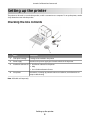
Checking the box contents
Name
Description
1
Color print cartridge
Cartridge to be installed in the printer
2
Power supply
Attaches to the power supply port located at the back of the printer
3
Installation software CD
4
Setup sheet
• Installation software for the printer
• Help
• User's Guide in electronic format
Instructions on setting up printer hardware and software, and information on
setup troubleshooting
Note: USB cable sold separately
Setting up the printer
6
Lexmark Confidential until announced
Learning about the printer
Understanding the parts of the printer
Use the
To
1
Paper guide
Keep paper straight when feeding.
2
Paper support Load paper.
3
Handle
4
Carry the printer.
Turn the printer on or off.
5
Access cover
6
Paper exit tray Hold paper as it exits.
7
PictBridge port Connect a PictBridge-enabled digital camera, a flash drive, or a Bluetooth adapter to the
printer.
Access the print cartridge.
Note: Bluetooth adapter sold separately.
8
Light
Determine if the print cartridge needs replacement. The light comes on once the cartridge
is 10 percent full. It remains on until the cartridge is replaced with a new cartridge.
Learning about the printer
7
Lexmark Confidential until announced
Use the
1
To
Power supply port Connect the printer to a power source using the power supply.
1 Plug the cord all the way into the power supply port on the printer.
2 Plug the cord into an electrical outlet that other electrical devices have been using.
3 If the
2
USB port
light is not on, press
.
Connect the printer to a computer using a USB cable.
Learning about the printer
8
Lexmark Confidential until announced
Learning about the software
The printer software can be accessed only from a computer. For more information on setting up the printer with a
computer, see the Setup sheet that came with the product.
Use this
To
Opening the software
The Solution Center
Find troubleshooting and
maintenance information.
From the desktop:
1 Click Start ª Programs or All
Programs ª P200 Series.
2 Select Solution Center.
Print Properties
Select the best print settings for the
photo you are printing using a
computer.
1 With a photo open in a program,
click File ª Print.
2 From the Print dialog, click
Properties, Preferences,
Options, or Setup.
Using the Solution Center
The Solution Center provides help, as well as information about the printer status and ink level.
To open the Solution Center:
1 Click Start ª Programs or All Programs ª P200 Series.
2 Select Solution Center.
The Solution Center consists of the following tabs:
From this tab
Printer Status (Main dialog)
You can
• View the status of the printer. For example, while printing, the
status of the printer is Busy Printing.
• View the ink level of the print cartridge.
Troubleshooting
• Learn tips about the current status.
• Solve printer problems.
Maintenance
•
•
•
•
•
Install the print cartridge.
Print a test page.
Clean to fix horizontal streaks.
Align to fix blurry edges.
Troubleshoot other ink problems.
Learning about the software
9
Lexmark Confidential until announced
From this tab
You can
Advanced
•
•
•
•
Change the appearance of the Printing Status window.
Turn printing voice notification on or off.
Change the network printing settings.
Obtain software version information.
Note: For more information, click Help in the lower right corner of the screen.
Using Print Properties
Opening Print Properties
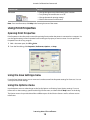
Print Properties is the software that controls the printing function when the printer is connected to a computer. You
can change the settings in Print Properties based on the type of project you want to create. You can open Print
Properties from almost any program:
1 With a document open, click File ª Print.
2 From the Print dialog, click Properties, Preferences, Options, or Setup.
Using the Save Settings menu
From the Save Settings menu, you can name and save the current Print Properties settings for future use. You can
save up to five custom settings.
Using the Options menu
Use the Options menu to make changes to the Quality Options and Printing Status Options settings. For more
information on these settings, open the tab dialog from the menu, and then click the Help button on the dialog.
The Options menu also provides direct links to different parts of the Solution Center as well as software version
information.
Learning about the software
10
Lexmark Confidential until announced
Using the Print Properties tabs
All of the print settings are on the two main tabs of the Print Properties software: Quality/Copies and Paper Setup.
Tab
Quality/Copies
Options
• Select a Quality/Speed setting.
• Select a Paper Type.
• Customize how the printer prints several copies of a single print job:
collated, normal, or last page first.
• Choose Automatic Image Sharpening.
Paper Setup
• Specify the size of paper loaded.
• Select the orientation of the document on the printed page: portrait or
landscape.
Learning about the software
11
Lexmark Confidential until announced
Loading paper
Loading paper
Notes:
• Load photo paper with the glossy or printable side facing you. (If you are not sure which side is the printable
side, see the instructions that came with the paper.)
• Make sure the paper is not used or damaged.
• Do not force paper into the printer.
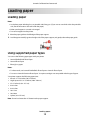
1 Move the paper guide to the left edge of the paper support.
2 Load the paper vertically against the right side of the paper support, and gently release the paper guide.
Using supported paper types
You can use the following paper types with your printer:
• Lexmark Perfectfinish Photo Paper
• Lexmark Photo Paper
• Photo/glossy paper
Notes:
• For best results, use Lexmark Perfectfinish Photo Paper or Lexmark Photo Paper.
• Do not use Lexmark Premium Photo Paper. Your print cartridge is not compatible with this type of paper.
Your printer supports the following paper sizes:
•
•
•
•
•
•
•
•
A6 card: 4.1 x 5.8 inches (105 x 148 mm)
Hagaki postcard: 3.9 x 5.8 inches (100 x 148 mm)
3.5 x 5 inches (8.89 x 12.7 cm)
4 x 6 inches
4 x 8 inches
10 x 15 cm
10 x 20 cm
L photo (89 x 127 mm)
Note: Do not load more than 25 sheets into the paper support.
Loading paper
12
Lexmark Confidential until announced
Connecting photo storage devices
Inserting a flash drive
A flash drive can be used to store photos taken using a digital camera or camera phone. The printer reads images
stored on a flash drive.
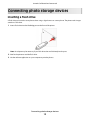
1 Insert a flash drive into the PictBridge port on the front of the printer.
Note: An adapter may be necessary if your flash drive does not fit directly into the port.
2 Wait for the printer to read the flash drive.
3 Use the software application on your computer to print the photos.
Connecting photo storage devices
13
Lexmark Confidential until announced
Connecting a PictBridge-enabled digital camera
PictBridge is a technology available in most digital cameras that lets you print directly from your digital camera
without using a computer. You can connect a PictBridge-enabled digital camera to the printer, and use the camera
to control printing photos.
1 Insert one end of the USB cable into the camera.
Note: Use only the USB cable that came with the camera.
2 Insert the other end of the cable into the PictBridge port on the front of the printer.
Note: Make sure the PictBridge-enabled digital camera is set to the correct USB mode. For more information,
see the camera documentation.
3 Use the camera to control printing photos. For more information, see the instructions in the camera
documentation.
Connecting photo storage devices
14
Lexmark Confidential until announced
Printing photos
You can use the following paper types with your printer:
• Lexmark Perfectfinish Photo Paper
• Lexmark Photo Paper
• Photo/glossy paper
Notes:
• For best results, use Lexmark Perfectfinish Photo Paper or Lexmark Photo Paper.
• Do not use Lexmark Premium Photo Paper. Your print cartridge is not compatible with this type of paper.
Printing photos using Print Properties
From a Windows program, you can use Print Properties to print photos stored on your computer.
1 Load photo paper, with the glossy or printable side facing you. (If you are not sure which side is the printable
side, see the instructions that came with the paper.) For more information, see “Loading paper” on page 12.
2 From the computer software application, click File ª Print.
3 Click Properties, Preferences, Options, or Setup.
4 From the Quality/Copies tab, select Photo.
5 From the Paper Type menu, select a paper type.
6 From the Paper Setup tab, select the paper size and the orientation of the photo.
7 Click OK.
8 Click OK or Print.
Note: To prevent smudging or scratching, avoid touching the printed surface with your fingers or sharp objects.
For best results, remove each printed sheet individually from the paper exit tray, and allow the prints to dry at
least 24 hours before stacking, displaying, or storing.
Printing photos
15
Lexmark Confidential until announced
Printing photos using Bluetooth
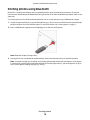
Bluetooth is a wireless technology that lets compatible products send and receive communication. The printer
communicates with Bluetooth-enabled devices through a Universal Serial Bus (USB) Bluetooth adapter, which is sold
separately.
You can print photos from a Bluetooth-enabled device such as a camera phone using a USB Bluetooth adapter.
1 Load photo paper with the glossy or printable side facing you. (If you are not sure which side is the printable side,
see the instructions that came with the paper.) For more information, see “Loading paper” on page 12.
2 Insert a USB Bluetooth adapter into the PictBridge port on the front of the printer.
Note: Bluetooth adapter sold separately.
3 To print photos from your Bluetooth-enabled device, see the documentation that came with the product.
Note: To prevent smudging or scratching, avoid touching the printed surface with your fingers or sharp objects.
For best results, remove each printed sheet individually from the paper exit tray, and allow the prints to dry at
least 24 hours before stacking, displaying, or storing.
Printing photos
16
Lexmark Confidential until announced
Maintaining the printer
Changing the print cartridge
Removing a used print cartridge
1 Make sure the printer is on.
2 Open the access cover. The print cartridge carrier moves and stops at the loading position, unless the printer is
busy.
3 Press down on the cartridge carrier lid to open the cartridge carrier.
4 Remove the used print cartridge.
If the cartridge you removed is not empty and you want to use it later, see “Preserving the print cartridge” on
page 21.
5 Close the cartridge carrier.
6 Close the access cover.
Installing the print cartridge
1 If you are installing a new print cartridge, remove the sticker and tape from the back and bottom of the cartridge.
Warning—Potential Damage: Do not touch the gold contact area on the back or the metal nozzles on the
bottom of the cartridge.
2 Open the access cover.
The print cartridge carrier moves and stops at the loading position, unless the printer is busy.
Maintaining the printer
17
Lexmark Confidential until announced
3 Press down on the cartridge carrier lid to open the cartridge carrier.
Note: If a cartridge is present, remove it.
4 Insert the cartridge.
5 Close the cartridge carrier.
6 Close the access cover.
Using genuine Lexmark print cartridges
Your printer, Lexmark print cartridges, and Lexmark photo paper are designed to perform together for superior print
quality.
If you receive an Out of Original Lexmark Ink message, the original Lexmark ink in the indicated cartridge
(s) has been depleted.
If you believe you purchased a new, genuine Lexmark print cartridge, but the Out of Original Lexmark
Ink message appears:
1 Click Learn More on the message.
2 Click Report a non-Lexmark print cartridge.
To prevent the message from appearing again for the indicated cartridge(s):
• Replace your cartridge(s) with new Lexmark print cartridge(s).
• If you are printing from a computer, click Learn more on the message, select the check box, and click Close.
Your printer warranty does not cover damage caused by non-Lexmark ink or print cartridges.
Refilling a print cartridge
The warranty does not cover repair of failures or damage caused by a refilled cartridge. Lexmark does not recommend
use of a refilled cartridge. Refilling a cartridge can affect print quality and may cause damage to the printer. For best
results, use Lexmark supplies.
Maintaining the printer
18
Lexmark Confidential until announced
Achieving better print quality
Improving print quality
If you are not satisfied with the print quality of a photo, make sure you:
• Use the appropriate paper for the photo. For best results, use Lexmark Perfectfinish Photo Paper or Lexmark Photo
Paper.
Note: Do not use Lexmark Premium Photo Paper. Your print cartridge is not compatible with this type of paper.
• Load the paper with the glossy or printable side facing you. (If you are not sure which side is the printable side,
see the instructions that came with the paper.)
• Select Photo as the print quality.
Note: To prevent smudging or scratching, avoid touching the printed surface with your fingers or sharp objects. For
best results, remove each printed sheet individually from the paper exit tray, and allow the prints to dry at least 24
hours before stacking, displaying, or storing.
If the photo still does not have the print quality you want, follow these steps:
1 Align the print cartridge. For more information, see “Aligning the print cartridge” on page 19.
If print quality has not improved, continue to step 2.
2 Clean the print cartridge nozzles. For more information, see “Cleaning the print cartridge nozzles” on
page 20.
If print quality has not improved, continue to step 3.
3 Remove and reinsert the print cartridge. For more information, see “Removing a used print cartridge” on
page 17 and “Installing the print cartridge” on page 17.
If print quality has not improved, continue to step 4.
4 Wipe the print cartridge nozzles and contacts. For more information, see “Wiping the print cartridge nozzles and
contacts” on page 20.
If print quality is still not satisfactory, replace the print cartridge. For more information, see “Ordering supplies”
on page 21.
Aligning the print cartridge
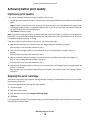
The printer automatically aligns the print cartridge after the cartridge is installed. Make sure that you have loaded
photo paper in the printer.
You may also align the print cartridge from the computer.
1 Load photo paper.
2 Open the Solution Center.
3 From the Maintenance tab, click Align to fix blurry edges.
4 Click Print.
If you aligned the cartridge to improve print quality, print your document again. If print quality has not improved,
clean the print cartridge nozzles.
Maintaining the printer
19
Lexmark Confidential until announced
Cleaning the print cartridge nozzles
1 Load photo paper.
2 Open the Solution Center. See “Using the Solution Center” on page 9.
3 From the Maintenance tab, click Clean to fix horizontal streaks.
4 Click Print.
A page prints, forcing ink through the print cartridge nozzles to clean them.
5 Print the document again to verify that the print quality has improved.
6 If print quality has not improved, try cleaning the nozzles up to two more times.
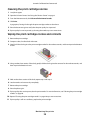
Wiping the print cartridge nozzles and contacts
1 Remove the print cartridge.
2 Dampen a clean, lint-free cloth with water.
3 Gently hold the cloth against the print cartridge nozzles for about three seconds, and then wipe in the direction
shown.
4 Using another clean section of the cloth, gently hold the cloth against the contacts for about three seconds, and
then wipe in the direction shown.
5 With another clean section of the cloth, repeat step 3 and step 4.
6 Let the nozzles and contacts dry completely.
7 Reinsert the print cartridge.
8 Print the photo again.
9 If print quality does not improve, clean the print nozzles. For more information, see “Cleaning the print cartridge
nozzles” on page 20.
10 Repeat “Cleaning the print cartridge nozzles” on page 20 up to two more times.
11 If print quality is still not satisfactory, replace the print cartridge.
Maintaining the printer
20
Lexmark Confidential until announced
Preserving the print cartridge
• Keep a new print cartridge in its packaging until you are ready to install it.
• Do not remove a cartridge from the printer except to replace, clean, or store it in an airtight container. The cartridge
does not print correctly if left exposed for an extended period of time.
Ordering supplies
Item
Part number
Lexmark color print cartridge
45
USB cable
1021294
Notes:
• For best results, use Lexmark Perfectfinish Photo Paper or Lexmark Photo Paper.
• Do not use Lexmark Premium Photo Paper. Your print cartridge is not compatible with this type of paper.
Paper
Paper size
Lexmark Perfectfinish Photo Paper
• 4 x 6 in.
• 10 x 15 cm
• L
Lexmark Photo Paper
• 4 x 6 in.
• 10 x 15 cm
Note: Availability may vary by country or region.
Recycling Lexmark products
To return Lexmark products to Lexmark for recycling:
1 Visit our Web site at www.lexmark.com/recycle.
2 Follow the instructions on the computer screen.
Maintaining the printer
21
Lexmark Confidential until announced
Troubleshooting
•
•
•
•
•
•
“Setup troubleshooting” on page 22
“Print troubleshooting” on page 24
“Jams and misfeeds troubleshooting” on page 26
“Device troubleshooting” on page 26
“Error messages troubleshooting” on page 27
“Removing and reinstalling the software” on page 28
Setup troubleshooting
Power button is not lit
Make sure you have disconnected the power supply cord from the printer and then from the wall outlet.
1 Plug the cord all the way into the power supply port on the printer.
2 Plug the cord into an electrical outlet that other electrical devices have been using.
3 If the
light is not on, press
.
Software does not install
The following operating systems are supported:
• Windows XP (32–bit)
• Windows XP (64–bit)
SOLUTION 1
1 Close all open software applications.
2 Disable any anti-virus programs.
3 Remove the printer software CD from the CD-ROM drive.
4 Restart the computer.
5 When the desktop appears, reinsert the printer software CD. The CD icon is created on the desktop.
6 Follow the instructions on the computer screen to install the software.
Troubleshooting
22
Lexmark Confidential until announced
SOLUTION 2
1 Remove the printer software CD.
2 Restart the computer.
3 When the desktop appears, cancel all Found New Hardware windows.
4 Reinsert the printer software CD.
5 Follow the instructions on the computer screen.
SOLUTION 3
1 Check the USB cable for any obvious damage.
2 Firmly plug the square end of the USB cable into the back of the printer.
3 Firmly plug the rectangular end of the USB cable into the USB port of the computer.
The USB port is marked with the
USB symbol.
SOLUTION 4
1 Disconnect the USB cable from any other device, such as a USB hub or switch box.
2 Directly connect the cable to the printer and the computer.
Cannot print from a digital camera using PictBridge
SOLUTION 1
Enable PictBridge printing on the camera by selecting the correct USB mode. For more information, see the digital
camera documentation.
SOLUTION 2
1 Disconnect the camera.
2 Connect a PictBridge-enabled digital camera to the PictBridge port. See the digital camera documentation to
determine whether it is PictBridge-enabled.
SOLUTION 3
Use only the USB cable that came with the camera.
Troubleshooting
23
Lexmark Confidential until announced
Print troubleshooting
Improving print quality
If you are not satisfied with the print quality of a photo, make sure you:
• Use the appropriate paper for the photo. For best results, use Lexmark Perfectfinish Photo Paper or Lexmark Photo
Paper.
Note: Do not use Lexmark Premium Photo Paper. Your print cartridge is not compatible with this type of paper.
• Load the paper with the glossy or printable side facing you. (If you are not sure which side is the printable side,
see the instructions that came with the paper.)
• Select Photo as the print quality.
Note: To prevent smudging or scratching, avoid touching the printed surface with your fingers or sharp objects. For
best results, remove each printed sheet individually from the paper exit tray, and allow the prints to dry at least 24
hours before stacking, displaying, or storing.
If the photo still does not have the print quality you want, follow these steps:
1 Align the print cartridge. For more information, see “Aligning the print cartridge” on page 19.
If print quality has not improved, continue to step 2.
2 Clean the print cartridge nozzles. For more information, see “Cleaning the print cartridge nozzles” on page 20.
If print quality has not improved, continue to step 3.
3 Remove and reinsert the print cartridge. For more information, see “Removing a used print cartridge” on
page 17 and “Installing the print cartridge” on page 17.
If print quality has not improved, continue to step 4.
4 Wipe the print cartridge nozzles and contacts. For more information, see “Wiping the print cartridge nozzles and
contacts” on page 20.
If print quality is still not satisfactory, replace the print cartridge. For more information, see “Ordering supplies”
on page 21.
Photo does not print
SOLUTION 1
If an error message is displayed, see “Error messages troubleshooting” on page 27.
SOLUTION 2
If the
light is not on, see “Power button is not lit” on page 22.
SOLUTION 3
Remove and then reload paper. For more information, see “Loading paper” on page 12.
Troubleshooting
24
Lexmark Confidential until announced
SOLUTION 4
Check the ink level, and install a new print cartridge if necessary. For more information, see “Installing the print
cartridge” on page 17.
SOLUTION 5
If the printer is connected to the computer through another device:
1 Disconnect the USB cable from any other device, such as a USB hub or switch box.
2 Directly connect the cable to the printer and the computer.
SOLUTION 6
1 Press
to turn the printer off.
2 Disconnect the power supply cord from the wall outlet.
3 Disconnect the other end of the power supply cord from the printer.
4 Reconnect the power supply cord to the printer.
5 Plug the power supply cord into the wall outlet.
6 Press
to turn the printer back on.
Print speed is slow
SOLUTION 1
Close all programs on your computer that you are not using.
SOLUTION 2
Try minimizing the number and size of graphics and images in the document.
SOLUTION 3
Consider purchasing more Random Access Memory (RAM) for your computer.
SOLUTION 4
Remove as many unused fonts as possible from your system.
SOLUTION 5
1 From the software application, click File ª Print.
2 Click Properties, Preferences, Options, or Setup.
3 Click Quality/Copies.
4 From the Quality/Speed area, select Normal.
Troubleshooting
25
Lexmark Confidential until announced
Partial photo prints
The flash drive or Pictbridge-enabled camera you inserted is empty or contains files that cannot be read by the printer.
SOLUTION 1
Use another flash drive or Pictbridge-enabled camera.
SOLUTION 2
Make sure the paper size being used matches the size you selected.
Jams and misfeeds troubleshooting
Paper jam in the printer
1 Firmly grasp the paper, and gently pull it out.
2 Press
.
3 Print again.
Paper jam in the paper support
1 Firmly grasp the paper, and gently pull it out.
2 Press
.
3 Print again.
Device troubleshooting
Device cannot be inserted
Make sure that the type of flash drive, camera cable, or Bluetooth adapter you are using can be used with the printer.
For more information, see “Connecting photo storage devices” on page 13.
Nothing happens when a device is inserted
SOLUTION 1
Remove and reinsert the flash drive, USB camera cable, or Bluetooth adapter quickly.
SOLUTION 2
For more information, see “Connecting photo storage devices” on page 13.
SOLUTION 3
Check that there is no obvious damage to the flash drive, PictBridge-enabled camera, or Bluetooth adapter.
Troubleshooting
26
Lexmark Confidential until announced
SOLUTION 4
Check the cable connections.
1 Check the USB cable for any obvious damage.
2 Firmly plug the square end of the USB cable into the back of the printer.
3 Firmly plug the rectangular end of the USB cable into the USB port of the computer.
The USB port is marked with the
USB symbol.
Error messages troubleshooting
These messages appear on your computer screen.
Cartridge Alert
The print cartridge needs to be replaced soon. The Cartridge Alert warning occurs when a cartridge is 25 percent full,
15 percent full, and five percent full.
Replace the print cartridge with a new cartridge. For more information, see “Removing a used print cartridge” on
page 17 and “Installing the print cartridge” on page 17.
To order supplies, click Order Ink on your computer screen. You can also see “Ordering supplies” on page 21 in this
guide.
Paper Jam
For more information, see “Jams and misfeeds troubleshooting” on page 26.
Out of Paper
The printer is out of paper in the middle of a print job. The
button on the printer blinks.
1 Load paper. For more information, see “Loading paper” on page 12.
2 Press the blinking
button on the printer.
Cartridge Stall
1 Open the access cover.
2 Make sure:
• There are no objects blocking the path of the print cartridge carrier.
• The cartridge carrier lid is snapped into place.
3 Close the access cover.
4 Press
.
5 Print again.
Troubleshooting
27
Lexmark Confidential until announced
Removing and reinstalling the software
If the printer is not functioning properly, or if a communications error message appears when you try to use the
printer, you may need to remove and reinstall the printer software.
1 Click Start ª Programs or All Programs ª P200 Series.
2 Select Uninstall.
3 Follow the instructions on the computer screen to remove the printer software.
4 Restart the computer before reinstalling the printer software.
5 Click Cancel on all New Hardware Found screens.
6 Insert the CD, and then follow the instructions on the computer screen to reinstall the software.
Troubleshooting
28
Lexmark Confidential until announced
Notices
Product name
P200 Series
Machine type
4303-012
Edition notice
August 2006
The following paragraph does not apply to any country where such provisions are inconsistent with local
law: LEXMARK INTERNATIONAL, INC., PROVIDES THIS PUBLICATION “AS IS” WITHOUT WARRANTY OF ANY KIND,
EITHER EXPRESS OR IMPLIED, INCLUDING, BUT NOT LIMITED TO, THE IMPLIED WARRANTIES OF MERCHANTABILITY
OR FITNESS FOR A PARTICULAR PURPOSE. Some states do not allow disclaimer of express or implied warranties in
certain transactions; therefore, this statement may not apply to you.
This publication could include technical inaccuracies or typographical errors. Changes are periodically made to the
information herein; these changes will be incorporated in later editions. Improvements or changes in the products
or the programs described may be made at any time.
References in this publication to products, programs, or services do not imply that the manufacturer intends to make
these available in all countries in which it operates. Any reference to a product, program, or service is not intended
to state or imply that only that product, program, or service may be used. Any functionally equivalent product,
program, or service that does not infringe any existing intellectual property right may be used instead. Evaluation
and verification of operation in conjunction with other products, programs, or services, except those expressly
designated by the manufacturer, are the user’s responsibility.
© 2006 Lexmark International, Inc.
All rights reserved.
UNITED STATES GOVERNMENT RIGHTS
This software and any accompanying documentation provided under this agreement are commercial computer
software and documentation developed exclusively at private expense.
Trademarks
Lexmark and Lexmark with diamond design are trademarks of Lexmark International, Inc., registered in the United
States and/or other countries.
All other trademarks are the property of their respective owners.
Notices
29
Lexmark Confidential until announced
Conventions
Note: A note identifies something that could help you.
Warning—Potential Damage: A warning identifies something that could damage your product hardware or
software.
CAUTION—POTENTIAL INJURY: A caution identifies something that could cause you harm.
CAUTION—DO NOT TOUCH: This type of caution indicates that you should not touch the marked area.
CAUTION—HOT SURFACE: This type of caution indicates a hot surface.
CAUTION—SHOCK HAZARD: This type of caution indicates a shock hazard.
CAUTION—TIPPING HAZARD: This type of caution indicates a tipping hazard.
Federal Communications Commission (FCC) compliance information
statement
This product has been tested and found to comply with the limits for a Class B digital device, pursuant to Part 15 of
the FCC Rules. Operation is subject to the following two conditions: (1) this device may not cause harmful interference,
and (2) this device must accept any interference received, including interference that may cause undesired operation.
The FCC Class B limits are designed to provide reasonable protection against harmful interference when the
equipment is operated in a residential installation. This equipment generates, uses, and can radiate radio frequency
energy and, if not installed and used in accordance with the instructions, may cause harmful interference to radio
communications. However, there is no guarantee that interference will not occur in a particular installation. If this
equipment does cause harmful interference to radio or television reception, which can be determined by turning
the equipment off and on, the user is encouraged to try to correct the interference by one or more of the following
measures:
•
•
•
•
Reorient or relocate the receiving antenna.
Increase the separation between the equipment and receiver.
Connect the equipment into an outlet on a circuit different from that to which the receiver is connected.
Consult your point of purchase or service representative for additional suggestions.
The manufacturer is not responsible for radio or television interference caused by using other than recommended
cables or by unauthorized changes or modifications to this equipment. Unauthorized changes or modifications could
void the user's authority to operate this equipment.
Note: To assure compliance with FCC regulations on electromagnetic interference for a Class B computing device,
use a properly shielded and grounded cable such as Lexmark part number 1021294 for USB attach. Use of a substitute
cable not properly shielded and grounded may result in a violation of FCC regulations.
Any questions regarding this compliance information statement should be directed to:
Director of Lexmark Technology & Services
Lexmark International, Inc.
740 West New Circle Road
Lexington, KY 40550
(859) 232–3000
Notices
30
Lexmark Confidential until announced
Industry Canada compliance statement
This Class B digital apparatus meets all requirements of the Canadian Interference-Causing Equipment Standard
ICES-003.
Avis de conformité aux normes de l’industrie du Canada
Cet appareil numérique de classe B est conforme aux exigences de la norme canadienne relative aux équipements
pouvant causer des interférences NMB-003.
European Community (EC) directives conformity
This product is in conformity with the protection requirements of EC Council directives 89/336/EEC and 73/23/EEC
on the approximation and harmonization of the laws of the Member States relating to electromagnetic compatibility
and safety of electrical equipmentdesigned for use within certain voltage limits.
A declaration of conformity with the requirements of the directives has been signed by the Director of Manufacturing
and Technical Support, Lexmark International, Inc., S.A., Boigny, France.
This product satisfies the Class B limits of EN 55022 and safety requirements of EN 60950.
Japanese VCCI notice
Noise emission levels
The following measurements were made in accordance with ISO 7779 and reported in conformance with ISO 9296.
Note: Some modes may not apply to your product.
1-meter average sound pressure, dBA
Printing
37
Scanning
not applicable
Copying
not applicable
Ready
Inaudible
Values are subject to change. See www.lexmark.com for current values.
Notices
31
Lexmark Confidential until announced
Waste from Electrical and Electronic Equipment (WEEE) directive
The WEEE logo signifies specific recycling programs and procedures for electronic products in countries of the
European Union. We encourage the recycling of our products. If you have further questions about recycling options,
please contact the place where you bought your printer.
ENERGY STAR
Power consumption
Product power consumption
The following table documents the power consumption characteristics of the product.
Note: Some modes may not apply to your product.
Mode
Description
Power consumption (Watts)
Printing
The product is generating hard-copy output from electronic
inputs.
9.7
Copying
The product is generating hard-copy output from hard-copy
original documents.
not applicable
Scanning
The product is scanning hard-copy documents.
not applicable
Ready
The product is waiting for a print job.
5.7
Power Saver
The product is in energy-saving mode.
5.32
High Off
The product is plugged into a wall outlet, but the power switch 0.56
is turned off.
Low Off (<1 W Off) The product is plugged into a wall outlet, the power switch is 0.56
turned off, and the product is in the lowest possible power
consumption mode.
Off
The product is plugged into a wall outlet, but the power switch 0.56
is turned off.
Notices
32
Lexmark Confidential until announced
The power consumption levels listed in the previous table represent time-averaged measurements. Instantaneous
power draws may be substantially higher than the average. Values are subject to change. See www.lexmark.com
for current values.
One-hour Off mode
This product is designed with an energy-saving one-hour Off mode. This mode is automatically engaged after this
product is not used for one hour.
Off mode
If this product has an off mode which still consumes a small amount of power, then to completely stop product power
consumption, disconnect the power supply cord from the wall outlet.
Total energy usage
It is sometimes helpful to calculate the total product energy usage. Since power consumption claims are provided
in power units of Watts, the power consumption should be multiplied by the time the product spends in each mode
in order to calculate energy usage. The total product energy usage is the sum of each mode's energy usage.
Notices
33
Lexmark Confidential until announced
Index
A
access cover 7
Advanced tab 10
aligning print cartridge 19
B
Bluetooth
adapter, inserting 16
printing 16
box contents 6
C
cannot print from digital camera
using PictBridge 23
Cartridge Alert 27
cartridge nozzles and contacts,
print
wiping 20
Cartridge Stall 27
cartridge, print
aligning 19
cleaning 20
installing 17
preserving 21
removing 17
cleaning print cartridge nozzles 20
contents, box 6
D
device cannot be inserted 26
device troubleshooting
device cannot be inserted 26
nothing happens when device is
inserted 26
E
emission notices 30, 31
error messages troubleshooting
Cartridge Alert 27
Cartridge Stall 27
Out of Paper 27
paper jam 27
F
FCC notices 30
P
finding
information 5
publications 5
flash drive
inserting 13
H
handle 7
I
improving print quality 19, 24
information, finding 5
inserting
Bluetooth adapter 16
flash drives 13
installing
print cartridge 17
printer software 28
J
jams and misfeeds troubleshooting
paper jam in paper support 26
paper jam in printer 26
L
landscape orientation, selecting 11
light 7
loading
paper 12
M
Maintenance tab 9
N
noise emission levels 31
nothing happens when device is
inserted 26
notices 30, 31, 32, 33
O
ordering supplies 21
orientation, changing
landscape 11
portrait 11
Out of Paper 27
Index
34
paper exit tray 7
paper guide 7
paper jam 27
paper jam in paper support 26
paper jam in printer 26
Paper Setup tab
changing orientation 11
changing paper size 11
paper sizes, specifying 11
paper support 7
paper, loading 12
paper, using supported
types 12, 15
partial photo prints 26
parts
access cover 7
handle 7
light 7
paper exit tray 7
paper guide 7
paper support 7
PictBridge port 7
power button 7
power supply port 8
USB port 8
photo does not print 24
photos
printing using Bluetooth 16
printing using Print Properties 15
printing using the computer 15
PictBridge port 7
PictBridge-enabled camera,
connecting 14
portrait orientation, selecting 11
power button 7
power button is not lit 22
power supply port 8
preserving print cartridge 21
print cartridge
aligning 19
cleaning 20
installing 17
preserving 21
removing 17
print cartridge nozzles and contacts
wiping 20
print cartridge nozzles, cleaning 20
Lexmark Confidential until announced
Print Properties
opening 9, 10
Options menu 10
Paper Setup tab 11
Quality/Copies tab 11
Save Settings menu 10
tabs 11
print quality, improving 19, 24
print speed is slow 25
print troubleshooting
improving print quality 24
partial photo prints 26
print speed is slow 25
printer software
reinstalling 28
removing 28
using 9
Printer Status dialog 9
printing
photos using Print Properties 15
photos using the computer 15
publications, finding 5
T
Quality/Copies tab 11
Troubleshooting tab 9
troubleshooting, device
device cannot be inserted 26
nothing happens when device is
inserted 26
troubleshooting, error messages
Cartridge Alert 27
Cartridge Stall 27
Out of Paper 27
paper jam 27
troubleshooting, jams and
misfeeds
paper jam in paper support 26
paper jam in printer 26
troubleshooting, print
improving print quality 24
partial photo prints 26
print speed is slow 25
troubleshooting, setup
cannot print from digital camera
using PictBridge 23
photo does not print 24
power button is not lit 22
software does not install 22
R
U
Q
removing print cartridge 17
S
safety information 2
setup troubleshooting
cannot print from digital camera
using PictBridge 23
photo does not print 24
power button is not lit 22
software does not install 22
software
Print Properties 9, 10, 15
removing and reinstalling 28
Solution Center 9
using 9
software does not install 22
Solution Center
Advanced tab 10
Maintenance tab 9
opening 9
Printer Status dialog 9
Troubleshooting tab 9
using 9
supplies, ordering 21
USB port 8
using
supported paper types 12, 15
W
wiping print cartridge nozzles and
contacts 20
Index
35