1
Getting started
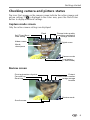
Checking camera and picture status
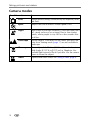
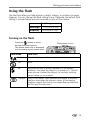
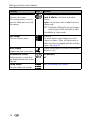
The icons that appear on the camera screen indicate the active camera and
picture settings. If
is displayed in the status area, press the Flash/Status
button to display additional settings.
Capture mode screen
Only the active camera settings are displayed:
Self Timer/Burst
Date stamp
Album name
Flash
Picture/video quality
Pictures/time remaining
Storage location
Digital zoom
Mode
description
Camera mode
Low battery
(flashing = exhausted)
Review screen
Print tag/number of prints
Favorite tag
Email tag
Protect
Picture/video number
Image storage
location
Review mode
Scroll arrows
6