1
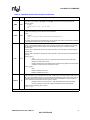
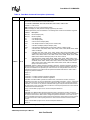
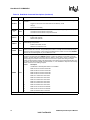
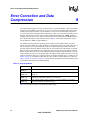
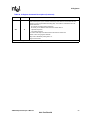
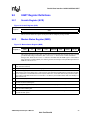
537EX Chipset
Developer’s Manual
January 2002
Order Number: 273584-002
Information in this document is provided in connection with Intel® products. No license, express or implied, by estoppel or otherwise, to any intellectual
property rights is granted by this document. Except as provided in Intel’s Terms and Conditions of Sale for such products, Intel assumes no liability
whatsoever, and Intel disclaims any express or implied warranty, relating to sale and/or use of Intel products including liability or warranties relating to
fitness for a particular purpose, merchantability, or infringement of any patent, copyright or other intellectual property right. Intel products are not
intended for use in medical, life saving, or life sustaining applications.
Intel may make changes to specifications and product descriptions at any time, without notice.
Designers must not rely on the absence or characteristics of any features or instructions marked “reserved” or “undefined.” Intel reserves these for
future definition and shall have no responsibility whatsoever for conflicts or incompatibilities arising from future changes to them.
The 536EX may contain design defects or errors known as errata which may cause the product to deviate from published specifications. Current
characterized errata are available on request.
Contact your local Intel sales office or your distributor to obtain the latest specifications and before placing your product order.
Copies of documents which have an ordering number and are referenced in this document, or other Intel literature may be obtained by calling
1-800-548-4725 or by visiting Intel's website at http://www.intel.com.
Copyright © Intel Corporation, 2002
*Third-party brands and names are the property of their respective owners.
2
536EX Chipset Developer’s Manual
Intel Confidential
Contents
Contents
1
Introduction...................................................................................................................................... 7
1.1
1.2
1.3
1.4
Controllerless Modem Driver Overview ................................................................................ 7
1.1.1 Windows* Millennium Edition (Windows Me), Windows 2000, Windows XP, and
Windows NT* 47
1.1.2 Windows 95 and Windows 98.................................................................................. 8
V.90/V.92 and V.34 Data Modes .......................................................................................... 9
Modem Connection Overview............................................................................................. 10
AT Commands Overview .................................................................................................... 11
1.4.1 Sending Commands .............................................................................................. 12
1.4.2 AT Escape Sequences .......................................................................................... 13
1.4.3 Dial Modifier ........................................................................................................... 13
2
AT Command Summary Tables .................................................................................................... 14
3
Data Mode AT COMMANDS ......................................................................................................... 26
3.1
3.2
3.3
3.4
3.5
3.6
3.7
3.8
3.9
3.10
Using AT Commands to Access the S-Registers [Sn?, Sn=x, ?]........................................ 26
Modem Responses and Command Echo [En, Vn, Xn, Wn, Qn]......................................... 26
Modem Reset and NVRAM Commands [DS=m, Zn, &F, &Vn, &Yn, &Wn, &Zn=x] ........... 28
Modem Identification Commands [In, +FMI, +FMR, +FMM, +GMI, +GMM, +GMR, +GSN,
+FMFR?, +FMDL?, +FREV?] ............................................................................................. 29
Establishing a Modem Connection [A, D, DS = n, S0]........................................................ 29
Online Command Mode [Escape Codes, On]..................................................................... 30
Hanging Up [Hn, S10, Zn, &D2].......................................................................................... 30
Modem-to-Modem Connection Data Rates ........................................................................ 30
Diagnostic Testing [S18, &Tn] ............................................................................................ 36
3.9.1 Local Analog Loopback [AT&T1] ........................................................................... 36
3.9.2 Local Analog Loopback With Self-Test [AT&T8].................................................... 37
AT Escape Sequences ....................................................................................................... 38
3.10.1 Time-Independent Escape Sequence ................................................................... 38
3.10.2 Hayes* Escape Sequence ..................................................................................... 40
4
Error Correction and Data Compression ....................................................................................... 56
5
Fax Class 1 AT Commands........................................................................................................... 64
5.1
5.2
6
Fax Identity Commands...................................................................................................... 64
Fax Class 1 Commands ..................................................................................................... 64
IS-101 Voice Mode AT Commands ............................................................................................... 70
6.1
6.2
DTMF Detection Reporting ................................................................................................. 71
Relay Control ...................................................................................................................... 71
7
S-Registers.................................................................................................................................... 85
8
Caller ID......................................................................................................................................... 90
9
Parallel Host Interface 16C450/16C550A UART ........................................................................... 92
9.1
9.2
UART Emulation in the Controllerless Modem ................................................................... 92
UART Register Definitions.................................................................................................. 95
536EX Chipset Developer’s Manual
3
Intel Confidential
Contents
9.3
9.2.1 Scratch Register (SCR) ......................................................................................... 95
9.2.2 Modem Status Register (MSR).............................................................................. 95
9.2.3 Line Status Register (LSR) .................................................................................... 96
9.2.4 Modem Control Register (MCR) ............................................................................ 97
9.2.5 Line Control Register (LCR) .................................................................................. 97
9.2.6 FIFO Control Register (FCR)................................................................................. 98
9.2.7 Interrupt Identity Register (IIR) .............................................................................. 99
9.2.8 Interrupt Enable Register (IER) ........................................................................... 100
9.2.9 Transmitter Holding Register (THR) .................................................................... 100
9.2.10 Receiver Buffer Register (RBR)........................................................................... 101
9.2.11 Divisor Latch Registers (DLM and DLL) .............................................................. 101
16C550A UART FIFO Operation ...................................................................................... 102
9.3.1 FIFO Interrupt Mode Operation ........................................................................... 102
9.3.2 FIFO Polled Mode Operation............................................................................... 102
Figures
1
2
3
4
5
6
7
8
9
10
11
12
13
14
15
16
17
18
19
20
21
22
23
24
WDM Driver Block Diagram.......................................................................................................... 8
VxD Mini Port Driver Block Diagram............................................................................................. 9
Example of a Remote Connection.............................................................................................. 27
Modem-on-Hold: Incoming Voice Call in Data Mode.................................................................. 32
Modem-on-Hold: Initiating a Voice Call in Data Mode ................................................................ 33
Local Analog Loopback Test ...................................................................................................... 37
Local Analog Loopback with Self-Test ....................................................................................... 37
T.30 HDLC Frame Format.......................................................................................................... 66
CLASS 1 DTE-Generated HDLC Frame Information (AT+FTH=<mod>)................................... 66
CLASS 1 DTE Reception of HDLC Frame Information (AT+FRH=<mod>) ............................... 66
UART Emulation in Intelsdb.VxD................................................................................................ 92
FIFO Buffers for Transmitter and Receiver ................................................................................ 93
Parallel Host Interface UART Register Bit Assignments ............................................................ 94
Scratch Register (SCR) .............................................................................................................. 95
Modem Status Register (MSR)................................................................................................... 95
Line Status Register (LSR)......................................................................................................... 96
Modem Control Register (MCR) ................................................................................................. 97
Line Control Register (LCR) ....................................................................................................... 97
FIFO Control Register (FCR)...................................................................................................... 98
Interrupt Identity Register (IIR) ................................................................................................... 99
Interrupt Enable Register (IER) ................................................................................................ 100
Transmitter Holding Register (THR) ......................................................................................... 100
Receiver Buffer Register (RBR) ............................................................................................... 101
Divisor Latch Registers (DLM and DLL) ................................................................................... 101
4
536EX Chipset Developer’s Manual
Intel Confidential
Contents
Tables
1
2
3
4
5
6
7
8
9
10
11
12
13
14
15
16
17
18
19
20
21
22
23
24
25
26
27
28
29
DTE-to-DCE Data Rates for Each Mode .................................................................................... 11
DCE-to-DCE Data Rates for Each Mode.................................................................................... 11
DCE-to-ISP Data Rates for V.90 Mode ...................................................................................... 11
DTE-Modem Data Rate Response Codes.................................................................................. 12
Data Mode Command Summary ................................................................................................ 14
V.44/V.42/V.42 bis MNP Command Summary ........................................................................... 19
Fax Identity Command Summary ............................................................................................... 21
Fax Class 1 Command Summary............................................................................................... 21
IS-101 Voice Command Summary ............................................................................................. 22
Voice DTEÆDCE Character Pairs ............................................................................................. 22
Voice DTE¨DCE Character Pairs................................................................................................ 23
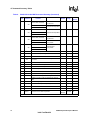
Dial Modifiers .............................................................................................................................. 24
S-Register Summary .................................................................................................................. 24
Data Reporting Wn Mapping ...................................................................................................... 27
Product Identification Information ............................................................................................... 29
Supported Modulation Types...................................................................................................... 35
Resulting Modem-to-Modem Connection Rates with Non-Default Values ................................. 36
Data Mode Command Descriptions............................................................................................ 40
Operating Modes ........................................................................................................................ 56
Resulting +ES Connection Types............................................................................................... 57
V.44/V.42/V.42 bis and MNP Data Modem Command Descriptions .......................................... 57
Fax Identity Command Descriptions........................................................................................... 64
<mod> Selection Table............................................................................................................... 65
Fax Mode Command Descriptions ............................................................................................. 67
Voice Mode Command Descriptions .......................................................................................... 71
S-Register Command Descriptions ............................................................................................ 85
Caller ID Tags for Formatted Reporting...................................................................................... 90
Interrupt Control Functions ......................................................................................................... 99
Programmable Data Rates .......................................................................................................101
536EX Chipset Developer’s Manual
5
Intel Confidential
Contents
Revision History
Date
Revision
Description
January 2002
002
Changed references to “HaM Data Fax Voice” to “Intel 536EP
V.92 Modem.”
August 2001
001
Initial release
6
536EX Chipset Developer’s Manual
Intel Confidential
1
Introduction
This developer’s manual describes the software interface for Intel® 536EX (controllerless and
controller) chipset solutions. The controllerless-based solutions include the 536EP for PCI and
Mini-PCI. Refer to the chipset datasheets for the detailed chipset descriptions (public order
numbers 273503-001, 273xxx-001, 273xxx-001, 273xxx-001, and 273xxx-001).
The controllerless-based chipset, as the name implies, does not have a dedicated hardware
controller. The controller functions are executed by the CPU. This developer’s manual includes the
AT command sets for data, fax, and voice and the UART interface and emulation. Like the earlier
solutions from Intel, the 536EX chipsets support a variety of applications without the need of
additional firmware development. Note, the supported AT commands are firmware or driver
version dependent.
1.1
Controllerless Modem Driver Overview
1.1.1
Windows* Millennium Edition (Windows Me), Windows
2000, Windows XP, and Windows NT* 4
The controllerless modem chipsets are integrated into the Microsoft* Windows* Me, Windows
2000, Windows XP, and Windows NT* 4 operating systems via proprietary Intel® Windows
Driver Model (WDM) modem drivers. These drivers are fully plug and play capable and conform
to all Microsoft WHQL certification requirements.
The functional block diagram in Figure 1 shows the common WDM architecture for the
Microsoft’s operating systems supporting common WDM drivers model.
User-mode application, via special Windows API (FILE, TAPI, UNIMODEM), can access a virtual
COM port provided by the Intel WDM driver. The data flow is converted inside the driver in
accordance with some compression and a channel level protocol and passed to the DSP. The
control flow follows the common Microsoft WDM driver model. The Intel WDM driver is
installed as a stack of filter drivers below the system modem.sys driver.
536EX Chipset Developer’s Manual
7
Intel Confidential
Introduction
Figure 1. WDM Driver Block Diagram
User
applications
User applications
Kernel - ring0
Modem drivers stack
virtual COM
port,
channel
protocols
layer
WDM driver
Intels51.sys
PCI bus
Hardware
1.1.2
Windows 95 and Windows 98
When the controllerless modem chipsets are used with Microsoft Windows 95 and Windows 98
applications, the traditional UART and serial port emulations are replaced by the proprietary HaM
Mini Port driver (see Figure 2). Instead of transferring commands to UART virtual registers, then
to a serial port, the HaM Port Driver sends commands directly to the Windows virtual machine
driver VCOMM.VxD. This low-level communication driver supports the Win16 and Win32
Communication APIs. Like the WDM drivers, the Mini Port VxD drivers are fully plug and play
and conform to Microsoft WHQL certification requirements.
8
536EX Chipset Developer’s Manual
Intel Confidential
Introduction
When the controllerless chipsets are used with MS-DOS* applications, however, a UART
emulation is required. Intel provides an additional driver called Intelsdb.VxD, which includes a
UART emulation. Please refer to Section 9.1, “UART Emulation in the Controllerless Modem” on
page 92 for an explanation of the 536EX UART emulation. The Intelsdb.VxD driver interacts
directly with the VCOMM.VxD driver using the Win16 and Win32 Communication APIs.
Figure 2. VxD Mini Port Driver Block Diagram
NON-SYSTEM
VIRTUAL MACHINE
MS-DOS SHELL APPLICATION
OR DRIVER
SYSTEM VIRTUAL MACHINE
MS-DOS
APPLICATION
WINDOWS
APPLICATION
TAPI
Win 16
Unimodem
COMM.DRV
Intelsdb.VXD
VCOMM.VXD
HaM Port Driver
Interrupt Services
Chipset Hardware
1.2
V.90/V.92 and V.34 Data Modes
The 536EX chipset defaults to the V.90 or V.92 mode depending on the driver version. The V.90/
V.92 mode allows receive data rates of up to 56,000 kbps over the PSTN (public switched
telephone network) only in connections with equipment-compatible ISPs (Internet Service
Providers); however, FCC regulations limit receive speeds to 53,333 kbps due to excessive power
demands at higher speeds. In modem-to-modem connections, V.90/V.92 mode falls back to V.34
mode in both the transmit and receive directions. The chipsets implement all data rates and
modulation schemes for ITU-T (International Telecommunications Union-Telecommunications)
standards V.34, V.32 bis, V.32, V.22 bis, V.22, V.21, Bell 212A, and Bell 103.
536EX Chipset Developer’s Manual
9
Intel Confidential
Introduction
1.3
Modem Connection Overview
The DCE (modem) operates in one of two states: command or online. In each state, both data and
commands (including DCE responses) are transferred through the UART THR (Transmit Holding
register) and the RBR (Receiver Buffer register).
The modem defaults to the command state. In the command state, the DTE (host) communicates to
the modem through AT commands and S-registers. AT commands are character strings that help
guide modem operation. S-registers are internal modem registers that the DTE can access. The Sregisters contain modem status and configuration information. Many of the AT commands
indirectly affect the contents of the S-registers. The AT command set and S-registers are divided
into the following modes: Group 3 fax, data, V.44/V.42 bis/V.42/MNP, and voice. Note that
supported AT commands are firmware revision-dependent (that is, not all commands are supported
by all modem models or all firmware revisions).
All command lines sent to the modem, except for A/, must be preceded by an ‘AT’ (which stands
for ‘attention’) and terminated by the contents of S-register S3 (typically a carriage return <CR>).
The ‘AT’ prompts the modem to receive a command line from the DTE. A <CR> informs the
modem that the entire command string has been transmitted and that the modem should start
processing all the commands within the command line.
A command line may include one or more AT commands that may or may not be separated by a
space. AT commands may be either upper- or lower-case characters, but all characters for a given
command must use the same case. If there are multiple commands in a line, a semicolon (;) must be
placed after each fax or voice command. The modem can be configured to send back (echo) to the
DTE any data that the DTE sends to the modem (while in command state only). The last command
may be repeated by typing A/ without using a carriage return. Each command line may include up
to 80 characters and spaces.
Examples of AT command strings:
ATS1?<CR>
A/
AT &C1 &D2 +FCLASS=? <CR>
AT &C1 &D2 +FCLASS=?; S0=1 <CR>
The modem provides status information to the DTE in the form of response codes. These response
codes can be expressed in text or numeric form. The supported response codes are provided in
Table 4 on page 12.
Examples of modem responses:
+MCR: V90
+MRR: 28800
CONNECT 50666
In the online state, the DCE is off-hook and communicating with a remote modem. Any data sent
from the DTE to the DCE is transmitted to the remote modem. Similarly, any data that the DCE
receives from the remote modem is transmitted to the DTE.
Note:
In the online state, the DCE does not ‘echo-back’ any of the data that the DTE sent to the DCE.
10
536EX Chipset Developer’s Manual
Intel Confidential
Introduction
The modem recognizes AT commands from the DTE at any valid data rate from 300 bps to 115,200
bps (that is, the modem autobauds up to 115,200 bps); however, the DTE should use the data rate
specified for each mode according to the transmitting direction—DTE-to-modem (Table 1) or
modem-to-modem (Table 2). The V.90 and V.92 data rates are effective only in DCE-to-ISP
connections.
Table 1.
DTE-to-DCE Data Rates for Each Mode
Mode
Table 2.
Data (V.34)
2400–115,200
Data (V.90)
28,800–115,200
Data (V.92)
28,800–115,200
Fax
19,200
Voice
19,200–115,200
Affected Data
DTE-to-modem data rate
AT commands, playback and record modes
(varies according to compression type)
DCE-to-DCE Data Rates for Each Mode
Mode
Table 3.
Data Rate (bps)
Data Rate (bps)
Data (V.34)
(transmit and receive)
2400–33,600
Fax
300–14,400
Voice
19,200–115,200
Affected Data
DTE-to-modem data rate
AT commands, playback and record modes
(varies according to compression type)
DCE-to-ISP Data Rates for V.90 Mode
Mode
Data Rate (bps)
Data (V.90) transmit
4800–33,600
Data (V.90) receive
28,000–56,000
Data (V.92) transmit
24,000–48,000
Data (V.92) receive
28,000–56,000
Affected Data
ISP-to-modem data rate
Each command may have one or more parameters associated with it. If a parameter is not sent for a
command requiring a numeric parameter, then the modem assumes a zero (‘0’) parameter (only if
zero is a valid parameter for the command). For example, ATZ and ATZ0 commands perform
identical functions (that is, the modem sees ‘ATZ’ and automatically uses the ‘0’ parameter during
processing the command). Other commands do not use parameters.
1.4
AT Commands Overview
The AT command set and S-registers are divided into four categories: data, Group 3 fax, voice, and
V.42/MNP. Summaries of all commands are provided later on in this chapter.
536EX Chipset Developer’s Manual
11
Intel Confidential
Introduction
1.4.1
Sending Commands
All command lines sent to the modem, except for A/, must be preceded by an ‘AT’ and terminated
by the contents of S-register S3 (typically a carriage return <CR>). AT stands for ‘attention’ and
prompts the modem to receive a command line from the DTE. A <CR> informs the modem that the
entire command string has been transmitted and to begin processing all the commands in the
command line. A command line can include one or more AT commands. The commands can be
separated by a space, if desired, but no punctuation is needed except for extended commands.
Extended commands begin with a ‘+’, such as fax, voice, and V.250 commands. In a multiplecommand line, extended AT commands must be separated from following commands by a
semicolon(;).
Examples:
ATS1?<CR>
A/
AT &F &D2 +FCLASS=?<CR>
AT +FCLASS=0; S0=1<CR>
The modem provides status information to the DTE in the form of response codes, as listed in
Table 4. Response codes take two (2) forms, text (ATV1) or numeric (ATV0), depending on how
the modem is configured.
Table 4 lists basic format response codes. These response codes have numeric equivalents that are
displayed depending on the value of ATV. In addition to the basic format response codes, there are
extended syntax result codes that indicate connection status of the DCE-DCE connection that are
not effected by numeric response reporting. These result codes have no numeric equivalent and are
always issued in text form. The result codes display modem mode, transmit connection rate, error
correction, compression, DTE rate, and receive rate. Note that the final connection message only
indicates receive rate if ATXn is greater than 0. The format for the result codes code depends on the
Wn command. The setting of the Wn command will determine which of the following connect
results codes are displayed (+MCR, +MRR, +ER, +DR, +ILRR). Refer to the Wn command for the
detailed description of the command. Note that the supported carrier modes for +MCR can be
found in parameter 1 of +MS. The last result code is the CONNECT <text>, where text is the DCE
receive rate. Note, the CONNECT <text> is not displayed when ATX0 is indicated, just
CONNECT is displayed and is reported by the rules in Table 4.
Table 4.
DTE-Modem Data Rate Response Codes
Numeric
Text
Numeric
Text
0
OK
9
DELAYED CALL
1
CONNECT
10
BLACKLISTED
2
RING
11
+FCERROR
3
NO CARRIER
12
RINGBACK
4
ERROR
13
CPON=
6
NO DIALTONE
14
CPOF=
7
BUSY
15
DRON=
8
NO ANSWER
16
DROF=
After sending an AT command string to the modem, the DTE must wait for a response code from
the modem before sending a new AT command string to the modem.
12
536EX Chipset Developer’s Manual
Intel Confidential
Introduction
1.4.2
AT Escape Sequences
The 536EX provides the industry-standard escape sequence, TIES (Time Independent Escape
Sequence). TIES is designed to work with existing communication software written for the Hayes
Escape Sequence.
Upon special request, Ambient provides the Hayes* Escape Sequence; however, please note that
licensing can be required.
TIES/Hayes* Escape Sequences
The 536EX modem chipset is manufactured with TIES (Time Independent Escape Sequence) as
the default setting. It is Hayes’ position that you must have a valid license from Hayes Micro
Computer of Norcross, Georgia, before producing modem systems that use the Hayes Escape
Sequence.
Intel accepts no responsibility and does not indemnify nor in any way provide protection for
patent or possible patent violations to its customers or users of it products.
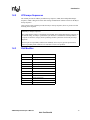
1.4.3
Dial Modifier
Command
Function
0 to 9
Dialing digits
A, B, C, D, *, #
Tone dial characters
P
Pulse dial
R
Reverse Originate mode
S=n
Dial NVRAM telephone number
T
Tone dial
W
Wait for dial tone
,
Pause
!
Flash hook
@
Wait for quiet answer
;
Return to command state
-()
Ignored by modem
536EX Chipset Developer’s Manual
13
Intel Confidential
AT Command Summary Tables
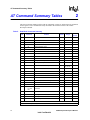
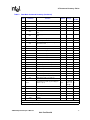
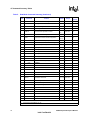
2
AT Command Summary Tables
This section contains summary tables of all AT commands, S-registers, and between AT commands
and S-registers. These commands are fully described in the relevant sections of the 536EX
Developer’s Manual.
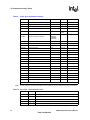
Table 5.
Data Mode Command Summary
Note
**
Command
Range
Reported
by &Vn
A/
Repeat last command
none
–
no
Answer
none
–
no
Cn
Carrier control option
1
0, 1
no
C1
Transmit carrier always off
Normal transmit carrier
D
Dial command
none
–
no
En
Command mode echo
1
0, 1
yes
0
0, 1
no
0
0–7, 10–11,
14, 20–23
no
2
0–3
yes
E0
E1
Hn
Disables echo
Enables echo
Switch hook control
H0
Hangs up the telephone line
H1
Picks up the telephone line
In
*
Default
A
C0
*
Function
Identification/checksum option
I0
ROM Checksum
I1
Modem Name
I2
Manufacturer
I3
Chipset
I4
Firmware Version
I5
Modem Chip Hardware Configuration
I6
DSP Patch Level
I12
Country Code
I7–I11, I13,
I14, I20–
I25
Reserved
Ln
Speaker volume control
L0
Low speaker volume
L1
Low speaker volume
L2
Medium speaker volume
*
Value saved in NVRAM.
**
Command not preceded by an ‘AT.’
14
536EX Chipset Developer’s Manual
Intel Confidential
AT Command Summary Tables
Table 5.
Data Mode Command Summary (Continued)
Note
*
Command
Function
L3
High speaker volume
M0
Speaker always off
M1
Speaker on until carrier present
M2
Speaker always on
M3
Speaker off during dialing; speaker on until
carrier present
Mn
Speaker control
On
Go online
O0
Returns modem to Data mode
O1
Retrains equalizer and then returns to Data
mode
O3
Renegotiates rate and then returns to Data
mode
Default
Range
Reported
by &Vn
1
0–3
yes
0
0, 1, 3
no
*
P
Select pulse dialing
none
–
yes
*
Qn
Result code display control
0
0, 1
yes
Q0
Enables result codes
Q1
Disables result codes
Sn
Select an S-register
none
0–33
no
Sn=x
Write to an S-register
none
n = 0–33
x = 0–255
no
Sn?
Read from an S-register
none
0–33
no
*
T
Select tone dialing
none
–
no
*
Vn
Result code form
1
0, 1
yes
0
0–4
yes
*
V0
Choose numeric form
V1
Choose verbose (text) form
Wn
Response code data rate
W0, W1
DTE data rate
W2
Modulation, DCE TX rate
W3
Modulation, DCE TX rate, Error Correction,
Compression and DTE data rate
W4
Modulation, DCE TX rate, Error Correction,
Compression
*
Value saved in NVRAM.
**
Command not preceded by an ‘AT.’
536EX Chipset Developer’s Manual
15
Intel Confidential
AT Command Summary Tables
Table 5.
Data Mode Command Summary (Continued)
Note
*
*
Command
Xn
X0
Enables result codes 0–4; disables detection
of busy and dial tone
X1
Enables result codes 0–5, 10, and above;
disables busy and dial tone detection
X2
Enables result codes 0–6 and 10 and above;
disables busy detection and enables dial
tone detection
X3
Enables result codes 0–5, 7, and 10 and
above; enables busy detection and disables
dial tone detection
X4
Enables result codes 0–7 and 10 and above;
enables busy and dial tone detection
Yn
Long space disconnect
Y0
Disables long space disconnect
Y1
Enables long space disconnect
Recall stored profile
Z0
Resets modem and recalls user profile 0
Z1
Resets modem and recalls user profile 1
&C0
Ignores remote modem status; DCD always
on
&C1
DCD set according to remote modem status
&Cn
DCD (data carrier detect) option
&Dn
*
Default
Result code type
Zn
*
Function
DTR (data terminal ready) option
&D0
In Async mode, modem ignores DTR
&D1
Modem switches from data mode to
command mode when an on-to-off transition
of DTR occurs
&D2
When DTR switches off, the modem goes
on-hook and disables Auto-answer mode;
when DTR switches on, auto-answer is
enabled
&D3
Turning off DTR re-initializes the modem and
resets values except UART registers
Range
Reported
by &Vn
4
0–4
yes
0
0, 1
yes
0
0, 1
no
1
0, 1
yes
2
0–3
yes
&F
Load factory defaults
none
–
no
&Gn
Guard tone option (1200 bps and 2400 bps
only)
0
0–2
yes
3
0, 3, 4
yes
&Kn
&G0
Disables guard tone
&G1
Enables 550 Hz guard tone
&G2
Enables 1800 Hz guard tone
Select serial flow control
*
Value saved in NVRAM.
**
Command not preceded by an ‘AT.’
16
536EX Chipset Developer’s Manual
Intel Confidential
AT Command Summary Tables
Table 5.
Data Mode Command Summary (Continued)
Note
*
*
Command
&K0
Disables flow control
&K3
Bidirectional hardware flow control
&K4
XON/XOFF software flow control
&Pn
Dial pulse ratio
&P0
Sets 10 pps pulse dial with 39%/61% makebreak
&P1
Sets 10 pps pulse dial with 33%/67% makebreak
&Sn
DSR (data set ready) option
&S0
DSR is always active
&S1
DSR active only during handshaking and
when carrier is lost
&Tn
*
Self test commands
&T0
Terminates test in progress
&T1
Initiates local analog loopback
&U0
Enables Trellis coding with QAM as fallback
&U1
QAM modulation only
&Un
Disable Trellis coding
&Vn
View active and stored profiles
&V0
View active profile and stored profile 0
&V1
View active profile and stored profile 1
&Wn
Stored active profile
&W0
&W1
*
*
*
Function
&Yn
Default
Range
Reported
by &Vn
0
0, 1
yes
0
0, 1
yes
0
0–1, 8
no
0
0, 1
no
0
0, 1, 3
no
0
0, 1
no
0
0, 1
yes
Store in user profile 0
Store in user profile 1
Select stored profile on power up
&Y0
Recall stored profile 0 on power-up
&Y1
Recall stored profile 1 on power-up
&Zn=x
Store telephone number (up to 30 digits) to
location ‘n’ (0–3)
none
n = 0–3
x = 0–9 A B
CD#*TP
RW@,!;
no
%En
Auto-retrain control
1
0, 1
yes
1
0, 1
yes
%E0
Disables auto-retrain
%E1
Enables auto-retrain
%Gn
Rate renegotiation
%G0
Disabled
%G1
Enabled
*
Value saved in NVRAM.
**
Command not preceded by an ‘AT.’
536EX Chipset Developer’s Manual
17
Intel Confidential
AT Command Summary Tables
Table 5.
Data Mode Command Summary (Continued)
Note
*
Command
-Cn
Function
Default
Generate data mode calling tone
-C0
Calling tone disabled
-C1
1300 Hz calling tone enabled
-C2
V.8 calling tone and 1300 Hz calling tone
Reported
by &Vn
Range
0
0–2
no
+A8E=m
V.8 and V.8 bis operation controls
1, 1, C1,
0, 0
See note
no
+EB
Controls break handling
1, 0, 30
See note
no
+ESA
Synchronous access mode configuration
0, 0, 1, ,
0, 0, 0,
no
+ESR
Controls selective repeat option in V.42
1
0–2
no
+ETBM
Controls call termination buffer management
1, 1, 20
See note
no
+GCAP
Request complete capabilities list
none
no
+GCI
Country of installation
none
no
+GMI
Identify modem manufacturer
none
–
no
+GMM
Identify product model
none
–
no
+GMR
Identify firmware version
none
–
no
+GSN
Identify product serial number ID
none
–
no
+IFC
Controls DTE-DCE flow control
2, 2
See note
no
+ILRR=m
Controls local rate reporting
0
0, 1
no
m=0
Disabled
m=1
Enabled
+MA
Controls modulation automode
–
See note
no
+MR=m
Selects modulation
0
See note
no
See note
m=0
Disabled
m=1
Enabled
+MS=m
Modulation selections
V92, 1,
0, 0, 0, 0
+PCW=m
Call waiting enable
0
+PHSW=m
Controls 2C relay
none
+PIG=m
PCM upstream ignore
1
no
+PMH=m
Modem on hold enable
0
no
+PMHF
V.92 modem on hold hook flash
none
no
+PMHR
Initiate modem on hold
none
no
+PMHT=m
Modem on hold timer
0
no
+PQC=m
V.92 phase 1 and phase 2 control
0
no
+PSS=m
Use short sequence
2
no
*
Value saved in NVRAM.
**
Command not preceded by an ‘AT.’
18
a
no
no
0, 1
no
536EX Chipset Developer’s Manual
Intel Confidential
AT Command Summary Tables
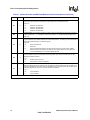
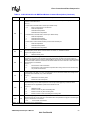
a. For Data mode, the factory default setting is AT+MS=V92, 1, 0, 0, 0, 0 to send at speeds of 33,600 bps or
below and receive at speeds of 53,333 bps and below.
Note:
Table 6.
See the relevant sections in the 536EX Developer’s Manual for full command description and
parameter ranges.
V.44/V.42/V.42 bis MNP Command Summary
Command
*
%An
Set auto-reliable fallback character
13
0–127
yes
*
%Cn
MNP 5 data compression control
1
0, 1
yes
3
0–3
yes
%C0
%C1
*
*
*
*
\An
Function
Default
Range
Reported
by &Vn
Note
No compression
Enables MNP5 data compression
MNP block size
\A0
Maximum 64 characters
\A1
Maximum 128 characters
\A2
Maximum 192 characters
\A3
Maximum 256 characters
\Bn
Set transmit break
3
0–9
\Cn
Set auto-reliable buffer
0
0–2
yes
0
0, 1
yes
0
0, 1
yes
5
0–5
no
\C0
No data buffering
\C1
Four-second buffer until 200 characters in the buffer or
detection of a SYN character
\C2
No buffering. Connects non-V.42 modems to V.42
modem
\Gn
Set modem port flow control
\G0
Disables port flow control
\G1
Sets port flow control to XON/XOFF
\J0
Disables rate adjust
\J1
Enables rate adjust
\Jn
bps rate adjust control
\Kn
Set break control
connect state, transmits
\K0
Enters command mode,
no break sent
command state, transmits
Destructive/expedited
connect state, receives
connect state, transmits
\K1
command state, transmits
Destructive/expedited
connect state, receives
*
Value saved in NVRAM.
536EX Chipset Developer’s Manual
19
Intel Confidential
AT Command Summary Tables
Table 6.
V.44/V.42/V.42 bis MNP Command Summary (Continued)
Note
Command
Function
connect state, transmits
\K2
Default
Range
Reported
by &Vn
Enters command mode,
no break sent
command state, transmits
Nondestructive/expedited
connect state, receives
connect state, transmits
\K3
command state, transmits
Nondestructive/expedited
connect state, receives
connect state, transmits
\K4
command state, transmits
connect state, receives
Enters command mode,
no break sent
Nondestructive/
nonexpedited
connect state, transmits
\K5
command state, transmits
Nondestructive/
nonexpedited
connect state, receives
*
\T0
Disables inactivity timer
0
0–90
yes
*
\Xn
Set XON/XOFF pass-through
0
0, 1
yes
1
0, 1
yes
3
0–3
yes
V.42 bis string length
32
6–250
no
Controls data compression reporting
0
0, 1
no
3, 0,
2048, 6
See note
yes
*
*
\X0
Processes flow control characters
\X1
Processes flow control characters and passes to local
or remote
-Jn
Set V.42 detect phase
-J0
Disables the V.42 detect phase
-J1
Enables the V.42 detect phase
“Hn
V.42 bis compression control
“H0
Disables V.42 bis
“H1
Enables V.42 bis only when transmitting data
“H2
Enables V.42 bis only when receiving data
“H3
Enables V.42 bis for both transmitting and receiving
data
“On
+DR=m
*
*
m=0
Disabled
m=1
Enabled
+DS=m
Controls V.42 bis data compression
Value saved in NVRAM.
20
536EX Chipset Developer’s Manual
Intel Confidential
AT Command Summary Tables
Table 6.
V.44/V.42/V.42 bis MNP Command Summary (Continued)
Note
Command
*
*
Table 7.
Function
Range
Reported
by &Vn
+DS44=m
V.44 Data Compression
3, 0, 0,
471,
942,
140,
140,
1884,
3768
+EFCS
Controls the 32-bit frame check sequence option in
V.42
0
0–2
no
+ER=m
Controls error control reporting
0
0, 1
no
3, 0, 2
See note
yes
m=0
Disabled
m=1
Enabled
+ES=m
Error control selection
no
Value saved in NVRAM.
Fax Identity Command Summary
Command
Table 8.
Default
Function
Default
Range
Reported by &Vn
+FMDL?
Identifies product model
none
–
no
+FMFR?
Identifies modem manufacturer
none
–
no
+FMI
Identifies modem manufacturer
none
–
no
+FMM
Identifies product model
none
–
no
+FMR
Identifies product version number
none
–
no
+FREV?
Identifies product version number
none
–
no
Fax Class 1 Command Summary
Command
Function
Default
Range
Reported
by &Vn
+FCLASS=1
Mode selection
0
0, 1, 8
no
+FRH=m
Receive HDLC data
none
3
no
+FRM=m
Receive data
none
24, 48, 72, 73, 74, 96, 97, 98, 121, 122,
145, 146
no
+FRS=m
Wait for silence
none
1–255
no
+FTH=m
Transmit HDLC data
none
3
no
+FTM=m
Transmit data
none
24, 48, 72, 73, 74, 96, 97, 98, 121, 122,
145, 146
no
+FTS=m
Stop transmission and pause
none
0–255
no
536EX Chipset Developer’s Manual
21
Intel Confidential
AT Command Summary Tables
Table 9.
IS-101 Voice Command Summary
Command
Function
Default
Range
Reported by &Vn
+FCLASS=8
Voice mode selection
0
0, 1, 8
no
+FLO=m
Flow Control Select
1
0–2
no
+VBT=m
Buffer threshold setting
192, 320
192, 320
no
+VCID=m
Caller ID selection
0*
0–2
no
+VDR=m
Distinctive Ring selection
0,0
0–255,
0–255
no
+VEM=m
Event reporting and masking
‘C’
BB860980
BFE63883
BB863EE0
–
no
+VGM=m
Speakerphone microphone gain
128
121–131
no
+VGR=m
Receive gain selection
128
121–131
no
+VGS=m
Speakerphone speaker gain
128
121–131
no
+VGT=m
Volume selection
128
121–131
no
+VIP
Initialize parameter
–
–
no
+VIT=m
DTE/DCE inactivity timer
0
0–255
no
+VLS=m
Hardware type control
0
0–15
no
+VNH=m
Automatic hang-up control
0
0–2
no
+VRA=m
Ringback-goes-away timer
50
0–50
no
+VRN=m
Ringback-never-appeared timer
10
0–255
no
+VRX
Record mode
none
–
no
+VSD=m
Silence detection (quiet and silence)
128, 50
See note
no
+VSM=m
Compression method selection
140, 8000, 0, 0
See note
no
+VSP=m
Speakerphone on/off control
0
0, 1
no
#VSPS=m
Speakerphone type selection
1
0, 1
no
+VTD=m
Beep tone duration timer
100
5–255
no
+VTS=m
DTMF and tone generation
none
See note
no
+VTX
Play mode
none
–
no
* The noted parameters, commands, and responses depend on the capability to receive.
Note:
See the complete command description in the 536EX Developer’s Manual for range information.
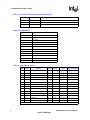
Table 10. Voice DTE→DCE Character Pairs
Response
Hex Code
Function
<NUL>
00
Do nothing
<DLE>
10
Two contiguous <DLE><DLE> codes indicate a single <DLE> in the data stream
<SUB>
1A
<DLE><DLE> in data stream
<ETX>
03
End transmit data state
/
2F
Start of DTMF tone shielding
22
536EX Chipset Developer’s Manual
Intel Confidential
AT Command Summary Tables
Table 10. Voice DTE→DCE Character Pairs (Continued)
Response
Hex Code
Function
<DEL>
7F
DTMF transition to off
u
75
Bump up the volume
d
64
Bump down the volume
<ESC>
1B
End receive data state
!
21
Receive data abort
<CAN>
18
Clear transmit buffer of voice data
?
3F
Transmit buffer space available query
Table 11. Voice DTE←DCE Character Pairs
Response
Hex Code
Function
<DLE>
10
Single <DLE> character in the data stream
<SUB>
1A
<DLE><DLE> in data stream
<ETX>
3
End of Record mode data
X
58
Packet header for ‘Complex Event Detection Report’
.
2E
Packet terminator for the ‘Complex Event Detection Report’
/
2F
Start of DTMF tone shielding
<DEL>
7F
DTMF transition to off
0–9
30–39
DTMF tones 0–9
A–D
41–44
DTMF tones A–D
*
2A
DTMF tone *
#
23
DTMF tone #
o
6F
Receive buffer overrun
c
63
1100 Hz fax calling tone
e
65
1300 Hz data calling tone
h
68
Local phone goes on hook
H
48
Local phone goes off hook
s
73
Presumed hang-up silence time-out
q
71
Presumed end-of-message quiet time-out
I
6C
Loop current interruption
L
4C
Loop current polarity reversal
r
72
Ringback
b
62
Busy/reorder/fast busy
d
64
Dial tone detected
u
75
Transmit buffer under-run
p
70
Line voltage increase (extension phone goes on-hook)
P
50
Line voltage decrease (extension phone goes off-hook)
a
61
Fax or data answer tone (2100 Hz)
536EX Chipset Developer’s Manual
23
Intel Confidential
AT Command Summary Tables
Table 11. Voice DTE←DCE Character Pairs (Continued)
Response
Hex Code
Function
f
66
Data answer detected (2225 Hz)
R
52
Incoming ring
% ‘ (,)
25, 26, 27, 28, 29
Manufacturer-specified
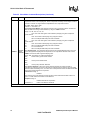
Table 12. Dial Modifiers
Command
Function
0 to 9
Dialing digits
A, B, C, D, *, #
Tone dial characters
P
Pulse dial
R
Reverse Originate mode
S=n
Dial NVRAM telephone number
T
Tone dial
W
Wait for dial tone
,
Pause
!
Flash hook
@
Wait for quiet answer
;
Return to command state
-()
Ignored by modem
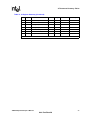
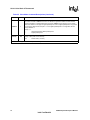
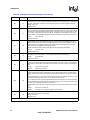
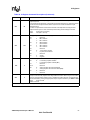
Table 13. S-Register Summary
Note
Register
Function
Default
*
S0
No. of rings to auto-answer on
S1
Ring count
0
*
S2
Escape character
43
S3
Carriage return character
13
S4
Line feed character
10
0
Range
0–255
Units
Reported by &Vn
ring
yes
0–255
ring
yes
0–127
ASCII
yes
0–127
ASCII
yes
0–127
ASCII
yes
S5
Backspace character
8
0–32, 127
ASCII
yes
*
S6
Wait before dialing
2
2–255
second
yes
*
S7
Wait for carrier
60
1–255
second
yes
*
S8
Pause time for dial modifier
2
0–255
second
yes
*
S9
Carrier recovery time
6
1–255
0.1 second
yes
*
S10
Lost carrier hang up delay
14
1–255
0.1 second
yes
*
S11
DTMF dialing speed
70
50–255
ms
yes
*
S12
Guard Time
50
0–255
(0.02 second)
yes
*
S14
Bit-mapped options
138
–
–
no
* Value saved in NVRAM.
24
536EX Chipset Developer’s Manual
Intel Confidential
AT Command Summary Tables
Table 13. S-Register Summary (Continued)
Note
Register
Function
Default
Range
Units
Reported by &Vn
S16
Modem test options
0
–
–
no
*
S18
Modem test timer
0
0–255
second
yes
*
S21
Bit-mapped options
48
–
–
no
*
S22
Bit-mapped options
118
–
–
no
*
S25
Detect DTR change
5
0–255
0.01 second
yes
*
S30
Disconnect inactivity timer
0
0–255
minute
yes
*
S33
Sleep mode timer
10
0–90
second
yes
* Value saved in NVRAM.
536EX Chipset Developer’s Manual
25
Intel Confidential
Data Mode AT COMMANDS
3
Data Mode AT COMMANDS
The 536EX chipsets implement:
• Standard Hayes*-compatible AT commands and S-registers in data mode
• Standard EIA/TIA-578 AT commands in Class 1 fax mode
• Additional AT command sets for error correction, data compression and voice mode
In data mode, the AT commands configure the DCE (modem) to establish a connection with a
remote data modem. In data mode, the 536EX chipsets execute the AT commands for error
correction (MNP 2-4, V.42) and data compression (MNP 5, V.42 bis) described in Table 21 on
page 57, as well as the fax and voice mode commands AT+FCLASS=1 (fax) and AT+FCLASS=8
(voice).
3.1
Using AT Commands to Access the S-Registers
[Sn?, Sn=x, ?]
The DTE can access the S-registers through the ATSn?, ATSn=x, and ? commands. For example,
to configure the modem to automatically answer a data modem call after two rings, type ATS0=2.
Examples:
ATS0=2
ATS0?
ATS0=
AT?
3.2
Configures S-register
Reads the contents of
Configures S-register
Reads the contents of
S0 to ‘2’
S-register S0
S0 to ‘0’
the last accessed (read or write) S-register
Modem Responses and Command Echo [En, Vn, Xn,
Wn, Qn]
The ATEn command configures the DCE to send back to the DTE any data that the DTE sent to
the DCE while in command mode. The ATVn command sets the DCE response codes to either text
or numeric form. For example, upon successfully processing an AT command string, the DCE
sends an ‘OK’ (text) or a ‘0’ (numeric) to the DTE.
Examples:
Modem Setup
Echo, Numeric (E1, V0)
Echo, Text (E1, V1)
Host
Command
Modem Response
AT<CR>
AT<CR>0<CR>
ATS0?<CR>
ATS0?<CR>000<CR><LF>0<CR>
AT<CR>
AT<CR><CR><LF> OK<CR><LF>
ATS0?<CR>
ATS0?<CR><CR><LF>000<CR><LF><CR>
<LF>OK<CR><LF>
26
536EX Chipset Developer’s Manual
Intel Confidential
Data Mode AT COMMANDS
Host
Command
Modem Setup
No Echo, Numeric (E0, V0)
No Echo, Text (E0, V1)
Modem Response
AT<CR>
0<CR>
ATS0?<CR>
000<CR><LF>0<CR>
AT<CR>
<CR><LF>OK<CR><LF>
ATS0?<CR>
<CR><LF>000<CR><LF><CR><LF>OK
<CR><LF>
The DCE can be configures to use different response codes depending on the V.250 command that
is enabled (AT+MR, AT+ER, AT+DR, and AT+ILRR). Alternatively, the ATWn command can
be used to set these V.250 commands. The mapping for the ATWn command to V.250 commands
is shown in Table 14. The setting for the ATXn command (page 43) can affect which ATWn
response codes are reported to the DCE. The ATXn command configures the modem call progress
detection and reporting requirements during dialing (for example, dial tone and busy tone
detection). The ATQn command selects whether the modem sends result codes to the DTE.
Table 14. Data Reporting Wn Mapping
Wn
+ER
+DR
+MR
+ILRR
W0
Disable
Disable
Disable
Disable
W2
Disable
Disable
Enable
Enable
W3
Enable
Enable
Enable
Enable
W4
Enable
Enable
Enable
Disable
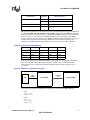
For example, a connection is established with the remote modem as shown below (with LAPM
error correction and V.42 bis data compression). The telephone line (or modem-to-modem
connection) data rate is 33,600 bps and the local UART (DTE-to-modem) connection rate is
115,200 bps.
Figure 3. Example of a Remote Connection
DTE
UART
Interface
LOCAL MODEM
(115,200 bps)
Telephone
Line
(33,600 bps)
REMOTE MODEM
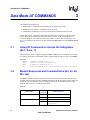
The modem then sends the ‘CONNECT’ messages for the following four Wn commands:
• ATW0
ILRR: 115200
CONNECT 50666
• ATW2
+MCR: V90
+MRR: 28800
CONNECT 50666
536EX Chipset Developer’s Manual
27
Intel Confidential
Data Mode AT COMMANDS
• ATW3
+MCR: V90
+MRR: 28800
+ER: LAPM
+DR: V42B
+ILRR: 115200
CONNECT 50666
• ATW4
+MCR: V90
+MRR: 28800
+ER: LAPM
+DR: V42B
CONNECT 50666
3.3
Modem Reset and NVRAM Commands [DS=m, Zn,
&F, &Vn, &Yn, &Wn, &Zn=x]
On powering-up, the DCE defaults to the configuration specified in NVRAM. The DCE may then
be configured as needed. The DTE stores the DCE configuration in the NVRAM by first setting up
the current configuration and then sending an AT&Wn command. The DCE configuration stored
in the NVRAM is called a user profile. Two independent user profile configurations and four
telephone numbers can be stored. Either user profile configuration can be used for the power-up
defaults (AT&Yn). While in command mode, the DCE can be re-initialized at any time and the
user profile changed using the ATZn command. To configure the modem to factory defaults, the
AT&F command is used. A summary of the active user profile, two NVRAM user profiles, and
previously-saved telephone numbers can be read from the modem using the view command,
AT&Vn. The AT&Zn=x command stores one of four telephone numbers in the NVRAM. To dial
these telephone numbers, use the ATDS=m command.
If the active profile is not stored in one of the two user profiles after setting up the modem, then the
current settings are lost when the commands ATZ or AT&F are issued or when the modem is
powered down.
Examples:
ATZ
AT&F S0=1 &W1
&Y1
AT&Z2 = 9,
(408)444-5555
Resets and then configures the modem to NVRAM user profile 0.
&F configures the modem for factory defaults.
S0=1 configures the modem to answer after one ring.
&W1 saves the active configuration to user profile 1.
&Y1 configures the modem to use NVRAM user profile 1 as the
power-up defaults.
Stores a telephone number into the NVRAM as phone number 2, which
can be re-dialed later using ATDS=2.
28
536EX Chipset Developer’s Manual
Intel Confidential
Data Mode AT COMMANDS
3.4
Modem Identification Commands [In, +FMI, +FMR,
+FMM, +GMI, +GMM, +GMR, +GSN,
+FMFR?, +FMDL?, +FREV?]
The modem provides product identification AT commands that help determine the modem’s
manufacturer, model number, and product revision. To provide flexibility with older software
application programs, the modem supports several commands that can be used to request a single
item of identification (such as a modem model number). Table 15 lists the commands used to
obtain product information (all identification commands are usable in data, fax, or voice mode).
Table 15. Product Identification Information
AT Commands
Product Information
ATIn Command
Data Mode
Class 1 Fax Mode
Legacy Modems
Modem Manufacturer
ATI2
AT+GMI
AT+FMI
AT+FMFR?
Model ID
ATI1
AT+GMM
AT+FMM
AT+FMDL?
Revision Number
ATI4
AT+GMR
AT+FMR
AT+FREV?
Example:
ATI1
Intel 536EP
V.92 Modem
3.5
Causes the modem to send the modem’s name to the DTE.
Response to the modem name request.
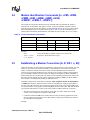
Establishing a Modem Connection [A, D, DS = n, S0]
Data mode provides several methods for establishing a connection with a remote modem. For each
modem, a connection can be initiated manually or automatically in both answer and originate
modes. A manual-to-manual connection is useful when both modems (that are on-hook) are
connected to an off-hook telephone line. For example, if two people are talking on the telephone,
they can manually establish a modem connection without first hanging up. When establishing a
manual connection, one modem must be designated as the originating modem and the other as the
answering modem. Manual originate mode is initiated by sending an ATD to the DCE. Manual
answer mode is accomplished by sending an ATA to the DCE.
Automatic originate mode is initiated by sending an ATD <telephone number & dial modifiers>
or ATDS=m to the DCE. Automatic-answer mode is accomplished by setting S-register S0 to a
non-zero value. S1 keeps track of how many ring signals are detected. If the content of S0 is nonzero and the number of ring signals (as defined by S0) are detected (that is, S1 = S0), then the DCE
goes off-hook and attempts to connect to the remote modem (with the following exceptions):
• The time period between the ring signals is greater than 8 seconds, which causes the S1
counter to reset and thus never reach the value for S0.
• Caller ID is enabled and S0=1, the modem answers on the second ring signal instead of the
first ring signal. This happens because Caller ID puts a signal on the telephone line between
the first and second ring signal.
Example:
536EX Chipset Developer’s Manual
29
Intel Confidential
Data Mode AT COMMANDS
ATDT 9,444-5555 Automatically dials the telephone number with DTMF tones. After
dialing a ‘9’, the comma (,) causes the modem to pause two seconds
before dialing the rest of the telephone number.
modem 1: ATD;
When establishing a manual-to-manual connection, the designated
modem 2: ATA
originating modem should receive the ATD command from its DTE
just before the designated answering modem receives the ATA
command from its DTE. It is important that the time between the ATD
and ATA commands is less than 2 seconds.
AT-C1DT 123
Causes the modem to dial the telephone number 123 and immediately
start sending a data calling tone. Calling tone can then be detected by
the remote voice mail system. After detecting the calling tone, the
remote system can change to data mode and start the data modem
connection handshake.
3.6
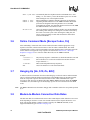
Online Command Mode [Escape Codes, On]
After establishing a connection with a remote modem, the DTE sends the appropriate escape
sequence to the DCE, which causes the DCE to enter the online command mode. The online
command mode is used to send AT commands to the DCE while the DCE is still connected to the
remote modem. The supported escape sequences are described in Section 3.10, “AT Escape
Sequences” on page 38. To re-enter the online data mode, use the ATOn command.
Example:
1 second +++
1 second
+++AT<CR>
ATO
3.7
Hayes Escape Sequence. Guard times (in which the DTE does not send
data to the DCE) of 1 second are needed before and after the three
escape characters ‘+’.
TIES (Time Independent Escape Sequence).
Causes the modem to re-enter online data mode.
Hanging Up [Hn, S10, Zn, &D2]
A modem connection terminates when the modem hangs up or when the remote modem transmit
carrier is off longer than the duration specified in S-register S10. To hang up, the DTE typically
sends an escape code sequence that causes the DCE to enter online command mode. Upon
receiving an ‘OK’ message, the DTE sends either ATH or ATZn to the DCE. When the AT&D2
command is used, the modem goes on-hook (hangs up) after an on-to-off transition of the DTR
occurs.
Note:
3.8
The ATZn command causes the DCE to hang up and re-initialize itself to the user profile specified
by ‘n’.
Modem-to-Modem Connection Data Rates
The data rates differ for each data mode selected. The 536EX chipsets either default to V.90 or V.92
mode depending on the driver version. For non-ISP connections, the chipsets fall back to V.34
mode. The modem defaults to whatever mode is issued by the +MS=m command (see the
supported modulation types on Table 16 on page 35).
30
536EX Chipset Developer’s Manual
Intel Confidential
Data Mode AT COMMANDS
In Data mode, the 56K chipsets can transmit up to 48,000 bps (V.92 mode) or 33,600 bps (V.90
mode) and receive up to 53,333 bps. Note that the chipsets are capable of achieving 56,000 bps, but
power limitations by the FCC limit actual speeds to 53,333 bps. The 56K receive data rates can be
achieved only in connections with equipment-compatible ISPs (Internet Service Providers). In V.92
mode, the 536EX supports three new features: Quick Connect, Modem-on-Hold and Pulse Code
Modulation (PCM) Upstream.
The Quick Connect (QC) feature reduces the time it takes to make a connection to your service
provider. The modem retains information of the line conditions from your previous connection and
uses this information to bypass parts of the training sequence. As a result, this provides faster
connections. Normal V.90 connections take about 25–30 seconds. With V.92 Quick Connect, your
connect times can be up to 50% faster.
The V.92 Quick Connect feature is controlled by the +PSS and +PQC commands. The +PQC
command enables and disables the shorten phase 1 and or phase 2 startup procedures. The +PSS
command forces either a short or full startup procedure on the next and subsequent connections. To
enable the modem for V.92 Quick Connect, set +PSS=0 or 1 and +PQC=0. Refer to Table 5 for the
detailed description of these commands.
The Modem-on-Hold (MOH) feature allows you to receive an incoming voice call and stay
connected to the Internet and then return online after your conversation without having to re-dial.
This is very convenient where the same phone line is used for voice calls and data connections. To
receive an incoming call as described above requires that you have the Call-Waiting service from
your telephone company. In addition, the Caller ID service from your telephone company is
recommended but not required for MOH. This feature allows you to determine who is calling. The
“hold” time for your incoming call is define by your service provide. The MOH feature also allows
you put you data connection on hold and initiate a voice call and then return online after
completing your voice conversation. These two scenarios are described in detail in Figure 4 and
Figure 5.
536EX Chipset Developer’s Manual
31
Intel Confidential
Data Mode AT COMMANDS
Figure 4. Modem-on-Hold: Incoming Voice Call in Data Mode
Enable MOH
(+PMH=0)
(+PCW=0)
Enable Caller ID
(Optional)
(+VCID=1)
Incoming Call
HW Ring Indication
(+++AT)
Accept/Reject
Call
?
Reject Call
Accept Call
Request to go
on hold
(+PMHR)
Stay Online
(ATO)
Server
Accepts
Request
?
Yes
(Returns 1-13)
Flash Hook
(+PMHF)
Answer Call
No (Returns 0)
Disconnect
?
No
Yes
End Data Connection
(ATH)
Finish Call
Flash Hook
(+PMHF)
Go Back Online
(ATO)
A9111-01
32
536EX Chipset Developer’s Manual
Intel Confidential
Data Mode AT COMMANDS
Figure 5. Modem-on-Hold: Initiating a Voice Call in Data Mode
Enable MOH
(+PMH=0)
Command Mode
(+++AT)
Request to go
on hold
(+PMHR)
Server
Accepts
Request
?
No (Returns 0)
Yes
(Returns 1-13)
Disconnect
?
No
Flash Hook
(+PMHF)
Yes
Initiate Call
End Data Connection
(ATH)
Finish Call
Flash Hook
(+PMHF)
Go Back Online
(ATO)
A9112-01
The following sequence describes how to configure the modem for MOH to process an incoming
voice call while online. First, MOH must be enabled. The +PMH and +PCW commands are used
to enable MOH and to capture the Call Waiting tone which is sent when the voice call comes in. To
enable MOH, set +PMH=0 and +PCW=0. Next, to enable Caller ID information (optional), by
setting +VCID=1. Now the modem is configured for the incoming call. When you receive the
incoming call, the modem will get a ring indication and the software/application will issue a
+++AT to put the modem in command mode. Then, you will be prompted to either “Accept” or
“Reject” the call based on the Caller ID information (if enabled). If you reject the call, an ATO
command is issued to perform a Quick Connect to stay online. If you accept the call, the data
connection is put on hold, and the modem send a request to the server to go on hold using the
+PMHR command. The server will accept enable (1–13 returned) or reject (0 returned) the
request. If the server accepts the request to go on hold, the modem issues the +PMHF to flash the
536EX Chipset Developer’s Manual
33
Intel Confidential
Data Mode AT COMMANDS
hook to connect the call. Now you can answer the phone and talk. After completing your voice
conversation, the modem will issue another +PMHF and ATO command to initiate a Quick
Connect. If the server rejects the request to go on hold, the user can stay on line (ATO command
issued) or disconnect from his initial data connection (ATH command issued).
The next sequence describes how to initiate a voice call while online. First, enable the MOH
feature by setting +PMH=0. When online, the user can initiate a voice call by first issuing +++AT
to put the modem in command mode. Then request the server to go on hold by issuing the +PMHR
command. The server will either accept (1–13 returned) or reject (0 returned) the request. If the
server accepts the request to go on hold, the modem issues the +PMHF to flash the hook and get
dial tone. You can then make a voice call. After completing the voice conversation, the modem will
issue another +PMHF and ATO command to initiate a Quick Connect. If the server rejects the
request to go on hold, the user can stay on line (ATO command issued) or disconnect from his
initial data connection (ATH command issued). Refer to Table 5 for the detailed description of the
V.92 commands.
The PCM Upstream feature allows you to upload data to the network up to 48,000 bps. This is an
improvement over the 33,600 bps maximum with V.90. This is beneficial when you are sending
large file, email attachments and gaming on the Internet. The +PIG command is used to enable and
disable the PCM Upstream feature. To enable PCM Upstream, set +PIG=0. To disable PCM
Upstream, set +PIG=1.
Several V.34 modes are available (see Table 16). These provide different speeds. For example,
V34S offers a modem-to-modem data rate of 2400, 4800, 7200, 9600, 12,000, 14,400, 16,800,
19,200, 21,600, 24,000, 26,400, and 28,800 bps. For V.42, MNP, and Buffer (Normal) modes, the
modem provides speed buffering (see Section 4 starting on page 56), which allows the DTE-tomodem data rate to be different from the modem-to-modem data rate. Users can take advantage of
this feature by setting the DTE-to-modem rate to a high speed like 115,200 bps and letting the
modem negotiate the best line rate.
The 536EX chipsets can be configured (by the +MS=m command) to support either asymmetrical
or symmetrical connections. The modem transmits and receives at the same speed in symmetrical
connections and at different speeds in asymmetrical mode. V.90 and V.92 connections are always
asymmetrical. V.34 mode connections can be either symmetrical or asymmetrical. The modem uses
six parameters for asymmetrical modes and four parameters for symmetrical modes. Note that the
transmitter speed and receiver speeds typically are different for most V.34 connections over the
PSTN.
To configure the DTE-to-modem data rate (in data on-hook command mode), change the terminal
program COM port speed selection or write the appropriate divisor latch values for a given speed
to the UART Divisor Latch registers. Then send an AT<CR> or any other valid AT command to the
modem. The modem responds with an OK at the new data rate. All commands and modem
responses that follow use the new data rate.
Note:
In command mode, the modem only changes its DTE-to-modem data rate after the Divisor Latch
register values change and the DTE sends a valid AT command.
The +MS=m command defines which modem-to-modem data rates are supported by the modem.
The table below shows the supported modulation types. Each modulation supports one or more
data rates. Refer to page 53 for the +MS command description.
34
536EX Chipset Developer’s Manual
Intel Confidential
Data Mode AT COMMANDS
Table 16. Supported Modulation Types
<carrier >
Description
Bell 103
300 bps
Bell 212A
1200 bps
V21
V.21 300 bps
V22
V.22 1200 bps
V22B
V.22 bis 1200 and 2400 bps
V23C
V.23, with constant carrier; 1200 bps forward and 75 bps reverse
V32
V.32 4800 and 9600 bps
V32B
V.32 bis 7200, 9600, 12,000, and 14,400 bps
V34
V.34 asymmetrical connections: 2400, 4800, 7200, 9600, 12,000, 14,400, 16,800, 19,200,
21,600, 24,000, 26,400, 28,800, 31,200, and 33,600 bps
56K V.90 asymmetrical connections (transmit): 4800, 7200, 9600, 12,000, 14,400, 16,800,
19,200, 21,600, 24,000, 26,400, and 28,800, 31,200, and 33,600 bps
V90
V92
56K V.90 asymmetrical connections (receive): 28,000, 29,333, 30,666, 32,000, 33,333, 34,666,
36,000, 37,333, 38,666, 40,000, 41,333, 42,666, 44,000, 45,333, 46,666, 48,000, 49,333,
50,666, 52,000 53,333, 54,666, and 56,000 bps
56K V.92 asymmetrical connections (transmit): 24,000, 25,333, 26,666, 28,000, 29,333, 30,666,
32,000, 33,333, 34,666, 36,000, 37,333, 38,666, 40,000, 41,333, 42,666, 44,000, 45,333, 46,666
and 48,000 bps
56K V.92 asymmetrical connections (receive): 28,000, 29,333, 30,666, 32,000, 33,333, 34,666,
36,000, 37,333, 38,666, 40,000, 41,333, 42,666, 44,000, 45,333, 46,666, 48,000, 49,333,
50,666, 52,000, 53,333, 54,666, and 56,000 bps
If the +MS=m parameters contain conflicting information like “+MS=V34,1,14400,0” with a DTE
data rate of 2400 bps, then the modem’s connection attempts always fail, and the modem reports a
“NO CARRIER” message. This happens because when the modem receives the +MS=m
command, the modem does not check for conflicts of valid parameter information.
Table 17 shows the resulting connection data rate when using non-default values. Because of
impairments on the telephone line, the actual connection speeds may be lower than the speeds
defined in this table.
For V.92, V.90, and V.34 modulation, the modem can receive data at a different data rate than the
transmit data rate. All other modulation types besides V.23 and V.34 use the same data rate for the
transmitter and receiver. Use ATW3 to see the modem’s actual receive and transmit data rates (the
modem must be configured for ATV1 text response codes). Table 17 shows examples of the
resulting connection rate when non-default values are used.
536EX Chipset Developer’s Manual
35
Intel Confidential
Data Mode AT COMMANDS
Table 17. Resulting Modem-to-Modem Connection Rates with Non-Default Values
Originating Modem
3.9
Answering Modem
Resulting Connection Speed
+MS = V34, 1, 0, 0, 0,
0;
the UART data rate =
115,200 bps
+MS = V32, 1, 0, 9600,
0, 0;
the UART data rate =
14,400 bps
9600 bps: the originating modem is configured to attempt
a maximum 28,800 bps connection, but the answering
modem is configured to attempt a maximum data rate of
9600 bps.
+MS = V34, 0, 33,600,
33,600, 0, 0;
UART data rate =
115,200 bps
+MS = V32B, 1, 0,
9600, 0, 0;
B1 and UART data rate
= 14,400 bps
No connection: the originating modem is configured to
attempt only a 33,600 bps connection, but the answering
modem is configured to attempt a maximum data rate of
9600 bps.
+MS = V32,
1, 7200, 9600, 0, 0;
and UART data rate =
7200 bps
+MS = V34, 1, 0,0, 0, 0;
UART data rate =
9600 bps
9600 bps: the originating modem is configured to attempt
connection at between 7200 to 9600 bps or below. The
answering modem is configured to attempt a data rate of
9600 bps or below. The connection takes place at
7200 bps, the highest speed supported by both modems.
Diagnostic Testing [S18, &Tn]
The &Tn command initiates loopback tests. Setting S-register S18 to a non-zero value determines
the length of testing after the modem receives the &Tn command. After the testing period elapses,
the modem halts the test and returns to command mode. To abort the test before the test timer has
timed out, enter the escape code sequence followed by AT&T0. Setting S18 to an ’0’ disables the
test timer. In this case, the loopback test continues to run until an escape code, followed by AT&T0
(or ATH), is sent to the modem.
The modem provides a local analog loopback test (see Section 3.9.1, “Local Analog Loopback
[AT&T1]” on page 36) for testing modem-to-modem integrity in all modes except V.90 and V.92.
After entering the loopback mode, the communication integrity is checked by the DTE sending
data to the modem and then checking the looped-back data for errors. In addition, in the self-test
mode the modem implements an internal data pattern generator and checker that detects errors.
When a data error occurs in self-test mode, the modem increments an internal error counter. Upon
completing the test, the modem sends a three-digit error count to the DTE. These tests are
illustrated in the following examples.
3.9.1
Local Analog Loopback [AT&T1]
This test is used by the local DTE to check the DTE-to-modem communication integrity. The local
DTE will not initiate the test from online command mode.
36
536EX Chipset Developer’s Manual
Intel Confidential
Data Mode AT COMMANDS
Figure 6. Local Analog Loopback Test
LOCAL MODEM
TXD
TRANSMITTER
DTE
RXD
RECEIVER
Local Modem (or Test Modem)
AT&F &W<CR>
Returns the modem to the factory defaults.
AT S18 = 0 &T1 Causes the modem to run local analog loopback without self-test.
CONNECT 115200 Modem response code indicates that analog loopback is
enabled with a DTE speed of 115200.
This is a test. Test string that the user could type at the keyboard. If the received data
is the same as the test string, then the DTE-to-modem communication
channel is working properly.
+++AT
TIES Escape Sequence is used to return to command mode.
OK
Modem enters command mode.
AT&T0
Terminates any loopback test.
OK
Modem aborts analog loopback and stays in command mode.
3.9.2
Local Analog Loopback With Self-Test [AT&T8]
This test is used by the local DTE to check the DTE-to-modem communication integrity.
Figure 7. Local Analog Loopback with Self-Test
LOCAL MODEM
TXD
PATTERN
GENERATOR
TRANSMITTER
PATTERN
CHECKER
RECEIVER
DTE
RXD
536EX Chipset Developer’s Manual
37
Intel Confidential
Data Mode AT COMMANDS
Local Modem (or Test Modem)
AT&F &W<CR>
AT S18=20 &T8
OK
AT
OK
000
OK
AT S18=0 &T8
OK
AT
OK
AT&T0
000
OK
3.10
Returns the modem to the factory defaults.
Causes the modem to start local analog loopback with self-test for 20
seconds.
After starting analog loopback, the modem goes back to command
mode.
The modem responds to new commands.
After 20 seconds, the modem stops analog loopback, sends
an error count to the DTE, and enters command mode.
Causes the modem to start local analog loopback with self-test, which
is only terminated by AT&T0 or ATH.
After starting analog loopback, the modem goes back to command
mode.
The modem responds to new commands.
After receiving AT&T0 or ATH, the modem stops analog
loopback, sends an error count to the DTE, and enters
command mode.
AT Escape Sequences
The 56K family provides the industry-standard Time Independent Escape Sequence (TIES). The
DTE sends the escape sequence to return the modem to command state while in the online data
state (that is, connected to another modem) or in diagnostic mode (&Tn commands).
Intel also makes the Hayes Escape Sequence available to customers; however, see the following
statement regarding licensing requirements.
Licensing Requirements for Hayes Escape Sequence
The Intel chipsets are manufactured with TIES as the default setting. It is Hayes’ position that you
must either have or obtain a valid license from Hayes Microcomputer Products, Inc., of Norcross,
Georgia, before producing modem systems that use the Hayes Escape Sequence.
Intel accepts no responsibility and does not indemnify nor in any way provide protection for
patent or possible patent violations to its customers or users of its products.
3.10.1
Time-Independent Escape Sequence
The TIES (Time-Independent Escape Sequence), implemented with +++AT, was developed by a
group of modem manufacturers as an alternative to the Hayes Escape Sequence. TIES was
designed for compatibility with existing communication software written for the Hayes Escape
Sequence.
38
536EX Chipset Developer’s Manual
Intel Confidential
Data Mode AT COMMANDS
The DTE implements the escape sequence by sending the escape character (as defined in S2) three
times, followed by a valid AT command, and then the contents of S3 (typically a <CR>). Upon
detecting the three consecutive escape characters, the modem changes to TIES command mode and
starts an internal EPD (Escape Prompt Delay) timer (with the time limit defined by S12). The
modem then looks for one of the following conditions to occur:
• No additional data is received and the EPD timer times out: the modem sends an ‘OK’
message to the DTE and then waits indefinitely for an incoming valid AT command string
from the DTE. Until the modem receives a valid AT command, it monitors any data received
from the DTE and passes on the data to the remote modem (that is, the modem does not echo
back the received character to the DTE).
— If the subsequent character received by the modem is not an ‘A’ or ‘a’, the modem returns
to data mode and sends a ‘CONNECT’ message back to the DTE.
— If the modem receives an ‘A’ or ‘a’, it stores any additional data received from the DTE in
the modem’s internal command buffer and continues to send the data to the remote
modem. The modem then waits until the DTE sends a <CR>, or up to 39 data characters,
before deciding whether to go to command mode or to return to data mode. Upon
detecting a <CR> or receiving the 39 data characters, the modem determines if a valid AT
command has been received. If a non-AT command string or an invalid command string
has been received, then the modem changes back to data mode and sends a ‘CONNECT’
message to the DTE. If a valid AT command has been received, the modem changes to
command mode and sends an ‘OK’ message. After sending the ‘OK’ message, the modem
echoes any received data from the DTE while in command mode.
• An ‘A’ or ‘a’ is received from the DTE. The modem disables the EPD timer and sends the
character to the remote modem. The modem then stores any received data from the DTE into
the modem internal command buffer and sends the data to the remote modem. Upon detecting
a <CR> or receiving up to 39 data characters, the modem determines if a valid AT command
has been received; if so, it processes the valid commands. If a non-AT command string or an
invalid command string has been received, then the modem remains in data mode. If a valid
AT command has been received, then the modem changes to command mode and sends an
‘OK’ message. After sending this, the modem (while in command mode) echoes back any data
received from the DTE.
• Any character except an ‘A’ or ‘a’ is received from the DTE. The modem disables the EPD
timer and changes back to data mode.
If an AT command string is received while in TIES command mode, the modem processes any
valid AT command. Upon detecting an invalid AT command, the modem changes back to data
mode and issues a ‘CONNECT’ message to the DTE. While in TIES command mode, the modem
ignores certain characters that may cause the modem to incorrectly decide that an incoming AT
string is invalid. The ignore characters are <LF>, <space>, and <CR> (<CR> is ignored only when
S3 is not equal to <CR>). Not all AT commands are supported during TIES command mode. The
following is a list of supported commands:
En, Hn, Mn, On, Qn, Sn, Vn, Xn, and ‘&’ commands (except &Tn and &F)
The escape character is determined by the value stored in S-register S2, and it is typically a ‘+’
character. The following is an example of the TIES Escape Sequence:
Format:
<char1><char2><char3><AT command><contents of S3>
char1 = char2 = char3 = escape character (S2)
Example:
536EX Chipset Developer’s Manual
39
Intel Confidential
Data Mode AT COMMANDS
DTE:
DCE:
Note:
3.10.2
+++ AT<CR>
OK
TIES requires that the three-character escape sequence be contiguous and not repeated. The
character immediately preceding the first character of the three-character sequence cannot be the
same as the escape character. Therefore, ‘+++ AT<CR>’ is valid, but ‘++++ AT<CR>’ is not.
Hayes* Escape Sequence
In this escape sequence, implemented with +++, the DTE sends the modem an escape character
three times, preceded and followed by guard times. Upon detecting the escape sequence, the
modem sends an ‘OK’ response to the DTE. To re-enter the online data state, the DTE then sends
the modem ATO followed by the contents of S-register S3 (typically a <CR>).
The escape character is determined by the value stored in S-register S2 and is typically a ‘+’
character. Guard times are silence times when the DTE does not send any data to the modem.
Guard times ensure that the modem does not falsely detect an escape sequence if three consecutive
escape characters are received from the DTE. The preceding and following guard times are defined
in S-register S12. Typically, these guard times are 1 second. In addition to the preceding and ending
guard times, there are inter-character time-outs between each escape character sent. The intercharacter time-outs define the maximum amount of time allowed between characters before the
modem ignores the previous escape characters. This inter-character delay time is set to 1 second.
An example of the Hayes Escape Sequence follows:
Format:
<gt1><char1><tm 2><char2><tm3><char3><gt4>
gt1 = gt4 ≥ preceding and following guard times (S12)
tm2 = tm3 ≤ inter-character time-out (= 1 second)
char1 = char2 = char3 = escape character (S2)
Example:
DTE:
DCE:
1 second +++ 1 second
OK
Table 18. Data Mode Command Descriptions
Command
Default
Description
Repeat Last Command: This command re-executes the last AT command string stored in the command
buffer. A/ is the only command not preceded by AT and ended by a carriage return.
A/
none
A
none
Sending any character (such as a carriage return) after A/ and before a modem response is sent to the
DTE causes the modem to abort the remainder of the command string in the modem internal command
buffer.
Answer Command: This command causes the modem to immediately go off-hook and initiate an
answer mode handshake without waiting for an incoming ring signal. This command is useful for
manually answering a call or establishing a back-to-back connection with an originate-mode modem.
Carrier Control Option: This command is reserved for selecting between controlled carrier or constant
carrier modes. This modem supports only constant carrier mode.
Cn
1
n=0
Transmit carrier always off (returns an ERROR message)
n = 1*
Normal transmit carrier (constant carrier)
NOTE: An asterisk (*) denotes the factory-default setting.
40
536EX Chipset Developer’s Manual
Intel Confidential
Data Mode AT COMMANDS
Table 18. Data Mode Command Descriptions (Continued)
Command
Default
Description
Dial Command: This command causes the modem to immediately go off-hook as an originating modem
and dial a telephone number with corresponding dial modifiers. Dial modifiers are parameters that define
how the modem should dial the telephone number.
Dial Modifiers
0–9
Dialing Digits
A, B, C,
Tone Dial Characters
D, *, #
D
none
P
Pulse Dial—configures the modem to use pulse dialing to dial a telephone number.
R
Reverse Originate Mode—places the modem in answer mode. This modifier should be the
last character in the dialing string (for example, ATDT 12345678R). After dialing the
telephone number, the modem goes into data modem answer mode instead of originate
mode.
S=n
Dial NVRAM Telephone Number—causes the modem to dial a telephone number
previously stored in the NVRAM with the AT&Zn=x command.
T
Tone Dial—configures the modem to use DTMF tones to dial a telephone number.
W
Wait for Dial Tone—causes the modem to look for dial tone for a specified amount of time.
If dial tone or the amount of time specified by the S-register, S6, times out, the modem
processes the next command in the dial string. If a busy signal is detected, the modem
responds to the DTE with a busy response code and then goes into off-line command
mode.
,
Pause—causes the modem to pause or delay implementing the next parameter in the dial
string by the time specified in S-register S8.
!
Flash Hook—causes the modem to go on-hook for 0.75 seconds.
@
Wait for Quiet Answer—causes the modem to wait for specified amount of time (S-register
S7) followed by 5 seconds of silence before processing the next dial modifier.
;
Return to Idle State—causes the modem to enter online command mode without initiating a
data modem handshake (used for phone directory auto-dialers).
<space> - ( ) Ignored by Modem—these four characters are ignored by the modem. Spaces also may be
included in the dial string to separate area codes and numbers.
Command Mode Echo: This command selects whether the modem echoes AT commands back to the
host in either online or off-line command mode.
En
1
n=0
Echo disabled
n = 1*
Echo enabled
Switch Hook Control: This command controls the telephone line relay (OHREL*) and causes the
modem to either hang up or pick up the telephone line.
Hn
0
n = 0*
Hang up telephone line (go on-hook)
n=1
Pick up telephone line (go off-hook)
NOTE: An asterisk (*) denotes the factory-default setting.
536EX Chipset Developer’s Manual
41
Intel Confidential
Data Mode AT COMMANDS
Table 18. Data Mode Command Descriptions (Continued)
Command
Default
Description
Identification/Checksum Option: This command causes the modem to send product code and
hardware setup information to the DTE.
In
0
n = 0*
ROM Checksum
n=1
Modem name
n=2
Manufacturer
n=3
Chipset
n=4
Firmware version
n=5
Modem chip hardware configuration
n=6
DSP patch level
n = 12
Country code
n = 7–11,
13, 14,
20–25
Reserved
Example:
ATI2
Intel Corporation
OK
Speaker Volume Control: This command selects the modem’s speaker volume.
n=0
Ln
2
Low speaker volume
n = 1*
Low speaker volume
n=2
Medium speaker volume
n=3
High speaker volume
Speaker Control: This command specifies when the speaker is turned on and off.
Mn
1
n=0
Speaker always off
n = 1*
Speaker on until carrier present
n=2
Speaker always on
n=3
Speaker off during dialing, and on until carrier
Go Online: This command causes the modem to return back to online data mode from online command
mode.
On
P
0
none
n = 0*
Returns the modem to data mode
n=1
Begins an equalizer retrain sequence; then returns to data mode
n=3
Renegotiates rate and then returns to data mode
Select Pulse Dialing: This command configures the modem to use pulse dialing next time the modem
dials a telephone number.
Result Code Display Control: This command selects whether the modem sends result codes to the
DTE.
Qn
0
Sn
none
Sn=x
none
n = 0*
Result codes enabled
n=1
Result codes disabled
Select an S-Register: This command selects the current S-register.
n = 0–33
Write to an S-Register: This command writes a decimal number ‘x’ to S-register ‘n’.
n = 0–33
x = 0–255
Sn?
none
Read an S-Register: This command is used to read a decimal number from S-register ‘n’.
n = 0–33
NOTE: An asterisk (*) denotes the factory-default setting.
42
536EX Chipset Developer’s Manual
Intel Confidential
Data Mode AT COMMANDS
Table 18. Data Mode Command Descriptions (Continued)
Command
Default
T
none
Description
Select Tone Dialing: This command configures the modem to use DTMF tones the next time the
modem dials a telephone number (touch tone dialing).
Result Code Form: This command selects whether the modem’s basic syntax response codes are in
numeric or verbose form.
Vn
1
n=0
Numeric form
n = 1*
Text form
Response Code Data Rate: This command selects whether the modem sends the DTE independent
modem connection extended syntax result codes for modulation mode, speed, error control protocol, or
data compression before the final 'CONNECT' message. This command does the selection by enabling
and disabling the appropriate V.250 reporting commands (+MR, +ER, +DR, and +ILRR).
n = 0*, 1
CONNECT result code reports DTE speed.
For example:
+ILRR: 115200
CONNECT 50666
n=2
CONNECT result code reports modulation mode and DCE transmitter speed.
For example:
+MCR: V90
+MRR: 28800
CONNECT 50666
n=3
Wn
CONNECT result code reports DTE data rate, modulation mode, error correction, data
compression, DCE transmitter speed and DCE receiver speed.
For example:
+MCR: V90
+MRR: 28800
+ER: LAPM
+DR: V42B
+ILRR: 115200
CONNECT 50666
0
n=4
CONNECT result code reports modulation mode, error correction, data compression, DCE
transmitter speed and DCE receiver speed.
For example:
+MCR: V90
+MRR: 28800
+ER: LAPM
+DR: V42B
CONNECT 50666
Please refer to +MR=m, +ER=m, +DR=m and +ILRR=m for a detailed description of each
command.
Result Code Type/Call Progress: This command determines which modem result codes are enabled.
Additionally, this command specifies whether busy and dial tone detection are enabled or disabled.
Xn
4
n=0
Result codes 0–4 enabled. Busy and dial tone detect disabled.
n=1
Result codes 0–5, 10 and above enabled. Busy and dial tone detect disabled.
n=2
Result codes 0–6, 10 and above enabled. Busy detect disabled and dial tone detect
enabled.
n=3
Result codes 0–5, 7, 10 and above enabled. Busy detect enabled and dial tone detect
disabled.
n = 4*
Result codes 0–7, 10 and above enabled. Busy and dial tone detect enabled.
NOTE: An asterisk (*) denotes the factory-default setting.
536EX Chipset Developer’s Manual
43
Intel Confidential
Data Mode AT COMMANDS
Table 18. Data Mode Command Descriptions (Continued)
Command
Default
Description
Long Space Disconnect: This command determines whether the modem disconnects after receiving
1.6 seconds of silence and whether the modem sends a period of silence to the remote modem before
disconnecting.
Yn
Zn
0
0
n = 0*
Disables long space disconnect
n=1
Enables long space disconnect. The modem disconnects after receiving 1.6 seconds of
silence from the remote modem. Additionally, after receiving an ATH0 command, the
modem sends at least 4 seconds of silence before hanging up.
Reset Modem/Recall Stored Profile: This command causes the modem to go on-hook (hang-up),
perform a warm reset, and load user-configuration profile ‘n’ (previously stored in the NVRAM) into the
active profile. The Zn command must be the last command in command string, as it causes all
subsequent commands to be ignored.
n = 0*
Resets the modem and recalls user profile 0
n=1
Resets the modem and recalls user profile 1
DCD (Data Carrier Detect) Option: This command controls how the modem functions in relation to the
DCD or RLSD signal.
&Cn
1
n=0
State of carrier from remote modem is ignored. DCD is always on.
n = 1*
State of carrier from remote modem is tracked. DCD reflects the state of the received
carrier.
DTR (Data Terminal Ready) Option: This command controls how the modem responds to DTR. After
toggling DTR, the host should wait 200 ms before modifying the UART registers or sending a new
command to the modem. This is done because the modem does not send an ‘OK’ message to indicate it
has performed the requested function.
&Dn
&F
&Gn
&Kn
2
none
0
3
n=0
In asynchronous mode (&Q0), the modem ignores DTR.
n=1
The modem switches from data mode to command mode when an on-to-off transition of
DTR occurs.
n = 2*
An on-to-off transition of DTR causes the modem to go on-hook (hang up). While DTR is
off, auto-answer is disabled.
n=3
An on-to-off transition of DTR re-initializes the modem. The re-initialize procedure performs
the same function as a power-up reset, except that the UART registers are not
reconfigured.
Load Factory Defaults: This command loads command defaults and S-register factory defaults into the
active configuration and configures the modem for data mode.
Guard Tone Option: This command controls whether the modem sends out guard tones while
connected to a remote modem (for ITU-T V.22 bis [1200 bps] and V.22 bis [2400 bps] connections only).
Guard tones may be required in some countries but are not needed in the United States. Guard tones are
sent by the answer modem to disable Central Office echo cancelers.
n = 0*
Guard tone disabled
n=1
550 Hz guard tone enabled
n=2
1800 Hz guard tone enabled
Select Serial Port Flow Control: This command specifies the DTE-to-modem flow control. Software
flow control uses the characters XOFF (13h) and XON (11h) to stop and start data transmission,
respectively, both to and from the DTE. Bidirectional hardware flow control uses RTS/CTS to stop and
start data from the modem.
n=0
Disables flow control
n = 3*
Bidirectional hardware flow control—RTS/CTS
n=4
XON/XOFF software flow control
NOTE: An asterisk (*) denotes the factory-default setting.
44
536EX Chipset Developer’s Manual
Intel Confidential
Data Mode AT COMMANDS
Table 18. Data Mode Command Descriptions (Continued)
Command
Default
Description
Dial Pulse Ratio: This command determines the make/break (that is, off-hook/on-hook) ratio during
pulse dialing.
&Pn
0
n = 0*
Make = 39%; Break = 61% at 10 pulses per second—for use in the United States.
n=1
Make = 33%; Break = 67% at 10 pulses per second—for use in the United Kingdom and
Hong Kong.
DSR (Data Set Ready) Option: This command controls how the modem treats the DSR signal.
&Sn
0
n = 0*
DSR circuit always on
n=1
DSR circuit is on during handshaking, off in test or idle modes. DSR is off when the carrier
is lost.
Data Mode Self-Test Command: This command is used in data mode (except x2 and V.90 connections)
to initiate and terminate loopback tests for testing modem-to-modem and DTE-to-modem data
communication integrity.
&Tn
0
n = 0*
Terminates test in progress
n=1
Local analog loopback
n=8
Local analog loopback with self-test
Disable Trellis Coding: This command selects whether the modem transmits or receives modulated
9600 bps carrier with QAM or Trellis encoding for V.32.
&Un
0
n = 0*
Enabled (Trellis modulation with QAM modulation as a fallback)
n=1
Disabled (QAM modulation only)
View Active Configuration and Stored Profiles: This command causes the modem to display the
command and S-register information contained in the active user profile and in one of two stored
profiles.The command &V0 displays the active profile and the stored profile 0; &V1 displays the active
profile and the stored profile 1. The information in the active profile is stored into the user profiles with the
&Wn command. &W0 stores the active profile into the stored profile 0; &W1, the stored profile 1.
n = 0*
Stored profile 0
n=1
Stored profile 1
AT&V0
&Vn
0
ACTIVE PROFILE:
E1 L2 M1 T Q0 V1 W0 X4 Y0 &C1 &D2 &G0 &J0 &K3 &P0 &S0 &Y0
%A013 %C1 %E1 \A3 \C0 \G0 \J0 \T000 \X0 -J1
S00:000 S01:000 S02:043 S03:013 S04:010 S05:008 S06:002 S07:060 S08:002
S09:006 S10:014 S11:070 S12:050 S18:000 S25:005 S27:064 S32:032 S33:010
+ES=003,000,002 +DS=003,000
STORED PROFILE 0:
E1 L2 M1 T Q0 V1 W0 X4 Y0 &C1 &D2 &G0 &J0 &K3 &P0 &S0
%A013 %C1 %E1 \A3 \C0 \G0 \J0 \T000 \X0 -J1
S00:000 S02:043 S06:002 S07:060 S08:002 S09:006 S10:014 S11:070 S12:050
S14:138 S18:000 S21:048 S22:118 S23:048 S25:005 S27:064 S30:000 S32:032
S33:010 +ES=003,000,002 +DS=003,000
TELEPHONE NUMBERS:
&Z0 =
&Z2 =
&Z1 =
&Z3 =
NOTE: An asterisk (*) denotes the factory-default setting.
536EX Chipset Developer’s Manual
45
Intel Confidential
Data Mode AT COMMANDS
Table 18. Data Mode Command Descriptions (Continued)
Command
Default
Description
Store Active Profile: This command causes the modem to store a subset of the active profile command
and S-register configurations into the NVRAM user profile ‘n’.
&Wn
0
n = 0*
Store in user profile 0
n=1
Store in user profile 1
Select Stored Profile on Power-up: This command selects the particular stored user profile from the
NVRAM to be loaded into the active profile upon modem power-up.
&Yn
&Zn=x
0
none
n = 0*
Select profile 0
n=1
Select profile 1
Store Telephone Number: This command stores a telephone number up to 30 digits (including dial
modifiers) in the NVRAM. To dial the stored telephone number, use the ATDS=m command. Use the &V
command to see the stored telephone number.
n = 0–3
x = 0–9 A B C D # * T P R W @ , ! ;
%En
%Gn
1
1
Auto-Retrain Control: This command controls whether the modem automatically initiates a modem
retrain whenever the received data signal quality falls below a threshold that may affect data reliability.
The value for ‘n’ is stored in the NVRAM.
n=0
Disabled
n = 1*
Enabled
Rate Renegotiation: This command selects whether the modem automatically initiates a change to a
higher speed or lower speed depending on received signal quality (that is, rate negotiation). The modem
always responds to any rate change initiated by the remote modem.
n=0
Disabled
n = 1*
Enabled
Generate Data Modem Calling Tone: This command allows the DTE to select whether the modem
sends a 1300 Hz calling tone or V.8 calling tone when originating a data modem connection.
-Cn
0
n = 0*
Calling tone disabled
n=1
1300 Hz calling tone sent for all data modem connections
n=2
V.8 calling tone sent for V.34 modulation and 1300 Hz calling tone sent for all other
modulations
NOTE: An asterisk (*) denotes the factory-default setting.
46
536EX Chipset Developer’s Manual
Intel Confidential
Data Mode AT COMMANDS
Table 18. Data Mode Command Descriptions (Continued)
Command
Default
Description
V.8 and V.8 bis Operation Controls: This command configures V.8 and V.8 bis operation. If issued
when the DCE is on-hook, this command is a compound parameter used to precondition V.8 and V.8 bis
originating and answering operation. It is not supported as an action command while the DCE is off-hook.
If enabled, V.8 negotiation does not preclude simultaneous implementation of other means of negotiation
(for example, V.8 bis, V.18, and V.32 bis Annex A).
For the +A8E default values, the signal indicators are not generated by the DCE. When the parameters
<v8o>=6 and <v8a>=5, the +A8I, +A8C, +A8A, +A8J, and +A8M indications are sent from the DTE, but
the +A8M command is not used because the DCE controls the V.8 section.
m = <v8o>, <v8a>, <v8cf>, <v8b>,<cfrange>, <protrange>
Defaults: 1, 1, C1, 0, ,
<v8o> V.8 origination selection.
Range: 0, 1, 6
0
Disable V.8 origination negotiation
1*
DCE-controlled V.8 origination negotiation
6
DCE-controlled V.8 origination negotiation, enable indications only
<v8a> V.8 answer selection.
Range: 0, 1, 5
0
Disable V.8 answer negotiation
1*
DCE-controlled V.8 answer negotiation
5
DCE-controlled V.8 answer negotiation, enable indications only
<v8cf> V.8 call function
+A8E=m
see ‘m’
Range: 0x21, 0xC1
0x21
Sets the V.8 call function to indicate H.324.
0xC1*
Sets the V.8 call function to indicate standard data mode.
<v8b> V.8 bis control
Range: 0
0*
Disable V.8 bis negotiation
<cfrange> Not supported.
<protrange> Not supported.
Indication
Definition
Indicates V.8 ANSam has been detected. This indication is only sent to the DTE if
+A8A:1
+A8E<v8o>=6 and operating in originate mode.
Indicates V.25 answer tone (2100 Hz) has been detected. This indication is only sent to
+A8A:2
the DTE if +A8E<v8o>=6 and operating in originate mode.
Indicates the detection of a V.8 CI-signal and the recovered call function (only if
+A8I:<v8cf>
+A8E<v8a>=5 and operating in answer mode).
Indicates the hexadecimal-coded CM signal (only if +A8E<v8a>=5 and operating in
+A8M:<CM>
answer mode)
Indicates the hexadecimal-coded JM signal (only if +A8E<v8o>=6 and operating in
+A8M:<JM>
originate mode)
Indicates the modem is transmitting the V.8 termination signal. +A8J:1 indicates
+A8J:[0,1] transmission or detection of CJ while +A8J:0 indicates time-out while waiting for a CJ
signal.
NOTE: An asterisk (*) denotes the factory-default setting.
536EX Chipset Developer’s Manual
47
Intel Confidential
Data Mode AT COMMANDS
Table 18. Data Mode Command Descriptions (Continued)
Command
Default
Description
Break Handling: Controls break handling in error control operation. It accepts three numeric
subparameters:
Syntax:
+EB = <break selection>, <timed>, <default length>
<break selection> specifies the type of break to be signaled to the remote DCE upon detecting one from
the local DTE.
0
+EB
1, 0, 30
Ignore Break (do not signal to remote DCE)
1
Non-expedited, non-destructive
2
Expedited, non-destructive
3
Expedited and destructive
<timed> specifies if the break signal to be signaled to the remote DCE is timed or not.
0
Sent without a break signal length
1
Sent with break signal length
<default length> specifies the amount of time in tens of milliseconds that a break should be signaled to
the local DTE when an indication of a break is received from the remote DCE without explicitly indicated.
0
Do not deliver received break to DTE
1
Default break length 0.01 to 2.54 seconds. Used for default to signal DTE when break
received from the remote DCE without break length
Controls the use of breaks in V.42.
NOTE: An asterisk (*) denotes the factory-default setting.
48
536EX Chipset Developer’s Manual
Intel Confidential
Data Mode AT COMMANDS
Table 18. Data Mode Command Descriptions (Continued)
Command
Default
Description
Synchronous Access Mode Configuration: controls the manner of operation of the Synchronous Access
Mode in the DCE (if present).
Syntax:
+ESA=[<trans_idle>[,<framed_idle>[,<framed_un_ov>[,<hd_auto>[,<crc_type>[,<nrzi_en>[,<syn1>[,<sy
n2>]]]]]]]]
<trans_idle> specifies the bit sequence transmitted by the DCE when a transmit data buffer underrun
condition occurs, while operating in Transparent sub-Mode.
0
In Transparent sub-Mode, DCE transmits 8-bit SYN sequence on idle. DCE receiver does
not hunt for synchronization sequence
1
In Transparent sub-Mode, DCE transmits 8-bit SYN sequence on idle. DCE receiver hunts
for 8-bit SYN sequence
2
In Transparent sub-Mode, DCE transmits 16-bit SYN sequence on idle. DCE receiver hunts
for 16-bit SYN sequence
<framed_idle> specifies the bit sequence transmitted by the DCE when a transmit data buffer underrun
condition occurs immediately after a flag, while operating in Framed sub-Mode.
0
In Framed sub-Mode, DCE transmits HDLC flags on idle
1
In Framed sub-Mode, DCE transmits marks (ones) on idle
<framed_un_ov> specifies the actions undertaken by the DCE when a transmit data buffer underrun or
overrun condition occurs immediately after a non-flag octet, while operating in Framed sub?Mode.
0, 0, 1,
, 0, 0,
0,
0
In Framed sub-Mode, DCE transmits abort on underrun in middle of frame
1
In Framed sub-Mode, DCE transmits a flag on underrun in middle of frame, and notifies
DTE of underrun or overrun
<hd_auto> specifies whether or not, in V.34 half duplex operation, additional procedures besides those
specified in clause 12/V.34 shall be performed by the DCE when switching from primary channel to
secondary channel operation, and vice versa.
0
When switching between primary and secondary channel operation in V.34 half duplex, the
DCE only executes those procedures defined in clause 12/V.34
1
When switching between primary and secondary channel operation in V.34 half duplex, the
DCE executes additional procedures as described in 8.8.5 besides those defined in clause
12/V.34
<crc_type> specifies the CRC polynomial used while operating in Framed sub-Mode.
0
CRC generation and checking disabled
1
In Framed sub-Mode, the 16-bit CRC specified in 8.1.1.6/V.42 is generated by the DCE in
the transmit direction, and checked by the DCE in the receive direction
2
In Framed sub-Mode, the 32-bit CRC specified in 8.1.1.6/V.42 is generated by the DCE in
the transmit direction, and checked by the DCE in the receive direction
<nrzi_en> specifies if Non Return to Zero Inverted (NRZI) encoding is to be used by the DCE for transmit
and receive data.
0
NRZI encoding and decoding disabled
1
NRZI encoding enabled in the DCE in the transmit direction, and NRZI decoding enabled in
the DCE in the receive direction
<syn2> specifies the octet value(s) to be used while performing character-oriented framing.
0–255
When <trans_idle>=0, specifies the 8-bit transmit idle sequence to be used by the DCE.
When <trans_idle>=1, specifies the 8-bit synchronization sequence to be used by the DCE.
When <trans_idle>=2, specifies first 8 bits of 16-bit synchronization sequence to be used
by the DCE
<syn1> specifies the octet value(s) to be used while performing character-oriented framing.
0–255
When <trans_idle>=2, specifies last 8 bits of 16-bit synchronization sequence to be used
by the DCE
NOTE: An asterisk (*) denotes the factory-default setting.
536EX Chipset Developer’s Manual
49
Intel Confidential
Data Mode AT COMMANDS
Table 18. Data Mode Command Descriptions (Continued)
Command
Default
Description
Selective Repeat: Controls the use of selective repeat (SREJ) option in V.42.
+ESR
1
0
Do not use SREJ
1
Use SREJ if available in remote DCE; continue without it if not
2
Use SREJ if available in remote DCE; disconnect if SREJ is not available
Call Termination Buffer Management: Controls the handling of data remaining in the DCE buffers upon
call termination. It accepts three numeric parameters:
Syntax:
+ETBM = <pending TD>, <pending RD>, <timer>
<pending TD> controls how previously transmitted data remaining in the DCE buffers should be handled
when the local DTE requests disconnection of the call.
+ETBM
0
Discard all buffered data immediately and disconnect
1
Attempt until all data is delivered and acknowledged (ignoring timer); if remote DCE
disconnects discard remaining data
2
Attempt until all data is delivered and acknowledged; if timer expires or remote DCE
disconnects, discard remaining data
1, 1, 20
<pending RD> controls how previously received data remaining in the DCE buffers should be handled
when the remote DCE disconnects the call.
0
Discard all buffered data immediately and disconnect
1
Attempt until all data is delivered (ignoring timer); if local DTE requests disconnect discard
remaining data
2
Attempt until all data is delivered; if timer expires or local DTE requests disconnect discard
remaining data
<timer> sets a maximum time limit that the DCE will attempt to deliver the buffered data before
disconnecting and discarding the remaining
0–30
+GCAP
+GCI=m
none
see ‘m’
Delivery timer value in seconds
Request Complete Capabilities List: This extended-format command causes the DCE to transmit a list
of additional capabilities commands.
AT+GCAP
+GCAP: +FCLASS,+MS,+ES,+DS
OK
Identify Country of Installation: This extended command is used to indicate and select the country of
installation for the DCE. The DTE may use this value to determine country-specific functions. To
determine what countries the DCE supports, issue the AT+GCI=? command. Refer to the ITU-T T.35
recommendation for the details on what country code is used for each country.
Default: country of installation
m = country code, e.g., United States
AT+GCI=B5
+GMI
+GMM
none
Identify Modem Manufacturer: This command causes the DCE to send a message to the DTE
indicating the DCE manufacturer. This command is identical to AT+FMFR? and AT+FMI.
AT+GMI
Intel Corporation
OK
none
Identify Product Model: This command causes the DCE to report the modem chipset name. This
command is identical to AT+FMDL? and AT+FMM commands.
AT+GMM
Intel 536EP V.92 Modem
OK
NOTE: An asterisk (*) denotes the factory-default setting.
50
536EX Chipset Developer’s Manual
Intel Confidential
Data Mode AT COMMANDS
Table 18. Data Mode Command Descriptions (Continued)
Command
+GMR
Default
Description
none
Identify Product Revision: This command causes the DCE to report the modem chipset revision level.
This command is identical to AT+FREV? and AT+FMR. The response message depends on the
firmware version.
AT+GMR
536EP Release 4.28 - Dec 10 2001
OK
Request Product Serial Number Identification: This command causes the DCE to transmit a message
to the DTE indicating the product serial number identification.
+GSN
none
Syntax:
AT+GSN
+GSN: PCI\VEN_8086&DEV_1040&SUBSYS_00000000&REV_00
OK
The modem responds with the hardware Id key from the registry that contains the VendorID, SubVendor
Id, Subsystem VendorId, Device ID, and hardware revision.
DTE-DCE Local Flow Control: Controls the flow control between local DTE and DCE when V.42 error
control or normal mode (buffering mode or speed matching) is being used. In addition to acting locally
the flow control characters can be passed on to remote DCE to act upon. It accepts two numeric
subparameters:
<DCE_by_DTE> specifies the method to be used by the DTE to control the flow of received data from
the DCE; and
<DTE_by_DCE> specifies the method to be used by the DCE to control the flow of transmitted data from
the DTE.
<DCE_by_DTE>
+IFC
2, 2
0
none
1
DC1/DC3 software flow control; do not pass DC1/DC3 characters to the remote DCE
2
RTS/CTS—hardware flow control
3
DC1/DC3 software flow control with DC1/DC3 characters being passed to the remote DCE
in addition to being acted upon for local flow control
<DTE_by_DCE>
+ILRR=m
0
0
None
1
DCI/DC3 software flow control
2
RTS/CTS hardware flow control
DTE to DCE Local Rate Reporting: Controls whether the “+ILRR:” result code is transmitted from the
DCE to the DTE once a connection has been made. If enabled the result code displayed shall represent
the current negotiated DTE-DCE rate, and is issued after any Modulation (+MR:), Error Control (+ER:) or
Data Compression (+DR:) reports and before the final result code “CONNECT”. +ILRR accepts one
numeric parameter decimal value and the format is as follows:
0
Disables reporting of local port rate (no +ILRR intermediate result code transmitted)
1
Enables reporting of local port rate (+ILRR intermediate result code transmitted)
Example response message when +ILRR = 1,
+ILRR: 19200
NOTE: An asterisk (*) denotes the factory-default setting.
536EX Chipset Developer’s Manual
51
Intel Confidential
Data Mode AT COMMANDS
Table 18. Data Mode Command Descriptions (Continued)
Command
Default
Description
Modulation Automode Control: This command specifies the alternative to the preferred modulation
specified in the +MS=<carrier> command. Alternative modulations are only available when
+MS=,<automode> enables automode. The alternative modulations available for the +MA command are
limited to all modulations the modem supports below the preferred modulation specified by
+MS=<carrier>. The +MA parameters are reset to all modulations supported by the modem below the
preferred modulation whenever the +MS=<carrier> changes the preferred modulation. The order of
priority of alternative modulations is determined by such mechanisms as V.8 and PN2330, not the order
in which they were entered for this command. <carrier> values omitted are no available as alternative
modulations.
m= <carrier>,<carrier>,…<carrier>
+MA=m
none
Defaults: all modulations below +MS=<carrier> and allowed by the DCE limits in the +MS command
<carrier> specifies the alternative modulations that are available. A table of these modulations are given
in +MS command description.
+MA? will display a list of enabled alternative modulations
+MA=? will display a list of available alternative modulations. This list is determined by the current values
of the +MS parameters for preferred modulation, automode and DTE rate limits. For example:
If +MS=<V32B>, V.34, V.90, and V.92 will not be available because they are above V.32 bis.
If +MS = ,0,, no alternative modulations will be available.
If +MS=V34,1,4800,33600, V.22 bis will not be available because its maximum DCE bit rate is
2400bps.
Modulation Reporting Control: Controls whether the “+MCR: and +MRR” result codes are transmitted
from the DCE to the DTE once a connection has been made. If enabled the result code displayed shall
represent the current negotiated DCE-DCE modulation and rate, and are issued before the Error Control
(+ER:) or Data Compression reports (+DR:) and before the final result code “CONNECT”. The format is
as follows:
+MR=m
0
0
Disables reporting of modulation (no +MCR and +MRR intermediate result code
transmitted)
1
Enables reporting of modulation (+MCR and +MRR intermediate result code transmitted)
Example if +MR = 1
+MCR: V34
+MRR: 33600
NOTE: An asterisk (*) denotes the factory-default setting.
52
536EX Chipset Developer’s Manual
Intel Confidential
Data Mode AT COMMANDS
Table 18. Data Mode Command Descriptions (Continued)
Command
Default
Description
Modulation Selection: This command sets the preferred modulation, whether alternative modulations
can be tried, and the transmit and receive DCE bit rates.
m = <carrier>,<automode>,<min rate>,<max rate>,<min rx rate>, <max rx rate>
Defaults: m = V92,1,0,0,0,0
+MS? will display the current +MS parameter settings
+MS=? will display the +MS parameter settings supported by the modem
<carrier> specifies the preferred modulation. The following table contains the modulations supported.
<carrier>
+MS=m
Description
BELL103
Bell 103 300bps (FSK)
BELL212
Bell 212A (DPSK)
V21
V.21 300bps (FSK)
V22
V.22 1200bps (QAM)
V22B
V.22 bis 1200 or 2400bps (QAM)
V23C
V.23 1200bps forward and 75bsp reverse channel (FSK)
V32
V.32 4800 or 9600bps (QAM) or 9600bps (TCM)
V32B
V.32 bis 4800 or 9600bps (QAM) or7200, 9600, 12000 or 14400bsp (TCM)
V34
V.34 2400, 4800, 7200, 9600, 12000, 14400, 16800, 19200, 21600, 24000, 26400, 28800,
31200 or 33600bps
V90
V.90 4800, 7200, 9600, 12000, 14400, 16800, 19200, 21600, 24000, 26400, 28800, 31200
or 33600 bps on the transmit channel and 28000, 29333, 30666, 32000, 33333, 34666,
36000, 37333, 38666, 40000, 41333, 42666, 44000, 45333, 46666, 48000, 49333, 50666,
52000, 53333, 54666 or 56000 bps (PCM) on the receive channel
V92
V.92 24000, 25333, 26666, 28000, 29333, 30666, 32000, 33333, 34666, 36000, 37333,
38666, 40000, 41333, 42666, 44000, 45333, 46666 and 48000 bps on the transmit channel
and 28000, 29333, 30667, 32000, 33333, 34667, 36000, 37333, 38667, 40000, 41333,
42667, 44000, 45333, 46667, 48000, 49333, 50667,52000, 53333, 54667 or 56000 bps
(PCM) on the receive channel
see ‘m’
<automode> enables or disable automatic modulation negotiation. Automatic modulation negotiation
allows the modem to connect with an alternative modulation to the preferred modulation. Alternative to
the preferred modulations are specified by the +MA command. The +MA parameters are reset to all
modulations supported by the modem below the preferred modulation whenever the +MS=<carrier>
changes the preferred modulation.
Range: 0, 1
Default: 1
<automode> = 0 Disable automatic modulation negotiation
<automode> = 1 Enable automatic modulation negotiation
<min rate> and <min rx rate> specifies the lowest bit rate, in decimal units of bits/s, that may be
established on the DCE. If 0, they are determined by the modulation selected by <carrier>, <automode>
and the +MA command. These values are reset to 0 whenever +MS=<carrier> changes the preferred
modulation. <min rx rate> is only used for modulations that support unequal minimum bit rate limits for
the transmit and receive channel like V.23 and V.90 and is used to specify limits for the receive channel
as distinct from the transmit channel.
Range: 0 and the DCE bps given in the <carrier> description table above
Default: 0
<max rate> and <max rx rate> specifies the highest bit rate, in decimal units of bits/s, that may be
established on the DCE. If 0, they are determined by the modulation selected by <carrier>. These values
are reset to 0 whenever the +MS=<carrier> changes the preferred modulation. <max rx rate> is only
used for modulations that support unequal maximum bit rate limits for the transmit and receive channel
like V.23 and V.90 and is used to specify limits for the receive channel as distinct from the transmit
channel.
Range: 0 and the DCE bps given in the <carrier> description table above
Default: 0
NOTE: An asterisk (*) denotes the factory-default setting.
536EX Chipset Developer’s Manual
53
Intel Confidential
Data Mode AT COMMANDS
Table 18. Data Mode Command Descriptions (Continued)
Command
Default
Description
Call Waiting Enable: This command controls the action to be taken upon detection of call waiting in a
V.92 DCE.
+PCW=m
0
0
Toggle V.24 Circuit 125 and collect Caller ID if enabled by +VCID
1
Hang up
2
Ignore V.92 call waiting
This command causes the DCE to activate/de-activate the hook relay for supporting the 2C relay.
+PHSW=
m
none
0
connects the telco terminals to the modem
1
connects the telco terminals to the phone terminals
PCM Upstream Ignore: This command controls the use of PCM upstream in a V.92 DCE.
+PIG=m
1
0
Enable PCM upstream
1
Disable PCM upstream
Modem on Hold Enable: This command controls whether or not modem on hold procedures are
enabled during V.92 operation.
+PMH=m
+PMHF
0
none
0
Enables V.92 modem on hold
1
Disables V.92 modem on hold
V.92 Modem on Hold Hook Flash: This command causes the DCE to go on-hook for a specified period
of time, and then return on-hook. The specified period of time is normally one-half second, but may be
governed by national regulations. If this command is initiated and the modem is not On Hold, ERROR is
returned. This command applies only to V.92 Modem on Hold.
Initiate Modem on Hold: This command requests the DCE to initiate or to confirm a modem on hold
procedure. The DCE shall return ERROR if Modem on Hold is not enabled or if the DCE is in an idle
condition. The DCE shall return the string response +PMHR: <value> where <value> is a decimal value
corresponding to the Modem on Hold timer value received or the request status during the DCE’s
modem on hold exchange procedure as defined below. This response may be delayed depending upon
the context under which the +PMHR command is made, i.e., if the +PMHR is in response to an incoming
Modem on Hold or if it is initiating a request.
+PMHR
none
<value>
Description
0
V.92 Modem on Hold Request Denied or not available
1
MOH with 10 second time-out Granted
2
MOH with 20 second time-out Granted
3
MOH with 30 second time-out Granted
4
MOH with 40 second time-out Granted
5
MOH with 1 minute time-out Granted
6
MOH with 2 minute time-out Granted
7
MOH with 3 minute time-out Granted
8
MOH with 4 minute time-out Granted
9
MOH with 6 minute time-out Granted
10
MOH with 8 minute time-out Granted
11
MOH with 12 minute time-out Granted
12
MOH with 16 minute time-out Granted
13
MOH with indefinite time-out Granted
NOTE: An asterisk (*) denotes the factory-default setting.
54
536EX Chipset Developer’s Manual
Intel Confidential
Data Mode AT COMMANDS
Table 18. Data Mode Command Descriptions (Continued)
Command
Default
Description
Modem on Hold Timer: This command controls whether or not the modem will grant or deny a Modem
on-hold (MOH) request as well as setting the Modem-on-Hold-Time-Out.
+PMHT=m
0
0
Deny V.92 Modem-on-hold Request
1
Grant MOH with 10 second time-out
2
Grant MOH with 20 second time-out
3
Grant MOH with 30 second time-out
4
Grant MOH with 40 second time-out
5
Grant MOH with 1 minute time-out
6
Grant MOH with 2 minute time-out
7
Grant MOH with 3 minute time-out
8
Grant MOH with 4 minute time-out
9
Grant MOH with 6 minute time-out
10
Grant MOH with 8 minute time-out
11
Grant MOH with 12 minute time-out
12
Grant MOH with 16 minute time-out
13
Grant MOH with indefinite time-out
V.92 Phase 1 and Phase 2 Control: This command controls the global enabling or disabling of the V.92
shortened Phase 1 and Phase 2 startup procedures, not the initiation thereof. This command is used in
conjunction with the +PSS command.
+PQC=m
0
0
Enable Short Phase 1 and Short Phase 2
1
Enable Short Phase 1
2
Enable Short Phase 2
3
Disable short Phase 1 and Short Phase 2
Use Short Sequence: This command causes a calling DCE to force either a V.92 short or full startup
sequence as defined by the +PQC command on the next and subsequent connections.
+PSS=m
2
0
The DCEs decide whether or not to use the short startup procedures. The short startup
procedures shall only be used if enabled by the +PQC command.
1
Forces the use of the short startup procedures on the next and subsequent connections if
they are enabled by the +PQC command.
2
Forces the use of the full startup procedures on the next and subsequent connections
independent of the setting of the +PQC command.
NOTE: An asterisk (*) denotes the factory-default setting.
536EX Chipset Developer’s Manual
55
Intel Confidential
Error Correction and Data Compression
Error Correction and Data
Compression
4
The 536EX chipsets support two types of data mode error correction (MNP 2–4 and V.42) and data
compression (V.44, MNP 5, and V.42 bis). V.42 error correction uses LAPM as the primary errorcontrol protocol and uses MNP 2-4 as an alternative. V.44 provides enhanced data compression
over the existing V.42 bis standard. Data compression is up to on average 40% faster than previous
methods. This provides for faster web browsing and data downloading. The +DS44 command
configures the operation of V.44. There are nine parameters associated with the +DS44 command.
For a detailed description of this command, refer to Table 6. V.42 bis data compression requires
V.42 (LAPM only). MNP 5 requires MNP 2-4.
The 536EX chipsets support four operating modes: buffer (normal), MNP reliable, V.42 autoreliable, and V.42 reliable. They allow the DCE to communicate with remote modems that may or
may not support error correction and data compression. Speed buffering, which is used for all
operating modes, allows the DTE-to-modem data rate to be different from the modem-to-modem
data rate. This is accomplished by using transmitter and receiver buffers in the modem. Thus, the
DTE-to-modem data rate can be set for 2400 bps when the modem-to-modem data rate is 300 bps
without causing any data errors. In all data modes, the DTE-to-modem data rate can be set for any
valid speed between 300 bps to 115,200 bps (that is, the modem autobauds up to 115,200 bps). See
Table 1 on page 11 for all DTE-to-DTE data rates. The modem-to-modem data rates are listed in
Table 2 on page 11. See Table 3 on page 11 for the modem-to-ISP data rates. Each operating mode
is explained in more detail in the following tables.
Table 19. Operating Modes
Mode
Features
Buffer (Normal)
+ES=1, 0, 1
No error correction/data compression, but speed buffering is supported.
MNP Reliable
+ES=4, 4, 6
MNP 2–5 connection only. If an MNP connection cannot be established, the modem
hangs up.
V.42 Auto-Reliable
+ES=3, 0, 2
V.42/V.42 bis with fallback to MNP 2–5 or normal mode.
V.42 Reliable
+ES=3, 2, 4
V.42, V.42 bis or MNP 2–5 only connection. If a V.42/V.42 bis/MNP 2–5 connection
cannot be established, the modem hangs up.
Table 20 lists connection types corresponding to +ES settings.
56
536EX Chipset Developer’s Manual
Intel Confidential
Error Correction and Data Compression
Table 20. Resulting +ES Connection Types
+ES Settings (Answer Modem)
+ES Settings
(Originate Modem)
+ES=1, 0, 1
(Buffer)
+ES=4, 4, 6
(MNP Reliable)
+ES=3, 0, 2
(V.42 Auto-reliable)
+ES=3, 2, 4
(V.42 Reliable)
+ES=1, 0, 1
(Buffer)
+ES=4, 4, 6
(MNP Reliable)
+ES=3, 0, 2
(V.42 Autoreliable)
+ES=3, 2, 4
(V.42 Reliable)
Buffer (normal) mode
Modem hangs up
Buffer (normal) mode
Modem hangs up
Modem hangs up
MNP 2–5
MNP 2–5
MNP 2–5
Buffer (normal) mode
MNP 2–5
V.42/V.42 bis
V.42/V.42 bis
Modem hangs up
MNP 2–5
V.42/V.42 bis
V.42/V.42 bis
NOTES:
• MNP 5 requires the modem to be configured for %C1.
• V.42 bis requires the modem to be configured for “H3.
• Refer to \Cn and %An commands for more information about auto-reliable mode.
The list of commands needed to enter a specific error correction or data compression mode are as
follows:
V.42 bis with fallback to MNP5,
MNP2–4 or V.42:
&F +ES=3,0,2
or
+ES=3,0,2 “H3 %C1
V.42 bis with fallback to V.42/MNP2–4:
&F +ES=3,2,4 %C0
or
+ES=3,2,4 %C0 “H3
-J1
V.42 bis only:
V.42 only:
&F +ES=3,2,4 -J0
&F +ES=3,2,4
-J0 “H0
or
or
+ES=3,2,4 -J0 “H3
+ES=3,2,4 -J0 “H0
MNP5 with fallback to MNP2–4:
MNP2–4 only:
&F +ES=4,4,6
&F +ES=4,4,6 %C0
or
or
+ES=4,4,6 %C1
+ES=4,4,6 %C0
Table 21. V.44/V.42/V.42 bis and MNP Data Modem Command Descriptions
Command
%An
Default
13
Description
Set Auto-Reliable Fallback Character: In auto-reliable mode (+ES=3,0,2) with auto-reliable fallback
character enabled (\C2), receipt of the fallback character from the line during the V.42 detection phase
causes the modem to switch to buffer (normal) mode. This allows a remote user with a non-V.42 modem
to connect immediately with a V.42 modem. A space or carriage return is usually chosen for the fallback
character.
n = 0–127 (ASCII character)
MNP 5 Data Compression Control: This command controls whether the data sent during the MNP
frames is compressed using MNP Class 5 compression standard. MNP 5 data compression can improve
throughput by as much as 150%.
%Cn
1
Range: 0, 1
n=0
No compression
n = 1*
MNP Class 5 compression
NOTE: An asterisk (*) denotes the factory-default setting.
536EX Chipset Developer’s Manual
57
Intel Confidential
Error Correction and Data Compression
Table 21. V.44/V.42/V.42 bis and MNP Data Modem Command Descriptions (Continued)
Command
Default
Description
MNP Block Size: This command specifies the maximum number of data bytes in an MNP data frame. A
smaller frame size may improve throughput on high-impairment (noisy) telephone lines.
Range: 0–3
\An
\Bn
3
3
n=0
Maximum 64 characters
n=1
Maximum 128 characters
n=2
Maximum 192 characters
n = 3*
Maximum 256 characters
Transmit Break: This command causes the modem to send a break (attention signal) to the remote for
duration specified by ‘n’. ‘n’ is specified in 100 ms units. When n = 0, the default break length is used.
Range: 0–9
Set Auto-Reliable Buffer (requires a license from Microcom*): In auto-reliable mode (+ES=3,0,2), this
command determines the fallback method and enables data buffering. The settings for this command are
used by the modem during the V.42 detection phase.
Range: 0–2
\Cn
0
n = 0*
Does not buffer data.
n=1
Reserved.
n=2
Does not buffer data. Switches to buffer (normal) mode upon receipt of auto-reliable
fallback character and passes it to serial port. This feature allows non-V.42 modems to
connect immediately to a V.42 modem without data loss.
Set Modem Port Flow Control: In buffer (normal) mode (either +ES=1,0,1 or after fallback), this
command enables modem-to-modem flow control using XOFF (13h) to stop and XON (11h) to start
transmission between modems.
\Gn
\Jn
0
0
n = 0, 1
n = 0*
Disables port flow control
n=1
Sets port flow control to XON/XOFF
bps Rate Adjust Control: If this command is enabled, the serial port speed automatically changes to the
modem-connection speed. This forces the user to change the DTE-to-modem bps rate, if needed. If the
command is disabled, the serial port speed is independent of the connection speed, which allows much
greater throughput when using error correction and data compression.
n = 0, 1
n = 0*
Turns off feature
n=1
Turns on feature
NOTE: An asterisk (*) denotes the factory-default setting.
58
536EX Chipset Developer’s Manual
Intel Confidential
Error Correction and Data Compression
Table 21. V.44/V.42/V.42 bis and MNP Data Modem Command Descriptions (Continued)
Command
Default
Description
Set break control: Defines what action the modem takes when a break (attention signal) is sent or
received, as described below:
where n =,
In connect state, transmits break to remote (if in reliable mode):
\Kn
5
0, 2, 4
Enters command mode, no break sent
1
Destructive/expedited
3
Nondestructive/expedited
5
Nondestructive/nonexpedited
In command state, transmits break to remote (if in reliable mode):
0, 1
Destructive/expedited
2, 3
Nondestructive/expedited
4, 5
Nondestructive/nonexpedited
In connect state, receives break at modem port and sends to serial port:
0, 1
Destructive/expedited
2, 3
Nondestructive/expedited
4, 5
Nondestructive/nonexpedited
Set Inactivity Timer: During a buffer (normal) or reliable connection, if no data is sent or received within
the inactivity time period, the link is disconnected. The default, ‘0’, disables this feature.
\Tn
0
Range: 0–90 Length in minutes
n = 0*
\Xn
0
Disables inactivity timer
Set XON/XOFF Pass-Through: If software flow control is enabled (\Q1), this command defines whether
the XON (11h) and XOFF (13h) characters received from the DTE are sent to the remote modem. In
addition, if the modem port flow control is enabled (\G1) in normal mode, the command specifies whether
the XON and XOFF characters received from the remote modem are sent to the DTE. In both cases, flow
control operation is not affected.
Range: 0, 1
n = 0*
Processes flow control characters*
n=1
Processes flow control characters and passes them through to the local or remote so they
can process the characters.
Set V.42 Detect Phase: In V.42 modes (+ES=3,0,2 and +ES=3,2,4), this command specifies whether the
modem detects V.42, MNP, or no error-correcting protocols from the remote modem and changes to the
appropriate mode. Otherwise, only V.42 is attempted.
-Jn
1
Range: 0, 1
n=0
Disables the V.42 detect phase
n = 1*
Enables the V.42 detect phase
V.42 bis Compression Control: This command specifies whether the data in the LAPM frames are
compressed using V.42 bis data compression. This can improve throughput by as much as 400%.
Compression can be negotiated to operate in one direction or both.
Range: 0–3
“Hn
3
n=0
Disables V.42 bis
n=1
Enables V.42 bis only when transmitting data
n=2
Enables V.42 bis only when receiving data
n = 3*
Enables V.42 bis for both transmitting and receiving data
V.42 bis String Length: This command specifies the maximum number of characters that can be
compressed into one V.42 bis code word. The default value of 32 optimizes throughput for most file types.
“On
32
Range: 6–250 Number of characters
n = 32*
Usual number of characters
NOTE: An asterisk (*) denotes the factory-default setting.
536EX Chipset Developer’s Manual
59
Intel Confidential
Error Correction and Data Compression
Table 21. V.44/V.42/V.42 bis and MNP Data Modem Command Descriptions (Continued)
Command
Default
Description
Data Compression Reporting: Controls whether the “+DR:” result code is transmitted from the DCE to
DTE once a connection with has been made. If enabled the result code displayed shall represent the
current negotiated DCE-DCE data compression type and is issued after the Error Control Report (+ER)
and before the final result code CONNECT. +DR accepts one numeric parameter decimal value and the
format is as follows:
+DR=m
0
Disables Data compression reporting—No +DR result code transmitted
1
Enables Data compression reporting—+DR result code transmitted
0
Display messages when +DR = 1,
+DR: NONE
Data compression not in use
+DR: V42B
V.42 bis is in use in both directions
+DR: V42B RD
V.42 bis is in use in receive direction only
+DR: V42B TD
V.42 bis is in use in transmit direction only
+DR: MNP5
MNP5 in use
Data Compression: This command sets multiple parameters for the control of data compression.
m = <direction>, <compression negotiation>, <max dict>, <max string> Default: m = 3, 0, 2048, 6
<direction> Specifies the direction of the data compression from the DTEs point of view.
Range: <direction> = 0–3
Default: <direction> = 3
<direction> = 0
Negotiated, no compression
<direction> = 1
Transmit only
<direction> = 2
Receive only
<direction> = 3*
Both directions, accept any direction
+DS=m
see ‘m’
<compression negotiation>Specifies whether the modem should stay connected or disconnect based
on the desired result.
Range: <compression negotiation> = 0, 1
Default: <compression negotiation> = 0
<compression negotiation> = 0* Do not disconnect
<compression negotiation> = 1 Disconnect
<max dictionary> Specifies the maximum number of dictionary entries that should be negotiated.
Range: <max dictionary> = 512 to 65535
Default: <max dictionary> = 2048
<max string>
Specifies the maximum string length to be negotiated.
Range: <max string> = 6–250
Default: <max string> = 6
NOTE: An asterisk (*) denotes the factory-default setting.
60
536EX Chipset Developer’s Manual
Intel Confidential
Error Correction and Data Compression
Table 21. V.44/V.42/V.42 bis and MNP Data Modem Command Descriptions (Continued)
Command
Default
Description
V.44 Data Compression: This command controls the V.44 data compression function if provided in the
DCE. It accepts the following sub parameters:
m=[<direction>[,<compression_negotiation>[,<capability>[,<max_codewords_tx>[,<max_codewords_rx>
[,<max_string_tx>[,<max_string_rx>[,<max_history_tx>[,<max_history_rx>]]]]]]]]]
<direction> specifies the desired direction(s) of operation of the data compression function.
0
Negotiated… no compression
1
Transmit only
2
Receive only
3
Both directions, accept any direction
<compression_negotiation> specifies whether or not the DCE should continue to operate if the desired
result is not obtained.
0
Do not disconnect if Rec. V.44 is not negotiated by the remote DCE as specified in
<direction>. Always set to 0.
<capability> specifies the use of stream method, packet method, multi-packet method.
+DS44=m
3, 0, 0,
471,
942,
140,
140,
1884,
3768
0
Stream method
1
Packet method
2
Multi-packet method
<max_codewords_tx> specifies the maximum number of codewords which should be negotiated in the
transmit direction.
256 to 65536
<max_codewords_rx> specifies the maximum number of codewords which should be negotiated in the
receive direction.
256 to 65536
<max_string_tx> specifies the maximum string length to be negotiated in the transmit direction.
32 to 255
<max_string_rx> specifies the maximum string length to be negotiated in the receive direction.
32 to 255
<max_history_tx> specifies the maximum size of the history buffer to be negotiated in the transmit
direction.
≥ 512
<max_history_rx> specifies the maximum size of the history buffer to be negotiated in the receive
direction.
≥ 512
32-bit Frame Check Sequence: Controls the use of 32-bit frame check sequence option in V.42.
+EFCS=m
0
0
Use 16-bit FCS
1
Use 32-bit FCS if available in remote DCE; otherwise use 16-bit FCS
2
Use 32-bit FCS if available in remote DCE; otherwise disconnect
NOTE: An asterisk (*) denotes the factory-default setting.
536EX Chipset Developer’s Manual
61
Intel Confidential
Error Correction and Data Compression
Table 21. V.44/V.42/V.42 bis and MNP Data Modem Command Descriptions (Continued)
Command
Default
Description
Error Control Reporting: Controls whether the “+ER:” result code is transmitted from the DCE to the
DTE once a connection has been made. If enabled the result code displayed shall represent the current
negotiated DCE-DCE error control type and is issued after the Modulation Report (+MCR and +MRR) and
before the final result code Data Compression Report (+DR:). +ER accepts one numeric parameter
decimal value and the format is as follows:
+ER=m
0
0
Disables error control reporting (no +ER intermediate result code transmitted)
1
Enables error control reporting (+ER intermediate result code transmitted)
Display messages when +ER = 1,
+ER: LAPM
V42 LAPM protocol in use
+ER: MNP 2
MNP 2 protocol in use
+ER: MNP 2 4
MNP 2 and 4 protocol in use
+ER: MNP 3
MNP 3 protocol in use
+ER: MNP 3 4
MNP 3 and 4 protocol in use
Example if +ER = 1
+ER: LAPM
NOTE: An asterisk (*) denotes the factory-default setting.
62
536EX Chipset Developer’s Manual
Intel Confidential
Error Correction and Data Compression
Table 21. V.44/V.42/V.42 bis and MNP Data Modem Command Descriptions (Continued)
Command
Default
Description
Error Control Selection: The +ES=m command controls the operation of the V.42 error detection and
correction protocol in the DCE. Once a connection has been established between the DCE and DTE, the
<orig_rqst> subparameter can put the interface into synchronous access mode. In the default settings,
synchronous access mode is disabled. To change modes, send another +ES command.
+ES=1,0,1
+ES=4,4,6
+ES=3,0,2*
+ES=3,2,4
+ES=2,3,5
+ES=6, ,8
Buffered mode
MNP reliable mode
V.42 autoreliable mode
V.42 reliable mode
LAPM reliable mode
Synchronous access mode
m = <orig_rqst>, <orig_fbk>, <ans_fbk>
Defaults: m = 3, 0, 2
<orig_rqst> Specifies the initial requested mode of operation when the DCE is the originator. If
<orig_rqst>=6, the modem ignores the <orig_fbk> setting.
Range: 1–4, 6
0
Reserved.
1
Initiate call with buffered mode only.
2
Initiate V.42 without detection phase. If V.80 mode is in use, this is a request to disable V.42
detection phase.
3*
Initiate V.42 with detection phase.
4
Initiate alternate protocol.
6
Initiate synchronous access mode when connection is completed and when in data state.
<orig_fbk> Specifies the acceptable fallback mode of operation when the DCE is the originator. This
setting is ignored if <orig_rqst>=6.
+ES=m
see ‘m’
Range: 0–2, 4
0*
Error control optional (either LAPM or alternative acceptable). If error control is not
established, maintain the DTE-DCE data rate and use the V.14 buffered mode with flow
control during non-error control operation.
1
Error control optional (either LAPM or alternative acceptable). If error control is not
established, change the DTE-DCE data rate to match the line rate and use direct mode.
2
Error control required (either LAPM or alternative acceptable). If error control is not
established, disconnect.
3
Reserved.
4
Error control required (only alternative protocol acceptable). If error control is not established,
disconnect.
<ans_fbk> Specifies the acceptable fallback mode of operation when the DCE is the answerer.
Range: 1, 2, 4–6, 8
0
Direct mode.
1
Error control disabled, use buffered mode.
2*
Error control optional (either LAPM or alternative acceptable). If error control is not
established, maintain the DTE-DCE data rate and use local buffering and flow control during
non-error control operation.
3
Reserved.
4
Error control is required (either LAPM or alternative is acceptable). If error control is not
established, disconnect.
5
Error control required (only LAPM acceptable). If error control is not established, disconnect.
6
Error control required (only the alternative protocol is acceptable). If error control is not
established, disconnect.
8
Initiate synchronous access mode when the connection is complete and data state is entered.
NOTE: An asterisk (*) denotes the factory-default setting.
536EX Chipset Developer’s Manual
63
Intel Confidential
Fax Class 1 AT Commands
5
Fax Class 1 AT Commands
The 536EX chipsets implement the EIA-578 data/fax Class 1 AT command set standard. This AT
command set allows a DTE (with Class 1 communication software) and a 536EX-based modem to
communicate with Group 3 fax machines. In addition, these chipsets provide fax identity and test
commands. Fax identity commands are described in Table 22; all other fax AT commands are
provided in Table 24 on page 67.
5.1
Fax Identity Commands
The fax identity commands are AT+FMFR?, AT+FMDL?, AT+FMI, AT+FMM, AT+FMR, and
AT+FREV?. These commands respond back with modem manufacturer, product model, and
product revision information.
Table 22. Fax Identity Command Descriptions
Command
+FMFR?/+FMI
Default
none
Description
Identifies Modem Manufacturer: This command causes the DCE to send a message to the DTE
indicating the DCE manufacturer. This command is identical to ATI2 and AT+GMI.
AT+FMFR?
Intel Corporation
OK
+FMDL?/+FMM
none
Identifies Product Model: This command causes the DCE to report the modem chipset name.
This command is identical to ATI1 and AT+GMM.
AT+FMDL?
Intel 536EP V.92 Modem
OK
+FREV?/+FMR
none
Identifies Product Version Number: This command causes the DCE to report the modem
chipset revision level. This command is identical to ATI4 and AT+GMR.
AT+FREV?
536EP Release 4.28 - Dec 10 2001
OK
5.2
Fax Class 1 Commands
The fax Class 1 AT commands are divided into three types: class selection and capabilities, data
stream transfers, and silence-time timers. All fax mode commands, except the silence-time timers,
must be the last command on the command line.
Each command may be used as follows:
+F<command>?
+F<command> = ?
+F<command> = <parameter>
Note:
Reads current setting
Reads permissible settings
Sets parameters
To originate a call, answer, and hang up, use the ATD, ATA, and ATHn commands, respectively.
64
536EX Chipset Developer’s Manual
Intel Confidential
Fax Class 1 AT Commands
The fax AT+FCLASS command is used for changing between fax classes, determining the current
class selection, and determining the supported fax classes. Both data/fax Class 0 (data modem
mode) and Class 1 (fax modem mode) are implemented by the modem. In Class 0, the DTE-tomodem data rate can be set from 300 bps to 115,200 bps. In Class 1, it is recommended that the
DTE-to-modem data rate is set to 19,200 bps.
The silence-time timers consist of AT+FTS=<TIME> and AT+FRS=<TIME>. Silence time is
defined as the length of time when the modem neither receives nor transmits energy (that is,
modem transmit carrier) on the telephone line.
The modem exchanges streams of data with the DTE while executing the data transfer commands
AT+FTM=<mod>, AT+FTH=<mod>, AT+FRM=<mod>, and AT+FRH=<mod>. The values
supported for <mod> are provided in Table 23.
During data transfer, an ASCII <DLE> character ($10h) is used as a special character to shield
other special characters.
Special characters in the data stream are used in the following way:
any data
any data
any data
<not DLE
... <DLE><ETX>
... <DLE><DLE>
... <DLE>
or ETX>
end of data stream
single 10h<DLE> in data stream
delete both <DLE> and next character
When the DTE transfers data to the modem, the DTE must insert a <DLE> for each <DLE> in the
original data stream. In addition, when data is no longer available, the DTE must add the stream
terminator <DLE><ETX> to the end of the data stream. The modem buffers up to one thousand
bytes of fax data before sending it to the remote modem (AT+FTM command). If the modem
detects the two terminating characters <DLE><ETX> within the data stream, it transmits the data
immediately to the remote modem without waiting for the buffer to fill up.
Table 23. <mod> Selection Table
Value
Modulation
Speed (bps)
3
V.21 ch 2
300
24
V.27 ter
2400
48
V.27 ter
4800
72
V.29
7200
73
V.17
7200
74
V.17 with short train
7200
96
V.29
9600
97
V.17
9600
98
V.17 with short train
9600
121
V.17
12,000
122
V.17 with short train
12,000
145
V.17
14,400
146
V.17 with short train
14,400
536EX Chipset Developer’s Manual
65
Intel Confidential
Fax Class 1 AT Commands
When the modem transfers data to the DTE, the DTE must filter the data stream by removing all
character pairs beginning with <DLE>. The DTE also must recognize <DLE><ETX> as the stream
terminator. Upon detecting <DLE><DLE>, the DTE must reinsert a single <DLE> in its place. The
modem buffers up to 512 bytes of fax data received from the remote modem if the DTE cannot
read the data immediately (AT+FRM command).
For the AT+FTH and AT+FRH commands, data is sent and received using HDLC formatting. The
format for HDLC framing is provided below. When sending the HDLC data, the modem
automatically generates the flags and the frame checking sequence (Frame Check Sum). All the
other fields are transmitted to or received from the DTE (that is, these fields are under the control
of the DTE).
Figure 8. T.30 HDLC Frame Format
Flag
Flag
Address
Field
Facsimile
Control
Field
Control
Field
Frame
Checking
Facsimile
Information
Field
Sequence
(FCS)
Flag
After receiving a frame correctly using the AT+FRH command (FCS is OK), the DCE returns an
‘OK’ message to the DTE. If the frame is received in error (FCS is not OK, carrier is lost, or data is
lost due to data overflow), the DCE returns an ‘ERROR’ message to the DTE; the DTE should then
discard the frame.
Note:
If the telephone line is on-hook, the modem responds back to the DTE with an ‘ERROR’ message
whenever any of the fax AT commands, except the +FCLASS command, are sent to the modem.
Figure 9. CLASS 1 DTE-Generated HDLC Frame Information (AT+FTH=<mod>)
Address
Field
Control
Field
Facsimile
Control
Field
Facsimile
Information
Field
Figure 10. CLASS 1 DTE Reception of HDLC Frame Information (AT+FRH=<mod>)
Address
Field
Control
Field
Facsimile
Control
Field
Facsimile
Information
Field
Frame
Checking
Sequence
(FCS)
Like the data modem mode, the DTE needs to issue an ATD string or ATA command to the modem
to originate or answer a fax call. Unlike the data modem mode, auto-answering is not supported by
the modem while in fax mode. It is recommended that S-register S0 be set to ‘0’ (that is, use ‘ATA’)
whenever the modem is expected to receive a fax call.
66
536EX Chipset Developer’s Manual
Intel Confidential
Fax Class 1 AT Commands
The ATDT <telephone number> command string causes the modem to originate a fax call. After
dialing the telephone number, the modem sends out a calling tone (1100 Hz), recognizes the remote
fax modem answer tone, and looks for the remote fax HDLC flags at 300 bps. If the HDLC flags
are detected, the modem sends the DTE a ‘CONNECT’ message followed by the Class 1 HDLC
frame information. If the HDLC flags are not detected within the time limit defined by S-register
S7, the modem sends a ‘NO CARRIER’ message to the DTE and then hangs up the line. If the
modem hangs up the line while processing the ATD command (that is, while the modem is onhook), the modem responds back with an ‘ERROR’ message whenever the DTE issues one of the
data stream AT commands.
The ATA command causes the modem to answer a fax call. After going off-hook, the modem sends
the answer tone followed by HDLC flags. The modem then sends a ‘CONNECT’ message to the
DTE and waits to receive the HDLC frame information from the DTE. In general, the ATA
command performs three functions:
1. It places the modem off-hook.
2. It causes the modem to transmit the answer tone.
3. It causes the modem to act as if it received an AT+FTH=3 command from the DTE.
The following data mode and voice mode AT commands are supported in fax mode:
Data: All
Voice: +FCLASS, +VDR, +VNH, +VIP, and + VCID
Table 24. Fax Mode Command Descriptions
Command
Default
Description
Fax Mode Selection: This command is used to select a fax class, indicate current fax
class mode setting, and indicate supported fax classes. All fax mode commands,
except for +FCLASS, are valid only in fax mode.
+FCLASS?
Indicates current fax class selection
+FCLASS = ? Indicates supported fax classes
+FCLASS
=1
0
+FCLASS = n Configures DCE for selected fax class. The modem
responds back with an ‘OK’ message at the same
DTE-to-modem data rate used to issue this command
Range: 0, 1, 8
n = 0*
Configures DCE for data modem operation
n=1
Configures DCE for fax Class 1 modem operation
n=8
Configures DCE for IS-101 voice mode
NOTE: An asterisk (*) denotes the factory-default setting.
536EX Chipset Developer’s Manual
67
Intel Confidential
Fax Class 1 AT Commands
Table 24. Fax Mode Command Descriptions (Continued)
Command
Default
Description
Receive HDLC Data: The +FRH=<mod> command causes the modem to receive
HDLC-framed data using the modulation mode selected in <mod>. The modem then
delivers the next-received frame to the DTE.
If the modem detects the selected carrier signal with an HDLC flag, the modem sends
a ‘CONNECT’ result code to the DTE. If the modem detects a different signal, the
modem sends the ‘+FCERROR’ (fax connect error) result code to the DTE and returns
to command mode. Upon loss of carrier, the modem returns to command mode and
sends a ‘NO CARRIER’ result code to the DTE.
After receiving the HDLC flags, the modem strips away the flags and buffers the
received frames. The modem then transfers the received data to the DTE, starting with
the first non-flag byte and continuing through the last FCS byte. The DTE should
ignore the value of the FCS bytes. The modem also performs HDLC zero-bit deletion
and error checking.
+FRH=m
none
After the FCS bytes are transferred, the modem marks the end of the frame with
<DLE><ETX> and reports the status of the frame reception to the DTE. If the frame
was received correctly (FCS is correct), the modem returns a ‘OK’ result code. If the
frame was received in error (FCS is not correct, carrier lost, or data lost due to data
overflow), the DCE returns an ‘ERROR’ result code. The DTE should then discard this
frame.
After sending the status result code, the modem is ready to accept new commands
from the DTE.
The modem obeys the configured flow control from the DTE. If the DTE sends any
character to the modem other than DC1 or DC3 while the modem is in this mode, the
modem enters command mode and return an ‘OK’ result code.
After sending the result code indicating that frame reception is complete, the modem
continues to receive and buffer the data in the selected mode. If the DTE issues
another +FRH=<mod> command, the modem returns another ‘CONNECT’ result
code and continues with HDLC reception. If the DTE issues any command that
changes modulation, the DCE stops the receive process; the DCE then discards any
buffered data and processes the command.
Range: <mod> = 3
Refer to Table 23 on page 65.
Receive Data: The +FRM=<mod> command causes the modem to enter receive
mode using the modulation scheme specified in <mod>. <mod> may have the values
shown in Table 23 on page 65.
When the selected carrier is detected, the modem sends a ‘CONNECT’ result to the
DTE. If a different signal is detected, the modem sends a ‘+FCERROR’ (connect error)
result code to the DTE and returns to command mode.
+FRM=m
none
After receiving the selected carrier, the modem transfers all received data patterns to
the DTE as consecutive start-stop framed bytes, including leading marking conditions
or flags. The modem marks the end of the data stream with <DLE><ETX>.
Upon loss of carrier, the modem returns to command state and sends a ‘NO
CARRIER’ result code to the DTE.
NOTE: If the modem is on-hook, then the modem always returns an ‘ERROR’
message to the DTE after receiving the +FRM=<mod> command.
Range: <mod> = 24, 48, 72, 73, 74, 96, 97, 98, 121, 122, 145, 146
Refer to Table 23 on page 65.
+FRS=m
none
Wait for Silence: The +FRS=<TIME> command causes the modem to send an ‘OK’
result code to the DTE when silence has been detected on the line for the amount of
time specified. The value <TIME> is in 10 ms intervals. The command terminates
when the required amount of silence has been detected on the line or the DTE sends
the modem another character that is discarded. In either event, the DTE returns the
‘OK’ result code.
Range: <TIME> = 1–255 (10 ms)
NOTE: An asterisk (*) denotes the factory-default setting.
68
536EX Chipset Developer’s Manual
Intel Confidential
Fax Class 1 AT Commands
Table 24. Fax Mode Command Descriptions (Continued)
Command
Default
Description
Transmit HDLC Data: The +FTH=<mod> command causes the modem to transmit
data framed in HDLC protocol using the modulation mode selected. <mod> may have
the values shown in Table 23 on page 65.
After receiving the +FTH command, the modem sends a ‘CONNECT’ result code to
the DTE. The modem then transmits signal converter training (if required) followed by
flags until the first byte of data is sent by the DTE. The modem terminates the +FTH
command upon detecting <DLE><ETX> characters in the data stream.
When the buffer is empty, the modem computes and appends the FCS (Frame Check
Sequence) and a closing flag to the frame. The modem ensures that the minimum
number of flags required by T.30 are sent before the data from the DTE begins to be
transmitted.
+FTH=m
none
The modem checks the final frame bit in the control field of each frame; this is the fifthreceived bit of the second byte of each frame. If the final frame bit is a ‘1’, the modem
ceases transmission after the frame is sent, returns to command state, and sends the
‘OK’ result code to the DTE. If the final frame bit is a ‘0’, the modem sends another
‘CONNECT’ result code to the DTE after the current frame is sent. The modem
continues to transmit flags until the DTE takes one of the following actions:
• The DTE sends additional data. The modem then transmits another frame.
• The DTE sends only <DLE><ETX> (a null frame). The modem then turns off the
transmit carrier and send the ‘OK’ result code to the DTE.
• If the DTE transmits no additional data within 5 seconds from when the modem
reported the ‘CONNECT’ result code, the modem turns off the transmit carrier
mode, returns to command mode, and sends the ‘ERROR’ result code to the DTE.
In HDLC transmit mode, the modem performs HDLC transparency functions, FCS
generation, and buffers the transmit data. The modem uses the configured method of
flow control to pause the DTE as necessary.
NOTE: If the modem is on-hook, it always returns an ‘ERROR’ message to the DTE
after receiving the +FTH=<mod> command.
Range: <mod> = 3
Refer to Table 23 on page 65.
Transmit Data: The +FTM = <mod> command causes the modem to transmit data
using the modulation selected in <mod>.
The modem returns a ‘CONNECT’ result code and transmits the proper training
sequence in the selected mode, followed by constant ‘1’ bits until data is received from
the DTE. The modem terminates this command upon detecting <DLE><ETX>
characters in the data stream.
+FTM=m
none
If the modem’s transmit buffer empties and the last transmitted character is an ASCII
NULL (00), the modem continues to transmit NULLs until the DTE sends more data or
5 seconds have elapsed. After 5 seconds have elapsed with an empty transmit buffer,
the DCE turns off the transmit carrier, returns to command state, and returns an
‘ERROR’ result code to the modem.
NOTE: Hex $00 replication does not provide the required timing needed for
generating the TCF frame (1.5 seconds of ‘0’s’).
If the modem’s transmit buffer empties and the last transmitted character was not a
NULL, the modem turns off the transmit carrier, returns to command state, and sends
the ‘OK’ result code to the DTE.
NOTE: If the modem is on-hook, the modem always returns an ‘ERROR’ message to
the DTE after receiving the +FTM = <mod> command.
Range: <mod> = 24, 48, 72, 73, 74, 96, 97, 98, 121, 122, 145, 146
Refer to Table 23 on page 65.
+FTS=m
none
Stop Transmission and Pause: The +FTS=<TIME> command causes the modem to
stop all transmissions. The modem waits for the specified amount of time, then sends
an ‘OK’ result code to the DTE. The value <TIME> is in 10 ms intervals.
Range: <TIME> = 0–255 (in 10 ms intervals)
NOTE: An asterisk (*) denotes the factory-default setting.
536EX Chipset Developer’s Manual
69
Intel Confidential
IS-101 Voice Mode AT Commands
IS-101 Voice Mode AT Commands
6
The 536EX chipsets implement a voice mode AT command set that allows a DTE to record and
play back voice messages. This product is compatible with the EIA/TIA IS-101 voice command
set. This section lists supported commands and a detailed description of each command (see
Table 25 on page 71). When multiple commands are placed on a line, a semicolon (;) must be
placed after each voice (and fax) command.
Note:
To originate a call, to answer, and to hang up, use the ATD, AT+VLS≠0, and AT+VLS=0
commands, respectively.
Each command may be used as follows:
+V<command>?
Read current setting
+V<command> = ?
Read permissible settings
+V<command> = <parameter> Set parameter
For example, AT+FCLASS? determines whether the modem is configured for data (or fax) mode
or voice mode. AT+FCLASS=? determines which data/fax/voice modes are supported by the
modem. AT+FCLASS=m switches between voice mode and data mode.
The modem exchanges streams of data with the DTE while executing the commands for voice
playback (AT+VTX) and record (AT+VRX) and while in voice command mode (with either the
modem being off-hook or using the local phone—AT+VLS=m). In these modes, the DCE searches
for DTMF, calling tone, and dial tones and reports them to the DTE whenever they are detected.
Detection information and data stream terminators are passed between the DTE and DCE by first
sending an ASCII <DLE> character ($10h) followed by a special character. Special characters in
the data stream are used as follows:
any data ... <DLE><ETX>
any data ... <DLE><DLE>
any data ... <DLE><X>
delete both <DLE> and X from
the data stream
end of data stream
single 10h<DLE> in data stream
X is a special character,
When the DTE transfers data to the modem during playback mode (AT+VTX command), the DTE
must insert a <DLE> for each <DLE> in the original data stream. When data is no longer available,
the DTE must add the stream terminator <DLE><ETX> to the end of the data stream. If the modem
detects the two terminating characters <DLE><ETX> within the data stream, it transmits the data
immediately to the remote modem without waiting for the buffer to fill up. To abort playback mode
without waiting for the modem to empty the internal modem buffer, send
<DLE><CAN><DLE><ETX>. Immediately aborting the playback mode eliminates long delays
between receiving a DTMF tone or keyboard abort and starting a new function such as playing
back or recording a new message.
When the modem transfers data to the DTE during record mode (AT+VRX command), the DTE
must filter the data stream by removing all character pairs beginning with <DLE>. The DTE also
must recognize <DLE><ETX> as the stream terminator. Upon detecting <DLE><DLE>, the DTE
must reinsert a single <DLE> in its place. The modem buffers up to 512 bytes of voice data
received from the SAFE analog-to-digital converters if the DTE cannot read the data immediately.
70
536EX Chipset Developer’s Manual
Intel Confidential
IS-101 Voice Mode AT Commands
6.1
DTMF Detection Reporting
DTMF detection information is reported by the modem to the DTE by a <DLE> shielded command
as outlined in Section 6.5 of the ITU V.253 specification. When the DTMF burst is detected in
Voice mode, the modem sends to the DTE a <DLE></> followed by a sequence of <DLE><-> is
inserted to indicate the end of the determination interval.
For example, a single 280ms burst of DTMF 5 would report:
<DLE></><DLE><5><DLE><5><DLE><5><DLE><5><DLE><->
6.2
Relay Control
To originate a call (that is, to originate call forwarding or auto-dialing) and to generate tones, use
the dialing command:
ATDT <telephone number>
If the modem was not already off-hook, then this command automatically configures the value for
AT+VLS=m to m = 1 or m = 5 depending on the value for Mn.
To answer a call, use the AT+VLS=m command. Unlike data mode, the modem (when configured
for voice mode) does not automatically answer an incoming call (that is, the modem ignores the
contents of S-register S0).
Remote playback/record takes place whenever the modem is off-hook (OHREL* is activated). For
local playback/record, the modem is on-hook, and the user uses a local telephone or handset. The
LPHREL* relay driver may be used to control the local telephone or handset when implementing
local playback/record mode (AT+VLS=m). Additionally, voice messages may be played through
the modem/computer speaker. The 536EX chipsets also provide a microphone interface that can be
used for local recording.
In voice mode, all voice AT commands can be issued by the DTE at any valid speed between 300
bps to 115,200 bps. Typically, the DTE-to-modem data rate is set for 19,200 bps, which is the
recommended data rate for Class 1 fax mode. The DTE-to-modem data rate may need to be set to
115,200 bps in certain instances, such as during playback or during record mode for a CL1
compression scheme.
The following data and fax AT commands are supported in voice mode:
Data:
Fax:
All except ATA, ATIn
+FCLASS
Table 25. Voice Mode Command Descriptions
Command
Default
Description
Voice Mode Selection: This command enables or disables voice mode. All voice mode commands
(except for +FCLASS=m) are valid only in voice mode.
+FCLASS
=8
0
0*
Data mode
1
Class 1 fax mode
8
Voice mode enabled
NOTE: An asterisk (*) denotes the factory-default setting.
536EX Chipset Developer’s Manual
71
Intel Confidential
IS-101 Voice Mode AT Commands
Table 25. Voice Mode Command Descriptions (Continued)
Command
Default
Description
Flow Control Select: This command allows the DTE to identify and select the types of flow control
used. DCEs using the IS-101 standard must support in-band XON/XOFF flow control. XON is the
ASCII <DCI> character (11h); XOFF is the ASCII <DC3> character (13h). The DCE may provide ITU-Ts
V.24 CTS (circuit 106) and RTS (circuit 133) for flow control.
+FLO=m
1
0
Disables XON/XOFF and CTS/RTS flow control
1*
Enables XON/XOFF flow control in either direction
2
The DTE uses ITU-Ts RTS to control flow to the modem; the modem uses ITU-T CTS to
control flow to the DTE.
Buffer Threshold Setting: This command specifies the flow control assert and deassert points inside
the DCE’s internal transmit buffer. The internal buffer is 512 bytes. The +VBT=m parameters are fixed
in firmware and cannot be changed.
m = <deassert>, <assert>
Defaults: <deassert> = 192, <assert> = 320
+VBT=m
see ‘m’
<assert>: This parameter stops data transfer from the DTE when the number of bytes in the buffer
reaches the lower number of the range specified by the <assert> parameter. So that no data is lost
before the modem stops the flow of data, the <assert> parameter allows more data to enter the buffer
until it reaches the larger number in its range.
Range: <assert> = 192
<deassert>: This parameter starts data transfer from the DTE after the number of bytes in the transmit
buffer falls below the <deassert> value.
Range: <deassert> = 320
Caller ID Selection: This command controls the reporting and presentation of data in the ICLID
(Incoming Call Line ID) data format used by the Caller ID services in the United States and Canada. At
a minimum, the data sent to the DCE includes the date, time, and the caller’s telephone number. Caller
ID information is sent to the DTE during the first and second ring signals when the modem is in voice,
data, or fax mode.
+VCID=m
0
0*
Disables Caller ID
1
Enables Caller ID with formatted presentation to the DTE. The modem presents the data
items in a <Tag><Value> pair format. The expected pairs are data, time, caller code
(phone number), and name.
2
Enables Caller ID with unformatted presentation to the DTE. The modem presents the
entire packet of information, excluding the leading Us, in ASCII-printable hex numbers.
NOTE: If S0=1 (auto-answer mode) and Caller ID is enabled in data modem mode, then the modem
answers only after the second ring signal.
NOTE: An asterisk (*) denotes the factory-default setting.
72
536EX Chipset Developer’s Manual
Intel Confidential
IS-101 Voice Mode AT Commands
Table 25. Voice Mode Command Descriptions (Continued)
Command
Default
Description
Distinctive Ring Selection: This command contains two parameters. The first selects whether the
modem reports distinctive ring cadence information. The second parameter controls the timing of the
RING event code report.
m=<enable>, <report>
Defaults = 0, 0
<enable> Ring Reporting: The DCE reports the length of the ring period.
Range: <enable> = 0–255 (enables/disables distinctive ring reporting in the form DROF=<number in
units of 0.1 seconds><CR><LF>)
+VDR=m
see ‘m’
<report> Time Ring Reporting: The DCE reports the silence period’s length. The DCE may produce
a RING event code after the DRON message if enabled by the <report> parameter. The <report>
parameter should be set to a value larger than the expected off-times within a single pattern so the
RING even reports are issued only during the off-times between the complex patterns.
Range: <report> = 0–255 (reporting type in the form DROF=<number in
units of 0.1 seconds>)
<enable> <report>
Function
0
–
1
0
1
2–255
non-0
–
Distinctive ring disabled
The modem reports DROF and DRON messages but does not report RING
messages
The modem reports DROF, DRON and RING messages
Reserved
Regardless of its setting, the +VDR command can be disabled by the +VEM command.
NOTE: An asterisk (*) denotes the factory-default setting.
536EX Chipset Developer’s Manual
73
Intel Confidential
IS-101 Voice Mode AT Commands
Table 25. Voice Mode Command Descriptions (Continued)
Command
Default
Description
Event Reporting and Masking: This command selects which detection events are supported in voice
mode. Each event is represented by a single bit of a four-digit hex number (see the following table).
Setting an event number bit to 0 means that event is not reported. Setting a bit to 1 indicates that a
detected event is reported. While the event settings affect all modes (that is, playback, record, and
command modes), not just voice command mode, the mask can be changed each time the mode is
changed. Not all events are supported in each mode. See the following table for supported events.
This modem supports more features than an IS-101 Class C-compliant modem. (Class C is the highest
IS-101 compliant modem, and Class A is the lowest.) See the following examples for more information.
+VEM=m
see ‘m’
m = <mask>
Defaults = ‘C’, BB860980, BFE63883, BB863EE0
Event
Hex Digit
Number
Event Description
DCE Voice Mode(s)
Location
(Bit Number)
1
0
Caller ID report
Command
1
Reserved
2
Distinctive ringing
All
3*
RING
All
2
4*
DTMF received
All
5*
Receive buffer overrun
Receive
6*
Fax calling (for example, 1100 Hz)
All
7
Data calling (for example, 1300 Hz)
All
3
8
Local phone on/off hook
All
9*
Presumed hang-up (SILENCE) time-out
Receive
Presumed end of message (QUIET) time10 *
Receive and command
out
11
Reserved
4
12
Reserved
13
Loop current interruption
All
14
Loop current polarity reversal
All
15
Reserved
5
16
Reserved
17
Reserved
18 *
Ringback/remote ring
All
19 *
BUSY reorder/fast busy
Receive and Command
6
20 *
DIALTONE
Receive and Command
21
Reserved
22
Reserved
23*
Transmit buffer under-run
Transmit
7
24
Extension phone on/off hook
All
25 *
Fax or data answer (for example, 2100 Hz) Command
26
Data answer (for example, 2225 Hz)
Command
27
Reserved
8
28
Reserved
29
Reserved
30
Reserved
31
Reserved
32
Reserved
33
Reserved
34
Reserved
35
Reserved
NOTES:
• Items marked with an asterisk (*) meet IS-101 Class C specifications.
• All: Playback, record, and command modes.
NOTE: An asterisk (*) denotes the factory-default setting.
74
536EX Chipset Developer’s Manual
Intel Confidential
IS-101 Voice Mode AT Commands
Table 25. Voice Mode Command Descriptions (Continued)
Command
Default
Description
Event Reporting and Masking: (cont.)
Example 1. Viewing Supported Events:
To determine what events are supported by the modem, send ‘AT+VEM=?’.
AT+VEM=?
‘C’ ← Feature Class
DB860980 ← Playback mode events
OFEE0883 ← Record mode events
BB863EE0 ← Command mode events
OK
Example 2. Setting the Event Mask:
+VEM=m
(cont.)
see ‘m’
To set the event mask, issue AT+VEM=m, where ‘m’ is eight hex digits. This command is issued only in
command mode and is followed when changing between voice modes. That is, the modem uses the
event mask previously set by the +VEM=m command when entering playback or record mode. The
modem ignores any event bit set when that feature is not supported in that voice mode.
AT+VEM=BB863EE0
Example 3. Reading the Event Mask Settings:
To read the settings for each event, type:
AT+VEM?
BB863EE0
OK
Example 4. Understanding the +VEM Hexadecimal Code:
The following illustration shows how the hexadecimal eight-digit code (BB863EE0) is derived from the
bit setting for each event:
HEX DIGIT LOCATION: 1 2 3 4 5 6 7 8
EIGHT-DIGIT HEX CODE: B B 8 6 3 E E 0
E
E
0
0123
4567
8 9 10 11
12 13 14 15
1
2
3
4
HEX DIGIT
LOCATION
1110
0000
16 17 18 19
20 21 22 23
24 25 26 27
28 29 30 31
5
6
7
8
}
EVENT
1110
0 0 11
}
0110
}
1000
}
1011
}
}
1011
}
}
BIT VALUE
}
3
}
6
}
8
}
}
}
B
}
B
EX VALUE
}
The following example shows how to read the string.
Speakerphone Microphone Gain: This command sets the speakerphone’s microphone gain.
+VGM=m
128
Range: 121–131
128*
+VGR=m
128
Nominal value
Receive Gain Selection: This command sets the recording level for the modem’s voice mode. A
different recording level may be needed for each type of recording device. This includes telephone
line, local handset, local telephone, or microphone.
Range: 121–131
128*
Nominal recording level
Speakerphone Speaker Gain: This command sets the speakerphone’s speaker gain.
Range: 121–131
+VGS=m
128
128*
121
Gain smaller than normal
131
Gain larger than normal
NOTE: An asterisk (*) denotes the factory-default setting.
536EX Chipset Developer’s Manual
75
Intel Confidential
IS-101 Voice Mode AT Commands
Table 25. Voice Mode Command Descriptions (Continued)
Command
+VGT=m
Default
Description
128
Volume Selection: This command sets the volume level for the modem’s playback voice mode. A
different playback level may be needed for each type of playback device (telephone line, local handset,
local telephone, or speaker).
Range: 121–131
128*
+VIP
+VIT=m
none
0
Nominal transmit level
Initialize Parameter: This command causes the modem to initialize all voice parameters to the factory
default values. This command does not change relay or speaker setup (that is, if the modem is offhook, then the modem remains off hook after processing this command).
DTE/DCE Inactivity Timer: This command sets the length of time the modem can be inactive in voice
mode before the modem resets its relays +VLS=0 and changes to data mode (FCLASS=0) with
autobauding. The purpose of this timer is to ensure that the DTE does not leave the DCE in a mode
that cannot be accessed by voice-unaware software. This timer is supported in playback, record and
voice command mode. Sending any data (such as a <DLE><NUL> string) to the modem re-initializes
this timer.
Range: 0–255 (units of 1.0 second)
m = 0*
Disables inactivity timer
m≠0
Inactivity timer active
NOTE: An asterisk (*) denotes the factory-default setting.
76
536EX Chipset Developer’s Manual
Intel Confidential
IS-101 Voice Mode AT Commands
Table 25. Voice Mode Command Descriptions (Continued)
Command
Default
Description
Relay/Playback Control: This command controls the four µP relay drivers and controls hardware
paths for voice playback/record transmit and receive.
Preassigned Voice I/O Labels
<label>
0
1
2
3
4
5
6
7
8
+VLS=m
0
9
10
11
12
13
14
15
16
Primitive Code
Description
None
DCE on hook. Local phone connected to Telco.
DCE off hook. DCE connected to Telco. Local phone provided with
T
power to detect the hook condition.
L
DCE on hook. Local phone connected to DCE.
DCE off hook. Local phone connected to Telco. DCE connected to
LT
Telco. (Not implemented. Return error.)
Internal speaker connected to DCE. DCE on-hook. Local phone
S
connected to Telco.
Internal speaker connected to Telco. DCE off-hook. DCE
ST
connected to Telco. Local phone provided with power to detect
hook condition.
Internal microphone connected to DCE. DCE on hook. Local
M
phone connected to Telco.
Internal microphone and internal speaker connected to Telco.
MST
Squelching active. DCE off hook. DCE connected to Telco. Local
phone provided with power to detect hook condition.
External speaker connected to DCE. DCE on-hook. Local phone
S1
connected to Telco. (Implemented as 4. Speaker jack determines.)
External speaker connected to Telco. DCE off hook. DCE
S1T
connected to Telco. Local phone provided with power to detect
hook condition. (Implemented as 5. Speaker jack determines.)
Internal microphone and external speaker connected to Telco.
Squelching active. DCE off hook. DCE connected to Telco. Local
MS1T
phone provided with power to detect hook condition. (Implemented
as 7. Speaker jack determines.)
External microphone connected to DCE. DCE on hook. Local
M1
phone connected to Telco. (Implemented as 6. Mic jack
determines.)
External microphone and internal speaker connected to Telco.
Squelching active. DCE off hook. DCE connected to Telco. Local
M1ST
phone provided with power to detect hook condition. (Implemented
as 7. Mic jack determines.)
External microphone and external speaker connected to Telco.
Squelching active. DCE off hook. DCE connected to Telco. Local
M1S1T
phone provided with power to detect hook condition. (implemented
as 7)
Handset or headset connected to DCE. DCE on hook. Local phone
H
connected to Telco.
Handset or headset connected to Telco. DCE off-hook. DCE
HT
connected to Telco. Local phone provided with power to detect
hook condition.
Handset or headset connected to Telco with microphone muted.
HT
DCE off-hook. DCE connected to Telco. Local phone provided with
power to detect hook condition.
NOTE: An asterisk (*) denotes the factory-default setting.
536EX Chipset Developer’s Manual
77
Intel Confidential
IS-101 Voice Mode AT Commands
Table 25. Voice Mode Command Descriptions (Continued)
Command
Default
Description
Relay/Playback Control: (cont.)
Voice I/O Primitive Codes
+VLS=m
(cont.)
Primitive Code
L
T
M0
M1
S0
S1
H0
0
Description
Local phone
Telco line
Internal microphone
External microphone
Internal speaker (requires squelch on any microphone activity)
External speaker (requires squelch on any microphone activity)
External microphone and speaker combination (handset or headset)
NOTE: For speakerphone applications, see ATI10, +VSP, and “Speakerphone AT Command
Requirements” in the Voice Application Note for more details.
Automatic Hang-Up Control: This command changes the way the modem responds to hang-up
commands after it switches from voice mode to fax or data modes.
Range: 0–2
+VNH=m
+VRA=m
0
50
0*
The modem retains automatic hang-ups as normal in data and fax modes
1
The modem disables automatic hang-ups usually found in non-voice modes
2
The modem disables all automatic hang-ups usually found in non-voice modes except a
‘logical’ hang-up
Ringback-Goes-Away Timer: After originating a call in voice mode, this command selects the length
of time the DCE waits between ringbacks before the DCE assumes the remote party has gone off
hook. After dialing a phone number and detecting a ringback, the modem sends <DLE><O> to the DTE
if another ringback is not detected within this timer value. This indicates that the remote telephone has
been picked up (that is, gone off-hook). The ringback-goes-away timer is reset every time a new
ringback is detected.
Range: 0–50 (in 100 ms increments)
+VRN=m
10
0
The DCE returns the ‘OK’ code immediately after ringback.
50*
(50 = 5.0 seconds)*
Ringback-Never-Appeared Timer: This command sets the length of time the DCE waits for ringback
when originating a call in voice mode. After dialing a phone number, the modem sends an ‘Error’ result
code to the DTE if ringback is not detected before the timer value elapses. This may indicate one of
several conditions: the remote telephone was picked up before the ringback tone was generated; the
number is no longer in service; or the number was incomplete. This timer is disabled after detecting the
first ringback.
Range: 0–255 (in 1 second increments)
0
The DCE immediately returns the OK result code after dialing
10*
(10 = 10 seconds)*
NOTE: An asterisk (*) denotes the factory-default setting.
78
536EX Chipset Developer’s Manual
Intel Confidential
IS-101 Voice Mode AT Commands
Table 25. Voice Mode Command Descriptions (Continued)
Command
Default
Description
Record Mode: This command causes the modem to enter record mode to record voice messages.
Upon receiving the AT+VRX command, the modem responds to the DTE with a ‘CONNECT’ message
at the current DTE-to-modem rate. It is important that the UART DTE-to-modem rate be equal or
higher to the compression-scheme-required UART data rate (for example, CL1 at 4800 samples/
second requires 57,600 bps). If the DTE-to-modem data rate is lower than the compression-schemerequired UART data rate, then data may be lost or may be garbled during playback of the message.
After sending the ‘CONNECT’ message, the modem then sends digitized voice data that is <DLE>shielded to the DTE. The modem buffers the data to ensure steady voice delivery even though the
voice data may be transferred to the DTE in bursts. The DTE may use the <DLE><NUL> shielded code
as a no-operation command to refresh the inactivity timer.
+VRX
none
During voice receive mode, the modem informs the DTE about pertinent events that may prompt the
DTE to terminate the voice receive state. The DCE sends <DLE> codes for detection of signals such as
busy tone, dial tone, DTMF tone, and codes for ‘Presumed End of Message’ or ‘Presumed Hang-up.’
Record mode is terminated whenever the modem issues a <DLE><ESC> command or provides a DTE/
DCE inactivity timer time-out. Upon detecting the terminating character, the modem stops sampling the
analog data. The modem then terminates record mode by sending the remaining voice data stored in
its internal buffer, <DLE><ETX>, and an ‘OK’ message to the DTE.
In some situations, the application software may want to abort record mode and immediately perform a
new function without first reading all the recorded voice data from the modem’s internal buffer (for
example, after detecting fax calling tone). This is accomplished by sending <DLE><!> to the modem
while in record mode. Upon seeing <DLE><!>, the modem terminates record mode, clears the
modem’s internal record buffer, and issues a <DLE><ETX> to the DTE followed by an ‘OK’ message.
The modem may immediately abort record mode if it receives either an AT+VIT=m time-out or a DTR
toggle. If +VIT≠0 and the modem has not received any data or a <DLE><NUL> code before the +VIT
timer times out, then the modem immediately aborts record mode. The modem then hangs up the line
and changes to data mode (+FCLASS=0). If the UART DTR signal is toggled on-off-on, then the
modem follows the &Dn setting. If configured for &D2 or &D3, the modem immediately aborts record
mode, hangs up the line, and changes to data mode (+FCLASS=0).
NOTE: The voice sampling rate and sampling mode must be the same values as used during record
mode.
Silence Detection (Quiet and Silence): This command allows the DTE to set two parameters: <sds>
reports the sensitivity for silence detection, and <sdi> reports the length of silence required for the
DCE to report silence when receiving voice.
The <DLE><s> silence timer starts immediately after entering record mode. The modem stops using
the <DLE><s> timer and starts using the <DLE><q> timer if:
• the <DLE><s> silence timer has timed out and a <DLE><s> code has been sent to the DTE, or
• if noise or voice energy has been detected above the silence detection threshold (as defined by
<sds>).
m = <sds>, <sdi>
Defaults: m = 128, 50
+VSD=m
see ‘m’
<sds> Silence Sensitivity: If the received analog signal stays below this specified level for a userspecified time delay, the modem sends <DLE><q> to the DTE. The modem sends only one <DLE><q>
to the DTE each time record mode +VRX is entered.
Range: 121–131
128*
Nominal level
<sdi> Length of Silence: This parameter sets the period of silence that must elapse before the DCE
reports silence (as detected by ‘Quiet’ or ‘Silence’).
Range: 0–255 (units of 0.1 second)
0
Silence detection disabled
50*
Silence detection enabled
NOTE: An asterisk (*) denotes the factory-default setting.
536EX Chipset Developer’s Manual
79
Intel Confidential
IS-101 Voice Mode AT Commands
Table 25. Voice Mode Command Descriptions (Continued)
Command
Default
Description
Compression Method Selection: This command contains four parameters that specify the voice
compression method, voice sampling rate, silence compression sensitivity, and the degree of silence
expansion. The DCE can support different capabilities for each compression method.
m= <cml>, <vsr>, <scs>, <sel>
Defaults: m = 140, 8000, 0, 0
<cml> Compression Method: This parameter selects a voice compression method. The DTE can
obtain the label and a string constant identifier by using the +VSM? command.
Range: 0–2, 128, 129, 132, 140, 141
0
LIN1: 8-bit Linear PCM (pulse code modulation) sampling using twos-complement
signed numbers
1
LIN2: 16-bit Linear PCM sampling using unsigned numbers
2
AD4: 4-bit Adaptive differential pulse code modulation
128
LIN1: 8-bit Linear PCM (pulse code modulation) sampling using twos-complement
signed numbers
+VSM=m
manufacturerspecified
129
LIN2: 16-bit Linear PCM sampling using unsigned numbers
132
AD4: 4-bit Adaptive differential pulse code modulation
140*
CL1: 8-bit Intel A-law
141
AD3: 3-bit Adaptive differential pulse code modulation
<vsr> Sampling Rate: This parameter selects the DCE voice sampling/digitizing rate for the voice
signal. The supported sampling rates are dependent on the compression schemes used. Use the
+VSM=? command to obtain supported sampling rates.
Range: 4800, 7200, 8000, and 11025 samples/second
4800
Default used by previous Intel modems
7200
8000*
Used by some bulletin boards
9600
11025
Used by many Windows* WAV files
<scs> Silence Sensitivity: The function of this parameter depends on whether the DTE is
transmitting or receiving in voice mode. The DTE can modify the silence expansion using the <sel>
parameter. When transmitting voice, a non-zero value of this parameter informs the DCE that the data
stream was recorded with silence compression.
Transmission: Range: 0
0*
Disabled
When receiving voice, this parameter changes the level of noise that the DCE treats as silence. A
higher ‘n’ number raises the threshold of noise detection.
Reception: Range: 0
0*
Disables DCE silence compression
increments of 1
Raises noise detection threshold
NOTE: An asterisk (*) denotes the factory-default setting.
80
536EX Chipset Developer’s Manual
Intel Confidential
IS-101 Voice Mode AT Commands
Table 25. Voice Mode Command Descriptions (Continued)
Command
Default
Description
Compression Method Selection: (cont.)
<sel> Silence Expansion: This command enables the DTE to modify the amount of silence
expansion. This parameter represents the maximum period of silence the DCE expands a period of
silence compressed by the <scs> parameter. The DCE ignores the <sel> parameter if <scs> is zero.
<vsr>
Sampling
Rate
4800
7200
8000
9600
11025
48,000
72,000
80,000
96,000
110,250
57,600
115,200
115,200
115,200
115,200
4800
7200
8000
9600
11,025
<cml> = AD3
4800
7200
8000
9600
11025
18,000
27,000
30,000
36,000
41,344
19,200
38,400
38,400
38,400
57,600
1800
2700
3000
3600
4135
<cml> = AD4
4800
7200
8000
9600
11025
24,000
36,000
40,000
48,000
55,125
38,400
38,400
57,600
57,600
57,600
2400
3600
4800
4800
5513
<cml> = LIN1
4800
7200
8000
9600
11,025
48,000
72,000
80,000
96,000
110,250
57,600
115,200
115,200
115,200
115,200
4800
7200
8000
9600
11,025
<cml>
Compression
<cml> = CL1*
+VSM=m
(cont.)
manufacturerspecified
Serial
UART
Data Rate (bps) Data Rate (bps)
Hard Disk
(Bytes/sec.)
Note
1
1
1
1
1
1
1
1
<cml> = LIN2
4800
96,000
115,200
9600
1
NOTES:
1. Because of the high UART data rates, these compression/sample rates may not be applicable to
the serial host interface (that is, serial box modem) designs (see ATI5 to determine if the modem is
using the serial host interface). For parallel and PC Card host interfaces, the modem ignores the
UART data rate.
2. DTMF detection is provided for all sample rates.
Speakerphone On/Off Control: This command turns on the speakerphone function. This feature
provides full-duplex speakerphone capabilities with internal adaptive echo cancellers. This command
takes the received voice signal and loops it back to the analog transmit pins. The host must configure
the relays and microphone interface as necessary using the AT+VLS=m command. Typically, this
means setting the off-hook relay driver, speaker, and microphone inputs with AT+VLS=13.
+VSP=m
0
After enabling the speakerphone mode (+VSP=1), the modem remains in voice command mode and
provides information about local off-hook detection, DTMF detection, and tone detection—if supported
by the modem board.
Range: 0, 1
0*
Speakerphone mode disabled
1
Speakerphone mode enabled
NOTE: An asterisk (*) denotes the factory-default setting.
536EX Chipset Developer’s Manual
81
Intel Confidential
IS-101 Voice Mode AT Commands
Table 25. Voice Mode Command Descriptions (Continued)
Command
#VSPS=m
Default
1
Description
Speakerphone Type Selection: This command determines which speakerphone type is used when
the modem receives a +VSP=m command. This allows the application software to select whether
telephone emulation or digital speakerphone is used for +VSP=m. Upon powering-up, the modem
determines whether it can support a digital speakerphone mode. If digital speakerphone is supported,
then the factory default value is equal to ‘1’. If the digital speakerphone is not supported, then the
factory default is ‘0’.
Range: 0, 1
0
Telephone Emulation Mode speakerphone
1*
Digital speakerphone
Beep Tone Duration Timer: This command sets the default duration of all DTMF tones.
+VTD=m
100
Range: 5–255 (units of 0.01 seconds)
100*
Default value (1 second)
NOTE: An asterisk (*) denotes the factory-default setting.
82
536EX Chipset Developer’s Manual
Intel Confidential
IS-101 Voice Mode AT Commands
Table 25. Voice Mode Command Descriptions (Continued)
Command
Default
Description
DTMF and Tone Generation: This command causes the modem to generate DTMF tones or pulse
tones in voice mode. The <DLE><!> code aborts the playback of tones, sends the ‘OK’ result code,
and returns the modem to the voice command state. The DTE/DCE inactivity timer is in place during
tone production. The command +VTS sent without a parameter assumes the default value, which is a
null string. The DTE may use the <DLE><NUL>-shielded code to refresh the timer.
m=<string> The <string> is made up of a list of <freq> and <duration> parameters. <freq> is in units of
Hz, and <duration> is in units of 0.01 seconds.
The tone string consists of up to three types of elements: a single ASCII character, a string in brackets,
and a string in braces. Commas must separate the elements. Missing elements assume the value of
zero. The following list explains each element and how it can be used.
1. Single ASCII character in the set, 0–9, #, *, ! and A-D, which is interpreted as a single DTMF tone.
DTMF tones are sent as a single element expressed in the form:
AT+VTS=<DTMF or !>
For example, to send a DTMF 1 tone, issue AT+VTS=1 to the modem.
2. String drawn from the first set but not including a flash hook code ‘!’ and enclosed in brackets “[
]”,which can produce a single or dual tone. The string includes three parameters, which set the
frequency of two non-standard DTMF or single tones and a common duration for both. The quantity
in brackets consists of a three-element list that is expressed in the following format:
AT+VTS=[<first tone freq 1>, <second tone freq 2>,
<duration>]
+VTS=m
none
If the duration is not specified in the <duration> parameter, the modem sends tones for the duration
specified by the +VTD=m command.
a. Single tones can be sent in brackets using the following format:
AT+VTS=[<first tone freq 1>]
or
AT+VTS=[<first tone freq 1>, <space>, <duration>]
For example: AT+VTS=[3000] This sends a single tone of 3000 Hz with a default duration
specified by +VTD=m.
For example: AT+VTS=[3000,,50]
This sends a single tone of 3000 Hz with a duration of 500 ms (50 x 0.01 second).
b. Dual tones may be sent using the following format:
AT+VTS=[<first tone freq 1>,<second tone freq 2>]
or
AT+VTS=[<first tone freq 1>,<second tone freq 2>,
<duration>]
For example: AT+VTS=[3000,3300]
This sends a dual tone of 3000 Hz and 3300 Hz with the default duration set by the +VTD=m
command.
For example: AT+VTS=[3000,3300,50]
This sends a dual tone of 3000 Hz and 3300 Hz with a duration of 500 ms (50 x 0.01 second).
c. This command can be used to send a period of silence in a tone string. Use the following format:
AT+VTS=[ , ,<duration>]
AT+VTS=[ ]
For example: AT+VTS=[ , ,50]
This sends a 500 ms period of silence.
NOTE: An asterisk (*) denotes the factory-default setting.
536EX Chipset Developer’s Manual
83
Intel Confidential
IS-101 Voice Mode AT Commands
Table 25. Voice Mode Command Descriptions (Continued)
Command
Default
Description
DTMF and Tone Generation: (cont.)
3. Single DTMF tones or hook flashes are sent enclosed in braces “{ }”. A duration must be included,
as the duration set in +VTD=m does not apply.
Use the following format:
AT+VTS={<DTMF or !>,<duration>}
For example: AT+VTS={2,30}
This command sends DTMF tone 2 with a duration of 300 ms.
For example: AT+VTS={!,50}
This command sends a hook flash with a duration of 500 ms.
Send multiple DTMF signals and tones by combining elements in a given +VTS=m command
string.
For example:
AT+VTS={!,30}, 1, 2, [1000,1300,50], !, {*,6}, [1000], 9
+VTS=m
(cont.)
none
This command line programs the following events:
1. Hook-flash with a duration of 300 ms.
2. Send DTMF 1 for the duration specified by +VTD command.
3. Send DTMF 2 for the duration specified by +VTD command.
4. Send tone pair 1000 Hz and 1300 Hz for a duration of 500 ms.
5. Hook-flash with a duration specified by +VTD command.
6. Send DTMF * for a duration of 60 ms.
7. Send tone 1000 Hz for a duration specified by the +VTD command.
8. Send DTMF 9 for the duration specified by +VTD command.
For example:
AT+VTS=1, [, ,50], 2, [ ], 9
This command line programs the following events:
1. Send DTMF 1 for the duration specified by +VTD command.
2. Play silence for a duration of 500 ms.
3. Send DTMF 2 for the duration specified by +VTD command.
4. Play silence for a duration specified by +VTD command.
5. Send DTMF 9 for the duration specified by +VTD command.
Play Mode: This command causes the modem to start voice transmission (playback mode) and play
back a previously recorded voice message.
Upon receiving the AT+VTX command, the modem responds to the DTE with a ‘CONNECT’ message
at the current DTE-to-modem rate. It is important that the UARTs DTE-to-modem rate be equal to or
higher than the compression-scheme-required UART data rate (for example, CL1 at 4800 samples/
second requires 57,600 bps). If the DTE-to-modem data rate is lower than the compression-schemerequired UART data rate, then data may be lost or the playback message may be garbled. After
receiving the ‘CONNECT’ message, the DTE then sends the voice file to the modem. To ensure that
data is not overwritten, the modem provides both hardware or software flow control with AT+FLO=m.
The modem also buffers the data to ensure steady voice delivery, even though the voice data may be
transferred from the DTE in bursts.
+VTX
none
Playing mode is terminated when the data is exhausted and the modem receives the two terminating
characters <DLE><ETX> from the DTE. Upon detecting <DLE><ETX>, the modem issues an ‘OK’ result
code. After the modem’s internal buffer is empty, it returns to the command mode.
To abort playback mode immediately without waiting for the modem to empty its internal buffer, send
<DLE><CAN><DLE><ETX>.The modem aborts playback mode immediately in two other situations:
during a AT+VIT=m time-out or a DTR toggle. The modem immediately aborts playback mode if
+VIT≠0 and the modem has not received any data or if the modem receives a <DLE><NUL> code
before the +VIT timer time-out. The modem then hangs up the line and switches to data mode
(+FCLASS=0). If the UART DTR signal is toggled from on-off-on, then the modem follows the &Dn
setting. If configured for &D2 or &D3, then the modem immediately aborts playback mode, hangs up
the line, and switches to data mode (+FCLASS=0).
NOTE: The voice sampling rate and sampling mode must be the same values used during record
mode.
NOTE: An asterisk (*) denotes the factory-default setting.
84
536EX Chipset Developer’s Manual
Intel Confidential
S-Registers
7
S-Registers
The 536EX chipsets provide direct access to the internal registers known as S-registers. The DTE
uses S-registers to set up and check modem configurations. The contents of these registers can be
changed using the ATSn=x command, where ‘n’ is the register number and ‘x’ is the value to be
stored. The contents of the S-registers can be read using the ATSn? command. Most S-registers
can be read from or written to; however, some S-registers (such as S14) are read-only. Writing to a
read-only register may cause the modem to act improperly (that is, even though the contents of a
read-only S-register may be changed using the ATSn=x command, changing the contents of the Sregister does not normally configure the entire modem).
Reserved S-registers are used by the modem and provide no valuable information to the DTE.
These registers have been removed from the following table. Reserved S-registers should never be
written to, as they cause the modem to lock up.
Table 26. S-Register Command Descriptions
Command
Default
Description
Number of Rings to Auto-Answer On: Assigning S0 a value from 1 to 255 configures the
modem for auto-answer mode. The modem automatically goes off-hook and initiates a data
mode-answer mode handshake after detecting the specified number of rings. This S-register is
meant for data modem mode only and should be set to ‘0’ for fax and voice modes.
Range: 0–255 rings
S0
0
0
Auto-answer mode disabled
1–255
NOTES:
Auto-answer mode enabled
•
If Caller ID is enabled (+VCID=m), then the modem only answers after the second ring
even if S0=1.
• Setting n > 2 causes the modem to answer on the nth ring signal.
S1
S2
0
43
Ring Count: Reports the number of ring signals detected by the modem. This register is cleared
to zero if no new ring signals are detected within an 8 second time interval.
Range: 0–255 rings
Default: 0 rings
Escape Character: S2 specifies an ASCII value for the Hayes or TIES escape character. The
factory default is ‘+’ or ASCII decimal 43. The escape character may range between 0–127. Any
value over 127 disables the escape sequence.
Range: 0–127
Default: 43 (‘+’)
Carriage Return Character: S3 specifies the AT command string terminator and modem
response code terminator. The factory default is a <CR> or carriage return (ASCII decimal 13).
S3
13
Range: 0–127
Default: 13 (carriage return)
Line Feed Character: S4 specifies the line feed character, which is used for verbose (text)
modem result codes.
S4
10
Range: 0–127
Default: 10 (line feed)
NOTE: An asterisk (*) denotes the factory-default setting.
536EX Chipset Developer’s Manual
85
Intel Confidential
S-Registers
Table 26. S-Register Command Descriptions (Continued)
Command
S5
Default
Description
8
Backspace Character: S5 specifies the backspace character that is used to delete the lastentered character. After receiving a backspace character, the modem sends three characters to
the DTE: a backspace character, a space character, and then another backspace character.
Range: 0–32, 127
Default: 8 (BS)
S6
2
Wait Before Blind Dialing: S6 specifies the amount of time that must elapse after the modem
goes off-hook before the modem starts dialing the first telephone number. The modem waits for
at least 2 seconds before dialing the first number, even if S6 is set for a value less than 2. S6 is
only used for result code type commands X0, X1, and X3 (that is, blind-dialing types of result
codes). Result code types X2 and X4 enable dial-tone detection and ignore the contents of S6.
Range:
2–255 seconds
Default: 2 seconds
S7
60
Wait for Carrier/Dial Tone: S7 specifies the length of time that the modem waits to detect the
remote modem carrier after dialing the telephone number. If the remote modem carrier is not
detected within the S7 time limit, the modem hangs up and sends a ‘NO CARRIER’ response
code to the DTE. If the remote modem carrier is detected, the modem goes into online data
mode and sends a ‘CONNECT’ message to the DTE.
S7 also specifies the time duration for the ‘@’ (wait for quiet answer) dial modifier.
Range:
1–255 seconds
Default: 60 seconds
Pause Time for Dial Modifier: S8 specifies the length of time that the modem pauses during
the dialing process each time the ‘,’ dial modifier is detected in the dialing string.
S8
2
Range:
0–255 seconds
Default: 2 seconds
S9
6
Carrier Detect Recovery Time: S9 specifies how long the remote modem carrier must be
present on the telephone line before the modem detects it and turns on DCD. The greater the
time duration, the less likely that a false carrier detection occurs due to noise on the telephone
line.
Range:
1–255 (1/10 of a second)
Default:
6 (equals 0.6 seconds)
Lost Carrier Hang Up Delay: For modes V.32 and below, S10 specifies the length of time the
modem waits before hanging up after the loss of the remote modem carrier. This delay allows
for the temporary loss of the remote modem carrier without causing the local modem to hang
up.
S10 reports the time in 1/10 second units beyond 20 seconds. For example, when S10 = 0, the
wait time is 20 seconds. When S10 = 100, the wait time is 30 seconds.
S10
14
In V.34 and V.90 modes, the modem automatically retries the connection for the time specified
in S10 (Plus the mode-specific base time) before hanging up. In V.34 mode, the base time is 20
seconds. In V.90 mode the base time is 45 seconds.
For all modes, the modem does not disconnect upon loss of the remote modem carrier if S10 is
255.
Range:
0–255 (1/10 of a second)
Default:
14 (equals 1.4 seconds plus the 20 second minimum)
DTMF Dialing Speed: S11 specifies the duration of dual-tone multi-frequency (DTMF) dialing.
This register is not used for pulse dialing.
S11
70
Range: 50–255 ms
Default: 70 ms
NOTE: An asterisk (*) denotes the factory-default setting.
86
536EX Chipset Developer’s Manual
Intel Confidential
S-Registers
Table 26. S-Register Command Descriptions (Continued)
Command
Default
Description
Guard Time: S12 is used to specify guard and detect times used for the Hayes and TIES
escape sequences.
S12
50
For the Hayes Escape Sequence, S12 specifies the minimum-delay timer (or guard time) before
and after the three escape characters that is required for the modem to detect the Hayes
Escape Sequence.
For TIES, S12 specifies the maximum time limit that must elapse after receiving the three
escape characters (and no other characters) before sending an OK message to the DTE.
Range:
0–255 (1/50 of a second)
Default:
50 (equals 1 second)
Bit-Mapped Options: S14 is a read-only register that indicates AT command settings.
Bit 0
S14
138
Reserved
Bit 1
0
1*
E0 is selected
E1 is selected
Bit 2
0*
1
Q0 is selected
Q1 is selected
Bit 3
0
1*
V0 is selected
V1 is selected
0*
1
T (tone) dial is selected
P (pulse) dial is selected
0
1*
Answer
Originate
Bit 4
Bit 5
Reserved
Bit 6
Bit 7
Reserved
Modem Test Options: S16 indicates the test in progress.
Bit 0
S16
S18
0
0
0*
1
Local analog loopback disabled
Local analog loopback enabled (&T1)
Bit 1
Reserved
Bit 2–5
Reserved
Bit 6
0*
1
Analog loopback with self-test disabled
Analog loopback with self-test enabled (&T8)
Bit 7
0*
1
Reserved
Reserved
Modem Test Timer: S18 specifies the length of time that the modem conducts a data mode
(except for V.90 and V.92) loopback test using the &Tn command. After timing out, the modem
returns to command mode. Setting S18 to ‘0’ disables the modem test timer; the loopback test
must be terminated by issuing the appropriate escape sequence followed by an AT&T0 or ATH.
Range:
0–255 seconds
Default: 0 seconds
NOTE: An asterisk (*) denotes the factory-default setting.
536EX Chipset Developer’s Manual
87
Intel Confidential
S-Registers
Table 26. S-Register Command Descriptions (Continued)
Command
Default
Description
Bit-Mapped Options: S21 is a read-only register that indicates AT command settings.
Bit 0
Reserved
Bit 1
Reserved
Bit 2
S21
Reserved
Bits 4–3
00
01
10*
11
&D0 is selected
&D1 is selected
&D2 is selected
&D3 is selected
Bit 5
0
1*
&C0 is selected
&C1 is selected
Bit 6
0*
1
&S0 is selected
&S1 is selected
Bit 7
0*
1
Y0 is selected
Y1 is selected
48
Bit-Mapped Options: S22 is a read-only register that indicates AT command settings.
S22
S25
118
5
Bits 1–0
00
01
10*
11
L0 is selected
L1 is selected
L2 is selected
L3 is selected
Bits 3–2
00
01*
10
11
M0
M1
M2
M3
Bits 6–4
000
001
010
011
100
101
110
111*
X0 is selected
Reserved
Reserved
Reserved
X1 is selected
X2 is selected
X3 is selected
X4 is selected
Bit 7
0*
1
&P0 is selected
&P1 is selected
is selected
is selected
is selected
is selected
Detect DTR Change: S25 defines the minimum amount of time that DTR has to remain off (that
is, on-to-off-to-on transitions) before the modem performs the function specified by &Dn
command. A change in DTR that persists for a shorter time than the value specified in S25 is
ignored by the modem (see the &Dn command).
Range: 0–255 (1/100 of a second)
S30
0
Disconnect Inactivity Timer: This S-register sets the length of time (in minutes) that the
modem stays online/off-hook before disconnecting when no data is being transmitted or
received. In data and fax modes, any data transmitted or received between the DTE-DCE
interface resets the timer. In all other modes (except Telephone-Emulation mode), any data
transmitted resets the timer. In Telephone-Emulation mode, S30 is ignored (that is, the modem
does not automatically hang up the line after a given time delay).
Range: 0–255 minutes
0
Disabled
NOTE: An asterisk (*) denotes the factory-default setting.
88
536EX Chipset Developer’s Manual
Intel Confidential
S-Registers
Table 26. S-Register Command Descriptions (Continued)
Command
Default
Description
Sleep Mode Timer: S33 determines when the modem enters sleep or power-down mode.
When enabled (S33 ≠ 0), the controller enters sleep mode whenever the modem has been
inactive for a user-programmable time delay (S33). The modem is considered to be in an
inactive state when:
• No internal processing is being performed;
S33
10
• No activity occurs between the host and the modem within a
specified time period;
• The modem is off-line.
The modem exits sleep mode whenever the host reads or writes to the
modem or when a ring signal is detected.
Sleep mode is disabled by setting S33 to ‘0’.
Range: 0–90 seconds
NOTE: An asterisk (*) denotes the factory-default setting.
536EX Chipset Developer’s Manual
89
Intel Confidential
Caller ID
8
Caller ID
This section describes Caller ID for the United States. Caller ID is a service that lets the called
party know the telephone number of the caller before the call is answered. The information
transmitted to the called party via Caller ID includes the caller’s name, call date, the call time, and
the call number. This service is not available everywhere due to central office telephone equipment
limitations and legal prohibition in some locations.
The +VCID = n command controls the reporting and presentation of data associated with the
Caller ID services in United States and Canada in the ICLID (incoming call line ID) data format.
The ICLID data comes in one of two formats: SDM (single data message) format or MDM
(multiple data message) format. In both formats, data is provided as data items and packet control
information.
When enabled, the DCE reports any Caller ID information detected after the first ring message
(note that more <CR> <LF> combinations may occur after the RING result code). All data items
are reported using the <tag> <=> <value> pair format. Spaces are present on both sides of the equal
sign.
This chipset allows for two types of Caller ID reporting formats, formatted and unformatted. In
formatted reporting, DCE does not report any Caller ID information if a check sum error is
detected in the Caller ID packet. If the DCE receives multiple copies of the Caller ID packets, the
DCE sends only one of the correct packets to the DTE. If the DCE has never presented a correct
packet but has received the line seizure information at least once, the DCE returns <MESG> <=>
<CALID_202>.
The DCE breaks up the presentation of the date and time into two separate <Tag><Value> pairs for
those data items where the date and time appear together.
Table 27. Caller ID Tags for Formatted Reporting
Tag
Description
DATE
DATE = MMDD where MM is the month number, 01 through 12, and DD is the day number, 01
through 31. All numbers are in ASCII decimal. For numbers less than 10, a filling ASCII zero is used.
TIME
TIME = HHMM where HH is the hour number, 00 through 23, and MM is the minute number, 00
through 59. All numbers are in ASCII decimal format. For numbers less than 10, a filling ASCII zero is
used.
NMBR
NMBR = <number> or P or O (ASCII 4Fh) where <number> is the telephone number of the caller,
where P indicates that the calling number information is not available since the originating caller has
requested private service, and where O indicates that the calling number information is not available
since the out of area code or the service is unavailable.
NAME
NAME = <listing name> where <listing name> is the subscription listing name.
MESG
MESG = <data tag> <length of message> <data> <checksum> in printable ASCII (to avoid possible
problems with binary output numbers).
If a data tag is unrecognizable, the DCE presents the given data item’s information using the
MESG tag. The DCE follows the conventions of the unformatted reporting form (defined below)
where applicable for the given data item only.
90
536EX Chipset Developer’s Manual
Intel Confidential
Caller ID
Example 1: The following example of formatted form report (AT+VCID=1) illustrates the case
when the DCE does not recognize the tag of one given data item from a packet of data items (data
or fax command mode).
RING
DATE
TIME
NMBR
NAME
MESG
RING
RING
=
=
=
=
=
0321
1405
5045551234
DOE JOHN
060342424231
Example 2: The following example illustrates the unsolicited response (AT+VCID=1) form of
voice mode (voice, command, playback, and record modes).
<DLE> R
<DLE> X
DATE = 0321
TIME = 1405
NMBR = 5045551234
NAME = DOE JOHN
MESG = 060342424231
<DLE> .
<DLE> R
<DLE> R
Example 3: The following example of formatted form reporting illustrates the case when the DCE
does not recognize the tag of the packet (data or fax command mode).
RING
MESG = 060342424231
RING
RING
For unformatted form reporting (AT+VCID=2), the DCE presents all information contained in the
Caller ID packet as ASCII hex in printable characters. This information includes all message type
information, message length, data and checksum.
Example 4: The following example illustrates unformatted form reporting (data or fax command
mode).
RING
MESG = 04123033323131334303539313435353132333435
RING
RING
536EX Chipset Developer’s Manual
91
Intel Confidential
Parallel Host Interface 16C450/16C550A UART
Parallel Host Interface 16C450/16C550A
UART
9
9.1
UART Emulation in the Controllerless Modem
When controllerless modems are used with Windows applications, the communication driver
architecture eliminates the need for a UART emulation (see Section 1.1, “Controllerless Modem
Driver Overview” on page 7). However, MS-DOS applications used with controllerless modems
retain the need for a UART emulation. Therefore, Intel provides the Intelsdb.VXD driver, which
includes this UART emulation and also interacts directly with the Windows VCOMM.VxD driver
(see Figure 11).
Figure 11. UART Emulation in Intelsdb.VxD
MS-DOS APPLICATION
Intelsdb.VXD
WINDOWS APPLICATION
UART EMULATION
HAM PORT DRIVER
VCOMM.VXD
The parallel host interface of the FastPath family emulate the electrical and register functions of a
16550A and 16C450 UART. Upon modem reset, the modem defaults to a 16C450. The host (DTE)
can then configure the UART to function as a 16C550A UART.
In 16C450 emulation mode, the DTE and modem transfer data back and forth a byte at a time. In
16C550A emulation mode, the modem provides two 16-byte FIFO buffers, one for the transmitter
and another for the receiver. Thus, up to 16 bytes of data may be sent to or received from the
92
536EX Chipset Developer’s Manual
Intel Confidential
Parallel Host Interface 16C450/16C550A UART
modem for each data interrupt, instead of only a single byte, as in 16C450 mode. The following
diagram shows how the FIFO is used. Host software using this FIFO capability can significantly
reduce system overhead by reducing the number of times that interrupt service routines are called.
Figure 12. FIFO Buffers for Transmitter and Receiver
Modem
Transmitter
Shift
Register
Modem Transmitter FIFO
UART
Transmitter
Holding
Register
(THR)
Host
(DTE)
UART Transmitter Flow Diagram
Modem
Receiver
Shift
Register
Modem Receiver FIFO
UART
Receiver
Buffer
Register
(RBR)
Host
(DTE)
UART Receiver Flow Diagram
The register addresses are divided into two types: single-register access and multiple-register
access. Most of the UART registers are single-register access (that is, only one internal register is
accessible for a given register address). UART register addresses 3–7 are used to access a single
internal register. The remainder of the UART register addresses (0–2) are used to access two or
more internal registers.
Register address 2 is used to write FIFO control information into the FCR (FIFO Control register)
and to read the IIR (Interrupt Identity register).
Register address 1 is used to read and write data to the IER (Interrupt Enable register) [when
DLAB = 0] and the MS DLM (Divisor Latch register) [when DLAB = 1].
Register address 0 is used to read data from the RBR (Receiver Buffer register) [when DLAB = 0],
write data to the THR (Transmitter Holding register) [when DLAB = 0], and read and write to the
LS DLL (Divisor Latch register) [when DLAB = 1]. The UART registers and FIFO usage are
described in the following sections.
536EX Chipset Developer’s Manual
93
Intel Confidential
Figure 13. Parallel Host Interface UART Register Bit Assignments
BIT NUMBER
REGISTER
ADDRESS
REGISTER
NAME
7
6
5
4
3
2
1
0
7
Scratch
register
(SCR)
6
Modem
Status
register
(MSR)
Data
Carrier
Detect
(DCD)
Ring
Indicator
(RI)
Data
Set
Ready
(DSR)
Clear
to
Send
(CTS)
Delta
Data
Carrier
Detect
(DDCDD)
Trailing
Edge of
Ring
Indicator
(TERI)
Delta
Data
Set
Ready
(DDSR)
Delta
Clear
to
Send
(DCTS)
Line
Status
register
(LSR)
Error in
RCVR
FIFO
(Note 1)
Transmitter
Empty
(TEMT)
Transmitter
Holding
register
Empty
(THRE)
Break
Interrupt
(BI)
Framing
Error
(FE)
Parity
Error
(PE)
Overrun
Error
(OE)
Data
Ready
(DR)
Modem
Control
register
(MCR)
0
0
0
Loop
Out 2
Out 1
Request
to
Send
(RTS)
Data
Terminal
Ready
(DTR)
3
Line
Control
register
(LCR)
Divisor
Latch
Access
bit
(DLAB)
Set
Break
(SBRK)
Stick
Parity
(SPAR)
Even
Parity
Select
(EPS)
Parity
Enable
(PEN)
Word
Length
Select
bit 1
(WLS1)
Word
Length
Select
bit 0
(WLS0)
2
FIFO
Control
register
[write only]
(FCR)
RCVR
Trigger
(MSB)
RCVR
Trigger
(LSB)
Reserved
Reserved
Reserved
XMIT
FIFO
Reset
(XFIFOR)
RCVR
FIFO
Reset
(RFIFOR)
FIFO
Enable
(FIFOE)
2
Interrupt
Identity
register
[read only]
(IIR)
FIFOs
Enabled
(Note 1)
FIFOs
Enabled
(Note 1)
0
0
Interrupt
ID
bit 1
Interrupt
ID
bit 0
‘0’ if
Interrupt
pending
Interrupt
Enable
register
(IER)
0
0
0
0
Receiver
Line Status
Interrupt
Enable
(RLSIE)
Transmitter
Holding Reg.
Empty
Int. Enable
(THREIE)
Received
Data
Available
Int. Enable
(RDAIE)
5
4
1
DLAB=0
0
DLAB=0
0
DLAB=0
1
DLAB=1
0
DLAB=1
Scratch register (SCR)
Interrupt
ID
bit 2
(Note 1)
Modem
Status
Interrupt
Enable
(MSIE)
Transmit
Holding
register
[write only]
(THR)
Transmit Holding register (THR) [Write only]
Receiver
Buffer
register
[read only]
(RBR)
Receiver Buffer register (RBR) [Read only]
Divisor
Latch
(MS)
(DLM)
MS Divisor Latch (DLM)
Divisor
Latch
(LS)
(DLL)
LS Divisor Latch (DLL)
NOTE: These bits are always ‘0’ in 16C450 mode.
Number
of
Stop bits
(STB)
Parallel Host Interface 16C450/16C550A UART
9.2
UART Register Definitions
9.2.1
Scratch Register (SCR)
Figure 14. Scratch Register (SCR)
Register 7
SCR
This is an 8-bit read/write register used by the DTE for temporary storage of data.
9.2.2
Modem Status Register (MSR)
Figure 15. Modem Status Register (MSR)
Register 6
DCD
RI
DSR
CTS
DDCDD
TERI
DDSR
DCTS
This register provides four bits (bits 7:4) that show current modem state and four bits (bits 3:0) that
provide modem change information. Bits 3:0 are set to ‘1’ whenever the control information
changes state. These bits are reset to ‘0’ whenever the DTE reads the MSR register. If the modem
status interrupt is enabled (IER3), the modem generates an interrupt on the µP HINT pin whenever
MSR bits 3:0 are set to ‘1.’
Bit 7
Data Carrier Detect (DCD)—When this bit is set to ‘1’, it indicates that the remote modem data carrier has been detected
(refer to the &C command).
Bit 6
Ring Indicate (RI)—This bit indicates when a ring signal has been detected.
Data Set Ready (DSR)—This bit indicates when the modem is ready to establish a communication link.
Bit 5
When entering voice mode, DSR is set to 1. DSR is used for voice playback/record DMA mode to indicate when the DTE
has not responded to a modem DMA data transfer request. DSR is set to 1 when DMA data are being transferred; DSR is
set to 0 when a new DMA transfer has not occurred with 1.7 ms after the previous DMA transfer. DSR works similarly to a
DMA terminal count.
Bit 4
Clear To Send (CTS)—When this bit is set to ‘1’, it indicates to the DTE that the modem is ready to receive data.
Bit 3
Delta Data Carrier Detect (DDCDD)—When this bit is set to ‘1’, it indicates that the DCD bit has changed its value since
the DTE last read the MSR register.
Bit 2
Trailing Edge of Ring Indicator (TERI)—This bit is set to ‘1’ after the RI signal goes from a high to low state.
Bit 1
Delta Data Set Ready (DDSR)—When this bit is set to ‘1’, it indicates that the DSR bit has changed its value since the
DTE last read the MSR register.
Bit 0
Delta Clear to Send (DCTS)—When this bit is set to ‘1’, it indicates that the CTS bit has changed its value since the DTE
last read the MSR register.
536EX Chipset Developer’s Manual
95
Intel Confidential
9.2.3
Line Status Register (LSR)
Figure 16. Line Status Register (LSR)
Register 5
RCVR Err
TEMT
THRE
BI
FE
PE
OE
DR
This read-only register provides UART status information to the host. Bits 4:1 report error
conditions. These bits are reset to ‘0’ any time the host reads this register. An interrupt is generated
to the host whenever any one of the bits (4:1) is set to ‘1’ and the RLSIE (receiver line status
interrupt) has been enabled. Bits 0, 5, and 6 provide status information for sending and receiving
data through the THR (Transmit Holding register) and the RBR (Receiver Buffer register). Bits 0,
5, 6 are reset to ‘1’ only when the host performs a specified action.
In FIFO mode, the modem keeps track of the character in which an error has occurred and does not
report the error to the DTE until the associated character gets to the top of the stack.
Note:
In FIFO mode, the DTE must write a data byte in the RX FIFO by the loopback mode to write to
LSR2–LSR4. LSR0 and LSR7 cannot be written to in FIFO mode.
Error in RCVR FIFO—In 16C450 emulation mode, this bit is always a ‘0’.
Bit 7
Bit 6
In FIFO mode, this bit is set to ‘1’ by the DCE whenever at least one parity error, framing error, or break indication has
occurred in the RCVR FIFO. This bit is cleared when the DTE reads the LSR register and there are no subsequent FIFO
errors.
TEMT (Transmitter Empty)—This bit is set to ‘1’ by the DCE whenever the THR (Transmit Holding register) and
transmitter shift register are empty. This bit is automatically reset to ‘0’ by the DCE whenever the host writes a byte to the
THR.
In FIFO mode, this bit is set to ‘1’ whenever the transmitter FIFO and shift register are both empty.
Bit 5
THRE (Transmitter Holding Register Empty)—This bit is set to ‘1’ whenever the THR (Transmit Holding register) is
empty. This bit is set to ‘0’ whenever the host writes data into the THR. Additionally, if the THREIE (Transmitter Holding
Register Empty Interrupt Enable) is set to ‘1’, the modem causes an interrupt to the host whenever THRE goes to ‘1’.
In FIFO mode, this bit is set to ‘1’ whenever the XMIT FIFO is empty. This bit is then reset to ‘0’ when at least one byte is
written to the XMIT FIFO.
Bit 4
BI (Break Interrupt)—This bit is set to ‘1’ whenever the received data are spaces (logic 0) for at least 2M + 3 bits (M =
start bit + # of data character bits + parity bit + # of stop bits). This bit is reset to ‘0’ whenever the host reads the LSR
register. The modem waits for the valid start bit, before again transferring data to the FIFO.
When a break occurs in FIFO mode, a single null character is placed in the RVCR FIFO. The BI bit is then set when the
zero character gets to the top of the FIFO stack.
Bit 3
FE (Framing Error)—This bit is set to ‘1’ whenever a valid stop bit (logic 1) has not been detected after the last data bit or
parity bit. This bit is reset to ‘0’ whenever the host reads the LSR register. The UART tries to re-synchronize after a
framing error.
In FIFO mode, the modem FE bit is set to ‘1’ whenever the associated framing error character has reached the top of the
stack.
Bit 2
PE (Parity Error)—This bit is set to ‘1’ whenever the received data character does not have the correct even or odd parity,
as selected by the EPS (even parity select) bit [LCR4] and the stick parity bit [LCR 5]. This bit is reset to ‘0’ whenever the
host reads the LSR register.
In FIFO mode, the modem PE bit is set to ‘1’ whenever the associated framing error character has reached the top of the
stack.
Bit 1
OE (Overrun Error)—Not supported.
Bit 0
Data Ready—This bit is set to ‘1’ whenever the modem writes a new received data character into the RBR (Receiver
Buffer register) or FIFO. This bit is reset to ‘0’ whenever the DTE reads the RBR or FIFO.
Parallel Host Interface 16C450/16C550A UART
9.2.4
Modem Control Register (MCR)
Figure 17. Modem Control Register (MCR)
Register 4
0
0
0
Loop
Out 2
Out 1
RTS
DTR
This register controls the DTE-DCE UART interface.
Bit 7:5
Not used—These bits are permanently set to ‘0’.
Loop Bit—When set to ‘1’, this bit configures the UART for loopback diagnostic testing. In diagnostic mode,
any data that is written to the THR (Transmit Holding register) is looped back to the RBR (Receiver Buffer
register).
Bit 4
After writing a data byte to the THR register in loopback mode, the DTE must read the RBR register before
writing a new data byte to the THR.
Unlike a real 16C450 UART, the modem signals OUT1*, OUT2*, RTS*, and DTR* are not looped back to the
MSR register.
Bit 3
Out 2—This bit, when set to ‘1’ by the DTE, enables the HINT output pin. When set to ‘0’, this bit causes the
HINT pin to be in a high-impedance state.
Bit 2
Out 1—This read/write bit is not used for any specific functions.
Bit 1
RTS (Request to Send)—This bit when set to ‘1’, indicates that the DTE is ready to send data to the modem.
Bit 0
DTR (Data Terminal Ready)—When set to ‘1’, this bit indicates that the DTE is read to establish a
communication link.
9.2.5
Line Control Register (LCR)
Figure 18. Line Control Register (LCR)
Register 3
DLAB
SBRK
SPAR
EPS
PEN
STB
WLS1
WLS0
This register specifies the asynchronous data communication exchange format. The modem
supports up to 10-bit data characters (1 start bit + # of data character bits + parity + # of stop bits).
Bit 7
Divisor Latch Access Bit (DLAB)—This bit must be set to ‘1’ to access the divisor latches of the baud rate
generator during a read or write operation. The UART registers 1 and 0 are used for the divisor latches. This
bit must be set to ‘0’ to access the Receiver Buffer register (RBR), the THR (Transmitter Holding register) or
the IER (Interrupt Enable register).
SBRK (Set Break)—This bit is used to send a long-space disconnect message to the remote modem.
The procedure is as follows:
Bit 6
• After the THRE bit has been set to ‘1’ by the DCE and before setting the SBRK bit, the DTE needs to write
a NULL ($00h) character to the THR.
• The DTE then sets the SBRK bit after the next time the THRE bit is set by the DCE (a long space is now
being transmitted).
• To return to normal transmission mode, wait for the TEMT to be equal to ‘1’, then reset the SBRK bit.
Bit 5
SPAR (Stick Parity)—When this bit is set to ‘1’, stick parity is enabled. When configured for stick parity (SPAR
= 1), even parity (EPS = 1) with parity enable (PEN = 1), then the parity bit is transmitted and checked as a
logic ‘0’. When configured for stick parity (SPAR = 1), odd parity (EPS = 0) and parity enable (PEN = 1) are set
to ‘1’, then the parity bit is transmitted and checked as a logic ‘1’.
536EX Chipset Developer’s Manual
97
Intel Confidential
Parallel Host Interface 16C450/16C550A UART
Bit 4
EPS (Even Parity Select)—When even parity select (LCR4) and parity enable (LCR3) are set to ‘1’, an even
number of logic 1’s are transmitted or checked. When even parity select (LCR4) is a ‘0’ and parity enable
(LCR3) is a ‘1’, an odd number of logic 1’s are transmitted or checked.
Bit 3
PEN (Parity Enable)—When this bit is set to ‘1’, a parity bit is generated (transmitted data) or checked
(receive data) between the last data character word bit and stop bit of the serial data.
NOTE: The parity bit is used to produce an even or odd number of 1’s when the data word bits and the parity
bits are summed.
Bit 2
Number of Stop Bits (STB)—This bit specifies the number of stop bits transmitted and received in each serial
character. When STB is set to ‘0’, one stop bit is generated for each transmitted data character. When STB is
set to ‘1’ and the word length (WLS1 and WLS0) is equal to 6, 7, or 8 bits, then two stop bits are generated for
each transmitted data character. When STB is set to ‘1’ and the word length (WLS1 and WLS0) is equal to 5
bits, then one and a half stop bits are generated for each transmitted data character. The receiver only checks
for the first stop bit, regardless of the number of stops bits transmitted.
Word Length Select Bits (WLS1 and WLS0)—These two bits specify the data character word length of the
transmitted and received data. The supported word lengths are provided below.
Bit 1
0
0
1
1
Bits 1:0
9.2.6
Bit 0
0
1
0
1
Word Length
5 bits
6 bits
7 bits
8 bits
FIFO Control Register (FCR)
Figure 19. FIFO Control Register (FCR)
RCVR Trig. RCVR Trig. Reserved
Register 2
Reserved
DMA
XFIFOR
RFIFOR
FIFOE
(write-only)
This write-only register is used to enable the receiver and transmitter FIFOs, clear the FIFOs, set
the RCVR FIFO trigger level, and select the DMA signaling type.
MSB and LSB (RCVR Trigger Bits)—FCR bits 7 and 6 are used to set the trigger level for the RCVR FIFO interrupt.
Bits 7:6
Bits 5:3
Bit 7
Bit 6
0
0
1
1
0
1
0
1
RCVR FIFO
Trigger Level (Bytes)
01
04
08
14
Reserved—Bits 5, 4, and 3 are reserved for future enhancements.
Bit 2
XFIFOR (XMIT FIFO Reset)—When set to ‘1’, this bit clears all the bytes in the XMIT FIFO and resets the internal
counter logic to ‘0’. The internal shift register is not cleared by the XFIFOR bit. This bit is automatically cleared by the
modem.
Bit 1
RFIFOR (RCVR FIFO Reset)—When set to ‘1’, this bit clears all the bytes in the RCVR FIFO and resets the internal
counter logic to ‘0’. The internal shift register is not cleared by the RFIFOR bit. This bit is automatically cleared by the
modem.
Bit 0
FIFOE (FIFO Enable)—This bit when set to ‘1’, enables both the XMIT and RCVR FIFOs. This bit must be a ‘1’
whenever writing to any other FIFO bit. If FIFO is not set to ‘1’, then the DTE can not program any of the FIFO
functions.
98
536EX Chipset Developer’s Manual
Intel Confidential
Parallel Host Interface 16C450/16C550A UART
9.2.7
Interrupt Identity Register (IIR)
b
Figure 20. Interrupt Identity Register (IIR)
Register 2
FIFO EN
FIFO EN
0
VDMA
Int. ID 2
Int. ID 1
Int. ID 0
Int. Pen.
(read-only)
This read-only register indicates when the transmitter and receiver FIFOs are enabled, and the
source of highest-priority pending interrupt to the DTE. Five levels of modem interrupt sources in
order of priority are: receiver line status, received data ready, character time-out indication,
transmitter holding register empty, and modem status. When the DTE reads the IIR, the modem
freezes all interrupts and indicates the highest-priority pending interrupt. While the DTE is reading
the IIR register, the modem records new interrupts but does not change its current indication until
the read process is completed.
Table 28. Interrupt Control Functions
Interrupt
Identification
Register
FIFO
Mode
Only
Bit 3
Bit 2
Bit 1
ID 2
ID1
0
0
Interrupt Source and Reset Functions
Priority
Level
Interrupt Type
ID0
Bit 0
Int.
Pend.
0
1
–
Interrupt Source
Interrupt Reset Control
None
None
–
Reading the LSR (Line
Status register)
0
1
1
0
Highest
Receiver Line
Status
Overrun Error, Parity Error,
Framing Error or Break
Interrupt
0
1
0
0
Second
Received Data
Available
Receiver Data Available or
Trigger Level Reached
Reading the RBR (Receiver
Buffer register) or the FIFO
Drops below the Trigger
Level
No characters have been
removed from or entered
into the RCVR FIFO during
the last four character times,
and there is at least one
character in it during this
time
Reading the RBR (Receiver
Buffer register)
Character
1
1
0
0
Second
Time-out
Indication
Transmitter
0
0
1
0
Third
Holding
Transmitter Holding
Register
Register Empty
Empty
Reading the IIR register (if
the source of interrupt) or
writing into the Transmitter
Holding register
Clear to Send,
0
0
0
0
Fourth
Modem Status
Data Set Ready,
Ring Indicator, or Data
Carrier Detect
Bits 7:6
Reading the MSR (Modem
Status register)
FIFOs Enable Bits—These two bits are set whenever FCR0 = 1.
Bits 5
Not used—This bit is permanently set to ‘0’.
Bit 4
Reserved
536EX Chipset Developer’s Manual
99
Intel Confidential
Parallel Host Interface 16C450/16C550A UART
Bit 3
Interrupt ID Bit 2—In 16C450 mode, this bit is always a ‘0’.
In FIFO mode, both this bit and bit IIR2 are set whenever a time-out interrupt is pending.
Bits 2:1
Interrupt ID Bits ID0 and ID1—These two bits are used to identify the highest-priority interrupt as shown in Table 28.
Bit 0
Interrupt Pending—This bit indicates when a modem interrupt is pending. Whenever this bit is equal to ‘0’, then one
or more interrupts are pending. Whenever this bit is equal to ‘1’, then no interrupts are pending. When an interrupt has
occurred, the host can determine the cause of the interrupt by looking at the IIR interrupt ID bits 0 and 1 (and interrupt
ID bit 2 for FIFO mode).
9.2.8
Interrupt Enable Register (IER)
Figure 21. Interrupt Enable Register (IER)
Register 1
0
0
0
0
MSIE
RLSIE
THREIE
RDAIE
(DLAB = 0)
This register is used to enable up to five types of UART interrupts: receiver line status, received
data available, character time-out indication (FIFO mode only), Transmitter Holding register
empty, and modem status. Each enabled interrupt can individually cause an interrupt to host on the
µP HINT output pin. To cause an interrupt to the host (HINT), both the interrupt enable bit and
OUT2 (MCR2) must be set to ‘1’.
Bits 7:4
Not used—These bits are permanently set to ‘0’.
Bit 3
MSIE (Modem Status Interrupt Enabled)—when set to ‘1’, this bit enables the modem status interrupt.
Bit 2
RLSIE (Receiver Line Status Interrupt Enabled)—when set to ‘1’, this bit enables the receiver line status interrupt.
Bit 1
THREIE (Transmitter Holding Register Empty Interrupt Enabled)—when set to ‘1’, this bit enables the Transmitter
Holding register empty interrupt.
Bit 0
RDAIE (Received Data Available Interrupt Enabled)—when set to ‘1’, this bit enables the received data available
interrupt.
9.2.9
Transmitter Holding Register (THR)
Figure 22. Transmitter Holding Register (THR)
Register 0
THR
(DLAB = 0)
The THR (Transmitter Holding register) is a write-only register used for sending data and AT
commands to the modem.
100
536EX Chipset Developer’s Manual
Intel Confidential
Parallel Host Interface 16C450/16C550A UART
9.2.10
Receiver Buffer Register (RBR)
Figure 23. Receiver Buffer Register (RBR)
Register 0
RBR
(DLAB = 0)
The RBR (Receiver Buffer register) is a read-only register used for receiving data and AT
command responses from the modem.
9.2.11
Divisor Latch Registers (DLM and DLL)
Figure 24. Divisor Latch Registers (DLM and DLL)
Register 1
DLM (MS)
(DLAB = 1)
Register 0
DLL (LS)
(DLAB = 1)
The LS divisor latch (least-significant byte) and MS divisor latch (most-significant byte) are two
read/write registers used to set the modem data rate. The data rate is selected by loading each
divisor latch with the appropriate hex value. The programmable data rates are provided in the
following table. For example, to use a data rate of 2400 bps, load a $00h into the DLM and a $30h
into the DLL.
Table 29. Programmable Data Rates
Data Rate
Divisor Number
Divisor Latch (Hex)
(Decimal)
MS
LS
300
384
01
80
1200
96
00
60
2400
48
00
30
4800
24
00
18
7200
16
00
10
9600
12
00
0C
19200
6
00
06
38400
3
00
03
57600
2
00
02
536EX Chipset Developer’s Manual
101
Intel Confidential
Parallel Host Interface 16C450/16C550A UART
9.3
16C550A UART FIFO Operation
The modem 16C550A UART FIFO works in both interrupt and polled operation. A description of
each type of operation is provided below.
9.3.1
FIFO Interrupt Mode Operation
Both the modem receiver and transmitter UART FIFOs can be set up for interrupt mode operation.
The RCVR FIFO trigger level and character time-out interrupts have the same priority as the
current received data available interrupt. The XMIT FIFO empty interrupt has the same priority as
the Transmitter Holding register empty interrupt. Information pertaining to using the receiver and
transmitter FIFO interrupts is provided below.
1. When both the receiver FIFO and the receiver interrupts are enabled (FCR0 = 1, IER0 = 1), the
UART initiates RCVR interrupts under the following conditions:
a. The receive data available interrupt (IIR = 04) is issued to the DTE when the FIFO has
reached its programmed trigger level; the interrupt clears as soon as the FIFO drops below
the programmed trigger level
b. The data ready bit, DR (LSR0), is set as soon as a character is transferred from the
Internal Shift register to the RCVR FIFO. DR is reset when the FIFO is empty.
2. When the RCVR FIFO and receiver interrupts are enabled, the UART initiates a RCVR FIFO
time-out interrupt under the following conditions:
a. A RCVR FIFO time-out occurs when:
— At least one character is in the FIFO.
— The most recent serial character received was longer than four continuous character times
ago.
— The most recent DTE read of the FIFO was longer than four continuous character times
ago.
b. When a time-out interrupt has occurred, then it is cleared and the timer is reset when the
DTE reads one character from the RCVR FIFO.
c. The time-out timer is reset after a new character is received or after the DTE reads the
RCVR FIFO.
3. When the transmitter FIFO and the transmitter interrupt are enabled (FCR0 = 1, IER1 = 1), the
UART initiates XMIT interrupts under the following conditions:
a. The Transmitter Holding register interrupt (IIR = 02) occurs when the XMIT FIFO is
empty; it is cleared as soon as the transmitter holding register is written to or the IIR is
read. During servicing, the 1–16 character interrupt can be written to the XMIT FIFO.
9.3.2
FIFO Polled Mode Operation
Both the modem receiver and transmitter UART FIFOs can be set up for polled mode operation.
The UART FIFO is set for polled mode when FIFOE (FCR0) = 1 and the respective interrupt
enable bit (IER) = 0.
In polling mode, the DTE checks the LSR for receiver and/or transmitter status. The LSR register
provides the following information:
102
536EX Chipset Developer’s Manual
Intel Confidential
Parallel Host Interface 16C450/16C550A UART
•
•
•
•
LSR7 indicates when any errors occur in the RCVR FIFO.
TEMT indicates when both the XMIT FIFO and Shift registers are empty.
The THRE bit (LSR5) is set to ‘1’ whenever the XMIT FIFO is empty.
LSR1 through LSR4 specify when a break interrupt, framing error, parity error, or overrun
error occurs.
• The DR bit (LSR0) is set to ‘1’ as long as there is at least one byte in the RCVR FIFO.
Unlike FIFO interrupt mode, FIFO polled mode does not support buffer trigger levels or time-out
conditions.
536EX Chipset Developer’s Manual
103
Intel Confidential