1
Troubleshooting guide
If a problem occurs while you are using the remote controller, first
try to operate the controls on the front panel of the DTR-8.3 to make
sure that it is not due to a malfunction (or worn out batteries) in the
remote controller.
POWER
No power.
• Power cord is disconnected.
➞ Connect power cord (see page 7).
• External noise is affecting the internal microcomputer.
➞ Turn off the power, wait five seconds, and then turn back on
the power (see page 30).
Power turns on but no sound.
• “Muting” is displayed.
➞ Press the MUTING button on the remote controller to turn off
muting (see page 33).
• Bad connections or wiring.
➞ Check connections, speaker cables, and other wiring (see
pages 16 to 29).
Sound of playback source is not heard.
• Input selector is not set properly.
➞ Set to correct input source.
• Headphones are connected.
➞ Lower volume and then disconnect headphones.
Power shuts off immediately after power on.
• Amplifier protection circuitry is activated.
➞ Remove the power cord from outlet immediately. Contact
your Integra/Onkyo service center.
SPEAKERS
No sound from the center speaker, or at very low
volume.
• Speaker cable is not connected.
➞ Check the connection between amplifier and speaker (see
page 23).
• Listening mode is set to Stereo or Direct.
➞ Set the Listening mode to any mode other than Stereo or
Direct. The output to the center speaker may differ depending
on the listening mode.
• Center speaker volume is set to minimum.
➞ Set the center speaker level to the appropriate volume (see
pages 34, 48).
• The Center setting is set to “None.”
➞ Set the Center setting to “Large” or “Small” at Setup Menu →
Speaker Setup Menu → Speaker Config Sub-menu (see page 46).
No sound or very low volume from subwoofer.
• Subwoofer setting is set to “No.”
➞ Set the Subwoofer setting to “Yes” at Setup Menu → Speaker
Setup Menu → Speaker Config Sub-menu (see page 46).
• Subwoofer volume is set to minimum.
➞ Set the subwoofer level to the appropriate volume (see pages 34,
48).
Low frequency humming is heard.
• Not properly grounded.
➞ Check outer conductor of input plugs.
• Turntable motor is not properly grounded.
➞ Check for proper ground connection.
82
• Audio connection cables on the rear panel are connected
incorrectly.
➞ Adjust the placement of the cable to reduce hum.
Howling is heard when the volume is turned up.
• Turntable and speakers are located too close together.
➞ Move them farther apart.
Rough or scratchy sound is heard. High range is not
clear.
• Turntable needle is dirty or worn, or a problem exists with a
connected component.
➞ Refer to the instruction of the connected components and
check for problem.
• Treble control is too high.
➞ Turn treble setting down at Setup Menu → Audio Adjust
Menu → Tone Control Sub-menu (see page 56).
FM/AM TUNER
AM stations cannot be received.
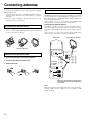
• AM loop antenna is not connected.
➞ Connect the included AM loop antenna to the AM antenna
terminals (see page 24).
Buzzing noise on AM stations (particularly noticeable at
night or with weak stations).
• Noise from electrical apparatus such as fluorescent lamp.
➞ Move the AM loop antenna to different position.
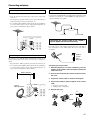
➞ Set up an outdoor AM antenna (see page 25).
Noise is heard at high-pitched sounds on AM stations.
• Noise caused by TV set.
➞ Place the AM loop antenna as far as possible from the TV.
➞ Move DTR-8.3 away from TV set.
Crackling noise on both AM and FM stations.
• Noise caused by fluorescent lamp being turned on and off.
➞ Move antenna as far as possible from the fluorescent lamp.
• Noise from automobile ignition.
➞ Install an FM outdoor antenna as far as possible from the road
(see page 25).
➞ Change the position or direction of the outdoor antenna.
Stereo indicator lights, but sound is distorted and stereo
separation is bad.
• Station is too strong.
➞ Change to FM indoor antenna (see page 24).
• Multiple reflection of the radio waves because of tall buildings
or mountains.
➞ Use antenna that has better directivity and orient it so
distortion is least.
Indicators for stereo reception flicker and hiss is heard
on FM stations.
• Station is too weak.
➞ Install an outdoor FM antenna (see page 25).
• Stereo FM broadcasts cover only about half the distance of an
ordinary broadcast.
➞ Change the position or direction of the outdoor antenna.
No preset station is recalled.
• Memory is lost because power has been turned off for a long
time.
➞ Store all stations again (see page 37).