1
Learning a pre-programming code
The remote controller has three learning functions. One is entering
the signal number for a remote controller of another brand that is preprogrammed. Another is a normal learning function that enables the
remote controller to learn the codes from other remote controllers.
And the last is a macro learning function that enables you to program
a series of operations into the remote controller so that the operations
can all be performed at once by pressing one button.
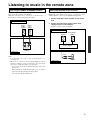
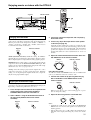
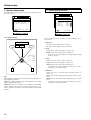
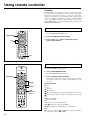
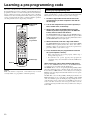
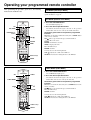
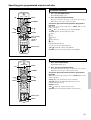
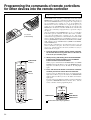
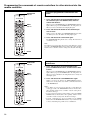
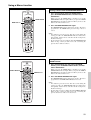
SEND/LEARN
indicator
Buttons that
can be preprogrammed
Learning a pre-programming code
By learning a pre-programming code, you can make the RC-441M
remote controller able to operate a product from another brand. The
buttons that are used for operation are given on the next page.
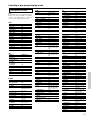
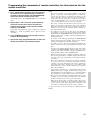
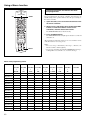
1. Find the 3-digit number for the brand name of the
component that you want to operate in the table on
the next page.
2. Turn on the component that you want to operate (i.e.
DVD, satellite tuner, or television).
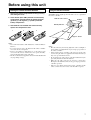
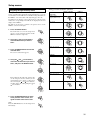
3. While holding down the MODE button on the RC441M that you want to program, press the DISPLAY
button, and then release both buttons.
The SEND/LEARN indicator lights when the MODE button is
pressed and turns off when the DISPLAY button is pressed. Wait
until the indicator turns off before releasing both buttons. Then
the SEND/LEARN indicator lights again.
4. Within 30 seconds, enter the 3-digit code number.
The SEND/LEARN indicator flashes twice slowly. If the SEND/
LEARN indicator quickly flashes three times, then either a
mistaken 3-digit code was entered or an incorrect operation was
performed. If this occurs, return to step 3.
5. Press the button that you programmed and check if
the system operates correctly.
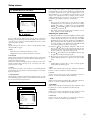
Numeric keys
DISPLAY
HOME THEATER CONTROLLER
RC-441M
Caution
With some brand’s components, some buttons may not work
correctly. In this case, program the command separately.
50
• If the component does not operate properly, return to step 3
and repeat the steps above.
• If it still does not operate properly, then program the
commands one by one to the buttons on the RC-441M remote
controller.
When entering the code of Integra/Onkyo DVD players:
There are three SETTING numbers. Choose the SETTING number
according to how you will be using the DVD player.
No. 601/613: These codes are for operating the Integra/Onkyo DVD
player by pointing the remote controller directly at it, either because
it does not have an z terminal, or it does but you are not using an
z cable and connecting it. First enter 601 and if it does not operate
properly, enter 613.
No. 600: This code is for Integra/Onkyo DVD players that have an
z terminal that you are connecting to the DTR-6.2 with an z
cable. You will then operate the DVD player by pointing the remote
controller at the remote control sensor on the DTR-6.2. You do not
need to enter this code because it is factory preset. However, if the
code has been changed to 601 or 613, then you will need to change it
back to 600.