1
Time Set Up Function
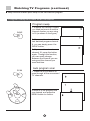
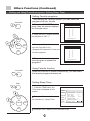
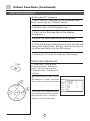
This model has time set function such as On/Off Time, Sleep and Remind Time, etc.
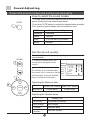
The unit of the TIME menu is minute.
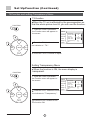
Set current time and On/Off Time functions
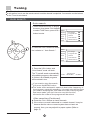
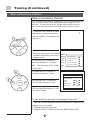
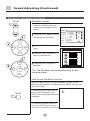
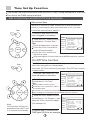
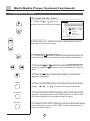
Set current time
When this function is used, please first check whether the
clock is in accordance with your local time; if not, you can
follow the instructions to adjust it.
TIME
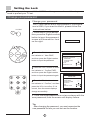
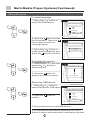
1. Press the TIME button, the Time
menu will appear on the screen.
MENU
. Press the CH+/- buttons to move
Picture
CH+
VOL-
MENU
VOL+
CH-
12
Current time
-Off Time
-On Time
On program
-Remind time
Remind program
Sleep Time
27
--10
---Off
the indicator to " Current Time ".
Tips:
Tune
The available option is green. Setup
Timer
Press the VOL-/+ buttons to
select the desired item.
Press the CH+/- buttons to
adjust the value.
After setting the Current time, press MENU button to confirm.
Sound
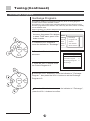
On/Off Time function
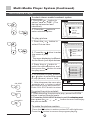
The TV set can be powered on/off at a preset time and it can
start with a program you have preset.
Here take On Time function for example. The Off Time function
is same with it.
TIME
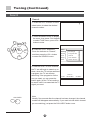
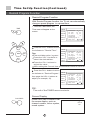
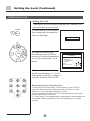
1. Press the TIME button, the Time
menu will appear on the screen.
. Press the CH+/- buttons to move
the indicator to " On Time ".
Tips:
CH+
VOL-
MENU
VOL+
MENU
Picture
Sound
Tune
Setup
12
Current time
-Off Time
18
On Time
On program
-Remind time
Remind program
Sleep Time
27
-00
10
---Off
Current time
12
Off Time
23
On Time
18
On program
Remind time
-Remind program
Sleep Time
27
00
00
10
---Off
Timer
The available option is green.
Press the VOL-/+ buttons to select
the desired item.
Press the CH+/- buttons to adjust the value.
After setting the Current time, press MENU button to confirm.
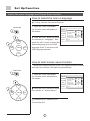
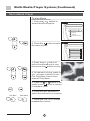
. Press the CH+/- buttons to move
CH-
the indicator to " On Program ", then
press the VOL-/+ buttons to adjust
Note:
This function will only be
available when the TV set
is in the mode of standby.
(For example, 10).
MENU
Picture
Sound
Tune
Setup
Timer
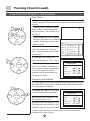
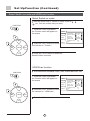
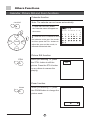
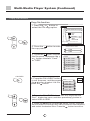
4. Repeat step 1-2 to turn OFF
TIME.(take 23:00 as an example)