1
Basic Navigation
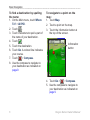
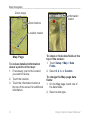
Zoom range
Information
button
Zoom buttons
Location marker
Map Page
To review detailed information
about a point on the map:
1. If necessary, pan to the location
you want to review.
2. Touch the location.
3. Touch the information button at
the top of the screen for additional
information.
8
To show or hide data fields at the
top of the screen:
1. Touch Setup > Map > Data
Fields.
2. Select 0, 2, 4, or Custom.
To change the Map page data
fields:
1. On the Map page, touch one of
the data fields.
2. Select a data type.
Oregon Series Owner’s Manual