1
Printer Setup
Setting up your printer is easy. Just follow the simple steps on the following pages.
Before you set up your printer, make sure your system meets the requirements
listed in the Introduction of your User’s Guide.
1 Unpack the Printer
Remove any packing material from the printer. See the Notice Sheet in the box for
details. Save all the packaging so you can use
it if you need to transport the printer later.
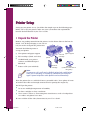
You need the following items to
set up your printer:
■
paper support
Your printer and paper support
■
Ink cartridges (black and color)
■
CD-ROM with your printer
software and EPSON Digital
PhotoLab
■
Printer cable (not included)
color ink
cartridge
printer
black ink
cartridge
CD-ROM
(located on the back of
this guide)
Note:
To connect to a PC, you’ll need a shielded, twisted-pair parallel printer
cable (6 to 10 feet long). To connect to a Macintosh, you’ll need an
Apple® System Peripheral-8 cable (Belkin brand recommended).
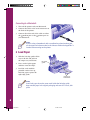
Place the printer flat on a stable desk near a grounded outlet. Leave plenty of room
in back for the cables and enough room in front for opening the output tray.
Do NOT put the printer:
2
■
In an area with high temperature or humidity
■
In direct sunlight or dusty conditions
■
Near sources of heat or electromagnetic interference, such as loudspeakers
or cordless telephone base units.
Be sure to follow all the Safety Instructions in your User’s Guide.
Comoro+ GS Booklet
6
3/17/98, 4:34 PM