1
Complete the information below, and keep it for reference.
Company product purchased from
Company telephone number
Product model number
Product serial number
Maintenance contract number
2 Overview
This document describes the basic process of setting up the Cisco 1710 Security router.
For advanced cabling information, refer to the Cisco 1710 Security Router Hardware Installation Guide. For advanced
configuration information, refer to the Cisco 1710 Security Router Software Configuration Guide. These documents also can be
found on Cisco.com.
Product Serial Number Location
The serial number label for Cisco 1710 router is located on the rear of the chassis, to the right of the power switch.
3 Parts List
Your router package should include the following items:
• One Cisco 1710 Security router
• One blue RJ-45-to-DB-9 console cable
• One black power supply
• One black power supply cord
• Product documentation
Items You Need to Provide
Depending on your network environment, you may need to provide some of the following items to install the router:
• Ethernet hub or switch to connect the router to the local network
• Straight-through Ethernet cables (RJ-45-to-RJ-45) to connect the router to a broadband (xDSL or cable) modem and to a
hub or switch
• A broadband modem connection to the Internet (typically, xDSL or cable)
4 Install the Router
You need to provide straight-through Ethernet cables for connecting the router to the local Ethernet network, and to your
xDSL/cable modem for your Internet connection. For more information on these cables, refer to the “Cabling Specifications”
chapter in the hardware installation guide that comes with the router.
Follow these steps to connect the router to your local network and to the Internet:
Step 1
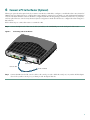
Connect one end of an Ethernet cable to the 10/100 ETHERNET port (the port on the right).
Step 2
Connect the other end of the Ethernet cable to a 10-, 100-, or 10/100-Mbps port on the hub or switch. The router senses
the port speed and duplex mode and then operates at the same speed and duplex.
3