1
Using Your Documentation
The following documentation is supplied with the Canon BJC-2000
Series Color Bubble Jet™ Printer to help you efficiently use your new
printer.
Quick Start Guide
This sheet describes the steps you follow to set up your printer and
install the BJC-2000 Series Printer Driver for Windows®. You can
follow the steps illustrated on this sheet to start printing in minutes.
User’s Manual
This manual offers detailed information on how to operate your printer.
It includes printing operations, maintenance, and specifications. Read
this manual to master basic operations and when you need to know the
specifications of the printer.
Conventions
This User’s Manual uses the following conventions to alert you to
information that will help you operate the printer correctly and safely.
N
C
Notes provide advice or suggestions regarding the use of the printer.
Cautions alert you to operations that could cause damage to your
hardware or software, or cause injury to yourself.
iii
Distinctive typefaces identify the printer buttons you press, the lights on
the operator panel, and any commands you enter at your computer.
❍ The buttons you press appear in this typeface: RESUME button.
❍ When you type something on your computer, it appears in this
typeface: DIR/P.
❍ The selections you make in Windows are shown in bold: Click OK.
iv
Contents
1 Introduction ......................................................................................................
Supplies and Accessories ....................................................................................
BJ Cartridges and BJ Tanks ..........................................................................
Canon Specialty Papers ................................................................................
Color Image Scanner Cartridge ...................................................................
Hardware and Software Requirements ..............................................................
Additional System Requirements for Windows NT 4.0 Users ...................
Canon Customer Care Center ...........................................................................
Servicing the Printer ....................................................................................
2 Using the Printer With Windows ................................................................
Understanding the Printer Driver.......................................................................
Printing a Document ..........................................................................................
Using the Printer Driver in Windows ................................................................
Accessing the Printing Options—Windows 98, Windows 95, or
Windows NT 4.0 ......................................................................................
Accessing the Printing Options—Windows 3.1 ..........................................
The Windows Tabs ..............................................................................................
The Main Tab ...............................................................................................
The Paper Tab ...............................................................................................
The Features Tab ..........................................................................................
The Maintenance Tab ...................................................................................
Specifying Your Printing Options on the Windows Tabs ...........................
Recommended Print Mode Settings ..................................................................
Customizing the Print Mode Settings ...............................................................
The Quality Tab ............................................................................................
The Color Tab ...............................................................................................
The Save Tab .................................................................................................
Executing a Print Tab ..........................................................................................
The BJ Background Monitor .......................................................................
BJ Backgrounder ..........................................................................................
BJ Status Monitor .........................................................................................
Printing Speed Versus Color ..............................................................................
Ways to Improve Print Speed in Windows .................................................
1-1
1-2
1-2
1-3
1-4
1-4
1-5
1-5
1-6
2-1
2-1
2-2
2-3
2-3
2-4
2-5
2-5
2-6
2-7
2-8
2-9
2-9
2-11
2-11
2-12
2-13
2-14
2-14
2-15
2-16
2-17
2-17
3 Paper Handling ..................................................................................................
3-1
Selecting Paper Types .......................................................................................... 3-2
Paper Guidelines ........................................................................................... 3-5
Setting the Paper Thickness Lever ...................................................................... 3-6
Printer Settings for Various Print Media............................................................ 3-7
Loading Paper ...................................................................................................... 3-7
Automatically Feeding Paper ........................................................................ 3-8
Auto Feed Guidelines .................................................................................... 3-10
v
Printing on Envelopes .........................................................................................
Using Canon’s Specialty Papers .........................................................................
Specialty Paper Guidelines............................................................................
High Resolution Paper .................................................................................
Fabric Sheets .................................................................................................
Printing on Banner Paper .............................................................................
Loading Glossy Photo Paper and Glossy Photo Cards ..............................
3-11
3-15
3-15
3-17
3-21
3-24
3-29
4 Maintaining the Printer .................................................................................. 4-1
Printer Guidelines ...............................................................................................
Cleaning the Printer ...........................................................................................
Printing a Test Page ............................................................................................
Cleaning the Print Head .....................................................................................
BJ Cartridge Guidelines ......................................................................................
BJ Cartridge and BJ Tank Maintenance ......................................................
Replacing the BJ Cartridge .................................................................................
Replacing a BJ Tank in the BC-21e Color BJ Cartridge ...................................
Storing a BJ Cartridge ........................................................................................
Transporting the Printer ....................................................................................
4-2
4-3
4-4
4-6
4-7
4-8
4-10
4-14
4-17
4-19
5 Troubleshooting ...............................................................................................
5-1
5-1
5-2
5-4
5-5
Identifying Your Printer Problem ......................................................................
Basic Problems ....................................................................................................
Clearing Paper Jams ............................................................................................
Using the Resume Button ...................................................................................
Appendix A
Specifications ................................................................................
Printing Specifications .......................................................................................
Printable Area .....................................................................................................
BJ Cartridges .......................................................................................................
General ................................................................................................................
Optional IS-22 Color Image Scanner Cartridge ...............................................
A-1
A-1
A-3
A-6
A-7
A-7
Appendix B
Appendix C
Installing the Printer Driver for Windows 3.1 ..................... B-1
Installing the Optional Color Image Scanner ........................ C-1
Installing the Scanner Cartridge ........................................................................ C-1
Removing the Scanner Cartridge ....................................................................... C-4
Glossary ..................................................................................................................... G-1
Index .......................................................................................................................... I-1
FCC Regulations ......................................................................................................FCC-1
vi
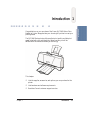
Congratulations on your purchase of the Canon BJC-2000 Series Color
Bubble Jet Printer. We appreciate your choosing this printer to meet your
printing needs.
The BJC-2000 Series printers offer excellent print quality and fast print
speed using both color and black inks. We are certain you will be
satisfied with this advanced Bubble Jet technology.
This chapter:
❍ Lists the supplies, accessories, and options you can purchase for the
printer
❍ Lists hardware and software requirements
❍ Describes Canon’s customer support services
Chapter 1
Introduction
1-1
Introduction
Introduction 1
Supplies and Accessories
Your BJC-2000 Series printer supports excellent and unique print media
options that will allow you to produce dazzling, professional, and fun
presentations. All of these print media are specially designed and
manufactured to work with your Canon Color Bubble Jet printer so you
can produce the finest output possible.
Canon has an extensive dealer network equipped to offer you supplies
as you need them. To find a dealer near you, call the Canon Referral
Service at 1-800-848-4123.
If supplies are not available from your local dealer, you can order
directly from Canon by calling 1-800-385-2155.
BJ Cartridges and BJ Tanks
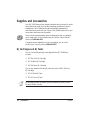
You can use the following BJ® cartridges with the BJC-2000 Series
printers:
❍ BC-21e Color BJ Cartridge
❍ BC-20 Black BJ Cartridge
❍ BC-22e Photo BJ Cartridge
You can purchase the following BJ tanks for use in the BC-21e Color
BJ Cartridge:
❍ BCI-21 Black BJ Tank
❍ BCI-21 Color BJ Tank
N
1-2
BJ cartridges contain the Bubble Jet print head and BJ tank(s), while
BJ tanks contain ink only.
Introduction
Chapter 1
Canon’s limited warranty does not cover damage caused to Canon’s
Bubble Jet products that is attributable to the use of third party parts or
supplies, including inks. The limited warranty remains in effect for its
life once that particular damage has been properly repaired.
For optimum printing results, Canon recommends that you use only
Canon BJ cartridges and BJ tanks.
You can also purchase the optional Canon BC-22e Photo Kit, which
includes everything you need to produce photo-realistic images:
❍ BC-22e Photo BJ Cartridge
❍ SB-21 Ink Cartridge Storage Box
❍ Canon High Resolution Paper HR-101 (60 sheets)
See Chapter 4, Maintaining the Printer, for details on replacing
BJ cartridges.
Canon Specialty Papers
Canon manufactures numerous specialty papers, including:
❍ Glossy Photo Paper
❍ Banner Paper
❍ Brilliant White Paper
❍ High Resolution Paper
❍ T-Shirt Transfers
❍ Greeting Cards
❍ Glossy Photo Cards
❍ Bubble Jet Paper (water resistant)
Chapter 1
Introduction
1-3
Introduction
N
Canon has more engineers dedicated to creating quality ink for providing
the best results for output on Bubble Jet printers than any other
organization. Canon does not prohibit the use of third-party inks and the
use of third-party inks does not invalidate the product’s limited warranty.
However, Canon cannot guarantee the quality or performance of your
printer when you are using inks from other suppliers.
❍ Fabric Sheets
❍ Transparencies
❍ Back Print Film
❍ High Gloss Film
See Chapter 3, Paper Handling, for details on Canon’s Specialty Papers.
Color Image Scanner Cartridge
You can use your BJC-2000 Series printer as a color image sheetfed
scanner by removing the BJ cartridge from the printer and replacing it
with the optional IS-22 Color Image Scanner Cartridge. This scanner
cartridge employs an optical head in place of a print head to scan images
and text on paper fed through the printer.
See Appendix C, Installing the Optional Color Image Scanner, for
instructions on how to install the scanner cartridge. For details about
using the scanner cartridge, see the IS-22 Color Image Scanner Cartridge
User’s Manual that comes with the scanner cartridge package.
Hardware and Software Requirements
Important! Before you start, make sure you have the following computer
setup. (These are the minimum requirements.)
❍ IBM® PC or compatible computer with a 486 PC processor or better
(Pentium® processor recommended)
❍ Microsoft® Windows® 98, Windows 95, or Windows 3.1
❍ 8 megabytes (MB) of RAM
(16 MB or more recommended for high resolution printing)
❍ 40 MB hard disk space
❍ Bi-directional, Centronics®-compatible parallel cable (IEEE
1284-compliant); a cable less than 6.6 feet in length is recommended
1-4
Introduction
Chapter 1
Canon Creative has additional requirements. See the Canon Creative
Quick Start Guide for details.
Additional System Requirements
for Windows NT 4.0 Users
❍ Pentium 90 processor or higher (Pentium 200 recommended)
❍ Service Pack 3 or later
❍ 32 MB RAM (64 MB recommended)
❍ 60 MB hard disk space available (150 MB recommended)
❍ CD ROM drive (or access to a CD ROM drive over the network
connection)
Canon Customer Care Center
Canon Computer Systems, Inc. offers a full range of customer technical
support* options including:
❍ 24-hour, 7-day-a-week, toll-free automated support for troubleshooting
issues on most current products (1-800-423-2366)
❍ Speak to a technician free of service charge (currently Monday–
Friday, 8:00 am–10:00 pm and Saturday 12:00 pm–6:00 pm EST,
excluding holidays) for products still under warranty**
(1-757-413-2848)
❍ Speak to a technician (currently $24.99 per call) during holidays and
days/hours not listed above regarding urgent product questions or
for products no longer under warranty (1-800-423-2366)
Or for a charge of $2.50 per minute, to a maximum of $25.00 per
call (1-900-246-1200)
Chapter 1
Introduction
1-5
Introduction
❍ CD ROM drive (2x or better)
(If you do not have a CD ROM drive, you can download the printer
driver from Canon’s Web site or BBS, or call the Canon Customer
Care Center to order the Printer Setup on diskettes for a small
shipping and handling fee. See the Canon Customer Care Center
information below for numbers.)
❍ Technical support via the Canon Computer Systems, Inc. Web site
(www.ccsi.canon.com)
❍ 24-hour, toll-free Fax Retrieval System (1-800-526-4345)
❍ To download the latest drivers using your modem, 24-hour Bulletin
Board Service (1-757-420-2000)
❍ Within Canada, 24 hours a day, 7 days a week* (1-800-263-1121)
*Support program specifics subject to change without notice.
**Refer to individual product information for warranty details.
Servicing the Printer
The Canon BJC-2000 Series Color Bubble Jet Printers are designed with
the latest technology to provide trouble-free operation. The Warranty
Card that comes with the printer describes Canon’s one-year limited
warranty for your Bubble Jet printer. Be sure to read the warranty
information to find out about the different service options available
to you.
N
Save your sales receipt for proof of purchase. In the event that your
printer needs service, you will need your proof of purchase to obtain
warranty service.
If you feel your BJC-2000 Series Color Bubble Jet Printer needs
servicing, contact Canon on the World Wide Web to locate the Canon
Authorized Service Facility (ASF) nearest you. If you do not have access
to the Web, you can call Canon (see page 1-5).
1-6
Introduction
Chapter 1
Using the Printer With Windows 2
This chapter describes how to use the printer with your Windows
applications. It includes:
❍ Understanding the printer driver
Using the Printer
With Windows
❍ Printing a document
❍ Using the Printer Driver in Windows
❍ The Windows tabs
❍ Recommended Print Mode settings
❍ Customizing the Print Mode settings
❍ Executing a print job
❍ Printing speed versus color
Understanding the Printer Driver
Before you can use any type of printer with your computer, you must
install software that allows the printer and computer to communicate;
the software is called a printer driver. The printer driver tells the
computer what kind of a printer you are using. The printer driver also
controls the various settings, such as print quality and paper type. You
define these settings within the printer driver, and the printer driver then
communicates the settings to both the computer and the printer.
N
Chapter 2
You must install the BJC-2000 Series Printer Driver for Windows before
you can use the printer with your computer. If you are using Windows
98, Windows 95, or Windows NT 4.0, see your Quick Start Guide for
instructions. If you are using Windows 3.1, see Appendix B for
instructions.
Using the Printer With Windows
2-1
Printing a Document
This procedure describes the general steps required for printing from
various Windows applications. The exact steps for printing a document
may vary depending on the application program you are using. Refer
to your software application’s documentation for the exact printing
procedure.
Start your
application.
❍ Start the program you are using to create the document,
and open the document you want to print.
Make sure
the Canon
BJC-2000 is
selected as
your default
printer.
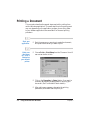
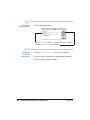
❍ Choose Print or Print Setup from the File menu. You will
see a screen similar to this:
❍ Click on the Properties (or Setup) button if you want to
make any adjustments as appropriate for printing your
document. (See The Windows Tabs for details.)
❍ After making any necessary changes to the printing
parameters, click OK to start the print job.
2-2
Using the Printer With Windows
Chapter 2
Using the Printer Driver in Windows
You use the printer driver to define the type of printing you plan to do.
The default settings may be adequate for most of your printing
operations, but you will want to change these settings for any special
color printing or when you use media other than plain paper.
To view or change your printer settings, you must open the printer
driver dialog box. The printer driver dialog box contains tabs on which
the printing options are displayed.
You can open the printer driver dialog box in one of the following ways:
❍ From within any Windows application, you can select the Print or
Print Setup command.
❍ From the Printers folder, you can select the printer and then select
the Properties command (Windows 98 or Windows 95) or the
Document Defaults command (Windows NT 4.0) from the File
menu.
❍ From the Printers folder, you can select the printer, click the right
mouse button, and then select the Properties command (Windows
98 or Windows 95) or the Document Defaults command (Windows
NT 4.0) from the drop down list.
The title and the tabs you see across the top of the printer driver dialog
box depend on how you start the printer driver and on the operating
system you are using. The Main, Paper, Features, and Maintenance tabs
contain the printing options that make up your printer driver. The other
tabs you see, such as General or Details, relate to your operating system;
for information regarding the options on these tabs, see your Windows
documentation.
Chapter 2
Using the Printer With Windows
2-3
Using the Printer
With Windows
Accessing the Printing Options—Windows 98,
Windows 95, or Windows NT 4.0
N
For detailed information on any of the printing options, you can use the
Windows 98, Windows 95, or Windows NT online Help:
❍ Use the right mouse button to click an item on the screen; then
click the What’s This? command.
❍ Click ? and then click an item.
❍ Press F1.
Accessing the Printing Options—Windows 3.1
You can access the printing options from the Printers dialog box in the
Control Panel, or you can select the Print Setup option available from
the File menu of most applications that run in Windows.
N
If the Print Setup option does not appear in the File menu for your
application, refer to the user’s manual supplied with the application.
It should provide information about changing the printer setup
parameters.
In Windows 3.1, the printing options are displayed on these tabs: Main,
Paper, Features, and Maintenance. See the next section, The Windows
Tabs, for details.
If you have not installed the BJC-2000 Series Printer Driver for Windows
3.1, see Appendix B for instructions.
2-4
Using the Printer With Windows
Chapter 2
The Windows Tabs
The BJC-2000 Series Printer Driver for Windows has several tabs from
which you can select your printing options. Be sure to use the Windows
help features to learn more about using these settings.
N
The tabs you see may be arranged differently than shown here. The
arrangement of the printing options on the tabs varies depending on the
operating system you are using. However the settings are the same.
Using the Printer
With Windows
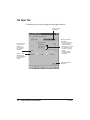
The Main Tab
This tab allows you to select your Print Mode.
SELECT YOUR PRINT MODE,
WHICH INCLUDES PRINT QUALITY
AND COLOR SETTINGS
CLICK HERE TO
PRINT COLOR DATA
AS GRAYSCALE
SPECIFY THE TYPE
OF BJ CARTRIDGE
INSTALLED
SELECT YOUR
MEDIA TYPE
ILLUSTRATES THE
CURRENT PAPER
SETTINGS
RESTORE DEFAULT
SETTINGS
CLICK HERE TO CUSTOMIZE
THE PRINT MODE SETTINGS
(SEE PAGE 2-11)
Chapter 2
Using the Printer With Windows
2-5
The Paper Tab
This tab allows you to specify paper size and page orientation.
SPECIFY YOUR
PAPER SIZE
FOR SCALED OR
PAGE LAYOUT
PRINTING,
SPECIFY SIZE
OF PAPER IN
PRINTER
SPECIFY PAGE
ORIENTATION
(HOW DOCUMENT
PRINTS ON A
PAGE)
SPECIAL PRINTING
FEATURES:
• SCALED—TURN ON
TO ENLARGE OR
REDUCE PRINTING
• PAGE LAYOUT—TURN
ON TO PRINT 2 OR 4
PAGES ON A SINGLE
SHEET
• BANNER—TURN
ON FOR BANNER
PRINTING
RESTORE DEFAULT
SETTINGS
2-6
Using the Printer With Windows
Chapter 2
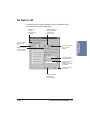
The Features Tab
This tab allows you to specify background printing features, which
include multiple copies and page layout.
ENABLE PRINTING IN
REVERSE ORDER
(LAST PAGE TO
FRONT PAGE)
SPECIFY NUMBER
OF COPIES TO
PRINT
ENABLE COLLATING
FOR MULTIPLE
COPIES
ENABLE TO PRINT
2 OR 4 PAGES ON
A SINGLE SHEET
PRINT BORDERS TO
SEPARATE PAGES
SPECIFY A GRAPHIC
STAMP TO BE
PRINTED ON YOUR
DOCUMENT
RESTORE DEFAULT
SETTINGS
CLICK TO VIEW OR
CHANGE THE
STAMP SETTINGS
Chapter 2
Using the Printer With Windows
2-7
Using the Printer
With Windows
ENABLE OR
DISABLE
BACKGROUND
PRINTING
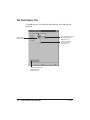
The Maintenance Tab
This tab allows you to initiate print head cleaning, roller cleaning, and
test prints.
FEED A SHEET OF PAPER
TO CLEAN ROLLERS
(SEE PAGE 3-17)
START PRINT
HEAD CLEANING
PRINT THE NOZZLE
CHECK PATTERN
(SEE PAGE 4-4)
START THE BJ PRINTER
STATUS MONITOR
(SEE PAGE 2-14)
2-8
Using the Printer With Windows
Chapter 2
Specifying Your Printing Options on the Windows Tabs
Be sure to use your online help to find out about the settings available
for each printing option.
❍ To move between the Windows tabs, click on any of the tabs.
❍ To save the settings and exit, click the OK button.
❍ To cancel your setting selections on a tab, click the Cancel button.
❍ To access helpful information about the printer and the printer
driver, click on the Help button.
❍ To find out about a setting, click the question mark ? in the upper
right corner. Move the larger question mark to the setting you are
interested in and click again.
Recommended Print Mode Settings
The Print Mode you select on the Main tab optimizes the printer’s
settings for print quality, media, paper feed method, and color
adjustment.
Chapter 2
Using the Printer With Windows
2-9
Using the Printer
With Windows
❍ To save your settings without exiting, click the Apply button.
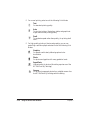
❍ For normal printing, select one of the following Print Modes:
Text
For standard printing quality.
Auto
To print text, photos, illustrations, tables, and graphics at
higher than normal printing quality.
Draft
To emphasize speed rather than quality; for printing draft
texts.
❍ For high-quality printing of photos and graphics, you can use
special high-resolution paper and select one of the following Print
Modes:
Graphics
For graphics with clearly defined graph and color
boundaries.
Photo
For photos and graphics with many gradation levels.
SuperPhoto
Highest quality for photos (this setting requires use of the
BC-22e Photo BJ Cartridge).
Camera
For printing images and photos from a digital camera. Use
the BC-22e Photo BJ Cartridge with this setting.
2-10
Using the Printer With Windows
Chapter 2
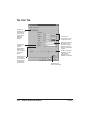
Customizing the Print Mode Settings
On the Main tab, you can click the Advanced button to customize the
selected Print Mode. You see the following three tabs.
SELECT THE TYPE
OF CARTRIDGE
INSTALLED
SPECIFY MEDIA
TYPE
SPECIFIES PAPER
FEED METHOD OF
AUTO FEED
SPECIFY HALFTONING
• AUTO—ALLOWS
THE PRINTER TO
DETERMINE THE
TYPE OF IMAGE
DATA AND APPLY
THE APPROPRIATE
DITHERING METHOD
• FINE (FAST)—USE
FOR HIGH SPEED
PRINTING OF
CHARACTERS
OR TABLES
• FINE—USE FOR
PRINTING GRAPHICS
OR CHARTS WITH
CLEARLY DEFINED
COLOR BOUNDARIES
• DIFFUSION—USE
FOR PRINTING
NATURAL COLOR
IMAGES SUCH AS
PHOTOGRAPHS
Chapter 2
SPECIFIES THE
BALANCE
BETWEEN PRINT
QUALITY AND
PRINT SPEED
ENABLES THE
IMAGE DATA
CORRECTION
FEATURE TO
SMOOTH LOWRESOLUTION
IMAGE DATA
FOR PRINTING
RESTORES
THE DEFAULT
SETTINGS
Using the Printer With Windows
2-11
Using the Printer
With Windows
The Quality Tab
The Color Tab
ENABLE OR
DISABLE COLOR
ADJUSTMENT
(USING COLOR
ADJUSTMENT
REDUCES
PRINTING
SPEED)
ADJUSTS THE
CONTRAST
AMONG
INTERMEDIATE
TONES THAT
FALL BETWEEN
BLACK AND
WHITE
SPECIFIES HOW
TO PROCESS
COLOR VALUES
SO THEY BEST
APPROXIMATE
THE ORIGINAL
2-12
Using the Printer With Windows
ADJUSTS THE
LUMINOSITY OF THE
FOUR COLOR INKS
SPECIFIES WHETHER
PRINTED OUTPUT
EMPHASIZES INTERMEDIATE TONES OR
BRIGHT, SHARP BASIC
COLORS
ADJUSTS THE PRINT
INTENSITY TO MAKE
THE OVERALL
PRINTED OUTPUT
DARKER OR LIGHTER
RESTORES THE
DEFAULT SETTINGS
Chapter 2
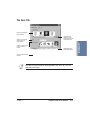
The Save Tab
DISPLAYS CURRENT
PRINT MODES
SPECIFY A NEW ICON
FOR THIS PRINT
MODE
DESCRIBES THE
NEW PRINT MODE
SAVE THE NEW PRINT
MODES
N
Chapter 2
You cannot use the names of existing modes (Text, Auto, etc.) nor the
reserved name Graph.
Using the Printer With Windows
2-13
Using the Printer
With Windows
SPECIFY A CUSTOM
NAME FOR THIS
PRINT MODE
CHANGES THE
ORDER OF THE
ICONS; MOVES THE
SELECTED ICON
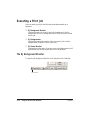
Executing a Print Job
After you start a print job, the following three features start up in
sequence.
❍ BJ Background Monitor
Displays the status of the print jobs in the background. Use the
background monitor to change the order of the print jobs or cancel
a print job.
❍ BJ Backgrounder
Displays the transmission status of the current print job. Use the
backgrounder to pause or cancel a print job.
❍ BJ Status Monitor
Displays the printer status. If an error occurs, the status monitor will
describe the error and provide a solution for the problem.
The BJ Background Monitor
To open the BJ Background Monitor, click its button on the Task Bar.
CLICK HERE
2-14
Using the Printer With Windows
Chapter 2
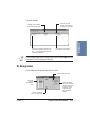
You see this screen:
NAMES OF DOCUMENT PRINTING AND
DOCUMENTS QUEUED FOR PRINTING.
Using the Printer
With Windows
DRAG THE COLUMN
DIVIDER LEFT OR RIGHT
TO RESIZE THE COLUMN
NUMBER OF DOCUMENT
PAGES AND SIZE (BYTES)
TIME AND DATE DOCUMENT
WAS SENT TO THE PRINTER
THE
ICON MARKS THE DOCUMENT
CURRENTLY PRINTING.
N
For more details about the BJ Background Monitor, select Help from the
Help menu of the BJ Background Monitor.
BJ Backgrounder
The BJ Backgrounder screen looks similar to this:
CANCELS THE PRINT JOB
SHOWS THE
FLOW OF
TRANSMISSION
DATA
SHOWS THE PAGE
AND COPY PRINTING
Chapter 2
PAUSES THE PRINT
JOB. AFTER PAUSING
THE PRINT JOB, THIS
BUTTON CHANGES
TO RESUME. CLICK
TO RESTART THE
PRINT JOB AFTER
PAUSING.
Using the Printer With Windows
2-15
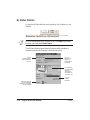
BJ Status Monitor
To open the BJ Status Monitor during printing, click its button on the
Task Bar.
CLICK HERE
N
For information about the BJ Status Monitor, click Help to pull down
the Help menu and select Screen Topics.
The BJ Status Monitor shows the printer status and the progress of
documents printing in Windows. It looks similar to this:
OPENS
AUTOMATICALLY
WHEN AN ERROR
OCCURS
CLICK TO
DISPLAY THE
CORRECT
RESPONSE TO
AN ERROR
PICTURES AND
TEXT DESCRIBE
PRINTER
STATUS AND
PROGRESS OF
THE PRINT JOB
CLICK TO
CANCEL
PRINTING
DISPLAYS THE TYPE
OF BJ CARTRIDGE
CURRENTLY MOUNTED
IN THE PRINTER
2-16
Using the Printer With Windows
Chapter 2
Printing Speed Versus Color
The BJC-2000 Series Printer Driver for Windows can interpret and
translate the full spectrum of colors, up to 16.7 million colors. When
printing in color, there is a significant increase in the amount of
information that the driver has to interpret and translate. When printing
with black ink only, the driver has only one color to interpret.
Ways to Improve Print Speed in Windows
To improve printing speed, you can try the following:
❍ Turn off the Print Manager in the Windows Control Panel
(Windows 3.1 only)
This avoids the extra step of sending the print file to the Print
Manager and may increase your printing speed by as much as 25%,
depending on the computer you are using.
❍ Add a permanent swap file in Windows 3.1
Under the 386 Enhanced icon in the Windows Control Panel, add or
create a permanent swap file that is from 4 MB to 9 MB. The
computer will be able to prepare the print file faster. See your
Windows documentation for instructions.
❍ Avoid diffusion halftones
In the Quality tab, choose Diffusion for Halftoning only when
printing final output or photographic images. Choosing a
Halftoning setting of Fine/Fast allows documents to print as much
as 20% faster because the computer does not need to compute to
“best possible position” for each dot.
❍ Avoid color adjustment
In the Color tab, disable the Color Adjustment option. This feature
takes longer to process in the computer because it requires special
information.
Chapter 2
Using the Printer With Windows
2-17
Using the Printer
With Windows
By decreasing the amount of colors that the printer driver has to
interpret, you can significantly decrease the time needed to translate
the information. This will speed up the overall printing process.
❍ Free up your memory
Use only one software program at a time and unload any screen
saving utilities or programs stored in Windows background; this
frees up more memory for Windows processing.
❍ Use Draft mode when possible
If you will be printing text in black ink only, choose a Print Mode
of Draft or Text. Use Draft mode to emphasize speed rather than
quality; in Draft mode the printer will need to disperse fewer dots.
❍ Limit the number of colors on each page
The computer will need to calculate and transmit fewer dots. Too
many colors can make the image confusing and less effective as well
as cause the print speed to slow down.
❍ Use basic colors when printing presentation graphics
Use black, yellow, magenta, blue, green, and red when possible. The
computer will need to calculate and transfer less dot information.
❍ Use Plain Paper as the Media Type
The print head will make only one pass for each printed line.
❍ Use smaller graphics and more white space in your
documents
The computer will be able to prepare the print file faster.
❍ Add more RAM to your computer
The computer will be able to prepare the print file faster.
❍ Use a computer with a faster processor
The computer will be able to prepare the print file faster.
2-18
Using the Printer With Windows
Chapter 2
Paper Handling 3
This chapter describes how to use the printer for all your printing
operations. It includes:
❍ Selecting paper types
❍ Setting the paper thickness lever
❍ Summary of printer settings for various print media
❍ Automatically loading paper
❍ Printing on envelopes
To ensure the best performance of your printer, you’ll want to select the
best paper and load it correctly. You can stack paper in the sheet feeder
to load it automatically, or you can manually feed one sheet at a time.
Chapter 3
Paper Handling
3-1
Paper Handling
❍ Using Canon’s Specialty Papers
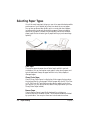
Selecting Paper Types
One of the most important things you can do to assure the best possible
performance of your Bubble Jet printer is to select the correct paper.
Your printer produces letter quality print on most plain bond papers,
including cotton bond and photocopying papers; it does not require
special ink jet papers. However, the print quality varies with different
paper types. Be sure to test a type of paper before you purchase a large
quantity.
Plain Paper
The printer supports paper sizes of letter, legal, and A4 in portrait
orientation. You can use regular copier paper, cotton bond papers, and
typical letterhead. Always use paper without curls, folds, staples, or
damaged edges.
Glossy Photo Paper
Canon Glossy Photo Paper is a high gloss, thicker paper that produces
the look and feel of a photograph. Use this paper with the BC-21e Color
or BC-22e Photo BJ Cartridge to produce photo-realistic prints from
your printer. (In your printer driver, select Glossy Paper when you have
Glossy Photo Paper loaded.)
Banner Paper
Canon’s Banner Paper is specifically designed for printing one
continuous sheet in a banner format. The connected sheets are divided
by a perforation. You can print from two to six sheets at one time.
3-2
Paper Handling
Chapter 3
Brilliant White Paper
Canon’s unique paper formulation gives you a bright white printing
surface that produces incredibly brilliant colors and dark, crisp black
text. This paper works great for everyday use, as well as proposals, color
presentations, color charts/graphs, flyers, and newsletters. You can print
on both sides of the sheet. (In your printer driver, select Plain Paper
when you load this paper.)
High Resolution Paper
The Canon High Resolution Paper is designed to produce photo-realistic
quality output with sharp and vivid graphics. For best results, use the
optional BC-22e Photo BJ Cartridge to produce images comparable to
your favorite photographs.
T-Shirt Transfers
Greeting Cards
Get the most out of your Canon Creative or other card making software
with Canon Greeting Cards. These cards give your unique, personalized
cards the look and feel of professional cards. You can create cards,
invitations, announcements, and more.
Glossy Photo Cards
Use Canon’s Glossy Photo Card media when creating greeting cards and
other fun items that you want to fill the entire card. These cards are the
same stock as Canon’s Glossy Photo Paper and have perforations around
the printable area. You can print beyond the perforation and then tear
off the margins; this allows you to fill the entire card with an image or
color.
Bubble Jet Paper (water resistant)
The Canon Bubble Jet Paper has been developed for high quality
printing with minimal or no smearing or running when in contact with
water or damp surfaces, making it a good choice for damp or rainy
environments. The paper is specially coated and printable on both sides.
(In your printer driver, select Plain Paper when you load this paper.)
Chapter 3
Paper Handling
3-3
Paper Handling
Use Canon’s popular T-Shirt Transfers to create and personalize T-shirts,
sweatshirts, aprons, tablecloths, napkins, tote bags, and anything else
your imagination allows! Use on any cotton or cotton/poly blend fabric.
Your image is printed in mirror image (when you select T-Shirt Transfer
for your Media Type in the BJC-2000 Series Printer Driver) so when you
iron it onto the T-shirt the image is viewed correctly.
Fabric Sheets
Use Fabric Sheets for Canon Bubble Jet printers to print pillow covers,
scarves, flags, and other textile items. Use these sheets for appliqués and
other craft and sewing projects. Fabric sheets are 9.5 × 14 inches. Be sure
to select Fabric Sheet as your Media Type in the printer driver.
Transparencies
Canon Transparencies are recommended. These transparencies produce
excellent contrast, sharpness, and color.
Back Print Film
Canon Back Print Film has been specially developed for Canon Color
Bubble Jet printers. The film is designed to deliver brilliant, highintensity color images suitable for business presentations, design work,
or professional reports. Back print film is printed on the back (nonglossy) side of the film in mirror image and then viewed from the front
or glossy side using a backlighting device. Be sure to select Back Print
Film as your Media Type in the printer driver.
High Gloss Film
The Canon High Gloss Film features a bright white finish that lends
striking visual power to charts, graphs, and photographic images. Use
this film to make your presentation materials and graphics look
professional.
N
3-4
If you are printing in an application outside Windows, your software
application or printer driver must support mirror image printing in
order to use Back Print Film or T-Shirt Transfers.
Paper Handling
Chapter 3
Paper Guidelines
When selecting or loading paper, please remember the following:
❍ Attempting to print on damp, curled, wrinkled, or torn paper can
cause paper jams and poor print quality.
❍ Use cut-sheet paper only. You cannot use multipart paper.
❍ Whenever possible, hold the paper by the edges and avoid touching
the print side. Any scratching or soiling of the print side will
adversely affect the print quality.
❍ When storing paper, put the paper back in its original package and
avoid locations that are exposed to direct sunlight or that are subject
to high temperatures or humidity. To avoid bending or wrinkling
the paper, store the package on a flat surface.
❍ When using graph paper, the lines may not match because the
1/6-inch line spacing of the printer is slightly less than that of
graph paper. Adjust the line spacing in your application.
❍ If the print density of your page is very high, light paper stock may
curl slightly due to the large amount of ink. If you need to print
dense graphics, try printing on thicker paper.
❍ Do not use thicker paper than meets the specifications for this
printer. Printing with a paper that is thick enough to come in
contact with the print head nozzles may damage the BJ cartridge.
❍ When printing on legal size paper (or larger), do not extend the
paper output tray.
Chapter 3
Paper Handling
3-5
Paper Handling
❍ After printing, do not touch the print side until the ink is dry. If
water gets on the printed media, do not touch the print side until
the media is dry.
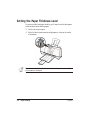
Setting the Paper Thickness Lever
To ensure trouble-free paper handling, you’ll want to set the blue paper
thickness lever before loading paper.
❍ Left for printing on paper
❍ Right for fabric sheets, heavier-weight paper or other print media,
or envelopes
N
3-6
Be sure to check this lever before and after printing on heavier-weight
print media or envelopes.
Paper Handling
Chapter 3
Printer Settings for Various Print Media
Paper
output
guides
Plain paper
Left
Down
Paper feed limit (Sheets)
Approx. 50 (0.2" or 5 mm stack)
Glossy Photo Paper
Left
Up
10
Banner Paper
Left
Up
1 (2 to 6)
Brilliant White Paper
Left
Down
Approx. 50 (0.2" or 5 mm stack)
High Resolution Paper
Left
Up
Approx. 40 (0.2" or 5 mm stack)
T-Shirt Transfers
Left
Down
1
Greeting Cards
Left
Down
1
Glossy Photo Cards
Left
Down
1
Bubble Jet Paper
Left
Down
Approx. 50 (0.2" or 5 mm stack)
Fabric Sheets
Right
Down
1
Transparencies
Left
Down
20
Back Print Film
Left
Down
10
High Gloss Film
Left
Down
1
Other heavier-weight
print media
Right
Down
1
Envelopes
Right
Down
5
Paper Handling
Media
Paper
thickness
lever
Loading Paper
You can stack paper in the sheet feeder to load it automatically, or you
can manually feed one sheet at a time through the sheet feeder.
You can place approximately 50 sheets of plain paper (20 lb or
75 g/m2) in the sheet feeder at a time.
You can stack approximately 20 sheets of transparency film or 10 sheets
of back print film in the sheet feeder. However, these special media may
not advance correctly under unusual environmental conditions (such as
extreme temperatures or humidity). If you have trouble with special
papers becoming skewed or feeding multiple sheets, do not stack them
in the sheet feeder. Load them one sheet at a time.
Chapter 3
Paper Handling
3-7
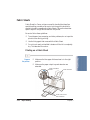
Automatically Feeding Paper
Prepare the
printer.
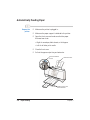
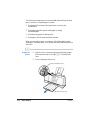
❍ Make sure the printer is plugged in.
❍ Make sure the paper support is attached to the printer.
❍ Open the front cover and make sure the blue paper
thickness lever is set:
• Right for envelopes, fabric sheets, or thick paper
• Left for all other print media
❍ Close the front cover.
❍ Pull out the paper output tray and extension.
PAPER THICKNESS
LEVER
PAPER SUPPORT
PAPER OUTPUT TRAY
AND EXTENSION
3-8
Paper Handling
Chapter 3
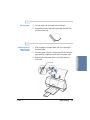
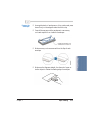
Fan the paper.
❍ For best results, fan the paper before loading it.
❍ Always fan a stack of paper along the edge that will feed
into the printer first.
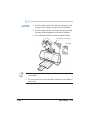
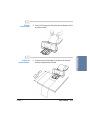
Load the stack of
paper into the
sheet feeder.
❍ Align the edge of the paper stack with the right edge of
the sheet feeder.
❍ Pinch the paper guide so it moves smoothly and slide the
paper guide snug against the left side of the paper stack.
Paper Handling
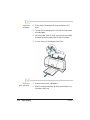
❍ Make sure that the paper stack is not higher than the
limit mark.
LIMIT MARK
Chapter 3
Paper Handling
3-9
Start your
print operation.
❍ Use the printer driver to set any necessary print
properties; for example, you need to change the settings
in the printer driver if you are printing photos or using
special paper.
Auto Feed Guidelines
When automatically feeding stacks of paper, follow these guidelines:
❍ Do not open the front cover while printing. This may cause paper
jams, smudges, or malfunctions.
❍ Do not leave paper stacked in the printer for long periods of time;
longer sheets of paper may become bent or curled over time. This
may cause the paper to misfeed or jam.
❍ Depending on the density of your printed pages, the ink may need
time to dry. Within two to three seconds, the ink becomes smudge
resistant.
❍ If your printed page contains lots of graphics, the ink may take
longer to dry.
❍ The capacity of the paper output tray is 20 sheets of paper. To
reduce paper jams, remove paper from the output tray before the
count reaches 20.
❍ If paper curls after printing, remove it immediately; otherwise, paper
jams may occur.
❍ Make sure there are no gaps between the stack of paper and the
paper guide nor the right edge of the sheet feeder.
3-10
Paper Handling
Chapter 3
D
❍ Do not try to load paper into the sheet feeder beyond the paper
limit mark ( ) on the left side or the tabs on both sides of the sheet
feeder; stacking too much paper may cause paper feeding or
printing problems.
Paper Handling
LOAD LIMIT MARK
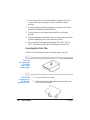
Printing on Envelopes
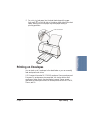
You can stack up to 5 envelopes in the sheet feeder or you can manually
feed envelopes one at a time.
U.S. Commercial number 10 (COM10) envelopes, Canon envelopes, and
European DL envelopes are recommended. You may be able to stack
envelopes of other sizes in the sheet feeder; however, Canon cannot
guarantee consistent performance on envelope sizes other than COM10,
Canon, and DL.
Chapter 3
Paper Handling
3-11
The following envelopes are not recommended because they may cause
jams or smears, or may damage your printer.
❍ Envelopes with windows, holes, perforations, cutouts, and
double flaps.
❍ Envelopes made with special coated paper or deeply
embossed paper.
❍ Envelopes using peel-off sealing strips.
❍ Envelopes in which letters have been enclosed.
When you are ready to print on envelopes, follow these steps to stack
envelopes in the sheet feeder. (You can also manually feed envelopes one
at a time.)
Prepare the
printer.
❍ Open the front cover and make sure that the blue paper
thickness lever is set to the right (A). Close the front
cover.
❍ Pull out the paper output tray.
PAPER THICKNESS LEVER
PAPER OUTPUT TRAY
3-12
Paper Handling
Chapter 3
Prepare the
envelopes.
❍ Arrange the stack of envelopes on a firm surface and press
down firmly on the edges to make the folds crisp.
❍ Press all the way around the envelopes to remove any
curls and expel air from inside the envelopes.
PRESS DOWN FIRMLY ON
THE EDGES OF THE FLAP
❍ Make sure the flaps are straight. Use the end of a pen or
similar object to flatten the leading edge of envelopes.
Chapter 3
Paper Handling
3-13
Paper Handling
❍ Make sure any curls are removed from the flap of each
envelope.
Insert the
envelopes.
❍ Slide a stack of envelopes into the sheet feeder until it
stops.
❍ The top of the envelope goes in first with the flap toward
the sheet feeder.
❍ Pinch the paper guide so it will move smoothly and slide
the paper guide snug against the left side of the stack.
❍ You can load up to 5 envelopes at one time.
Start your
print operation.
3-14
Paper Handling
❍ Make sure the printer is plugged in.
❍ When 5 envelopes have been printed, remove them from
the paper output tray.
Chapter 3
Using Canon’s Specialty Papers
This section provides guidelines for printing on Canon’s Specialty Papers
and describes special procedures required for High Resolution Paper,
Fabric Sheets, Banner Paper, and Glossy Photo Paper and Cards.
Specialty Paper Guidelines
N
Be sure to read any instructions that come with your Canon Specialty
Paper. These instructions provide important information regarding how
to achieve the highest print quality with these papers.
Follow these guidelines:
❍ Let the printed sheets of film or paper dry completely before storing
them.
Media type
Drying time
Canon Glossy Photo Paper or Cards
Canon Fabric Sheets
Canon Transparencies
Canon Back Print Film
10 minutes
1 hour
15 minutes
15 minutes
❍ When a sheet of film has dried completely, cover its printed side
with a sheet of plain (not coated) paper before storing it; this is
recommended even if you place the sheets of film in a clear file or
plastic holder.
Chapter 3
Paper Handling
3-15
Paper Handling
❍ When automatically feeding transparencies or back print film,
remove each sheet after it is delivered. Do not allow film sheets to
stack up.
❍ Do not leave the film in the sheet feeder for long periods of time.
Dust and dirt may accumulate on the film resulting in spotty
printing.
❍ To avoid smudging caused by fingerprints, use a pair of thin cloth
gloves while loading and handling the film.
❍ To avoid fading, do not expose the printed film to prolonged
sunlight.
❍ Store unused papers and films flat. Do not remove papers from their
protective packaging until you are ready to use them.
❍ Store unused film at temperatures between 59°F to 86°F (15°C to
30°C). The relative humidity should be between 10% and 70%.
Uncurling Back Print Film
If Back Print Film becomes curled, follow these steps to uncurl it:
Cover the
non-glossy side
of the film
with a sheet
of plain paper.
Roll the film
and paper up in
the direction
opposite the curl.
3-16
Paper Handling
❍ Do not roll the film too tight.
❍ The film and paper rolled together should be about one
inch (2.5 cm) in diameter.
Chapter 3
Keep the film
rolled up for
about five
minutes.
❍ You may want to fasten the roll with a small piece of tape.
High Resolution Paper
Using the Printer’s Output Tray
Paper Handling
The paper output tray on your printer is equipped with paper output
guides. When using the BC-22e Photo BJ Cartridge to print on Canon’s
High Resolution Paper, lift the paper output guides on both sides of the
printer’s output tray:
PAPER OUTPUT
GUIDES
❍ Always lift both paper output guides.
❍ With the paper output guides up, the output tray holds 20 sheets.
❍ After using the BC-22e Photo BJ Cartridge to print on High
Resolution Paper, lower the paper output guides.
3-17
Paper Handling
Chapter 3
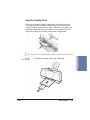
Using the Cleaning Sheet
Canon’s High Resolution Paper is designed for high quality printing.
This paper is specially coated to produce delicate color output. After
using a package of High Resolution Paper (200 sheets), you need to use
the cleaning sheet enclosed with the paper to remove paper dust from
the printer’s rollers; this will help prevent paper feed problems.
Chapter 3
❍ Make sure the paper output tray is extended.
Paper Handling
Paper Handling
Set up
the printer.
3-18
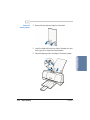
Insert the
cleaning sheet.
❍ Remove the two pieces of tape from the sheet.
❍ Insert the sheet with the sticky side out (toward you) and
down (going into the printer’s sheet feeder).
Paper Handling
❍ Adjust the paper guide to the edge of the cleaning sheet.
3-19
Paper Handling
Chapter 3
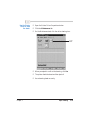
Use the Printer
Driver to feed
the sheet.
❍ Open the Printer Driver Properties window.
❍ Click the Maintenance tab.
❍ On the Maintenance tab, click the roller cleaning icon.
CLICK
HERE
❍ When prompted to confirm the cleaning, click Yes.
❍ The printer feeds the sheet and then ejects it.
❍ Use a cleaning sheet once only.
Chapter 3
Paper Handling
3-20
Fabric Sheets
Fabric Sheets for Canon printers come with a booklet that describes
special handling procedures. Be sure to look through this booklet for
special information regarding the Fabric Sheets. This section describes
specific steps for using Fabric Sheets with this printer.
Be sure to follow these guidelines.
❍ To avoid paper jams, smearing, and other problems, do not open the
printer’s cover during printing.
❍ Use the fixing agent that comes with the Fabric Sheet.
❍ Do not touch newly printed fabric sheets until the ink is completely
dry. This takes about one hour.
Prepare
the printer.
❍ Make sure the blue paper thickness lever is to the right
position.
❍ Make sure the paper output tray and extension are
extended.
PAPER THICKNESS
LEVER
PAPER SUPPORT
PAPER OUTPUT TRAY
AND EXTENSION
3-21
Paper Handling
Chapter 3
Paper Handling
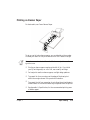
Printing on a Fabric Sheet
Insert the
fabric sheet.
❍ Insert the sheet with the cloth side out (toward you) and
the open end up (away from the printer’s sheet feeder).
❍ Pinch the paper guide so it will move smoothly and slide
the paper guide snug against the left side of the sheet.
❍ Do not attempt to load more than one sheet at a time.
PRINT SIDE (CLOTH SIDE UP)
OPEN END
N
❍ Do not remove the film backing from the fabric sheet until printing
is completed.
❍ Do not touch the front side of the fabric sheet when your hands are
wet or dirty.
Chapter 3
Paper Handling
3-22
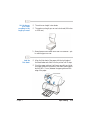
Set up the
Printer Driver.
❍ In the Main tab, select Fabric Sheet for the Media Type.
❍ In the Paper tab, select Letter or A4 for the Paper Size.
❍ Change other settings as required.
❍ Start the print operation from your Windows application.
Dry and
then wash the
fabric sheet.
❍ Let the printed fabric sheet set for about one hour to
allow the ink to completely dry.
❍ When dry, peel the film backing from the printed fabric
sheet. Do not remove the film backing before printing.
❍ Wash the printed fabric sheet for about three minutes
under lukewarm running water to remove extra ink.
❍ Iron the dried fabric sheet with a clothes iron.
❍ See the booklet that comes with the Fabric Sheets for
details on drying and washing.
3-23
Paper Handling
Chapter 3
Paper Handling
❍ Hang the fabric sheet up to dry it again.
Printing on Banner Paper
For best results, use Canon Banner Paper.
To set up a print job on banner paper, you must decide on the number
of sheets you need. You can print banners from 2 to 6 sheets in length.
N
Always leave an extra sheet at the end of the banner—just in case the
type runs over.
❍ Printing on banner paper requires quite a bit of ink. If you think
your BJ cartridge may run out of ink, use a new BJ cartridge.
❍ For best print results on banner paper, use light design patterns.
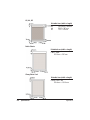
❍ To prevent ink from running over the edges of the sheet, print
within the margins shown in the previous illustration.
❍ To prevent the ink from smearing, do not allow the printed sheets to
fold and stack on one another after they are ejected from the printer.
❍ See Appendix A, Specifications, for the recommended printing area
of banner paper.
Chapter 3
Paper Handling
3-24
Cut the banner
at a crease
according to the
length you need.
❍ The minimum length is two sheets.
❍ The maximum length you can use is six sheets (66 inches
or 1676 mm).
❍ Always leave an extra sheet at the end of the banner—just
in case the type runs over.
Load the
first sheet.
❍ Align the first sheet of the paper with the right edge of
the sheet feeder and slide it into the printer until it stops.
❍ Pinch the paper guide so it will move smoothly and slide
the paper guide to the left side of the sheet. Leave a gap of
about 0.04 in. (1 mm) between the paper guide and the
edge of the paper.
PAPER GUIDE
Chapter 3
Paper Handling
3-26
Adjust the
printer location.
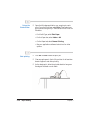
❍ Gently fold the paper at the perforations between the first
and second sheet.
❍ Place the printer at the edge of the desk so at least two
sheets are supported by the desk.
TS Y
EE B
SH TED
2 R
ST PO
A
P
LE SU SK.
AT RE DE
A E
TH
Chapter 3
Paper Handling
3-27
Paper Handling
Fold the
banner paper.
Set up the
Printer Driver.
❍ Open the Windows application you are going to use to
print. From the File menu, select Print. Then select your
print options using the BJC-2000 Series Printer Driver for
Windows.
• For Media Type, select Plain Paper.
• For the Paper size, select Letter or A4.
• On the Paper tab, select Banner Printing.
• See your application software instructions for other
options.
Start printing.
❍ Click OK or Print to start the print job.
❍ Clear enough space in front of the printer for at least two
sheets of paper to rest after printing.
❍ As the sheets print, allow the printed sheets to hang over
the edge of the desk or work table.
3-28
Paper Handling
Chapter 3
Loading Glossy Photo Paper and Glossy Photo Cards
When you load Glossy Photo Paper or Glossy Photo Cards in the
printer, always use the Loading Support Sheet provided with the
package.
Prepare
the sheets.
❍ Hold the sheets of Glossy Photo Paper with the whiter
sides (print sides) up and place them on top of the
Loading Support Sheet.
Paper Handling
❍ You can load up to 10 sheets of Glossy Photo Paper in the
sheet feeder.
Stack
the sheets.
Chapter 3
❍ Tap the stack against a flat surface to align the edges of
the Glossy Photo Paper and the Loading Support Sheet.
Paper Handling
3-29
Load the Glossy
Photo Paper.
N
3-30
❍ Insert the stack into the sheet feeder.
Before loading Glossy Photo Cards in the printer, read the instructions
provided with the package of Glossy Photo Cards.
Paper Handling
Chapter 3
Maintaining the Printer 4
This chapter covers the care required for your printer. It includes:
❍ Printer guidelines
❍ Cleaning the printer
❍ Printing the test pages
❍ Cleaning the print head
❍ BJ cartridge guidelines
❍ Replacing the BJ cartridge
❍ Replacing a BJ tank in the BC-21e Color BJ Cartridge
❍ Storing a BJ cartridge
Maintaining
the Printer
❍ Transporting the printer
Chapter 4
Maintaining the Printer
4-1
Printer Guidelines
Follow these guidelines to avoid damage to your printer and harm to
you or others:
❍ Set the printer on a stable surface. Do not use an angled printer
stand. Avoid setting the printer in direct sunlight.
❍ Keep the front cover closed when printing.
❍ Do not set anything on top of the printer.
❍ Do not unplug the printer unnecessarily. If you will not be using the
printer for an extended period, unplug the power cord from the
power outlet.
❍ When you unplug the power cord, grasp the plug itself. Do not pull
on the cord.
❍ Do not unplug the printer when it is printing. This may prevent the
print head unit from returning to the home position on the right and
being capped, which may cause the print head to dry out. This is
critical. If left uncapped, the print head unit may clog and may need
to be replaced.
❍ Do not move the mechanism that holds the BJ cartridge. Attempting
to move the BJ cartridge holder may damage delicate mechanical
parts. (When you open the front cover, the cartridge holder
automatically moves to the center of the printer.)
BJ CARTRIDGE
HOLDER
4-2
Maintaining the Printer
Chapter 4
❍ Do not place the printer too close to a fluorescent lamp. Allow at
least six inches (15 cm) clearance between the printer and any
fluorescent lamp. Fluorescent lamps generate electrical noise that
may cause printer malfunctions.
Cleaning the Printer
Your printer requires little routine maintenance. Perform the following
maintenance, as necessary, to keep your printer in good operating
condition.
C
❍ Do not clean the exterior of the printer with volatile liquids such as
thinners, benzine, or any spray-type or chemical cleaners; doing so
will damage the surface of the printer.
❍ When cleaning the printer, avoid the area near the print head on the
BJ cartridge. Do not touch the print head. Ink may leak out and
cause stains.
❍ To avoid personal injury, always unplug the printer before
cleaning it.
Maintaining
the Printer
Unplug the
printer.
Chapter 4
Maintaining the Printer
4-3
Clean the printer.
❍ Clean the exterior of the printer with a soft cloth
moistened with water.
❍ Clean away smudges and dust.
❍ Do not use paper products (such as paper towels or
tissues) to clean the printer.
Printing a Test Page
You can print a Nozzle Check Pattern to check the operation of your
printer and your print quality. If the Nozzle Check Pattern indicates
poor print quality, try cleaning the print head (see page 4-6). If
necessary, replace the BJ cartridge.
Before starting, make sure paper is properly loaded in the sheet feeder
(see Automatically Feeding Paper starting on page 3-7).
4-4
Maintaining the Printer
Chapter 4
You use the Test Prints option on the Maintenance tab in your
BJC-2000 Series Printer Driver for Windows to print a Nozzle Check
Pattern.
CLICK HERE
Click on the Test Prints option and then click OK.
When the BC-21e Color BJ Cartridge is installed, the pattern includes all
four colors: yellow, magenta, cyan, and black. In the color pattern, you’ll
notice that lines are missing between the colors. This is normal.
YELLOW
Maintaining
the Printer
MAGENTA
CYAN
BLACK
The following sample shows the Nozzle Check Pattern when the
optional BC-20 Black BJ Cartridge is installed.
N
Chapter 4
You can also print the Nozzle Check Pattern by pressing the RESUME
button on the printer. Quickly press it twice to start printing.
Maintaining the Printer
4-5
Cleaning the Print Head
Your printer is equipped with a print head cleaning function to ensure
constant high quality printing.
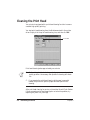
You start print head cleaning from the Maintenance tab in the printer
driver. Simply click the print head cleaning icon, and then click OK.
CLICK HERE
Print head cleaning takes approximately one minute.
N
❍
Perform the print head cleaning only when you encounter a print
quality problem. Unnecessary and repetitious cleaning will waste
ink.
❍ If you execute the print head cleaning while paper is manually
loaded, the printer will eject the paper and then perform the
cleaning.
After print head cleaning, be sure to print another Nozzle Check Pattern.
If three successive print head cleanings do not solve the problem, try
replacing a BJ tank or BJ cartridge.
4-6
Maintaining the Printer
Chapter 4
BJ Cartridge Guidelines
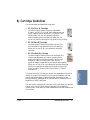
You can use these cartridges with the printer:
❍ BC-21e Color BJ Cartridge
Contains the print head unit and two replaceable
BJ tanks—the BCI-21 Color BJ Tank contains color ink
(cyan, magenta, yellow) and the BCI-21 Black BJ Tank
contains black ink. You can replace the BJ tanks
without replacing the print head unit when you run
out of ink. Use this cartridge for high quality color printing.
❍ BC-20 Black BJ Cartridge
Contains the print head unit and black ink only. Use
this cartridge for high speed, black ink only printing.
When you run out of ink, you replace the complete
cartridge.
The actual amount of ink that you use will vary depending on the print
density of a page. If the majority of your output is graphics, you may
need to change cartridges or tanks more often than when you are
printing text only. See Appendix A, Specifications, for details on the life
expectancy of the BJ cartridges.
You may need to replace the BJ cartridge or a BJ tank when your printed
output is not crisp and clear and there are gaps in the characters
(missing dots)—even after you have cleaned the print head at least three
to five times.
Chapter 4
Maintaining the Printer
4-7
Maintaining
the Printer
❍ BC-22e Photo BJ Cartridge
Contains the print head unit and color and black inks.
Use this cartridge when you want to produce photoquality color printing. When used with Canon’s High
Resolution Paper or Glossy Photo Paper, this ink
produces images comparable to your favorite photographs.
When you run out of ink, you replace the complete cartridge.
When you install this cartridge, you must set up the printer
driver for a Print Mode of Photo, SuperPhoto, or Camera;
see page 2-12.
If you are using the BC-21e Color BJ Cartridge and your output is
blank, one of the BJ tanks is probably out of ink. See the instructions
starting on page 4-14 for replacing a BJ tank.
N
Canon has more engineers dedicated to creating quality ink for providing
the best results for output on Bubble Jet printers than any other
organization. Canon does not prohibit the use of third-party inks and the
use of third-party inks does not invalidate the product’s limited warranty.
However, Canon cannot guarantee the quality or performance of your
printer when you are using inks from other suppliers.
Canon’s limited warranty does not cover damage caused to Canon’s
Bubble Jet products that is attributable to the use of third party parts or
supplies, including inks. The limited warranty remains in effect for its
life once that particular damage has been properly repaired.
For optimum printing results, Canon recommends that you use only
Canon BJ cartridges and Canon BJ tanks.
BJ Cartridge and BJ Tank Maintenance
The most important thing you can do to extend the life of your printer
and to ensure optimum print quality is take care of the BJ cartridges.
C
Spilled ink can stain any surface. Open BJ cartridges and BJ tanks
carefully, and follow the guidelines presented here to protect against
spilled ink.
❍ Do not unpack a BJ cartridge until you are ready to use it.
4-8
Maintaining the Printer
Chapter 4
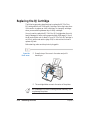
Replacing the BJ Cartridge
The following procedure describes how to replace the BC-21e Color
BJ Cartridge with the BC-20 Black BJ Cartridge. Follow the instructions
in this section to replace an old BJ cartridge or to change BJ cartridges
when you are switching between any of the BJ cartridges.
You only need to replace the BC-21e Color BJ Cartridge when the print
head is damaged (or after printing approximately 2000 pages). If one of
the BJ tanks (either color or black) in your BC-21e Color BJ Cartridge is
out of ink, see the next section (page 4-14) for instructions on how to
replace a BJ tank.
Before starting, make sure the printer is plugged in.
Open the
front cover.
❍ Grasp the top of the cover in the center and pull it
toward you.
❍ The cartridge holder moves to the center of the printer.
N
4-10
Do not attempt to move the cartridge holder manually. This
may damage the printer.
Maintaining the Printer
Chapter 4
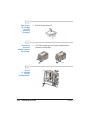
Remove the
BJ cartridge.
❍ Slide the BJ cartridge out of the holder.
❍ If you are replacing an old BJ cartridge, dispose of the old
cartridge properly.
❍ If you are switching cartridges, you must store the
cartridge you are removing in the Ink Cartridge
Storage Box.
Maintaining
the Printer
Store or
dispose of the
BJ cartridge.
❍ Lift the blue lock lever on the cartridge holder.
Chapter 4
Maintaining the Printer
4-11
Take the new
BJ cartridge
out of its
protective
packaging.
Remove the
protective
material from the
BJ cartridge.
❍ Peel off the protective foil.
❍ Lift off the orange cap from the print head and then
remove the orange tape.
TAPE
CAP
Set the
BJ cartridge
into the
cartridge holder.
4-12
Maintaining the Printer
Chapter 4
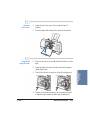
Lower the
lock lever.
❍ Press the blue lock lever down completely;
do not use excessive force.
❍ The BJ cartridge is now positioned and locked.
C
Set the paper
thickness lever.
Do not manually move the mechanism that houses the
BJ cartridge. Attempting to move the BJ cartridge holder will
damage the printer.
❍ If you plan to load envelopes, fabric sheets, or thick paper,
set the lever to the right.
Chapter 4
Maintaining the Printer
Maintaining
the Printer
❍ For all other print media, set the lever to the left.
4-13
Close the
front cover.
C
Whenever the printer stops printing, the BJ cartridge moves to the home
position on the right and caps itself. If you unplug the printer while it is
printing (or if you turn off a power strip to which the printer is
connected), or if you manually move the cartridge holder from the
home position, the BJ cartridge will not be capped and it may dry out.
If you installed a new BJ cartridge, the printer automatically cleans the
print head. If you need to initiate the print head cleaning, see page 4-6.
Replacing a BJ Tank in the BC-21e
Color BJ Cartridge
If you perform a print operation correctly but the output is blank, a
BJ tank may be out of ink. Perform the print head cleaning at least
three times and then print a Nozzle Check Pattern. If the Nozzle Check
Pattern indicates an empty BJ tank, replace the empty BJ tank in the
BC-21e Color BJ Cartridge.
Leave the BJ cartridge in the printer when replacing a BJ tank. Make sure
the printer is plugged in.
4-14
Maintaining the Printer
Chapter 4
Open the
front cover.
❍ Grasp the top of the cover in the center and pull it
forward.
❍ The cartridge holder moves to the center of the printer.
Remove the
empty BJ tank.
❍ The color BJ tank is on the left; the black BJ tank is on the
right.
❍ Then lift the BJ tank up and out of the BJ cartridge unit.
❍ Dispose of the BJ tank properly. You may want to place it
in a plastic bag to keep from spilling any residual ink.
Chapter 4
Maintaining the Printer
4-15
Maintaining
the Printer
❍ Grasp the tab on the top of the tank and pull forward to
release the BJ tank.
Take the new
BJ tank out of its
packaging.
Insert the new
BJ tank.
❍ Then remove the protective cap.
❍ Slide the new BJ tank into the empty slot on the
BJ cartridge.
❍ Press firmly on the tab on the top of the BJ tank until it
locks into place.
❍ Make sure each BJ tank is correctly seated in its
respective slot.
❍ If you are replacing both tanks, repeat steps 2 through 4
for the other BJ tank.
4-16
Maintaining the Printer
Chapter 4
Close the printer’s
front cover.
❍ Press firmly to close the cover.
❍ The printer moves the cartridge holder to the home
position on the right of the printer.
❍ The printer automatically cleans the print head unit.
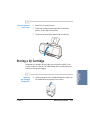
Storing a BJ Cartridge
Open the
Ink Cartridge
Storage Box.
Chapter 4
❍ When opening the Ink Cartridge Storage Box, press in on
the release tab that locks the cover in place.
Maintaining the Printer
4-17
Maintaining
the Printer
Whenever you unwrap a BJ cartridge, you must either install it in the
printer or store it in the Ink Cartridge Storage Box to prevent the print
head from drying and clogging.
Carefully set
the cartridge in
the storage box.
Close the
storage box.
N
4-18
❍ You must insert the cartridge correctly or the storage box
will not close.
❍ The protective cap must be removed from the cartridge
before you set it in the storage box.
❍ Be sure the lid snaps closed.
Whenever you remove a BJ cartridge from the printer, store the cartridge
in the storage box (unless you are disposing it).
Maintaining the Printer
Chapter 4
If you have more than one Ink Cartridge Storage Box, you can hook
them together. Simply connect them by the slides and grooves on the
sides of the containers.
Transporting the Printer
If you plan to move the printer from one location to another, or if you
want to store it, follow these steps.
Chapter 4
Maintaining the Printer
4-19
Maintaining
the Printer
N
While your printer is small and compact, it is not a portable printer and
you need to take care when transporting it. The printer’s components,
such as the sheet feeder, may become damaged if subjected to severe
vibration during transportation. Also, your print head may dry out
during travel (and become unusable) if it is not capped and taped
correctly.
Turn off the
printer’s power.
❍ Make sure the print head is in the home position.
❍ Remove any paper from the sheet feeder.
❍ Detach the interface cable.
❍ Unplug the printer and detach the power cord.
Remove the trays.
4-20
❍ Remove the paper support and paper output tray.
Maintaining the Printer
Chapter 4
Tape and cover
the printer.
❍ Tape the cover to the printer body.
❍ Cover the printer with its shipping bag.
TAPE
Maintaining
the Printer
Repack the printer
in its original
packing materials.
Chapter 4
Maintaining the Printer
4-21
N
Do not remove the BJ cartridge from the printer or ship a BJ cartridge
or an ink tank from which you have removed the protective cap. An
opened BJ cartridge or BJ tank that is not installed in the printer may
leak, and the print head may dry out.
If you are shipping the printer through a shipping agent, make sure the
top of the box is clearly marked FRAGILE or HANDLE WITH CARE.
4-22
Maintaining the Printer
Chapter 4
Troubleshooting 5
Due to today’s rapidly changing computer environment, we have placed
troubleshooting information in a variety of places to ensure that the most
accurate information possible is available. The best way to find current
information is through our online support services and through our
Fax Retrieval System. Online services include the World Wide Web and
our BBS (see page 1-5).
This chapter contains very basic information to help you solve printer
problems. It covers a few basic problems and describes how to clear a
paper jam. For complete problem solving information, be sure to use our
support services.
See Canon Customer Care Center in Chapter 1 (page 1-5) for details on
Canon’s customer technical support options.
Identifying Your Printer Problem
Before contacting Canon, identify your printer problem and make sure
you have the following information:
❍ Product name
❍ Serial number
❍ Place of purchase
❍ Nature of problem
Troubleshooting
❍ Steps you have taken to solve the problem and the results
Chapter 5
Troubleshooting
5-1
The serial number is located on the label on the back of the printer:
N
Attempting to repair the printer yourself may void the limited warranty
as to that repair. See the limited warranty information that came with
your printer for details.
Basic Problems
This section describes these basic problems:
❍ Cannot install the printer driver
❍ Paper does not feed from the sheet feeder
❍ An error message appears
❍ Print job will not start
❍ Printing halts
❍ Printout is unsatisfactory
For all other problems, be sure to use Canon’s support services described
on page 1-5.
5-2
Troubleshooting
Chapter 5
The BJ Printer Status Monitor uses messages and pictures to display the
printing progress and the status of the printer while it is printing. When
the ink or paper runs out or a paper jam occurs, the BJ Printer Status
Monitor automatically appears.
❍ Look at the messages and pictures to determine what type of error
has occurred.
Troubleshooting
❍ Click the Guide tab and proceed as directed by the messages shown.
Printing resumes once you resolve the error.
Chapter 5
Troubleshooting
5-3
Cause
Solution
Problem with the
CD ROM (continued)
Check that the Windows 98, Windows 95, or Windows
NT Explorer or the Windows 3.1 File Manager can
successfully read the CD.
If the CD is unreadable, call the Canon Customer Care
Center (see page 1-5).
Paper Does Not Feed From Sheet Feeder
Cause
Solution
Paper is too thick
Use recommended paper
Paper within the range of 17 to 24 lb (64 to 105 g/m2)
can be loaded in the sheet feeder. Thicker paper cannot
be used.
Sheet feeder
overloaded
Check sheet feeder capacity
Check that you do not exceed the sheet feeder capacity.
Paper will not feed correctly if you exceed the specified
number of sheets. (See page 3-7.)
Paper support not
attached
Attach the paper support
Always attach the paper support. If the paper support is
not attached, the media will not slide fully into the paper
feed slot and will not feed into the printer correctly.
Paper wrinkled or
curled
Check that you are using appropriate media
Paper that is folded, curled, or crumpled will not feed
into the printer correctly, and may also cause paper jams.
See page 5-12 for details on clearing a paper jam.
Troubleshooting
N
Chapter 5
Troubleshooting
5-5
An Error Message Appears
Printing does not start due to an error writing to LPT1.
Cause
Solution
Printer is not on
Check the power cord
Make sure the printer is plugged in to a power outlet.
Printer cable not
connected correctly
Check the parallel cable
Make sure the parallel cable is securely fastened to the
computer and the printer. See the Quick Start Guide for
details.
Printer cable fault
Try to use another printer cable
Make sure the cable is an IEEE 1284-compatible parallel
interface cable.
Another device is
connected to LPT1
Check the LPT1 port
Make sure the printer is connected to LPT1.
Switching device or
external buffer fault
Check the switching device or external buffer
Disconnect the switching device or external buffer and
print with the printer connected directly to the computer.
If you can then print normally, the fault is probably in
the switching device or external buffer. Consult the
switching device or external buffer supplier.
Print spool is not
operating correctly
Change the spool setting
Open the printer Properties dialog box. On the Details
tab, click Spool Settings and then select “Print directly to
the printer.”
5-6
Troubleshooting
Chapter 5
Cause
Solution
Printer port LPT1: fault
Check the status of the printer port LPT1
Click on Start, Settings, and Control Panel. Double-click
on the System icon. On the Device Manager tab, doubleclick Ports (COM & LPT). Double-click Canon BJ LPT
Printer Port (LPT1). The Device status should read “This
device is working properly.”
Installed printer driver
not operating correctly
Remove the installed BJ printer driver and then
install the printer driver again
To uninstall the printer driver, click Start and select
Programs. Then select BJ Printer and click Uninstall.
Follow the on-screen instructions. For details about
installing the printer driver, see the Quick Start Guide.
A Windows Printing
System (WPS) driver
is installed on the
computer
Change the WPS driver port setting to FILE or
delete the WPS driver
To change the port setting, open the WPS Driver
Properties window. In the Details tab, select FILE in the
“Print to Port” setting.
To delete the WPS driver, click Start and select
Programs. Then select Windows Printing System
and click Uninstaller. Follow the on-screen
instructions.
Troubleshooting
To continue using the WPS printer, install a second
parallel port.
Chapter 5
Troubleshooting
5-7
Printing does not start due to an application error or General Protection Fault.
Cause
Solution
Printing from a
Windows 3.1 application
Change applications
A Windows 3.1 application installed on a Windows 98 or
Windows 95 system may cause this problem. Print from
a Windows 98 or Windows 95 software application.
Multiple software
applications running
Quit other programs
Quit any other application programs you are running and
try printing again.
Sufficient memory
not available for the
software application
Check your memory
Refer to the manual for your software application and
check that the required amount of memory is allocated
to the application.
If there is not enough memory installed, install more
memory. Refer to the documentation for your computer
for information on installing additional memory.
Sufficient space not
available on hard disk
Delete files
Delete any unnecessary files to make more space
available
Internal file or
application software
problem
Rebuild the document and print it again
If there is no problem with the new document, the
original file was probably faulty. If the same problem
occurs with the new file, call the Canon Customer Care
Center for help.
5-8
Troubleshooting
Chapter 5
Cause
Solution
Installed printer driver
not operating correctly
Reinstall the printer driver
Remove the installed BJ printer driver and then install the
printer driver again.
To uninstall the printer driver, click Start and select
Programs. Then select BJ Printer and click Uninstall.
Follow the on-screen instructions.
Cause
Solution
The power cord is
disconnected from the
power outlet
Check your power cord
Check that the power cord is securely connected
to the power outlet.
No power is coming
from the power outlet
Check the outlet
Check that power is coming from the power outlet.
The printer and the
computer are not
properly connected
with the printer cable
Check your cables
Connect the power cord and the printer cable securely.
For details, see the Quick Start Guide.
A large-sized document,
such as a photograph or
graphics, is being printed
Wait awhile until printing starts
Data transfer takes longer with large-sized documents.
The printer driver being
used is not the BJC-2000
printer driver
Make sure the BJC-2000 driver is selected
Check the printer name in the Print dialog box of the
application software, and select BJC-2000.
The printer port is not
set correctly
Check the port setting
If the printer and the computer are connected directly
with a cable, set the “Print to following port:” setting in
the printer driver setup screen to LPT1.
The computer printer
port is set to ECP
Check the ECP setting
Delete the computer ECP mode and try printing again.
Chapter 5
Troubleshooting
5-9
Troubleshooting
Print Job Will Not Start
Cause
Solution
Printer cable fault
Try to use another printer cable
Make sure the cable is an IEEE 1284-compatible parallel
interface cable.
Switching device or
external buffer fault
Disconnect the switching device or external buffer
Print with the printer directly connected to the computer.
If you can then print normally, the fault is probably in
the switching device or external buffer. Consult the
switching device or external buffer supplier.
Windows Printing System
(WPS) driver is installed
on the computer. You
may not be able to print
correctly with a WPS
printer driver installed
on your computer.
Change the WPS driver port setting to FILE or
delete the WPS driver
To change the port setting, open the WPS Driver
Properties window. In the Details tab, select FILE in
the “Print to Port” setting.
To delete the WPS driver, select Programs from the
Windows Start menu. Then select Windows Printing
System and click Uninstaller. Follow the on-screen
instructions.
Printed and on-screen colors do not match
Cause
Solution
Print head nozzles in
the BJ cartridge are
clogged or the ink has
run out
Print a Nozzle Check Pattern
Check the status of the print heads (see page 4-4). Clean
the print head (see page 4-6). Replace the BJ cartridge
if necessary (see page 4-10).
Printer driver settings are
not correct
Check the printer driver settings
To print a photo, select the correct print media icon for
the document you are printing (such as SuperPhoto).
Check also that the BJ cartridge and Media Type settings
match the BJ cartridge and media you are actually using.
Chapter 5
Troubleshooting
5-11
Troubleshooting
The color reproduction methods used by monitors differ from those used by printers.
In addition, the printed color tones may not perfectly match those on the monitor
because the colors vary depending on the circumstances in which the monitor is
viewed and the monitor’s color calibration settings. For example, objects that appear
blue on the screen are printed purple, and objects that appear pale green on the screen
are printed dark green. However, if the differences are extreme, check the items below.
Printed pages curled/warped/wrinkled
Cause
Solution
Excess ink is being
absorbed by the paper
Check your media type
If you are printing on very thin paper, try a different
paper type. Print on special print media such as High
Resolution Paper or Glossy Photo Paper.
Print density is set
too high
Reduce the print intensity in the printer driver
To change this setting, open the Printer Properties dialog
box. On the Main tab, click the Advanced button and
then click the Color tab. Move the intensity slider to the
left to lower the print intensity.
Clearing Paper Jams
Gently pull the paper out with one hand while holding down the printer
with the other hand.
If the paper tears off inside the printer, unplug the printer. Then open
the front cover and remove the paper left inside the printer.
N
5-12
If you are printing high density graphics when a paper jam occurs, feed
at least two sheets of paper through the printer to clean the rollers.
Troubleshooting
Chapter 5
Using the Resume Button
You use the RESUME button to perform two functions:
❍ Press and hold the RESUME button to reset the printer and resume
printing.
Troubleshooting
❍ Double-click the RESUME button to print a Nozzle Check Pattern.
(You can also print a Nozzle Check Pattern with the printer driver.
See the information starting on page 4-4.)
Chapter 5
Troubleshooting
5-13
5-14
Troubleshooting
Chapter 5
Specifications
Specifications A
Printing Specifications
Printing Method
Bubble Jet ink on-demand
Printing Resolution
720 (vertical) × 360 (horizontal) dpi (maximum)
Print Speed
BC-21e Color
BJ Cartridge
Draft mode—up to 4.5 ppm
Standard mode—up to 3.8 ppm
Fine mode—up to 0.9 ppm
BC-20 Black
BJ Cartridge
Draft mode—up to 5 ppm
High quality mode—up to 3.6 ppm
Print Direction
Bi-directional
Print Width
Maximum
9.5 inches (241 mm) maximum
Line Feed Speed
Approximately 150 ms/line at 2/6-inch line feeds
Paper Handling
Automatic feed
Paper Weight
17 to 30 lb (64 to 105 g/m2)
Appendix A
Specifications
A-1
Sheet Feeder Capacity – Auto Feed Only
Maximum thickness of stacked paper: 0.2 inches (5 mm)
Plain paper
Approx. 50 sheets
(20 lb or 75 g/m2)
Glossy photo paper
10 sheets
Banner paper
1 sheet (2 to 6 sheets long)
Brilliant white paper
Approx. 50 sheets
High resolution paper
Approx. 40 sheets
T-shirt transfers
1 sheet
Greeting cards
1 card
Glossy photo cards
1 card
Bubble Jet paper
Approx. 50 sheets
Fabric sheets
1 sheet
Transparencies
20 sheets
Back print film
10 sheets
High Gloss Film
1 sheet
Envelopes
5 envelopes (U.S. Commercial number 10,
Canon envelopes, or European DL)
Paper Size
Letter
Legal
A4
A5
B5
Banner
U.S. Commercial
number 10 envelope
European DL envelope
Canon envelope
Custom
Width
Height
A-2
Specifications
8.5 in × 11 in
8.5 in × 14 in
210 mm × 297 mm
148 mm × 210 mm
182 mm × 257 mm
8.5 in × 11 in sheets;
maximum length 66 in (1676 mm)
9.5 in × 4.12 in
220 mm × 110 mm
9 in × 6 in
3.94 in to 9.50 in (100 mm to 241 mm)
3.94 in to 23 in (100 mm to 584 mm)
Appendix A
Recommended
Glossy photo paper
Banner paper
Brilliant white paper
High resolution paper
T-shirt transfers
Greeting cards
Glossy photo cards
Bubble Jet paper
Fabric sheets
Transparencies
Back print film
High gloss film
Envelopes
Canon Glossy Photo Paper
Canon Banner Paper
Canon Brilliant White Paper
Canon High Resolution Paper
Canon T-Shirt Transfers
Canon Greeting Cards
Canon Glossy Photo Cards
Canon Bubble Jet Paper (water-resistant)
Fabric Sheets for Canon Bubble Jet printers
Canon Transparencies
Canon Back Print Film
Canon High Gloss Film
U.S. Commercial number 10, Canon
envelopes, or European DL
Printable Area
The printable area includes the recommended printing area and the
actual printable area.
Recommended Printing Area
Canon recommends that you print within this area.
Printable Area
The area in which it is possible to print. However, printing in this area
can adversely affect the print quality or the paper feed precision.
Letter and Legal
Printable Area (width x length)
Letter
Legal
Appendix A
8 in × 10.6 in
8 in × 13.6 in
Specifications
A-3
Specifications
Media Type
A5, A4, B5
Printable Area (width x length)
A5
A4
B5
141.2 mm × 200 mm
203.2 × 287 mm
75.2 × 247 mm
Fabric Sheets
Printable Area (width x length)
Fabric Sheet
203.2 mm × 287 mm
Glossy Photo Card
Printable Area (width x length)
Glossy Photo Card
109.4 mm × 159.9 mm
A-4
Specifications
Appendix A
U.S. Commercial No. 10 Envelope
Printable Area (width x length)
Specifications
U.S. Commercial #10
8.25 in × 3.72 in
European DL Envelope
Printable Area (width x length)
European DL
207.2 mm × 100 mm
Banner Paper
The shaded portions of the drawing below illustrate the maximum
recommended printing area of Banner Paper.
Appendix A
Specifications
A-5
BJ Cartridges
BC-21e Color BJ Cartridge
Print head
Print head life
BJ tanks
Ink color
BJ tank yield
BCI-21 Color
BCI-21 Black
64 nozzles for black
24 nozzles for each color (cyan, magenta,
yellow)
Approximately 2,000 color pages at 30%
coverage
BCI-21 Color (cyan, yellow, magenta)
BCI-21 Black
Black, cyan, yellow, magenta
Approx. 100 pages at 7.5% coverage
Approx. 225 pages at 5% coverage
BC-20 Black BJ Cartridge
Print head
Ink color
Cartridge yield
128 nozzles
Black
Approx. 900 text pages at 5% coverage
BC-22e Photo BJ Cartridge
Print head
Ink color
Cartridge yield
A-6
Specifications
64 nozzles for black
24 nozzles for color
Black, cyan, magenta, yellow
Approximately 50 pages at
7.5% coverage for each color
Appendix A
A-8
Specifications
Appendix A
Installing the Printer Driver B
for Windows 3.1
Start up
your system.
❍ Turn on your printer, and then turn on your computer.
Make sure
Windows 3.1
starts.
❍ Insert the Canon Creative CD into your CD drive.
Appendix B
❍ From Program Manager, select Run in the File menu.
Installing the Printer Driver for Windows 3.1
B-1
Installing Printer
Driver Windows 3.1
This appendix describes how you install the BJC-2000 Series Printer
Driver for Windows 3.1. If you are using Windows 98 or Windows 95,
see the Quick Start Guide.
Specify the
Setup program.
❍ When you see this screen:
Type D:\SETUP (where D: is your CD drive… most CD
drives are D: or E:). Then click OK.
Follow the
on-screen
instructions.
❍ Select BJC-2000 Series from the list of printers.
❍ Be sure to wait for Windows to complete each operation.
❍ When complete, restart Windows.
B-2
Installing the Printer Driver for Windows 3.1
Appendix B
Installing the Optional C
Color Image Scanner
You can easily convert your printer into a color scanner by installing the
optional IS-22 Color Image Scanner Cartridge. This section describes
how to install and remove the Color Image Scanner Cartridge. For
details on operating the printer as a scanner, see the IS-22 Color Image
Scanner Cartridge User’s Manual that comes with the scanner cartridge
package.
SCANNING
HEAD
Installing Color
Image Scanner
C
CONTACT TERMINALS
Do not touch the contact terminals or the scanning head.
Installing the Scanner Cartridge
Remove the
BJ Cartridge.
❍ Open the front cover. The cartridge holder moves to the
center of the printer.
❍ Lift the blue lock lever.
❍ Slide the BJ cartridge out of the cartridge holder.
❍ Store the BJ cartridge in an Ink Cartridge Storage Box
(see page 4-17 for details).
Appendix C
Installing the Optional Color Image Scanner
C-1
Remove the
scanner cartridge
from its
packaging.
❍ Handle the scanner cartridge carefully.
Insert the
scanner cartridge.
❍ Hold the scanner cartridge by the ridges on either side of
the cartridge.
❍ Do not touch the scanning head area.
❍ Set the scanner cartridge into the holder, and lower the
blue lock lever.
Set the paper
thickness lever
to the right.
C-2
❍ The thickness lever must be set to the right (for thick
paper, envelopes) so you can feed the carrier sheet
provided with the Scanner Cartridge.
Installing the Optional Color Image Scanner
Appendix C
Close the
front cover.
❍ The cartridge holder moves to the home position on
the right.
Installing Color
Image Scanner
❍ For details about installing the IS Scan scanner driver,
refer to the IS-22 Color Image Scanner Cartridge User’s
Manual.
Removing the Scanner Cartridge
C
Always remove the Color Image Scanner Cartridge as soon as you are
finished scanning and replace it with a BJ cartridge. Do not leave the
Color Image Scanner Cartridge in the printer.
Remove the scanner cartridge just as you would a BJ cartridge.
(See steps 1 and 2 starting on page 4-10 for details.)
Store the scanner cartridge in the soft plastic case provided with the
cartridge. Only store the Color Image Scanner Cartridge in this case.
Appendix C
Installing the Optional Color Image Scanner
C-3
C
Never store the IS-22 Color Image Scanner Cartridge in an Ink
Cartridge Storage Box that has been used for a BJ cartridge. The pad in
the storage box where the head of a BJ cartridge rests is covered with ink
that will damage the scanning head of the IS-22 Color Image Scanner
Cartridge.
Be sure to replace the BJ cartridge in the printer after you remove the
scanner cartridge. Also, be sure to set the paper thickness lever for the
type of media you will be using.
C-4
Installing the Optional Color Image Scanner
Appendix C
Glossary G
Automatic feed
Refers to one way in which paper can be fed into the printer when the
sheet feeder is used.
BJ cartridge
The printing mechanism that contains the print head unit and BJ tanks.
BJ tank
The special type of ink container housed by the BJ cartridge. The
BC-21e Color BJ Cartridge contains two BJ tanks: one color (which
includes cyan, yellow, magenta) and one black.
Bubble Jet printer
An ink-jet type printer that heats the ink to a boiling point in a nozzle to
form a bubble. When the bubble expands, there is no room left in the
nozzle for the ink and the ink is projected onto paper.
CMYK
Acronym for cyan, magenta, yellow, and black; the four colors used in
the standard color model of the printing industry. Refers to a method of
specifying color using CMYK color values. (K is used for black because
B is used to represent blue in RGB.)
Composite black
cpi
Characters per inch. A unit of measurement relevant to a fixed-space
font. Because all characters have the same width, you can calculate the
number of characters printed per inch.
cpl
Characters per line. A unit of measurement that indicates the number of
characters printed per line.
cps
Characters per second. A unit of measurement that indicates the
printer’s speed.
Glossary
G-1
Glossary
The black color formed by mixing cyan, magenta, and yellow ink so that
they appear almost black on a printout.
dB(A)
Stands for decibel level (a decibel being a unit of measurement for the
intensity of the sound coming from the printer), adjusted for
background noise.
dpi
Dots per inch. A unit of measurement for indicating a printer’s
resolution. Your printer can produce a resolution up to 720 × 360 dpi.
Font
A complete set of characters of the same size and style; a particular
implementation of a typeface. For example, 12-point, Courier bold.
Form feed
A printer function that automatically ejects the current page and
advances the printer to the top of the next page.
Grayscale
Representing color in black and white as a result of different intensities
of color. Different colors and intensities of colors appear as different
shades of gray.
Halftone
Using this method, the printer produces shades of gray or of colors by
mapping dots to be printed. For color printing, different colored dots of
ink are placed closely together to create illusions of other colors.
Hue
A color in the color spectrum. Examples are red, green, and violet.
Ink Cartridge Storage Box
A box for storing a BJ cartridge. A BJ cartridge removed from the printer
must be stored inside this storage box to prevent the print head of the
cartridge from drying and clogging.
Intensity
The amount of color. More intense or more saturated colors are more
pure. Less intense or less saturated colors are less vivid.
Interface
The connection between two devices that makes it possible for them to
communicate with each other. This printer features a parallel interface,
which makes it compatible with IBM and similar personal computers.
Landscape orientation
Refers to printing across the length of the page (as opposed to portrait
orientation printing across the width of the page). The term landscape is
derived from pictures of the landscape, which are usually horizontal in
format.
G-2
Glossary
lpi
Lines per inch. The measurement used in describing the number of lines
that will print within one vertical inch. Most printing is done in 6 or 8 lpi.
Manual feed
A method of feeding paper to the printer one sheet at a time.
Noise level
See dB(A).
Page orientation
Refers to the direction of print on the page. Printing across the width of
a page is called portrait orientation. Printing across the length of a page
is called landscape orientation.
Paper thickness lever
The green lever located inside the printer, which you adjust as necessary
to accommodate different BJ Cartridges, paper thicknesses, and graphics
densities.
Parallel interface
An interface that transmits multiple bits simultaneously (usually in onebyte segments). Your printer has a built-in, Centronics-type parallel
interface with bidirectional capability. See also Interface.
Pitch
Refers to the number of characters per inch that can be composed using
a fixed space font.
Platen
Printer component that holds the paper in position during ink transfer.
Character height is defined in points; one point is 1/72 inch. For
instance, this text is printed using a 10-point font.
Portrait orientation
Refers to printing across the width of the page (letter style). This is the
opposite of landscape orientation, which is printing across the length of
the page.
Print head
The printing mechanism that contains print nozzles and ejects the ink
for printing.
Print head capping
An automatic protection function that prevents the print head unit and
ink cartridges from drying out or becoming clogged with dust.
Glossary
G-3
Glossary
Point size
Printable area
The area of a sheet of paper on which a printer can reproduce text or
graphics (the printing area is smaller than the paper). On this printer,
the printing area varies depending on the type of paper being used.
Printer driver
Software that sends printing instructions to a printer. The printer driver
keeps track of the attributes of a printer and the codes the program
must send to access those attributes.
RAM
Random Access Memory. Printer memory that is used for temporary
storage of information you want to print and downloaded fonts.
Resolution
The density of dots for any given output device. Expressed in terms of
dots per inch (dpi). Low resolution causes font characters and graphics
to have a jagged appearance. Higher resolution means smoother curves
and angles as well as a better match to traditional typeface designs.
Resolution values are represented by horizontal data and vertical data,
for example, 360 × 360 dpi. This printer can produce output with
resolutions up to 720 × 360 dpi precision.
RGB
An acronym for Red, Green, and Blue; the three primary colors used in
the additive process to form a wide spectrum of colors.
Smoothing mode
A printer mode that refines your printout by polishing away jagged
edges and ragged stair-stepping curves of characters and graphics.
Subtractive colors
The three primary colors (cyan, yellow, and magenta); when combined
through a subtractive process give a spectrum of colors.
True black
Contrary to composite black, true black color on a printout is obtained
with the use of black ink.
TrueType font
The scalable font technology built into Microsoft Windows 3.1. It offers
you the same font images both on computer displays and printer
outputs.
G-4
Glossary
Index I
A4-size paper: A-2, A-4
A5-size paper: A-2, A-4
Accessories: 1-2–4
Acoustic noise level: A-7
Advanced settings: 2-5, 2-11–13
Application error: 5-8
Authorized Service Facility (ASF): 1-6
Auto feed guidelines: 3-10–11
Auto mode: 2-11
Automatically feeding paper: 3-7–11,
A-2
B
B5-size paper: A-2, A-4
Back Print Film: 1-3, 3-4, 3-6–7,
3-14–16, A-2–3
uncurling: 3-16–17
Background printing: 2-7
Backlighting device: 3-4
Banner Paper: 1-3, 3-2, 3-7, 3-15,
3-24–28, A-2–3, A-5
printing: 2-6, 3-24–28
Basic
colors: 2-18
problems: 5-2
BBS: 1-6, 5-1
BC-20 Black BJ Cartridge: 1-2, 4-5,
4-7–14, 4-18, A-1, A-6
BC-21e Color BJ Cartridge: 1-2, 3-2,
4-5, 4-7–19, A-1, A-6
replacing BJ tanks: 4-14–17
BC-22e Photo BJ Cartridge: 1-2–3,
2-12, 3-2–3, 3-17, 4-7–8, A-6
BCI-21 Black BJ Tank: 1-2, 4-7, A-6
Index
BCI-21 Color BJ Tank: 1-2, 4-7, A-6
Bi-directional parallel cable: 1-4
BJ cartridge(s): 1-2, 2-5, 2-11, 4-3–19,
4-22, A-1, A-6, C-1
capping: 4-14
guidelines: 4-7–9
holder: 4-2
maintenance: 4-8–9
replacing: 4-10–14
setting: 2-5, 2-11
specifications: A-6
storage box: 4-8, 4-11, 4-17–19
storing: 4-17–19
yield: A-6
BJ Printer Status Monitor: 2-8, 2-14,
2-16, 5-4
BJ tank(s): 1-2, 4-6–9, 4-14–17
maintenance: 4-8–9
replacing: 4-14–17
yield: A-6
BJC-2000 Series Printer Driver: 4-5–6
See also: Printer driver
Black only output: 4-7
Borders: 2-7
Brightness, adjusting: 2-12
Brilliant White Paper: 1-3, 3-3, 3-7,
A-2–3
Bubble Jet Paper: 1-3, 3-3, 3-7, A-2–3
Bubble Jet print head: 1-2, 4-3, 4-6–9
See also: Print head
Bulletin Board Service: 1-6, 5-1
C
Index
A
Camera mode: 2-10
Canadian Radio Interference
Regulations: FCC-1
I-1
Canon
Authorized Service Facility: 1-6
Bulletin Board Service: 1-6, 5-1
Canada: 1-6
Customer Care Center: 1-5–6, 5-1
Fax Retrieval System: 1-6, 5-1
Referral Service: 1-2
Scanner Cartridge: 1-4, A-7, C-1–4
Specialty Papers: 1-3–4, 3-1–7,
3-15–30
Capping, BJ cartridges: 4-14
Cartridge holder: 4-10–15, 4-17
CD ROM drive: 1-5, 5-4
Centronics-compatible cable: 1-4, A-7
Changing settings: 2-9, 2-11–13
Cleaning
print heads: 2-8, 4-6
printer: 4-3–4
Cleaning sheet, High Resolution Paper:
3-18–20
Clearing, paper jams: 5-12
Collating: 2-7
Color Image Scanner Cartridge: 1-4,
A-7, C-1–4
Color(s)
adjustment: 2-12, 2-17
balance: 2-12
printing: 4-7
settings: 2-5, 2-12
tab: 2-12
versus print speed: 2-17–18
COM 10 envelopes: 3-11, A-2, A-5
Communication, printer to computer:
2-1
Computer, processor: 1-4–5, 2-18
Contrast, adjusting: 2-12
Copies: 2-7
Custom
print mode: 2-11–13
size: A-2
Customer Care Center: 1-5–6, 5-1
Cut-sheet paper: 3-5
I-2
D
Density: 4-7
Diffusion, halftoning: 2-11, 2-17
Dimensions, printer: A-7
DL envelopes: 3-11, A-2, A-5
Document, printing: 2-2
Document Defaults command: 2-3
dpi: A-1, A-7
Draft mode: 2-10, 2-18, A-1
Drying time, media types: 3-15
E
ECP mode: 5-9
Electrical noise: 4-3
Envelopes: 3-6–7, A-2–3, A-5
Canon: 3-11
inserting: 3-14
preparing: 3-13
printable area: A-5
printing: 3-11–14
Error writing to LPT1: 5-6
European DL envelopes: 3-11, A-2, A-5
External buffer: 5-6, 5-11
F
Fabric Sheets: 1-3, 3-4, 3-6–8, 3-15,
3-21–23, A-2–3
drying: 3-23
margins: A-4
printable area: A-4
printing: 3-21–23
Fanning paper: 3-9
Fax Retrieval System: 1-6, 5-1
FCC regulations: FCC-1
Features tab: 2-7
Feeding paper, automatically: 3-7–11
Film, handling: 3-15–16
Fine (Fast), halftoning: 2-11
Fine mode: A-1
Fluorescent lamp: 4-3
Index
G
I
General Protection Fault: 5-8
General specifications: A-7
Glossy Photo Cards: 1-3, 3-3, 3-7,
3-29–30, A-2–4
Glossy Photo Paper: 1-3, 3-2, 3-7, 3-15,
3-29–30, 4-7, A-2–3
Graph paper: 3-5
Graphic stamp: 2-7
Graphics mode: 2-10
Grayscale print: 2-5
Greeting Cards: 1-3, 3-3, 3-7, A-2–3
Guidelines
auto feed: 3-10–11
BJ cartridges: 4-7–9
paper: 3-5, 3-15–17
printer: 4-2
IBM
PC computer: 1-4
Proprinter X24E: 5-3
IEEE 1284-compatible interface: 1-4, A-7
Image data correction: 2-13
Ink Cartridge Storage Box: 1-3, 4-8,
4-11, 4-17–19
Ink: 1-2–3, 3-10, 4-9, A-6
Installation, problems: 5-4
Installing, scanner cartridge: C-1–4
Installing, Windows 3.1: B-1–2
Intensity: 2-12
Interface: A-7
cable: 1-4, 4-20, 5-9
IS-22 Color Image Scanner Cartridge:
1-4, A-7, C-1–4
H
L
Halftoning: 2-11
diffusion: 2-11, 2-17
fine/fast: 2-11
Hard disk space: 1-4–5, 5-8
Hardware requirements: 1-4–5
Heavier-weight print media: 3-6–7
Help
online: 2-4
printing options: 2-9
Windows: 2-4, 2-9
High density graphics: 5-4
High Gloss Film: 1-3, 3-4, 3-7, A-2–3
High quality
color printing: 4-7
mode: A-1
printing: 2-10
High Resolution Paper: 1-3, 2-12, 3-3,
3-7, 3-15–20, 4-7, A-2–3
cleaning sheet: 3-18–20
output guides: 3-17
Home position: 4-14
Humidity: 3-16, A-7
Landscape orientation: 2-6
Legal-size paper: A-2–3
Letter-size paper: A-2–3
Limit mark: 3-9, 3-11
Limited warranty: 5-2
Line feed speed: A-1
Loading paper: 3-7–11
Loading Support Sheet: 3-29
LPT1: 5-6–7
Index
Main tab: 2-5, 2-9–10, 3-2–4
Maintaining
BJ cartridges and tanks: 4-8–9
printer: 4-1–22
Maintenance tab: 2-8, 4-5–6
Margins: A-3–5
Media type: 2-5, 2-11, 2-18, 3-2–4, 3-7
drying time: 3-15
recommended: A-3
Memory: 1-4–5, 2-18, 5-8
I-3
Index
M
Microsoft: See Windows
Mirror image printing: 3-3–4
Multipart paper: 3-5
N
Normal printing: 2-10
Normal-size printing: 2-6
Nozzle Check Pattern: 2-8, 4-4–6,
4-14, 5-10–13
Nozzles: A-6
O
Online
help: 2-4
support: 1-5, 5-1
Operating environment: A-7
Optional IS-22 Color Image Scanner
Cartridge: A-7, C-1–4
Orientation setting: 2-5–6
Output style: 2-12
Output tray, guides: 3-17, 3-25
P
Packing materials: 4-21
Page
order: 2-7
orientation: 2-6
Page layout: 2-7
printing: 2-6
Page size setting: 2-6
Paper
does not feed: 5-5
fanning: 3-9
guidelines: 3-5
handling: 3-1–29, A-1, A-7
jams, clearing: 5-12
settings: 2-6
storing: 3-5
weight: A-1
I-4
Paper feed
limit: 3-7
loading: 3-7–11
method: 3-7–8
Paper guide: 3-9, 3-14
Paper output guides: 3-7, 3-17, 3-25
Paper output tray: 3-8, 3-14, 4-20
capacity: 3-10
Paper size(s): 3-2, A-2
setting: 2-6
Paper support: 3-8, 4-20
Paper tab: 2-6
Paper thickness lever: 3-6–7, 3-12, 3-21,
3-25, 4-13
Paper types
recommended: A-3
selecting: 3-1–5
Parallel
cable: 1-4, 4-20, 5-6, 5-9–11
interface: A-7
PC Processor: 1-4–5
Pentium processor: 1-4–5
Photo Kit: 1-3
Photo mode: 2-10
Photographic images: 2-11, 2-17
Photographs: 3-2–3, 4-7
Photo-quality printing: 4-7
Photo-realistic printing: 3-2–3
Plain paper: 2-18, 3-2, 3-6–11
Portrait orientation: 2-5–6
Power
consumption: A-7
cord: 4-2, 4-20, 5-6, 5-9
source: A-7
Print
density: 3-5, 3-10
manager: 2-17
resolution: A-1
setup: 2-2, 2-4
speed: 2-11, 2-17–18, A-1
test page: 2-8
width: A-1
Index
Index
Fabric Sheet: 3-21–23
halts: 5-10
method: A-1
resolution: A-1
specifications: A-1–5
speed vs. color: 2-17–18
test page: 4-4–5
test print: 2-8, 4-3
unsatisfactory: 5-10
will not start: 5-9
Printing options: 2-3–13
help: 2-9
specifying: 2-9
Problems
basic: 5-2
identifying: 5-1
Processor, computer: 1-4–5, 2-18
Properties
printer: 2-2–3
Windows: 2-3
Q
Quality tab: 2-11
R
Random access memory (RAM):
1-4–5, 2-18
Recommended printing area: A-3
Removing, scanner cartridge: C-3–4
Replacing
BJ cartridges: 4-10–14
BJ tanks: 4-14–17
Reset, printer: 5-13
Resolution: A-1
scanner: A-7
RESUME button: 4-5, 5-13
Reverse order printing: 2-7
Roller cleaning: 2-8, 3-18–20
Index
Print head: 4-3, A-6
area: 4-9
cleaning: 2-8, 4-6
life: A-6
Print mode: 2-5, 2-11, 2-16
customizing: 2-11–13
icon: 2-14
settings: 2-11–12
Print quality: 2-5, 2-10–11, 4-4
problems: 5-3
vs. speed: 2-11, 2-17–18
Printable area: A-3–5
Printer
cable, 1-4, 4-20, 5-6, 5-9–11
cleaning: 4-3–4
dimensions: A-7
guidelines: 4-2
maintaining: 4-1–22
port: 5-9
problem, identifying: 5-2
reset: 5-13
rollers: 3-18
servicing: 1-6
stands: 4-2
status monitor: 2-14–16
transporting: 4-19–22
using with Windows: 2-1–18
weight: A-7
Printer driver: 2-1–18, 3-2–4, 3-20,
3-23, 3-28
help: 2-4
printer maintenance: 4-4–6
problems: 5-9
using: 2-1–18
Windows 3.1: B-1–2
Printing
Banner Paper: 3-24–28
borders: 2-7
document: 2-2
envelopes: 3-11–14
I-5
S
T
Sales receipt: 1-6
Save tab: 2-13
SB-21 Ink Cartridge Storage Box: 1-3,
4-8, 4-11, 4-17–19
Scaled printing: 2-6
Scanner cartridge: 1-4, A-7, C-1–4
head: C-1
paper handling: A-7
removing: C-3–4
resolution: A-7
Serial number, printer: 5-1–2
Servicing, printer: 1-6
Sheet feeder: 3-9, 3-14
capacity: A-2
paper does not feed: 5-5
Sheetfed scanner: 1-4
Smudge resistant: 3-10
Software requirements: 1-4–5
Specialty Papers: 1-3–4, 3-1–7, 3-15–30
guidelines: 3-15–17
Specifications: A-1–7
Spilled ink: 4-8–9
Spool settings: 5-6
Stamp: 2-7
settings: 2-7
Standard mode: A-1
Status monitor: 2-8, 2-14–16
Storage Box, BJ cartridges: 1-3, 4-8,
4-11, 4-17–19
Storing
BJ cartridges: 4-17–19
environment: A-7
paper: 3-5
SuperPhoto mode: 2-10
Supplies: 1-2–4
Support, Canon: 1-5–6, 5-1
Swap file: 2-17
Switching device: 5-6, 5-11
System memory: 1-4–5, 2-18
Tabs, Windows: 2-5–13
Technical support: 1-5–6, 5-1
Temperature: 3-16, A-7
Test page: 2-8
printing: 4-4–5
Test prints: 2-8
option: 4-5
Text mode: 2-10
Thick paper: 3-5
Transparencies: 1-3, 3-4, 3-7, 3-15–16,
A-2–3
Transporting, printer: 4-19–22
Troubleshooting: 5-1–13
T-Shirt Transfers: 1-3, 3-3–4, 3-7, A-2–3
I-6
U
U.S. Commercial number 10 envelopes:
3-11, A-2, A-5
Uncurling, back print film: 3-16–17
W
Warranty: 1-3, 1-6, 4-8, 5-2
Water resistant: 3-3
Weight, printer: A-7
Windows
3.1: 1-4, 2-4, 2-17, B-1–2
98/95: 1-4, 2-3
NT 4.0: 1-5, 2-3
tabs: 2-5–13
using printer: 2-1–18
Windows Printing System (WPS): 5-7,
5-11
World Wide Web: 1-6, 5-1
Index
FCC Regulations
This equipment has been tested and found to comply with the limits for
a Class B digital device, pursuant to Part 15 of the FCC Rules. These
limits are designed to provide reasonable protection against harmful
interference in a residential installation. This equipment generates, uses
and can radiate radio frequency energy and, if not installed and used in
accordance with the instructions, may cause harmful interference to
radio communications. However, there is no guarantee that interference
will not occur in a particular installation. If this equipment does cause
harmful interference to radio or television reception, which can be
determined by turning the equipment off and on, the user is encouraged
to try to correct the interference by one or more of the following
measures:
❍ Reorient or relocate the receiving antenna.
❍ Increase the separation between the equipment and receiver.
❍ Connect the equipment into an outlet on a circuit different from
that to which the receiver is connected.
❍ Consult the dealer or an experienced radio/TV technician for help.
Do not make any changes or modifications to the equipment unless
otherwise specified in the manual. If such changes or modifications
should be made, you could be required to stop operation of the
equipment.
Use of shielded cable is required to comply with Class B limits in
Subpart B of Part 15 of FCC Rules.
Canadian Radio Interference Regulations
This digital apparatus does not exceed the Class B limits for radio noise
emissions from digital apparatus as set out in the interference-causing
equipment standard entitled “Digital Apparatus,” ICES-003 of the
Industry and Science Canada.
Cet appareil numérique respecte les limites de bruits radioélectriques
applicables aux appareils numériques de Classe B prescrites dans la
norme sur le matériel brouilleur: “Appareils Numériques,” NMB-003
édictée par l’Industrie et Sciences Canada.
FCC Regulations
FCC-1
FCC-2
FCC Regulations