1
ENGLISH
ESPAÑOL
Canon Inkjet Photo All-In-One
Equipo multifunción fotográfico Canon Inkjet
series
Getting Started
Read Me First
Guía de inicio
Léame en primer lugar
Make sure to read this manual before using the machine. Please keep it in hand for future reference.
Asegúrese de leer este manual antes de usar el equipo. Consérvelo a mano para utilizarlo como referencia en el futuro.
■ Sy m b o l s U s e d i n T h i s D o c u ment
■ Símbolos utilizados en este documento
Prohibited actions.
Acciones prohibidas.
Instructions including important information.
Instrucciones que incluyen información importante.
• In this guide, Windows 7 operating system is referred to as Windows 7 and
Windows Vista operating system as Windows Vista.
• In this guide, the screens are based on Windows 7 Home Premium and
Mac OS X v.10.6.x. (Unless noted otherwise, the screens are those of
Windows 7.)
• En esta guía, para referirse al sistema operativo Windows 7 se utiliza el
término Windows 7 y para referirse al sistema operativo Windows Vista se
utiliza el término Windows Vista.
• Las pantallas de esta guía se basan en Windows 7 Home Premium y Mac
OS X v.10.6.x. (A menos que se indique lo contrario, las pantallas serán de
Windows 7).
• Microsoft is a registered trademark of Microsoft Corporation.
• Microsoft es una marca comercial registrada de Microsoft Corporation.
• Windows is a trademark or registered trademark of Microsoft Corporation in the
U.S. and/or other countries.
• Windows es una marca comercial o una marca comercial registrada de
Microsoft Corporation en EE. UU. y/u otros países.
• Windows Vista is a trademark or registered trademark of Microsoft Corporation
in the U.S. and/or other countries.
• Windows Vista es una marca comercial o una marca comercial registrada de
Microsoft Corporation en EE. UU. y/u otros países.
• Internet Explorer is a trademark or registered trademark of Microsoft Corporation
in the U.S. and/or other countries.
• Internet Explorer es una marca comercial o una marca comercial registrada de
Microsoft Corporation en EE. UU. y/u otros países.
• Macintosh and Mac are trademarks of Apple Inc., registered in the U.S. and
other countries.
• Macintosh y Mac son marcas comerciales de Apple Inc., registradas en EE. UU.
y en otros países.
Model Number: K10355 (MP280)
Número de modelo: K10355 (MP280)
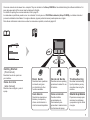
On-screen manuals can be viewed on a computer. They are included on the Setup CD-ROM and are installed during the software installation. For
some languages parts of the manual may be displayed in English.
For details on opening the on-screen manuals, refer to page 20.
Los manuales en pantalla se pueden ver en un ordenador. Se incluyen en el CD-ROM de instalación (Setup CD-ROM) y se instalan durante el
proceso de instalación del software. Con algunos idiomas, algunas partes del manual pueden aparecer en inglés.
Para obtener información sobre cómo se abren los manuales en pantalla, consulte la página 20.
• G e t t i n g S t a r t ed
(this manual)
Describes how to set up and use
your machine.
•Guía de inicio
(este manual)
Describe cómo configurar y usar el
equipo.
Basic Guide
Describes basic operations
and media, and gives
an introduction to other
functions available.
Describes various operating
procedures to make full use
of machine.
Advanced Guid e
Tr o u b l e s h o o t i n g
Guía básica
Guía avanzada
Solución de problemas
Describe las operaciones
básicas y los soportes y
ofrece una introducción a
otras funciones disponibles.
Describe distintos
procedimientos de
funcionamiento para
aprovechar al máximo todas
las funciones del equipo.
Describes troubleshooting
tips for problems you may
encounter when using the
machine.
Proporciona consejos para
solucionar los problemas
que puedan surgir al utilizar
el equipo.
■ Co n t e n t s
1 Preparation P.3
1 Preparación P.3
2 Install the FINE Cartridges P.7
2 Instalación de los cartuchos FINE (FINE Cartridges) P.7
3 Load Paper P.11
3 Carga del papel P.11
4 Install the Software P.12
4 Instalación del software P.12
5 Try Using the Machine P.20
5 Pruebe el equipo P.20
Try Copying P.22
Print Photos from a Computer P.24
■ Contenido
Realice una prueba de copia P.22
Impresión de fotografías desde un ordenador P.24
6 Maintenance P.26
6 Mantenimiento P.26
7 Specifications P.27
7 Especificaciones P.28
1
Preparation
Preparación
1
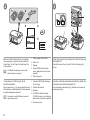
Remove all the protective materials and orange
tape from the outside of the machine.
A
• Do not install the machine where an object may fall on it. In addition, do not
place any object on the top of the machine. It may fall into the machine when
opening covers, resulting in malfunction.
• Paper Output Tray (A) automatically opens when printing starts. Do not place
anything in front of the Paper Output Tray.
• No instale el equipo donde le pueda caer algún objeto. Además, no coloque
ningún objeto encima del equipo. Podría caerse en éste al abrir las cubiertas y
provocar fallos en el funcionamiento.
• La bandeja de salida del papel (A) se abre automáticamente cuando comienza
la impresión. No coloque nada frente a la bandeja de salida del papel.
• The tape and protective materials may differ
in shape and position from what they actually
are.
Retire la cinta naranja y todos los materiales
protectores del exterior del equipo.
• La forma y la posición de la cinta y los
materiales protectores pueden variar
respecto a las reales.
2
3
1
2
D
3
C
4
D
5
A
B
Make sure all the following items are supplied.
Some accessories (1) and (2) are stored within the
Paper Output Tray (A). Open the Paper Output Tray
to remove them.
• A USB cable is necessary to connect the
machine with your computer.
1. FINE cartridges (Color, Black)
2. Power cord
3. Manuals
4. Setup CD-ROM (containing the
drivers, applications and on-screen
manuals)
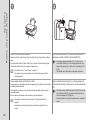
Lift the Scanning Unit (Cover) (B) and fix it with the Scanning
Unit Support (C).
Close the Document Cover (D) and lift it with the Scanning Unit
(Cover).
5. Other documents
Compruebe que no falta ninguno de los
elementos siguientes.
Algunos accesorios (1) y (2) vienen guardados dentro
de la bandeja de salida del papel (A). Abra la bandeja
de salida del papel para extraerlos.
• Se necesita un cable USB para conectar el
equipo al ordenador.
1. Cartuchos FINE (FINE Cartridges)
(Color, Negro)
2. Cable de alimentación
3. Manuales
4. CD-ROM de instalación (Setup
CD‑ROM) (incluye los controladores,
aplicaciones y manuales en pantalla)
5. Otros documentos
Levante la unidad de escaneado (cubierta) (B) y sujétela con
el soporte de la unidad de escaneado (C).
Cierre la cubierta de documentos (D) y levántela con la unidad de
escaneado (cubierta).
4
5
6
F
1
2
3
E
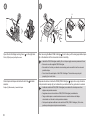
Remove the orange tape (E)
carefully.
The protective material (F) is removed
along with the orange tape.
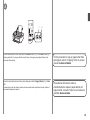
Lift the Scanning Unit (Cover) slightly (1) and fold the
Scanning Unit Support (2), then gently close the Scanning
Unit (Cover) (3).
Insert the power cord into the connector on the
left side of the machine and into the wall outlet
firmly.
• Do NOT connect the USB cable at this
stage.
• Make sure that the Document Cover is
closed.
Retire la cinta naranja (E) con
cuidado.
El material protector (F) se retira junto
con la cinta naranja.
Levante la unidad de escaneado (cubierta) ligeramente (1) y
pliegue el soporte de la unidad de escaneado (2) para cerrar
después la unidad de escaneado (cubierta) (3) con cuidado.
Conecte el cable de alimentación en el conector
situado en la parte izquierda del equipo y
enchúfelo firmemente a la toma de corriente.
• NO conecte el cable USB en este momento.
• Asegúrese de que la cubierta de
documentos esté cerrada.
7
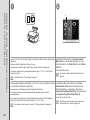
Press the ON button (G) and make sure that it lights green.
G
• It takes about 4 seconds for the ON button to work after the power cord is plugged in.
Pulse el botón ACTIVADO (ON) (G) y asegúrese de que se ilumina en verde.
• Una vez conectado el cable de corriente, el botón ACTIVADO (ON) tarda unos 4 segundos en
ponerse en funcionamiento.
When it is necessary to power
off the machine
Cuando sea necesario
desconectar el equipo
Be sure to follow the procedure
below.
2
Asegúrese de seguir el procedimiento que se
explica a continuación.
1. Press the ON button to turn
off the machine.
2. Make sure that all the lamps
on the Operation Panel are
not lit.
1. Pulse el botón ACTIVADO (ON) para apagar
el equipo.
2. Asegúrese de que todas las luces del panel
de control estén apagadas.
• The specification of the
power cord differs for each
country or region.
• Las especificaciones del cable de
alimentación varían según el país o la región
de uso.
Operating noise may continue for
up to 40 seconds until the machine
turns off.
1
Hasta que el equipo se apague, 40 segundos como
máximo, se puede seguir escuchando el ruido de
funcionamiento.
• When removing the power plug, make sure that all
the lamps on the Operation Panel are not lit before
removing the plug. Removing the power plug while
all the lamps on the Operation Panel light up or flash
may cause drying and clogging of the FINE Cartridges,
resulting in poor printing.
• Antes de retirar el cable de alimentación, asegúrese
de que todas las luces del panel de control estén
apagadas. Si se retira el cable de alimentación
mientras las luces del panel de control están
encendidas o parpadeando, los cartuchos FINE (FINE
Cartridges) se pueden secar y obstruir teniendo como
resultado una impresión de mala calidad.
Install the FINE Cartridges
Instalación de los cartuchos FINE (FINE Cartridges)
2
1
2
E
D
3
F
E
A
Lift the Scanning Unit (Cover) (A) and fix it with the Scanning
Unit Support (D).
Close the Document Cover (E) and lift it with the Scanning Unit
(Cover).
The FINE Cartridge Holder (F) moves to the
installation position.
If the FINE Cartridge Holder does not move, make
sure that the machine is turned on. For details, refer
to
to
on page 5 in "1 Preparation".
Follow the next
procedure to insert the
and Color
Black
FINE Cartridges into
their corresponding
slots
and .
Go to the next
page.
Levante la unidad de escaneado (cubierta) (A) y sujétela con
el soporte de la unidad de escaneado (D).
Cierre la cubierta de documentos (E) y levántela con la unidad de
escaneado (cubierta).
El soporte de cartucho FINE (FINE Cartridge
Holder) (F) se desplazará a la posición de
instalación.
Si el soporte de cartucho FINE (FINE Cartridge
Holder) no se mueve, compruebe que el equipo esté
encendido. Para conocer todos los detalles, consulte
de
a
en la página 5 de "1 Preparación".
Siga el procedimiento
que se indica
a continuación
para insertar los
cartuchos FINE (FINE
Cartridges) negro
y de color
en
sus ranuras
y
correspondientes.
Vaya a la
siguiente página.
4
5
H
H
G
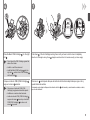
Open the Ink Cartridge Locking Cover
Pinch (G) firmly and pull up the cover.
on the right side.
After removing the Black FINE Cartridge
from its box, pull the orange protective tape
(H) in the direction of the arrow and remove it carefully.
• Handle the FINE Cartridges carefully. Do not drop or apply excessive pressure to them.
• Be sure to use the supplied FINE Cartridges.
• Be careful not to stain your hands or surrounding work area with ink on the removed
protective tape.
• Do not touch the metal parts of the FINE Cartridges. The machine may not print
properly if you touch them.
Abra la tapa de bloqueo del cartucho de tinta
derecho.
Sujete (G) firmemente y levante la tapa.
del lado
Después de extraer el cartucho FINE (FINE Cartridge)
negro de su caja, tire de la
cinta protectora naranja (H) en la dirección que indica la flecha y quítela con cuidado.
• Instale los cartuchos FINE (FINE Cartridges) con cuidado. No los deje caer ni les
aplique una presión excesiva.
• Asegúrese de usar los cartuchos FINE (FINE Cartridges) suministrados.
• Tenga cuidado para no mancharse las manos ni manchar el área de trabajo
circundante con tinta de la cinta protectora retirada.
• No toque las partes metálicas de los cartuchos FINE (FINE Cartridges). Si los toca,
puede que el equipo no imprima correctamente.
6
7
Place the Black FINE Cartridge
slot .
into the right
Push down
of the Ink Cartridge Locking Cover until you hear a click to close it completely.
View the Ink Cartridge Locking Cover
straight on and check that it is locked correctly (not at an angle).
• Do not knock the FINE Cartridge against the
sides of the holder.
• Install in a well-lit environment.
• Install the Black FINE Cartridge
into the
right slot , and the Color FINE Cartridge
into the left slot .
Coloque el cartucho FINE (FINE Cartridge)
negro en la ranura
derecha.
• Procure que el cartucho FINE (FINE
Cartridge) no golpee los lados del soporte.
Presione en
de la tapa de bloqueo del cartucho de tinta hacia abajo hasta que oiga un clic y
quede totalmente cerrada.
Compruebe que la tapa de bloqueo del cartucho de tinta
que no esté inclinada.
esté derecha y correctamente cerrada, es decir,
• Instálelo en un entorno bien iluminado.
• Instale el cartucho FINE (FINE Cartridge)
negro en la ranura
derecha y el cartucho
FINE (FINE Cartridge)
de color en la
ranura
izquierda.
8
9
10
I
1
2
J
3
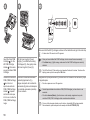
Make sure that the LED (I) changes as shown in the illustration and go to the next step.
• It takes about 90 seconds until 1 appears.
Insert the Color FINE
Cartridge
into the
left FINE Cartridge
Holder
in the same
way as the Black FINE
Cartridge.
Lift the Scanning Unit (Cover)
slightly (1) and fold the Scanning
Unit Support (2), then gently close
the Scanning Unit (Cover) (3).
Introduzca el cartucho
FINE (FINE Cartridge)
de color en el
soporte de cartucho
FINE (FINE Cartridge
izquierdo
Holder)
del mismo modo que
lo hizo con el cartucho
FINE (FINE Cartridge)
negro.
Levante la unidad de escaneado
(cubierta) ligeramente (1) y
pliegue el soporte de la unidad de
escaneado (2) para cerrar después
la unidad de escaneado (cubierta)
(3) con cuidado.
10
• Once you have installed the FINE Cartridges, do not remove them unnecessarily.
• If the Alarm lamp (J) lights orange, make sure that the FINE Cartridges are correctly
installed.
• The LED will turn off if the machine is not operated for about 5 minutes. To restore the
display, press any button except the ON button.
Asegúrese de que la pantalla LED (I) cambie como se muestra en la ilustración y vaya
al siguiente paso.
• 1 tarda en aparecer unos 90 segundos.
• Cuando haya instalado los cartuchos FINE (FINE Cartridges), no los retire si no es
necesario.
• Si la luz de alarma (Alarm) (J) se ilumina en color naranja, asegúrese de que los
cartuchos FINE (FINE Cartridges) estén correctamente instalados.
• Si no se utiliza el equipo durante unos 5 minutos, la pantalla LED se desconectará.
Para restaurarla, pulse cualquier botón excepto el botón ACTIVADO (ON).
Load Paper
Carga del papel
3
1
2
3
4
3
D
2
A
C
B
Prepare the Paper Support (A).
1. Open it.
2. Withdraw it upwards.
3. Tilt it back.
Move the Paper
Guides (B) to both
edges.
Prepare el soporte del papel (A).
1. Ábralo.
2. Despliéguelo hacia arriba.
3. Inclínelo hacia atrás.
Desplace las guías del
papel (B) hasta ambos
bordes.
Load paper in the
center of the Rear
Tray (C).
Load paper in portrait
orientation with the
printing side facing up.
Cargue el papel en el
centro de la bandeja
posterior (C).
Cargue el papel con
orientación vertical con la
cara de impresión hacia
arriba.
Slide the left and right Paper Guides against
both edges of the paper.
Make sure that the height of the paper stack does not
exceed the line (D).
• For details on how to handle paper, refer to
"Loading Paper" in the on-screen manual:
Basic Guide after installation is complete.
Deslice las guías de papel izquierda y derecha
contra ambos bordes del papel.
Compruebe que la altura de la pila de papel no
supere la línea (D).
• Para obtener más información sobre cómo
manipular el papel, consulte “Carga del
papel” en el manual en pantalla: Guía
básica después de finalizar la instalación.
11
Install the Software
Instalación del software
4
Do not connect the USB cable yet.
Aún no conecte el cable USB.
• To use the machine by connecting it to a computer, software
including the drivers needs to be copied (installed) to the
computer's hard disk. The installation process takes about
20 minutes. (The installation time varies depending on the
computer environment or the number of application software
to be installed.)
• Quit all running applications before installation.
• Log on as the administrator (or a member of the Administrators
group).
• Do not switch users during the installation process.
• Internet connection may be required during the installation.
Connection fees may apply. Consult the internet service
provider.
• It may be necessary to restart your computer during the
installation process. Follow the on-screen instructions and do
not remove the Setup CD-ROM during restarting.
The installation resumes once your computer has restarted.
• For the system requirements, refer to "7 Specifications".
• Para poder utilizar el equipo conectado a un ordenador, se
debe copiar (instalar) el software, incluidos los controladores,
en el disco duro del ordenador. El proceso de instalación lleva
unos 20 minutos. (El tiempo necesario para instalar varía en
función del entorno del ordenador o de cuánto software de
aplicación se vaya a instalar).
• Cierre las aplicaciones que se estén ejecutando antes de la
instalación.
• Inicie la sesión como administrador (o miembro del grupo de
administradores).
• No cambie de usuario durante el proceso de instalación.
• Durante la instalación, es posible que se tenga que conectar
a Internet. Esto puede implicar gastos de conexión. Consulte
con el proveedor de servicios de Internet.
• Es posible que deba reiniciar el ordenador durante el proceso
de instalación. Siga las instrucciones en pantalla y no retire
el CD-ROM de instalación (Setup CD-ROM) mientras se
reinicia el equipo.
La instalación se reanudará una vez reiniciado el ordenador.
• Para obtener información sobre los requisitos del sistema,
consulte "7 Especificaciones".
12
□ For Spanish Users in the
U.S.A.:
□ Para los usuarios de habla
hispana en EE. UU.:
For Windows 7
□ If you connect the machine via
USB cable before installing the
software:
□ Si se conecta el equipo
mediante un cable USB antes
de instalar el software:
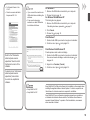
1. Remove the USB cable connected to your computer.
2. Proceed to
on page 14.
For Windows Vista/Windows XP
This dialog box may appear.
1. Remove the USB cable connected to your computer.
If the dialog box closes, proceed to
on page 14.
2. Click Cancel.
3. Proceed to
on page 14.
Para Windows 7
1. Quite el cable USB que conecta el equipo al ordenador.
2. Continúe con el paso
de la página 14.
Para Windows Vista/Windows XP
Puede aparecer este cuadro de diálogo.
1. Quite el cable USB que conecta el equipo al ordenador.
Refer to the "Información
adicional para usuarios
españoles" sheet to install
the Spanish version of the
software.
Si se cierra el cuadro de diálogo, continúe con el paso
la página 14.
de
2. Haga clic en Cancelar (Cancel).
3. Continúe con el paso
de la página 14.
Consulte la hoja "Información
adicional para usuarios
españoles" para instalar
la versión en español del
software.
□ Easy-WebPrint EX
□ Easy-WebPrint EX
Easy-WebPrint EX is Web print software that is installed on the computer when
installing the supplied software. Internet Explorer 7 or later is required to use
this software. An Internet connection is required for installation.
Easy-WebPrint EX es un software de impresión para web que se instala en
el ordenador al instalar el software incluido. Para utilizar este software es
necesario Internet Explorer 7 o posterior. Para la instalación, es necesario
estar conectado a Internet.
13
1
2
A
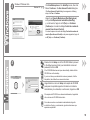
Press the ON button (A) to TURN OFF THE MACHINE.
Operating noise may continue for up to 40 seconds until the machine turns off.
• Do NOT connect the USB cable to the computer and the machine yet. If
you have already connected the cable, disconnect it now.
Turn on the computer, then insert the Setup CD-ROM into the CD-ROM
drive.
If you are using Windows, the setup program starts automatically.
For Windows
• If the program does not start automatically, double-click the CD-ROM icon
in Computer or My Computer. When the CD-ROM contents appear,
double-click MSETUP4.EXE.
Pulse el botón ACTIVADO (ON) (A) para APAGAR EL EQUIPO.
Hasta que el equipo se apague, 40 segundos como máximo, se puede seguir
escuchando el ruido de funcionamiento.
• Aún NO conecte el cable USB al ordenador ni al equipo. Si ya lo ha
conectado, desconéctelo ahora.
14
Encienda el ordenador y, a continuación, introduzca el CD-ROM de
instalación (Setup CD-ROM) en la unidad de CD-ROM.
Si usa Windows, el programa de instalación se inicia automáticamente.
Para Windows
• Si el programa no se inicia automáticamente, haga doble clic en el icono
del CD-ROM en Equipo (Computer) o Mi PC (My Computer). Cuando
aparezca el contenido del CD-ROM, haga doble clic en MSETUP4.EXE.
3
Windows 7/Windows Vista
Windows XP
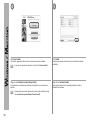
Click Run Msetup4.exe on the AutoPlay screen, then click
Yes or Continue on the User Account Control dialog box.
If the User Account Control dialog box reappears in following
steps, click Yes or Continue.
Haga clic en Ejecutar Msetup4.exe (Run Msetup4.exe)
en la pantalla Reproducción automática (AutoPlay)
y, a continuación, haga clic en Sí (Yes) o en Continuar
(Continue) en el cuadro de diálogo Control de cuentas de
usuario (User Account Control).
Si vuelve a aparecer el cuadro de diálogo Control de cuentas de
usuario (User Account Control) en los pasos siguientes, haga clic
en Sí (Yes) o en Continuar (Continue).
3
Double-click the Setup icon of the CD-ROM folder to proceed
to the following screen. Enter your administrator name and
password, then click OK.
If the CD-ROM folder does not open automatically, double-click the
CD-ROM icon on the desktop.
If you do not know your administrator name or password, click the
help button, then follow the on-screen instructions.
Haga doble clic en el icono Setup de la carpeta del CD-ROM
para pasar a la pantalla siguiente. Introduzca el nombre de
administrador y la contraseña; a continuación, haga clic en OK.
Si la carpeta del CD-ROM no se abre automáticamente, haga doble
clic en el icono del CD-ROM del escritorio.
Si no sabe su nombre o contraseña de administrador, haga clic
en el botón el Ayuda y, a continuación, siga las instrucciones que
aparezcan en pantalla.
15
4
5
Click Easy Install.
The drivers, application software, and on-screen manuals are installed.
• If you want to select particular items to install, click Custom Install.
Haga clic en Instalación simple (Easy Install).
Se instalarán los controladores, el software de aplicación y los manuales en
pantalla.
• Si desea seleccionar unos elementos concretos para instalarlos, haga
clic en Instalación personalizada (Custom Install).
16
Click Install.
Follow any on-screen instructions to proceed with the software
installation.
Haga clic en Instalar (Install).
Siga cualquier instrucción en pantalla para llevar a cabo la
instalación del software.
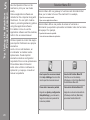
Important Information for the Installation
Información importante para la instalación
□ USB Port
□ Puerto USB
□ Necessary Information for the User
Registration
□ Información necesaria para el registro de
usuario (User Registration)
□ If the Extended Survey
Program screen appears
□ Si aparece la pantalla
Extended Survey Program
B
Serial No. * * * * * * * * *
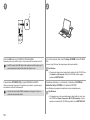
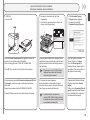
When the Printer Connection screen appears, connect the
machine to the computer with a USB cable.
After connecting the cable, TURN ON THE MACHINE.
The USB Port is located on the right side of the machine.
Cuando aparezca la pantalla Conexión de impresora (Printer
Connection), conecte el equipo al ordenador mediante un
cable USB.
Después de conectar el cable, ENCIENDA EL EQUIPO.
El puerto USB se encuentra en el lateral derecho del equipo.
When the serial number is not displayed on the
registration screen automatically, input the serial
number located inside the machine (as shown in
the illustration).
• If the power is on, the FINE Cartridge
Holder will move when the Scanning
Unit (Cover) (B) is opened.
Si el número de serie no aparece
automáticamente en la pantalla de registro,
introduzca el que viene en el interior del equipo
(en el lugar que muestra la ilustración).
• Si está encendido, el soporte de
cartucho FINE (FINE Cartridge Holder)
se desplazará cuando se abra la unidad
de escaneado (cubierta) (B).
If you can agree to Extended
Survey Program, click Agree.
If you click Do not agree, the
Extended Survey Program will not
be installed. (This has no effect on
the machine's functionality.)
Si desea admitir Extended Survey
Program, haga clic en Aceptar
(Agree).
Si hace clic en No aceptar (Do not
agree), Extended Survey Program
no se instalará. (Esto no afecta al
funcionamiento del equipo).
17
6
Click Exit to complete the installation.
For Macintosh
It is necessary to restart the computer before
scanning using the Operation Panel on the machine
for the first time.
7
For Windows
Solution Menu EX starts.
For Macintosh
Solution Menu EX starts when clicking OK in the Canon Solution Menu EX dialog.
Remove the Setup CD-ROM and keep it in a safe place.
• The buttons displayed on Solution Menu EX may vary depending on the country or
region of purchase.
Haga clic en Salir (Exit) para finalizar la
instalación.
Para Macintosh
Es necesario reiniciar el ordenador antes de escanear
por primera vez mediante el panel de control del
equipo.
Para Windows
Se iniciará Solution Menu EX.
Para Macintosh
Solution Menu EX se iniciará al hacer clic en OK en el cuadro de diálogo Canon Solution Menu
EX.
Extraiga el CD-ROM de instalación (Setup CD-ROM) y guárdelo en un lugar seguro.
• Los botones que muestre Solution Menu EX pueden variar en función del país o la
región de adquisición.
18
□ Installing the XPS Printer Driver
□ Instalación del Controlador de impresora XPS (XPS Printer Driver)
In Windows 7 and Windows Vista SP1 or later, the XPS Printer Driver
can be installed additionally. To install, perform from
in "4 Install the
Software" on page 14. Click Custom Install in , then select XPS Printer
Driver in the Custom Install screen.
For details on useful functions of the XPS Printer Driver, refer to the onscreen manual: Advanced Guide.
En Windows 7 y Windows Vista SP1 o posterior, también se puede instalar
el Controlador de impresora XPS (XPS Printer Driver). Para instalarlo,
ejecute a partir de
de "4 Instalación del software" de la página 14.
Haga clic en Instalación personalizada (Custom Install) en
y, a
continuación, seleccione Controlador de impresora XPS (XPS Printer
Driver) en la pantalla Instalación personalizada (Custom Install).
Para conocer todos los detalles sobre las prácticas funciones del
controlador de impresora XPS (XPS Printer Driver), consulte el manual en
pantalla: Guía avanzada.
Congratulations! Setup is complete.
Proceed to page 20 for information regarding the Solution
Menu EX and the on-screen manual or page 22 to start
using the machine.
Enhorabuena. El proceso de instalación habrá finalizado.
Consulte la página 20 para obtener información sobre
Solution Menu EX y el manual en pantalla o la página 22
para empezar a utilizar el equipo.
19
Try Using the Machine
Pruebe el equipo
5
20
Use the O p e r a t i o n P a n e l o n t h e
machine t o p r i n t y o u r o w n i t e m s
easily.
Various a p p l i c a t i o n s o f t w a r e a r e
installed o n t h e c o m p u t e r a l o n g w i t h
the driv e r s . Yo u c a n p r i n t c r e a t i v e
items by c o r r e c t i n g / e n h a n c i n g p h o t o s
using th e a p p l i c a t i o n s o f t w a r e .
For deta i l s o n h o w t o u s e t h e
applicat i o n s o f t w a r e a n d t h e m a c h i n e ,
refer to t h e o n - s c r e e n m a n u a l .
Utilice e l p a n e l d e c o n t r o l d e l e q u i p o
para imp r i m i r f á c i l m e n t e s u s p r o p i o s
element o s .
Junto co n l o s c o n t r o l a d o r e s , e n
el orden a d o r s e i n s t a l a n v a r i a s
aplicaci o n e s . P u e d e i m p r i m i r
element o s c r e a t i v o s c o r r i g i e n d o /
mejoran d o f o t o s c o n l a s a p l i c a c i o n e s .
Para ob t e n e r m á s i n f o r m a c i ó n
sobre có m o u t i l i z a r e l s o f t w a r e d e
aplicaci ó n y e l e q u i p o , c o n s u l t e e l
manual e n p a n t a l l a .
Solution Menu EX
S o l u t i o n M e n u E X i s a g a t e w a y t o f unctions and information that
a l l o w y o u t o m a k e f u l l u s e o f t h e m achine! For example,
• Open the on-screen manual.
• Open various application software.
S o l u t i o n M e n u E X e s u n a p u e r t a d e acceso a funciones e
i n f o r m a c i ó n q u e p e r m i t e n a p r o v e c har al máximo todas las funciones
del equipo. Por ejemplo,
• Apertura del manual en pantalla.
• Inicio de diverso software de aplicación.
How to open the on-screen manual
Click Help & Settings, then click this
icon to open the on-screen manual.
How to start Solution Menu EX
Click this icon on the desktop
(Windows) or on the Dock (Macintosh)
to start Solution Menu EX.
Cómo abrir el manual en pantalla
Cómo iniciar Solution Menu EX
Haga clic en Ayuda y configuración
(Help & Settings) y, a continuación,
haga clic en este icono para abrir el
manual en pantalla.
Haga clic en este icono del escritorio
(Windows) o del Dock (Macintosh)
para iniciar Solution Menu EX.
E a s y - WebPrint EX
Use Easy-WebPri n t E X t o p r i n t w e b p a g e s i n I n t e r n e t E x p l o r e r e a s i l y. S o m e o f i t s
features include:
• Printing a web page by reducing its size to fit the paper width automatically without cropping edges.
• Printing only the pages you want by selecting them from preview.
• Printing selected portions of various pages after editing them.
Con Easy-WebPri n t E X s e p u e d e n i m p r i m i r f á c i l m e n t e p á g i n a s w e b e n I n t e r n e t E x p l o rer.
Entre otras funcio n e s , i n c l u y e :
For details on Solution Menu EX
and Easy-WebPrint EX, refer
to the on-screen manual: Basic
Guide.
Para conocer todos los detalles
sobre Solution Menu EX y EasyWebPrint EX, consulte el manual
en pantalla: Guía básica.
• Impresión de páginas web reduciendo el tamaño para que se ajuste automáticamente a la anchura del papel sin
tener que recortar los bordes.
• Impresión únicamente de las páginas deseadas mediante su selección en la vista preliminar.
• Impresión de partes seleccionadas de varias páginas después de editarlas.
When Easy-WebPrint EX is installed, the Easy-WebPrint EX toolbar appears in Internet Explorer. This
toolbar can be used any time while Internet Explorer is running.
Cuando se instala Easy-WebPrint EX, la barra de herramientas de Easy-WebPrint EX aparece en Internet
Explorer. Esta barra de herramientas se puede utilizar en cualquier momento mientras se esté ejecutando
Internet Explorer.
21
Try Copying
Realice una prueba de copia
1
2
D
C
B
A
Load A4 or Letter-sized plain paper.
Make sure that the Paper Output Tray (A) and the Output Tray Extension (B) are
open.
If printing starts while the Paper Output Tray is closed, it will automatically open.
This section describes how to perform a standard copy.
• For details, refer to "3 Load Paper" on page 11.
• The machine may make operating noise when feeding paper. This is
normal operation.
Cargue papel normal de tamaño A4 o Carta.
Asegúrese de que la bandeja de salida del papel (A) y la extensión de la bandeja
de salida (B) están abiertas.
Si la impresión comienza con la bandeja de salida del papel cerrada, se abre
automáticamente.
En esta sección se describe cómo se realiza una copia estándar.
• Para obtener más información, consulte "3 Carga del papel" en la
página 11.
• Es posible que el equipo haga ruido al suministrar el papel. Esto es
normal.
22
E
Open the Document Cover (C), then place the document
face-down and align it with the Alignment Mark (D).
• Do not place objects weighing 4.4 lb / 2.0 kg or more
on the Platen Glass (E), or do not apply pressure to the
document by pressing on it with a force exceeding 4.4 lb /
2.0 kg.
The scanner may malfunction or the glass may break.
Abra la cubierta de documentos (C) y coloque después el
documento boca abajo y alinéelo con la marca de alineación
(D).
• No coloque ningún objeto que pese 2,0 kg/4,4 lb o más en
el cristal de la platina (E), ni presione el documento con
una fuerza superior a 2,0 kg/4,4 lb.
El escáner podría funcionar incorrectamente o romperse el
cristal.
3
F
G
Close the Document Cover, then press the Black button (F) or the Color button (G).
Copying will start. Do not open the Document Cover until copying is complete. Remove the
document after printing.
Cierre la cubierta de documentos, pulse después el botón Negro (Black) (F) o Color
(G).
Comenzará la copia. No abra la cubierta de documentos hasta que finalice la copia. Retire el
documento después de imprimir.
For the procedure to copy on paper other than
plain paper, refer to "Copying" in the on‑screen
manual: Advanced Guide.
Para obtener información sobre el
procedimiento de copia en papel distinto del
papel normal, consulte “Copia” en el manual en
pantalla: Guía avanzada.
23
Pr int P hotos from a Computer
I m pr es ió n d e fo to grafías desde un ordenador
1
2
B
A
Load 4" x 6" (10 x 15 cm) photo paper in portrait orientation with the printing side
facing up.
Make sure that the Paper Output Tray (A) is open.
If printing starts while the Paper Output Tray is closed, it will automatically open.
This section explains how to print borderless photos using 4" x 6" (10 x 15 cm) Photo
Paper Plus Glossy II.
• For details, refer to "3 Load Paper" on page 11.
Cargue papel fotográfico de tamaño 4" x 6" (10 x 15 cm) con orientación vertical
y la superficie de impresión hacia arriba.
Asegúrese de que la bandeja de salida del papel (A) está abierta.
Si la impresión comienza con la bandeja de salida del papel cerrada, se abrirá
automáticamente.
En esta sección se explica cómo imprimir fotografías sin bordes en Papel Fotográfico
Brillo II (Photo Paper Plus Glossy II) de tamaño 4" x 6" (10 x 15 cm).
• Para obtener más información, consulte "3 Carga del papel" en la página 11.
24
Start Solution Menu EX from the Canon Solution
Menu EX icon on the desktop (Windows) or on the
Dock (Macintosh), click Photo Print, then click Photo
Print (B).
Easy-PhotoPrint EX starts.
• For details on starting Solution Menu EX, refer to
page 20.
Inicie Solution Menu EX desde el icono Canon
Solution Menu EX del escritorio (Windows) o del
Dock (Macintosh) y, a continuación, haga clic en
Impresión fotográfica (Photo Print) y, seguidamente,
en Impresión fotográfica (Photo Print) (B).
Se inicia Easy-PhotoPrint EX.
• Para obtener más información sobre cómo iniciar
Solution Menu EX, consulte la página 20.
3
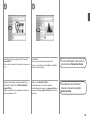
Select the image you want to print, then click
Layout/Print.
4
Click Print.
If you are using Windows, printing will start.
When a photo is selected, the number of copies is set
to "1".
If you are using Macintosh, click Print on the Print
dialog box to start printing.
Seleccione la imagen que desee imprimir y, a
continuación, haga clic en Diseño/Imprimir
(Layout/Print).
Haga clic en Imprimir (Print).
Cuando se selecciona una fotografía, el número de
copias se establece en “1”.
Si utiliza Windows, se iniciará la impresión.
Si utiliza Macintosh, haga clic en Imprimir (Print) en
el cuadro de diálogo Imprimir (Print) para iniciar la
impresión.
For more information, refer to the onscreen manual: Advanced Guide.
Para obtener más información,
consulte el manual en pantalla:
Guía avanzada.
25
Maintenance
Mantenimiento
6
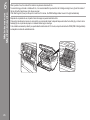
After a period of use, the inside of the machine may become stained with ink.
To avoid staining your hands or clothes with ink, it is recommended that you clean the Ink Cartridge Locking Cover (A) and the inside of
the tray (B) with a facial tissue or the like as required.
If the Scanning Unit (Cover) is left open for more than 10 minutes, the FINE Cartridge Holder moves to the right automatically.
Después de un período de uso, la parte interior del equipo se puede manchar de tinta.
Para evitar mancharse las manos o la ropa de tinta, se recomienda limpiar la tapa de bloqueo del cartucho de tinta (A) y el interior de la
bandeja (B) con un pañuelo de papel o un material similar según convenga.
Si la unidad de escaneado (cubierta) se queda abierta durante más de 10 minutos, el soporte del cartucho FINE (FINE Cartridge Holder)
se desplaza a la derecha automáticamente.
A
B
26
General Specifications
Specifications
7
Printing resolution (dpi)
4800* (horizontal) X 1200 (vertical)
* Ink droplets can be placed with a pitch of 1/4800 inch at minimum.
Interface
USB Port:
Hi-Speed USB *
* A computer that complies with Hi-Speed USB standard is required. Since
the Hi-Speed USB interface is fully upwardly compatible with USB 1.1, it
can be used at USB 1.1.
Print width
8 inches/203.2 mm
(for Borderless Printing: 8.5 inches/216 mm)
Operating environment
Temperature: 5 to 35°C (41 to 95°F)
Humidity: 10 to 90% RH (no condensation)
Storage environment
Temperature: 0 to 40°C (32 to 104°F)
Humidity: 5 to 95% RH (no condensation)
Power supply
AC 100-240 V, 50/60 Hz
Power consumption
Printing (Copy): Approx. 10 W
Standby (minimum): Approx. 0.8 W*
OFF: Approx. 0.4 W*
* USB connection to PC
External dimensions
Approx. 17.8 (W) X 13.2 (D) X 6.0 (H) inches
Approx. 450 (W) X 335 (D) X 153 (H) mm
* With the Paper Support and Paper Output Tray retracted.
Weight
Approx. 5.5 kg (Approx. 12.0 lb)
* With the FINE Cartridges installed.
Canon FINE Cartridge
Total 1472 nozzles (BK 320 nozzles, C/M/Y each 384 nozzles)
Copy Specifications
Multiple copy
1 - 9, 20 pages
Reduction/Enlargement
Fit-to-page
Scan Specifications
Scanner driver
TWAIN/WIA (for Windows 7/Windows Vista/Windows XP)
Maximum scanning size
A4/Letter, 8.5'' X 11.7''/216 X 297 mm
Scanning resolution
Optical resolution (horizontal x vertical) max: 1200 dpi X 2400 dpi
Interpolated resolution max: 19200 dpi X 19200 dpi
Gradation (Input/Output)
Gray: 16 bit/8 bit
Color: 48 bit/24 bit (RGB each 16 bit/8 bit)
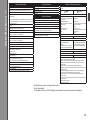
Minimum System Requirements
Conform to the operating system’s requirements when higher than those
given here.
Operating System/Processor/RAM
Windows 7
1 GHz or faster 32-bit (x86) or 64-bit
(x64) processor
1 GB (32-bit)/2 GB (64-bit)
Windows Vista, Vista SP1, Vista SP2
1 GHz processor
512 MB
Windows XP SP2, SP3
300 MHz processor
128 MB
Mac OS X v.10.6
Intel processor
1GB
Mac OS X v.10.5
Intel processor, PowerPC G5, PowerPC
G4 (867 MHz or faster)
512 MB
Mac OS X v.10.4.11
Intel processor, PowerPC G5, PowerPC
G4, PowerPC G3
256 MB
Browser
Internet Explorer 6 or later
Safari 3
Hard Disk Space
1.5 GB
1.5 GB
Note: For bundled software
Note: For bundled software installation.
installation.
The necessary amount of hard disk
The necessary amount of hard disk
space may be changed without notice.
space may be changed without notice.
CD-ROM Drive
Required
Required
Display
SVGA 800 x 600
XGA 1024 x 768
• Windows: Operation can only be guaranteed on a PC with Windows 7,
Windows Vista or Windows XP pre-installed.
• Windows: Uninstall software bundled with the Canon inkjet printer before
upgrading from Windows Vista to Windows 7, then, install the bundled
software again.
• Some functions may not be available with Windows Media Center.
• Macintosh: Hard Disk must be formatted as Mac OS Extended (Journaled) or
Mac OS Extended.
• Macintosh: After upgrading from Mac OS X v.10.5 or lower to Mac OS X
v.10.6, install software bundled with the Canon inkjet printer.
• Internet Explorer 7 or later is required to install Easy-WebPrint EX. For
Windows use only.
• You cannot use movie files with the Easy-Photo Print EX under the following
operating system:
- Windows XP 64bit version
- Mac OS X on Power PC
Specifications are subject to change without notice.
About Consumables
Consumables (ink tanks / FINE Cartridges) are available for 5 years after production has stopped.
27
Especificaciones
Especificaciones generales
Resolución de impresión (ppp)
4800* (horizontal) x 1200 (vertical)
* Las gotas de tinta se pueden situar con una separación de 1/4800
pulgadas como mínimo.
Interfaz
Puerto USB:
Hi-Speed USB*
* Es necesario un ordenador compatible con el estándar Hi-Speed USB.
Puesto que la interfaz Hi-Speed USB es totalmente compatible con
USB 1.1, también se puede utilizar con USB 1.1.
Ancho de impresión
8 pulg./203,2 mm
(para la impresión sin bordes: 8,5 pulg./216 mm)
Entorno de funcionamiento
Temperatura: de 5 a 35 °C (41 a 95 °F)
Humedad: del 10 al 90% (humedad relativa sin condensación)
Entorno de almacenamiento
Temperatura: de 0 a 40 °C (32 a 104 °F)
Humedad: del 5 al 95% (humedad relativa sin condensación)
Suministro eléctrico
100 a 240 V de CA, 50 a 60 Hz
Consumo
Impresión (copia): 10 W aprox.
En espera (mínimo): 0,8 W aprox.*
Apagado: 0,4 W aprox.*
* Conexión USB al ordenador
Dimensiones externas
17,8 (An) x 13,2 (Pr) x 6,0 (Al) pulg. aprox.
450 (An) x 335 (Pr) x 153 (Al) mm aprox.
* Con el soporte del papel y la bandeja de salida del papel retraídos.
Peso
5,5 kg aprox. (12,0 lb aprox.)
* Con los cartuchos FINE (FINE Cartridges) instalados.
Cartucho FINE (FINE Cartridge) de Canon
Total: 1472 inyectores (BK 320 inyectores, C/M/Y 384 inyectores cada
uno)
Especificaciones de copia
Copia múltiple
1-9, 20 páginas
Reducción/ampliación
Ajustar a página
Especificaciones de escaneado
Controlador del escáner
TWAIN/WIA (para Windows 7/Windows Vista/Windows XP)
Tamaño máximo de escaneado
A4/Carta, 8,5 x 11,7"/216 x 297 mm
Resolución de escaneado
Resolución óptica (horizontal x vertical) máx: 1200 ppp x 2400 ppp
Resolución interpolada máx: 19 200 ppp x 19 200 ppp
Gradación (Entrada/Salida)
Gris: 16 bits/8 bits
Color: 48 bits/24 bits (RGB cada uno 16 bits/8 bits)
Requisitos mínimos del sistema
Cumple los requisitos del sistema operativo cuando son mayores que los
mencionados aquí.
Sistema operativo/Procesador/RAM
Windows 7
Procesador a 1 GHz o superior de 32
bits (x86) o 64 bits (x64)
1 GB (32 bits)/2 GB (64 bits)
Windows Vista, Vista SP1, Vista SP2
Procesador a 1 GHz
512 MB
Windows XP SP2, SP3
Procesador a 300 MHz
128 MB
Mac OS X v.10.6
Procesador Intel
1 GB
Mac OS X v.10.5
Procesador Intel, PowerPC G5,
PowerPC G4 (867 MHz o más rápido)
512 MB
Mac OS X v.10.4.11
Procesador Intel, PowerPC G5,
PowerPC G4, PowerPC G3
256 MB
Zona de búsqueda
Internet Explorer 6 o posterior
Safari 3
Espacio en el disco duro
1,5 GB
1,5 GB
Nota: para instalar el software incluido. Nota: para instalar el software incluido.
El espacio disponible en el disco duro El espacio disponible en el disco duro
puede cambiar sin aviso.
puede cambiar sin aviso.
Unidad de CD-ROM
Necesaria
Necesaria
Pantalla
SVGA 800 x 600
XGA 1024 x 768
• Windows: sólo se garantiza el funcionamiento en un PC con Windows 7,
Windows Vista o Windows XP preinstalado.
• Windows: desinstale primero el software incluido con la impresora de
inyección de tinta Canon antes de actualizar de Windows Vista a Windows 7
y, a continuación, vuelva a instalar el software.
• Es posible que algunas funciones no estén disponibles con Windows Media
Center.
• Macintosh: el disco duro debe estar formateado como Mac OS Plus (con
registro) o Mac OS Plus.
• Macintosh: después de actualizar de Mac OS X v.10.5 o inferior a Mac OS
X v.10.6, instale el software incluido con la impresora de inyección de tinta
Canon.
• Se necesita Internet Explorer 7 o posterior para instalar Easy-WebPrint EX.
Para uso sólo en Windows.
• No se pueden utilizar archivos de vídeo con Easy-Photo Print EX con los
sistemas operativos siguientes:
- Windows XP versión de 64 bits
- Mac OS X en PowerPC
Especificaciones sujetas a cambios sin previo aviso.
Acerca de los consumibles
Los consumibles (depósitos de tinta/cartuchos FINE (FINE Cartridges)) estarán disponibles durante
5 años después de haber dejado de fabricar el producto.
28
Getting Help from Canon
Ayuda de Canon
Email Tech Support — www.canontechsupport.com
Soporte técnico por correo electrónico —
www.canontechsupport.com
Please note, from there you will need to select your product, then click on
the "Support by Email" link under Tech Support.
Toll-Free Tech Support— 1-800-OK-CANON
Tenga en cuenta que, desde esa página, tendrá que seleccionar el
producto y a continuación hacer clic en el vínculo "Support by Email"
situado bajo "Tech Support".
Ordering Information
Esta opción proporciona soporte técnico telefónico, libre de cargos, de
lunes a viernes (excepto festivos), durante el periodo de garantía.
El soporte mediante dispositivo telefónico para personas con discapacidad
auditiva (TDD) está disponible en
1-866-251-3752.
This option provides live telephone technical support, free of service
charges, Monday-Friday (excluding holidays), during the warranty period.
Telephone Device for the Deaf (TDD) support is available at
1-866-251-3752.
The following ink cartridges are compatible with this machine.
Soporte técnico telefónico gratuito —
1-800-OK-CANON
Información de pedidos
Este equipo es compatible con los cartuchos de tinta siguientes.
PG-210XL
CL-211XL
PG-210
CL-211
Order #
2973B001
2975B001
2974B001
2976B001
Call 1-800-OK-CANON to locate a dealer near you, or visit the Canon
online store at www.shop.usa.canon.com
CANON U.S.A. INC.
One Canon Plaza, Lake Success, NY 11042 U.S.A.
www.usa.canon.com
QT5-2928-V01
XXXXXXXX
PG-210XL
CL-211XL
PG-210
CL-211
N.º de referencia
2973B001
2975B001
2974B001
2976B001
Llame a 1-800-OK-CANON para localizar un distribuidor cercano o visite
la tienda en línea Canon en www.shop.usa.canon.com
©CANON INC.2010
PRINTED IN VIETNAM