1
3Com Router 5000 and Router 6000 Family
Release Notes v2.41 • Page 22
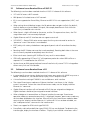
<6040>tftp 172.16.1.254 get r6y02_41vc03.bin
File will be transferred in binary mode. Downloading file from remote
tftp server, please
wait..................................................................
.......................................................................
........................................................./ TFTP:
11204734 bytes received in 194 second(s).
File downloaded successfully.
<6040>sys
System View: return to User View with Ctrl+Z.
[6040]boot main r6y02_41vc03.bin
Set main boot file successfully!
[6040]quit
<6040>reboot
4.5
Upgrading Software Using TFTP (option 2)
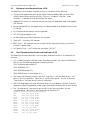
Upgrading the application image with the NET command will use an Ethernet interface to
download. In this approach, the router is the TFTP Client and needs
to connect to a TFTP Server using a fixed Ethernet interface. The following describes how to
upgrade the application image with this approach:
1
Start the TFTP Server on the host connected to the Ethernet interface on the router. Set the
path for the source file to be downloaded.
Caution: No TFTP Server is available on the routers. You must have a TFTP server available.
2
In the Boot Menu, select option 2 to enter the Net Port Download Menu (shown below):
Net Port Download Menu:
1: Change Net Parameter
2: Download From Net to Flash
3: Download From Net to RAM
4: Exit to Main Menu
Enter your choice(1-4):1
3
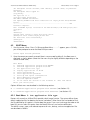
Select option 1 (Change Net Parameter) to change the download parameters, as shown in
the example below.
Note: To modify the parameter values, enter the new values next to the existing values. Do not
use the Delete or Backspace key to erase the existing values.
Change Boot Parameter:
'.' = clear field; '-' = go to previous field;
boot device
: fei0
processor number
: 0
host name
: 8040
file name
: r5000.bin
inet on ethernet (e) : 10.1.1.110
inet on backplane (b):
host inet (h)
: 10.1.1.241
gateway inet (g)
: 10.1.1.254
user (u)
:
ftp password (pw) (blank = use rsh):
flags (f)
: 0x80
target name (tn)
:
startup script (s)
:
other (o)
:
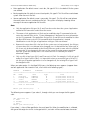
Table 5: Description on the download parameters
^D = quit