1
3Com Router 5000 and Router 6000 Family
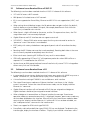
Parameter
Description
file name
File name of the router software
inet on Ethernet (e)
IP address of interface eth0.
host inet (h)
IP address of TFTP/FTP Server
gateway inet (g)
IP address of the gateway
user (u)
FTP user name
ftp password (pw)
password used for ftp session
0x80 – TFTP
0x0 -- FTP
flags (f)
target name (tn)
4
Release Notes v2.41 • Page 23
Target file name to be used on the router
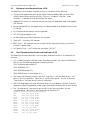
When the Net Port Download Menu is re-displayed, select option 2 (Download from Net to
Flash) to download and write the application image to Flash memory. Depending on the
running code, the system display would look something like:
Net Port Download Menu:
1: Change Net Parameter
2: Download From Net To Flash
3: Download From Net To SDRAM And Run
4: Upload the current config file to PC
5: Exit to Main Menu
Enter your choice(1-5): 2
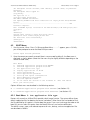
boot device
: fei
unit number
: 0
processor number
: 0
host name
: 8040
file name
: r5000.bin
inet on ethernet (e) : 10.1.1.110
host inet (h)
: 10.1.1.241
gateway inet (g)
: 10.1.1.254
flags (f)
: 0x80
Attached TCP/IP interface to fei0.
Attaching network interface lo0... done.
Loading...
NET download completed...
read len = [12632583]
Please select file to be saved as
1. Main application file
2. Backup application file
3. Secure application file
4. Cancel downloading
Enter your choice(1-4): 1
Creating the file: flash:/r5000.bin
Write data to flash...
Please wait, it may take a long time!
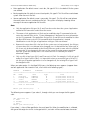
#####################################################################
#####################################################################
#####################################################################
#####################################################################