1
Control Buttons
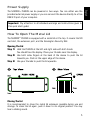
You may skip to the next Scene or go back to the last Scene by manually using
the ‘left’ and the ‘right’ button on the device.
Pause playback by using the ‘down’ button and continue playback by pressing
‘down’ for the second time.
Stop playback entirely by using ‘up’. Start playback again by pressing ‘down’.
Managing Devices Further
You can further manage and set up your device. In MADRIX®, please open the
menu ‘Tools’ à ‘PLEXUS Configuration…’. More information is provided in the
user manuals.
Further Information
Digital documentation files are automatically installed with the MADRIX®
software. More information about the device is provided in the MADRIX®
PLEXUS User Manual. More information about the software is provided in the
MADRIX® Help And Manual (the software user manual). You can also open the
MADRIX® Help And Manual by pressing ‘F1’ on your keyboard or by navigating
to the menu ‘Help’ à ‘Help…’ while using the MADRIX® software.
Support
In case of further questions concerning handling of the MADRIX® PLEXUS or
technical problems, please read the MADRIX® PLEXUS User Manual and the
MADRIX® Help And Manual first, contact your dealer, or have a look at the
website http://www.madrix.com
You can also directly contact [email protected]
17
English
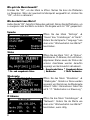
The five control buttons can be used for manual control during stand-alone
playback. Please navigate to the PLEXUS menu ‘Stand-Alone’ à ‘Playback’.