1
POWER
TV SOURCE
DVD RECEIVER/TV
SLEEP
Basic Functions
ECHO
RDS DISPLAY
2
1
Repeat Playback
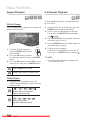
3A-B Repeat Playback
4
5
BAD
7
DVD/DivX Repeat
can repeatedly play back a designated section
9You
of a DVD or CD.
8
DSP /EQ
0
You can repeat the title, chapter or the section(A-B
Repeat) of the DVD/DivX.
Repeat
B
6
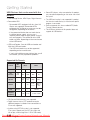
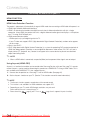
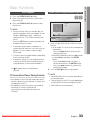
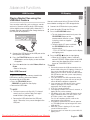
1. During the DVD disc or CD playback, press the
REPEAT button on the remote control.
2. For DVD, press the $% buttons to select A-.
For CD press the REPEAT button repeatedly
until
appears.
OFF
3. Press the ENTER button at the point where you
want repeat play to start (A).
MUTE
MIC VOL+
REPEAT
TUNING
/CH
4. Press the ENTER button at the point where you
want repeat play to stop (B).
VOL
5. To return to normal playback,
For DVD, press the $% buttons to select to OFF.
MIC VOL.
TITLE MENU For CD, press the REPEAT button to select to
1. During the DVD/DivX playback,
press the REPEAT button on the
MENU
DISC MENU
remote control.
2. Press the $% buttons to select a
desired repeat mode, then press the ENTER
TOOLS
button.
✎ NOTE
INFO
3. Press the ▲▼ buttons to select OFF to return
to normal play, then press the ENTER button.
Z
D
Title ➞ Chapter ➞ A - ➞RETURN
Off
CD/MP3 Repeat
B
DIMMER
S . VOL
MO/ST
CD RIPPING
C
D
AUDIO UPSCALE
1. During the CD/ MP3 playback, press the
REPEAT button repeatedly to select the repeat
mode you want.
B
A
;
;
;
The A-B Repeat function does not operate with
DivX, MP3 or JPEG discs.
EXIT
Track ➞ Dir (Directory) ➞ Disc
➞ Off
TUNER MEMORY
A
`
P .BASS
;
(Normal ; Repeat Track ; Repeat All ;
Random ; Repeat Section A-B)
;
;
;
;
(Normal ; Repeat Track;
Repeat Dir ; Repeat All; Random)
Downloaded From TheatreSystem-Manual.com Manuals
English