1
TFCB24F3XYZ1
Step
Display
17
Specification & Installation Instructions
Description
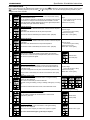
Maximum voltage of the heating output:
Display shows “max vdc analog output heating” and the value of the
minimum voltage of the heating ramp.
Please select the desired value of the maximum voltage of the heating
ramp. (This is the “span” value)
Values
Range: 0.0 to 10.0 Volt
Increment: 0.1 Volt
Default value: 10.0 Volt
The maximum value is restricted by the minimum value. (step #16)
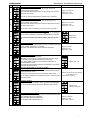
Set signal for 4 pipe cooling system: (If ‘’4P’’ has been selected at step #8)
Display shows “select 4 pipe cooling signal”. Cooling symbols is also
displayed.
Select which cooling signal output you want for your 4 pipe system.
You can choose analog or on/off output.
If you select analog, AO1 will be set in cooling.
If you select on/off, TO1 will be set in cooling.
If you have selected on/off signal, go directly to step #21.
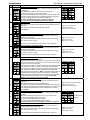
Minimum voltage of the cooling output:
Display shows “min vdc analog output cooling” and the value of the
minimum voltage of the cooling ramp.
Please select the desired value of the minimum voltage of the cooling
ramp. (This is the “zero” value)
18
19
Default value: Analog
Range: 0.0 to 10.0 Volt
Increment: 0.1 Volt
Default value: 0.0 Volt
The minimum value is restricted by the maximum value. (step #20)
Maximum voltage of the cooling output:
Display shows “max vdc analog output cooling” and the value of the
minimum voltage of the cooling ramp.
Please select the desired value of the maximum voltage of the cooling
ramp. (This is the “span” value)
20
Range: 0.0 to 10.0 Volt
Increment: 0.1 Volt
Default value: 10.0 Volt
The maximum value is restricted by the minimum value. (step #19)
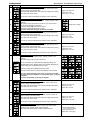
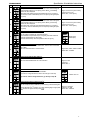
Set local reheat signal
Display shows “set local reheat signal”. Heating symbols is also
displayed.
Select which signal output you want for reheat.
You can choose OFF (no signal selected), ANALOG heating only,
ANALOG heating & fan, ON/OFF heating only, ON/OFF heating & fan,
PULSE heating only, PULSE heating & fan output.
21
If you select analog (& fan), AO3 will be set in reheat.
If you select on/off (& fan) or pulse (& fan), TO3 will be set in reheat.
If you have selected analog (& fan) signal, go directly to step #22.
If you have selected on/off (& fan) or pulse (& fan) signal, go directly
to step #24.
If you have selected OFF, go directly to step #26.
Default value: Off
Minimum voltage of the reheat output:
Display shows “min vdc analog output reheat” and the value of the
minimum voltage of the reheat ramp.
Please select the desired value of the minimum voltage of the reheat
ramp. (This is the “zero” value)
22
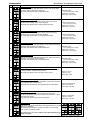
Range: 0.0 to 10.0 Volt
Increment: 0.1 Volt
Default value: 0.0 Volt
The minimum value is restricted by the maximum value. (step #23)
Maximum voltage of the reheat output:
Display shows “max vdc analog output reheat” and the value of the
minimum voltage of the reheat ramp.
Please select the desired value of the maximum voltage of the reheat
ramp. (This is the “span” value)
23
Range: 0.0 to 10.0 Volt
Increment: 0.1 Volt
Default value: 10.0 Volt
The maximum value is restricted by the minimum value. (step #22)
24
C
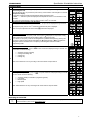
Reheat proportional band:
Display shows “control ramp reheat” and the value of the reheat
proportional band, heating symbol is also displayed.
Please select the desired value of reheat proportional band.
Proportional band range:
0.5 to 5.0ºC [1 to 10ºF]
Increment: 0.5ºC [1ºF]
Default value: 2.0ºC [4ºF]
5