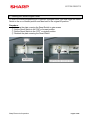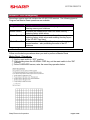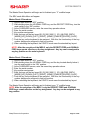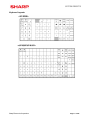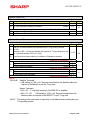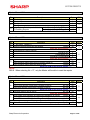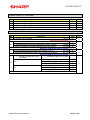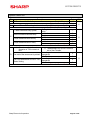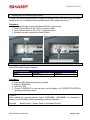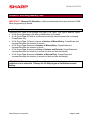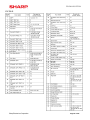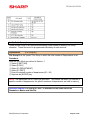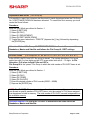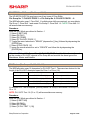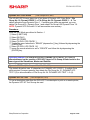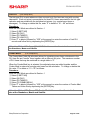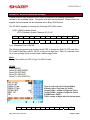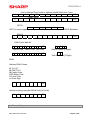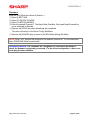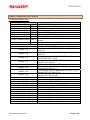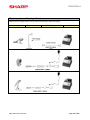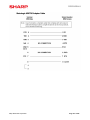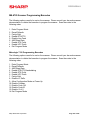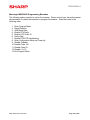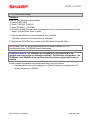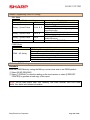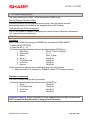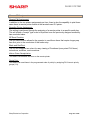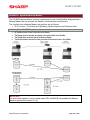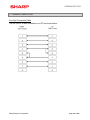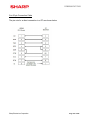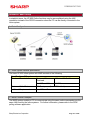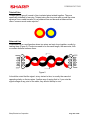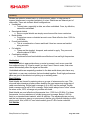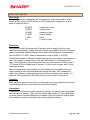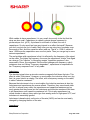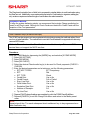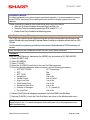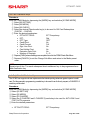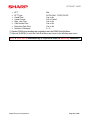
1
MODEL UP-800 DISCLAIMER The best efforts were made to ensure that the information in this manual is complete and correct. Sharp Electronics Corporation makes no warranty of any kind with regard to this material, including but not limited to the implied warranties of marketability and fitness for a particular purpose. Information in this manual is subject to change without notice. No part of this manual may be reproduced or transmitted in any form or by any means, electronic or mechanical, including photocopying, recording, or information recording and retrieval systems, for any purpose other than for personal use, without the express written permission of Sharp Electronics Corporation. Sharp Electronics Corporation is not affiliated with suppliers mentioned in this document and has no responsibility or liability in connection with those companies’ products and services. The information contained in this document is furnished without assurance of peripheral/software compatibility between Sharp POS products and the products of the suppliers listed. Sharp Electronics Corporation shall not be liable for errors contained herein or for incidental or consequential damages in connection with the furnishing, performance, or use of this manual. Product specifications change without notification (both Sharp and other supplier products). Sharp does not undertake to update materials. It is the dealer’s responsibility to keep current with all technical issues associated with these products. TRADEMARKS Sharp and all related trademarks are trademarks or registered trademarks of Sharp Corporation and its affiliated companies. Microsoft, Windows, Windows 98SE, Windows 2000, Windows XP and Win32 are Trademarks of Microsoft Corporation Datacap, Datacap Systems, DataTran, DialTran, IPTran, TwinTran, NoLoad, AutoLoad and PSCS are trademarks of Datacap Systems, Inc. All other trademarks are the property of their respective holders. SHARP UP-800 POS Procedure Guide TABLE OF CONTENTS 1-System Presets……………………………………………………………………………………..……………………………6 Section 1: Overview……………………………………………………………..……...………………………….…7 SRV-Mode Program Main Menu………………………………………………………………..…………………………………………7 Entering SRV-Mode/Program Reset………………………………………………………….……………………….…………………8 Section 2: Prior to Beginning………………………………………………………………………………….…....9 Master & System Presets……………………………………...……………………..…………………………………………..….9-12 Section 3: System Preset Job No…………………………………………………………………………….…...13 System Presets 901-929……………………………………………………………..……………….…………………………….13-29 System Presets 980, 981,986,987, 988……………………………………………………..……………..…………………30-31 System Presets 803, 804, 930, 942, 944…………………………………………………..…………………………………32-33 2-Free Key Layout……………………………………….……………..……..………………………..………………...…….34 Section 1: Overview ………………………………………………………………………………………….…….35 Section 2: Free Key Layout Readings……………………………………………………………………….....36 Entering SRV-Mode; Free & Direct Key Program Readings………………………………………………….……………..37 Section 3: Free Key Layout Setup………………………………….……………………………………………37 Free Key Assignment...................................................................................................................37-41 Key Initial & PGM Mode Programming-Direct Key………………………………………………….……….…..………42-43 3-File Allocation…………………………………………………………………………………...…………..…..…44 Section 1: Overview ……………………………………………………………..………………………….………45 Section 2: Allocating Memory Files…………………………………………………………..………….....47-49 File Table Descriptions………………………………………………………………………………………….………..….…….49-67 Section 3: More on Memory Allocation……………………………………………………………………......68 Overview……………………………………………………………………………………………………………………………..……….68 Glossary of Terms………………………………………………………………………………………………………………….….69-71 4-Peripherals…………………………………………………………….....………………....………………………72 Section 1: Overview……………………………………………………………………….………………………...73 SRV-Mode Program Reset & Readings……………………………………………………………………………………..……….74 Section 2: Peripheral Device Overview…………………………………………………………………….75-77 Section 3: Printers…………………………………………………………..……………………………….....78-90 Section 4: Scanner (Barcode Reader)…………………………………………………………………....91-103 Section 5: Scale……………………………………………………………………………………………....104-108 Section 6: Coin Dispenser………………………………………………………………........................109-110 Section 7: MCR Unit UP-E13MR3……………………………………………………………….............111-113 5-Inline…………………………………………………………………..…….....……………....…….….........…115 Section 1: Overview……………………………………………………………………….…………….…..116-121 Section 2: Inline System Connection…………………………………………………………………….122-123 Section 3:Inline System Readings…………………………………………………………………........124-125 Section 4: Basic Inline System Setup……………………………………………………..……….…...126-130 Section 5: IRC Related Programming………………………………………………………….………..131-134 Section 6: Remote Printing and Printer Re-routing………………………………………………....135-141 Section 7: Inline Download Jobs…………………………………………………………………….......142-145 Section 8: Data Clear Jobs……………………………………………………………………..………...…......146 Section 9: System Backup Master…………………………………………………………………….....147-153 Section 10: Inline System Report List…………………………………………………………...........154-157 Section 11: Error Handlingr…………………………………………………………………………........158-162 Glossary of Terms……………………………………………………………………………..…………...……...163 6-Communications………………………………………………………………….....………………......……164 Section 1: Overview……………………………………………………………………….……………..….165-167 Section 2: Online via RS-232………………………………………………………….…………….....….168-170 Section 3: RS232 Communication Setup………………………………………….………….……..….171-175 Section 4:MWS Setup……………………………………………………………………….…….…………...….176 Section 5: MWS Connection using Inline System…………………………………………………….…….177 Section 6: MWS Communications Setup…………………………………….…………………..……………178 Glossary: RS232…………………………………………………………………………………………….…179-188 7-EFT & Gift Card………………………………………………………………….....………………......……..…189 Section 1: Overview……………………………………………………………………….……………..….190-191 Section 2: Programming Principles…………………………………………………...…….………..….192-195 Section 3: EFT Related Programming………………………………………………………………..….196-212 Section 4: DataTran™ Functions………………………………………………………….………….…..212-218 Section 5: Sales Operations……………………………………………………………….……..………..219-226 Section6: Correction Operations………………………………………………………………………….227-231 Section 7: Reports Operations…………………………………………………………………………….232-237 Glossary……………………………………………………………………….……………..………………....238-240 8-SD Card Utilities………………………………………………………………….....………………......………241 Section 1: Overview……………………………………………………………………….……………..….242-244 Page 5 of 246 Section – 1: SYSTEM PRESETS - Page 6 of 246 SYSTEM PRESETS Section-1: Overview SRV-mode programming consists of service programming jobs, which define the UP-800 system capabilities. The service program settings may be printed on the report and journal printer or displayed on the operator display. 1. SRV-mode Program Main Menu: SRV-mode Program Main Menu: Main Menu Description 1 READING Print or view system preset, device configuration, free key, file, and SSP settings. 2 SETTING Program device configuration, system preset, Z counter, GT, mode secret #, free key, file, supervisor, memory initial, SSP settings or perform backup send and backup receive operations. 3 IRC SETTING Program satellite, master, and backup master, standalone with IRC and stand alone terminal settings or perform an IRC reset. 4 DOWN LOAD In an IRC system, transfer SRV parameters (system presets) and free key program settings from a master terminal to all or an individual satellite terminal on the existing IRC network. 5 DIAGNOSTIC Perform product&test, ram&rom&ssp, lock&key&switch, serial I/O, display&printer, mcr&drawer, TCP/IP diagnostic testing. Please refer to the Service Manual for requirements and possible results. 6 SD CARD MODE Perform SD card Load/Save operations. For more information on SRV Mode programming please see the UP-810F, UP-820N, UP820F Service Programming Manual. Documentation is available on www.sharp-pos.com. Sharp Electronics Corporation Page 7 of 246 SYSTEM PRESETS 2. Entering SRV-Mode/Program Reset To enter SRV Mode programming or to perform a program reset, you must toggle the Reset Switch to the on or forward position and then back to the original off position. Procedure: ① Unscrew the plate covering the Reset Switch to gain access ② Set the Reset Switch to the “ON” or forward position ③ Set the Reset Switch to the “OFF” or original position. ④ Reattach the plate covering the Reset Switch. The SRV-mode Main Menu will appear: Sharp Electronics Corporation Page 8 of 246 SYSTEM PRESETS Section-2: Prior to Beginning Executing a master reset will initialize the UP-800 POS terminal. The following types of Program and Master Reset operations are available. Type Program Reset Master Reset-1 Master-Reset-2 Master Reset-3 Description Initializes the hardware and resident program without clearing memory and totalizers Initializes the hardware and clears the entire memory – restoring factory initial values Initializes the hardware and clears the entire memory – restoring factory initial values and enabling free key layout of the UP-800 “fixed keys” Is the same as a Master Reset-2 and requires the entry of a serial number – also prohibiting the reset of the GT totalizers 1. Master Resets: Follow one the below procedures when you wish to perform a Master Reset Master Reset-1 Procedure: ① Set the reset switch to “OFF” position. ② While holding down the JOURNAL FEED key, set the reset switch to the “ON” position. ③ At the PASSWORD screen, enter the secret key operation below. Sharp Electronics Corporation Page 9 of 246 SYSTEM PRESETS The Master Reset Operation will begin and is finalized upon ‘’3’’ audible beeps. The SRV-mode Main Menu will appear: Master Reset-2 Procedure: ① Set the reset switch to “OFF” position. ② While holding down the JOURNAL FEED key, and the RECEIPT FEED key, turn the reset switch to the “ON” position. ③ At the PASSWORD screen, enter the secret key operation above. ④ Enter the serial number. ⑤ Key position assignment. ⑥ Enter the keys on the key board [0]- [9], [00], [000] [.] [CL], [@/FOR], [SBTL], [MODE] [UP], [DOWN], [LEFT], [RIGHT], [HOME], [CANCEL] [ENTER], [CA/AT]. ⑦ Push the key on the keyboard to be assigned. With this, the function key of the key number displayed is assigned to that key position. ⑧ When relocating the keyboard, the PGM 1/2 mode uses the standard key layout. NOTE: After the execution of the MRS-2, only the RECEIPT FEED and JOURNAL FEED keys remain effective on the key assignment. Any key can be assigned to any key position on the main keyboard. Master Reset-3 Procedure: ① Set the reset switch to “OFF” position. ② While holding down the JOURNAL FEED key, and the key located directly below it, turn the reset switch to the “ON” position. ③ At the PASSWORD screen, enter the secret key operation above. ④ Enter the serial number. ⑤ Key position assignment. ⑥ Enter the keys on the key board [0]- [9], [00], [000] [.] [CL], [@/FOR], [SBTL], [MODE] [UP], [DOWN], [LEFT], [RIGHT], [HOME], [CANCEL] [ENTER], [CA/AT]. ⑦ Push the key on the keyboard to be assigned. With this, the function key of the key number displayed is assigned to that key position. ⑧ When relocating the keyboard, the PGM 1/2 mode uses the standard key layout. The Master Reset Operation will begin and is finalized upon ‘’3’’ audible beeps. NOTE: After the execution of the MRS-3, only the RECEIPT FEED and JOURNAL FEED keys remain effective on the key assignment. Any key can be assigned to any key position Sharp Electronics Corporation Page 10 of 246 SYSTEM PRESETS Keyboard Layouts: Sharp Electronics Corporation Page 11 of 246 SYSTEM PRESETS 2. System Preset: When making entries for system presets, leading zeros are not required. Please note that trailing zeros are required and that the order of entry is from the left-most digit (A) to the right-most digit (D). Reference: 1. Sharp Electronics Corporation 2. 3. Page 12 of 246 SYSTEM PRESETS Section-3: System Preset Job No. System Preset: 901 Bit A B C D Description Data --- ----Not Used Tax System: Auto Tax 1-5 & Manual Tax System / Canadian Tax (Type 1-10) 0/6/7 / Canadian Tax (Type-11: VAT-on-VAT) Enter the Desired Value ----^ ---Not Used, Fixed at ‘0’ Tab Setting: 3/2/1/0 - Number of decimal places for display and print Enter the Desired Value ----^ MRS 0 0 0 2 System Preset: 902 Bit A B C D Description Data Inline operations are Enabled Yes/No 1/0 Enter the Desired Value ----^ 2. REF# and AP code 1. Gift reload command to entry at Gift Sales In --DataTran Void Compulsory 0 ----AT&UM8 Not compulsory 2 Compulsory 4 ----AT&UM20 Not compulsory 6 Enter the Desired Value ----^ 1. Operator Display 2. Gift Card Sales Format command for DataTran AT&UM4 0 GLU MODE AT&UM5 1 AT&UM4 4 CHECK OUT MODE AT&UM5 5 Enter the Desired Value ----^ ---- Not Used – Do not change fixed at “0” --- MRS 0 0 Flat (0) Raised (4) 0 NOTE: -902-A: is set automatically during the IRC Setting Terminal selection -902-C=0 or 1: Will display open GLU upon sign-on, if using GLU or GLU recall to display manually. -902-C must be set to 4 or 5 for scale interface. Sharp Electronics Corporation Page 13 of 246 SYSTEM PRESETS System Preset: 903 Bit A Description IR (POS data copy) Baud Rate (bps): 38400/19200/9600/4800/2400 1. Symbol of scale entry B LB KG C D Data 6/5/4/3 /2 Enter the Desired Value ----^ 2. Printing Gift Card No. at Gift Activates and Reloads No 0 Yes 1 No 2 Yes 3 Enter the Desired Value ----^ Tare Weight Entry is disallowed / Scale Weight System 2 decimal places – 2ID(3ID)+2DD Tare Weight Entry is disallowed / Scale Weight System 3 decimal places 1ID(2ID)+3DD Tare Weight Entry is allowed / Scale Weight System 2 decimal places 2ID(3ID)+2DD Tare Weight Entry is allowed / Scale Weight System 3 decimal places 1ID(2ID)+3DD Food Stamp System: MRS 6 0 0 1 0 2 3 Enter the Desired Value ----^ Forgiveness 3 Tax is payable w/ Food Stamps 2 Tax is NOT payable w/ Food Stamps 1 No Food Stamps / Cash Benefit 0 Enter the Desired Value ----^ Raised (3) Flat (0) NOTE: -903C = 0 for CAS Scale Sharp Electronics Corporation Page 14 of 246 SYSTEM PRESETS System Preset: 904 Bit A B C D Description Data 2. Fraction treatment for 1. Date is printed gasoline quantity calculation Round Off 0 Yes Round Up 1 Ignore 2 Round Off 4 No Round Up 5 Ignore 6 Enter the Desired Value ----^ 2. Decimal point position of 1. Consecutive No. is printed gasoline quantity 0 0 1 1 Yes 2 2 3 3 0 4 1 5 No 2 6 3 7 Enter the Desired Value ----^ Gas Dept. Discount Fraction Calculation Ignore/Round Up/Round Off 2/1/0 Enter the Desired Value ----^ Gas Dept. Unit Price Tab Position 3 decimal places/2 decimal places 2/0 Gas Dept. Function is Enabled Yes/No 1/0 Enter the SUM of the Desired Values ----^ MRS 0 0 0 0 NOTE: -904-A&B applies to Receipts, Guest Checks, and Kitchen Print chits Sharp Electronics Corporation Page 15 of 246 SYSTEM PRESETS System Preset: 905 Bit A B C D Description Data Tax4 Subtotal is printed on Trans. Reports No/Yes 4/0 Gross Tax4 & Refund Tax4 Totals are printed on Trans. Reports No/Yes 2/0 Net Tax4 Total is printed on Trans. Reports No/Yes 1/0 Enter the SUM of the Desired Values ----^ Tax is printed when the Taxable Subtotal = $0.00 Yes/No 4/0 Tax is printed when GST is VAT No/Yes 2/0 Tax is printed when Tax = $0.00 No/Yes 1/0 Enter the SUM of the Desired Values ----^ GST Exempt is printed on Trans. Reports No/Yes 4/0 Enter the Desired Value ----^ 9/8/7/6 Canadian Tax System: /5/4/3/ Type10/Type9/Type8/Type7/Type6/Type5/Type4/Type3/Type2/Type1 2/1/0 Enter the Desired Value ----^ MRS 0 0 0 5 NOTE: -Trans. Report represents both X1/Z1 and X2/Z2 Sharp Electronics Corporation Page 16 of 246 SYSTEM PRESETS System Preset: 906 Bit A B C D Description Data Dept. & PLU/UPC Codes are printed Yes/No 4/0 PLU/UPC Stock System: 2/1/0 Entry is Inhibited/Error Message and Operation continues/Allowed Enter the SUM of the Desired Values ----^ Bottle Return Function is Enabled Yes/No 4/0 Hash/Gift Dept. is Enabled Yes/No 2/0 Enter the SUM of the Desired Values ----^ 1. Split pricing counting 2. Multiplication entry Multiplication 0 Successive multiplication 1 Quantity Split pricing 2 FFx (FF sequence + split pricing) 3 Multiplication 4 Successive multiplication 5 Package Split pricing 6 FFx (FF sequence + split pricing) 7 Enter the Desired Value ----^ 3. Fractional Qty 1. PLU/UPC Price 2. Presetting of the System is Look Up at Consecutive No. enabled (3 Refund Entry decimal places) No 0 Yes Yes(3 decimal places) 1 No No 2 No Yes(3 decimal places) 3 No 4 Yes Yes(3 decimal places) 5 Yes No 6 No Yes(3 decimal places) 7 Enter the Desired Value ----^ MRS 0 0 3 0 NOTE: -To enable Scale entries 906-D must be set = 1, 3, 5 or 7 -To allow OPEN type PLU entries 906-C FF(Fast Food Sequence) must be disabled. -FF(Fast Food Sequence) cannot be used for Coupon Like PLU. Sharp Electronics Corporation Page 17 of 246 SYSTEM PRESETS System Preset: 907 Bit Description 1. Entry of SCM(+)/(-) after registration A ---UPC code is printed on the Journal UPC code is printed on the Receipt X report before CCD C 2. SCM input compulsory Disable Enable CCD compulsory D MRS --- Non-compulsory Compulsory for an individual cashier Compulsory for all cashiers Non-compulsory Compulsory for an individual cashier Compulsory for all cashiers Enter the Desired Value ----^ Disable Enable B Data 0 1 2 4 5 6 --No/Yes 2/0 No/Yes 1/0 Enter the SUM of the Desired Values ----^ Minus Dept. and PLU/UPC items are Enabled --Disable 0 Enable 1 Disable 2 Enable 3 Enter the Desired Value ----^ --Non-compulsory 0 For individual servers 1 For all servers 2 Enter the Desired Value ----^ 0 0 1 0 NOTE: - To enable Coupon PLU items 907-C must be set = 1 Sharp Electronics Corporation Page 18 of 246 SYSTEM PRESETS System Preset: 908 Bit GT printing on Z report GT1 (NET) Description GT2 (+) Print Print Skip A Print Skip Skip GT printing on X report GT1 (NET) B C D Data GT3 (-) Print Skip Print Skip Print Skip Print Skip Enter the Desired Value ----^ 0 1 2 3 4 5 6 7 --GT3 (-) Skip 0 Skip Print 1 Skip Skip 2 Print Print 3 Skip 4 Skip Print 5 Print Skip 6 Print Print 7 Enter the Desired Value ----^ VOID-mode operations affect the Hourly Report Yes/No 4/0 -----Consecutive No. is Reset upon a Trans.-Z Report Yes/No 1/0 Enter the SUM of the Desired Values ----^ X/Z Report Printing: Journal only/Receipt & Journal 4/0 -----Trans.-Z1 Report resets the GT Yes/No 1/0 Enter the SUM of the Desired Values ----^ MRS 0 GT2 (+) 0 0 0 NOTE: - 908-D: The X/Z Report printing option does not apply to Individual Server Report TransZ1 GT reset option is not allowed if a Master Reset 3 was executed. Sharp Electronics Corporation Page 19 of 246 SYSTEM PRESETS System Preset: 909 Bit A B C D Description Data Training GT is printed on the Trans.-X Report Yes/No 2/0 Training GT is printed on the Trans.-Z Report No/Yes 1/0 Enter the SUM of the Desired Values ----^ PLU/UPC Item Data is printed on the Z Report No/Yes 4/0 Enter the Desired Value ----^ VOID-mode & MGR VOID is printed on the Trans.-Z2 Report No/Yes 4/0 VOID-mode & MGR VOID is printed on the Trans.-Z1 Report No/Yes 2/0 Enter the SUM of the Desired Values ----^ ---- Not used. Fixed at ‘0’ --- MRS 2 0 0 0 NOTE: -909-B: No Sales Data is printed for the PLU-Z Report when = 4 System Preset: 910 Bit A Description The Cash Drawer opens at Server Sign-On Data Yes/No 2/0 Enter the Desired Value ----^ --Auto Sign-Off/Stay-Down 2/0 Enter the Desired Value ----^ 4 MRS B C ----Not used. Fixed at ‘0’ Server/Cashier Sign-on System D (Fixed): Server/Cashier system is code entry Data Ignored/Round-Up/Round-Off 2/1/0 Enter the Desired Value ----^ UPC (EAN) Check Digit System Checking is Enabled Yes/No 4/0 Enter the Desired Value ----^ ---- Not used. Fixed at ‘0’ --Receipt/Journal/(Bill)Slip Header Format-3/Format-2/Format-1 4/2/0 Format: Enter the Desired Value ----^ MRS 0 0 2 4 System Preset: 911 Bit A B C D Description Fractional Qty System: 0 0 0 0 NOTE: - 911-A: Must be set for rounding for Scale operations = 0 - 911-B: You cannot modify this setting once UPC codes have been preset in the system Sharp Electronics Corporation Page 20 of 246 SYSTEM PRESETS System Preset: 912 Bit A B C D Description Data YYMMDD/DDMMYY/MMDDYY 2/1/0 Enter the Desired Value ----^ Time Clock System 24-Hour System/12-Hour System 1/0 Enter the Desired Value ----^ Receipt After-Transaction Format Detailed/Totals only 4/0 Copy Receipt Function is Enabled Yes/No 2/0 Receipt Footer Print Control By Media Preset/All Receipts 1/0 Enter the SUM of the Desired Values ----^ 3-Line Header – No Stamp 0 Graphic Logo Stamp only 1 Logo Message Control: Graphic Logo Stamp & 3-Line Footer 2 6-Line Header – No Stamp 3 3-Line Header – No Stamp/3-Line Footer 5 Enter the Desired Value ----^ Date Print Format MRS 0 0 6 1 System Preset: 913 Bit A B C D Description Data Content of total VP amount --Total Amount 0 Tendered Amount 1 Enter the Desired Value ----^ Subtotal is printed when the [SBTL] key is depressed Yes/No 4/0 Merch. Subtotal is printed when the [MDSE] key is depressed Yes/No 2/0 Escaping Compulsory VP/slip print is Enabled Yes/No 1/0 Enter the SUM of the Desired Values ----^ -----Error-Tone System Until [CL] is depressed/2 seconds 2/0 Keyboard Buffering is Enabled No/Yes 1/0 Enter the SUM of the Desired Values ----^ Compulsory Drawer Closed prior to operation is enabled Yes/No 4/0 Error System “Misoperation”/One-Shot Error only 2/0 Key Touch-Tone is enabled No/Yes 1/0 Enter the SUM of the Desired Values ----^ NOTE: - 913-B: The sequence for escaping “Compulsory” Bill print operations: or Æ[.]Æ[SLIP] Sharp Electronics Corporation MRS 1 1 0 4 Æ [.] Æ [BILL] Page 21 of 246 SYSTEM PRESETS System Preset: 914 Bit A B C D Description Data Receipts are printed upon [NO SALE] operations No/Yes 4/0 The [NO SALE] function is combined with the [CASH] key Yes/No 2/0 Tax Delete function is Enabled Yes/No 1/0 Enter the SUM of the Desired Values ----^ The [NO SALE] function is allowed after a Non-Add No. entry Yes/No 1/0 Enter the Desired Value ----^ VOID-mode is Enabled No/Yes 2/0 Non-Add # Entry is Compulsory at the beginning of each Trans. Yes/No 1/0 Enter the SUM of the Desired Values ----^ Manual Tax entry is Enabled No/Yes 4/0 Check-Cashing function is Enabled Yes/No 2/0 Non-Add # Entry is Enabled No/Yes 1/0 Enter the SUM of the Desired Values ----^ MRS 1 1 0 0 System Preset: 915 Bit Description A ------Dollar Amount Symbol B ------[PO] System 1. Number of ST(-) or ST(%) entries within one transaction C Any number of times Once D ---- Not Used. Fixed at ‘0’ Sharp Electronics Corporation Data ----(Space), (*) Asterisk, ($) Dollar Symbol 0/1/2 Enter the Desired Value ----^ ----Cash only/Mixed-Tender 1/0 Enter the Desired Value ----^ 2. RA system MRS 0 0 --- Mixed entry 4 Cash only entry 5 Mixed entry 6 Cash only entry 7 Enter the Desired Value ----^ --- 4 0 Page 22 of 246 SYSTEM PRESETS System Preset: 916 Bit A B C D Description Data ----------Print when the No. Text Characters overlap the Amount 2-Line/Truncate 1/0 Enter the Desired Value ----^ Charge Media Finalization when the Amount = $0.00 Yes/No 4/0 -----Food Stamp SBTL is Compulsory before FS-Tender Yes/No 1/0 Enter the SUM of the Desired Values ----^ Allow the MDSE SBTL to go Negative No/Yes 4/0 [SBTL] Entry is Compulsory before Tendering Finalization Yes/No 2/0 [SBTL] Entry is Compulsory before Direct Finalization Yes/No 1/0 Enter the SUM of the Desired Values ----^ Coupon PLU Totalizer prints on the Trans.-(X/Z) Reports No/Yes 4/0 NET Sales SBTL (NET1) is printed on the Trans.-(X/Z) Reports No/Yes 2/0 Check change Totalizer is printed on the Trans.-(X/Z) Reports No/Yes 1/0 Enter the SUM of the Desired Values ----^ MRS 1 4 0 0 NOTE: -916-C: Allow the sales transaction to go negative System Preset: 917 Bit A B C D Description Data Tax1 Subtotal is printed on Trans. Reports No/Yes 4/0 Gross Tax1 & Refund Tax1 Totals are printed on Trans. Reports No/Yes 2/0 Net Tax1 Total is printed on Trans. Reports No/Yes 1/0 Enter the SUM of the Desired Values ----^ Tax2 Subtotal is printed on Trans. Reports No/Yes 4/0 Gross Tax2 & Refund Tax2 Totals are printed on Trans. Reports No/Yes 2/0 Net Tax2 Total is printed on Trans. Reports No/Yes 1/0 Enter the SUM of the Desired Values ----^ Tax3 Subtotal is printed on Trans. Reports No/Yes 4/0 Gross Tax3 & Refund Tax3 Totals are printed on Trans. Reports No/Yes 2/0 Net Tax1 Total is printed on Trans. Reports No/Yes 1/0 Enter the SUM of the Desired Values ----^ Total Tax is printed on the Trans.-(X/Z) Reports No/Yes 4/0 Gross & Ref. Manual Tax Totals are printed on Trans. Reports No/Yes 2/0 Net Manual Tax Totalizer is printed on Trans.-(X/Z) Reports No/Yes 1/0 Enter the SUM of the Desired Values ----^ Sharp Electronics Corporation MRS 0 0 0 0 Page 23 of 246 SYSTEM PRESETS System Preset: 918 Bit A B C D Description Data Assoc. PLU Text of Combo Meals is printed No/Yes 4/0 Direct-Tender for 2nd or subsequent tender is allowed Yes/No 2/0 Combo Meal Kitchen Printer printing is by Combo Meal’s KP/by PLU’s KP 1/0 Enter the SUM of the Desired Values ----^ -----PLU is printed in RED when the unit price is $0.00 Yes/No 2/0 Fractional entries allowed for non-Scalable Dept. & PLU items No/Yes 1/0 Enter the SUM of the Desired Values ----^ -----Kitchen Printer output Groups Like Items No/Yes 2/0 Kitchen Printer output prints Dept. & PLU Text in Double-Sized Yes/No 1/0 Enter the SUM of the Desired Values ----^ Tip Paid function includes Cash Tips No/Yes 4/0 Tip Totals are Reset upon executing a Server Z1 Report Yes/No 2/0 Tip Totalizer is printed on the Server Report Yes/No 1/0 Enter the SUM of the Desired Values ----^ MRS 2 2 3 3 NOTE: - 918-C: Does not apply to items that are entered as part of a Condiment entry System Preset: 919 Bit A B C D Description Data Guest Check System GLU (detail)/PBLU (totals) 4/2 -----GLU/PBLU Entry is Compulsory for Reorder Entries No/Yes 1/0 Enter the SUM of the Desired Values ----^ Checking of Server# for Guest Check Entries when re-ordering No/Yes 4/0 -----Guest Check Number-System Entry Manual/Auto-Generate 1/0 Enter the SUM of the Desired Values ----^ -----[GLU/PBLU] Entry is Compulsory Yes/No 2/0 Amount Prints when PLU Unit Price is $0.00 (recei[pt/bill) Yes/No 1/0 Enter the SUM of the Desired Values ----^ Normal SBTL is printed in addition to the Conversion SBTL No/Yes 4/0 -----Foreign Currency Format Omit Decimal Digits/Not 1/0 Enter the SUM of the Desired Values ----^ MRS 5 1 0 0 NOTE: - 919-B: Requires that the Auto GLU Gen (File 40) is allocated. - 919-C: Text will always print even if Amount prints when PLU Unit Price is $0.00. Sharp Electronics Corporation Page 24 of 246 SYSTEM PRESETS System Preset: 920 Bit A B C D Description -----Back-Up Master Function is Enabled Data ----Yes/No 3/2 Enter the Desired Value ----^ Back-Up Master can perform System Reports & Download Jobs No/Yes 0/4 ----------Enter the Desired Value ----^ Inline Download Jobs are Broadcasted (vs. sending individual) No/Yes 4/0 -----PGM2-Mode Programming is allowed at the Satellite Terminal Yes/No 1/0 Enter the SUM of the Desired Values ----^ Back-up Master 3 Master 2 The POS Terminal Type Satellite 1 Standalone 0 Enter the Desired Value ----^ MRS 2 0 4 0 NOTE: - 920-D: This is setting is determined in the IRC Setting / Terminal Setting Programming in the SRV Mode. System Preset: 921 Bit A B C D Description Data 4/0 ----Enter the Desired Value ----^ GLU System Control Each Terminal/Centralized (Master) 4/0 ----------Enter the Desired Value ----^ ----------Bill Printing Method: Item Data Is Retained/Item Data is Cleared 1/0 Enter the Desired Value ----^ Individual Server Report executes the Tip Paid function No/Yes 0/4 ----------Enter the Desired Value ----^ Convert UPC-E codes to UPC-A ------- MRS Yes/No 0 0 0 0 NOTE: - 921-A: Do not modify this setting once UPC codes have been preset - 921-C For roll/soft check printers only. Sharp Electronics Corporation Page 25 of 246 SYSTEM PRESETS System Preset: 922 Bit A ---- Not used. Fixed at ‘0’ Description B $1 Coin Dispenser Handling is Enabled C D ---- Not used. Fixed at ‘0’ ---- Not used. Fixed at ‘0’ Data --Yes/No MRS 0 0/1 0 Enter the Desired Value ----^ ----- 0 0 System Preset: 923 Bit A B Description Data The No. of Records which are requested for the T-Log Polling Function (x 100) example: if AB = 15; then the Satellite will request for T-Log polling when the no. of records reaches 1500 (15 x 100) 0 - 99 MRS 00 * see Note below when referring to a Master or Standalone terminal C ------T-Log Function is Enabled D ------T-Log Polling Cycle (seconds) NOTE: - 923-A+B: Enter the Desired Value ----^ ----Yes/No 1/0 Enter the Desired Value ----^ ----0-9 Enter the Desired Value ----^ 1 0 Satellite Terminals • (AB setting) x (100) = No. Records stored before the Satellite makes its request to the Master to poll the T-Log data Master Terminals • AB = 00: T-Log Data sending to the MWS PC is disabled • AB = 01 – 99: (AB setting) x (100) = No. Records stored before the Master makes its request to the MWS PC to poll T-Log data - 923-D: This setting is the wait-cycle (in seconds) for the Master when making the next T-Log polling request Sharp Electronics Corporation Page 26 of 246 SYSTEM PRESETS System Preset: 924 Bit A B C D Description Data (Fixed at 1) 1 (Fixed at 4) 4 (Fixed) 2 (Fixed) 1 Inline System Control upon Individual Lock After Ind. Daily Net Z2 Report 2/0 Z2 Resetting Reports Lock after Ind. Trans. Z2 Report 1/0 Enter the SUM of the Desired Values ----^ MRS 1 4 3 3 System Preset: 925 Bit A B Description ---- Not used. Fixed at ‘0’ Various Individual report jobs are allowed C Print format for Consol. Reports: D Data --Yes/No 3/0 Enter the Desired Value ----^ Individual only 2 Consolidated only 1 Individual & Consolidated 0 Enter the Desired Value ----^ -----Allow resetting reports while Server remains signed-on Yes/No 2/0 Allow resetting reports while the store is open Yes/No 1/0 Enter the SUM of the Desired Values ----^ MRS 0 3 0 3 NOTE: 925-B: When selecting No = “0”, only the Master will be able to reset the reports System Preset: 926 Bit A B C D Description Data -----Direct Voids and the Voided item is printed on the KP No/Yes 2/0 Past Voids and the Voided item is printed on the KP No/Yes 1/0 Enter the SUM of the Desired Values ----^ Refunded Data is sent to the KP No/Yes 2/0 Enter the Desired Value ----^ Open/Close Store operation is Enabled for Standalone w/ Online Yes/No 4/0 Send AT Command String when Open Store is Executed Yes/No 2/0 Send AT Command String when Close Store is Executed Yes/No 1/0 Enter the SUM of the Desired Values ----^ Online Channel is Reversed in Close Store state Yes/No 4/0 Enter the Desired Value ----^ Sharp Electronics Corporation MRS 0 0 0 0 Page 27 of 246 SYSTEM PRESETS System Preset: 927 (Not Used) Bit A B C D Description Data --------- MRS 0 0 0 0 Data Yes/No 1/0 Enter the Desired Value ----^ -----VP Message printing on Slip is Enabled for Check & Charge Yes/No 2/0 Header is Printed on Slip when Reorder entries are printed No/Yes 1/0 Enter the SUM of the Desired Values ----^ PLU is printed on the [BILL] when the unit price = $0.00 No/Yes 4/0 Combo Meal Individual PLU Item Text is printed on the [BILL] No/Yes 2/0 Enter the SUM of the Desired Values ----^ 1. Printing of PB/Service on bill 2. Compulsory Bill Print System: at re-order According to each media’s preset 0 Yes Compulsory for every entry 1 Compulsory for PB 2 According to each media’s preset 4 No Compulsory for every entry 5 Compulsory for PB 6 Enter the Desired Value ----^ MRS ---- Not used. ---- Not used. ---- Not used. ---- Not used. Fixed at ‘0’ Fixed at ‘0’ Fixed at ‘0’ Fixed at ‘0’ System Preset: 928 Bit A B C D Description SLIP Logo Text is Printed Sharp Electronics Corporation 0 0 6 0 Page 28 of 246 SYSTEM PRESETS System Preset: 929 Bit A B C D Description Data Detailed/Summary 1/0 Enter the Desired Value ----^ Server & Trans.-Z Resetting is allowed when Open GLUs exist Yes/No 1/0 Enter the Desired Value ----^ 2. Registration when the closed file --1. Mark Down and entry system is full Inhibited 0 Normal markdown/Normal entry Continue 1 Inhibited 2 Cursor markdown/Normal entry Continue 3 Inhibited 6 Cursor markdown/BOGO entry Continue 7 Enter the Desired Value ----^ 1. Selection method of seal 2. Taxable status of PLU/UPC which is character of TAX contents in set to ‘Non-Taxable’ BILL According to the associated 0 The total of the tax amount is printed department Non-Taxable 2 According to the associated 4 Tax Print Method and PLU/UPC Tax department Status Setting Non-Taxable 6 Enter the Desired Value ----^ MRS KP Print format for Media Keys Sharp Electronics Corporation 0 0 0 Page 29 of 246 SYSTEM PRESETS System Preset: 980 Bit A B C D Description Data ---- Not used. Fixed at ‘0’ --HASH/Gift department entries affect hourly sales totals Yes/No 1/0 Enter the Desired Value ----^ ---- Not used. Fixed at ‘0’ ------ Not used. Fixed at ‘0’ --- MRS 0 0 0 0 System Preset: 981 (RESERVED) Bit A B C D ---- Not used. ---- Not used. ---- Not used. ---- Not used. Description Data --------- MRS 0 0 0 0 Description Data SECL CAT/DATA TRAN 0/2 Enter the Desired Value ----^ --Enable/Disable(MGR Only) 0/4 Enter the Desired Value ----^ MRS Fixed at ‘0’ Fixed at ‘0’ Fixed at ‘0’ Fixed at ‘0’ System Preset: 986 Bit A CAT2 B C ---- Not used. Fixed at ‘0’ Sub-total void in customer entry D PLU/UPC printing on receipt when it’s zero Yes/No 0/1 2 0 0 0 Enter the Desired Value ----^ System Preset: 987 Bit A B C D Description ---- Not Used – Fixed at ‘0’ Age limit function can be overridden in MGR Mode ---- Not Used – Fixed at ‘0’ ---- Not Used – Fixed at ‘0’ Sharp Electronics Corporation Data --Disable/Enable 0/2 Enter the Desired Value ----^ ----- MRS 0 0 0 0 Page 30 of 246 SYSTEM PRESETS System Preset: 988 Bit A B C D Description Data 1. Customer Code entries finalized 2. Payment by charge1 over --by customer charge amount Enable 0 Charge1 only Disable 1 Enable 2 Any payment type Disable 3 Enter the Desired Value ----^ Control characters for EJ data saved No spaces/spaces 0/2 to the SD card. Enter the Desired Value ----^ ---- Not Used – Fixed at ‘0’ ------ Not Used – Fixed at ‘0’ --- MRS 0 0 0 0 NOTE: 988-B: Control characters (From code:0x00 to 0x1F, 0xFF); Space character = (0x20) System Preset: 801 (Not Used) Bit A B C D Description ---- Not used. ---- Not used. ---- Not used. ---- Not used. Fixed at ‘0’ Fixed at ‘0’ Fixed at ‘0’ Fixed at ‘0’ Data --------- MRS 0 0 0 0 System Preset: 802 Bit A B Description ---- Not Used. Fixed at ‘0’ ---- Not Used. Fixed at ‘0’ C ---- Price level of auto combo item D ---- Not Used. Fixed at ‘0’ Data ----0/1/2/3 1/2/3/4/5/6 /4/5 Enter the Desired Value ----^ --- MRS 0 0 Data No/Yes 0/1 Enter the Desired Value ----^ ------- MRS 0 0 System Preset: 803 Bit A Over ring entry prompt at CCD Description B C D ---- Not Used. Fixed at ‘0’ ---- Not Used. Fixed at ‘0’ ---- Not Used. Fixed at ‘0’ Sharp Electronics Corporation 0 0 0 0 Page 31 of 246 SYSTEM PRESETS System Preset: 804 Bit A B Description ---- Not Used. Fixed at ‘0’ ------- Not Used. Fixed at ‘0’ 1. Taxable SUBTOTAL5 (X/Z) 2. Gross TAX5,Refund TAX5 total (X/Z) Printed C Printed Not Printed Printed Not Printed Not Printed D ---- Not Used. Fixed at ‘0’ Data ------3. Net TAX5 total (X/Z) MRS 0 0 --- Printed 0 Not Printed 1 Printed 2 Not Printed 3 Printed 4 Not Printed 5 Printed 6 Not Printed 7 Enter the Desired Value ----^ --- 0 0 Z Report Counter - 930 Counter Transaction Z1 Consol. Trans. Z1 Server Z1/Z2 Hourly Z1 PLU/UPC Z1/Z2 GLU Z1 Transaction Z2 Consol. Trans Z2 Daily Net Z2 Department Z1 Department Z2 EJ Z1 Description Transaction Z1 Report Counter System Transaction Z1 Report Counter Server Z1/ Z2 Report Counter Hourly Z1 Report Counter PLU/UPC Z1/Z2 Report Counter GLU/PBLU Z1 Report Counter Transaction Z2 Report Counter System Transaction Z2 Report Counter Daily Net Sales Z2 Report Counter Department Z1 Report Counter Department Z2 Report Counter EJ Z1 Report Counter No. Digits (4 digits) (4 digits) (4 digits) (4 digits) (4 digits) (4 digits) (4 digits) (4 digits) (4 digits) (4 digits) (4 digits) (4 digits) MRS 0000 0000 0000 0000 0000 0000 0000 0000 0000 0000 0000 0000 No. Digits (13 digits) (13 digits) (13 digits) MRS 0000000000000 0000000000000 0000000000000 GT Report Counter - 942 Counter Positive GT Negative GT Training GT Description GT2 (Positive): 13 digits GT3 (Negative): 13 digits Training GT: 13 digits Sharp Electronics Corporation Page 32 of 246 SYSTEM PRESETS Mode Secret Code - 944 Counter OP X/Z Mode X1 Mode Z1 Mode X2 Mode Z2 Mode PGM1 Mode PGM2 Mode SD Card Mode Description OP X/Z Mode Secret Code X1 Mode Secret Code Z1 Mode Secret Code X2 Mode Secret Code Z2 Mode Secret Code PGM1 Mode Secret Code PGM2 Mode Secret Code SD Card Mode Secret Code Sharp Electronics Corporation No. Digits (4 digits) (4 digits) (4 digits) (4 digits) (4 digits) (4 digits) (4 digits) (4 digits) MRS 0000 0000 0000 0000 0000 0000 0000 0000 Page 33 of 246 Section – 2: FREE KEY LAYOUT Page 34 of 246 FREE KEY LAYOUT Section-1: Overview Free Key programming allows you to place function keys other than department, PLU and combo table keys directly onto a key position. The Free Key programming is used to design the POS keyboard based on the end user’s requirements. Direct Key programming allows you to link a PLU, DEPT, or Combo Table to a key position on the keyboard for direct registration based on the end user’s requirements. The UP820N keyboard default (MRS) is raised type popular (common) to Retail environments. The UP810F/820F keyboard default (MRS) is flat type offering protection against spills and wet hands common in Quick Service and Table Service establishments. UP820N Master Reset Keyboard UP810F/820F Master Reset Keyboard Sharp Electronics Corporation Page 35 of 246 FREE KEY LAYOUT Section-2: Free Key Layout Readings 1. Entering SRV-Mode To enter SRV Mode programming or to perform a program reset, you must toggle the Reset Switch to the on or forward position and then back to the original off position. Procedure: ① Unscrew the plate covering the Reset Switch to gain access ② Set the Reset Switch to the “ON” or forward position ③ Set the Reset Switch to the “OFF” or original position. ④ Reattach the plate covering the Reset Switch. The SRV-mode Main Menu will appear: CAUTION: SRV Mode may be entered even though the Standby Switch is not set to the “ON” position. Once SRV Mode is exited, no operation is possible unless the Standby Switch is in the “ON” position. Sharp Electronics Corporation Page 36 of 246 FREE KEY LAYOUT 2. Free Key and Direct Key Program Readings: In SRV–mode, it is possible to print the Free Key assignment: SRV-mode Free Key Reading: ① ② ③ ④ Enter SRV-mode Select [1 READING] Select [3 FREE KEY LAYOUT] Select [1 HOME MENU DISPLAY] to print the key assignment for the touch screen, or select [2 KEYBOARD LAYOUT] to print the key assignment for the keyboard. ⑤ Select [1 DISPLAY] to view the report’s contents on the touch screen, or select [2 REPORT PRINTER] to print the report PGM2-mode Direct Key Reading: Enter the PGM2-Mode by pressing [MODE] Æ [6 PGM2 MODE] ① Select [1 READING] ② Select [31 DIRECT KEY] ③ Select [1 DISPLAY] to view the report’s contents on the touch screen, or select [2 REPORT PRINTER] to print the report Section-3: Free Key Layout Setup There are 402 function numbers available for assignment to a physical key position. These function numbers may be assigned to multiple key positions. Typically, a function must exist on the keyboard in order to update and report the associated total(s) in memory with sales amounts. A function must exist on the keyboard before any associated PGM mode programming can be performed. 1. Free Key Assignment Free Key programming allows you to place function keys other than department, PLU and combo table keys directly onto a key position. Procedure for keyboard: ① Enter SRV Mode ② Select [2 SETTING] ③ Select [06 FREE KEY] ④ Select [2 KEYBOARD LAYOUT] ⑤ Select [01 <028 ALL FUNC.KEY>] ⑥ Highlight the function in the touch screen list, and touch the desired key on the keyboard to place. Sharp Electronics Corporation Page 37 of 246 FREE KEY LAYOUT Procedure for touch screen: ① Enter SRV Mode ② Select [2 SETTING] ③ Select [06 FREE KEY] ④ Select [1 HOME MENU DISPLAY] ⑤ Select [1 SETTING] ⑥ Select touch screen key position ⑦ Select [01 <028 ALL FUNC.KEY>] ⑧ Choose the desired function and press [ENTER] A maximum of 15 free keys may be assigned to the touch screen. Free Key Function List Function No. 999 1-12 13 14 15 16 17 18 19 20 21 22 23 24 25 26 27 28 29 30 31 32 33 34 35 36 37 38 39 40 41 42 43 44 45 46 Function INHIBIT 0 KEY-000KEY . KEY CL X/QTY SUB TOTAL MODE UP DOWN LEFT RIGHT HOME CANCEL ENTER TOTAL (CA/AT) P UP P DOWN BKSPC DEL MDS ST TRY ST GAS ST #/TM NS SCALE PLU FS/CBN SHIFT VALIDATION PRINT BILL RCPT G.C. Copy CHARGE TIP CASH TIP TIP PAID VOID I. VOID Sharp Electronics Corporation Description Removes previously assigned function Numeric Keys Decimal Point Key Clear Entry Multiplier Key Displays Transaction Total with Tax Opens the mode menu in the touch screen display Move the Cursor Up Move the Cursor Down Move the Cursor Left Move the Cursor Right Displays the REG mode Home screen Cancel Programming or an Entry or Page Back To Save an Entry or Page Forward Cash Media Totalizer, Finalized Programmed Data Page Up to the Next Screen or Menu Page Down to the Next Screen or Menu Back Space use when programming or editing Deletes a highlighted item or text on the screen Displays Transaction Total without Tax Displays and Print s a Tray Subtotal per Order Gasoline sales subtotal key Use to Enter Non Add Numbers No Sale Key Displays Weight from the Scale Price Look Up Key Used to shift Food Stamp/Cash benefit status Validation Print Key Use to print the bill /guest check on a soft/hard check print Use to issue a copy receipt Use to issue a guest check copy receipt Use to add a charge tip to a guest check Use to add a cash tip to a guest check Use to pay out tip amounts to the servers Use to Void an Item Immediately and Void Mode Use to perform an indirect void Page 38 of 246 FREE KEY LAYOUT 47 48 49 50 51 52 53 ST VD RFND RETURN TAX COVER COUNT GLU/PBLU N.C. (New Check) Sharp Electronics Corporation Use to CANCEL or Void an Entire Transaction Use to Refund an Amount or Item Use to Return an Amount or Item Use to Enter the Tax Amount Manually Use to Enter the Number of Customers Use to recall an Open Guest Look Up Order Use to Open / Start a new Guest Look Up Order Page 39 of 246 FREE KEY LAYOUT Function No. Function Description SERVICE Service Key – used for guest look up (GLU/PBLU) orders. Does not calculate or print tax on the guest check and/or receipt. Stores the sales taxable subtotal and other data as they are in the GLU file. Also sends orders to the remote printers 55 FINAL 56 57 58 59 60 61 62 63 64 65 66 67 DEPO DEP. RF B.T. (Bill Transfer) FS TENDER KEY FS TEND by EBT Cash Benefit by EBT FS/Cash benefit subtotal SRV# RP SND GRATUITY OPN TARE BALANCE KEY 68 69 70 71 72 73 74 75 76 77 REPEAT AMOUNT KEY DEPT # INQ PRICE CHANGE CUSTOMER BIRTHDAY TRANS OUT TRANS IN SEAT # 78 I. PAY Final Key – used for guest look up orders. Calculates and prints the order with tax on the check and/or receipt. Also Sends Order to the remote printers Use to Deposit a Media Amount on a Guest Check Use to Refund the Media Deposit Amount Use to Transfer a Bill (Guest Check) to another Food Stamp Tender Key Food Stamp Tender Key (electronic payment) Cash benefit tender key (electronic payment) Used to display the food stamp/cash benefit subtotal Server (Cashier) Sign On Key Use to Send an item to the RP before Service of Final Use to add gratuity as it’s programmed, to the subtotal Use to Enter an Open Tare Amount Used with the customer management function to look up the customer’s account balance Use to re-register a previously ordered item Use to input an amount when required Use to register a dept # Use to inquire a price Use to Change price Use to enter Customer Account # for the customer management feature Age Verification Use to Transfer Out a Guest Check From a Server Use to Transfer In a Guest Check to a Server from Another Server Use to Enter the Number of Persons on a GC Required I. Pay Buffer Created in Memory Allow to Pay Out Individual Check Before Finalization Required Individual Pay Buffer Created in Memory 79 RF.SAL 80 81 82 83 84 85 86 87 88 89 90 91 92 93-97 98 Function RCPT ON/OFF B.S. (Bill Separate) WASTE C NEXT NEXT $ EDIT TIP REPEAT GLU RECALL UPSIZE GC BAL MGR# HOLD/RECALL LEVEL # L1-L5 PRICE SFT # Function 54 Sharp Electronics Corporation Use for Dept and PLU/UPC entries only. Press at the beginning of the transaction to put the POS in REFUND SALES mode. Cannot finalize with a check payment. Use to Turn ON/OFF a Receipt Printer Use to Split a Guest Check in a Fine Dining Operation Use to Report Wasted Products Skip the Next Condiment Table Programmed Use to Tender the Next Dollar Cash Amount Use to Edit Charge Tip Amount on a Guest Check Use to Repeat a Previous Item Ordered Recall Checks Up-charge key Performs a gift card balance inquiry Used to enter a manager number Used to temporarily store a single transaction Shifts Menu Levels Menu Level Keys Shifts Price Levels Description Page 40 of 246 FREE KEY LAYOUT No. 99-104 105 106 107 108 109 110 111 112 113 114 115 116-124 125-133 134-232 233-236 237-245 246-254 255-258 259 260 261 262 263-271 272 273 274 275-279 P1 – P6 TAX1SF TAX2SF TAX3SF TAX4SF TAX5SF GD1SFT GD2SFT GD3SFT GDSC %1 GDSC %2 GDSC %3 %1– %9 (--) 1 – (–) 9 AUTO – AUTO 99 CA2-CA5 CHK – CHK9 CH1 – CH 9 CONV1 – CONV4 RA RA2 PO PO2 CA/CHK_1 – CA/CHK_9 EAT IN 1 EAT IN 2 EAT IN 3 MESSAGE 1-5 280 281-330 331-334 MAIL MESSAGE PLU MENU 1-50 KEY Macro Function 1-4 KEY 335-344 CAPTURE 1-10 KEY 345-374 375-402 FUNCTION MENU 1-30 KEY GASOLINE SALES SBTL 1-28 Sharp Electronics Corporation Price Level Keys Tax Shift 1 Tax Shift 2 Tax Shift 3 Tax Shift 4 Tax Shift 5 Group Discount 1 Shift Key Group Discount 2 Shift Key Group Discount 3 Shift Key Group discount 1% key Group discount 2% key Group discount 3% key Use as % Mark Up or Mark Up Down Keys Use as Dollar Discount Keys Programmable Auto Keys (25 Keystrokes Max) Cash 2-5 Media Totalizer Check 1-5 Media Totalizer Charge 1-9 Media Totalizer Currency Conversion 1-4 Keys Receive on Account Key Receive on Account Key 2 Paid Out Key Paid Out Key 2 Check cashing keys Use as a Totalizer for Take Out or Dine In Orders Use as a Totalizer for Take Out or Dine In Orders Use as a Totalizer for Take Out or Dine In Orders Prints doubled sized characters together with items on the remote printer or chit receipt. Used to retrieve mail messages Pop Up Menu Selection Window (Max 50 Items Per) Use to run a series of instructions with a single key stroke. 15 Max. mode position/auto key no. for each macro key Use to collect information at the POS when a specific function key is pressed. Allows for presetting specific functions to a single key position. Used to display gasoline department sale subtotals. Page 41 of 246 FREE KEY LAYOUT 2. Key Initial The UP-800 Keyboard layout can be recovered to MRS defaults without risk of losing previously programmed PLU items, etc by initiating the Initial Key Layout. Procedure: ① ② ③ ④ Enter SRV-Mode Select [2 SETTING] Select [7 KEY INITIAL] At the “ARE YOU SURE?” prompt, select [1 YES] to restore the MRS1 Defaults or [NO] to cancel the request 3. PGM Mode Programming – Direct Key Direct Key programming allows you to link a PLU, DEPT, or Combo Table to a key position for direct registration. Procedure: ① ② ③ ④ ⑤ Press [MODE] Select [6 PGM2 MODE] Select [2 SETTING] Select [2 DIRECT KEY] Select a key location where you wish to place a direct Dept., PLU, or Combo key. Use the up/down arrows to select desired key from the menu or by pressing the key on the keyboard. ⑥ Using the decimal point key or subtotal key, select the type (PLU, Combo or Dept). ⑦ Enter the PLU code for the respective level(s), or Department code or Combo Table No. for each Menu Level UP810F/820F – Key position numbers Sharp Electronics Corporation Page 42 of 246 FREE KEY LAYOUT UP820N- Key position numbers Sharp Electronics Corporation Page 43 of 246 Section – 3: FILE ALLOCATION Page 44 of 246 FILE ALLOCATION Section-1: Overview File Allocation also known as memory file allocation and 970 programming, is used to reserve areas of memory for data storage. The concept of file allocation is similar to partitioning a hard disk drive. Instead of disk space, you are working with areas of memory. File allocation allows for dividing and dedicating memory space for the files to store its data. File allocation uses File Groups to reserve areas of memory for data storage. During file allocation, file groups work much like a batch file or command does in an operating system or software program. A single File Group may reserve areas of memory for a single file table or multiple dependent or related file tables. The UP-820N and UP-810F/820F Memory: UP-800 MRS Values HEX Start address Used address End address A7E82000 A7F04E82 A7FFFFFF Options: UP-S04MB2 (4MB) – 2 chips Start address Used address End address A7E82000 A7F04E82 A83FFFFF UP-S08MB (8MB) – 4 chips Start address Used address End address A7E82000 A7F04E82 A87FFFFF Memory Allocation program settings may be printed on the report and journal printer or displayed on the operator display. Sharp Electronics Corporation Page 45 of 246 FILE ALLOCATION 1. Entering the SRV-Mode/Program Reset To enter SRV Mode programming or to perform a program reset, you must toggle the Reset Switch to the on or forward position and then back to the original off position. Procedure: ① Unscrew the plate covering the Reset Switch to gain access ② Set the Reset Switch to the “ON” or forward position ③ Set the Reset Switch to the “OFF” or original position. ④ Reattach the plate covering the Reset Switch. The SRV-mode Main Menu will appear: 2. SRV-mode Program Readings: List of SRV-mode Program Reports: Device Assignment Mode SRV-Mode Main Menu 1 READING Sub Menu 4 FILE Procedure: ① ② ③ ④ Enter the SRV-Mode as previously outlined Select [1 READING] Select [4 FILE] Choose [1 DISPLAY] to view the report on the display, or [2 REPORT PRINTER] to generate a hard-copy report. Caution: When adding the optional memory board (UPS04MB2), (UPS08MB), it’s necessary to execute one of the Master Reset procedures outlined in Section – 1. Example: Master Reset-1, Master Reset-2, and Master Reset-3 Sharp Electronics Corporation Page 46 of 246 FILE ALLOCATION Section-2: Allocating Memory Files IMPORTANT: Memory File Allocation – Must be determined before any extensive PGM2 Mode programming is started. 1. File Group Tables: There are Four Types of File Groups: File Type 0, File Type 1, File Type 2, and File Type 3. • A File Group generates a file table or tables when it is created. • A File Group Type 0 (Child) is modified automatically when the parent file is changed. Create/Erase only. • A File Group Type 1 (Parent) requires a Number of Record Entry. Create/Erase and Increase/Decrease the number of records. • A File Group Type 2 requires a Number of Blocks Entry. Create/Erase and Increase/Decrease the number of blocks. • A File Group Type 3 requires an Entry of Indexes and Records. Create/Erase and Increase/Decrease the number of records for label and data individually. • A File Group Type 4 requires a Number of Record Entry. Create/Erase and Increase/Decrease the number of records for label and data individually. IMPORTANT: Prior to beginning Memory Allocation, the following important guideline is to be observed. Develop the UP-800 program a Standalone terminal setting. Sharp Electronics Corporation Page 47 of 246 FILE ALLOCATION Sharp Electronics Corporation Page 48 of 246 FILE ALLOCATION 2. File Table Descriptions: Please review some of the recommended setting notes related to Memory File Group allocation. These files must be programmed individually at each terminal. Departments (File Group #1) File Group #1 is the “parent” File Group in which the total number of Departments is set. Procedure: Enter the SRV-Mode as outlined in Section -1 ① Select [2 SETTING] ② Select [8 FILE] ③ Select [01 DEPARTMENT] ④ Select [01 DEPT] ⑤ Enter the desired number of departments (00 – 99) ⑥ Depress the [ENTER] key NOTE: The department file is a fixed type allocation. This means that when you allocate a specific number of departments; the specific numbers of departments are held in memory. Allocation Method: File Group #1: DEPT is allocated to the same size at the Standalone, Master and Satellite. Sharp Electronics Corporation Page 49 of 246 FILE ALLOCATION Department Text (File Groups #2, #3) There are 2 different lengths for text characters for departments. The default allocation uses 16 characters and if memory permits, the File Group No. 3: Dept Text (16) can be deleted to allow allocation of File Group No. 2: Dept Text (8). Procedure: Enter the SRV-Mode as outlined in Section -1 ① Select [2 SETTING] ② Select [8 FILE] ③ Select [01 DEPARTMENT] ④ Select [03 DEPT TEXT (16)] ⑤ Toggle the record selection to “ERASE” (depress the [.] key) followed by depressing the [ENTER] key. ⑥ Select [02 DEPT TEXT (8)] ⑦ Insure the record selection is set to “CREATE” and follow this by depressing the [ENTER] key. Allocation Method: File Group #2 or #3: DEPT TEXT (8) or (16) is allocated to the same type at the Standalone, Master and Satellite and follows the File Group #1: DEPT settings Sharp Electronics Corporation Page 50 of 246 FILE ALLOCATION Department Mark Down (File Group #4) It is possible to report item coupons and discounts by each department when the File Group No. 4: DEPT MARK DOWN file has been allocated. To create this file in memory you must create the file as follows: Procedure: Enter the SRV-Mode as outlined in Section -1 ① Select [2 SETTING] ② Select [08 FILE] ③ Select [01 DEPARTMENT] ④ Select [04 DEPT MARK DOWN] ⑤ Toggle the record selection to “CREATE” (depress the [.] key) followed by depressing the [ENTER] key. Allocation Method: File Group #5: DEPT MARK DOWN is allocated the same at the Standalone, Master and Satellite and follows the File Group #1: DEPT settings PLU/UPC Items (File Groups #6, #7, #8, #9 #10, #11, #12, #13, #14, #15, #16, #17) In the UP800, the PLU and UPC file group is shared. The system identifies a PLU as an article item with 5 or less digits and an UPC as an article item with 6 – 13 digits. In File Allocation, PLU refers to both PLUs and UPCs. File Group #6 is the “parent” File Group in which the total number of PLU/UPC items is set. Procedure: Enter the SRV-Mode as outlined in Section -1 ① Select [2 SETTING] ② Select [08 FILE] ③ Select [02 ITEMS] ④ Select [06 PLU/UPC] ⑤ Enter the desired number of PLU records (00000 – 99999) ⑥ Depress the [ENTER] key NOTE: The PLU/UPC file is a dynamic type allocation. In summary this means that when you allocate a specific number of PLU/UPC items; only the number of PLU items assigned to a department is held in memory. The total number of PLU/UPC records is dependent on the available memory. Allocation Method: File Group #6: PLU/UPC is allocated to the same size at the Standalone, Master and Satellite. Sharp Electronics Corporation Page 51 of 246 FILE ALLOCATION PLU/UPC Price Shifts (File Groups #7, #8) The UP-800 PLU/UPC file may have one of two types of Price Shifts: File Group No. 7: PLU/UPC PRICE 1 or File Group No. 8: PLU/UPC PRICE 1 – 6. The MRS allocation uses 1 Price Shift. If multiple price shifts are required, you may delete File Group 7 -Price Shift 1 and create File Group 8 - Price Shift 1-6. NOTE: Price shift 1-6 will accumulate more memory. Procedure: Enter the SRV-Mode as outlined in Section -1 ① Select [2 SETTING] ② Select [08 FILE] ③ Select [02 ITEMS] ④ Select [07 PLU/UPC PRICE 1 ] ⑤ Toggle the record selection to “ERASE” (depress the [.] key) followed by depressing the [ENTER] key. ⑥ Select [8 PLU PRICE 1-6] ⑦ Insure the record selection is set to “CREATE” and follow this by depressing the [ENTER] key. Allocation Method: File Group #7 or #8: PLU/UPC PRICE 1 or (1 to 6) is allocated based on the number of PLU/UPC records in File Group #6 and must be the same type at the Standalone, Master and Satellite. PLU Text (File Groups #9, #10, #12, #13) The MRS allocation uses 16 characters for PLU/UPC Text 1. There are two choices for the length of the PLU/UPC descriptor based for Price 1 or Price (1-6). File Group Number Description Comments 9 PLU/UPC Text 1 (8) 1 Descriptor – 8 Characters 10 PLU/UPC Text 1 (16) - DEFAULT 1 Descriptor – 16 Character 12 PLU/UPC Text 1-6 (8) 6 Descriptors – 8 Characters 13 PLU/UPC Text 1-6 (16) 6 Descriptors – 16 Characters If a different PLU Text is required, you may delete File Group 9 and create File Group 10, 12 or 13. NOTE: PLU /UPC Text 1-6 (12 or 13) will accumulate more memory. Procedure: Enter the SRV-Mode as outlined in Section -1 ① Select [2 SETTING] ② Select [08 FILE] ③ Select [02 ITEMS] ④ Select [10 PLU TEXT 1 (16)] Sharp Electronics Corporation Page 52 of 246 FILE ALLOCATION ⑤ Toggle the record selection to “ERASE” (depress the [.] key) followed by depressing the [ENTER] key. ⑥ Select [09 PLU PRICE 1-6 (8)] ⑦ Insure the record selection is set to “CREATE” and follow this by depressing the [ENTER] key. Allocation Method: File Group #9, #10, #12 or #13: PLU TEXT (8) or (16) must be consistent with the PLU/UPC Price(s). The number of records allocated is based on File Group #5 and must be allocated to the same type at the Standalone, Master and Satellite. E.g. If you choose the MRS setting of File Group #7 (PLU/UPC Price 1), you must select PLU/UPC Text Files Groups 9 (PLU/UPC Text1 (8)) or 10 PLU/UPC Text1 (16) - MRS. PLU KP Text (File Groups #11, #14) If you wish to use a description other than the PLU text descriptor to print on the remote printers, the PLU KP text file may be used. The UP-800 PLU file may have one of two types of PLU KP Text – File Group No. 11: PLU KP Text 1 (12) or File Group No. 14: PLU KP Text 1 – 6 (12). The File Group used must be consistent with the PLU Price and Text used. Price 1 use Text 1 or Price 1-6 use Text 1-6 NOTE: PLU KP Text 1-6 will accumulate more memory. Procedure: Enter the SRV-Mode as outlined in Section -1 ① Select [2 SETTING] ② Select [08 FILE] ③ Select [02 ITEMS] ④ Select [14 KP TEXT 1 – 6] ⑤ Toggle the record selection to “ERASE” (depress the [.] key) followed by depressing the [ENTER] key. Allocation Method: File Group #11, #14: KP-TEXT1 or KP-TEXT 1-6. The number of records allocated is based on File Group #5 and must be allocated to the same type at the Standalone, Master and Satellite. Sharp Electronics Corporation Page 53 of 246 FILE ALLOCATION PLU/UPC Stock (File Group #15) It is possible to report PLU/UPC stock levels by each PLU when File Group No. 15: PLU STOCK has been allocated. The file is allocated based on the number of records allocated in File Group No. 5: PLU/UPC. To create this file in memory you must create the PLU STOCK file as follows: Procedure: Enter the SRV-Mode as outlined in Section -1 ① Select [2 SETTING] ② Select [08 FILE] ③ Select [02 ITEMS] ④ Select [15 PLU STOCK] ⑤ Insure the record selection is set to “CREATE” and follow this by depressing the [ENTER] key. Allocation Method: File Group #14: PLU STOCK must be allocated at the Standalone, Master and Satellite. Please consider the general rules listed below when using this feature: • For the In-Line Configuration, stock keeping is updated by batch processes and not kept in real-time. Dynamic UPC (File Group #18) File Group #15 is the “parent” File Group in which the total number of DYN.UPC records is set. Dynamic UPC (also known as the UPC Learning Function) allows you to register a UPC that has not been programmed in the PLU/UPC file. The UPC is added to the Dynamic UPC file memory space, for temporary storage or for a later upload to the PLU/UPC file. This can assist with the register traffic flow and prevent unwanted and inaccurate items from being added to the PLU/UPC file. Procedure: Enter the SRV-Mode as outlined in Section -1 ① Select [2 SETTING] ② Select [08 FILE] ③ Select [02 ITEMS] ④ Select [18 DYN.UPC] ⑤ Enter the desired number of PLU items (00000 – 99999) ⑥ Depress the [ENTER] key Sharp Electronics Corporation Page 54 of 246 FILE ALLOCATION Dynamic UPC Price Shifts (File Groups #19, #20) The UP-800 UPC file may have one of two types of Dynamic UPC Price Shifts – File Group No. 19: Dynamic PRICE 1 or File Group No. 20: Dynamic PRICE 1 – 6. The default allocation uses Dynamic Price 1. If multiple price shifts are required, you may delete File Group #19 - Dynamic Price 1 and create File Group # 20 Dynamic Price 1-6. NOTE: Dynamic UPC Price shift 1-6 will accumulate more memory. Procedure: Enter the SRV-Mode as outlined in Section -1 ① Select [2 SETTING] ② Select [08 FILE] ③ Select [02 ITEMS] ④ Select [19 DYN. UPC PRICE1 ] ⑤ Toggle the record selection to “ERASE” (depress the [.] key) followed by depressing the [ENTER] key. ⑥ Select [20 DYN. UPC PRICE 1-6] ⑦ Insure the record selection is set to “CREATE” and follow this by depressing the [ENTER] key. Allocation Method: File Group #19 or #20: DYNAMIC UPC PRICE 1 or (1 to 6) is allocated based on the number of DYN UPC items in File Group #18 and must be the same type at the Standalone, Master and Satellite. Dynamic UPC Text (File Groups #18, #19, #21, #22) The default allocation uses 16 characters for DYNAMIC UPC PRICE 1. If multiple Price shifts required If memory permits, then delete the File Group No. 21: DYNAMIC UPC TEXT1 (8) to allow allocation of File Group No. 24: DYNAMIC UPC TEXT1 – 6 (8). Dynamic UPC KP Text (File Groups #20, #23) To use a description other than the DYN.UPC Text descriptor to print on a remote printer, the Dynamic UPC KP Text file may be used. Sharp Electronics Corporation Page 55 of 246 FILE ALLOCATION Link PLU (File Group #32) The link type PLU is used when more than one and up to five items are rung with one key depression. Each unit price is accumulative for those PLU items associated to the link type operation and are printed with the individual unit prices. (e.g. special menu items or messages). To change or delete this file, enter “0” to delete or “01 – 99” as follows: Procedure: Enter the SRV-Mode as outlined in Section -1 ① Select [2 SETTING] ② Select [08 FILE] ③ Select [03 TABLES] ④ Select [32 LINK PLU] ⑤ Enter “0” to delete (followed by “YES” at the prompt) or enter the number of Link PLU records and follow this by depressing the [ENTER] key. Allocation Method: File Group #32: LINK PLU tables must be allocated to the same size at the Standalone, Master and Satellite Combo Meals (File Group #33) The Combo Meal Table file allocation allows for combining menu items, which exist in the PLU item file and “bundle” them together with a different unit price. The maximum number of PLU items that may be combined in a single table is “9”. When the Combo Meal key is selected, the adjusted prices are added together and the Combo Meal is entered at a single price based on the calculation. To change or delete this file, enter “0” to delete or “01 – 20” as follows: Procedure: Enter the SRV-Mode as outlined in Section -1 ① Select [2 SETTING] ② Select [08 FILE] ③ Select [03 TABLES] ④ Select [33 COMBO MEAL] ⑤ Enter “0” to delete (followed by “YES” at the prompt) or enter the number of Combo Meal Tables and follow this by depressing the [ENTER] key. Allocation Method: File Group #33: Combo Meal tables must be allocated to the same size at the Standalone, Master and Satellite. Sharp Electronics Corporation Page 56 of 246 FILE ALLOCATION Condiment Tables (File Group #35) The Condiment Table file allocation allows for assignment of prep instructions to a previously entered PLU or Combo Meal item. The condiment allows for the preset of a “Repeat Counter” as well as assignment to a “Next” table no. when it is necessary to enter more than one instruction for preparing the food. When a PLU or Combo Meal key is selected, the assigned Condiment Table appears on the touch screen. To change or delete this file, enter “0” to delete or “01 – 99” as follows: Procedure: Enter the SRV-Mode as outlined in Section -1 ① Select [2 SETTING] ② Select [08 FILE] ③ Select [03 TABLES] ④ Select [35 CONDIMENT TABLE] ⑤ Enter “0” to delete (followed by “YES” at the prompt) or enter the number of Condiment Tables and follow this by depressing the [ENTER] key. Allocation Method: File Group #35: Condiment tables must be allocated to the same size at the Standalone, Master and Satellite. Please consider the general rules listed below when using this feature: • A maximum of (28) PLU items can be set within any one-condiment table. • Repeat times (1 – 9) the number of times the table will appear on the touch screen. • Next table# is used to designate the next condiment table to display on screen (table linking). Sharp Electronics Corporation Page 57 of 246 FILE ALLOCATION Servers (File Group #38) The Server File is mandatory for operating the UP-800 system. In order to make sales entries a Server must be signed on to the POS terminal. The server file is a fixed-type allocation and when reports are issued, all servers are printed. To change this file in memory you must modify the Server file as follows: Procedure: Enter the SRV-Mode as outlined in Section -1 ① Select [2 SETTING] ② Select [08 FILE] ③ Select [04 PERSONNEL] ④ Select [38 SERVER] ⑤ Enter “0” to delete (followed by “YES” at the prompt) or enter the number of Server records and follow this by depressing the [ENTER] key. Allocation Method: File Group #38: SERVER is to be allocated at the Standalone, Master and Backup Master. Listed below are some things to consider when using this function: • The maximum number of Servers is 255 • It is mandatory to have Servers allocated. Do not delete this file • For the Inline configuration, the Server system is centralized at the Master • When a terminal is a Satellite, do not modify this file – the system will modify/set this file allocation upon the IRC SETTING • Secret coded Servers are a preset 4-digit code in PGM mode • When a Back-Up Master is part of the In-Line configuration, then it is necessary to allocate the Server related File Groups to the same number of records as the Master. • Only one Server may be signed on at any terminal at a time • The UP-800 employs two types of Server systems; o 1st: Auto sign on/off system (Servers are automatically signed off when the transaction is finalized) o 2nd: Stay-down system (Servers can be signed and remain signed on until physically signed off) Sharp Electronics Corporation Page 58 of 246 FILE ALLOCATION Sign Off Server (File Group #40) A Master in the Inline system configuration uses the Sign-Off Server File. The usage of the file is to monitor, which Server is signed on at a particular terminal (In-Use Flag). This file does not have to be allocated and is automatically allocated during the SRV Job for IRC SETTING. Allocation Method: File Group #40: SIGN OFF SERVER is only allocated at the Master and the Backup Master. Caution: This allocation is used in some error recovery procedures after a system is installed and a Server number becomes unavailable due to a malfunction at a Satellite. Avoid allocating this file unless instructed to. Customer (File Group #57) File Group No. 57: CUSTOMER is the file group that is used to allocate the necessary file for the dedicated collection of summary or detailed sales data by a Customers code. This file is allocated at the master. Procedure: Enter the SRV-Mode as outlined in Section -1 ① Select [2 SETTING] ② Select [08 FILE] ③ Select [06 OTHERS] ④ Select [57 CUSTOMER] ⑤ Enter “0” to delete (followed by “YES” at the prompt) or enter the number of Customer records and follow this by depressing the [ENTER] key. Allocation Method: File Group #57: CUSTOMER is to be allocated at the Standalone, Master and Backup Master. Sharp Electronics Corporation Page 59 of 246 FILE ALLOCATION Customer Sales (File Group #58) File Group No. 58: CUSTOMER SALES is the file allocated when the sales entries of customers are to be tracked and reported. The detail or summary information of an customer sale is tracked and may be and can be calculated as follows: Examples: No. Terminals No. Total Customers (System-wide) + 1 Avg. No. Items per Check REG BUFFER setting Calculation No. Records Required Allocation Entry: Detailed 5 101 32 150 (101 x 32) + (5 x 150) 3232 + 750 Index = 101 Records = 3982 Summary 5 101 7 150 (101 x 7) + (5 x 150) 700 + 750 Index = 101 Records = 1450 To change this file in memory you must modify the CUSTOMER as follows: Procedure: Enter the SRV-Mode as outlined in Section -1 ① Select [2 SETTING] ② Select [08 FILE] ③ Select [06 OTHERS] ④ Select [58 CUSTOMER] ⑤ Enter “0” to delete (followed by “YES” at the prompt) or enter the Index (no. Customers) and the Records (calculation) and follow each by depressing the [ENTER] key. Allocation Method: File Group #58: CUSTOMER SALE is to be allocated at the Master and Backup Master. Hourly (File Group #54) File Group No. 54: HOURLY is the file allocated when the restaurant owner wishes to summarize “Net Sales” by specific ranges of time. This report is updated after individual sales transactions are executed and stored by a pre-defined time interval. The allocation is (no. Days +1). To change this file in memory you must modify the HOURLY as follows: Procedure: Enter the SRV-Mode as outlined in Section -1 ① Select [2 SETTING] ② Select [08 FILE] ③ Select [06 OTHERS] ④ Select [54 HOURLY] Sharp Electronics Corporation Page 60 of 246 FILE ALLOCATION ⑤ Enter “0” to delete (followed by “YES” at the prompt) or enter the number of (days +1) required to store totals and follow this by depressing the [ENTER] key. Allocation Method: File Group #54: HOURLY is allocated the same at the Standalone, Master and Satellite. Listed below are some things to consider when using this function: • The allocation must match the type PGM2 setting for the Hourly Time Interval: 15 min. (96), 30 min. (48) or 1 hour (24) • The recommended setting is to leave the default settings which covers all requirements Daily Net (File Group #55) File Group No. 55: DAILY NET is the file allocated when the restaurant owner wishes to summarize “Net Sales” by calendar dates. This report is updated after individual Transaction Z1 Reports are executed. The allocation is (no. days +1). To change this file in memory you must modify the DAILY NET as follows: Procedure: Enter the SRV-Mode as outlined in Section -1 ① Select [2 SETTING] ② Select [08 FILE] ③ Select [06 OTHERS] ④ Select [55 DAILY NET] ⑤ Enter “0” to delete (followed by “YES” at the prompt) or enter the number of (days +1) required to store totals and follow this by depressing the [ENTER] key. Allocation Method: File Group #55: DAILY NET is to be allocated the same at the Standalone, Master and Satellite Listed below are some things to consider when using this function: • The recommended setting for File Group #35: DAILY NET is 31 (31 days + 1) Sharp Electronics Corporation Page 61 of 246 FILE ALLOCATION GLU/PBLU (ALL) (File Group #42) File Group No. 42: GLU/PBLU (ALL) is the file allocated when the GLU/PBLU Guest Check Lookup/Previous Balance Lookup function is required. A Guest Check sale is tracked in detail (GLU) or summary (PBLU) and can be calculated as follows: Method Detailed (GLU) Memory Index Record Summary Index (PBLU) Record Calculation No. Total Open Checks at a time (Avg. no. Items per check) x (no. Open Checks) + (No. Terminals x REG BUFFER size) No. Total Open Checks at a time (7) x (no. Open Checks) + (No. Terminals x REG BUFFER size) To change this file in memory you must modify the GLU/PBLU (ALL) as follows: Procedure: Enter the SRV-Mode as outlined in Section -1 ① Select [2 SETTING] ② Select [08 FILE] ③ Select [05 GLU] ④ Select [42 GLU/PBLU (ALL)] ⑤ Enter “0” to delete (followed by “YES” at the prompt) or enter the Index (no. Checks) and the Records (calculation) and follow each by depressing the [ENTER] key. Allocation Method: File Group #42: GLU/PBLU (ALL) is to be allocated at the Standalone, Master, Satellite and Backup Master. Listed below is an example how to calculate the Index and Record setting for this function: Examples: Detailed Summary No. Terminals 5 5 No. Total Checks (System-wide) + 1 101 101 Avg. No. Items per Check 32 7 REG BUFFER setting 250 250 Calculation (101 x 32) + (5 x 250) (101 x 7) + (5 x 250) No. Records Required 3232 + 1250 707 + 1250 Index = 101 Index = 101 Allocation Entry: Records = 4482 Records = 1957 Please consider the general rules listed below when using this feature: • Used when it is necessary to clear the Open GLU/PBLU preset area (File Group #42) • The Open GLU/PBLU file area should be erased using this File Group when: o SRV job # 919-A is changed from a GLU type system to a PBLU type system and vise-versa and preserves the GLU related buffers Sharp Electronics Corporation Page 62 of 246 FILE ALLOCATION Closed GLU (File Group #43) File Group No. 43: CLOSED GLU is the file allocated in conjunction with the GLU (Guest Look Up) function and is used to track the GLU (Guest Checks), which have been closed by a Media function for payment. This file is also used for the EDIT TIP function. The Closed GLU is tracked in summary and can be calculated as follows: Method Memory Summary Index Record Calculation No. Total Checks closed for a reporting period (e.g. 1 day) (2) x (No. Checks closed) To create this file in memory you must allocate the CLOSED GLU file as follows: Procedure: Enter the SRV-Mode as outlined in Section -1 ① Select [2 SETTING] ② Select [08 FILE] ③ Select [05 GLU] ④ Select [43 CLOSED GLU] ⑤ Enter “0” to delete (followed by “YES” at the prompt) or enter the Records (no. Guest Checks x 2) and follow each by depressing the [ENTER] key. Allocation Method: File Group #43: CLOSED GLU is to be allocated at the Standalone, Master and Backup Master. Listed below is an example how to calculate the Record setting for this function: Examples: No. Closed Guest Checks (for 1 day) No. Records per Check Calculation Allocation Entry: Summary 300 2 300 x 2 Records = 600 Listed below are some things to consider when using this function: • For the centralized Inline configuration, the Closed GLU file allocation is at the Master • When a terminal is a Satellite, do not modify this file – the system will modify/set this file allocation upon the IRC SETTING Sharp Electronics Corporation Page 63 of 246 FILE ALLOCATION Auto GLU Generate (File Groups #44) File Groups No. 44: AUTO GLU GENERATE. This is the file that is allocated when it is desired to generate the GLU (Guest Check) numbers automatically. The allocation for these files can be calculated as follows: No. 44 File Group Auto GLU Generate Calculation Index from File Group #42: GLU/PBLU (ALL) + 1 To create these files in memory you must allocate them as follows: Procedure: Enter the SRV-Mode as outlined in Section -1 ① Select [2 SETTING] ② Select [08 FILE] ③ Select [05 GLU] ④ Select [44 AUTO GLU GENERATE] ⑤ Enter “0” to delete (followed by “YES” at the prompt) or enter the Records and follow each by depressing the [ENTER] key. Allocation Method: File Group #44: AUTO GLU GENERATE is allocated at the Standalone, Master, Satellite and Backup Master. Listed below are some things to consider when using this function: • The GLU number range is preset in PGM2 (e.g. 1 – 100) • The number generated will be the lowest available number within the range KP Buffer and KP(IRC) (File Groups #49 and #50) File Groups No. 49: KP BUFFER and File Group No. 50: KP(IRC) work together to provide a maximum of (9) Kitchen printers with a buffer allocated to provide Inline system printer routing between terminals. To change this file in memory you must modify the KP as follows: Procedure: Enter the SRV-Mode as outlined in Section -1 ① Select [2 SETTING] ② Select [08 FILE] ③ Select [06 OTHER] ④ Select [49 KP BUFFER] ⑤ Enter “0” to delete (followed by “YES” at the prompt) or enter the number of KP (kitchen printers) and follow this by depressing the [ENTER] key. Allocation Method: File Group #49 and #50: KP and KP BUFFER are to be allocated the same at the Standalone, Master and Satellite. Sharp Electronics Corporation Page 64 of 246 FILE ALLOCATION Listed below are some things to consider when using this function: • The recommended setting for File Group #50: KP (IRC) is 9 • File Group #56: REG BUFFER controls File Group #49: KP BUFFER T-Log Buffer (File Group #59) File Group No. 59: T-LOG BUFFER is the file allocated in certain configurations where a Back Office application collects the T-Log data for processing. The T-Log (Transaction Log) data collects and stores sales entry data made in the REG and MGR modes. To modify this file in memory you must allocate the T-LOG BUFFER file as follows: Procedure: Enter the SRV-Mode as outlined in Section -1 ① Select [2 SETTING] ② Select [08 FILE] ③ Select [06 OTHER] ④ Select [59 T-LOG BUFFER] ⑤ Enter “0” to delete (followed by “YES” at the prompt) or enter the Records and follow by depressing the [ENTER] key. Allocation Method: File Group #45: T-LOG BUFFER is allocated at the Standalone, Master and Satellite and is controlled by SRV Job#923-C. Listed below is an example how to calculate the Record setting for this function: Examples: Calculation Satellite (Avg. No. Items) x (No. Transactions) Master (Avg. No. Items) x (Total No. Transactions) Listed below are some things to consider when using this function: • For the Inline configuration, the T-LOG BUFFER file allocation is used • The actual setting for the T-Log When a terminal is a Satellite, do not modify this file – the system will upon the IRC SETTING Sharp Electronics Corporation Page 65 of 246 FILE ALLOCATION Individual Pay Buffer (File Group #62) The Individual Pay Buffer is not included from MRS defaults. File Group No. 62: IND. PAY BUFFER is allocated when the Bill is separated and individual payment is desired. To create this file in memory you must create the IND.PAY BUFFER file as follows: Procedure: Enter the SRV-Mode as outlined in Section -1 ① Select [2 SETTING] ② Select [08 FILE] ③ Select [06 OTHER] ④ Select [62 IND. PAY BUFFER] ⑤ Insure the record selection is set to “CREATE” and follow this by depressing the [ENTER] key. Allocation Method: File Group #62: IND.PAY BUFFER will automatically be set to the File Group #56: REG BUFFER and must be allocated to the same level at the Standalone, Master and Satellite. Buffers (File Groups #56, #45, #60, #61, #62, #47) The UP-800 system utilizes numerous buffers to manage the system’s functions and calculations. The following System Buffers are available for modification and are outlined below: System Buffer Descriptions No. File Group 56 Register Buffer 45 GLU/PBLU Receive Buffer 60 J-Log Buffer 61 Receipt Window Buffer 62 Individual Payment Buffer 47 B.T. Buffer Sharp Electronics Corporation System Usage The edited registration buffer is used for consolidating like items, receipt printing, calculations and updating totalizers Used at the Master during Inline communications as a temporary buffer for centrally controlling GLU entries and updating Used for journal printing and acts as the buffer for the printer re-routing function in an Inline configuration Is the display control for the Receipt Window on the screen while in REG-mode The temporary buffer for the Register Buffer during the Individual Guest Check Payment operation The temporary buffer for the Register Buffer during the Individual Guest Check Bill Totalizing and Transfer operation Page 66 of 246 FILE ALLOCATION NOTE: The maximum file settings for Systems Buffers are indicated below: • File Table #138 (Register Buffer): Set according to the number of items in a transaction (MRS Default = 250 – this is recommended unless otherwise informed) • File Table #120 (Edited Register Buffer): Refers to File Table #120 automatically • File Table #121 (GLU/PBLU Buffer): Refers to File Table #120 automatically • File Table #122 (B.T. Buffer): Refers to File Table #120 automatically • File Table #123 (KP Buffer): Refers to File Table #120 automatically • File Table #124 (GLU/PBLU Rcv. Buffer): Refers to File Table #120 automatically • File Table #125 (GLU/PBLU Save Buffer): Refers to File Table #120 automatically • File Table #126 (J-Log Buffer): 100 Records • File Table #127 (Receipt Window Buffer): 30 Records • File Table #130 (Individual Pay Edit Buffer): Refers to File Table #120 automatically • File Table #131 (Individual Pay Buffer): Refers to File Table #120 automatically Term File Groups (File Groups #5, #17, #39, #52) Term files are allocated to provide “period-to-date” totalizers for Departments, PLU, transaction and Server sales. For simplified term file allocation, File Group No. 53: ALL OF TERM FILE is provided to globally create or erase all of the term files at one execution. To create these files in memory you must create the ALL OF TERM FILE as follows: Procedure: Enter the SRV-Mode as outlined in Section -1 ① Select [2 SETTING] ② Select [08 FILE] ③ Select [06 OTHER] ④ Select [53 ALL OF TERM FILE] ⑤ Insure the record selection is set to “CREATE” and follow this by depressing the [ENTER] key. Allocation Method: File Group #53: ALL OF TERM FILE will automatically create File Groups #5, #17, #39, and #52, and must be allocated to the same level at the Standalone, Master and Satellite Please consider the general rules listed below when using this feature: • PLU TERM file allocation is not available at Master Reset and can be allocated if period-to-date totals are required for PLU item sales. Sharp Electronics Corporation Page 67 of 246 FILE ALLOCATION Section-3: More on Memory Allocation IMPORTANT: Memory File Allocation – Must be determined before any extensive PGM2 Mode Programming is started. 1. Overview: In order to store programming and sales data, not only must space in memory be available, but also the logic circuitry must know exactly where in memory it resides in order to retrieve it on demand. If an additional number of functions (such as increasing the number of PLU items from default, or the “out of box” number) were to be made available, additional RAM has to be added to the register to hold this information. Until a few years ago, RAM additions to the register were mounted in specific RAM slots, depending upon the function that was to be expanded. For example, if PLU items were to be expanded, the chip had to be mounted in the RAM slot that was used for PLU items. The limitation of additional memory chips to specific functions is a disadvantage because the unused portion of the chip could not be used for anything else. If another function, such as “Previous Balance Files”, was to be expanded, a “PB” chip had to be installed even though there may have been sufficient unused memory on the “PLU” chip. To solve this problem, the method of memory access in the register was changed so that if an optional RAM chip was installed, the memory in that chip could be used for any purpose. Instead of designating the whole chip to a function, separate portions of the memory area of the chip are set aside for any of the functions that can be expanded, utilizing the chip’s storage capabilities. Memory in this type of register is seen by the logic as one continuous block of addresses. Additional memory added to the register takes up where the last address of the previous chip left off resulting in a larger block. Before any portion of the memory can be utilized for storage of a specific function, the logic must know how large a block of the memory area needs to be set aside, or “allocated” for that function. Memory is allocated for each function by programming. This programming references the File Allocation Table (FAT) which provides the following information: • • • • • A list of the files that are in the register (FDS records) Each file’s maximum and minimum expansion limits The default size of each file The amount of RAM memory (in bytes) required for each function Each file’s reference number (Table or Group #) used for programming Sharp Electronics Corporation Page 68 of 246 FILE ALLOCATION 2. Glossary or Terms: The following terminology is used when discussing the Memory File Allocation Table: Table #: This is a reference number for the file and is used in the actual File Allocation Programming File Name: Indicates the purpose of the particular file. File #: Is used to indicate individual files (by giving them a unique file number) the POS terminal’s application can prevent conflicts in memory allocation by preventing selected files from being opened at the same time. For example, you cannot have memory allocated for both 8 character departments and 16 character departments at the same time. # Records: This area refers to the amount, or number, of each function that memory can be allocated for. The actual meaning of each record depends upon the file. For example, with PLU or Department Files, each PLU, or Department requires one record; with table files such as PLU Link or Condiment, each record equals one line of the table. “ # Records” is usually divided into two columns on the file table – MRS DEFAULT and MAXIMUM. When asterisks denote the Maximum number of records for the file, it is limited only by the available memory in the machine. # Blocks: The “Blocks” referred to are actually individual memory areas set aside for transaction data for each Server. Each block of memory has a fixed number of records in it. Each record corresponds to a particular piece of data that would be printed in the Server Report. Block counts other than “1” are seldom recommended. Label Size: This denotes the number of bytes in the header area of each memory file. The number of bytes in the label MUST be added to the number of bytes in the record length to get an accurate number of bytes each record requires. Record Length: Shows the number of bytes required for the data in each record within a specific file. Memory Size: Shows the total number of bytes required for the file at default. In some File Allocation Tables the total number of bytes is also shown for the file if it is opened to the maximum number of records. 3. File Types: There are four types of files that can be listed in the File Allocation, depending upon the register model: Primary Files: These include functions such as Departments, PLU and Servers. The register usually references the size of these files when the other types of files are opened by the register’s logic. Operational buffers, such as the “Register Buffer”, are also considered to be Primary Files. Primary Files also include those files opened for report data storage such as Term, Gross Margin, Daily Net, Hourly, and Transaction. Without these files being opened, these reports cannot be run. Sharp Electronics Corporation Page 69 of 246 FILE ALLOCATION Save Files (IRC – Master and Satellite): These are memory areas that hold transaction sales data to be retrieved by the Master in registers in an Inter-Register Communications (IRC) System when a Consolidation Report is performed. If SAVE Files are used, they must be present in all the registers in the IRC System. SAVE Files cannot be entered through normal (FILE Allocation) programming, if they have been programmed as “enabled” in Service Job Code 924 programming, the file memory will automatically be created when the IRC SETTING is executed. These files are always opened to the same size as the corresponding Primary File. If the number of records in the Primary File is changed, the number of records in the SAVE Files will automatically change to the same size. Receive Files (IRC – Master/Backup Master Only): These files are automatically opened in the “Master register” in an IRC System when the IRC SETTING job is executed. They provide a buffer area for transaction sales data retrieved from the Satellite(s) when a Consolidation Report is performed. The size (number of records) of the Receive Files is always opened to the same size as the corresponding Primary File in the Master. To insure there will be room for all the data from the Satellite(s), the Satellite’s memory allocation MUST match the Master’s Primary Files. Consolidation Files (IRC – Master/Backup Master Only): Data received by the Master from the Satellite(s) in its Receive Files is totaled in the Master’s Consolidation Files to provide store-wide reports. As with the other IRC Files, these files are opened when the IRC SETTING job is executed at the Master/Backup Master (based on SRV Job#920-B) to the same size as the corresponding Primary Files. 4. Calculating Memory Usage Calculating the memory needed for specific applications is very important. This information is needed to know what RAM options are required. On the other hand, given a set amount of RAM, it enables you to determine the maximum number of functions (such as PLU items and Guest Check) that can be implemented. The general formula for calculating the memory required for any particular file requires is: TN = NR (x) NB (x) RL Where: TN = Total Number of bytes. NR = Number of Records NB = Number of Blocks RL = Record Length Sharp Electronics Corporation Page 70 of 246 FILE ALLOCATION If the file that is being calculated is opened at default, you should subtract the number of bytes the file uses at default from the value derived by the formula shown above. The result will be the amount of ADDITIONAL RAM required, or if the file size is being decreased, the amount of RAM freed. Remember that the Label Size must be added to the Record Length in order to get the actual number of bytes required for each record. When calculating memory, it’s also important to remember that if the number of records (or blocks) of a Primary file is changed, the files that follow the primary’s size will also be changed. This is especially important in IRC. For example, if the number of PLU items is changed in an IRC Master using SAVE files, the SAVE PLU, Receive PLU, and Consolidation PLU Files will be automatically changed by the same amount. Sharp Electronics Corporation Page 71 of 246 Section – 4: PERIPHERALS - Page 72 of 246 PERIPHERALS Section-1: Overview This section has been developed to assist in the implementation of peripheral devices that require connection to an RS232 port and are not part of the Inline system or communicate to external host devices. The following devices are considered peripheral devices: Peripheral Devices No. Device 2 Journal Printer 3 External Journal 4 Receipt Printer 5 Bill Printer 6 Report Printer 7 Validation Printer 8-16 Kitchen Printers 17 Electronic Funds Transfer 18 Pin Pad 19 Scanner 20 Drink Dispenser 21 Scale 22 Coin Dispenser 23 Online 24 Color Video Monitor 25 Prepaid Card 26 Online Account Balance 27 Integrated Circuit Card (Smart Card) 28 Pole Display Abbreviation 07 VALIDATION(VP) 08 KP#1- 16 KP#9 17 EFT – covered in another section 19 BCR(Scanner) 20 BERG(BAR) 21 SCALE 22 COIN DISPENSER 23 ONLINE - covered in another section 24 CVM DATA I/F 26 ONL ACCT BAL 27 IC CARD Device configuration programming consists of SRV and PGM2 – mode-programming jobs, which define the peripheral devices that make up the UP-800 system. Sharp Electronics Corporation Page 73 of 246 PERIPHERALS 1. Entering SRV-Mode/Program Reset To enter SRV Mode programming or to perform a program reset, you must toggle the Reset Switch to the on or forward position and then back to the original off position. Procedure: ① Unscrew the plate covering the Reset Switch to gain access ② Set the Reset Switch to the “ON” or forward position ③ Set the Reset Switch to the “OFF” or original position. ④ Reattach the plate covering the Reset Switch. The SRV-mode Main Menu will appear: 2. SRV-mode Program Readings: List of SRV-mode Program Reports: Device Config Mode SRV-Mode Main Menu 1 READING Sub Menu 2 DEVICE CONFIG Procedure: (1) (2) (3) (4) Enter the SRV-Mode as previously outlined Select [1 READING] Select [2 DEVICE CONFG] Choose [1 DISPLAY] to view the report on the display, or [2 REPORT PRINTER] to generate a hard-copy report. Caution: When adding peripheral devices, it is critical not to assign more than 1-type device to the same channel no. Please verify that multiple type devices are not assigned to the same channel no. Example: - Printers “CAN” share the same Channel No. Assignment - Printers and a Scale “CANNOT” share the same Channel No. Assignment Sharp Electronics Corporation Page 74 of 246 PERIPHERALS Section-2: Peripheral Device Overview Prior to programming, it is important to insure that the hardware connections necessary for each device are completed. As a basic rule, the following steps may be used for each peripheral device: 1. Connecting the UP800: Procedure: Connect the specified RS232 cable to the desired Channel to be assigned and install a ferrite core (part no. RCORF6699BHZZ) within 50 cm of the connector on the connection cable to reduce interference. 2. Cabling Specifications: As a general rule, each peripheral device’s manufacturer should provide their recommended specifications for cabling to the peripheral device. The below guideline for cabling should be observed when connecting a serial device to the UP800 terminal: Cabling Specifications: RS232 Serial Cable Maximum Distance from POS to Printer Type Cable Wire Gauge Belden Number 50 ft. or less Twisted Pair 24 AWG / Shielded 9540 * The true maximum distance will be determined by the quality of the cable CH1 and CH2 utilizes a standard PC-type COM Port - EIA-574 RS-232 pin out on a DB-9 pin used for Asynchronous Data for RS232. Sharp Electronics Corporation Page 75 of 246 PERIPHERALS CH3 and CH4 utilizes a Modular Jack RJ45 8 pin type COM Port for RS232. Sharp Electronics Corporation Page 76 of 246 PERIPHERALS 3. Conversion Cable With the exception of printers, to attach devices to CH3 or CH4 a DB9 to RJ45 Conversion Cable is required. See the appropriate peripheral for other cable requirements. Modular Conversion Cable for CH2 Datacomm Part# DCN100226-3E (800) 544-4627 Sharp Electronics Corporation Page 77 of 246 PERIPHERALS Section-3: Printers A variety of printers may be configured with the UP800 system. As a basic rule, the following steps may be used for each peripheral device: 1. BUILT-IN/RECEIPT Printer setup Procedure Enter the SRV-Mode as outlined in Section -1 ① Select [2 SETTING] ② Select [01 DEVICE CONFIG] ③ Select [01 BUILT-IN PRINTER] ④ Choose the desired parameters: ° Light & Shade ° Image Footer Å to view the choices printers depress the [DECIMAL or SBTL] key ⑤ Depress the [CASH] key when all settings are completed The menu will return to the Device Config Sub-Menu ⑥ Select [04 RECEIPT PRINTER] ⑦ Choose the desired parameters: ° Auto Cutter Å to view the choices printers depress the [DECIMAL or SBTL] key ° Tray ST Feed# ° Depress the [CASH] key when all settings are completed The menu will return to the Device Config Sub-Menu ⑧ Depress the [CANCEL] key to return to the SRV Mode Setting Sub-Menu NOTE: When “ALL” devices are assigned to the desired Channel No., it is recommended that a PROGRAM Reset be performed. Assignment Method: The CHANNEL NO. Assignment is required at the machine where the printer is physically connected. For the Inline configuration – the TERMINAL and CHANNEL of the machine where the printer is physically located is required. Please consider the general rules listed below when using this feature: • A printing device can not be assigned to a Channel where a non-printing device is already assigned (ex: SCALE). Sharp Electronics Corporation Page 78 of 246 PERIPHERALS Related Programming Jobs: Journal Printer SRV Mode SRV Menu / Job# Setting – System Preset Description 908-D Printing of X/Z Report PGM2 Mode PGM Menu 2. Setting Selection Description 10. Optional 4. Print Select Options Journal Select Journal Size Tax Status Related Programming Jobs: Receipt Printer SRV Mode SRV Menu / Job# Description Setting –System Preset Setting – System Preset Setting – System Preset Setting – System Preset 904-A 904-B 911-D 912-D Setting – Free Key 950 Printing of Date Printing of Consecutive Number Receipt Header Format Receipt Logo Format Function No. 40 RCPT (Copy Receipt) Function No. 80 RECEIPT ON/OFF PGM2 Mode PGM Menu # Selection Options 5. Media Footer on Receipt Number of Receipt Chit Receipt 10. Optional 4. Print Select Time Printing Tax Status 2. Setting Sharp Electronics Corporation Description 1. Cash 2. Check 3. Charge 8. Service 9. Final Page 79 of 246 PERIPHERALS 2. BILL Printer setup A BILL printer may be added to the UP800 configuration for printing Guest checks. The selected Epson series printers may be used and setup as outlined below: Procedure Enter the SRV-Mode as outlined in Section -1 ① Select [2 SETTING] ② Select [01 DEVICE CONFIG] ③ Select [05 BILL PRINTER] ④ Enter the desired Terminal # and/or Channel # and choose the desired parameters: ° Printer Name (Type) Å to view the available printers depress the [DECIMAL OR SBTL] key ° Auto Cutter Yes/No ° Initial Feed # = 02 min. ° Slip Max Line = 32 or 36 to prevent the printer from going into an endless loop. ⑤ Depress the [CASH] key when all settings are completed The menu will return to the Device Config Sub-Menu ⑥ Depress the [CANCEL] key to return to the SRV Mode Setting Sub-Menu NOTE: When “ALL” devices are assigned to the desired Channel No., it is recommended that a PROGRAM Reset be performed. Assignment Method: The CHANNEL NO. Assignment s required at the machine where the printer is physically connected. For the Inline configuration – the TERMINAL and CHANNEL of the machine where the printer is physically located is required. Please consider the general rules listed below when using this feature: A printing device cannot be assigned to a Channel where a non-printing device is already assigned (ex: SCALE). Sharp Electronics Corporation Page 80 of 246 PERIPHERALS Related Programming Jobs: BILL Printer SRV Mode SRV Menu / Job# Description Setting – System Preset Setting – System Preset 911D 921C = 1 Setting – System Preset 928-C Setting – System Preset 928-D Setting – Free Key 950 Slip Header Detail To retain detail Printing of “0” Price Items on Bill Printing of PLU Text in a Combo Meal on Bill Compulsory Bill Printing Method Function No. 39 [BILL] Function No. 52 [GLU/PBLU] Function No. 53 [N.C.] Function No. 54 [SERVICE] Function No. 55 [FINAL] PGM2 Mode PGM Menu# Selection 5. Media 2. Setting 10. Optional 13. Logo Text Description 1. Cash 2. Check 3. Charge 8. Service 9. Final 4. Print Select 3 Bill Logo Option Header On Bill Footer On Bill Bill Print Compulsory Item on Bill Header and Footer 3. Report Printer setup A Report printer may be added to the UP800 configuration for issuing Individual or System Sales Reports. The built-in printer or an external unit can be used. The Epson series printers may be used and may be setup as outlined below: Procedure Enter the SRV-Mode as outlined in Section -1 ① Select [2 SETTING] ② Select [01 DEVICE CONFIG] ③ Select [06 REPORT PRINTER] ④ Enter the desired Terminal # and/or Channel # and choose the desired parameters: ° Printer Name (Type) Å to view the available printers depress the [DECIMAL or SBTL] key ° Auto Cutter Yes/No ° Logo Text Å to view the choices depress the [DECIMAL or SBTL] key ⑤ Depress the [CASH] key when all settings are completed The menu will return to the Device Config Sub-Menu Sharp Electronics Corporation Page 81 of 246 PERIPHERALS ⑥ Depress the [CANCEL] key to return to the SRV Mode Setting Sub-Menu. NOTE: When “ALL” devices are assigned to the desired Channel No., it is recommended that a PROGRAM Reset be performed. Assignment Method: The CHANNEL NO. Assignment is required at the machine where the printer is physically connected. For the Inline configuration – the TERMINAL and CHANNEL of the machine where the printer is physically located is required. Please consider the general rules listed below when using this feature: • A printing device can not be assigned to a Channel where a non-printing device is already assigned (ex: SCALE). Related Programming Jobs: Report Printer SRV Mode SRV Menu / Job# Description Setting – System Preset 905 Setting – System Preset Setting – System Preset Setting – System Preset Setting – System Preset Setting – System Preset Setting – System Preset 908-D 909-B 909 A, C 917 918D 925 Taxable 4 Subtotal, Gross Tax, Refund, Net Tax GST EXPT print on X/Z Report Printing of X/Z Report Printing PLU/UPC sales data on Z Report Printing Training GT, VOID Mode Totalizer on X/Z Report Printing Tax 1,2,3, and manual Tax on X/Z Report Tip Totalizer Reset and Print In-Line Reporting PGM2 Mode PGM Menu # 2. Setting Selection 10. Optional Sharp Electronics Corporation Description 1. Func. Prohibit 2. Func. Select2 Options OPX/Z Report Auto Hourly Page 82 of 246 PERIPHERALS 4. Validation Printer setup A Validation Printer may be added to the UP800 configuration to allow for the VP Text Message e.g. FOR DEPOSIT ONLY. Only the Epson TM-295 series printers may be used as a Validation Printer. Procedure Enter the SRV-Mode as outlined in Section -1 ① ② ③ ④ Select [2 SETTING] Select [01 DEVICE CONFIG] Select [07 VALIDATION (VP)] Enter the desired Terminal # and/or Channel # and choose the desired parameters: ° Printer Name (Type) Å to view the available printers depress the [DECIMAL or SBTL] key ° VP Times (0-9) ⑤ Depress the [CASH] key when all settings are completed The menu will return to the Device Config Sub-Menu ⑥ Depress the [CANCEL] key to return to the SRV Mode Setting Sub-Menu NOTE: When “ALL” devices are assigned to the desired Channel No., it is recommended that a PROGRAM Reset be performed. Assignment Method: The CHANNEL NO. Assignment is required at the machine where the printer is physically connected. For the Inline configuration – the TERMINAL and CHANNEL of the machine where the printer is physically located is required. Please consider the general rules listed below when using this feature: • A printing device can not be assigned to a Channel where a non-printing device is already assigned (ex: SCALE). Sharp Electronics Corporation Page 83 of 246 PERIPHERALS Related Programming Jobs: Validation Printer SRV Mode SRV Menu# / Job# Description Setting – System Preset 913-A =1 Setting – System Preset 928 Setting – Free Key Validation Print Format and Contents (Tendered Amount) VP Message printing n slip enabled for Check & Charge Function No. 38 [VALIDATION PRINT] PGM2 Mode PGM Menu # 2. Setting Selection Description Options 01. Article 01. Department Compulsory Validation 05. Media 1. Cash 2. Check 3. Charge 8. Service 9. Final VP Non-Compulsory or Compulsory 10. Optional 1. Func. Select1 13. Logo Text 2 VP Text Item, RF/RT, (-), CA/CHK RA, PO and Tip VP e.g. For Deposit Only Epson Series Printers Epson TM-U295: TM-U295 Switch–1Settings: ROM Version 1.08 Switch Contents On SW1-1 SW1-2 SW1-3 SW1-4 SW1-5 SW1-6 SW1-7 SW1-8 SW1-9 SW-10 Data Receive Buffer Receive Buffer Capacity Handshaking Data Word length Parity Check Parity selection Baud Rate Selection Baud Rate Selection DSR (#6) Reset Init (#25) Reset Off Ignored 35 bytes XON/XOFF 7 bits With Parity Even Parity (*1) (*1) Effective Effective Prints “?” 512 Kbytes DTR/DSR 8 bits Without Parity Odd Parity Invalid Invalid Setting OFF OFF OFF OFF OFF OFF OFF OFF OFF ON (*1): SW1-7, 1-8 Definitions Sharp Electronics Corporation Rate SW1-7 SW1-8 1200 bps 2400 bps 4800 bps 9600 bps ON OFF ON OFF ON ON OFF OFF Page 84 of 246 PERIPHERALS Epson TM-U300: Switch Settings Switch Settings Switch SW-1 SW-2 SW-3 SW-4 SW-5 SW-6 SW-7 SW-8 SW-9 SW-10 Ignored Prints “?” UP-3301 Requirements OFF 48 bytes 4 Kbytes OFF XON/XOFF 7 bits with Parity Even parity (*1) (*1) Ignored Connect DTR/DSR 8 bits without Parity Odd parity OFF OFF OFF OFF OFF OFF OFF OFF Contents ON Data Receive error Receive Buffer Capacity Handshaking Word Length Parity check Parity selection Baud Rate setting Baud Rate setting Internal use (fixed) Internal use (fixed) OFF Prints “?” Not connected (*1) Baud Rate selection Rate SW-7 SW-8 1200 2400 4800 9600 ON OFF ON OFF ON ON OFF OFF Epson TM-T80: Switch Settings Switch Settings Switch SW1-1 Ignored Prints “?” UP-3301 Requirements OFF 45 bytes 4 Kbytes OFF XON/XOFF with Parity Even parity DTR/DSR without Parity Odd parity Contents ON SW1-3 SW1-4 SW1-5 Data Receive error Receive Buffer Capacity Handshaking Parity check Parity selection SW1-6 Baud Rate setting (*1) SW1-7 Baud Rate setting (*1) SW1-8 Print Density selection (*2) SW1-9 SW1-10 Print Density selection (fixed to OFF) (*2) --- SW1-2 OFF --- OFF OFF OFF ON (9600) OFF OFF (Level2) OFF OFF (*1) Baud Rate selection Sharp Electronics Corporation Rate SW1-6 SW1-7 1200 4800 9600 19200 ON OFF ON OFF ON ON OFF OFF Page 85 of 246 PERIPHERALS (*2) print Density selection Level SW2-2 SW2-3 Level-1 Level-2 Level-3 Level-4 ON OFF ON OFF ON OFF OFF ON Light Dark Epson TM-T85: Switch Settings Switch Settings Switch SW1-1 Ignored Prints “?” UP-3301 Requirements OFF 45 bytes 4 Kbytes OFF XON/XOFF with Parity Even parity DTR/DSR without Parity Odd parity Contents ON SW1-3 SW1-4 SW1-5 Data Receive error Receive Buffer Capacity Handshaking Parity check Parity selection SW1-6 Baud Rate setting (*1) SW1-7 Baud Rate setting (*1) SW1-8 Print Density selection (*2) SW1-9 SW1-10 Print Density selection (fixed to OFF) (*2) --- SW1-2 OFF --- OFF OFF OFF ON (9600) OFF OFF (Level2) OFF OFF (*1) Baud Rate selection Rate SW1-6 SW1-7 1200 4800 9600 19200 ON OFF ON OFF ON ON OFF OFF Level SW2-2 SW2-3 Level-1 Level-2 Level-3 Level-4 ON OFF ON OFF ON OFF OFF ON (*2) print Density selection Light Dark Sharp Electronics Corporation Page 86 of 246 PERIPHERALS Epson TM-T88 (2): Switch Settings TM-T88(3) Switch Contents ON OFF SW1-1 SW1-2 SW1-3 SW1-4 SW1-5 SW1-6 Data Receive error Receive Buffer Capacity Handshaking Data Word length Parity Check Parity selection Ignored 45 bytes XON/XOFF 7 bits with Parity Even Parity SW1-7 Transmission Speed (*1) SW1-8 Transmission Speed (*1) SW2-1 SW2-2 SW2-3 SW2-4 Busy Condition Do Not Change Print Density/Low power Print Density/Low power SW2-5 Release condition of Receive error SW2-6 SW2-7 SW2-8 Do Not Change Do Not Change Do Not Change Buffer Full – Off Line -(*2) (*2) Remaining receive buffer capacity reaches 138 bytes ---- Prints “?” 4 Kbytes DTR/DSR 8 bits without Parity Odd Parity Buffer Full – Printer error -- Remaining receive buffer capacity reaches 256 bytes ---- UP-3301 Requirements OFF OFF OFF OFF OFF OFF ON (9600) OFF OFF OFF OFF OFF OFF OFF OFF OFF (*1) Baud Rate selection Rate SW1-7 SW1-8 1200 4800 9600 19200 ON OFF ON OFF ON ON OFF OFF (*2) print Density selection Level Low power consumption mode 1 (Normal) 2 (Medium) 3 (Dark) SW2-2 SW2-3 ON OFF ON OFF ON OFF OFF ON Data Transmission Format • • • • • 7 bits ASCII code One Start bit Even Parity One Stop bit Baud Rate: 9600 bps asynchronous Sharp Electronics Corporation Page 87 of 246 PERIPHERALS Connection Cable The pin outs for the Epson Series printers are shown below: DB-9 to DB-25 Printer Cable Datacomm Part# DCN 99521-3E (800) 544-4627 Sharp Electronics Corporation Page 88 of 246 PERIPHERALS RJ-45 to DB-25 Printer Cable UP-800 RJ 45 Male Epson DB-25 Male 1 N/A 2 6 3 3 4 N/A 5 7 6 2 7 20 8 4 Sharp Electronics Corporation Page 89 of 246 PERIPHERALS Modular Conversion Cable for CH2 Datacomm Part# DCN100226-3E (800) 544-4627 Sharp Electronics Corporation Page 90 of 246 PERIPHERALS Section-4: Scanner (Barcode Reader) A serial Scanner may be added to the UP800 configuration for reading barcodes as outlined in the examples below. The dealer must procure the scanner. Please inform the supplier that the scanner will be interfaced with a Sharp POS System. The UP-800 is capable of scanning the following UPC (EAN) codes. 1) UPC (EAN) Available Codes: UPC-A (Number System Character 0,2,3,4,5) 0 * * * * * Maker Code 2 “ “ “ “ “Item Code Note: Maximum Price = $99.99 * “ “ “ “ “ “ C/D “Item Code ‘ * * * * C/D ‘P/C-Price Check Digit *Price The following programming is required at the POS to change the EAN 13 UPC code NonPLU code format (flag code 02, 20-29) to allow a five-digit price. EAN-13 codes are used for in store marking, such as meats and variable weight items. Scale Change the scale from UPC A Type 2 to EAN13 code. UP-800 Press [MODE] Select [6 PGM2 MODE] Select [02 SETTING] Select [01 ARTICLE] Select [11 UPC NON-PLU] Type of Code = Non-PLU Format EAN13. System Code = Flag Code (02, 20-29). Length FLD#1 = number of digits for Field 1. Length FLD#2 = number of digits for Field 2. Field#2 Data = PRICE. TAB = number of digits after the decimal place. 3 Sharp Electronics Corporation C/D Page 91 of 246 PERIPHERALS Use for National Drug Codes or National Health Retail Item Codes * * * * * * * * * * C/D *Free Format * * * * ‘ ‘ ‘ “ “ C/D *Maker Code ‘Family Code “Coupon Price 4 5 UPC-E UPC-E is a zero-suppressed version of UPC-A which conforms to the UPS-E Standards. EAN 13 * * “ *Nation Code “ “ “ “ “ Maker Code ‘ ‘ ‘ ‘ ‘Item Code ‘ C/D EAN-13 plus Add-On * * * * * * * “ “ “ “ “ ‘ ‘ ‘ ‘ ‘ C/D *Nation Code “Maker Code ‘Item Code *Add On Codes (5 Digits) * * “ “ “ “ “ ‘ ‘ ‘ ‘ ‘ C/D *Nation Code “Maker Code ‘Item Code * * *Add On Codes (2 Digits) EAN8 Ordinary EAN-8 Codes 40 123 12 7 AB CDE FG H AB: Nation Code CDE: Maker Code FG: Item Code H: Check Digit * * “ *Nation Code “ “ “ ‘ CD “Maker Code ‘Item Code Internal encoding using the EAN-8 Code (2x Code) 2 * * “ *Dept Code “ “ “ CD “Price 1. Scanner Setup Sharp Electronics Corporation Page 92 of 246 PERIPHERALS Procedure Enter the SRV-Mode as outlined in Section -1 ① Select [2 SETTING] ② Select [01 DEVICE CONFIG] ③ Select [19 BCR(SCANNER)] ④ Enter the desired Channel #. The Baud Rate, Data Bits, Parity and Stop Bit should be set as indicated in the slide. ⑤ Depress the [CASH] key when all settings are completed The menu will return to the Device Config Sub-Menu ⑥ Depress the [CANCEL] key to return to the SRV Mode Setting Sub-Menu NOTE: When “ALL” devices are assigned to the desired Channel No., it is recommended that a PROGRAM Reset be performed. Assignment Method: The CHANNEL NO. assignment is required at the machine where the Scanner is physically connected. For the Inline configuration – there is no re-routing function available. Sharp Electronics Corporation Page 93 of 246 PERIPHERALS Related Programming Jobs: Scanner SRV Mode Related Jobs SRV Menu / Job# Description Setting – System Preset Setting – System Preset Setting – System Preset Setting – System Preset Setting – System Preset Setting – System Preset Setting – System Preset 906-A 906-D 907-B 907-C 909-B 911-B 918-C Setting – System Preset 920-C Setting – System Preset 921-A Setting – File Setting – File Setting – File Setting – File Setting – File Setting – File Setting – File Setting – File Setting – File Setting – File Setting – File Setting – File Setting – File Setting – File Setting – Free Key Setting – Free Key Setting – Free Key Setting – Free Key Setting – Free Key Setting – Free Key Setting – Free Key Sharp Electronics Corporation Inhibit PLU/UPC (EAN) item when Stock goes Negative UPC Price Look Up at Refund Entry UPC (EAN) Codes printing on Receipt and Journal Enable Negative UPC Printing of UPC Data when resetting C/D check of UPC (EAN) Printing of UPC text on KP in double size character Automatic UPC download to all machines in an inline system Convert UPC-E code to UPC-A code File Group No. 6 PLU/UPC File Group No. 7 or 8 PLU/UPC Price 1 or PLU/UPC Price 1-6 File Group No. 9 or 10 PLU/UPC Text (8) or PLU/UPC Text (16) File Group No. 11 or 14 PLU/UPC KP Text 1 (12) or PLU/UPC KP Text 1-6 (12) File Group No. 12 or 13 PLU/UPC Text 1-6 (8) or PLU/UPC Text 1-6 (16) File Group No.18 Dynamic UPC File Group No. 19 or 20 Dynamic UPC Price 1 or Dynamic UPC Price 1-6 File Group No. 20 or 23 Dynamic UPC KP Text 1 (12) or Dynamic UPC KP Text 1-6 (12) File Group No. 24 or 25 Dynamic UPC Text 1-6 (8) or Dynamic UPC Text 1-6 (16) File Group No. 28 UPC PGM Pick Up File Group No. 29 Dynamic PGM Pick Up File Group No. 30 EAN X/Z Pick Up File Group No. 27 Term Dynamic PLU File Group No. 31 Dynamic UPC X/Z Pick Up Function No. 29 Delete key Function No. 36 PLU/UPC key Function No. 68 Repeat key Function No. 69 Amount key Function No. 70 Department number entry key Function No. 71 Inquire key Function No. 72 Price change key Page 94 of 246 PERIPHERALS PGM2 Mode PGM Menu # Selection 01. Article 2. Setting 10. Optional Description 02. PLU/UPC 11. UPC Non-Plu 12. UPC Delete 1. Func. Prohibit 3. Func. Select2 4. D-UPC Load Options UPC Programming UPC Non-PLU Programming Non used UPC period (day) UPC learning, Price Change ISBN Price Uploading UPC from Dynamic UPC file to main UPC Suggested Suppliers The supplier information contained in this document is furnished without assurance of peripheral/software compatibility between Sharp POS products and the products of the suppliers listed. Product specifications change without notifications (both our products and the supplier’s products). SHARP POS does not undertake to update materials. It is the dealer’s responsibility to keep current with all technical issues associated with these products SYMBOL TECHNOLOGIES INC. One Symbol Plaza Hotsville, NY 11742-1300 PHONE: 1-800-722-6234 INTERNET: htttp://www.symbol.com METROLOGIC INSTRUMENTS, INC. 90 Coles Road Blackwood, NJ 08012 PHONE: 800-ID-METRO (436-3876) or 856-228-8100 FAX: 856-228-6673 Email: [email protected] INTERNET: www.metrologic.com READY DISTRIBUTION 8303 SW Cirrus Drive Beaverton, Oregon 97008 PHONE: 800-255-6676 INTERNET: http://readypos.com EMAIL: [email protected]; [email protected] Sharp Electronics Corporation Page 95 of 246 PERIPHERALS What to purchase – Symbol Models Please inform the supplier that the scanner will be interfaced with a Sharp POS System. Scanner (Model) Sharp Electronics Corporation Power Adapter Serial (RS232) Adapter Cable POS Page 96 of 246 PERIPHERALS Sharp Electronics Corporation Page 97 of 246 PERIPHERALS LS1004 Programming Barcodes The following options need to be set on the scanner. Please consult your bar code scanner documentation to obtain the barcodes to program the scanner. Scan the codes in the following order: 1. Set RS-232C Host 2. Standard RS-232 Host Type 3. Continuous 4. Disable All Code types 5. Enable UPC/EAN 6. Do Not Transmit UPC-A Check Digit 7. Do Not Transmit UPC-E Check Digit 8. Decode UPC Only Disable 9. Do Not Convert UPC-E to UPC-A 10. Ignore UPC/EAN Supplementals 11. Disable EAN Zero Extend 12. System Character 13. Disable Code 128 14. Do Not Verify Code-39 Check Digit 15. Disable Code 39 – Full ASCII 16. Disable Code 93 17. Disable Code I 2 of 5 18. Disable Code D 2 of 5 19. Disable Codabar 20. Disable CLSI Editing 21. Transmit Code ID Character 22. Prefix STX 23. Suffix CR 24. 4800 25. Odd 26. 7-Bit 27. 1 Stop Bit 28. RTS/CTS 29. None (Parity) Sharp Electronics Corporation Page 98 of 246 PERIPHERALS LS 4004 Scanner Programming Barcodes The following options need to be set on the scanner. Please consult your bar code scanner documentation to obtain the barcodes to program the scanner. Scan the codes in the following order: 1. Set Defaults 2. Fujitsu RS-232C 3. Continuous On 4. Do Not Transmit UPC-A Check Digit 5. Do Not Transmit UPC-E Check Digit 6. Symbol Code ID Character 7. Scan Prefix 8. 1 9. 0 10. 0 11. 2 12. Scan Options 13. Prefix Data Suffix 14. Enter 15. 4800 16. Odd 17. 7 Bit Sharp Electronics Corporation Page 99 of 246 PERIPHERALS What to purchase – Metrologic Models Please inform the supplier that the scanner will be interfaced with a Sharp POS System. Scanner (Model) Sharp Electronics Corporation Power Adapter Serial (RS232) Adapter Cable POS Page 100 of 246 PERIPHERALS Sharp Electronics Corporation Page 101 of 246 PERIPHERALS MS-6720 Scanner Programming Barcodes The following options need to be set on the scanner. Please consult your bar code scanner documentation to obtain the barcodes to program the scanner. Scan the codes in the following order: 1. 2. 3. 4. 5. 6. Enter Program Mode Recall Defaults Parity=Odd Enable RTS/CTS Disable Line Feed 4800 Baud Rate 7. Enable STX Prefix 8. Enable UPC Prefix 9. Exit Program Mode Metrologic 7120 Programming Barcodes The following options need to be set on the scanner. Please consult your bar code scanner documentation to obtain the barcodes to program the scanner. Scan the codes in the following order: 1. Enter Program Mode 2. Recall Defaults 3. 4800 Baud Rate 4. Enable RTS/CTS Handshaking 5. Enable STX Prefix 6. Enable UPC Prefix 7. Parity=Odd 8. Disable LF Suffix 9. Allow Configuration Mode on Power Up 10. Disable Codabar 11. Disable Code 128 12. Disable Code 93 13. Disable I 2 of 5 14. Exit Program Mode Sharp Electronics Corporation Page 102 of 246 PERIPHERALS Metrologic MS9520/40 Programming Barcodes The following options need to be set on the scanner. Please consult your bar code scanner documentation to obtain the barcodes to program the scanner. Scan the codes in the following order: 1. Enter Program Mode 2. Recall Defaults 3. 4800 Baud Rate 4. Enable STX Prefix 5. Enable UPC Prefix ID 6. Parity=Odd 7. Enable RTS/CTS Handshaking 8. Allow Configuration Mode on Power Up 9. Disable Codabar 10. Disable Code 128 11. Disable Code 93 12. Disable I 2 of 5 13. Exit Program Mode Sharp Electronics Corporation Page 103 of 246 PERIPHERALS Section-5: Scale The Scale may be added to the UP800 configuration as outlined below. Models ERSC6710 and ERSC6720 Avery/Weightronix Scales (Serial) are available from Sharp Sales. 1. Scale Setup Procedure Enter SRV-Mode as outlined in Section -1 ① Select [2 SETTING] ② Select [01 DEVICE CONFIG] ③ Select [21 SCALE] ④ Enter the desired Channel # ⑤ Depress the [CASH] key when all settings are completed The menu will return to the Device Config Sub-Menu ⑥ Depress the [CANCEL] key to return to the SRV Mode Setting Sub-Menu NOTE: When “ALL” devices are assigned to the desired Channel No., it is recommended that a PROGRAM Reset be performed. Assignment Method: The CHANNEL NO. Assignment is required at the machine where the Scale is physically connected. For the Inline configuration – there is no rerouting function available. Please consider the general rules listed below when using this feature: • Manual entry of weighed items is prohibited unless the item is refunded. • The UP800 customer display is not the certified display for the scale. Sharp Electronics Corporation Page 104 of 246 PERIPHERALS Related Programming Jobs: Scale SRV Mode Related Jobs SRV Job# Setting – System Preset 902-C = 5 Setting – System Preset 903-B Setting – System Preset 903-C Setting – System Preset Setting – System Preset 906-C 906-D Setting – Free Key 950 Description Allows the item subtotal to display on screen. Otherwise only the weight ad price per pound will display. Required for scale refund operation Scale Weight System Scale is Enabled Tare Entry is Enabled Unit Weight for Scale Entry Multiplication Entry. If using, UP-P16DP set to 5. Fractional Qty entries are Enabled Function No. 35 [SCALE] Function No. 66 [OPEN TARE] PGM2 Mode PGM Job # 2. Setting Selection 01.Article 10. Scale Table Description 01. Department 02. PLU/UPC 03. PLU Range Options Scale Compulsory / Inhibit/ Enable Table 1 – 9 (Weight preset) Department Programming Follow the procedure outlined below to assign the Scale status to a department. Procedure Enter the PGM2-Mode by turning the MA key counter clock wise to the PGM2 position. ① Press [MODE] ② Select [6 PGM2 MODE] ③ Select [02 SETTING] ④ Select [01 ARTICLE] ⑤ Select [01 DEPARTMENT] ⑥ Select the desired department from the Department list ⑦ Go to the SCALE option and select “INHIBIT”/”ENABLE”/”COMPULSORY” by toggling the setting with the [.] decimal key or by depressing [SBTL] and making the desired setting. Assignment Method: A Department may be preset as Scale: Inhibited”/”Enabled”/”COMPULSORY”. Please consider the general rules listed below when using this feature: • A setting of “COMPULSORY” allows scalable registration without the depression of the [SCALE] key prior to the entry • The Fast Food multiplication sequence must be disabled in SRV Job#906-C Sharp Electronics Corporation Page 105 of 246 PERIPHERALS PLU Programming Follow the procedure outlined below to assign the Scale status toa PLU/UPC. Procedure Enter the PGM2-Mode by turning the MA key counter clock wise to the PGM2 position ① Press [MODE] ② Select [6 PGM2 MODE] ③ Select [02 SETTING] ④ Select [01 ARTICLE] ⑤ Select [02 PLU/UPC] ⑥ Select the desired PLU from the PLU list ⑦ Go to the SCALE option and select “INHIBIT”/”ENABLE”/”COMPULSORY” by toggling the setting with the [.] decimal key or by depressing [SBTL] and making the desired setting. Assignment Method: A PLU may be preset as Scale: “Inhibited”/”Enabled”/”COMPULSORY”. Please consider the general rules listed below when using this feature: • A setting of “COMPULSORY” allows scalable registration without the depression of the [SCALE] key prior to the entry. • The Fast Food multiplication sequence must be disabled in SRV Job#906-C. Sharp Electronics Corporation Page 106 of 246 PERIPHERALS Tare Table Programming Follow the procedure outlined below to program the tare tables. A maximum of 9 scale tare tables are available. System Preset 903C = 2 or 3 to allow scale tare tables. Procedure ① ② ③ ④ ⑤ ⑥ ⑦ Press [MODE] Select [6 PGM2 MODE] Select [02 SETTING] Select [01 ARTICLE] Select [10 SCALE TABLE] Select the desired Tare Weight Table Enter the Tare Weight which is to be deducted when the article is to be weighed followed by entering the [ENTER] to return to the Scale Table sub-menu. Assignment Method: A Tare (Scale Table) weight preset will be based on the setting in SRV Job#903 Please consider the general rules listed below when using this feature: • The Scale Table assignment is by each Department and/or PLU 2. Data Transmission Format • • • • 7 bits ASCII code Even Parity One Stop bit Baud Rate: 9600 bps Sharp Electronics Corporation Page 107 of 246 PERIPHERALS 3. Connection Cable Diagram Sharp Electronics Corporation Page 108 of 246 PERIPHERALS Section-6: Coin Dispenser The TeleQuip Transact Coin Dispenser may be added to the UP800 configuration as outlined below: 1. Coin Dispenser Setup Procedure Enter the SRV-Mode as outlined in Section -1 ① Select [2 SETTING] ② Select [01 DEVICE CONFIG] ③ Select [22 COIN DISPENSER] ④ Enter the desired Channel # ⑤ Depress the [CASH] key when all settings are completed The menu will return to the Device Config Sub-Menu ⑥ Depress the [CANCEL] key to return to the SRV Mode Setting Sub-Menu NOTE: When “ALL” devices are assigned to the desired Channel No., it is recommended that a PROGRAM Reset be performed. Assignment Method: The CHANNEL NO. Assignment is required at the machine where the Coin Dispenser is physically connected. For the Inline configuration – there is no re-routing function available. Please consider the general rules listed below when using this feature: • In order for the Coin Dispenser to issue change, the Cashier/Server drawer assignment must be set (“1”, or “2”) • Change due must be enabled in the Media programming. Sharp Electronics Corporation Page 109 of 246 PERIPHERALS Related Programming Jobs: Coin Dispenser PGM2 Mode PGM Job# 2. Setting Selection 5. Media Description 1. Cash 2. Check Options Short Tender Enable Change Due Enable Drawer Opening Yes 2. Data Transmission Format • • • • • 7 bits ASCII code One Start bit Even Parity One Stop bit Baud Rate: 9600 bps asynchronous 3. Connection Cable Diagram Sharp Electronics Corporation Page 110 of 246 PERIPHERALS Section-7: MCR UNIT UP-E13MR3 The Magnetic Card Reader is used for account balances, Customer File, Credit Cards, and Debit card. Tracks 1, 2, and 3 are available. Se 1. MCR Installation Procedure tion4: Coin Dispenser ① Align the MCR sheet (1) with the positioning line of the top cabinet. ② Mark 3 points of the asterisk mark on the MCR sheet (3). Sharp Electronics Corporation Page 111 of 246 PERIPHERALS ③ Aligning with the markings, secure the MCR bracket to the top cabinet with 3 screws. ④ Connect the connector cable to the MCR unit. ⑤ Install the MCR unit to the MCR bracket. Sharp Electronics Corporation Page 112 of 246 PERIPHERALS ⑥ Fix the connector cable to the MCR unit. ⑦ Fix the connector cable to the bottom of the lower cabinet with the nylon clam and screw. Note: Since the connector cable is passed through the gab between the reset switch cover and the RS232C cover, avoid bringing the cable in contact with the cover plates. ⑧ Connect the connector cable to the main unit Sharp Electronics Corporation Page 113 of 246 PERIPHERALS Section-3: More on RS232 RS232 communications for peripheral devices is usually low-speed communications, which do not demand the tight specifications required for complex communications. Cabling considerations - you should use cabling made for RS-232 data communications using a high quality low capacitance data grade cable. The standard maxim length is 50' but if data is Async you can increase that distance with a good grade of cable. The RS-232 signal on a single cable is impossible to screen effectively for noise. By screening (or shielding) the entire cable you can reduce the influence of outside noise, but internally generated noise remains a problem. As the baud rate and line length increase, the effect of capacitance between the different lines introduces serious cross talk (this especially true on synchronous data - because of the clock lines) until a point is reached where the data itself is unreadable. Using low capacitance cable and shielding each pair can reduce Signal Cross talk. The maxim distance will depend on the speed and noise level around the cable run. On longer runs a line driver may be required. This is a simple modem used to increase the maxim distance you can run RS-232 data. Sharp Electronics Corporation Page 114 of 246 Section – 5: INLINE Page 115 of 246 INLINE SYSTEM Section-1: Overview This section has been developed to assist in the implementation of inline operations for the model UP-800 that incorporates an Ethernet topology using some of the TCP/IP suite of protocols. In simplistic terms, the UP-800 inline system is essentially a Local Area Network (LAN) consisting of point of sale terminals, remote printers, a hub and possibly a personal computer. For additional information, please refer to the Sharp UP-800 Inter Register Communications Manual. 1. Basic Configuration Sharp Electronics Corporation Page 116 of 246 INLINE SYSTEM 2. Inline System General Specification The basic UP-800 Inline system consists of the following: Specifications & Requirements Number of Terminals Maximum 32 Terminals 1 Master / 31 Satellites 1 Satellite can be a Backup Master Maximum Cable Distance 328 Feet per run (from POS to Hub) Additional Requirements Hub 10Base-T 3. Inline Function Principles The INLINE system enables multiple POS terminals to be connected through LAN cables for executing the following tasks: • • • • • Real time transmission between POS terminals (for select data such as Server Sign-on and Guest check data (GLU) entry) (Master ÅÆ Satellite) Batch consolidation of sales data between POS terminals (Satellite Æ Master) Preset data downloading between POS (Master Æ Satellite) Automatic printout of menu data from the POS to kitchen printers (All Æ KP) Consolidation of sales data by T-LOG polling (Satellite Æ Master) NOTE: Real time transmission is used for this inline system. Since the satellites operate by back tasks, care should be exercised for downloading The following are considered Inline functions: Inline Functions No. Functions 1 Downloads 2 Sales Data Collection 3 Centralized Control 4 5 Printer Re-routing Misc. Functions 6 T-Log polling Sharp Electronics Corporation Description System Presets Free Key Layout PGM-mode All Individual or All Satellites Sales Data Consolidation by the Master Report printing Guest Checks/Drive Through operations Servers/Employees Kitchen Printer Open/Close Store Manager Retry Functions Transaction Log analysis SRV-mode Page 117 of 246 INLINE SYSTEM Server Sign On/Off function: The Master has transaction memories dedicated to ALL Servers and utilizes a RECEIVE BUFFER to process the data. Server signs ON at a Satellite terminal: • Its Server Transaction memory is cleared • Its Server preset memory is received Server signs OFF at a Satellite Terminal: • The contents of its Server transaction memory is transferred to the Master • The transferred data is added into the Transaction memory for the specific Server that signed off IMPORTANT: The PROGRAM RESET can cause the system to become unbalanced when performed while Servers remain signed on. Sharp Electronics Corporation Page 118 of 246 INLINE SYSTEM GLU/PBLU Lookup function: The Inline system offers a “floating” GLU/PBLU (guest check) system allowing any terminal within the system to access the Guest Check data. When the GLU file lookup entry is made in REG or MGR mode at a Satellite, inline communications are initiated with the Master under the following type entries: • New Order or Reorder – Look up • Payment entry (any Media key) or Temporary finalization ([SERVICE] or [FINAL]) - Finalization • Bill printing • Bill Transfer/Bill Totalizing (Check-Add) Inline communications for GLU/PBLU entries are classified as Look up or Finalization: IMPORTANT: The above data transfer illustrates why a PROGRAM RESET can cause the system to become unbalanced when performed while Guest Checks are in an open state Sharp Electronics Corporation Page 119 of 246 INLINE SYSTEM Sharp Electronics Corporation Page 120 of 246 INLINE SYSTEM T-Log Polling function: The transaction data in REG and MGR mode can be saved in the T-Log file where the Master consolidates the system’s data for further processing. T-Log Polling – Sequence ① ② ③ ④ T-Log polling starts by the execution of the Open Store command from the Master T-Log polling is stopped by the execution of the Close Store command from the Master T-Log polling and Consolidation occurs upon the Closed Store command When T-Log data exceeds the preset record number (defined in SRV Job#923-A&B), the Satellite will request the Master to poll the T-Log data. The Master starts the T-Log polling of the Satellite and consolidates the data in its own file ⑤ When the Master completes the polling of the 1st Satellite, it will wait for a polling cycle (as defined in SRV Job#923-D) and start the consolidation of the next Satellite, IMPORTANT: T-Log data is used to analyze transaction details by software applications such as the Sharp Data Wizard for reporting analytics down to the receipt level Please consider the general rules listed below when using this feature: • If the T-Log file becomes full, it is possible to inhibit all further REG-mode operations • The T-Log full error is printed on the Journal printer if assigned Sharp Electronics Corporation Page 121 of 246 INLINE SYSTEM Section-2: Inline System Connection Prior to programming, it is important to insure that the hardware connections necessary for each terminal are accomplished. As a basic rule, the following steps may be used for each peripheral device: 1. Connecting the UP-800: Procedure: ① Connect the specified LAN cable to the Ethernet port marked “LAN” ② Install a ferrite core (part no. RCORF6699BHZZ) within 3 cm of the connector on the connection cable to reduce interference 2. Cabling Specifications: The below guideline for cabling should be observed when connecting a UP-800 as an Inline terminal: Cabling Specifications: Specifications & Requirements Maximum Cable Distance 328 Feet per run (from POS to Hub) Requirements Hub 10Base-T Straight RJ45 CAT 5 Cable UTP 24 AWG with shielded connector. The Electrical Industries Association (EIA) divides UTP into different categories by quality grade (average wiring grade -AWG). The rating for each category refers to conductor size, electrical characteristics, and twists per foot. UTP cables consist of four pairs of unshielded copper wires twisted around each other and bundled with resin and coated as a single line. Cable connectors should be 8-core (RJ-45) shielded modular jacks. Sharp Electronics Corporation Page 122 of 246 INLINE SYSTEM Connector Specifications: IMPORTANT: The UP-800 LAN port is a shielded-type port that provides a well-grounded connection for external cabling. In order to insure a proper connection it is recommended that shielded RJ-45 connectors be used for external cabling. Sharp Electronics Corporation Page 123 of 246 INLINE SYSTEM Section-3: Inline System Readings Inline programming consists of SRV and PGM2 – mode-programming jobs, which define the system configuration, which makes up the UP-800 Inline system. 1. Entering the SRV-Mode/Program Reset To enter SRV Mode programming or to perform a program reset, you must toggle the Reset Switch to the on or forward position and then back to the original off position. Procedure: ① Unscrew the plate covering the Reset Switch to gain access ② Set the Reset Switch to the “ON” or forward position ③ Set the Reset Switch to the “OFF” or original position. ④ Reattach the plate covering the Reset Switch. The SRV-mode Main Menu will appear: IMPORTANT: A program reset should NOT be performed at any terminal in an Inline configuration when the system is being used (e.g. Guest Checks are opened or servers are signed on). A safe scenario for performing a Program Reset is to only perform this when the system is in the CLOSE STORE state (executed in the PGM2 Mode) Please consider the general rules listed below when using this feature: • A Closed Store command can not be executed when Servers remain signed on at the Satellites Sharp Electronics Corporation Page 124 of 246 INLINE SYSTEM 1. SRV-mode Program Readings: List of SRV-mode Program Reports: Program Readings Mode Main Menu SRV-Mode 1 READING Sub Menu 1 SYSTEM PRESET 2 DEVICE CONFIG 3 FREE KEY LAYOUT 4 FILE 5 SSP Procedure – example (System Presets): (1) (2) (3) (4) Enter the SRV-Mode as previously outlined Select [1 READING] Select [1 SYSTEM PRESETS] Select either [1 DISPLAY] or [2 REPORT PRINTER] Usage Method: The resulting report will provide the settings for the SRV Job# 902, #920 ~ #925 which will determine how the UP-800 will function. Please consider the general rules listed below when using this feature: • The Master List will include the terminal number (IP ADDRESS 4 only) and the machine no. for each terminal in the system • The Master’s terminal no. must be programmed in the Master List (should be first) 2. PGM-mode Program Readings: List of PGM-mode Program Reports: Program Readings Mode PGM2-mode Main Menu 08 KP READING 20 INLINE READING Sub Menu 1 INLINE PRESET 2 SIGN ON SERVER Procedure – Inline Preset: Enter the PGM2-Mode by pressing the [MODE] key and selecting [6 PGM2 MODE] and choosing [1 READING]. Select [20 INLINE READING] ① Select [1 INLINE PRESET] ② Select [1 DISPLAY] to view the reading on the touch-screen or select [2 REPORT PRINTER] to generate a hard copy of this report. Sharp Electronics Corporation Page 125 of 246 INLINE SYSTEM Section-4: Basic Inline System Setup Each Satellite and a Master is assigned a unique terminal IP Address during the IRC programming. The terminal IP Address acts as the “terminal no.” for each machine on the network. The Inline setup has been automated through the IRC SETTING job in SRVmode, which may be executed as follows: 1. Satellite Procedure: Enter the SRV-Mode as outlined earlier ① Select [3 IRC SETTING] ② Select [1 TERMINAL SETTING] ③ Select [1 SATELLITE] ④ Enter the desired IP ADDRESS along with choosing the desired parameters: • PLU/UPC Centralized/Individual • PLU/UPC STOCK Centralized/Individual • GLU Centralized/Individual • POSITIVE Centralized/Individual • NEGATIVE Centralized/Individual • Backup Master: Not/Exist Assignment Method: The Satellite terminals should be setup prior to the Master. The IRC SETTING job will automatically CREATE or ERASE memory file allocation based on the terminal-type selection. Please consider the general rules listed below when using this feature: • A PROGRAM RESET is required upon completion • A journal printer should be connected in order to see that the available memory is sufficient (memory lacking errors are printed only on the journal printer) Sharp Electronics Corporation Page 126 of 246 INLINE SYSTEM 2. Master Procedure: Enter the SRV-Mode as outlined earlier ① Select [3 IRC SETTING] ② Select [1 TERMINAL SETTING] ③ Select [2 MASTER] ④ Enter the desired IP ADDRESS along with choosing the desired parameters: • PLU/UPC Centralized/Individual • PLU/UPC STOCK Centralized/Individual • GLU Centralized/Individual • POSITIVE Centralized/Individual • NEGATIVE Centralized/Individual • Backup Master: Not/Exist ⑤ Enter the master’s IP ADDRESS 4 followed by its machine no. followed by depressing the [ENTER] key ⑥ Enter IP ADDRESS 4 and machine number for every Satellite in the system followed by depressing the [ENTER] key a second time upon entry of the last Satellite The Master will display “processing” - automatically executing an Inline Preset download Assignment Method: The Master terminal should be setup after the Backup Master and Satellite terminals. After the IRC SETTING job has automatically created the necessary memory file allocation, it will automatically download the Inline Presets. Please consider the general rules listed below when using this feature: • A PROGRAM RESET is required upon completion • A journal printer should be connected in order to see that the available memory is sufficient (memory lacking errors are printed only on the journal printer) Sharp Electronics Corporation Page 127 of 246 INLINE SYSTEM 3. Memory File Allocation Usage Once the SRV Job: IRC SETTING has been executed, depending on the type of terminal; memory files are created or erased to establish the Inline system environment for data transfer. The following sections will outline which files exist and how they interact in the Inline configuration. Satellite’s File Allocation: When the type Terminal is a Satellite, selected memory files are erased from the system. The specific files erased or created upon the IRC SETTING job is determined by the setting in System Preset Job# 924 and #925 and which “Parent” file is resident in the UP-800 at the time of execution of the IRC SETTING job. The below chart represents the file allocation when the terminal is a Satellite: Assignment Method: The Satellite terminal should be setup prior to the Master. Please consider the general rules listed below when using this feature: • A PROGRAM RESET is required upon completion • A journal printer should be connected in order to see that the available memory is sufficient (memory lacking errors are printed only on the journal printer) Sharp Electronics Corporation Page 128 of 246 INLINE SYSTEM Inline System – Master’s File Allocation: When the Type Terminal has been selected as a Master; additional memory files are created. The specific files created upon the IRC SETTING job is determined by the setting in System Preset Job# 924 and #925 and which “Parent” file is resident in the UP-800 at the time of execution of the IRC SETTING job. The below chart represents the file allocation when the terminal is a Master: Caution: The Master terminal should be setup after the Satellite terminals. The IRC SETTING job will automatically CREATE memory file allocation based on the terminal-type selection. Please consider the general rules listed below when using this feature: • A PROGRAM RESET is required upon completion • A journal printer should be connected in order to see that the available memory is sufficient (memory lacking errors are printed only on the journal printer) Sharp Electronics Corporation Page 129 of 246 INLINE SYSTEM IRC Setting related errors Lacking Memory: When memory allocation has exceeded the physical capacity, then the “LACKING MEMORY” results upon executing the IRC SETTING job Sharp Electronics Corporation 03/01/03 #0095 INLINE RAM CLEAR 902# 920# 921# T-NO. MASTER LIST T-NO. 001 002 *008* *094* *120* *124* *053* *058* *063* *068* *073* *185* *144* *143* *009* *014* *054* *059* *064* *069* *074* *089* *095* *121* *125* *134* *135* *010* *015* *055* *060* *065* *070* *075* *090* *096* *122* *126* *136* *137* *146* *111* *112* INITIAL D/L INLINE PRESET 0000002 000001 10:13 1000 6002 0000 192.168.000.001 M-NO. 000001# 000002# LACKING MEMORY LACKING MEMORY LACKING MEMORY LACKING MEMORY LACKING MEMORY LACKING MEMORY OK Page 130 of 246 INLINE SYSTEM Section-5: IRC Related Programming IRC setup programming consists of service-mode and PGM-mode programming jobs, which define the UP-800 Inline system capabilities. Related Programming Jobs: Inline System SRV Mode: SRV-Mode Related Jobs SRV Menu Job No. Setting – System Preset 902-A Setting – System Preset 919-A Setting – System Preset 920-A, B, C, D Setting – System Preset 921-B Setting – System Preset 923-A, B, C, D Setting – System Preset 924 Setting – System Preset 925-A, B, C, D Description Inline operations are Enabled Guest Check System / GLU/PBLU Entry is Compulsory for Reorder Entries A-Back-Up Master Function is Enabled B-Back-Up Master can perform System Reports & Download Jobs C-Inline Download Jobs are Broadcasted (vs. sending individual) D-PGM2-Mode Programming is allowed at the Satellite Terminal GLU System Control-Each Terminal/Centralized (Master) A, B- The No. of Records which are requested for the TLog Polling Function C-T-Log Function is Enabled D-T-Log Polling Cycle (seconds) Inline System Control upon Individual Z2 Resetting Reports / Lock After Ind. Daily Net Z2 Report / Lock after Ind. Trans. Z2 Report A-Method of System Trans.-Z Resetting / Only Individual Reset/All data / System Trans.-Z Consolidation Clears Individual memory B-Various Individual report jobs are allowed C-Print format for Consol. Reports D- Allow resetting reports while Server remains signedon / Allow resetting reports while the store is open NOTE: These are minimal settings for the terminals. More programming may be necessary as per end user specifications. Caution: Making changes to the Systems Presets that are related to Inline System control will require the execution of the IRC SETTING job. Please consider the general rules listed below when using this feature: • An IRC SETTING is required after modification to the above SRV Job’s • A PROGRAM RESET is required upon modification Sharp Electronics Corporation Page 131 of 246 INLINE SYSTEM PGM-Mode: PGM Mode Job Listing PGM2 –Menu Description PGM2 05 Data Clear PGM2 06 Open Store PGM2 07 Close Store PGM2 08 KP Reading PGM2 09 KP Setting 20 Inline Reading Inline Preset Sign On Server PGM2 21 Inline Setting PGM2 22 Initial D/L PGM2 23 Maintenance D/L PGM2 24 Declaration Master Satellite limited Inline System – Terminal No. IP Address: This programming is intended to determine the terminal number of each machine within the Inline system • TERMINAL NO. IP ADDRESS 1 – 3 must be set the same for every machine within the Inline system • If TERMINAL NO. IP ADDRESS 4 is programmed at “0”, the machine’s Inline communications function is disabled • If two or more machines are assigned the same terminal number within the same Inline system, communications cannot be assured • TERMINAL NO. IP ADDRESS 4 must be 1 and 254 Assignment Method: When the above guidelines are not observed, when programming the Master’s polling list, a LOCK ERROR will result. Sharp Electronics Corporation Page 132 of 246 INLINE SYSTEM 1. Inline Setting The INLINE SETTING programming job is available as a standard preset in case there is the requirement for modification after the initial SRV Mode IRC SETTING job has been executed. Procedure: ① Enter the PGM2-Mode by pressing the [MODE] key and selecting [6 PGM2 MODE]. Select [21 INLINE SETTING] ② Enter the desired IP ADDRESS along with choosing the desired parameters: 1. System Retry: Enable/Disable 2. Lookup Order: MA/SA Assignment Method: It is recommended that the when changing the IP ADDRESS 4 setting that this be performed through the IRC SETTING job. Please consider the general rules listed below when using this feature: • When changes are made at the Master, the Master List will be prompted (the existing Machine No. will appear at the Terminal No. input) • The INITIAL D/L: INLINE PRESET job should be performed upon completion 2. Server Sign On Report Procedure: Enter the PGM2-Mode by pressing the [MODE] key and selecting [6 PGM2 MODE]. ① Select [20 INLINE READING] ② Select [2 SIGN ON SERVER] ③ Select [1 DISPLAY] to view the reading on the touch-screen or select [2 REPORT PRINTER] to generate a hard copy of this report. Important: It recommended that the SERVER SIGN ON reading is performed prior to working on an installed system to insure that when entering the SRV mode that the servers have been previously signed off Sharp Electronics Corporation Page 133 of 246 INLINE SYSTEM 3. Open Store The Open Store command is used to control the Inline system. Upon execution at the Master, sales entry and the T-Log polling service to Satellite machines is started. Procedure: Enter the PGM2-Mode by pressing the [MODE] key and selecting [6 PGM2 MODE]. 1. Select [6 OPEN STORE] The Open Store command is executed based on the Master’s polling list presets Usage Method: Notification of the Inline System status is printed on the journal printer. 4. Close Store The Close Store command is used to control the Inline system. Upon execution at the Master, sales entries and the T-Log polling service to Satellite machines is halted. Procedure: Enter the PGM2-Mode by pressing the [MODE] key and selecting [6 PGM2 MODE]. 1. Select [7 CLOSE STORE] The Closed Store command is executed based on the Master’s polling list presets Usage Method: Notification of the Inline System status is printed on the journal printer. Please consider the general rules listed below when using this feature: • All servers must be signed off prior to executing the Close Store command or the “IS SIGNED ON” error will appear listing which machines have a server signed on to it Sharp Electronics Corporation Page 134 of 246 INLINE SYSTEM Section-6: Remote Printing and Printer Re-routing This section will assist in the implementation of printer devices used for remote printing, which require connection to an RS232 port and is considered part of the Inline system. Prior to programming, it is important to insure that the hardware connections necessary for each device are accomplished. As a basic rule, the following steps may be used for each peripheral device: 1. Connecting the UP-800: Procedure: ① Connect the specified RS232 cable to the desired Channel to be assigned ② Install a ferrite core (part no. RCORF6699BHZZ) within 50 cm of the connector on the connection cable to reduce interference 2. Cabling Specifications: As a general rule, each peripheral’s manufacturer should provide their recommended specifications for cabling to the peripheral device. The below guideline for cabling should be observed when connecting a serial device to the UP-800 terminal: Cabling Specifications: RS232 Serial Cable Maximum Distance from POS to Printer Type Cable Wire Gauge Belden Number 50 ft. or less Twisted Pair 24 AWG / Shielded 9540 * The true maximum distance will be determined by the quality of the cable 3. Standard D-Sub 9 Pin Connector: The UP-800 CH1 and CH2 utilizes a standard PC-type COM Port - EIA-574 RS-232 pin out on a DB-9 pin used for Asynchronous Data and CH3 and CH4 utilizes a Modular Jack RJ45 8 pin type COM Port for RS232. Please refer to the Peripherals section for port and cable pinouts. Sharp Electronics Corporation Page 135 of 246 INLINE SYSTEM 4. KP System Overview A Remote printer (KP) may be added to the UP-800 configuration when item printing to a remote location such as a kitchen or prep area is required. A system overview and example Device assignment assuming that KP #1 is used: Example KP Configuration: The following device assignments are considered based on the above configuration: KP Setup Term. Type Terminal No. 001 Master 002 1st Satellite 003 2nd Satellite KP #1 Device Assign Setup (Terminal No./Channel No.) Term. No.= 000 / Channel No.= 1 Term. No.= 001 / Channel No.= 1 Term. No.= 001 / Channel No.= 1 Basically the Satellite’s are using the port settings of another terminal. This means that it is possible for the Satellites to utilize their own Channel No. 1 as a direct connection to another device. Sharp Electronics Corporation Page 136 of 246 INLINE SYSTEM 5. Standalone with IRC – (Minimum Setting) Procedure: Enter the SRV-Mode as outlined earlier ① Select [3 IRC SETTING] ② Select [1 TERMINAL SETTING] ③ Select [4 STD. WITH IRC] ④ Enter the desired IP ADDRESS followed by depressing the [ENTER] key Assignment Method: The IRC SETTING job will automatically CREATE the memory file allocation based on the KP preset being preset and initialize the I/O control for KP printing. Please consider the general rules listed below when using this feature: • A PROGRAM RESET is required upon completion • A journal printer should be connected in order to see that the available memory is sufficient (memory lacking errors are printed only on the journal printer) Printer Devices: KP Printing System The following devices may be considered for KP devices: Device KP #1 – KP #9 Sharp Electronics Corporation Type Printer Epson TM-U200/U230 Epson TM-U300 Epson TM-T80 Epson TM-T85/88(3) Epson TM-T88(3) ER-01PU UP-T80BP Page 137 of 246 INLINE SYSTEM 6. KP Printer Device setup Procedure Enter the SRV-Mode as outlined earlier ① Select [2 SETTING] ② Select [1 DEVICE CONFIG] ③ Select [08 KP#1] – [16 KP#9] ④ Enter the desired Channel # and Terminal # and choose the desired parameters (Printer Name: Type and Auto Cutter: Yes/No) ⑤ Depress the [CASH] key when all settings are completed The menu will return to the Device Assign Sub-Menu ⑥ Depress the [CANCEL] key to return to the SRV Mode Setting Sub-Menu NOTE: When “ALL” KP printers are assigned to the desired Channel No., it is recommended that a PROGRAM Reset be performed. Assignment Method: The CHANNEL NO. assignment is only dedicated at the machine where the printer is physically connected. For the Inline configuration – the TERMINAL and CHANNEL of the machine where the printer is physically located is required. Please consider the general rules listed below when using this feature: • A printing device can not be assigned to a Channel where a non-printing device is already assigned (ex: SCALE) Sharp Electronics Corporation Page 138 of 246 INLINE SYSTEM Related Programming Jobs: KP Printing SRV Mode SRV Menu / Job# Setting – System Preset 902-A Setting – System Preset 918-A, B, C Setting – System Preset 926-A, B Setting – System Preset 929-A Setting – Free Key 950 Description Inline operations are ENABLED A: Combo Text print selections B: PLU text RED print selections C: KP print output selections (grouping like items/double-size) A: Direct Voids/Past Void printing selections B: Refund print selections Media Key KP Print Format is Detailed/Summary Function No. 64 [RP SEND] PGM2 Mode PGM2 Menu /Job # PGM2 – KP Setting Description KP Setting / Remote printer Enable data transmission for Remote printers Second Remote printer number assignment Remote printer header text setting Remote printer formatting Chit Receipt print formatting KP Setting PGM Reading Procedure Enter the PGM2-Mode by turning the MA key counter clock wise to the PGM2 position ① Select [08 KP READING] ② Select [1 DISPLAY] to view the reading on the touch-screen or select [2 REPORT PRINTER] to generate a hard copy of this report. NOTE: The KP may output: Item Text, Quantity, Unit Price, Amount, DEPT/PLU code, Media, Non Add # and Header information. Sharp Electronics Corporation Page 139 of 246 INLINE SYSTEM 7. KP Printer Setting Options The option selections for KP#1 – KP#9 are preset in PGM2 mode. Second (Backup) Remote Printing: If an error occurs at the first assigned remote printer, then the system recovers automatically and prints the data at the assigned Second KP (backup). Duplicate Remote Printer Assignment: The UP-800 system is capable of assigning two remote printers to any item (department, PLU, and media keys) simultaneously. KP PGM Presets Procedure Enter PGM2-MODE by pressing the [MODE] key and select [6 PGM2 MODE] ① Select [09 KP SETTING] ② Select the KP (1 – 9) ③ Enter the desired parameters followed by depressing the [CASH] key: 1. Data Print: ON KP, CHIT or Nothing 2. Second KP: 0–9 3. Name: Max. 12 char. 4. Qty is 1: Skip/Print 5. PLU/Dept Code: Skip/Print 6. Unit Price: Skip/Print 7. Amount: Skip/Print Please consider the general rules listed below when using this feature: • When transmission is selected for “DISABLE” then a CHIT receipt is printed Procedure (continued) The CHIT FORMAT settings will be prompted ① Enter the desired parameters followed by the [CASH] key: 1. Qty is 1: Skip/Print 2. PLU/Dept Code: Skip/Print 3. Unit Price: Skip/Print 4. Amount: Skip/Print Assignment Method: When a second KP is not assigned then the data is printed on a CHIT receipt if the Receipt printer is assigned at the machine. Sharp Electronics Corporation Page 140 of 246 INLINE SYSTEM More on KP Assignments Receipt Chit Assignment: In addition to the two printer assignments per item, there is also the capability to print those same items in remote printer format at the terminals own R/J printer. Expeditor Printer Assignment: The setting is performed through the assigning of a remote printer to a specific media key. This will initiate a "receipt" type order to be printed once the previously assigned media key has concluded sales. RP Send Function: The RP Send function allows for the operator to send those items that require longer prep time first, prior to the conclusion of that order entry. Black and Red Print: The UP-800 supports two colors for easy viewing of Condiment (zero priced PLU items) instructions, modifiers, and corrections. Kitchen Printer Recapitulation: This feature consolidates like items on the remote printer. Priority Print: This feature can send items in the programmed order of priority by assigning PLU items to priority groups (1-9). Sharp Electronics Corporation Page 141 of 246 INLINE SYSTEM Section-7: Inline Download Jobs When modifications are made to the Inline Master, system presets, keyboard and preset (pgm2) data programming, you can distribute the preset data from the master to all satellites in the network. The purpose is to keep the Inline system synchronized through the usage of program data download jobs (Master Æ Satellites). 1. Download Methods There are three options for updating preset data in the UP-800 Inline system: MODE Option SRV Download SRV Parameter Free Key Layout PGM 2 Initial D/L PGM 2 Maintenance D/L Explanation Intended Use Downloading System Presets (900s) and the Free key (950) layout/keyboard Downloading the contents of the file program data of the Master into the file of a Satellite after clearing the file totalizers (Z1/Z2). Downloading the contents of the file program data of the Master into the file of a Satellite without clearing the file totalizers (Z1/Z2) During setup During setup When Preset data is changed 2. SRV Mode Download Jobs The SRV Mode Download option allows for transmitting the system presets settings and free key layout from the master to the satellite terminals. This option is used typically upon initial setup of the Inline system. SRV Mode SRV Menu / Job# 04 Download Description 1 SRV Parameter 2 Free Key Layout Procedure Enter the SRV-Mode as outlined earlier ① Select [4 DOWN LOAD] ② Select [1 SRV PARAMETER] ③ Select [1 ALL] or [2 MACHINE SELECT] (followed by selecting each machine) ④ Execute the Download Job by depressing the [ENTER] key Sharp Electronics Corporation Page 142 of 246 INLINE SYSTEM Assignment Method: For 2 MACHINE SELECT: choose each machine by toggling the [.] decimal key to change the selection from “NO” to “YES”. Please consider the general rules listed below when using this feature: • SRV Parameter (System Presets) jobs that may cause system malfunctions will not be downloaded 3. PGM2 Mode Download Jobs The Initial Download method for distributing preset data transmits the program data from the Master after the file area is cleared. This method is used typically upon initial setup of the Inline system. PGM2 Mode PGM2 Mode Menu 22 INITIAL D/L Description Timing 01 DEPT – Department 02 DIRECT KEY – Direct Departments and PLU 03 PLU – PLU presets 04 PLU Menu Key 05 LINK PLU 06 CONDIMENT 07 MIX&MATCH 08 COMBO MEAL 09 UPC NON-PLU 10 TRANSACTION 11 MANAGER 12 SERV. SIGN OFF 13 OPTION 14 DATE/TIME 15 LOGO 16 DEF. MENU LEVEL 17 TAX 18 NEGATIVE# 19 POSITIVE# 20 MACRO KEY 20 FUNCTION KEY 22 CAPTURE KEY 23 CAPTURE JOB# 24 ONLINE PRESET 25 INLINE PRESET 26 KP PRESET 27 DEVICE CONFIG 28 ALL PGM only after Z1 and Z2 anytime only after Z1 and Z2 anytime anytime anytime anytime only after Z1 and Z2 only after Z1 and Z2 only after Z1 and Z2 Only after Z1 and Z2 anytime only after Z1 and Z2 anytime anytime only after Z1 and Z2 anytime anytime anytime anytime anytime anytime only at Initial setup anytime anytime anytime only at Initial setup only at Initial setup Procedure Sharp Electronics Corporation Page 143 of 246 INLINE SYSTEM Enter PGM2-MODE by pressing the [MODE] key and select [6 PGM2 MODE] ① Select [22 INITIAL D/L] ② Select the desired file data (and their parameters) to be downloaded ③ Choose the Satellites to receive the file data (All/by each machine) Caution INITIAL D/L Job #27 ALL PGM will clear the Satellite’s totals if executed prior to performing the Z1 or Z2 reports Sharp Electronics Corporation Page 144 of 246 INLINE SYSTEM Maintenance Download Jobs The Maintenance Download method for distributing preset data transmits the program data from the Master without clearing the file area. This method is used when the preset data is modified after the initial installation. Job # MAINTENANCE D/L Description Timing 01 DEPT 02 DEPT PRICE 03 DEPT CVM DATA 04 PLU/UPC 05 PLU PRICE 06 PLU CVM DATA 07 LINK PLU 08 CONDIMENT 09 MIX&MATCH 10 COMBO MEAL 11 COMBO CVM DATA 12 TRANSACTION 13 POSITIVE# anytime anytime anytime anytime anytime anytime anytime anytime anytime anytime anytime anytime anytime Procedure Enter PGM2-MODE by pressing the [MODE] key and select [6 PGM2 MODE] ① Select [23 MAINTENANCE D/L] ② Select the desired file data (and their parameters) to be downloaded ③ Choose the Satellites to receive the file data (All/by each machine) Assignment Method: For 2 MACHINE SELECT: choose each machine by toggling the [.] decimal key to change the selection from “NO” to “YES”. More on Download Jobs ① PGM download for PLU/UPC do not include Stock data. ② PGM download for Option includes the following: • • • • • • • • • • • Optional feature presets Scale preset Validation presets Hourly report format presets Stack report presets Secret code presets (PGM mode) Auto key presets Location presets GLU range The Logo file includes logo text, bill logo, dept, group text, hourly group text, currency, and descriptor. PGM download jobs for PLU/UPC include Link PLU and Set PLU presets NOTE: Initial D/L All PGM should not be performed when totals exist in the system. The totalizers of the receiving satellite are erased. Performed individual initial D/L jobs will result in a non-reset error. Sharp Electronics Corporation Page 145 of 246 INLINE SYSTEM Section-8: Data Clear Jobs In the event a problem has occurred within the Inline system, it is possible to manually clear selected status flags and memories to PGM2 Mode – Data Clear Jobs: PGM 2 Mode Menu 05 DATA CLEAR PGM2 –Mode Programming 1 T-LOG 2 CAPTURE DATA 3 TRANSACTION 4 HOURLY 5 DAILY NET 6 SIGN ON FLAG 7 GLU USED FLAG 8 OFFLINE ACCT 9 E.JOURNAL Master Satellite Procedure Enter PGM2-MODE by pressing the [MODE] key and select [6 PGM2 MODE] ① Select [05 DATA CLEAR] ② Select the desired memory to be cleared followed by depressing the [ENTER] key Caution It is recommended to use the MANUAL CLEAR option as a last resort as they will cause the system to become unbalanced. Assignment Method: It is recommended to restrict the MANUAL CLEAR jobs from unsupervised end-user usage. Please consider the general rules listed below when using this feature: • The results of the MANUAL CLEAR job are printed on the Journal printer • The TRANSACTION manual clear job clears both the Department and Transaction memories Sharp Electronics Corporation Page 146 of 246 INLINE SYSTEM Section-9: System Backup Master The UP-800’s Backup Master function is performed by one of the Satellites designated as a Backup Master that can execute the Master’s functions when trouble exists. The functions that a Backup Master may perform are as follows: • GLU Function: File lookup and Uploading, System Reports and Download Jobs 1 Backup Master GLU/PBLU Lookup function: • • • • All Satellites upload Guest Check data to the Master The Master receives the data, processes it and sends it back to the Satellite The Satellite then sends the data to the Backup Master The Backup Master receives the data, processes it and sends it back to the Satellite IMPORTANT: The above data transfer is only possible when SRV Job#920-B has enabled the Backup Master to provide this function (= +4) Sharp Electronics Corporation Page 147 of 246 INLINE SYSTEM 2 Inline System Setup – with a Backup Master Please note that the SRV mode IRC SETTING job is combined with SYSTEM PRESET settings to enable a Backup Master that can provide the functions supported by the Master. Satellite – Minimum procedure Procedure: Enter the SRV-Mode as outlined earlier ① Select [2 SETTING] ② Select [1 SYSTEM PRESET] ③ Set SRV#920 = 74x1 followed by [ENTER] key and then [CASH] to return to the SRV SETTING menu ④ Depress the [CANCEL] key to return to the SRV Main Menu ⑤ Select [3 IRC SETTING] ⑥ Select [1 TERMINAL SETTING] ⑦ Select [1 SATELLITE] ⑧ Enter the desired IP ADDRESS along with choosing the desired parameters: • PLU/UPC Centralized/Individual • PLU/UPC STOCK Centralized/Individual • GLU Centralized/Individual • POSITIVE Centralized/Individual • NEGATIVE Centralized/Individual • Backup Master: Not/Exist ⑨ Depress the [CASH] key to complete the IRC SETTING IMPORTANT: A PROGRAM RESET should be performed at the completion of the IRC SETTING job Sharp Electronics Corporation Page 148 of 246 INLINE SYSTEM Backup Master – Minimum procedure Procedure: Enter the SRV-Mode as outlined earlier ① Select [2 SETTING] ② Select [SYSTEM PRESET] ③ Set SRV#920 = 7413 followed by [ENTER] key and then [CASH] to return to the SRV SETTING menu ④ Depress the [CANCEL] key to return to the SRV Main Menu ⑤ Select [3 IRC SETTING] ⑥ Select [1 TERMINAL SETTING] ⑦ Select [3 BACKUP MASTER] ⑧ Enter the desired IP ADDRESS along with choosing the desired parameters: • PLU/UPC Centralized/Individual • PLU/UPC STOCK Centralized/Individual • GLU Centralized/Individual • POSITIVE Centralized/Individual • NEGATIVE Centralized/Individual • Backup Master: Not/Exist ⑨ Depress the [CASH] key to complete the IRC SETTING IMPORTANT: A PROGRAM RESET should be performed at the completion of the IRC SETTING job Sharp Electronics Corporation Page 149 of 246 INLINE SYSTEM Master – Minimum procedure The assumption is that the machine, which is designated as the Master, has a Standalone program defined prior to the following procedure. Procedure: Enter the SRV-Mode as outlined in Section -3 ① Select [2 SYSTEM PRESET] ② Select [1 TERMINAL SETTING] ③ Set SRV#920 = 7452 followed by [ENTER] key and then [CASH] to return to the SRV SETTING menu ④ Depress the [CANCEL] key to return to the SRV Main Menu ⑤ Select [3 IRC SETTING] ⑥ Select [1 TERMINAL SETTING] ⑦ Select [2 MASTER] ⑧ Enter the desired IP ADDRESS along with choosing the desired parameters: • PLU/UPC Centralized/Individual • PLU/UPC STOCK Centralized/Individual • GLU Centralized/Individual • POSITIVE Centralized/Individual • NEGATIVE Centralized/Individual • Backup Master: Not/Exist ⑨ Depress the [CASH] key to continue the IRC SETTING preset for the Master List IMPORTANT: A PROGRAM RESET should be performed at the completion of the IRC SETTING job Sharp Electronics Corporation Page 150 of 246 INLINE SYSTEM Procedure (cont.): ⑩ Enter the IP ADDRESS4 for the Master ⑪ Enter the MACHINE No. for the Master ⑫ Repeat steps 10 and 11 for every terminal in the Inline system and depress [CASH] after the entry of the last terminal’s machine number has been entered The entry of the Backup Master’s machine no. will appear ⑬ Enter the BMA MACHINE NO. followed by depressing the [CASH] key The Master will finalize the IRC SETTING will automatically continue and execute Inline Presets download - Perform a PROGRAM RESET While in the SRV MODE main menu, select [4 DOWNLOAD] and download [1 SRV PARAMETER] and [2 FREE KEY] if required and depress [CANCEL] to exit SRV mode Enter the PGM2-Mode by pressing the [MODE] key and selecting [6 PGM2 MODE] ① Select [24 DECLARATION] ② Select [2 RECOVER DECLARE] to send the GLU/Server data to the Backup Master IMPORTANT: A PROGRAM RESET should be performed at the completion of the IRC SETTING job Completing the Inline System: ① Select [22 INITIAL D/L] ② Select [28 ALL PGM] and select [1 ALL] to initiate downloading to all machines While in PGM2 MODE, select [6 OPEN STORE] prior to going to REG mode Sharp Electronics Corporation Page 151 of 246 INLINE SYSTEM Related Programming Jobs: Backup Master SRV Mode SRV Mode Menu / Job# Description Setting – System Preset 920-A, B, C, D Inline Terminal setting No. 38: Server No. 42: GLU/PBLU (All) Setting - File No. 43: Closed GLU No. 44: Auto Generate PGM2 Mode PGM2 Mode Menu 24 DECLARATION PGM2 –Mode Programming Master Backup Master Satellite 1 Master Declaration 2 Recover Declaration IMPORTANT: To insure that the Backup Master system is fully functional when a Master breaks down, it is recommended to make sure that the physical printers required for operation be connected to each terminal separately Please consider the general rules listed below when using this feature: • The printer rerouting function for the Receipt, Journal and Report printers should be minimized when Backup Master is required • If the terminal breaks down where the Receipt, Journal or Report printer are physically attached – Printer related errors will result Master Declaration – Backup Master and Master Assignment Method: This operation is enabled for use when the Master or Backup Master breaks down. Please consider the general rules listed below when using this feature: • Master Declaration is used at the Backup Master when the Master has failed communications. • Master Declaration at the Master is used when the Backup Master has failed communication • Completion of the Master Declaration executes the following processes: o Inhibits GLU data communications o Error GLU data and Error Server data is collected o Notification of the Master/Backup Master breakdown situation to the Satellites When done at the Master – the Satellites do not update the Backup Master When done at the Backup Master – Satellites do not update the Master o Restarts the GLU data communications when completed Sharp Electronics Corporation Page 152 of 246 INLINE SYSTEM Recovery Declaration – Backup Master and Master Assignment Method: This operation is enabled for use when the Master or Backup Master is recovered. Please consider the general rules listed below when using this feature: • Recover Declaration is performed upon initial setup of the Inline system • Recover Declaration is used at the Backup Master when the Master has recovered • Recover Declaration is used at the Master when the Backup Master has recovered • Completion of the Master Declaration executes the following processes: o Inhibits GLU data communications o Error GLU data and Error Server data is collected o Notification of the Master/Backup Master breakdown situation to the Satellites When done at the Master – the Satellites will begin to update the Backup Master When done at the Backup Master – Satellites will begin to update the Master o Restarts the GLU data communications when completed IMPORTANT: When preset programming for Servers, Employees and Guest Checks is “modified” it is mandatory to synchronize the Backup Master by executing the RECOVERY DECLARE job Sharp Electronics Corporation Page 153 of 246 INLINE SYSTEM Section-10: Inline System Report List 1. Inline System Reports – Master and Backup Master Report Name DEPT DEPT.IND.GROUP DEPT.GROUP TOTAL MARK DOWN FOR DEPT PLU BY RANGE PLU BY DEPT PLU IND.GROUP TOTAL PLU GROUP TOTAL PLU STOCK PLU COST PLU TOP 20 PLU ZERO SALES PLU ZERO SALES DEPT PLU MINIMUM STOCK PLU GROUP BY HOURLY TRANSACTION CID TAX ALL SERVER IND.SERVER EMPLOYEE EMPLOYEE ADJUSTEMNT EMPLOYEE ACTIVE STATUS EMPLOYEE SALES EMPLOYEE SALES HOURLY (ALL) RANGE LABOR COST % EMPLOYEE OVERTIME DAILY NET INGREDIENT STOCK GLU GLU BY SERVER CLOSED GLU CLOSED GLU BY SERVER DRIVE THRU DRIVE THRU BY SERVER CLOSED DRIVE THRU CLOSED DRIVE THRU BY SERVER DRIVE THRU SERVICE TIME STACKED REPORT RESET CLEAR Sharp Electronics Corporation OP X/Z X Z Mode *1 X1/Z1 X1 Z1 X2/Z2 X2 Z2 Data for Reading --GROUP No. ----PLU CODE DEPT CODE GROUP No. --PLU CODE PLU CODE AMOUNT/ QTY ALL DEPT CODE ------------Note: *2 Note: *2 Employee No./*2 Employee No./*2 Detailed All ------Employee No. Ingredient Code Note: *2 --Note: *2 --Note: *2 --Note: *2 --------- Page 154 of 246 INLINE SYSTEM Assignment Method: All reports are printed on the Report printer if assigned as a device. Please consider the general rules listed below when taking reports: • To “STOP” a report from printing you may “cancel” it by depressing the [@/FOR] key • When the printing is stopped, the following occurs: o Z-counters are incremented o When stopped during Z-Reports, the Memory is not reset • When the Master has consolidated the data, the report can not be stopped NOTE: *1: X1: Daily X Report, Z1: Daily Z Report, X2: Periodic X Report, Z2: Periodic Z Report *2: The Range can be specified by entering Start and End numbers (codes) Sharp Electronics Corporation Page 155 of 246 INLINE SYSTEM 2. Individual Reports – All Machines Report Name DEPT DEPT.IND.GROUP DEPT.GROUP TOTAL MARK DOWN FOR DEPT PLU BY RANGE PLU PICK UP PLU BY DEPT PLU IND.GROUP TOTAL PLU GROUP TOTAL PLU STOCK PLU COST PLU STOCK PICK PLU ZERO SALES PLU ZERO SALES DEPT PLU MINIMUM STOCK PLU CATEGORY TRANSACTION DYNAMIC UPC D-UPC PICK UP D-UPC By Dept CID TAX POSITIVE CHECK ALL SERVER IND.SERVER HOURLY (ALL) RANGE DAILY NET GLU GLU BY SERVER CLOSED GLU CLOSED GLU BY SERVER CUSTOMER SALES 1 CUSTOMER SALES 2 CUSTOMER BY AMT CHARGE ACCOUNT NO ACCESS UPC NO ACCESS CUSTOM CUSTOMER DELETE STACKED REPORT Sharp Electronics Corporation OP X/Z X Z Mode *1 X1/Z1 X1 Z1 X2/Z2 X2 Z2 Data for Reading --GROUP No. ----PLU CODE DEPT CODE GROUP No. --PLU CODE PLU CODE AMOUNT/ QTY ALL DEPT CODE ------- ------Note: *2 ----Note: *2 --Note: *2 --Note: *2 --Note: *2 ------- Page 156 of 246 INLINE SYSTEM Assignment Method: All reports are printed on the Report printer if assigned as a device. Please consider the general rules listed below when taking reports: • To “STOP” a report from printing you may “cancel” it by depressing the [@/FOR] key • When the printing is stopped, the following occurs: o Z-counters are incremented o When stopped during Z-Reports, the Memory is not reset • When the Master has consolidated the data, the report can not be stopped NOTE: *1: X1: Daily X Report, Z1: Daily Z Report, X2: Periodic X Report, Z2: Periodic Z Report *2: The Range can be specified by entering Start and End numbers (codes) Sharp Electronics Corporation Page 157 of 246 INLINE SYSTEM Section-11: Error Handling When an error in the Inline system occurs, a corresponding message is displayed. When troubleshooting an Inline system, please refer to the Error Message table below: 1. Types of Errors General Error Messages: More on Type Errors In the event you have a different ROM version between the Master and the Satellites it is probable that you will experience a [TYPE ERROR]. This will be displayed when performing the PGM2 [INITIAL D/L] – [21 ALL PGM] download function. Sharp Electronics Corporation Page 158 of 246 INLINE SYSTEM Server Sign On/Off Error Processing There are two methods of error handling for the Server function. When an error occurs during the Server sign-on a “Lock” error will result. When there is an error upon Server sign-off process the Manager Function is initiated. Method-1: Lock Errors (at Sign On) List of Server Sign On Lock Errors Error Message Description NO RECORD The specified Server code is not present in the Master IRC BUSY The Master is busy – can not respond within the time out period IRC ERROR Transmission error Method-2: System Retry (at Sign Off) If the Master is busy or out of service when a Satellite attempts to send Server data to the Master, the Satellite display the Manager Retry error message and will wait for input prior to proceeding. RETRY? Error: ① To “retry” the transmission, select [1 RETRY] ② To “terminate” the transmission select [2 ABORT] This causes the Satellite to place the Server’s data in an error-save file and terminates that transaction. Thereafter ordinary sales operations can be performed at the Satellite, as that server will remain “on” the specific terminal until the Master or communications are recovered. Assignment Method: Once the Master is recovered, the Server data is updated automatically. Please consider the general rules listed below when using this feature: • It is not recommended to perform a PROGRAM RESET at a Satellite when the Master experiences problems preventing communications RETRY? Error (Backup Master): ① To “retry” the transmission, select [1 RETRY] ② To “terminate” the transmission select [2 ABORT] Sharp Electronics Corporation Page 159 of 246 INLINE SYSTEM IMPORTANT: When in an Inline system with a Backup Master, the recommended selection should be to depress [ABORT] followed by the execution of the [MASTER DECLARATION]. This causes the Satellite to place the Server/GLU data in an error-save file and terminates that transaction. Thereafter when the Master Declaration is performed, the data is recovered. Guest Check Lookup/Drive Thru Lookup Error Processing The error processing for the GLU/PBLU and Drive Through guest check operation is the same. There are two methods of error handling for the guest check functions. When an error occurs during the “look up” function a “Lock” error will result. When there is an error upon finalization process the Manager Function is initiated. Method-1: Lock Errors (at Look Up) List of Guest Check Lookup Lock Errors Error Message Description NO RECORD The GLU code is not entered (listed) at the Master NOT FREE The GLU code is already in use MEMORY FULL There is not enough available memory in the GLU file NO AUTHORITY The Server entering the GLU-code does not have permission to open that code IRC BUSY The Master is busy – can not respond within the time out period IRC ERROR Transmission error Method-2: Retry (at Finalization) If the Master is busy or out of service when a Satellite attempts to send guest check data to the Master, the Satellite display the Manager Retry error message and will wait for input prior to proceeding. RETRY? Error: ① To “retry” the transmission, press the [1 RETRY] key ② To “terminate” the transmission depress the [2 ABORT] key and the error condition will be displayed. This causes the Satellite to place the guest check data in an error-save file and terminates that transaction. Thereafter ordinary sales operations can be performed at the Satellite, as that server will remain “on” the specific terminal until the Master or communications are recovered. Guest check operation is restricted to the GLU code, which has been stored in the errorsave file since the look up function to the Master is not possible. Sharp Electronics Corporation Page 160 of 246 INLINE SYSTEM Assignment Method: Once the Master is recovered, reopen the GLU (xxxxxxxx Æ [PBAL]) and finalize normally. Please consider the general rules listed below when using this feature: • It is possible to reopen the GLU to add items and finalize through the [SERVICE] or [FINAL] key Sharp Electronics Corporation Page 161 of 246 INLINE SYSTEM KP Printer Error Processing The error processing for print data that is output to a kitchen printer using the Inline system will result in initiating the Manager Function or some related error depending on the circumstances at the time of sending the data. Retry (at KP printing) If the terminal where the printer is connected is busy or out of service when the sending machine attempts to KP print data to another terminal, the sending machine may display the Manager Retry error message and will wait for input prior to proceeding. RETRY? Error: ① To “retry” the transmission, press the [1RETRY?] key ② To “terminate” the transmission depress the [2 ABORT] key and the error condition will be displayed. When [2 ABORT] is selected, based on the system setup, the KP data will be printed at the secondary KP assigned or (if a Receipt printer has been assigned), the data will be printed at as a “CHIT” receipt. Other Errors (at KP printing) Based on the physical state of the Inline system, other errors may result based on where the trouble is within the system. No power at Printer- Check Connection Error: ① To “retry” the transmission, press the [1 RETRY?] key ② To “terminate” the transmission depress the [2 ABORT] key No power at Terminal – Busy Error: ① To “retry” the transmission, press the [1 RETRY?] key ② To “terminate” the transmission depress the [2 ABORT] key Caution It is recommended to program a Receipt printer as part of the secondary printer to alert the Cashier that there is a problem somewhere in the system. This also provides a method to continue food prep when the system has troubles. Sharp Electronics Corporation Page 162 of 246 INLINE SYSTEM 2. Manager Retry Function The Manager Retry function is selected as “Enabled” or “Disabled” and related to Inline transmissions and the T-Log polling functions. This function is summarized as follows: List of Manager Retry Settings Category Description System Retry Disable/Enable Default Setting Enable Procedure: Enter the PGM2-Mode by turning the MA key counter clock wise to the PGM2 position ① Select [21 INLINE SETTING] ② Select the setting for “SYSTEM RETRY” (ENABLE/DISABLE) followed by depressing the [CASH] The prompt for the Master List entry will follow and entering the terminal number will automatically display the associated. Assignment Method: The MGR RETRY function should be enabled (not disabled) to alert the operator of trouble within the Inline system. Please consider the general rules listed below when using this feature: • When the SYSTEM RETRY is set as DISABLE, the transmission job will terminate without notification to the operator Sharp Electronics Corporation Page 163 of 246 INLINE SYSTEM Glossary of Terms This network of point of sale systems and printers is controlled by a Master terminal. The master is analogous to the file server in a PC LAN. The Master unit controls the issuing of guest check numbers, stores sales data, and coordinates communication between all nodes (Satellites) connected to the inline system. The UP-800 inline system also provides for a backup to the Master called the Backup Master. The Backup Master’s main function is to take over the jobs of the Master unit in the event of the Master unit failing. The satellites receive data from the master and report back sales data, guest check information, and preset data look-up requests. The final components of the UP-800 inline system are the remote printers (or kitchen printers). The remote printers are output devices only but can communicate error codes and other status information of the network. Each satellite, each printer, the Backup Master, and the Master are assigned a unique terminal ID # during the IRC programming. The terminal ID acts as the “address” for each device on the network. When data is sent on the network, the data are contained in an entity called a frame (packet). Ethernet is a bus or star bus based technology that uses base band signaling and CSMA/CD (carrier sense multiple access with collision detection) to arbitrate network access. The Ethernet medium is passive, which means that the terminal drives the signals over the network. The UP-800 Point of Sale systems are connected in the star topology which means each terminal has its own connection directly to the hub. Sharp Electronics Corporation Page 164 of 246 Section - 6: Communications -0- Page 165 of 246 COMMUNICATIONS Section-1: Overview This section has been developed to assist in the implementation of a Back Office Application, which requires connection to an RS232 port or TCP/IP external host devices. The following devices are considered peripheral devices: Communication Functions No. Function 1 Back Office Communications 2 Manager Work Station 3 Credit Card Authorization Abbreviation Online MWS See Section - 7 1. Entering SRV-Mode/Program Reset To enter SRV Mode programming or to perform a program reset, you must toggle the Reset Switch to the on or forward position and then back to the original off position. Procedure: ① Unscrew the plate covering the Reset Switch to gain access ② Set the Reset Switch to the “ON” or forward position ③ Set the Reset Switch to the “OFF” or original position. ④ Reattach the plate covering the Reset Switch. The SRV-mode Main Menu will appear: The SRV-mode Main Menu will appear: Sharp Electronics Corporation Page 166 of 246 COMMUNICATIONS 1. SRV-mode Program Readings: List of SRV-mode Program Reports: Device Assignment Mode SRV-Mode Main Menu 1 READING Sub Menu 2 DEVICE CONFIG Enter the SRV-Mode as outlined earlier ① Select [1 READING] ② Select [2 DEVICE CONFIG] Caution: When adding any communication functions, it is critical to note that peripheral devices cannot be assigned to the same channel no. Please verify that multiple type devices are not assigned to the same channel no. Example: - Printers “CAN” share the same Channel No. Assignment - ONLINE “CANNOT” share the same Channel No. Assignment with Printers Sharp Electronics Corporation Page 167 of 246 COMMUNICATIONS 2. PGM-mode Program Readings: List of PGM2-mode Program Reports: Communications List Mode Main Menu PGM2-Mode 10 ONLINE READING 18 MWS READING Procedure – Online: Enter the PGM2-Mode by pressing [MODE] and selecting [6 PGM2 MODE] ① Select [10 ONLINE READING] ② Select [1 DISPLAY] to view the report on the touch-screen or select [2 REPORT PRINTER] to print a hard copy. Assignment Method: The ONLINE NO. assignment is required only at the Master or Standalone machine. Please consider the general rules listed below when using this feature: • The Online Terminal No. is not used for Inline communications and is only for host communications Procedure – MWS: Enter the PGM2-Mode by pressing [MODE] and selecting [6 PGM2 MODE] ① Select [18 MWS READING ] ② Select [1 DISPLAY] to view the report on the touch-screen or select [2 REPORT PRINTER] to print a hard copy. Assignment Method: The MWS assignment requires the Pos Terminal to be set as Std w/ Irc or Master/ Satellite terminal. Please consider the general rules listed below when using this feature: • The IRC SETTING for a terminal type STD. WITH IRC is a minimum requirement Sharp Electronics Corporation Page 168 of 246 COMMUNICATIONS Section-2: Online via RS-232 Prior to programming, it is important that the hardware connections necessary for Online communications are accomplished. As a basic rule, the following steps may be used whether the online connection is direct to a PC or a modem. 1. Connecting the UP-800: Procedure: ① Connect the specified RS232 cable to the desired Channel to be assigned ② Install a ferrite core (part no. RCORF6699BHZZ) within 50 cm of the connector on the connection cable to reduce interference 2. Cabling Specifications: As a general rule, each peripheral’s manufacturer should provide their recommended specifications for cabling to the peripheral device. The below guideline for cabling should be observed when connecting a serial device to the UP-800 terminal: Cabling Specifications: RS232 Serial Cable Maximum Distance from POS to PC Type Cable Wire Gauge Belden Number • 50 ft. or less Twisted Pair 24 AWG / Shielded 9540 The true maximum distance will be determined by the quality of the cable Sharp Electronics Corporation Page 169 of 246 COMMUNICATIONS 3. CN1 and CN2 Connector: CH1 utilizes a standard PC-type COM Port - EIA-574 RS-232 pin out on a DB-9 pin used for Asynchronous Data for RS232. CH3 and CH4 utilizes a Modular Jack RJ45 8 pin type COM Port for RS232. Sharp Electronics Corporation Page 170 of 246 COMMUNICATIONS 4. Conversion Cable With the exception of printers, to attach devices to CN 3 & 4 a DB9 to RJ45 Conversion Cable is required. See the appropriate peripheral for other cable requirements. Modular Conversion Cable for CH2 Datacomm Part# DCN100226-3E (800) 544-4627 Sharp Electronics Corporation Page 171 of 246 COMMUNICATIONS Section-3: RS232 Communications Setup Communications setup programming consists of SRV and PGM2 mode programming, which define the parameters which make up the UP-800 system. 1. Related Programming Jobs: Online System SRV Mode: SRV-Mode Related Jobs SRV Mode Menu / Job No. Setting – Device Config 23 Online Setting – System Preset 926-C, D Description Online Channel Assignment for RS232 Connection C-Open Store operation for a Standalone, Sending AT command D-Online channel is reversed in a Closed Store condition Procedure: Enter the SRV-Mode as outlined in Section -1 ① Select [2 SETTING] ② Select [1 DEVICE CONFIG] ③ Select [23 ONLINE] ④ Enter the desired Channel # and depress the [CASH] key when completed The menu will return to the Device Assign Sub-Menu, Depress the [CANCEL] key to exit NOTE: When the Online is assigned to the desired Channel No., it is recommended that a PROGRAM Reset be performed. Assignment Method: The ONLINE NO. assignment is required only at the standalone or master machine. Please consider the general rules listed below when using this feature: • A communications device can not be assigned to a Channel where a printing device is already assigned (ex: J-Printer) Sharp Electronics Corporation Page 172 of 246 COMMUNICATIONS PGM-Mode: PGM Mode Job Listing PGM2 –Mode 11 Online Setting Master Satellite Procedure – Online: Enter the PGM2-Mode by pressing the [MODE] button and choosing [6 PGM2 MODE]. ① Select [11 ONLINE SETTING] ② Enter the desired parameters – usually prescribed by the application software company: • Terminal No. (000000 – 999999) Å usually set to 000001 • CI Signal: Non/Sensing Å “Non” is for direct, “Sensing” is for Modems • Line Form: Full/Half • Baud Rate: 38400, 19200, 9600, 4800, 1200, 600, 300 bps • Start Code: (000 – 999) • End Code: (000 – 999) • Time Out: (000 – 999) seconds Assignment Method: The application software provider determines the settings for Online. Please consider the general rules listed below when using this feature: • When connecting a modem, data compression is not recommended • The AT Command will be determined by the modem mfg. • For the Inline system, the Master terminal is connected Sharp Electronics Corporation Page 173 of 246 COMMUNICATIONS 2. Connection Cable Pin outs 9-to-9 pin Connection Cable The pin outs for a direct connection to a PC are shown below: Sharp Electronics Corporation Page 174 of 246 COMMUNICATIONS 9-to-25 pin Connection Cable The pin outs for a direct connection to a PC are shown below Sharp Electronics Corporation Page 175 of 246 COMMUNICATIONS 9-to-25 pin Connection Cable The pin outs for a direct connection to a Hayes Modem are shown below: Sharp Electronics Corporation Page 176 of 246 COMMUNICATIONS Section-4: MWS Setup In simplistic terms, the UP-800 Online functions may be accomplished using the LAN connection instead of the RS232 connection when the PC can be directly connected to the Inline system. 1. Basic Configuration 2. Inline System General Specification The basic UP-800 Inline system with MWS consists of the following: Specifications & Requirements Number of Terminals Maximum 32 Terminals Host PC on LAN 1 Master / 31 Satellites 1 MWS Maximum Cable Distance 328 Feet per run (from POS to Hub) Additional Requirements Hub 10Base-T 3. MWS Function Principles The MWS system enables a PC to communicate using the same online commands over the same LAN used by the Inline systems. For further information, please refer to the SDW polling software application. Sharp Electronics Corporation Page 177 of 246 COMMUNICATIONS Section-5: MWS Connection using the Inline System Prior to programming, it is important to insure that the hardware connections necessary for each terminal are accomplished. As a basic rule, the following steps may be used for the UP-800 connection to an Inline system: 1. Connecting the UP-800: Procedure: 1. Connect the specified LAN cable to the Ethernet port marked “LAN” 2. Install a ferrite core (part no. RCORF6699BHZZ) within 3 cm of the connector on the connection cable to reduce interference 2. Cabling Specifications: The cabling for the MWS specification is the same as for the Inline system. Please refer to Section 5: Inline for information for the cabling specifications. 3. Related Programming Jobs - MWS: Once the Inline system has been properly configured, to determine the MWS settings, please refer to the PGM2- mode reading as outlined below: Program Readings PGM Menu PGM2 Mode Main Menu 18 MWS READING Procedure: Enter PGM2-Mode by pressing the MODE key and selecting 6 PGM2 MODE ① Select [18 MWS READING] ② Select [1 DISPLAY] to view the report on the touch-screen, or select [2 REPORT PRINTER] to generate a hard copy of the report. Usage Method: The resulting report will provide the settings for the MWS IP ADDRESS and a Gateway IP ADDRESS, which may be used when the Inline system is an extended LAN. Sharp Electronics Corporation Page 178 of 246 COMMUNICATIONS Section-6: MWS Communications Setup Once the Inline System has been properly established, the communications setup programming consists of a single PGM2 – mode-programming job, which defines the parameters which make up the UP-800 MWS IP connection. 1. Related Programming Jobs: MWS System Procedure – MWS: Enter PGM2-Mode by pressing the MODE key and selecting 6 PGM2 MODE ① Select [ 19 MWS SETTING] ② Enter the desired parameters – usually prescribed by the application software company: 1. MWS1 IP ADDRESS 1: (000 – 254) Å same as Master’s 2. MWS1 IP ADDRESS 2: (000 – 254) Å same as Master’s 3. MWS1 IP ADDRESS 3: (000 – 254) Å same as Master’s 4. MWS1 IP ADDRESS 4: (000 – 254) Å PC’s unique number (000 – 254) 5. MWS1 Time out: (000 – 999) Å leave at “007” 6. MWS2 IP ADDRESS 1: (000 – 254) Å same as Master’s 7. MWS2 IP ADDRESS 2: (000 – 254) Å same as Master’s 8. MWS2 IP ADDRESS 3: (000 – 254) Å same as Master’s 9. MWS2 IP ADDRESS 4: (000 – 254) Å PC’s unique number (000 – 254) 10. MWS2 Time out: (000 – 999) Å leave at “007” 11. G.W. ADDR 1 – 4: (000 – 255) Å provided by IT assignment NOTE: The UP-800 MUST be a Master or Std With IRC to communicate through TCP/IP. Assignment Method: The MWS SETTING is only available for an Inline system or a unit that has been setup as STD. WITH IRC (standalone with Inline) Please consider the general rules listed below when using this feature: • The MWS IP ADDRESS number must be unique to the Inline system • The MWS IP ADDRESS represents the IP address of the PC to be connected Sharp Electronics Corporation Page 179 of 246 COMMUNICATIONS Glossary - More on RS232 Independent channels are established for two-way (full-duplex) communications. The RS232 signals are represented by voltage levels with respect to a system common (power / logic ground). The "idle" state (MARK) has the signal level negative with respect to common, and the "active" state (SPACE) has the signal level positive with respect to common. RS232 has numerous handshaking lines (primarily used with modems), and also specifies a communications protocol. The RS-232 interface presupposes a common ground between the DTE and DCE. This is a reasonable assumption when a short cable connects the DTE to the DCE, but with longer lines and connections between devices that may be on different electrical busses with different grounds, this may not be true. RS232 Term Definitions Glossary of Abbreviations, etc. CTS DCD DCE DSR DSRS DTE DTR FG NC RCk RI RTS RxD SG SCTS SDCD SRTS SRxD STxD TxD Clear To Send [DCE --> DTE] Data Carrier Detected (Tone from a modem) [DCE --> DTE] Data Communications Equipment e.g. Modem Data Set Ready [DCE --> DTE] Data Signal Rate Selector [DCE --> DTE] (Not commonly used) Data Terminal Equipment e.g. computer, printer Data Terminal Ready [DTE --> DCE] Frame Ground (screen or chassis) No Connection Receiver (external) Clock input Ring Indicator (ringing tone detected) Ready To Send [DTE --> DCE] Received Data [DCE --> DTE] Signal Ground Secondary Clear To Send [DCE --> DTE] Secondary Data Carrier Detected (Tone from a modem) [DCE --> DTE] Secondary Ready To Send [DTE --> DCE] Secondary Received Data [DCE --> DTE] Secondary Transmitted Data [DTE --> DTE] Transmitted Data [DTE --> DTE] Sharp Electronics Corporation Page 180 of 246 COMMUNICATIONS More on Cabling Cabling considerations - you should use cabling made for RS-232 data communications using a high quality low capacitance data grade cable. The standard maxim length is 50' but if data is Async you can increase that distance with a good grade of cable. The RS-232 signal on a single cable is impossible to screen effectively for noise. By screening (or shielding) the entire cable you can reduce the influence of outside noise, but internally generated noise remains a problem. As the baud rate and line length increase, the effect of capacitance between the different lines introduces serious cross talk (this especially true on synchronous data - because of the clock lines) until a point is reached where the data itself is unreadable. Using low capacitance cable and shielding each pair can reduce Signal Cross talk. The maximum distance will depend on the speed and noise level around the cable run. On longer runs a line driver may be required. This is a simple modem used to increase the maximum distance you can run RS-232 data. Cabling Construction Beyond the obvious traits such as number of conductors and wire gauge, cable specifications include a handful of less intuitive terms. Characteristic Impedance (Ohms): A value based on the inherent conductance, resistance, capacitance and inductance of a cable that represents the impedance of an infinitely long cable. When the cable is out to any length and terminated with this Characteristic Impedance, measurements of the cable will be identical to values obtained from the infinite length cable. That is to say that the termination of the cable with this impedance gives the cable the appearance of being infinite length, allowing no reflections of the transmitted signal. If termination is required in a system, the termination impedance value should match the Characteristic Impedance of the cable. Basic constructions Wire and cable consists, for the most part, of four basic constructions: • • • • Single conductor o One conductor, bare or insulated. Multi conductor o Multiple insulated wires Twisted pairs o Two insulated wires usually twisted together Coaxial cable o Insulated center conductor with a shield and jacket overall. Sharp Electronics Corporation Page 181 of 246 COMMUNICATIONS Solid and Stranded Conductors come in two variations, solid and stranded. Solid (Figure 1) offers slightly lower resistance. The key to solid conductors is better performance at high frequencies. Figure 1 Stranded (Figure 2) offers greater flexibility that is limpness, and greater "flex-life", or flexes until failure. Figure 2 Multiconductor As the name implies, multi conductor cables consist of many conductors. (Figure 3.) They are common in control applications but are rarely used for signal applications, and therefore, we will not be focusing on them for this paper. Sharp Electronics Corporation Page 182 of 246 COMMUNICATIONS Twisted Pairs Twisted pairs (Figure 4) consist of two insulated wires twisted together. They are specifically intended for carrying. Twisted pairs offer low noise pick-up and low noise emission from a cable because it is a balanced line and because a balanced line offers "common-mode noise rejection". Balanced Line A balanced line is a configuration where two wires are kept close together, usually by twisting them (Figure 5). Conductors need to be the same length, the same size, with a constant distance between them. Figure 5 It should be noted that the signal, at any instant in time, is exactly the same but opposite polarity on the two wires. Another way of saying that is, if you note the signal voltage at any point of the cable, they should add up to zero. Sharp Electronics Corporation Page 183 of 246 COMMUNICATIONS When Noise Appears: Noise is a fact of life. It is electromagnetic radiation and can come from many sources including fluorescent lighting, motors, car ignition systems, equipment such as hospital analyzers, transmission equipment from CB’s, truck, taxis, radio and television broadcasters, and natural sources such as the sun. When noise appears, and hits the two wires in our twisted pairs (Figure 6), the electromagnetic radiation of the noise induces a voltage in both wires. However, the direction is the same or "common mode" in both wires. Figure 6 When the two noise signals reach either end of the cable, there is either a passive balancing device (such as a transformer shown in Figure 6) or the equivalent active balanced input. As you can see, the two noise signals on the two wires cancel each other out. In this way, the noise cancels out and the signal (which is "differential mode") can continue through. Sharp Electronics Corporation Page 184 of 246 COMMUNICATIONS Shielding Shields are added to twisted pairs, or multiconductor cables, to help prevent in ingress (interference) or egress (radiation) of noise. Shields are an inherent part of coax cable. There are six basic shield configurations: • Unshielded o Twisted pairs, especially in data, are often unshielded. Coax, by definition, cannot be unshielded. • Serve/spiral shields o Serve or spiral shields are simply wound around the inner conductors. • Braid shields o Conductors woven or braided around a core. Most effective from 1,000 Hz to 50 MHz. • French braid shields o This is a combination of serve and braid. Here two serves are braided along one axis. • Foil shields o These are the simplest, cheapest, and easiest to apply. They are most effective above 50 MHz • Combination shields o Combined foil and braid shields are effective at low and high frequencies. Unshielded Unshielded cable is appropriate where no noise is present, such as no cross talk from adjacent wires. Or it can be used if you don’t care if there is noise, that noise cannot substantially affect the signal on the cable. Unshielded cables are especially prevalent in the data world where pairs have very tight twists, or may use conductors that are bonded together. Such high-performance pairs are good to excellent at not picking up or radiating noise. Braid Shields Braid shields are formed by spinning wires or groups of wires around a core. This slow and labor-intensive process makes braiding the most expensive single step of cable manufacturing. Single braid coverage of up to 95% can be realized. Double braid coverage can be up to 98% coverage. Since braids always have "holes" where the wires cross, 100% coverage not possible with braid. Braid shields are most effective at frequencies from 1,000 Hz to 50 MHz. For these frequencies, the low resistance of a braid gives good coverage. Below 1,000 Hz there is no standard braid material, which is effective. The wavelengths are so long, and the low frequency energy so pronounced, that the only effective shielding is solid steel conduit. And, at 60 Hz, even steel conduit gives 27 dB of noise reduction. Foil Shields Sharp Electronics Corporation Page 185 of 246 COMMUNICATIONS Foil shields are the easiest and cheapest to apply. They can be applied as fast as the cable will run. Foil shields actually consist of two layers, a metal layer and a plastic substrate of polyester. This can be easily seen since the foil is silver on one side and colored (red, blue green or other colors) on the plastic side. Since foil shields lack the mass and low resistance of a braid shields, the exhibit poor to average low-frequency performance. However, after 50 MHz, foil shields have excellent high frequency coverage. Since foil is a continuous sheet of metal, coverage can be 100%. Combination Shields Combination shields consist of foil and braid combined. Occasionally there can be more than one layer of each, such as "quad" cable television cable, so called because it has two layers of foil and two layers of braid. Because of this, combination shields are the most expensive of all. But they also give the best broadband coverage, since it contains a braid for low frequencies and a foil for high frequencies The difference between broadcast coax cables, which often contain foil and braid in digital applications, and CATV/broadband cable is that CATV cables use low coverage braid (sometimes as low as 40). The reason is that these cables only operate above 50 MHz. At those frequencies, braid shields are ineffective. It is actually the foil shield that is doing all the noise reduction. The braid shield is there to give the F-connector something to grab onto. It’s a reliability issue, not a performance issue. CATV braids are aluminum belying their low cost and indicating that this braid is not included for performance. Combination braids are required for digital video such as SDI or HD. The Broad frequency ranges of SDI (135 MHz) or HD (750 MHz) make a combination shield a requirement. That being said, it should be notes that double-braid cables (such as Belden 8281) can still operate at these high frequencies. It is simply that the effective distance they can run is severely reduced compared to cables with foil + braid (among other improvements). Most precision digital cables contain 95% braid + 100% foil Sharp Electronics Corporation Page 186 of 246 COMMUNICATIONS More on the Type Wire Wire Gauge The size of each wire is describes as the gauge size, and is measured in units of American Wire Gauge (AWG). Below is a list of gages with a description of how small or large that size is: 40 AWG 30 AWG 20 AWG 10 AWG 1 AWG 1/0 smaller than a hair sewing thread diameter of a pin knitting needle pencil "1-aught" finger Resistance The choice of metal, the gauge size of the wire, and the length of the wire can determine the resistance of any conductor. Charts are available, such as in the back pages of the Belden Master Catalog, which shows the resistance for stranded wire from 36 AWG to 10 AWG, and the resistance for solid 40 AWG to 10 AWG. All wire has resistance. Resistance affects the signal by turning part of the signal into heat. This creates a voltage drop on the wire when one end is compared to the other. The voltage drop can be determined by one of the formulas of Ohm’s Law, E =I2R, where E is the voltage drop on the wire, I is the current in amps, and R is the resistance in ohms. While a voltage drop in the presence of any resistance is unavoidable, picking a larger conductor with lower resistance can reduce the effect. Also, resistance is linear over frequency, meaning that resistance affects all frequencies equally. It is therefore often ignored since the effect may be a minor drop in overall level. Insulation Basic insulation prevents wires from touching each other and creating a short circuit or grounding portions of a circuit that should not be grounded. Capacitance A capacitor is a device that holds an electrical charge. It consists of two metal plates with insulation in between. Well, isn’t that exactly what a cable is? Two metal plates (or wires) with an insulator (dielectric) in between. Figure 9 shows the specific parts of a twisted pair and coax cable that are involved with capacitance. Sharp Electronics Corporation Page 187 of 246 COMMUNICATIONS While cables do have capacitance, it is very small, due mostly to the fact that the wires are also small. Capacitance in cables is almost always measured in picofarads-per-foot. (pF/ft.) A picofarad is a trillionth of a farad, the unit of capacitance. So why would we have any interest in an effect that small? Because you don’t use just one foot of cable. Most often you are using tens, hundreds, even thousands of feet. And this capacitive effect adds up. That is, a 1,000-ft. cable will have 1,000 times the capacitance as a one-foot piece. Then you can get up to some serious capacitance! The real problem with capacitance is that it is affected by the frequency of the signal on the cable. The higher the frequency, the more the capacitance "stores" that signal as a charge. This "reaction" to frequency creates "capacitive reactance" also measured in Ohms, like resistance. But the effect changes with frequency, which resistance does not. Being "Frequency-dependant", capacitance is responsible for the "Frequency response curve" of any cable. Inductance The electrical signal down a wire also creates a magnetic field down that wire. This effect is called "inductance". However, on most cables, the inductive effect is so tiny, that it is never listed in a catalog. The effect, with a frequency running on the cable, is called "inductive reactance". Because the inductance is tiny on most cables, the inductive reactance is also tiny. Inductance and capacitance are reverse effects. Therefore, they cancel each other out. But, in almost every cable, the capacitance and capacitive reactance and so much greater that they cancel out the inductance and inductive reactance/ But there is still capacitance, and capacitive reactance, left. This is why capacitance is a critical number in almost every cable type from analog audio to high-speed UTP, and inductance is essentially ignored. Inductance is based mainly on the size of the wire (AWG) and can be most easily changed by changing the size of the wire. Impedance Sharp Electronics Corporation Page 188 of 246 COMMUNICATIONS Of all the effects of frequency on a cable, impedance is the hardest specification to understand. That is because it is the sum-total effect of resistance, capacitance, and inductance when a frequency or band of frequencies is applied to the cable. Since it describes the "total opposition to current flow" caused by these three factors, it too is measured in Ohms. Fire Ratings The National Fire Protection Agency (NFPA) is a voluntary non-profit organization that puts out the National Electrical Code (NEC). This book sets suggested standards for safe construction of buildings. These standards include flammability testing of wire and cable. The NEC code is voluntary. This means that a state, county, or city may or may not adopt the code. The majority of the states and communities subscribe to the NEC, but you can’t know for sure unless you ask. The NEC book lists many different cable ratings. Unrated cables are those which will not be installed, and which will be visible when in operation such as microphone cables. In the 1999 NEC, they now state that any cable installed must carry a rating. If this is how your inspector interprets the new rules, then unrated cables cannot even be installed in a conduit. Sharp Electronics Corporation Page 189 of 246 Section – 7: EFT & GIFT CARD Page 190 of 246 EFT&GIFT CARD Section-1: General Overview UP-800 Supported Functions The UP-800 POS terminal will support the following functions: No. 1 2 Procedure Batch Execute Function Supported Open Batch Close Batch Clear Batch Change Batch Initialize Dial Out Dial In Local Summary Local Inquiry Local Total Batch Status Reports Sales Functions: Function Normal Sale Refund Sale VOID Mode Sale Credit: Dial Credit: Authorization only Credit: Post Authorization Debit Check O O O O O O O X O X O X X X X VOID Mode Refund O X X X X Edit Tip O X X X X O = Yes, X = No Assignment Method: Each function is initiated through the Media key preset. The corresponding Function key must be accessible in order to execute entries and provide reporting totals. Please consider the general rules listed below when using this feature: • Charge Tips may be entered for Normal and Guest Check entries • The Closed Check file must be allocated to Edit Tips • When using Split-Tender the Charge Tip amount must be settled first (the Tip can not be split) • When a Guest Check is to be paid with multiple medias, then the [BS] function must be used • Check Tender is w/o MICR (manual data entry) Sharp Electronics Corporation Page 191 of 246 EFT&GIFT CARD General Guidelines The general guideline for implementing a successful installation is outlined below Selling Credit Card Solution Process Merchant Parameter form Important The merchant form must be filled out entirely Week-1 Order Equipment Schedule 2 ½ Weeks from beginning to end when installing a credit card solution Setup Equipment Week-2 Precaution Install Equipment Week 2.5 It is recommended that a test is schedule at the time of installation to insure all functions are correctly working Conduct Test w/ Processor Train End User NOTE: Do not remove the previous credit card solution until it is certain that the integrated solution is proven. IMPORTANT: To simplify the installation and training process it is important to avoid taking shortcuts in procuring the product and/or taking shortcuts in the process Please consider the general rules listed below when using this feature: • Assist the store owner with obtaining the necessary information from the bank • Allow at least 1 week to obtain the merchant parameters – especially new accounts • Always set up new merchant accounts - verify each card type to be used • Schedule a test day with the processor to verify sales and batch operations Sharp Electronics Corporation Page 192 of 246 EFT&GIFT CARD Section-2: Programming Principles The UP-800 POS terminal incorporates the use of certain function keys to be used when making programming changes. To simplify programming, please review the below list of function keys and usages listed below: Function K K I The UP, DOWN, LEFT and RIGHT arrow keys are used to navigate within the specified menu and/or preset entry field. J PAGE UP Used to scroll the programming window back to the previous page PAGE DOWN Used to scroll the programming window to the next page . SBTL Used to “toggle” between fixed selections within a preset entry field when it is applicable The SUBTOTAL key is used to “List” available fixed selections within a present entry field when it is applicable ENTER Used to “set” each preset entry field CA/AT Used to “finalize” each preset entry CL CANCEL Used to clear the last setting you have programmed or clear an error state Used to “cancel” programming and return to the previous screen Sharp Electronics Corporation Page 193 of 246 EFT&GIFT CARD 1. Entering SRV-Mode/Program Reset To enter SRV Mode programming or to perform a program reset, you must toggle the Reset Switch to the on or forward position and then back to the original off position. Procedure: ① Unscrew the plate covering the Reset Switch to gain access ② Set the Reset Switch to the “ON” or forward position ③ Set the Reset Switch to the “OFF” or original position. ④ Reattach the plate covering the Reset Switch. The SRV-mode Main Menu will appear: Sharp Electronics Corporation Page 194 of 246 EFT&GIFT CARD 1. SRV-mode Program Readings: List of SRV-mode Program Reports: EFT Related Jobs Mode SRV-Mode Main Menu 1 READING Sub Menu 1 SYSTEM PRESET 2 DEVICE CONFIG Procedure – System Preset: ① Enter the SRV-Mode as previously outlined ② Select [1 READING] ③ Select [1 SYSTEM PRESET] ④ Select [1 DISPLAY] to view the report on the touch-screen or [2 REPORT PRINTER] to generate a hard copy. Procedure – Device Assign: ① ② ③ ④ Enter the SRV-Mode as previously outlined Select [1 READING] Select [2 DEVICE CONFIG] Select [1 DISPLAY] to view the report on the touch-screen or [2 REPORT PRINTER] to generate a hard copy. Caution: When adding Credit Card devices, it is critical not to assign more than 1-type device to the same channel no. Please verify that multiple type devices are not assigned to the same channel no. Example: EFT and Printers “CANNOT” share the same Channel No. Assignment Sharp Electronics Corporation Page 195 of 246 EFT&GIFT CARD 2. PGM-mode Program Readings: The PGM mode readings for credit card devices are also associated to the other presets readings (ex: Media Keys, etc.) that may be found within each section. List of PGM2-mode Program Reports: EFT Related Jobs Mode PGM2-Mode Main Menu 1 READING Sub Menu 11 MEDIA 14 EFT READING Procedure – Media: Enter the PGM2-Mode by depressing the [MODE] key and selection [6 PGM2 MODE] ① Select [1 READING] ② Select [11 MEDIA] ③ Select [1 DISPLAY] to view the report on the touch-screen or [2 REPORT PRINTER] to generate a hard copy. Procedure – EFT: Enter the PGM2-Mode by depressing the [MODE] key and selection [6 PGM2 MODE] ① Select [9 PGM2 MODE] ② Select [14 EFT READING] ③ Select [1 DISPLAY] to view the report on the touch-screen or [2 REPORT PRINTER] to generate a hard copy. Sharp Electronics Corporation Page 196 of 246 EFT&GIFT CARD Section-3: EFT Related Programming EFT (Electronic Funds Transfer) related programming includes Credit, Check and Debit card authorization setup, which consist of service-mode and PGM-mode programming jobs, which define the UP-800 system capabilities. Recommendations: Recommended Sequence for programming: Please complete the SRV-mode and PGM-mode sections in the order outlined below: ① Always back up your existing program prior to adding Credit and/or Debit Card Authorization. ② Set the Device Configuration: a. EFT b. PIN Pad ③ Set any applicable SRV Mode - System Presets ④ Place the necessary Function keys on the keyboard SRV Mode - Free Key Layout ⑤ Allocate any Memory Files SRV Mode – File Allocation ⑥ Perform a Program Reset (SRV Reset) ⑦ Set related presets in PGM2 mode a. EFT Settings b. Media Key presets ⑧ Initialize the device ⑨ Conduct a Test with the merchant's processor a. Credit Card sales b. Check Card sales c. Check sale (if applicable) d. Debit sale (if applicable) Sharp Electronics Corporation Page 197 of 246 EFT&GIFT CARD Related Programming Jobs: EFT System System Presets: SRV Menu / Job# Description SRV Mode - Device Config 902-B SRV Mode – System Presets 902-C 903-B 906-B 980-B SRV Mode – Free Key EFT PIN Pad IC Card Gift Reload Command to DataTran/Ref # and AP code entry at Gift Sales in Void Gift Card Command to DataTran Printing of Gift Card No. for Activate/Reload Enable Hash/Gift department Hash/Gift Department Affect Hourly Sales Function No. 42 CHARGE TIP (Charge Tip) Function No. 237 CHECK Function No. 238 CHECK2 Function No. 239 CHECK3 Function No. 240 CHECK4 Function No. 241 CHECK5 Function No. 242 CHECK6 Function No. 243 CHECK7 Function No. 244 CHECK8 Function No. 245 CHECK9 Function No. 246 CHARGE1 Function No. 247 CHARGE2 Function No. 248 CHARGE3 Function No. 249 CHARGE4 Function No. 250 CHARGE5 Function No. 251 CHARGE6 Function No. 252 CHARGE7 Function No. 253 CHARGE8 Function No. 254 CHARGE9 Function No. 85 EDIT TIP Function No. 80 RECEIPT ON/OFF Function No. 89 GC BAL (Gift Card Balance) File Group No.43 Close GLU SRV Mode – File Allocation Sharp Electronics Corporation File Group No. 44 Auto GLU Generate File Group No.62 Ind. Pay Buffer File Group No.42 GLU/PBLU (All) Page 198 of 246 EFT&GIFT CARD NOTE: These are minimal settings related to credit/gift card function for the terminals. More programming may be necessary as per end user specifications. Caution: Making changes to the Systems Presets that are related to Inline System control will require the execution of the IRC SETTING job. Please consider the general rules listed below when using this feature: • An IRC SETTING is required after modification to memory file allocation • A PROGRAM RESET is required upon modification PGM2 Mode PGM Job # Selection 01 ARTICLE Description 01 DEPARMENT 02 PLU/UPC 01 CASH 2.Setting Options EFT/ACCT Prog., EFT, EFT Type, Card# Print, Card# Format, Signature Line Print, Card Holder Print, Expiration Print, Number of Receipts, Tip Line Print 02 CHECK 05 MEDIA 03 CHARGE 04 FINAL 01 EFT Preset/ 04 PRESET 15.EFT Setting 02 PIN Pad 03 IC CARD Sharp Electronics Corporation IP Address 1-4 Time Out1 Time Out2 Time Out3 Tel No. Tel ID Tel Mode FTS Mode Amount% Time Out1 Time Out2 Baud Rate 1-254 010 180 3000 12 digits 8 digits Tone/Pulse Disable/Enable 000.00% - 100.00% 000 – 255 (recommended 010) 000 – 255 (recommended 099) 300/1200/2400/4800/9600/19200 Time Out1 060 Page 199 of 246 EFT&GIFT CARD 1. Device Assign Settings The SRV-mode programming of the UP-800 consists of Device Assignment, System Presets, Free Key layout and File Allocation. The recommended settings are described below: EFT The EFT device may be added to the UP-800 configuration when EFT functions are required. The DataTran modem is used for the EFT device and may be setup as outlined below: Procedure Enter the SRV-Mode as outlined in Section -1 ① Select [2 SETTING] ② Select [01 DEVICE CONFIG] ③ Select [17 EFT] ④ Enter the desired parameters followed by depressing the [ENTER] key ⑤ Depress the [CASH] key when all settings are completed The menu will return to the Device Config Sub-Menu ⑥ Depress the [CANCEL] key to return to the SRV Mode Setting Sub-Menu NOTE: When the EFT device is assigned to the desired Channel No., it is recommended that a PROGRAM Reset be performed. Assignment Method: The CHANNEL NO. assignment is required at the machine where the EFT device is physically connected. For the Inline configuration – the TERMINAL and CHANNEL of the machine where the DataTran modem is physically located is required Please consider the general rules listed below when using this feature: • No other device can be assigned to a Channel where a the EFT device is already assigned (ex: SCALE) Sharp Electronics Corporation Page 200 of 246 EFT&GIFT CARD PIN Pad The PIN Pad device may be added to the UP-800 configuration when Debit Card w/ PIN entry functions are required. The Datacap Peripheral Device Controller and VeriFone PIN pad 1000 is used for the PIN entry device and may be setup as outlined below: Procedure Enter the SRV-Mode as outlined in Section -1 ① Select [2 SETTING] ② Select [01 DEVICE CONFIG] ③ Select [18 PIN PAD] ④ Enter the desired Channel# followed by depressing the [ENTER] key ⑤ Depress the [CASH] key when all settings are completed The menu will return to the Device Config Sub-Menu ⑥ Depress the [CANCEL] key to return to the SRV Mode Setting Sub-Menu NOTE: When the PIN Pad device is assigned to the desired Channel No., it is recommended that a PROGRAM Reset be performed. Assignment Method: The CHANNEL NO. assignment is required at every machine where the PIN Pad device (Peripheral Device Controller) is physically connected. Please consider the general rules listed below when using this feature: • No other device can be assigned to a Channel where a the Peripheral Device Controller is already assigned (ex: SCALE) IC Card Procedure Enter the SRV-Mode as outlined in Section -1 ① Select [2 SETTING] ② Select [01 DEVICE CONFIG] ③ Select [27 IC CARD] ④ Enter the desired Channel# followed by depressing the [ENTER] key ⑤ Depress the [CASH] key when all settings are completed The menu will return to the Device Config Sub-Menu ⑥ Depress the [CANCEL] key to return to the SRV Mode Setting Sub-Menu Sharp Electronics Corporation Page 201 of 246 EFT&GIFT CARD NOTE: When the IC Card device is assigned to the desired Channel No., it is recommended that a PROGRAM Reset be performed. Assignment Method: The CHANNEL NO. assignment is required at every machine where the IC CARD device. Please consider the general rules listed below when using this feature: • No other device can be assigned to a Channel where a the IC Card is already assigned (ex: SCALE) 2. System Preset Settings There are System Preset jobs that should be preset with recommended values based on the requirements of UP-800 system configuration and are described below: Procedure Enter the SRV-Mode as outlined in Section -1 ① Select [2 SETTING] ② Select [02 SYSTEM PRESET] ③ Enter the desired parameters: • SRV#902 = 0310 when ViVOpay is Stand Alone (1310 when Inline) is recommended • SRV#902 = xx2x: when the Network is Host-based • SRV#902 = xxxx: when the Network is Terminal-based (Batch operations) • SRV#902 = xx1x: Gift Card Command to DataTran • SRV#902 =x4xx: Gift Reload Command to DataTran • SRV#902 =x2xx: Ref# and AP Code entry for void of Gift Sales Non-Compulsory • SRV#903 = x1xx: Printing of Gift Card Number for Activations/Reloads • SRV#906 = x2xx: Enable Hash/Gift department • SRV#916 = x4xx, • SRV#918 = xxx1 • SRV#921 = xxx4 • SRV#980 = x1xx: Hash/Gift Department affects Hourly Sales ④ Depress the [CASH] key when all settings are completed ⑤ Depress the [CANCEL] key to return to the SRV Mode Setting Sub-Menu NOTE: SRV#906-C must disable fast food to allow Open Price PLU. Sharp Electronics Corporation Page 202 of 246 EFT&GIFT CARD NOTE: SRV#918 and #921 are related to the Server Tip Paid function, which impacts the usage of the Edit Tip entry used for Credit Card Authorization. 3. Free Key Layout Settings The Function keys required and the description for recommended usage are shown below: Recommended Function Keys Function Func.No. 233 CA2; The CASH2 media key is preset for Debit settlement Func.No. 237-245 CHECK1-9; the check media keys are preset for Checks and/or Check Card settlements (w/o MICR). Check keys can also be used for Gift Cards. Func.No.246-254 CHARGE1-9; the charge media keys are preset for Credit Card and/or Check Card settlements. Charge keys can also be used for Gift Cards. Func.No.42 CHARGE TIP; the charge tip function is used to enter tips included in Credit Card sales prior to finalization. Func.No.85 EDIT TIP; the edit tip function is used in conjunction with the closed check file and may only be used for modifying a tip entry for a FLU transaction Func.No.40 RCPT; The receipt copy key used to issue a receipt or generate 2nd or subsequent copies of the sales transaction. Example Free Key Layout Programming Procedure Enter the SRV-Mode as outlined in Section -1 ① Select [2 SETTING] ② Select [6 FREE KEY LAYOUT] ③ If the function key is to be placed on the touch-screen, select [1 HOME MENU DISPLAY]. If the key is to be placed on the keyboard, select [2 KEYBOARD LAYOUT] ④ Select <028 ALL FUNC.KEY> ⑤ To program the keyboard, use the UP and DOWN arrow keys, scroll to the desired Function key and depress the desired location on the keyboard. To program the touchscreen, select [1 HOME MENU DISPLAY] from the free key layout menu. Choose [1 SETTING], use the UP and DOWN arrows to select the desired function and press [ENTER] ⑥ Depress the [ENTER] key located on the Receipt-Window when all settings are completed ⑦ Depress the [CANCEL] key to return to the SRV Mode Setting Sub-Menu Sharp Electronics Corporation Page 203 of 246 EFT&GIFT CARD NOTE: When placing Function keys on the keyboard please refer to the Free Key Layout section for further information 4. File Allocation Allocation of memory files is necessary when Guest Checks and the Edit Tip function are requirements. The Edit Tip function is intended for adding the CH TIP to a guest check after the check has been previously settled by the patron's credit card. Procedure Enter the SRV-Mode as outlined in Section -1 ① Select [2 SETTING] ② Select [08 FILE] ③ Select [05 GLU] ④ Select [42 GLU/PBLU (ALL)] ⑤ Enter the desired parameters: 1. Index: No. Open Checks at any one time (+1) 2. Records: Total number of lines shared by the system (+ Reg Buffer) ⑥ Depress the [ENTER] key to finalize the settings Allocation Method: GLU/PBLU (ALL) is to be allocated at the Standalone, Master, Satellite and Backup Master (based on SRV Job#920-B and SRV Job#921-B). Please refer to the File Allocation section when allocating memory for the guest check function. ⑦ Select [43 CLOSED GLU] and input the number of closed checks (ex: 300) ⑧ Enter the desired parameters: RECORD = No. Closed Checks per day ⑨ Depress the [ENTER] key to finalize the settings Allocation Method: CLOSED GLU is to be allocated at the Standalone, Master and Backup Master (based on SRV Job#920-B and SRV Job #921-B) Please refer to the File Allocation section when allocating memory for the guest check function ⑩ Select [44 AUTO GLU GENERATE] and input the number of open checks Sharp Electronics Corporation Page 204 of 246 EFT&GIFT CARD ⑪ Enter the desired parameters: RECORD = GLU Index (+) 1 ⑫ Depress the [ENTER] key to finalize the settings ⑬ Depress the [CANCEL] key to return to the SRV mode Main Menu Allocation Method: AUTO GLU GENERATE Allocated at the Standalone, Master, Satellite and Backup Master (based on SRV Job #921-B). Please refer to the File Allocation section when allocating memory for the guest check function Sharp Electronics Corporation Page 205 of 246 EFT&GIFT CARD 5. PGM2 mode programming: The PGM2 mode-programming settings outlined in this section are recommended settings for a typical implementation of the UP-800 EFT function for credit card, debit card and/or personal checks. EFT Settings: Procedure: Enter the PGM2-Mode by depressing the [MODE] key and selection [6 PGM2 MODE] ① Select [15 EFT SETTING] ② Select [1 EFT PRESET] ③ Select [4 PRESET] ④ Set the following parameters time-out values as shown below followed by depressing the [ENTER] key o TIMEOUT1 = 010 o TIMEOUT2 = 180 o TIMEOUT3 = 3000 ⑤ Set the TEL NO. as instructed for DIAL OUT purposes – using the [TEXT] keyboard o Example: TEL NO. = 1,2159973963 ⑥ Set the TEL ID to the designated number provided by Datacap for that merchant file or DIAL OUT purposes ⑦ Set TEL MODE to the desired setting followed by depressing the [ENTER] key ⑧ Set FTS MODE = ENABLE for Inline systems or DISABLE for Stand-alone machines ⑨ Set the AMOUNT% only when CH. Tips are used ⑩ Depress the [ENTER] key to finalize the settings ⑪ Depress [CANCEL] when at the EFT SETTING sub-menu to exit to the PGM2 MainMenu NOTE: The AMOUNT% is used as a calculation basis for DataTran’s Authorization Amount parameter. It is recommended to set this parameter = 15.00% - 50.00% when using the CH Tip function Assignment Method: When using Nova or any other Host-based service, the Amount% should be preset to %0. 00 Sharp Electronics Corporation Page 206 of 246 EFT&GIFT CARD PIN Pad Settings: Procedure: Enter the PGM2-Mode by depressing the [MODE] key and selection [6 PGM2 MODE] ① Select [15 EFT SETTING] ② Select [2 PIN PAD] ③ Set the following parameters time-out values as shown below followed by depressing the [ENTER] key o TIMEOUT1 = 010 o TIMEOUT2 = 099 o BAUD RATE = 9600 bps ④ Depress the [ENTER] key to finalize the settings ⑤ Depress [CANCEL] when at the EFT SETTING sub-menu to exit to the PGM2 MainMenu NOTE: The PIN Pad settings are preset to the recommended settings from MRS Defaults Sharp Electronics Corporation Page 207 of 246 EFT&GIFT CARD Department and PLU Programming Settings (Gift Card): Procedure: Enter the PGM2-Mode by depressing the [MODE] key and selection [6 PGM2 MODE] ① ② ③ ④ Select [02 SETTING] Select [01 ARTICLE] Select [01 DEPARTMENT] Create two new departments or select departments which are not being utilized. At a minimum: a. For the first department, set its Department Type to GIFT and set the other parameters accordingly. b. Set the other department’s Department Type to GIFT RELOAD and set the other parameters accordingly. Press [CANCEL] to return to the Article menu. Refer to the Instruction Manual for programming departments. ⑤ Select [02 PLU/UPC] ⑥ Create two new PLUs or select two available PLUs. At a minimum: a. For the first new PLU, change its text to Gift Card Activate (or whatever you prefer) and link it to the newly created GIFT department (step 4). For the PLU’s pricing, set its Entry Type to Open. b. For the 2nd PLU, change its text to Gift Card Reload (or whatever you prefer) and link it to the newly created GIFT RELOAD department (step 1). For the PLU’s pricing, set its Entry Type to Open. 6. Media Key programming: The media key initiates communications to the DataTran unit based on the presets entered during setup. The below procedures are separated by the type media key: Credit Card Finalization Keys: There are 2 methods in which to set the system for credit card finalization: Method-1: for simplified operations: It is possible to provide a single Credit Card key and rely on the DataTran terminal to track the individual credit card's totalizers. Method-2: for detailed operations: It is possible to provide a media key for each type of credit card at the POS terminal and cross check the machine's totalizers against the DataTran. Procedure: Enter the PGM2-Mode by depressing the [MODE] key and selection [6 PGM2 MODE] ① Select [02 SETTING] ② Select [05 MEDIA] ③ Select [03 CHARGE] Sharp Electronics Corporation Page 208 of 246 EFT&GIFT CARD ④ Select the desired Charge media key(s) to be used for Credit Cards (CHARGE1 – CHARGE9) ⑤ Enter the desired parameters and at minimum, set the following parameters: • EFT/ACCT PROG. EFT Compulsory • EFT: Dial • EFT TYPE: Credit • Card# Print: Yes or No • Card# Format: Full or Partial • Sign. Line Print: Yes or No • Card Holder Print: Yes or No • Expiration Date Print: Yes or No • Number of Receipts: 0 – 9 (usually 2) • Tip Line Print Yes or No NOTE: If you are utilizing the Edit Tip function, you will need to set the ‘CLOSED CG’ parameter to RETAINED NOTE: If you are using the IC CARD device, set the IC CARD parameter to YES ⑥ Depress [CASH] when all settings are completed to exit to the PGM2 Charge Sub-Menu ⑦ Depress [CANCEL] to exit the Charge Sub-Menu and return to the Media preset menu NOTE: Repeat steps 4 thru 7 for each subsequent charge card to be programmed as a credit card finalization key. Only one charge media is required. Assignment Method: For terminal-based host systems (batch operations required), it is recommended to select a single CHARGE media key when settling credit cards to simplify operations for the operator. The individual Credit Card totals are provided upon the EFT reports. Please consider the general rules listed below when using this feature: • • • Preset the Footer Print related programming in SRV Job#911-C = “+1” Enable Footer Print = Enable for the Media key preset Partial tenders are required, the Charge media key must be preset as ‘Amount Tender = Compulsory” Check Card Finalization Keys: Sharp Electronics Corporation Page 209 of 246 EFT&GIFT CARD The Check card is actually a form of debit, but is processed in a similar fashion to credit cards when using the DataTran unit. Additionally, some requirements that exist for Credit cards (ex: signature, adding tips, etc.) are also a requirement when this type of card finalizes the sales transaction. Assignment Method: To keep the system balancing simple, we recommend that a single Charge media key be preset for all Check cards. Settings for Check Cards are identical to Credit Cards with the exception of the Text parameters. Check Finalization Keys: (w/ Manual Data Input): The UP-800 can also support end user requirements that include processing the traditional written Check as a form of sales finalization. The method that is used with Check finalization is supported with data entry versus a MICR reader. Method: The method used for Check finalization is with data entry. This model POS terminal does not support the MICR interface. Procedure: Enter the PGM2-Mode by depressing the [MODE] key and selection [6 PGM2 MODE] ① Select [02 SETTING] ② Select [05 MEDIA] ③ Select [02 CHECK] ④ Select the desired Check media key(s) to be used for Check payments (CHECK1 – CHECK9) ⑤ Enter the desired parameters and at minimum, set the following parameters: • EFT/ACCT PROG. EFT Compulsory • EFT: Dial • EFT TYPE: Check • Card# Print: Yes or No • Card# Format: Full or Partial • Sign. Line Print: Yes or No • Card Holder Print: Yes or No • Expiration Date Print: Yes or No • Number of Receipts: 0-9 • Tip Line Print Yes or No ⑥ Depress [CA/AT] when all settings are completed to exit to the PGM2 Check Sub-Menu ⑦ Depress [CANCEL] to exit the Charge Sub-Menu and return to the Media preset menu NOTE: Repeat steps 4 thru 7 for each subsequent check settlement key to be programmed as a check finalization key. Sharp Electronics Corporation Page 210 of 246 EFT&GIFT CARD Assignment Method: For terminal-based host systems (batch operations required), it is recommended to select a single CHECK media key when settling personal checks to simplify operations for the operator. Please consider the general rules listed below when using this feature: • When the Tip Line is not desired, then preset Sign. Line Print = No • Preset the Footer Print related programming in SRV Job#911-C = “+1” • Enable Footer Print = Enable for the Media key preset Debit Finalization Keys (w/ PIN entry): The UP-800 can support end user requirements that also include processing debit card transactions that require PIN data entry using Datacap's Peripheral Device Controller in conjunction with the VeriFone 1000 PIN pad. For this example in programming a media key to be used as a Debit settlement, a CASH2 media key will be used. Debit transactions are immediate and are not part of any batch operations. Procedure: Enter the PGM2-Mode by depressing the [MODE] key and selection [6 PGM2 MODE] ① Select [02 SETTING] ② Select [05 MEDIA] ③ Select [1 CASH] ④ Select the [2 CASH2] media key to be used for Debit payments ⑤ Enter the desired parameters and at minimum, set the following parameters: • EFT/ACCT PROG. EFT Compulsory • EFT: Dial • EFT TYPE: Debit • Card# Print: Yes or No • Card# Format: Full or Partial • Sign. Line Print: Yes or No • Card Holder Print: Yes or No • Expiration Date Print: Yes or No • Number of Receipts: 0 – 9 (usually 2) • Tip Line Print Yes or No ⑥ Depress [CA/AT] when all settings are completed to exit to the PGM2 Cash Sub-Menu ⑦ Depress [CANCEL] to exit the Cash Sub-Menu and return to the Media preset menu NOTE: Repeat steps 4 thru 7 for each subsequent cash settlement key to be programmed as a debit finalization key. Sharp Electronics Corporation Page 211 of 246 EFT&GIFT CARD Gift Card Finalization Keys: Procedure: Enter the PGM2-Mode by depressing the [MODE] key and selection [6 PGM2 MODE] ① Select [02 SETTING] ② Select [05 MEDIA] ③ Select [02 CHECK] ④ Select the desired Check media key(s) to be used for Gift Card Redemptions (CHECK1 – CHECK9) ⑤ Enter the desired parameters: • EFT/ACCT PROG.: EFT Compulsory • EFT: Dial • EFT Type: GIFT • Card# Print: No • Card# Format: Full • Sign. Line Print: No • Card Holder Print: No • Expiration Date Print: No • Number of Receipts: 0–9 ⑥ Depress [CASH] when all settings are completed to exit to the PGM2 Check Sub-Menu ⑦ Depress [CANCEL] to exit the Charge Sub-Menu and return to the Media preset menu NOTE: Repeat steps 4 thru 7 for each subsequent check settlement key to be programmed as a check finalization key Auth-Only / Post-Auth Finalization Keys: The UP-800 can support end user requirements that include posting advances against a patron’s credit card. For this example in programming a media key to be used for an Auth-only request, a CHARGE 2-9 media key will be used. Procedure: Enter the PGM2-Mode by depressing the [MODE] key and selection [6 PGM2 MODE] ① Select [02 SETTING] ② Select [05 MEDIA] ③ Select [03 CHARGE] ④ Select the [2 CHARGE2 and 3 CHARGE 3] media key to be used for AUTH-ONLY and POST-AUTH payments ⑤ Enter the desired parameters: • EFT/ACCT PROG.: Sharp Electronics Corporation EFT Compulsory Page 212 of 246 EFT&GIFT CARD • • • • • • • • EFT: EFT Type: Card# Print: Card# Format: Sign. Line Print: Card Holder Print: Expiration Date Print: Number of Receipts: Dial AUTH-ONLY / POST-AUTH* Yes or No Full or Partial Yes or No Yes or No Yes or No 0–9 ⑥ Depress [CASH] when all settings are completed to exit to the PGM2 Cash Sub-Menu ⑦ Depress [CANCEL] to exit the Cash Sub-Menu and return to the Media preset menu NOTE: A POST-AUTH finalization key is required to settle the Auth-Only transaction. Sharp Electronics Corporation Page 213 of 246 EFT&GIFT CARD Section-4: DataTran Functions When implementing the DataTran modem, select functions have been incorporated to allow for remote support and management of EFT enabled terminals. Incorporated Functions: The following list of functions has been implemented in the UP-800 POS terminal: Function Initialization Open Batch Close Batch Dial Out Dial In Description for Usage Used after installation is complete Used to initialize the DataTran whenever power is removed When terminal-based processors used: must be accomplished daily prior to accepting credit cards for that business day When terminal-based processors used: must be accomplished daily in order to settle credit card sales transaction at the host When the Tel No. and Tel ID are preset: this is used to dial out to Datacap’s host to download the merchant parameter file Places the DataTran into an access state where remotely Datacap may dial into the terminal to load a merchant parameter file 1. DataTran Initialization: Procedure: Press the [MODE] key and choose [06 PGM2 MODE] ① Select [15 EFT SETTING] ② Select [1 EFT] ③ Select [1 INITIALIZE] ④ Depress [CANCEL] to exit and return to REG-mode NOTE: The Initialize operation does not affect the DataTran totals and may be executed whenever necessary to insure proper operations. IMPORTANT: Once the POS and EFT settings have been completed and the equipment is connected, it is important that the DataTran unit be initialized. It is also important to remember that the Initialization function should be conducted every time AC power is removed from the DataTran unit. 2. DataTran Open Batch: Sharp Electronics Corporation Page 214 of 246 EFT&GIFT CARD Required at the start of each day, this procedure prepares the DataTran for processing credit cards. Procedure: Press the [MODE] key and choose [3 X1/Z1 MODE] ① Select [6 EFT] ② Select [1 EFT] ③ Select [1 BATCH EXECUTE] ④ Select [1 OPEN BATCH] to print a receipt chit ⑤ Depress [CANCEL] to exit and return to REG-mode NOTE: When the Open Batch operation is executed when the batch is already open, the “Batch Already Open” message will be returned. Print Example: YOUR RECEIPT THANK YOU 03/01/03 #0097 000001 10:13 *X 1* OPEN BATCH #1 OPEN BATCH message and Batch No. is printed In case the batch is already opened: Print Example: YOUR RECEIPT THANK YOU 03/01/03 #0097 000001 10:13 *X 1* OPEN BATCH BATCH ALREADY OPENED message is printed BATCH ALREADY OPENED Sharp Electronics Corporation Page 215 of 246 EFT&GIFT CARD 3. DataTran Close Batch: Required at the end of each day, this procedure posts the credit, check and debit transactions to the clearinghouse. Procedure: Press the [MODE] key and choose [3 X1/Z1 MODE] ① Select [6 EFT] ② Select [1 EFT] ③ Select [1 BATCH EXECUTE] ④ Select [2 CLOSE BATCH] this will automatically start to print a chit. ⑤ Depress [CANCEL] to exit and return to REG-mode NOTE: When the Close Batch operation is executed when the batch is already open, the “Batch Already Open” message will be returned. Print Example: YOUR RECEIPT THANK YOU 03/01/03 #0098 000001 10:13 *X 1* CLOSE BATCH C 8 123456789012 5.00 2 CLOSE BATCH message, Batch No., Total Amount, Number of Credit card sales settled is printed In case the batch is already closed: Print Example: YOUR RECEIPT THANK YOU 03/01/03 #0097 000001 10:13 *X 1* CLOSE BATCH BATCH ALREADY CLOSED Sharp Electronics Corporation BATCH ALREADY CLOSED message is printed Page 216 of 246 EFT&GIFT CARD 4. DataTran Clear Batch: This procedure should only be used under the direction of Sharp or authorized dealer. All Transaction in the DataTran will be erased. Procedure: Press the [MODE] key and choose [3 X1/Z1 MODE] ⑥ Select [6 EFT] ⑦ Select [1 EFT] ① Select [1 BATCH EXECUTE] ② Select [3 CLEAR BATCH] This will automatically start to print a chit. ③ Depress [CANCEL] to exit and return to REG-mode CAUTION: When the Clear Batch operation is executed the totals within the batch are eliminated. Only execute this job when instructed. Print Example: YOUR RECEIPT THANK YOU 03/01/03 #0100 000001 10:13 *X 1* CLEAR BATCH CLEAR BATCH message is printed 5. DataTran Change Batch: This procedure should only be used under the direction of Sharp or authorized dealer. All Transaction in the DataTran will be erased. Procedure: Press the [MODE] key and choose [3 X1/Z1 MODE] ① Select [6 EFT] ② Select [1 EFT] ③ Select [1 BATCH EXECUTE] ④ Select [4 CHANGE BATCH] ⑤ Enter the informed Batch Number followed by depressing the [ENTER] key Sharp Electronics Corporation Page 217 of 246 EFT&GIFT CARD ⑥ This will automatically start to print a record of the change ⑦ Depress [CANCEL] to exit and return to REG-mode CAUTION: The Change Batch operation is executed under certain circumstances such as when the storeowner changes the type processor to be used for settlements. Only execute this job when informed to do so. Print Example: CHANGE BATCH message is printed 6. DataTran Dial Out: Procedure: Press the [MODE] key and choose [06 PGM2 MODE] ① Select [15 EFT SETTING] ② Select [1 EFT] ③ Select [2 DIAL OUT] The UP-800 will initiate the Dial Out operation ④ Depress [CANCEL] to exit and return to REG-mode When the load is complete the version message is printed on the journal printer NOTE: The Dial Out operation may be executed when the merchant’s file (TEL ID) is preset in the memory of the UP-800. IMPORTANT: Extra charges may apply - please verify the type of service you are eligible for. 7. DataTran Dial In: Procedure: Press the [MODE] key and choose [06 PGM2 MODE] Sharp Electronics Corporation Page 218 of 246 EFT&GIFT CARD ① ② ③ ④ Select [15 EFT SETTING] Select [1 EFT] Select [3 DIAL IN] – the UP-800 will initiate the Dial In operation Depress [CANCEL] to exit and return to REG-mode When the load is complete the version message is printed on the journal printer NOTE: The Dial In operation may be executed when prior notification to Datacap has been arranged and the merchant parameters are prepared. IMPORTANT: Extra charges may apply - please verify the type of service you are eligible for. Sharp Electronics Corporation Page 219 of 246 EFT&GIFT CARD Section-5: Sales Operations There are three basic sales operations in REG-mode, which may or may not be settled by the EFT. Finalization method outlined in the next section. They are 1-Normal, 2-Guest Check and 3Employee Sales. UP-800 Sales Finalization Methods Finalization of sales entries that require "Electronics Funds Transfer" (EFT) may be accomplished using one of the following methods outlined in the chart below. Type Sales Entry Type Normal Sales Guest Check (GLU) Customer Sales O = Yes, X = No Credit Card O O Check Card O O O O Type Finalization Check Debit (W/PIN) O O O O O O Auth/Post Auth X O Edit Tip X X X O Additional Notes: • Edit Tips The [Edit Tip] function is designated for use when entering "CH-Tips" after the patron has indicated the tip amount while the patron is signing the restaurant's copy of the approval draft. Because the UP-800 terminal provides 2 types of number generation systems (Auto & Table#) for opening the guest check, a unique "Bill No." is generated at the time of media payment and is stored into the "Closed Check" file for future reference when "Tip" entries are made using the [Edit Tip] function. • Guest Check Payments Based on the system setup, guest checks may be settled by either a single payment or 2types of multiple payment methods. (1) Single payment: when a single person pays a guest check or (2) when the guest check may be split into multiple checks. Sharp Electronics Corporation Page 220 of 246 EFT&GIFT CARD 1. Finalization with a Credit Card Finalizations of sales entries are accomplished with two methods through the Charge media keys. Credit Cards Finalization Example Operation: Card Swipe Method GLU entry Item Entry SBTL PAYMENT VISA Select Type Media < SWIPE CARD is PROMPTED > Swipe Card M/C AMEX Check card NOTE: When a [CH TIP] entry exists, the sale must be finalized to the Charge media key by the amount of the Tip at a minimum in order to complete the sale. Example: Item entry = $10.00 [CH TIP] = $ 2.00 * $2.00 must be finalized to a Charge media key minimally before any other media type is selected. Usage Method: For further details on making sales entries, please refer to the UP-800’s Instruction Manual Example Receipt: Sharp Electronics Corporation Page 221 of 246 EFT&GIFT CARD 2. More on Guest Check Finalization with Credit Cards When using the Guest Check function of the UP-800 and if multiple persons in the party wish to make payments using their individual credit cards, two methods are available for credit card settlement: • Bill Separate • Individual Payment NOTE: A “Split-Tender” will not be sufficient nor recommended in the above situation because the Bill# is only generated during a Guest Check operation. Guest Check Entry – with Bill Separate It is possible to "split" the items from the original guest check to separate checks before or during payment operations. Example Operation: NOTE: In the above cases, it is possible to utilize the [EDIT TIP] for Charge Tips when the "Tip" has not been entered, the Closed Check File exists, and the sale has been finalized through the "Charge media" which has been programmed to "Retain" the check. Usage Method: For further details on making sales entries, please refer to the UP-800 Instruction Manual. Sharp Electronics Corporation Page 222 of 246 EFT&GIFT CARD Guest Check Entry – with Individual Payment When guest check entries have been entered using [COVER COUNT] and [PERSON#] entries, it is possible to individually pay by the person, which separates the Bill into multiple payments. Example Operation: Usage Method: For further details on making sales entries, please refer to the UP-800 Instruction Manual. Sharp Electronics Corporation Page 223 of 246 EFT&GIFT CARD 3. Finalization with a Check Finalizations of sales entries are accomplished with manual data entry when using the Check media keys. Example Operation: Check Entry Method GLU entry Item Entry SBTL Check 1-4 < AMOUNT is PROMPTED > Enter Check Amount ENTER Enter License # ENTER Enter DOB ENTER Enter State Code ENTER Usage Method: For further details on making sales entries, please refer to the UP-800 Instruction Manual. Example Receipt: Sharp Electronics Corporation Page 224 of 246 EFT&GIFT CARD 4. Finalization with a Debit Finalization of sales entries with a Debit media will require PIN data entry when using the Debit media keys. Example Operation: Debit Entry Method GLU entry Item Entry SBTL Debit Enter Amount ENTER < SWIPE CARD is PROMPTED > Swipe Card < ENTER PIN is PROMPTED > Enter PIN at Verifone PINpad Usage Method: For further details on making sales entries, please refer to the UP-800 Instruction Manual. Example Receipt: Sharp Electronics Corporation Page 225 of 246 EFT&GIFT CARD 5. Edit Tip Function The Edit Tip function is provided when a Guest Check has been finalized through a Media key which has been preset to “Retain” the Closed Check with the Closed GLU file. To modify/add a Tip Amount is to be added/modified the below procedure may be used: Example Operation: BILL NO. EDIT TIP REF NUMBER ENTER ARE YOU SURE? TIP AMOUNT Entry of Yes: Will result in the addition of a Tip amount to the pre-existing Guest Check with the Closed GLU file NOTE: Media payments must be programmed to retain the guest check sale in order to use the Edit Tip function. Usage Method: For further details on making sales entries, please refer to the UP-800 Instruction Manual. Please consider the general rules listed below when using this feature: • The Bill Number and Reference Number is obtained from the original Bill printed at the time of authorization • If necessary, the Closed Check Report and the Local Summary report may be used to determine the Bill Number and Reference Number Sharp Electronics Corporation Page 226 of 246 EFT&GIFT CARD 6. Auth-only Sales The UP-800 allows support for Authorization only requests, which may be used advances, will be made against a credit card (i.e. bar tab, etc). Example Operation: GLU entry Item Entry SBTL CHG MENU Select Auth-Only < SWIPE CARD is PROMPTED > Swipe Card AUTH Usage Method: For further details on making sales entries, please refer to the UP-800 Instruction Manual. Please consider the general rules listed below when using this feature: • [DEPOSIT] and [DEPOSIT RF] functions of the UP-800 are methods that may be used in relationship to Guest Check entries to provide credit balances for sales entries to work against 7. Post - Auth Sales The Post-Auth Sales may only be entered against a sale that has been previously finalized through the "Auth-only" process. Example Operation: GLU entry Item Entry SBTL CHG MENU POST Select POST-AUTH < SWIPE CARD is PROMPTED > Swipe Card Enter A/P Code ENTER Usage Method: For further details on making sales entries, please refer to the UP-800 Instruction Manual Please consider the general rules listed below when using this feature: • The Post-Auth allows the Auth-only sales transaction to clear during the batch process at the end-of-day Sharp Electronics Corporation Page 227 of 246 EFT&GIFT CARD Section-6: Correction Operations In order to provide the operator with the functions necessary to correct or adjust over rings and invalid entries, it is important to understand the correction functions available and is indicated in the chart below. UP-800 Sales Correction Chart Type Sales Finalization Type Direct Void Credit Card X Check Card X Check X Debit (w/PIN) X Auth/Post Auth X O = Yes, X = No Sharp Electronics Corporation Type Correction Past Void Mgr Void X O X O X O X X X O Refund O O O X X Page 228 of 246 EFT&GIFT CARD 1. Void Corrections In the event that a sales entry was incorrectly settled, it is possible to VOID that entry. IMPORTANT: Prior to making a VOID-mode entry, it is recommended that you execute the Local Inquiry report and locate the original receipt/bill so that all pertinent information is available Example Operation: GLU entry VOID Item Entry SBTL CHG MENU Select Type Media < SWIPE CARD is PROMPTED > Swipe Card VISA < AP CODE is PROMPTED > Enter AP Code M/C ENTER < RF NUMBER is PROMPTED > AMEX Enter Ref No. Check card ENTER < TRN SEQ is PROMPTED > Enter Trn Seq No. ENTER Auth Post NOTE: The following type settlements are valid for VOID-mode corrections: • Credit Card, Check Card, Auth-Only and Post-Auth Sales Usage Method: For further details on making sales entries, please refer to the UP-800 Instruction Manual. Please consider the general rules listed below when using this feature: • The Approval code may be obtained from the original receipt or the DataTran report • The Reference Number may be obtained from the original receipt or the DataTran Local Inquiry report Sharp Electronics Corporation Page 229 of 246 EFT&GIFT CARD Example Receipts Example: Sharp Electronics Corporation Page 230 of 246 EFT&GIFT CARD 2. Refund Corrections In the event that a sales item is returned, it is possible to refund that entry or sales transaction. IMPORTANT: Prior to making a Refund entry, it is recommended that you execute the Local Inquiry report and locate the original receipt/bill so that all pertinent information is available prior to operation. Example Operation – Credit Card: Card Swipe Method GLU Refund entry Item Refund Entry SBTL PAYMENT Select Type Media < SWIPE CARD is PROMPTED > VISA Swipe Card M/C AMEX Check card NOTE: The following types of settlements are valid for Refund corrections: • Credit Card, Check Card and Debit Card Usage Method: For further details on making sales entries, please refer to the UP-800 Instruction Manual. Please consider the general rules listed below when using this feature: • Manual Account number entry is not permitted for Debit-type corrections • A duplicate receipt may be obtained by depressing the [RCPT] key or the media key presets Sharp Electronics Corporation Page 231 of 246 EFT&GIFT CARD Example Receipt Example Receipts: Sharp Electronics Corporation Page 232 of 246 EFT&GIFT CARD Section-7: Reports Operations The UP-800 interface provides certain commands so the contents of the DataTran may be printed in a format allowing reconciliation between the POS terminal and the DataTran prior to executing the batch operations for closing the business day. An important factor to keep in mind is which network provider is being used and the type of service that is being provided. The results from issuing Inquiry commands will vary depending upon whether the service provided is Host-based or Terminal based. Report Command Functions: The following command functions are provided: • Local Transaction Summary • Local Transaction Inquiry • Local Status • Batch Status Report Command Functions – by Type Processor Function by Type Processor Command Function Local Summary Local Inquiry Local Status (Totals) Batch Status O = Yes, X = No Host-Based X X O O Terminal-Based O O O O NOTE: The above chart indicates the typical scenario and may not hold true for all networks. Sharp Electronics Corporation Page 233 of 246 EFT&GIFT CARD 1. DataTran Inquiry Report Examples Local Summary: Procedure: Press the [MODE] key and choose [3 X1/Z1 MODE] ① Select [6 EFT] ② Select [1 EFT] ③ Select [2 REPORT] ④ Select [1 LOCAL SUMMARY] to print a hard copy of the DataTran data ⑤ Depress [CANCEL] to exit and return to REG-mode o After the Local Summary report finishes, the menu returns to the REPORT Sub-menu. Sharp Electronics Corporation Page 234 of 246 EFT&GIFT CARD Local Inquiry: Procedure: Press the [MODE] key and choose [3 X1/Z1 MODE] ① Select [6 EFT] ② Select [1 EFT] ③ Select [2 REPORT] ④ Select [2 LOCAL INQUIRY] to print a hard copy of the DataTran data ⑤ Depress [CANCEL] to exit o After the Local Inquiry report finishes, the menu returns to the REPORT Sub-menu. Local Totals: Procedure: Press the [MODE] key and choose [3 X1/Z1 MODE] ① Select [6 EFT] ② Select [1 EFT] ③ Select [2 REPORT] ④ Select [3 LOCAL TOTAL] This will automatically start to print a hard copy of the DataTran data ⑤ Depress [CANCEL] to exit and return to REG-mode o After the Local Total report finishes, the menu returns to the REPORT Sub-menu. Batch Status Procedure: Press the [MODE] key and choose [3 X1/Z1 MODE] ① Select [6 EFT] ② Select [1 EFT] ③ Select [2 REPORT] ④ Select [4 BATCH STATUS] this will automatically start to print a hard copy of the DataTran data ⑤ Depress [CANCEL] to exit and return to REG-mode o After the Batch Status report finishes, the menu returns to the REPORT Sub-menu. Sharp Electronics Corporation Page 235 of 246 EFT&GIFT CARD 2. Associated UP-800 Report Examples Depending on the UP-800 system configuration, the procedure will vary for taking the related reports used to cross-balance the system against the DataTran reports. Transaction Report For this example the UP-800 Standalone report is shown below: Procedure: Press the [MODE] key and choose [3 X1/Z1 MODE] ① Select [2 RESETTING] ② Select [12 TRANSACTION] ③ Select [1 DISPLAY] to view the report on the touch-screen or [2 REPORT PRINTER] to generate a hard copy ④ Depress [CANCEL] to exit Example Report: Sharp Electronics Corporation Page 236 of 246 EFT&GIFT CARD Server Report – Individual or All For this example the UP-800 Standalone report is shown below: Procedure: Press the [MODE] key and choose [3 X1/Z1 MODE] ① Select [2 RESETTING] ② Select [15 IND. SERVER] ③ Select [1 DISPLAY] to view the report on the touch-screen or [2 REPORT PRINTER] to generate a hard copy ④ Depress [CANCEL] to exit Example Report: Sharp Electronics Corporation Page 237 of 246 EFT&GIFT CARD Closed GLU Report For this example the UP-800 Standalone report is shown below: Procedure: Press the [MODE] key and choose [3 X1/Z1 MODE] ① Select [2 RESETTING] ② Select [19 CLOSED GLU] ③ Select [1 DISPLAY] to view the report on the touch-screen or [2 REPORT PRINTER] to generate a hard copy ④ Depress [CANCEL] to exit Example Report: Sharp Electronics Corporation Page 238 of 246 EFT&GIFT CARD Glossary of Terms The interface for credit and debit card authorization for the UP-800 will introduce new terminology, which you should understand prior to installing the EFT solution. For those not already familiar with the terminology associated to processing payments electronically, the definition below may be helpful. Terminology 1. Network Programming Involves the Merchant Set Up information stored within the DataTran unit. The Merchant parameters in the DataTran may be loaded via the UP-800 DIAL OUT or DIAL IN commands. 2. Initialization Used to synchronize/ initialize the DataTran unit upon installation, after setting changes at the UP-800 and for unexplained occurrences when the DataTran ceases t function normally. 3. Batch Execution There are four (4) commands supported in the UP-800 interface. (1) Open Batch used to start the business day (2) Close Batch is used to settle the credit transaction at the end of day (3) Clear Batch is used to erase all current batch transactions when batch settlement can not be achieved (4) Change Batch No. is used to change the existing batch number when replacement (loaner) units are installed and/ or when there is a conflict at the processor and network advises you to change the batch number. 4. Reports There are four (4) different reports to be used with the DataTran interface (1) Local Summary report is used to indicate the summary information pertaining to each processed (2) Local Inquiry report retrieves each record from DataTran in detail (ex: Date, time, etc.) (3) Local Total report summarizes the DataTran’s totalizers by Credit Card company (4) Batch Status report is used to determine the status of the DataTran at that specific time the repot is initiated. Sharp Electronics Corporation Page 239 of 246 EFT&GIFT CARD DataTran Command Reference The following table cross-references the POS functions to the DataTran command functions: Category ECR Function Dial In Setup Dial Out Initialize Operations Corrections Tips DataTran Command AT&UF1, AT&UH AT&UF1, AT&UH, AT&UP96 AT&UF1, AT&C1, AT&UT0, AT&UT1, AT&UP98, AT&UP96 Credit AT&UM4 Check AT&UM2 Debit AT&UM4, AT&US1, AT&UV3 Auth AT&UM1 Post Auth AT&UM13 VOID Credit AT&UI6, AT&UI8, AT&UM9 Refund Credit AT&UM8 Refund Debit AT&UM8, AT&US1, AT&UV3 Edit Tip AT&UM19 Local Summary AT&UI5 Local Inquiry AT&UI8 Local Total AT&UI7 Batch Status AT&UI9 Open Batch AT&UB1 Close Batch AT&UB3 Clear Batch AT&UB6 Change Batch AT&UB7 Reports Batch Execution Sharp Electronics Corporation Comments “Switches in/out of FTS Mode” “Auth amount is calculated using AMOUNT% preset in EFT setting” Must Have Closed GLU file allocated “Should take these reports prior to and after closing the batch” “Beginning and Ending Day procedures should include these jobs” Page 240 of 246 EFT&GIFT CARD Quick Setup The following table summarizes the quick set up procedure for the UP-800. It assumes that the DataTran has been received with the merchant parameters loaded or that the DataTran has been loaded with a Demo program. Step ECR Mode 1 Action Install all Options (RAM, Etc.) Off 2 Connect all Peripherals (DataTran, etc.) 3 Master Reset 4 Set Device Configuration 5 Related Preset SRV Set System Presets Depress [MASTER RESET1] and enter the password: "11111111" and wait for to SRV. 2 SETTING, 01 DEVICE CONFIG. 17 EFT, 18 PINPAD, 27 IC CARD 2 SETTING, 02 SYSTEM PRESETS, JOB#902, JOB#916, JOB#918, JOB#921 6 Set Free Key Layout 2 SETTING, 06 FREE KEY 7 Allocate Memory 2 SETTING, File Allocation Closed GLU 8 Set EFT presets 15 EFT SETTING, 1 EFT PRESET 9 Set Pin Pad presets 15 EFT SETTING, 3 PIN PAD Department/PLU Programming (Gift Card) 02 SETTING, 01 ARTICLE 10 Set Media Key presets 2 SETTING, 05 MEDIA, 01 CASH, 02 CHECK, 03 CHARGE 11 Initialize DataTran 15 EFT SETTING, 2 EFT PRESET, 1 INITIALIZE PGM2 Sharp Electronics Corporation Page 241 of 246 Section – 8: SD CARD UTILITIES -0- Page 242 of 246 SD Card Utilities Section-1: Overview The UP-800 POS Terminal has a SD Memory card slot which is used for saving or loading the terminals data. In order to access the SD Functions, you will need to be in SRV Mode. The SD Card slot is located on the right hand side of the unit. NOTE: This model supports SD cards only. The use of any other types of SD cards, such as miniSD, microSD, etc. with an adapter, is not supported. 1. Formatting the SD memory card: You can format the SD card from the UP-800. Please note that you can format a SD card using a PC. Warning: Formatting the SD card will erase all of the data on the SD card. Procedure: • • • • Perform a PROGRAM RESET to enter SRV mode. (Toggle the RESET switch located on the right hand side of the unit.) Press [6 SD CARD MODE] Select [5 FORMATTING] At the “Are You Sure Prompt” prompt, choose [1.YES] 2. Folder Names and Folder Creation Folder Names are used for file/folder structure. Folder names can be up to 8 characters long. Please note that alphanumeric characters can be used. Each individual program will need to have a unique folder name. If the same folder name is used, your program will be overwritten. Procedure: • • • • • • • Perform a PROGRAM RESET to enter SRV mode. (Toggle the RESET switch located on the right hand side of the unit.) Press [6 SD CARD MODE] Select [3 FOLDER CONTROL] Select [1 FOLDER NAME] Enter the desired folder code and press [ENTER] Press [2 FOLDER CREATE] At the “Are You Sure Prompt” prompt, choose [1.YES] Sharp Electronics Corporation Page 243 of 246 SD Card Utilities The folder structure on the SD memory card is as follows: 3. Loading or Saving Data The UP-800 supports the loading of programming data and ALLRAM data and supports the saving of sales data, electronic journal data, or programming data to the SD memory card. NOTE: You must set the correct folder name before any saving or loading operation. Failure to do so will result in unintentionally overwriting a program. Load Procedure: • • • • • Perform a PROGRAM RESET to enter SRV mode. (Toggle the RESET switch located on the right hand side of the unit.) Press [6 SD CARD MODE] Select [2 LOADING] Select one of the following: [1 PROGRAMMING DATA] or [2 ALL RAM DATA] At the “Are You Sure Prompt” prompt, choose [1.YES] Save Procedure: • • • • • Perform a PROGRAM RESET to enter SRV mode. (Toggle the RESET switch located on the right hand side of the unit.) Press [6 SD CARD MODE] Select [1 SAVING] Select one of the following: [1 SAVE ONLY] or [1 SAVE & CLEAR] At the “SD CARD JOB – SAVING prompt, select [1.OK] Sharp Electronics Corporation Page 244 of 246 SD Card Utilities Usage Method: Insure that you know whether or not the optional Memory was installed when this program was initially saved prior to sending the ALL RAM data to the UP-800 Please consider the general rules listed below when using this feature: • For the In-Line Configuration please insure the system is not physically connected to a network during transmission IMPORTANT: A PROGRAM RESET is MANDATORY after the completion of this function 4. Error Codes 5. Additional Resources For additional information, please refer to the UP-800 Field Service Programming Manual. Sharp Electronics Corporation Page 245 of 246 COPYRIGHT© 2008 BY SHARP ELECTRONICS CORPORATION All rights reserved. Printed in the U.S.A. No part of this publication may be reproduced, stored in a retrieval system, or transmitted in any form or by any means, electronic, mechanical, photocopying, recording, or otherwise, without prior written permission of the publisher.