1
Additional Features
Keys States and LED Behavior
There are two call states on the phones that support SCA bridging:
•
Bridge-active - A bridged call is in progress
•
Bridge-held - The 3rd-party (i.e., non-SCA party) in the bridge is on hold.
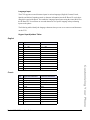
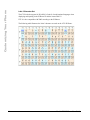
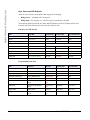
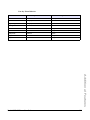
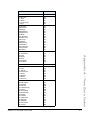
The following tables provide the key states and LED behavior in an SCA bridge call for users
involved in an SCA call and users not involved in the SCA call.
Line Keys and Idle Screens
State
Call LED
Call Caller ID
Non-Call LED
Non-Call Caller ID
Idle
N/A
N/A
Off
N/A
Seized
Solid Green
None
Solid Red
None
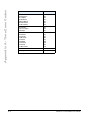
Progressing (outgoing call)
Green
Called Part7
Solid Red
None
Alerting (incoming call)
Blinking Unselected Red
N/A
Active
Solid Green
Far-end
Solid Red
Far-end
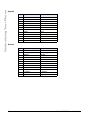
Held
Slow Flashing Green
Far-end
Slow Flashing Red
Far-end
Hold private
Slow Flashing Green
Far-end
Solid Red
Far-end
Bridge-active
Solid Green
Far-end
Solid Red
Far-end
Bridge-held
Slow Flashing Green
Far-end
Solid Red
Far-end
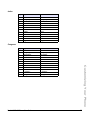
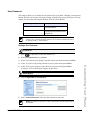
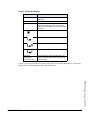
Programmable Line Keys
State
Call Icon
Call LED
Non-Call Icon
Non-Call LED
Idle
Small circle
None
Small circle
None
Seized
N/A
N/A
Sold Circle
Solid Red
Progressing (outgoing call)
Empty circle
Solid Red
Sold Circle
Solid Red
Alerting (incoming call)
Empty blinking circle
Flashing Red
N/A
N/A
Active
Empty circle
Solid Red
Sold Circle
Solid Red
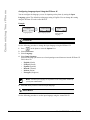
Held
Reverse empty blinking
circle
Slow Flashing
Red
Sold Reverse Circle Slow Flashing Red
Hold private
Reverse empty blinking
circle
Slow Flashing
Red
Sold Circle
Solid Red
Bridge-active
Empty circle
Solid Red
Sold Circle
Solid Red
Bridge-held
Reverse empty blinking
circle
Slow Flashing
Red
Sold Circle
Solid Red
188
Model 6753i IP Phone User Guide