1
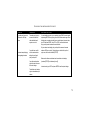
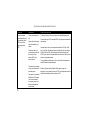
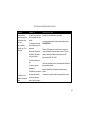
TROUBLESHOOTING AND ONLINE H ELP RESOURCES
PROBLEM
DIAGNOSIS
POSSIBLE SOLUTION
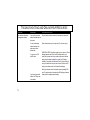
The modem displays double
characters on your monitor.
Both the modem’s and
software’s local character
echoes are turned on.
Disable Local Echo in your software OR on your modem (not both). Turn local
echo off on the modem by typing ATE0 and pressing ENTER in your software’s
terminal mode. To turn the local echo off in the software, refer to its documentation.
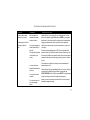
The modem won’t go off hook to
dial or doesn’t answer the
phone.
You may have plugged your
modem’s phone cord into a
digital line.
You might have a bad phone
cord connection to your
modem.
You may have devices
between the modem and the
phone jack.
You may have a poor line
connection.
If you have voice mail, you
may have messages
waiting.
Plugging your modem’s phone cord into a digital phone line can damage the
modem. Call your phone company if you are unsure whether or not your phone
line is digital.
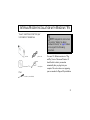
The phone cord should be plugged into the TELCO jack on the modem and an
analog wall phone jack. The phone cord should not exceed 12 feet in length. Use
the phone cord included with your modem if possible. Have your phone company
make sure that the phone jack is wired properly (tip and ring are on the inside pair
of wires).
There should be no line splitters, fax machines, or other devices between the
modem and the wall jack.
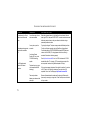
Place the call again. Calls are routed differently each time. To verify a valid phone
connection, enter the RapidComm Voice software’s Terminal mode, type
ATX3DT18479825092 (the 3Com BBS), and press ENTER. This string bypasses
the dial tone, allowing a connection if the modem is working properly.
Answer your voice mail to restore your normal dial tone. Your dial tone may be
altered when messages are waiting.
77