1
The “normal” leg of the Madrigal Balanced Bridging Input Adapter will be
marked with a red stripe to indicate positive polarity, and the inverted leg will
be marked with a black stripe to indicate inverted polarity (corresponding to
the red and black terminals of your loudspeaker).
The Balanced Bridging Output Adapter is simply a heavy-gauge copper bar
(silver- and gold-plated) used to strap two of the output ground terminals together. This establishs a common reference for the amplifier and completes
the circuit that includes the loudspeakers.
Important!
Do not attempt to operate your amplifier in a bridged mode
without first strapping the black output terminals together.
Failure to establish a common ground reference between
the two channels can damage your amplifier by forcing
significant currents to flow where they do not belong!
To bridge your Proceed amplifier using a balanced input signal, follow these
steps:
1
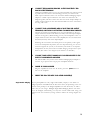
DISCONNECT YOUR AMPLIFIER FROM EVERYTHING
Start with your amplifier totally disconnected from inputs, outputs, and AC
power. It is always best to power down an amplifier before changing connections; here you are also changing its basic configuration, making it
essential.
2
CONNECT THE BALANCED BRIDGING INPUT ADAPTER TO THE AMP’S
INPUTS
Connect the two male XLRs to the inputs of your amplifier, noting which
XLR is marked red and which is black. The channel with the red, normal
input will later be connected to the red, positive terminal of your loudspeaker. Don’t forget to choose the balanced input on each channel using
the switch located between the XLR and the RCA connectors.
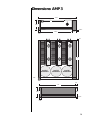
Balanced Bridged
Input Connection
Madrigal Bridging Output Adapter
inverting
from preamplifier
18
(left)
when viewed from the front
PUSH
channel 2
channel 1
PUSH
when viewed from the front
(right)
loudspeaker terminals
mains fuse
100-120VAC:
8A 3AG fast acting
200-240VAC:
4A 3AG fast acting
non-inverting
Madrigal Balanced Bridging Input Adapter