1
User's Guide
1
Knowing
theyou
Parts
Before
Start
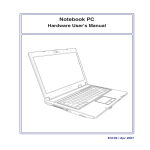
Built - In PC Camera (Optional)
The built-in camera (1.3 Megapixels) allows picture taking or video recording. Can be used with video
conferencing and other interactive applications.
2
Display Panel
The Notebook PC uses an ultra-clear flat panel with LED backlit which provides excellent viewing like that of
desktop monitors without any harmful radiation or flickering, so it is easier on the eyes Use a soft cloth
without chemical liquids (use plain water if necessary) to clean the display panel.
Warning :
The display panel is fragile. Do not to bend or press the panel.
3
Power Button
The power switch turns the Notebook PC ON and OFF or puts the Notebook PC into sleep or hibernation
modes. Actual behavior of the power switch can be customized in Windows Control Panel “Power Options.”
4
Keyboard
The keyboard provides keys with comfortable travel (depth at which the keys can be depressed) and palm
rest for both hands. A Windows function key is provided to help ease navigation in the Windows operating
system.
5
Microphone (Built-in)
The built-in mono microphone can be used for video conferencing, voice narrations, or simple audio
recordings
2-2