1
Ulead VideoStudio 11 Plus
Reviewed by Laurence Fenn
artefacts, didn’t substantially improve the
quality of the blocky clips I tested. I tried this
with some poorly encoded VCD clips (the
VCD frame size is a quarter of DVD) and
some good VCD clips. Like with picture editing programs, there is only so much you can
improve on. You cannot create a perfect clean
video from a badly encoded original, just as
you can’t make a perfectly sharp image from a
blurred photo.
Pause Button When Encoding
Your Video
Ulead was a strong brand in video editing, so Corel (who bought Jasc’s Paint
Shop Pro) have acquired them to add to
their software group.
Their isn’t much difference between this
and the previous version 10, but if you
don’t have a video editing package, then
this will certainly provide all the tools
needed to turn a boring family video into a
slick presentation with titles, effects, music
and a finished DVD with fancy menus.
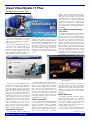
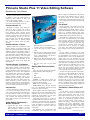
very different from version 10, has been
tweaked. Most useful is the ability to increase the size of the timeline and reduce the
Preview window. The Enlarge button fits all
the tracks onscreen automatically, so you
don’t have to scroll around when using lots
of overlays. You can also now add cue
points to the timeline to help you find specific scenes in your edit. These can be used
as chapter points when outputting the video
to disc.
The Splash Screen
When you launch VideoStudio, the initial
splash screen presents you with three simple options. The DV-to-DVD Wizard allows you to quickly grab video clips from a
camcorder and burn them straight onto
DVD. The Movie Wizard allows you to
import a series of video clips and select a
template that will automatically create an
introductory sequence for you and then
insert transitions between each clip. The
Movie Wizard in version 11 has a few new
templates that can create montage effects
containing multiple video clips. If you’re
new to video-editing, you can use the
Movie Wizard to quickly put together a
project before moving onto the third option,
which is the main Editor module.
VideoStudio interface
The VideoStudio interface, although not
ROM August — September 2007
One major change that may seem subtle is
the inclusion of a pause button when you are
encoding your video. The software takes up
all the resources of your PC when rendering
the video, so you cannot do anything else. I
found this most annoying on the previous
versions, as there was not setting to allow it to
render in the background, for instance. Other
video encoders have this option, but don’t
have the ability to add titles and effects to the
video. Now with the pause button it is possible
to tell the program to wait whilst you do
something else, like browse the web, check
email, burn a disc, etc. If you have many effects added to your video it will take a while
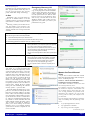
Enlarged Preview
The timeline has seven video tracks plus a
title track, which should be plenty for most
projects. Even though Premier Elements
offers 99 tracks I doubt anyone uses that
many. You can use a Picture-in-picture effect, resizing and distorting the picture. You
can also resize footage if you only have the
one video, but I found it a bit of a hit and
miss affair, grabbing corners and pulling
instead of specifying a particular frame size,
like TMPGenc for example.
Colour-Correction
A new colour-correction feature performed
well in auto mode, with convenient manual
controls for gamma, contrast, brightness,
saturation, and hue. A new DeSnow filter
worked well on a noisy video shot in low
light, but the new DeBlock filter, designed to
clean up video with blocky compression
to produce the final output. The only time it
will take a shorter time is if you are using the
same type of file in your project as you want
for the final video, and are only making small
changes. The program will use Smart Rendering and only build the parts of the video that
will change.
MPEG Optimiser
The MPEG Optimiser effectively doublechecks your editing before you encode the
footage and audio together. It is of course only
of use if all the clips in your project are mpeg
files, and is disabled if this is true. It is
strangely hidden in the Create Video File option of the Share Video section.
There is support for high-definition content,
so you can edit in HD as well as write to an
(Continued on page 6)
Page 5