1
Changing Parameters
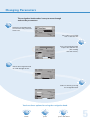
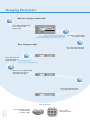
The navigation knob makes it easy to move through
and set the parameters.
Rotate the navigation knob
to move from one parameter
to the next.
Let’s select a parameter
from a selection list.
Press the navigation knob
to open the selection list
(like clicking
with the mouse).
Rotate the navigation knob
to scroll through the list.
Select an item by pressing
the navigation knob.
You have three options for using the navigation knob.
rotate
press
press and rotate
5