1
TV Menu operation
PC Settings | 7 Day TV Guide | USB record
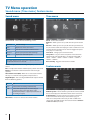
PC Settings
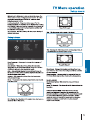
Auto Adjust - Lets you automatically configure the television
to be used as a computer monitor.
H Offset - Changes the horizontal position of the picture.
V Offset - Changes the vertical position of the picture.
Size - increase picture size.
Tip: If the computer is left in-active for a period of time,
Phase
- To adjust
delay
time
of aphase
order
to reduce
the television
will
switch
into
‘sleep’instate
(the
screen the
noise
of picture
will power
off to save power). To switch back on press the
Position
- Changes back to the original settings
standbyReset
button.
7 Day TV Guide / USB Record
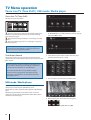
1. Press [TV GUIDE]. The following 7 Day TV Guide will appear.
2. Navigate through the menu using Ÿ/ź/Ż/Ź.
You can now:
Record a Programme by pressing RED.
Set a reminder by pressing GREEN.
View a previous day by pressing YELLOW.
View the next day by pressing BLUE.
3. Press [EXIT] to exit the 7 day TV Guide.
Note: This TV is designed to operate with USB memory sticks
up to 32GB. It is possible to use either a USB memory stick
or a USB portable Hard Drive of a larger capacity, however,
it must be formatted to the FAT32 file system in order to
operate correctly. At the time of printing this user guide,
Windows XP/Vista computers are only capable of formatting
up to 32GB, therefore, you will need a software programme/
utility to format larger USB drives/hard drives to FAT32.
Additional help and support is available from the web site.
USB Record - Digital mode
USB RECORD – DIGITAL/FREEVIEW MODE
Built into this television is a USB record facility. This function is
available in Digital mode when.
used in conjunction with a compatible USB memory stick or
USB Hard drive. The benefits of this are as follows:
English
• Pause live TV and then playback, fast forward and rewind
(up to live TV).
• One button record, if you decide you want to record the
current programme.
• Easy programmable recording from the 7 day TV Guide
• Record TV and watch back on your computer/laptop.
Due to the nature of the product, it is necessary to use a high
speed USB memory stick (as the TV reads from and writes to
the memory stick at the same time, some memory sticks may
not be suitable).
Minimum Specification - USB Memory Stick
TV Guide is available in Digital TV mode. It provides
information about forthcoming programmes (where supported
by the Digital channel). You can view the start and end time of
all programmes and on all channels for the next 7 days and set
reminders.
Read Speed
20 MB/s (Mega Byte Per Second)
Write Speed
6 MB/s (Mega Byte Per Second)
If you wish to use a USB portable hard drive larger than
32GB, please refer to the FAQ section at the rear of this
user guide.
19