1
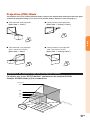
Projection (PRJ) Mode
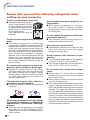
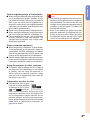
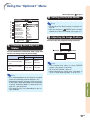
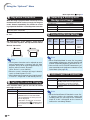
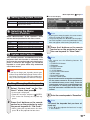
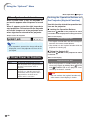
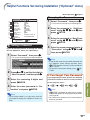
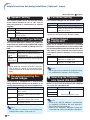
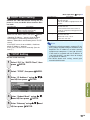
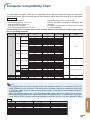
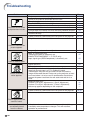
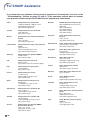
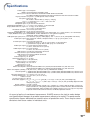
The projector can use any of the 4 projection modes, shown in the diagram below. Select the mode most appropriate for the projection setting in use. (You can set the PRJ mode in “Options2” menu. See page 52.)
■ Ceiling mounted, front projection
[Menu item ➞ “Ceiling + Front”]
■ Table mounted, rear projection
(with a translucent screen)
[Menu item ➞ “Rear”]
■ Ceiling mounted, rear projection
(with a translucent screen)
[Menu item ➞ “Ceiling + Rear”]
Setup
■ Table mounted, front projection
[Menu item ➞ “Front”]
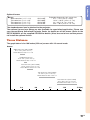
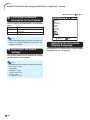
Indication of the Projection Image Size and Projection Distance
For details, refer to the “SETUP MANUAL” contained on the supplied CD-ROM.
Example: NORMAL Mode (4:3) for standard lens
Picture Size
500"
400"
×300
"
200"
160
"×12
80"×
67"× 60"
50"
48"×
36"
0"
Pro
ject
7'
(2 0"–
.1 8
9' m – '5"
(3 10 2.6
.0 "– m
m 11 )
11 – 3 '10
(3 '9 .6 m "
.6 "– )
m 14
23 – 4. '1"
(7 '5 3 m
.1 "– )
m 28
– '1
8. "
6
58 m)
'
(1 7
7. "–
9 7
m 0
– '4"
21
.4
m
)
100"
84"
60"
ion
Dist
anc
e
-19