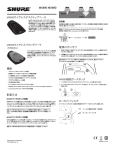
1
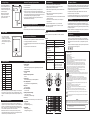
Locking Settings
Press ON/OFF PROGRAM and
SELECT simultaneously to lock or
unlock transmitter settings. When
locked, the current settings cannot
be manually changed.
Note: Locking the transmitter
settings does not disable IR
frequency synchronization or the
High Pass/Low Cut filter.
Automatic Frequency Synchronization
1. Power off all transmitters.
2. Power on all receivers.
3. Begin with the first transmitter. Open the battery cover and power it on.
4. Aim the IR sensor at the first receiver IR port. The transmitter should be
no more than 15 cm (6 in.) from the receiver. Press and hold the receiver SYNC
button to send group and channel data to the transmitter. The red LED on the
transmitter will stop flashing when programming is complete.
5. Power off the first transmitter and repeat the synchronization with each
additional transmitter and receiver pair.
Troubleshooting
Frequency Selection
Shure offers wireless systems in a selection of bands that conform to the
different government regulations of specific nations or geographic regions. These
regulations help limit radio frequency (RF) interference among different wireless
devices and prevent interference with local public communications channels, such
as television and emergency broadcasts.
If you encounter difficulty with the SLX Wireless System:
• Make sure both the transmitter and the receiver are turned on.
• Replace the battery if the battery LED is red.
• Make sure the Group/Channel settings for each transmitter-receiver
pair are identical.
The system’s band and frequency range are identified on the receiver and
transmitter. For example, “H4 518-578 MHz.”
• Make sure there is an unobstructed line of sight between the
transmitter and receiver.
For information on bands available in your area, consult your local dealer or phone
Shure. More information is also available at Shure’s website (www.shure.com).
• If necessary, reposition the receiver or decrease the distance between
transmitter and receiver.
Licensing
• Remove local sources of RF interference, such as computers or
lighting equipment.
Manual Frequency Synchronization
1. Press and hold the transmitter SELECT button until the desired group number
appears.
2. Press SELECT again and release it when the desired channel number appears.
LOGIC MODE
To use with a logic enabled
receiver, you must perform an
automatic sync. The LCD flashes
“log” during sync. Once in logic
mode, the LCD flashes “log” when
powered up.
Band
Range
H5
518–542 MHz
J3
572–596 MHz
L4
638–662 MHz
P4
702–726 MHz
R13
794–806 MHz
R5
800–820 MHz
S6
838–865 MHz
JB
806–810 MHz
Q4
740–752 MHz
G4
470–494 MHz
G5
494–518 MHz
Note: This radio apparatus may be capable of operating on some frequencies
not authorized in your region. Please contact your national authority to obtain
information on authorized frequencies for wireless microphone products in your
region.
Master List Frequencies
The Master List is an index of all frequencies in a band, including those not
assigned to a Group or Channel. The Master List can only be accessed through
the receiver, so the transmitter must be synchronized via the IR port. When a
Master List frequency is in use, “MASTER LIST” appears on the display. Refer
to the SLX Wireless System User Guide for more information.
Note: Wireless devices such as cellular phones and two-way radios may
interfere with wireless microphones. Keep these and other potential sources of
interference away from the transmitters and receivers.
• Remove metal objects within 0.3 m (1 ft.) of the transmitter
Note: Refer to the SLX Wireless System User Guide for complete
troubleshooting procedures.
Changes or modifications not expressly approved by Shure Incorporated could
void your authority to operate this equipment.
Microphone Specifications
MX890
Tips for Optimum Performance
• Maintain a direct line of sight between the transmitter and receiver antennas.
• Avoid placing the transmitter on metal surfaces.
• Avoid placing laptop computers or other obstructions in front of the microphone
during use.
• Only use with a Shure SLX4 wireless receiver.
Frequency Bands
Licensing of Shure wireless microphone equipment is the user’s responsibility,
and licensability depends on the user’s classification and application, and on
the selected frequency. Shure strongly urges the user to contact the appropriate
telecommunications authority concerning proper licensing, and before choosing
and ordering frequencies.
Transmitter Specifications
Operating Range
30 m (100 ft.)
Note: Actual range depends on RF signal absorption, reflection,
and interference
Frequency Stability
±10 ppm
Maximum Frequency Deviation
45 kHz
Oscillator Type
Phase-locked loop (PLL) controlled synthesizer
Power Requirements
3V (2 AA alkaline or rechargeable batteries)
Battery Life
≥8 hours (alkaline)
Power Consumption
130 mA, 15 mA
Operating Temperature Range
-18–57 °C (0–135 °F)
Note: Battery may limit this range
Dimensions
43 mmH x 87 mmW x 148 mmD (1 11/16 x 3 3/8 x 5 13/16 in.)
Weight MX890
Net: 312 g (11 oz)
Packaged: 530 g (18.7 oz)
Weight MX690
Net: 319 g (11.2 oz)
Packaged: 516 g (18.2 oz)
Certification
Note: See gooseneck microphone, MX690, for acoustic specifications.
Certified to FCC Part 74 (FCC ID: DD4MX890).
Certified by IC in Canada under RSS-123 and RSS-102 (IC: 616A-MX890).
MX690
Type
Condenser (electret bias)
Frequency Response
50–17000 Hz
Polar Pattern (at 1 kHz)
Cardioid
Sensitivity (at 1 kHz , open
circuit voltage)
1 Pascal=94 dB SPL
–33 dBV/Pa (22 mV)
Dynamic Range (1 kΩ load
at 1 kHz)
96 dB
Common Mode Rejection
(10 Hz to 100 kHz)
45 dB minimum
Preamplifier Output
Clipping Level (1% THD)
–6 dBV (0.5 V)
Polarity
Positive sound pressure on diaphragm
produces positive voltage on pin
2 relative to pin 3 of output XLR
connector or tip of 1/4” phone plug.
Meets essential requirements of the European R&TTE Directive 99/5/EC (ETSI
EN 300-422 Parts 1 & 2, EN 301 489 Parts 1 & 9) and eligible to carry the CE
marking.
Changes or modifications not expressly approved by Shure Incorporated could
void your authority to operate this equipment.
IMPORTANT SAFETY INSTRUCTIONS
1.
2.
3.
4.
5.
6.
7.
8.
9. 10.
11.
12.
READ these instructions.
KEEP these instructions.
HEED all warnings.
FOLLOW all instructions.
DO NOT use this apparatus near water.
CLEAN ONLY with dry cloth.
DO NOT block any ventilation openings. Install in accordance with the manufacturer’s instructions.
DO NOT install near any heat sources such as radiators, heat registers, stoves, or other apparatus (including amplifiers) that produce heat.
DO NOT defeat the safety purpose of the polarized or grounding-type plug. A polarized plug has two blades with one wider than the other. A grounding type plug has two blades and a third grounding prong. The wider blade or the third prong are provided for your safety. If the provided plug does not fit into your outlet, consult an electrician for replacement of the obsolete outlet. PROTECT the power cord from being walked on or pinched, particularly at plugs, convenience receptacles, and the point where they exit from the apparatus.
PROTECT the power cord from being walked on or pinched, particularly at plugs, convenience receptacles, and the point where they exit from the apparatus.
ONLY USE attachments/accessories specified by the manufacturer.
USE only with a cart, stand, tripod, bracket, or table specified by the manufacturer, or sold with the
apparatus. When a cart is used, use caution when moving the cart/apparatus combination to avoid
injury from tip-over.
13. UNPLUG this apparatus during lightning storms or when unused for long periods of time.
14. REFER all servicing to qualified service personnel. Servicing is required when the apparatus has been damaged in any way, such as power supply cord or plug is damaged, liquid has been spilled or objects have fallen into the apparatus, the apparatus has been exposed to rain or moisture, does not operate normally, or has been dropped.
15. DO NOT expose the apparatus to dripping and splashing. DO NOT put objects filled with liquids, such as vases, on the apparatus.
16. The MAINS plug or an appliance coupler shall remain readily operable.
17. The airborne noise of the Apparatus does not exceed 70dB (A).
18. Apparatus with CLASS I construction shall be connected to a MAINS socket outlet with a protective earthing connection.
19. To reduce the risk of fire or electric shock, do not expose this apparatus to rain or moisture.
20. Do not attempt to modify this product. Doing so could result in personal injury and/or product failure.
This symbol indicates that dangerous voltage constituting a risk of electric shock is present within this unit.
This symbol indicates that there are important operating and maintenance instructions in the literature
accompanying this unit.
WARNING:
Voltages in this equipment are hazardous to life. No user-serviceable parts inside. Refer all servicing to qualified
service personnel. The safety certifications do not apply when the operating voltage is changed from the factory setting.
WARNING: This product contains a chemical known to the State of California to cause cancer and birth
defects or other reproductive harm.