1
3.2
Adjustment Procedure Cont.
Adjustment Procedure Cont.
Feature
Adjustment Instructions
Advanced
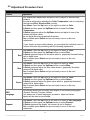
The advanced control allows for several advanced adjustments.
♦ Factory Preset
♦ Sharpness
♦ OSD Horz. Pos
♦ OSD Vert. Pos
The Vartech display has a number of standard settings installed at the factory for
your convenience. If you make a number of adjustments and then want to default
to the standard settings, proceed as follows.
Factory
Preset
Sharpness
Press Menu. Press the Up button to the ninth icon which is Advanced.
Hit Select and then press the Up/Down button to select Factory Preset.
Hit Select again and the display will default to all original factory adjustments.
When complete press Select and you are ready to move to the next adjustment.
Press Menu. Press the Up button to the eight icon which is Advanced.
Hit Select and then press the Up/Down button to select Sharpness.
Hit Select again and adjust the sharpness value which is graphically illustrated
along with a digital value.
When complete press Select and you are ready to move to the next adjustment.
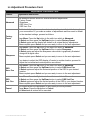
If you desire to adjust the OSD display off center to another location, proceed to
adjust the horizontal and vertical position as outlined.
OSD
Horz. Pos
Press Menu. Press the Up button to the ninth icon which is Advanced.
Hit Select and then press the Up/Down button to select OSD Horz. Pos.
Hit Select again and adjust the horizontal position of the OSD to your desired
location.
When complete press Select and you are ready to move to the next adjustment.
OSD
Vert. Pos.
Press Menu. Press the Up button to the ninth icon which is Advanced.
Hit Select and then press the Up/Down button to select OSD Vert Pos.
Hit Select again and adjust the vertical position of the OSD to your desired location.
When complete press Select and you are ready to move to the next adjustment.
Cancel
This control allows the cancellation of any values previously entered.
Press Menu. Press the Up button to Cancel.
Hit Select and all entries will be canceled.
10
VT121 DiamondVue Series User Guide
150-001