1
Installation
Notes
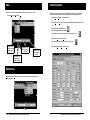
Before you install the Quantum Data 801GC-ISA or 801GF-ISA card
1.
■
Determine which port is available for use
■
Determine the correct ISA or base I/O address
■
Make sure the contents of the kit are near your computer so you can follow the steps in order
without stopping.
Make sure your computer and monitor are turned off.
This protects the card from possible electrical damage when you connect your system
components later.
Important — For now, leave the line cord for the computer plugged in.
2.
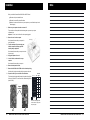
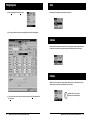
Remove the cover from the computer.
Power supply
See the manual that came with your computer for
specific instructions.
3.
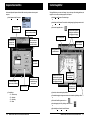
Touch the metal part of the power supply case
inside the computer to discharge any static
electricity that you might have.
See the manual that came with your computer to locate
its power supply.
4.
Unplug the computer’s line cord.
5.
Locate a full-size, unobstructed slot on your
computer.
See the manual that came with your computer.
6.
Remove the backplate for this slot.
7.
Remove the 801GC-ISA or 801GF-ISA card from its static-proof bag.
Hold the card by its edges to avoid touching the connector on the card.
8.
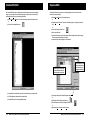
Prepare the card for your correct ISA or base I/O address.
0
1
2
This is done by placing the provided jumpers in the pattern for your ISA or
I/O shown in this table. The card comes with a default setting of ISA 0
(base I/O 300H).
Jumper
Locations
= jumper in
ISA
Base I/O
(Hex)
ISA 7
268
ISA 6
260
ISA 5
258
ISA 4
250
ISA 3
318
ISA 2
310
ISA 1
308
ISA 0
300
= jumper out
There are two other jumper positions:
X and M. Position X is empty and M
always has a jumper.
GC
•2•
GF
Model 801GC-ISA & 801GF-ISA Quick Start Guide
Model 801GC-ISA & 801GF-ISA Quick Start Guide
• 19 •