1
EN
CAUTION
– Keep the console away from direct sunlight.
– Dry the surface of the console when it is covered with drops of
sweat.
– Do not lean on the console.
NOTE
– The console switches to standby mode when the equipment is not
used for 5 minutes.
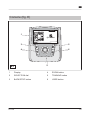
Explanation of buttons
Button
Explanation
BACK/STOP
Before use: Press the button to return to the main
menu.
During use: Press the button again to pause the
training (max. 4 minutes). Press the button again to
continue the training. Press and hold the button to stop
the training.
ZOOM
Press the button to increase or decrease the size of
the displayed profile image.
Zoom options: 1x / 2x / 4x / 8x / 16x.
TRAINING
Press the button to go to the training menu.
Menu items: QUICK START / MANUAL / TARGET
HR / WATT CONTROL / PRESET PROGRAMS / TRIDE / OWN TRAINING / FITNESS TEST.
USER
Press the button to go to the user menu.
Menu items: CREATE USER / CHANGE USER /
SETTINGS / EDIT USER / DELETE USER / USER
LOG.
CF 8.0
21