1
Printer 900 Installation Guide
Installing the Printer 900
CAUTION: Unplug the terminal’s power pack before connecting the Printer 900 to the terminal.
Before installing the Printer 900, you must have the
correct printer interface cable. The Accessories Section,
located on the last page of this installation guide, lists the
interface cable part numbers for different VeriFone
terminals.
Power
Connection
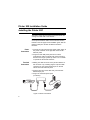
1. Connect the 3-pin plug from the printer power supply to
the power connector on the right side of the Printer
900 rear panel.
2. Plug the Printer 900 power pack into an indoor,
grounded AC outlet. The printer will now be turned on
and will run through a power-up routine. Do not install
or operate the Printer 900 outdoors.
Terminal
Connection
3. Making sure that the arrow on the printer interface cable connector is up, carefully plug the 8-pin mini-DIN
connector into the communications port on the left
side of the Printer 900 rear panel.
4. Plug the other end of the cable into your terminal’s
RS-232 8-pin port.
5. Plug in the terminal’s power pack
(not shown).
Figure 4. Printer Connections
6